
The FSF has awarded the Respects Your Freedom hardware certification to the LulzBot AO-100 3D printer by Aleph Objects. The device uses a free software stack and can be build and operated entirely with free software tools.
Read more at The H

The Raspberry Pi mini computer just got a RAM upgrade – from 256MB to 512MB — but the $35 price-tag is staying the same. Eben Upton, chip design and founder of the Raspberry Pi Foundation, said the extra RAM follows frequent suggestions for a more expensive version of the Pi with more RAM for those who want to use the Pi for general computing purposes. But Upton notes the Foundation is “very attached to $35 as our highest price point†— in a recent interview with TC, Upton described price as “our differentiatorâ€.
“There were a lot of boards like Raspberry Pi in the $200 range but not a lot in the $25 to $35 range,†he told me. “You’ve got to see [price] as our differentiator. The big impressive thing we’ve done, as far as I’m concerned, is to make this stuff cheap and available – we’re not making anything that didn’t exist before, but we’re making a thing that previously was very expensive [affordable].â€
It all seems upside down: a major toy company releases its first tablet; a major search company works on its first car. Yet all of this makes sense when you realize everyone just wants to be – or may already be – in the mobile device business. Including car companies.
A friend recently showed me his shiny new luxury sports car. Did he rave about the 333-horsepower, six-cylinder engine, or 14-speaker, noise-cancelling stereo system? No. His first point of pride was the car’s ability to become an internet hotspot, powering Wi-Fi devices throughout the vehicle. This makes sense when you realize cars have become our portable offices and homes, a shared mobile experience for the entire family.

In this brave new world, connectivity is king. The engine is almost an afterthought.
The big question, however, is: Couldn’t my friend have achieved the same result with just an iPad and Velcro? He paid thousands extra for the “in-vehicle infotainment†(IVI) system: two screens in the back to stream content, one up front for navigation, Pandora, etc. Custom navigation? Great, but it will quickly get out of date since there’s no way to update software over his hotspot connection. Pandora? Nice, but I prefer Mog – and unlike with mobile devices, I can’t choose my in-car apps: It’s not a computer (yet). And who knows what options I’ll prefer as the market and technology changes.
Read more at Wired.
Telling the time on Linux is more complicated than it might seem at first glance. To start with, the time command on Linux doesn’t tell the time:
$ time
real 0m0.000s
user 0m0.000s
sys 0m0.000s
Because time is a timer for measuring how long a process runs. For example, how long does it take to recursively list all the files in a directory?
$ time ls -Rl dir/*
[...]
real 0m22.156s
user 0m1.652s
sys 0m4.772s
It may sound odd, but you must use the date command to see the time on Linux:
$ date
Thu Oct 11 11:47:25 PDT 2012
The date command is fundamental to understanding time options on Linux. For example, the panel clock in Xfce4 supports using the standard date options to customize the date and time display. Figure 1 shows what mine looks like.
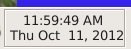
This comes from these FORMAT options for the date command: %r %n%a %b %d, %Y, which you can easily test for yourself:
$ date +"%r %n%a %b %d, %Y"
12:05:00 PM
Thu Oct 11, 2012
man date details all the formatting options. Note how you can use ordinary spacing and punctuation to control the appearance. You customize date and time displays to suit your own whims, and in consistent, script-friendly ways.
man date lists a good set of options, but it does not tell you everything. To get the complete story of date you need the GNU coreutils manual. And that is where we learn about the magic strings that let us ask for dates next week, last year, day of week, and many more. Like the date three Tuesdays from now, five months from now, eight years ago:
$ date -d "third tuesday"
Tue Oct 30 00:00:00 PDT 2012
$ date -d "fifth month"
Mon Mar 11 14:02:54 PDT 2013
$ date -d "8 years ago"
Mon Oct 11 14:03:32 PDT 2004
$ date -d "23 years ago 2 months 19 days 17 hours 59 minutes"
Sun Dec 31 06:48:14 PST 1989
You can quickly check the time in a different time zone:
$ date +"%r EST"
01:53:10 PM EST
UTC (Coordinated Universal Time) is the universal standard for time worldwide. When you know your UTC offset you always know what time it is, because date will tell you:
$ date -R
Thu, 11 Oct 2012 13:56:17 -0700
If you live in one of those demented regions that uses Daylight Savings Time, date -R will always tell you the correct offset no matter what time of year it is.
When you just want to see some dates, think of our good old friend cal:
$ cal
October 2012
Su Mo Tu We Th Fr Sa
1  2  3  4  5  6
7  8  9 10 11 12 13
14 15 16 17 18 19 20
21 22 23 24 25 26 27
28 29 30 31
cal -3 displays three months: last month, this month, and next month. cal YYYY displays a specific year, like cal 1962.
ncal is included on most Linux systems, and it is an oldtimer designed to fit nicely on a 25×80 terminal:
$ ncal
 October 2012
Su     7 14 21 28
Mo  1  8 15 22 29
Tu  2  9 16 23 30
We  3 10 17 24 31
Th  4 11 18 25
Fr  5 12 19 26
Sa  6 13 20 27
ncal -b switches to our customary horizontal display. ncal will show an arbitrary number of months in the past or future. For example ncal -bB 6 displays the current month plus six months previous, and ncal -bA 6 display the current month plus the next six months.
You can see any month in any year, for example March 1950, with ncal -bm March 1950. This works for future months, too.
The way the ls outputs the date and time is a continual source of vexation because it varies on the different Linux distributions. This is how it looks on my Linux Mint system:
$ ls -l
-rw-r-----  1 carla carla   11537 Oct  1 17:16 hp-check.log
-rw-r--r--  1 carla carla     705 Aug 12  2011 ledproject.txt
Files dated within the last six months display the time instead of the year, and older files display the year and not the time. The Mint time style is called iso, and this is the the GNU default. long-iso is my preference, and it looks like this:
$ ls -l --time-style=long-iso
-rw-r-----  1 carla carla   11537 2012-10-01 17:16 hp-check.log
-rw-r--r--  1 carla carla     705 2011-08-12 12:15 ledproject.txt
I like long-iso because it’s easy to sort– year, month, day, single-digit months and days are padded to two digits, and it uses a 24-hour clock. This is all defined in ISO 8601. On Linux it’s controlled by the TIME_STYLE environment variable, so you can override the default system-wide in /etc/profile, or in your personal .profile or .bashrc by adding a line like export TIME_STYLE=long-iso, then logging out and back in.
You might want to create a custom timestamp. This uses the same options as the date command, and you can test this on the command line before making it permanent in a configuration file:
$ export TIME_STYLE="+%Y-%m-%d %H:%M:%S %z"
$ ls -l -rw-r-----  1 carla carla   11537 2012-10-01 17:16:45 -0700 hp-check.log
-rw-r--r--  1 carla carla     705 2011-08-12 12:15:02 -0700 ledproject.txt
The GNU manual spells all this out in plain English. You can experiment to your heart’s content, and then log out and log back in to reset to your system default.
And that is just the beginning of telling time on Linux. My dream is a lifestyle that doesn’t need clocks at all, but I haven’t figured out how to do that in Linux.
Reports suggest the Galaxy Premier will be a watered-down Galaxy S III. [Read more]
Jean-Philippe Guillemin has announced the release of Zenwalk Linux 7.2, a Slackware-based desktop Linux distribution with Xfce as the preferred desktop environment: “We are happy to release Zenwalk Linux 7.2. After several months of rescheduling we think it’s time to let this new jet fly.