DIRECTORY PERMISSIONS BY EXAMPLE
Can an unprivileged user remove a file, owned by root:root, and to which the user has absolutely no permissions whatsoever?
This article will answer that question in the course of exploring directory permissions.
If you are surprised that the answer is “yes,” read on to find out why.
If you already knew that, read on to see if you learn something else.
If you know everything there is to know about directory permissions, read on and correct my mistakes.
PRELIMINARIES
An effort has been made to use the terms “regular_file” and “directory_file” because they simultaneously point to both the similarity and distinction. Everyone knows that “everything in Linux is a file.” Sometimes it is helpful to reinforce that concept.
In the examples, PS1 will display the user name, and the working directory.
The examples will use with weak permission settings, with the intent of limiting the scope of the investigation. If the user is a member of the public, and governed by permissions granted to “other”, we can narrowly focus on a single set of permissions limited to a set of eight possibilities.
Also, in order to keep that narrow focus, directories will generally be owned “root:root”, and the user executing the examples is a non-privileged user.
REMOVING root’s SUPER SECRET, PROTECTED FILE
Non-privileged user “dan” is at the keyboard:
dan_/tmp> id
uid=1000(dan) gid=100(users) groups=100(users)
Consider /tmp/Test_rm, a directory_file:
dan_/tmp> ls -ld Test_rm
d——-wx 2 root root 4096 Aug 11 08:06 Test_rm
The “x” bit for the public lets “dan” change to this directory_file:
dan_/tmp> cd Test_rm
dan_/tmp/Test_rm>
The “r” bit is not set for the public, so even though “dan” can “cd” to this directory_file, he cannot read it:
dan_/tmp/Test_rm> ls -l
ls: cannot open directory_file .: Permission denied
But since “x” gives “others” access to the directory, “dan” can list a file in the directory, but only if he has pre-knowledge of the file’s name:
dan_/tmp/Test_rm> ls -l do_not_remove_me
-r——– 1 root root 0 Aug 11 08:06 do_not_remove_me
As a member of the public, “dan” has no permissions on this file. But he knows the pathname components, and has access to those components by virtue of the “x” bit on directory components of the path.
Knowing the regular_file name, he tries to remove it, naming the file explicitly:
dan_/tmp/Test_rm> rm -i do_not_remove_me
rm: remove write-protected regular empty file ‘do_not_remove_me’? y
dan_/tmp/Test_rm> ls -l do_not_remove_me
ls: cannot access do_not_remove_me: No such file or directory
The listing above indicates that the preceding “rm” was successful,but let’s run the list via “sudo” (since “dan” does not have permission to list it), just to be sure:
dan_/tmp/Test_rm> sudo ls -l
total 4
-rw-r–r– 1 root root 23 Aug 11 08:43 do_not_edit_this
“rm” worked. “do_not_remove_me” is gone.
With no permissions on the regular_file, why was “dan” allowed to remove it? Because removing a file does not write to the file. It writes to the file’s directory.
“w” on the directory_file allows write. But writing, such as creating or removing a file, also requires directory access. The ability to “search,” or traverse the directory, was granted via “x”.
Having “r”ead on the directory_file would have made it simpler, because then “dan” could have listed the directory.
But with advance knowledge of the path components, a user does not need read permission on the directory_file to create a file, a symlink, or to unlink (remove) a file. You don’t need any permission whatsoever on the file to be removed–you need write and execute on its directory.
Here’s what happens if you need wild-card help with the regular_file name, but you don’t have read access to the file’s directory_file:
dan_/tmp/Test_rm>rm -i do_not_edit_th*
rm: cannot remove ‘do_not_edit_th*’: No such file or directory
dan_/tmp/Test_rm>rm -i *
rm: cannot remove ‘*’: No such file or directory
This scenario will trip up a lot of users.
Listing another directory_file:
dan_/tmp> ls -ld Test_rm_again
d——r-x 2 root root 4096 Aug 11 11:13 Test_rm_again
Note that the “r” on directory_file “Test_rm_again” will let user “dan” list the directory contents.
Changing to “Test_rm_again”, then listing its contents:
dan_/tmp> cd Test_rm_again/
dan_/tmp/Test_rm_again> ls -l
total 0
-rw——- 1 terry terry 0 Aug 11 11:13 do_not_remove_this_either
We see that the file named “do_not_remove_this_either”, in directory_file “Test_rm_again”, is owned by unprivileged user “terry” who has denied all permissions to everyone but the owner.
User “terry”, the owner, might conclude that the restricted file permissions protect it from removal:
dan_/tmp/Test_rm_again> rm -i do_not_remove_this_either
rm: remove write-protected regular empty file ‘do_not_remove_this_either’? y
rm: cannot remove ‘do_not_remove_this_either’: Permission denied
But terry’s conclusion would be mistaken. “Permission denied” refers to the directory_file, not to the regular_file. It is NOT the permissions on the regular_file that protect it from removal. It is directory_file permissions that protect the files within from removal (but not from editing).
User “dan” cannot remove the file becasue the absence of “w” on the directory_file prevents “dan” from writing the directory /tmp/Test_rm_again
Permissions on regular_files are fairly straightforward, but as the above illustrations suggest, a misunderstanding of directory_file permissions muddies the understanding of regular_file permissions, and vice versa.
WHAT IS A DIRECTORY?
A directory is a type of file in Linux that contains a list of other names and their associated inodes.
The list of names refers to other files, which might include:
directory_files, regular_files, symlinks, sockets, named pipes, devices.
Included in the list are the inodes associated with each name. Information in the member file’s inode includes filetype, permissions, owner, group, size, timestamps.
(Aside: “ext” filesystems optionally include file type in the directory,
per http://man7.org/linux/man-pages/man5/ext4.5.html
“filetype
This feature enables the storage file type
information in directory entries. This feature is
supported by ext2, ext3, and ext4.”)
WHAT ARE DIRECTORY PERMISSION MODES 1, 2 AND 4
1 x – search quoting the Linux Programmer’s Manual: “”search” applies for
directories, and means that entries within the directory
can be accessed”
The names in the directory_file are accessible, eg, via
“cd”, or a pathname (though the file named in the directory
carries its own permissions, in its own inode). A name in the
directory, if known by the user, is accessible even if the
user is denied permission to read the list from the directory
(ie, no read perm on the directory_file).
2 w – write names in the directory_file list can be removed (rm), created
or changed (mv). The directory must also be searchable to
be written.
4 r – read the directory_file can be read, that is, its name list can be
displayed via “ls” (though a file named in the list is not
necessarily accessible, as it carries its own permissions
in its inode).
READ PERMISSION ON A DIRECTORY
Understanding what is read from and written to directory_file data, as opposed to what is read from and written to regular_file data, helps with understanding directory permissions.
Directory file data is a list of names mapped to their corresponding inodes. A directory does not contain file data or metadata for the names that thedirectory itself contains. The entry for the directory name itself is in that directory’s parent directory. Permission to access a directory AND to write it, allows for adding or remove entries (files).
Likewise, understanding the distinction between regular_file data and regular file metadata (from the inode), helps in understanding directory permissions.
The inode stores metadata about the file such as permissions, type, timestamps, size, link count. So permission to write to a file is not the same as the permission to remove that file from its directory.
Some tutorials suggest that both read and execute permission are required to read (list, “ls”) a directory_file.
But “r”ead, and only read, is required to list (“ls”) names in a directory_file, based on the following illustration:
dan_/tmp> ls -ld Read_only
d——r– 2 root root 4096 Aug 11 09:05 Read_only
Above, we see that the directory_file “/tmp/Read_only” is “read-only,” and readable only for the public. All permissions are turned off for user (owner) and group, and both write and execute are turned off for other.
(Aside: turning off permissions does not affect the “root” user.)
Is it accessible?
dan_/tmp> cd Read_only
bash: cd: Read_only: Permission denied
We can’t access it via “cd” because we don’t have search (x) permission.
But can we read it? Yes. Sort of:
dan_/tmp> ls -l Read_only/
ls: cannot access Read_only/test.1: Permission denied
ls: cannot access Read_only/test.3: Permission denied
ls: cannot access Read_only/test.2: Permission denied
total 0
-????????? ? ? ? ? ? test.1
-????????? ? ? ? ? ? test.2
-????????? ? ? ? ? ? test.3
“ls” was able to read the file names, “test.1”, “test.2”, and “test.3”, from the “Read_only” directory_file. But because the “x” bit is turned off on the directory_file, we can’t go any further. That is, we can’t traverse the directory to access metadata stored in the inodes of its regular_files.
What we can see in the above listing comes from the directory_file. And what we cannot see in the above listing (where the question marks are used as placeholders), is information from the inode.
From the directory_file, we see the block count:
total 0
and the leading dash indicating a regular file, in:
-?????????
and the file names:
test.1
test.2
test.3
What could not be retrieved from the inode is shown as question marks:
-????????? these question marks are in place of the permission bits.
(the “-” indicates regular file and comes from the directory_file, in this case)
The next five question marks (following the permission bit placeholders) are in place of link count, owner, group, size, and datestamp.
So “ls” can retrieve names from a read-only directory_file. But it cannot traverse the directory_file to read the inode information of its contents, absent the “x” bit on the directory_file.
Lastly, here is a recursive listing, run via sudo, of the “Read_only” directory_file’s contents, followed by a listing of the directory_file itself.
dan:/tmp> sudo ls -lR Read_only/
Read_only/:
total 0
-rwxrwxrwx 1 root root 0 Aug 11 09:05 test.1
-rwxrwxrwx 1 root root 0 Aug 11 09:05 test.2
-rwxrwxrwx 1 root root 0 Aug 11 09:05 test.3
dan:/tmp> ls -ld Read_only/
d——r– 2 root root 4096 Aug 11 09:05 Read_only/
For owner root, group root, and “other”, permissions are wide open on the three test files. But the read-only setting on their directory_file is not sufficient for directory traversal. Full access via these file permissions did not help user dan, because he did not have search “x” for their directory. (Note that the absence of these same permissions did not prevent “root” from listing them.)
EXECUTE PERMISSION ON A DIRECTORY
e”x”ecute, and only execute, is required to traverse a directory_file. That is, to “cd” to it, or to see below the directory_file by using it as a component in a pathname.
Consider the following directory_file tree, listed via sudo:
dan_/tmp> sudo ls -ld a a/b a/b/c a/b/c/d a/b/c/d/e
d——–x 3 root root 4096 Aug 10 15:50 a
d——–x 3 root root 4096 Aug 11 13:46 a/b
d——rwx 3 root root 4096 Aug 11 13:46 a/b/c
d——rw- 3 root root 4096 Aug 11 14:03 a/b/c/d
drwxrwxrwx 2 root root 4096 Aug 11 14:04 a/b/c/d/e
Note the absence of “x” for other on “a/b/c/d”, and its effect on the same listing for a non-privileged user (the error output is rearranged to make it more readable):
dan_/tmp> ls -ld a a/b a/b/c a/b/c/d a/b/c/d/e
d——–x 3 root root 4096 Aug 10 15:50 a
d——–x 3 root root 4096 Aug 11 13:46 a/b
d——rwx 3 root root 4096 Aug 11 13:46 a/b/c
d——rw- 3 root root 4096 Aug 11 14:03 a/b/c/d
ls: cannot access a/b/c/d/e: Permission denied
The lack of execute on directory_file “a/b/c/d” prevents the listing of its sub-directory_file “e”. That is, “ls” cannot traverse “a/b/c/d”. “ls” can retrieve the directory_file name “a/b/c/d” from its parent directory_file, but “ls” cannot traverse “a/b/c/d” to show its sub-directory_file, “e”.
Contrast that to “x”, and “x” alone, on directories “a” and “a/b”, and “rwx” on “a/b/c”. “x” on these subdirectories allow for those directory_files to be traversed.
But “r”ead access on subdirectory_file “d” will allow the listing of filenames, (in this next example, “d” is not an option to “ls”, but a directory_file argument for “ls” to act on):
dan_/tmp/a/b/c> ls -lR d
d:
ls: cannot access d/e: Permission denied
ls: cannot access d/abcd.test: Permission denied
total 0
-????????? ? ? ? ? ? abcd.test
d????????? ? ? ? ? ? e
ls: cannot open directory d/e: Permission denied
Without the directory_file traversal granted by “x”, no inode data is accessible for the above listing.
This example shows directory_file traversal, and operation of the “x” bit, using bash’s “cd” builtin:
dan_/tmp> cd a && cd b && cd c && cd d && cd e
bash: cd: d: Permission denied
dan_/tmp/a/b/c>
Each successive “cd” is only attempted if the previous “cd” succeeded. Lack of “x” on the “d” sub-directory_file causes “cd” to fail at that point. The final “cd” cannot be attempted, and the current working directory becomes /tmp/a/b/c/
“x”, and only “x”, being required for directory_name traversal is analagous to “x”, and only “x”, being required to execute a binary regular file.
WRITE PERMISSION ON A DIRECTORY
“w”rite permission on a directory_file is necessary, but not sufficient, to create a file in that directory. The same is true for removing a file from that directory_file. The same is true for creating or removing symlinks in that directory.
Creating or removing a file from a directory_file requires both “w”rite and e”x”ecute permission on the directory.
A user can remove any file, owned by any user/group (including root), with any permissions, or no permissions at all, if that user has “wx” permission on that file’s directory. This is because these operations–creating a file, removing a file, and symlinking to a file–do not write to the file. These operations write to the file’s directory.
A user does not require “r”ead and/or “w”rite on a file’s directory_file to edit an existing file. But that user does require e”x”ecute on that file’s directory in order to traverse the directory, which is a precondition to editing that file.
Without “x”, the user cannot traverse the directory to reach the file.
With “x”, but without “r”, a user can still access the file if the user already knows its name.
To write to an existing file, a user does not require “w”rite on the existing file’s directory, because writing to an existing file does not write to that file’s directory, it writes to the file.
Likewise, a user does not require “w”rite on an existing file’s directory to change the file’s permissions, because doing so does not write to thefile’s directory. Changing a file’s permissions writes to the file’s inode.
Consider again the following directory_file, listed after “r” permission was added for “other” on directory_file “a”:
dan_/tmp> ls -ld ? ?/*
d——r-x 3 root root 4096 Aug 13 13:39 a
———- 1 root root 0 Aug 13 13:39 a/meeting
The above is like showing up un-invited to a secret meeting. You can navigate your way by listing “/tmp”. “r” on /tmp means you can discover “a” with the wild-card “?”. E”x”ecute on “a” means that “a” is accessible. And “r”ead on “a” means that “meeting” can be read with the wild card “*”.
But once you arrive, you are turned away at the door with no permission to open “meeting”.
Versus this directory tree:
dan_/tmp> ls -ld x x/y x/y/z x/y/z/meeting
d——–x 3 root root 4096 Aug 13 13:54 x
d——–x 3 root root 4096 Aug 13 13:54 x/y
d——–x 2 root root 4096 Aug 13 13:57 x/y/z
-rwxrwxrwx 1 root root 0 Aug 13 13:57 x/y/z/meeting
which is like pin-the-tail-on-the donkey. You can traverse a path that you have committed to memory, but you can’t see any help from wildcards along the way.
Absent knowledge of the existence of “x”, “x/y” and “x/y/z”, you could not use “ls” to show you the way (you would need read permission to see the step, and execute permission to take the step). But you can get there if you already know the path, and on arrival, you have full access to “meeting”.
EXPLAINING SEEMING ODDITIES
vim will appear to magically “write” a read-only file if you have “wx” on the file’s directory. Of course, it does not write the existing file, but appears to do so by removing the original, then writing a new file with the same name from its buffer. “wx” on the directory allows removal of the original, followed by creation of a new file of the same name.
An aside, not related to directory permissions: vim will not open a “write-only (-w-)”. But it will open an empty buffer, and any saves will overwrite the original file. The only directory permission that is required is search “x”.
Another aside, not directly related to directory permissions: You don’t need read permission to redirect to a file. With write-only permission, you can over-write with > redirection, or append with >> redirection. (But write-only for a user is meaningless if the user is clever enough to realize that “w” gives permission to change permissions.)
SUMMARY: DIRECTORY PERMISSIONS FROM 0 to 7
0 — the only thing user can do is read the directory name (but the ability
to do so depends on read permission on the parent, not the directory
under consideration).
ls -ld Read-Execute Read-Execute/NO_PERMS
d——r-x 4 root root 4096 Sep 3 20:57 Read-Execute
d——— 2 root root 4096 Sep 3 20:55 Read-Execute/NO_PERMS
1 –x user can search (traverse) the directory, ie “cd” to it. This can be
very useful to give an application access through a directory tree in
which you don’t want users poking around from their shell sessions.
2 -w- write-only on a directory grants permission to change permissions on
the directory. I can’t think of a practical application. What is the
point in denying a user “r” and “x” while giving that user permission to
change those very settings?
ls -ld _Write_
d——-w- 2 dan users 4096 Sep 3 21:03 _Write_
chmod 777 _Write_
ls -ld _Write_
drwxrwxrwx 2 dan users 4096 Sep 3 21:03 _Write_
3 -wx user can create files (including subdirectories), rename files, and
remove files, in the directory, if he already know the names of the
files. This can be useful if the creation and deletion of files is
under control of an application, but you need a way to protect users
from themselves.
4 r– user can list the names in the directory. Not practical. It can only
encourage snoops with no business to the data to try harder.
5 r-x user can list the names in the directory and “cd” to the directory.
user can edit existing files in the directory (subject to permission
granted on the file itself), but cannot create, delete or remove files
within the directory. Mode 5 is a very practical setting for directories.
6 rw- This mode is not practical. A user with read permission on the directory
can list directory’s files, and since the user has write permission on
the directory, he can change its permissions. Meaning, there was no
practical point to denying search “x” in the first place.
7 rwx User can wreak havoc. Makes sense for a user’s home directory.
CONCLUSION
There are many good articles and tutorials discussing file permissions.
There aren’t so many discussing directory permissions, but here is an excellent one authored by Bri Hatch:
http://www.hackinglinuxexposed.com/articles/20030424.html
As one who has learned some hard lessons through lack of understanding, I strongly encourage everyone to set up and work through example scenarios, especially those folks most confident in their skills. 😉

 I recently caught up with Joyent CEO Scott Hammond at LinuxCon in Seattle. Joyent has been a leader in supporting the growth and diversity of the Node.js community and was a founding member of the
  Not too long ago, software development was done a little differently. We programmers would each have our own computer, and we would write code that did the usual things a program should do, such as read and write files, respond to user events, save data to a database, and so on. Most of the code ran on a single computer, except for the database server, which was usually a separate computer. To interact with the database, our code would specify the name or address of the database server along with credentials and other information, and we would call into a library that would do the hard work of communicating with the server. So, from the perspective of the code, everything took place locally. We would call a function to get data from a table, and the function would return with the data we asked for. Yes, there were plenty of exceptions, but for many application-based desktop applications, this was the general picture.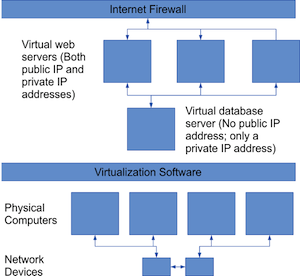
 The X.Org Foundation, through Keith Packard, announced the immediate availability for download of the first Release Candidate (RC) build towards the X.Org Server 1.18 open-source implementation of the X Window System.