Home Blog Page 1047

Embedded Linux Pioneer MontaVista Spins IoT Linux Distribution

CGX MontaVistaMontaVista Software has launched an Internet of Things version of its commercial MontaVista Linux Carrier Grade Edition (CGE) development platform. The new Yocto Linux-based MontaVista Linux Carrier Grade eXpress (CGX) distribution will be available in the fourth quarter in a scaled down CGX Foundation optimized for IoT products. Customers can then add profiles including Carrier Grade and Virtualization in modular fashion.

MontaVista Linux CGX differs from MontaVista Linux CGE not only with its smaller footprint and modular approach, but with a yearly release cadence that aims to keep projects up-to-date with the latest IoT technologies. CGX provides real-time, power management, memory footprint optimization, and connectivity features, while also adding a few features missing from CGE, including a built-in QEMU simulator and Docker container support.

Like rival Wind River, which years ago took over Cavium-owned MontaVista’s leading role as the top commercial embedded Linux software vendor, MontaVista is aiming primarily at the IoT gateway market. Wind River, for example, makes the Linux-based Edge Management System software for the Intel Atom and Quark-compatible Intel IoT Platform for gateways.

IoT gateways, which aggregate input from endpoints such as sensor devices, require a unique mix of embedded and wireless technology, networking savvy, and cloud integration. In MontaVista’s scheme, you can drive simpler gateways with CGX Foundation while using the same software with Carrier Grade Linux profile for more advanced gateway systems farther up the food chain.

In a sense, IoT gateways bring technology full circle. Internet of Things typically refers to lower end, albeit wirelessly enabled, embedded endpoint equipment, overlapping in some cases with RTOS/microcontroller based endpoint devices. Yet, IoT gateways also require integration with high-end networking as well as enterprise server and cloud resources. In addition, IoT gateways require a higher end, networking savvy OS like Linux.

Scores of companies are going after the IoT gateway market from various angles. These include Intel, Qualcomm with its AllJoyn/AllSeen standard, Samsung with its Artik modules, and Canonical with its Snappy version of Ubuntu Core. The lightweight Snappy, for example, works much the same in an embedded device or a Docker virtual container running on a cloud server.

Many more enterprise and cloud companies are looking into the market at the same time that embedded hardware firms and projects tackle the segment from the ground up. The emerging IoT gateway market brings together some strange bedfellows indeed, often speaking in mutually incomprehensible jargon. This is all the more reason to have enterprise, cloud, and embedded events mixed together, as the Linux Foundation has done with recent conferences, like the upcoming LinuxCon + CloudOpen + Embedded Linux Conference Europe. The LinuxCon Europe show, which runs from Oct. 5-7 in Dublin, Ireland, prominently features IoT in several of the shared keynotes.

MontaVista aims to stay relevant in a business it helped invent

It’s nice to hear MontaVista Software is keeping current with the latest IoT developments. We no longer hear much from the company, which still owns a good chunk of the high-end Carrier Grade Linux market with CGE, but has otherwise largely faded from view. The Cavium subsidiary dropped the mainstream MontaVista Linux distribution for consumer electronics, and it sold its GENIVI-compliant automotive stack to Mentor Graphics in 2013.

Long before it was acquired by networking chipmaker Cavium, MontaVista Software was the primary driver of embedded Linux. Jim Ready launched MontaVista in 1999 with the first fully formed embedded version of Linux, called Hard Hat Linux. Today, commercial Linux distributions like MontaVista, Wind River, Mentor Graphics, and Enea Linux are somewhat peripheral to the heart of embedded Linux development, although they collectively run a large percentage of high-end embedded industrial and networking systems around the world. The industry is now driven more by chipmakers, hacker communities, standards groups, Google’s Android ecosystem, and open source code sets like Linaro and Yocto, which now underlies all the major commercial distros.

Embedded Linux vendors like MontaVista and Wind River, which expanded from its VxWorks RTOS business to launch Wind River Linux in 2004, were essential to building the case for Linux vs. the dominant RTOS, Windows CE, and Windows Mobile platforms of the time. In the early years of the 21st Century, semiconductor companies had only begun to release Linux distributions optimized for their embedded processors. There was no Yocto or Linaro, and few open source embedded hacker communities. Desktop Linux distros had limited embedded or mobile support, and usually only for x86, and something like Android had not even been imagined, let alone planned.

By 2003, Hard Hat Linux had become MontaVista Linux, and had moved beyond industrial and networking equipment to target early Motorola smartphones. Years before the iPhone and subsequent Android and BlackBerry phones turned the smartphone into a must-have consumer device, companies like Motorola and Panasonic launched a variety of Linux smartphones. One of the first major open source hardware projects — OpenMoko— was a smartphone platform instead of an SBC.

Linux phones, and later, the small, thick tablets called MIDs, never took off much beyond certain Asian markets. Yet, Linux increasingly thrived in industrial, networking, defense, and consumer electronics segments, where it appeared in early successes like the TiVo and Roku set-tops. For a time, Linux even thrived in netbooks, which included products that ran a MontaVista version of Moblin, the forerunner of Meego.

MontaVista ain’t what it used to be, but we wish it well in the turbulent currents of embedded Linux. The industry wouldn’t be quite the same without it.


 

openSUSE Releases First Milestone for Leap

Leap1The newest openSUSE release Leap 42.1, which is based on core SUSE Linux Enterprise source code, has just released its first development milestone.

Milestone is being used to avoid the term Alpha because the milestone is able to be deployed without the additional future items and subsystems that will become available when Leap is officially released.

“This is where the excitement for Leap begins,†said Richard Brown, chairman of the openSUSE board. “The opportunity for topping this SLE core with the things you want in a long-term release really makes this attractive and I see people wanting to get involved with this next chapter of openSUSE.â€


Read more at openSUSE News

IT Leaders Expect Rise in Budgets in 2015, But Hiring Slows

Security professionals, programmers and developers, software engineers and project managers remained in the top five most difficult positions to fill.

Read more at eWeek

Founder of GNU Bestows Blessing Upon Open-Source Crowdfunding Site

Richard Stallman, the founder of the Free Software Foundation and the GNU Project known by many in the open source worlds as rms, is not the sort of person you’d expect to endorse a product. But Stallman and the FSF have formed a partnership of sorts with Crowd Supply, a crowdfunding company that has been largely focused on open source hardware and software projects.

Crowd Supply is best known for launching the Librem laptop (a privacy-focused computer built by Purism) and the Novena (an open-hardware “laptop”  designed by Andrew “bunnie” Huang and Sean “xobs” Cross). Based in Portland, Oregon, the company was founded by Joshua Lifton, a Ph.D. alumnus of MIT Media Lab and the former head of engineering at Puppet Labs. In addition to providing product designers with a crowdfunding platform, Crowd Source also provides them with long-term sales, marketing, and fulfillment services.

Read more at Ars Technica

The Only Remaining Barrier to Entry for Linux

After my last piece, “Alternative is the question; Linux is the answer,” I received quite a lot of feedback. Much of that feedback was positive. Some, as you might expect, went the opposite direction. Those who sent in the negative feedback promised to re-answer the question for me.

Their answer? To my shock and dismay, went something like this:

The answer is Windows. Why? Because Linux is too hard to install.

Pardon me while I double take, spitting soda out of my mouth and through my nose.

Read more at TechRepublic.


Linux Foundation Training Kicks Off $79 Pricing for India

India flagOpen source has always been about democracy, openness, and opportunity. In keeping with that spirit, at Linux Foundation Training we’re working to make high-quality professional Linux training available worldwide. As part of that, we’re excited to be able to offer Linux Foundation Training in India through a regional Linux Foundation Authorized Training Partner in the South Asia region.
Why India?

India is second only to the United States in inquiries regarding Linux Foundation training and certification but ranks among the lowest in Linux certification exam enrollment. The feedback we have received is that this population of IT professionals sees the opportunities Linux training and certification present but hasn’t been able to pursue these programs due to cost barriers. This is why our Authorized Training Partners program exists.

What About My Region?

In the coming months, additional regions will be considered for a similar program to help increase access to Linux learning materials to anyone who seeks to pursue a lucrative IT career. We’ll also continue to run events like our Summer Training Sale throughout the year to give people a chance to get a great deal on our training courses.

Why Authorized Training Partners?

We truly are dedicated to making quality Linux training and certification available to as many people as possible. You may be familiar with some of our efforts:

In the end, our goal is to promote the growth of Linux by ensuring that there are enough trained Linux professionals to meet the ever-growing need for Linux talent. That’s it! No tricks, no agendas, just really, really great Linux training and certification.

We’ll see you in class!

How to Create a Streaming Media Server with Linux Using Plex

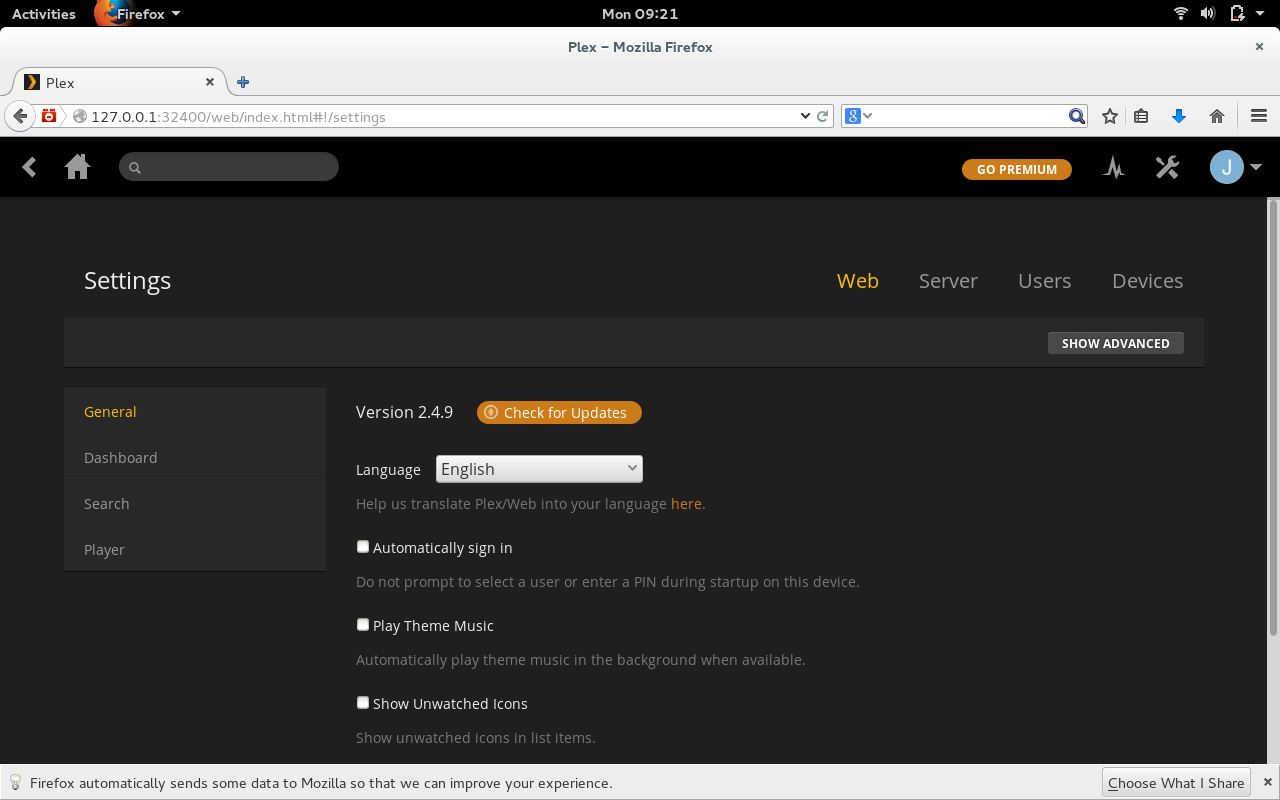
Figure 1: The Plex web interface.

Media is king—it has been for a very long time. It helps inform, enlighten, inspire, and entertain. More and more, users aren’t content with sitting in front of a television or desktop to enjoy their media. Or, collections have become so large, transferring them from drive to drive has become cumbersome at best. So what do you do when you want to take advantage of that massive media collection from multiple locations and your target devices either don’t have space for it or you don’t want to take the time to transfer it?

You set up a media streaming server.

With this type of server you can enjoy your media from a desktop, laptop, smart phone, or tablet. Naturally, each media streaming server offers different features and there are plenty of available servers (from bare bones to full-featured solutions). I want to demonstrate the process of setting up a streaming server using Plex. Why Plex? Because it is one of the most feature-rich media servers available that also happens to be cross-platform, has a built-in media player (and transcoder), and also offers apps for both Android and iOS. With Plex, you can also sign into your account and stream outside of your local network (and enjoy other features). Do note: Some of the Plex features require a premium membership fee.

With all of that in mind, let’s begin the process of setting up the Plex server. I will be installing on the latest release of openSUSE, but the server can be installed on Fedora, Ubuntu, Debian, and more.

Installation

You will be surprised to find out that installation is the easiest piece of the Plex puzzle—even on a non-Ubuntu distribution. Let’s walk through the steps (with a reminder, I’m using the latest version of openSUSE):

  1. Open up your web browser and download the installer that meets your needs.

  2. Open up your file manager (in my case, on openSUSE, that’d be Files).

  3. Change into the directory housing the downloaded installer.

  4. Double-click on the downloaded installer.

  5. Type your admin password and hit Enter.

  6. Allow the installation to complete.

That’s it! The installation of the Plex media server is done.

Starting the server

Now you must start up the Plex server. This is done manually at this point (reboot should start the server automatically); so open up a terminal window and su to the root user. Once you have admin power at your fingertips, issue the following command:

/etc/init.d/plexmediaserver start

The Plex server will start running in the background and you can connect to the web-based interface to set up your server.

Set up

You might not be surprised to know that the setup of the Plex server will take the most time. It’s not terribly difficult, but can be time consuming. I’ll cut to the chase and illustrate the important pieces of this puzzle.

The first thing you should do is sign up for a Plex account (even the free account) so you are able to take advantage of some of the extra features. You can sign up here. Once you have your account created, you’re ready to go.

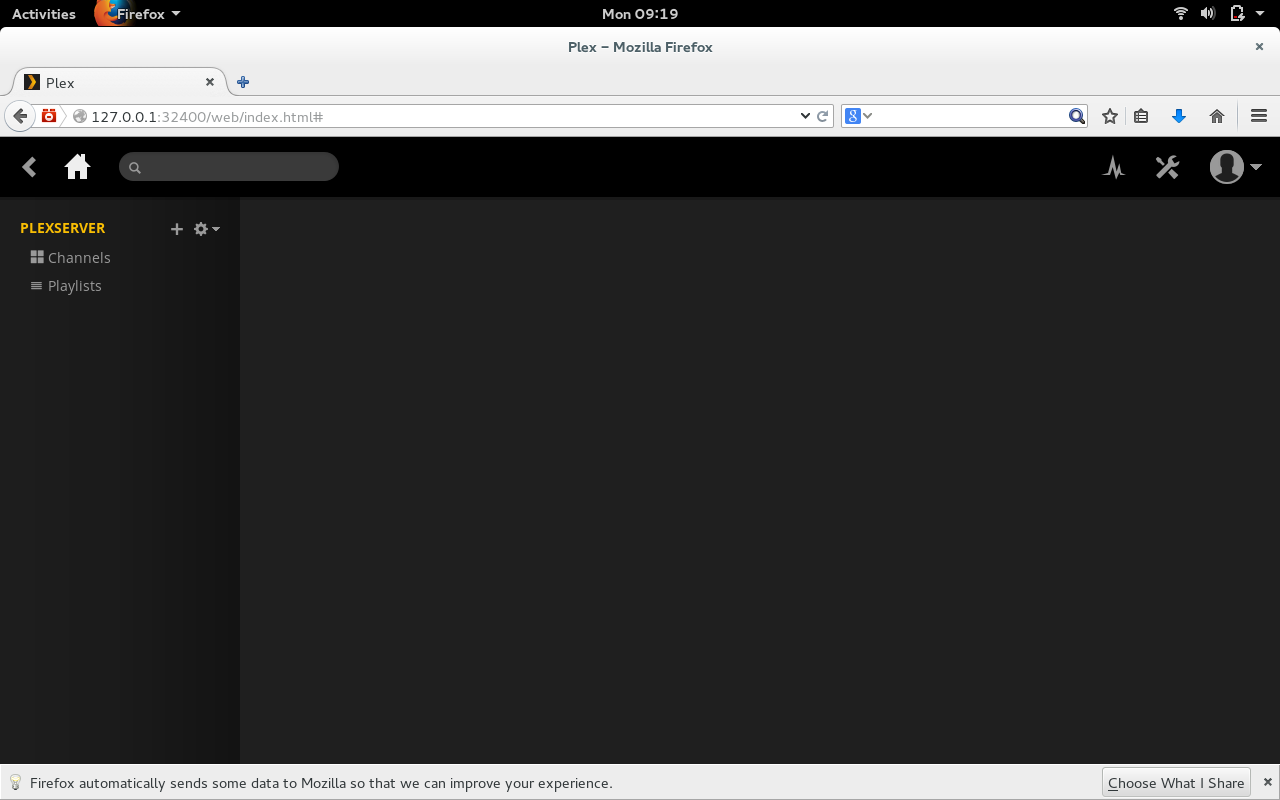
Open up your browser (on the PC housing the Plex server) and point it to http://localhost:32400/web. You will be presented with the Plex web-based administration tool (Figure 1, above).

NOTE: You can also configure the Plex server from a remote machine. To do this, you simply replace localhost with the IP address of the Plex server.

The first thing you want to do is click on the user drop-down and select Sign In. When prompted, enter your Plex credentials and then click on the Config icon (wrench to the left of the user drop-down). In the Setting page (Figure 2), click on the Server tab.

plex configuration

You will see a configuration option called Friendly name. Enter a name for your Plex server and then click SAVE CHANGES.

Now it’s time to configure the locations of your libraries. This is one issue that must warrant a tiny explanation. Yes, you can configure the root location of your Music and Video libraries; but there are guidelines for naming files and folders. Here are some tips:

  • Separate media into appropriate folders (Music, Movies, TV, etc)

  • Movies should be named as follows: [Movie_Name (Release_Year)].mp4

  • TV shows should include season and episode numbers in the name: [Show Name – sXXeYY].mp4

  • Each TV Show episode file should be stored in a set of folders as follows: ~/TV Shows/Show Name/Season/episodes (NOTE: For TV Shows, the folder structure is crucial.)

  • Music content should be stored as follows: ~/Music/Artist/Album/tracks

NOTE: Your root folder does not have to be housed under your home user directory.

In order to be able to stream, you have to create Libraries for each type of media. Here’s how:

  1. Open up the Plex web admin tool

  2. Click on the Home button

  3. Click the + button associated with PLEXSERVER (or whatever friendly name you gave your Plex server) in the left navigation

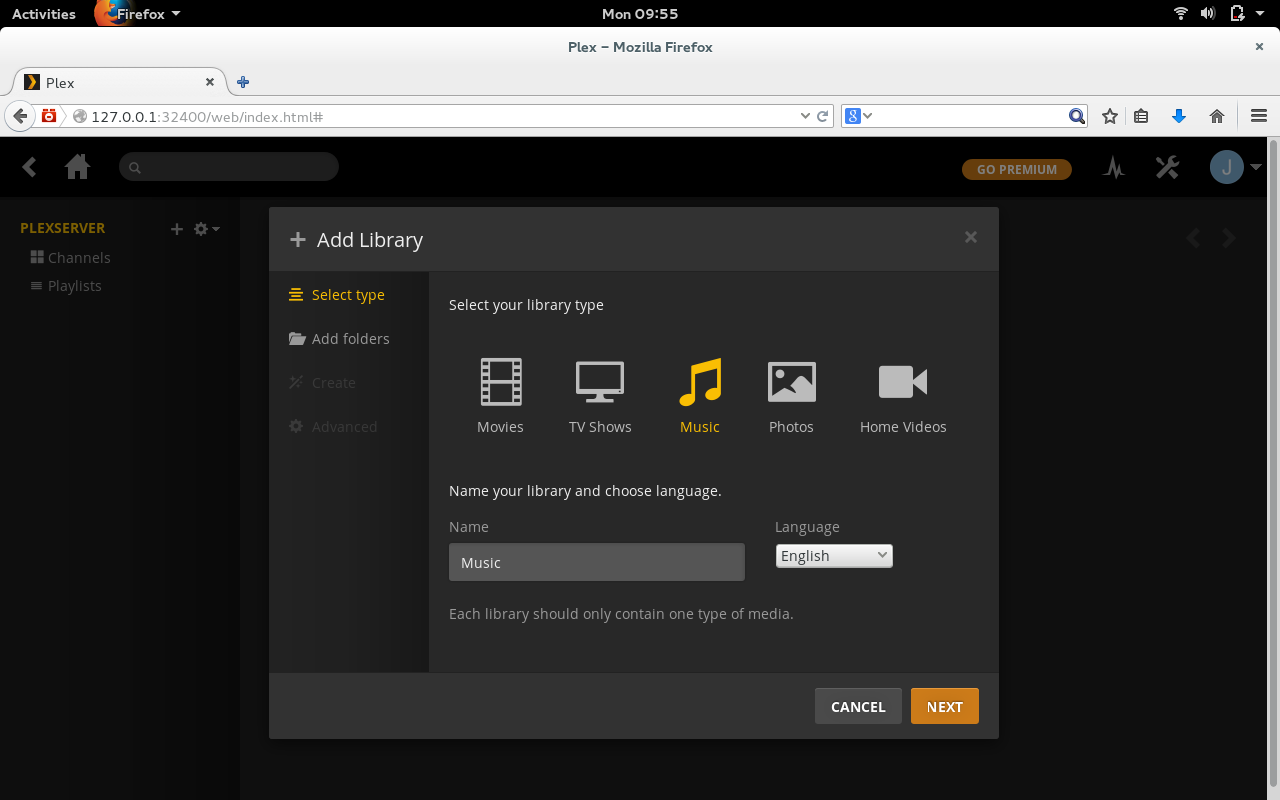
  4. Click the icon for the media type associated with the library to be added (We’ll add a music library for example)

  5. Give the library a name, select a language, and click NEXT (Figure 3)

  6. Click BROWSE FOR MEDIA FOLDER

  7. Locate the media folder and, once you’ve selected it, click NEXT

  8. Select Create a basic music library and click NEXT

  9. Scan through the presented options on the last page (the defaults work fine) and click ADD LIBRARY.

naming a plex media library

That’s it. After a refresh, your media should show up (depending on how large the folder is, this could take some time.)

Repeat this process for every type of media you want to add and your Plex streaming server is ready.

Using your server

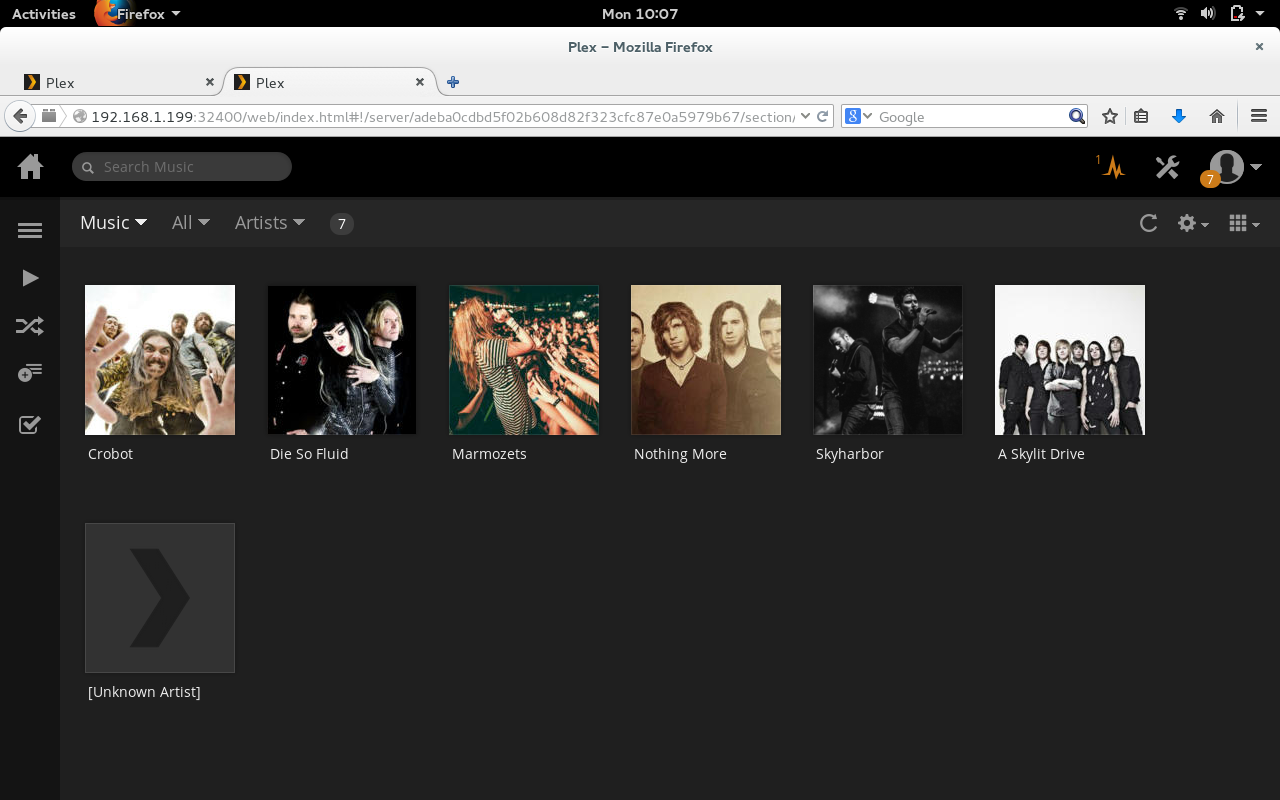
Out of the box, you can point any desktop or laptop device on your network to the IP of the Plex server (in the form http://IP_ADDRESS:32400/web) and Plex will appear, ready to stream media (Figure 4).

plex streaming

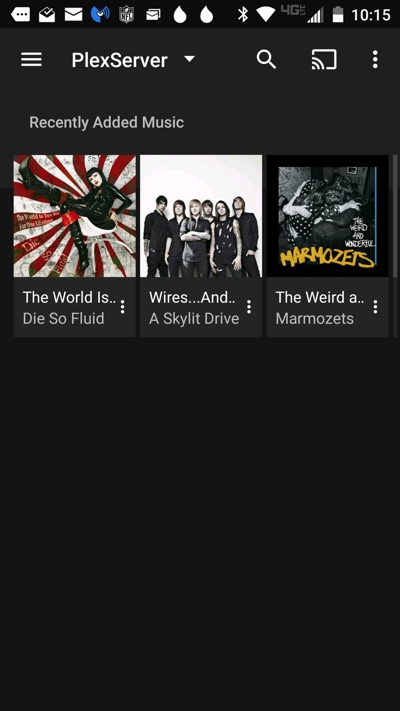
To connect to your Plex streaming server from the mobile app is incredibly simple—you open the app, select your server from the dropdown, and your stream-able media will appear (Figure 5).

Figure 5: Plex running on a Verizon-branded Motorola Droid Turbo.

NOTE: Unless you pay the $4.99 license fee for the app, your media will be limited in playback (music will stop after 1 minute and all videos/images will be watermarked).

If you’re looking for one of the most feature-rich and well supported media streaming servers on the market, you can’t go wrong with Plex. Yes, there are plenty of other streaming servers available, but you’ll be hard-pressed to find one as robust and ready to serve.

How to Enable Logging in Open vSwitch for Debugging and Troubleshooting

Open vSwitch (OVS) is the most popular open-source implementation of virtual switch on the Linux platform. As the today’s data centers increasingly rely on the software-defined network (SDN) architecture, OVS is fastly adopted as the de-facto standard network element in data center’s SDN deployments.

Open vSwitch has a built-in logging mechanism called VLOG. The VLOG facility allows one to enable and customize logging within various components of the switch. The logging information generated by VLOG can be sent to a combination of console, syslog and a separate log file for inspection. You can configure OVS logging dynamically at run-time with a command-line tool called ovs-appctl.

Read more at Xmodulo.

Samsung Launches Additional Information Services for Tizen TV

  Samsung Electronics have announced the addition of four services that provide real-time on-screen Information on their Tizen based Smart TVs. You can display Information that relates to sports, news, entertainment, and social. The Information is displayed on the right hand side of the screen on a transparent window, and can be accessed via the…

The post Samsung launches additional information services for Tizen TV appeared first on Tizen Experts.

Read more at Tizen Experts

Ubuntu Touch to Soon Get a New Mir Version

Canonical works on a few Ubuntu Touch branches at all times, besides the current stable one that everyone can get. From the looks of it, the development one is based on the new Wily Werewolf, and it’s receiving some interesting changes.

A new OTA update has been released for the Ubuntu Phones, and lots of improvements have landed, but… (read more)