
Cyrus is an advance IMAP daemon widely used in small to large scale organizations. It is a full fledge IMAP system and offers some greater advantages over other freely available IMAP alternatives. It is designed to handle massive flow of emails effectively, and it runs on “Sealed†servers where normal users are not permitted to login. Alongside IMAP, it also support POP protocol for email retrieval and provides ability to setup and mange quotas on emails/accounts. Read more at LinuxPitstop
How to Best Manage Encryption Keys on Linux
 Storing SSH encryption keys and memorizing passwords can be a headache. But unfortunately in today’s world of malicious hackers and exploits, basic security precautions are an essential practice. For a lot of general users, this amounts to simply memorizing passwords and perhaps finding a good program to store the passwords, as we remind such users not to use the same password for every site. But for those of us in various IT fields, we need to take this up a level. We have to deal with encryption keys such as SSH keys, not just passwords.
Here’s a scenario: I have a server running on a cloud that I use for my main git repository. I have multiple computers I work from. All of those computers need to log into that central server to push to and pull from. I have git set up to use SSH. When git uses SSH, git essentially logs into the server in the same way you would if you were to launch a command line into the server with the SSH command. In order to configure everything, I created a config file in my .ssh directory that contains a Host entry providing a name for the server, the host name, the user to log in as, and the path to a key file. I can then test this configuration out by simply typing the command
ssh gitserver
And soon I’m presented with the server’s bash shell. Now I can configure git to use this same entry to log in with the stored key. Easy enough, except for one problem: For each computer I use to log into that server, I need to have a key file. That means more than one key file floating around. I have several such keys on this computer, and several such keys on my other computers. In the same way everyday users have a gazillion passwords, it’s easy for us IT folks to end up with a gazillion key files. What to do?
Cleaning Up
Before starting out with a program to help you manage your keys, you have to lay some groundwork on how your keys should be handled, and whether the questions we’re asking even make sense. And that requires first and foremost that you understand where your public keys go and where your private keys go. I’m going to assume you know:
1. The difference between a public key and private key
2. Why you can’t generate a private key from a public key but you can do the reverse
3. The purpose of the authorized_keys file and what goes in it
4. How you use private keys to log into a server that has the corresponding public key in its authorized_keys file.
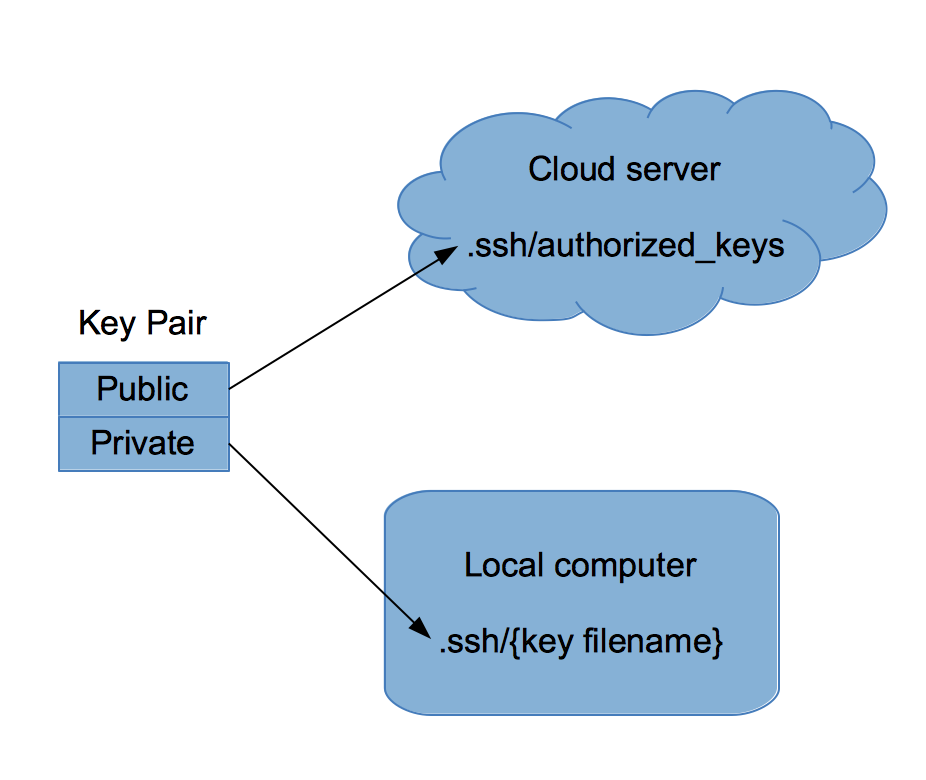
Here’s an example. When you create a cloud server on Amazon Web Services, you have to provide an SSH key that you’ll use for connecting to your server. Each key has a public part and a private part. Because you want your server to stay secure, at first glance it might seem you put the private key onto that server, and that you take the public key with you. After all, you don’t want that server to be publicly accessible, right? But that’s actually backwards.
You put the public key on the AWS server, and you hold onto your private key for logging into the server. You guard that private key and keep it by your side, not on some remote server, as shown in the figure above.
Here’s why: If the public key were to become known to others, they wouldn’t be able to log into the server since they don’t have the private key. Further, if somebody did manage to break into your server, all they would find is a public key. You can’t generate a private key from a public key. And so if you’re using that same key on other servers, they wouldn’t be able to use it to log into those other computers.
And that’s why you put your public key on your servers for logging into them through SSH. The private keys stay with you. You don’t let those private keys out of your hands.
But there’s still trouble. Consider the case of my git server. I had some decisions to make. Sometimes I’m logged into a development server that’s hosted elsewhere. While on that dev box, I need to connect to my git server. How can the dev box connect to the git server? By using the private key. And therein lies trouble. This scenario requires I put a private key on a server that is hosted elsewhere, which is potentially dangerous.
Now a further scenario: What if I were to use a single key to log into multiple servers? If an intruder got hold of this one private key, he or she would have that private key and gain access to the full virtual network of servers, ready to do some serious damage. Not good at all.
And that, of course, brings up the other question: Should I really use the same key for those other servers? That’s could be dangerous because of what I just described.
In the end, this sounds messy, but there are some simple solutions. Let’s get organized.
(Note that there are many places you need to use keys besides just logging into servers, but I’m presenting this as one scenario to show you what you’re faced with when dealing with keys.)
Regarding Passphrases
When you create your keys, you have the option to include a passphrase that is required when using the private key. With this passphrase, the private key file itself is encrypted using the passphrase. For example, if you have a public key stored on a server and you use the private key to log into that server, you’ll be prompted to enter a passphrase. Without the passphrase, the key cannot be used. Alternatively, you can configure your key without a passphrase to begin with. Then all you need is the key file to log into the server.
Generally going without a passphrase is easier on the users, but one reason I strongly recommend using the passphrase in many situations is this: If the private key file gets stolen, the person who steals it still can’t use it until he or she is able to find out the passphrase. In theory, this will save you time as you remove the public key from the server before the attacker can discover the passphrase, thus protecting your system. There are other reasons to use a passphrase, but this one alone makes it worth it to me in many situations. (As an example, I have VNC software on an Android tablet. The tablet holds my private key. If my tablet gets stolen, I’ll immediately revoke the public key from the server it logs into, rendering its private key useless, with or without the passphrase.) But in some cases I don’t use it, because the server I’m logging into might not have much valuable data on it. It depends on the situation.
Server Infrastructure
How you design your infrastructure of servers will impact how you manage your keys. For example, if you have multiple users logging in, you’ll need to decide whether each user gets a separate key. (Generally speaking, they should; you don’t want users sharing private keys. That way if one user leaves the organization or loses trust, you can revoke that user’s key without having to generate new keys for everyone else. And similarly, by sharing keys they could log in as each other, which is also bad.) But another issue is how you’re allocating your servers. Do you allocate a lot of servers using tools such as Puppet, for example? And do you create multiple servers based on your own images? When you replicate your servers, do you need to have the same key for each? Different cloud server software allows you to configure this how you choose; you can have the servers get the same key, or have a new one generated for each.
If you’re dealing with replicated servers, it can get confusing if the users need to use different keys to log into two different servers that are otherwise similar. But on the other hand, there could be security risks by having the servers share the same keys. Or, on the third hand, if your keys are needed for something other than logging in (such as mounting an encrypted drive), then you would need the same key in multiple places. As you can see, whether you need to use the same keys across different servers is not a decision I can make for you; there are trade offs, and you need to decide for yourself what’s best.
In the end, you’re likely to have:
– Multiple servers that need to be logged into
– Multiple users logging into different servers, each with their own key
– Multiple keys for each user as they log into different servers.
(If you’re using keys in other situations, as you likely are, the same general concepts will apply regarding how keys are used, how many keys are needed, whether they’re shared, and how you handle private and public parts of keys.)
Method of safety
Knowing your infrastructure and unique situation, you need to put together a key management plan that will help guide you on how you distribute and store your keys. For example, earlier I mentioned that if my tablet gets stolen, I will revoke the public key from my server, hopefully before the tablet can be used to access the server. As such, I can allow for the following in my overall plan:
1. Private keys are okay on mobile devices, but they must include a passphrase
2. There must exist a way to quickly revoke public keys from a server.
In your situation, you might decide you just don’t want to use passphrases for a system you log into regularly; for example, the system might be a test machine that the developers log into many times a day. That’s fine, but then you’ll need to adjust your rules a bit. You might include a rule that that machine is not to be logged into from mobile devices. In other words, you need to build your protocols based on your own situation, and not assume one size fits all.
Software
On to software. Surprisingly, there aren’t a lot of good, solid software solutions for storing and managing your private keys. But should there be? Consider this: If you have a program storing all your keys for all your servers, and that program is locked down by a quick password, are your keys really secure? Or, similarly, if your private keys are sitting on your hard drive for quick access by the SSH program, is a key management software really providing any protection?
But for overall infrastructure and creating and managing public keys, there are some solutions. I already mentioned Puppet. In the Puppet world, you create modules to manage your servers in different ways. The idea is that servers are dynamic and not necessarily exact duplicates of each other. Here’s one clever approach that uses the same keys on different servers, but uses a different Puppet module for each user. This solution may or may not apply to you.
Or, another option is to shift gears altogether. In the world of Docker, you can take a different approach, as described in this blog regarding SSH and Docker.
But what about managing the private keys? If you search, you’re not going to find many software options, for the reasons I mentioned earlier; the private keys are sitting on your hard drive, and a management program might not provide much additional security. But I do manage my keys using this method:
First, I have multiple Host entries in my .ssh/config file. I have an entry for hosts that I log into, but sometimes I have more than one entry for a single host. That happens if I have multiple logins. I have two different logins for the server hosting my git repository; one is strictly for git, and the other is for general-purpose bash access. The one for git has greatly restricted rights on that machine. Remember what I said earlier about my git keys living on remote development machines? There we go. Although those keys can log into one of my servers, the accounts used are severely limited.
Second, most of these private keys include a passphrase. (For dealing with having to type the passphrase multiple times, considering using ssh-agent.)
Third, I do have some servers that I want to guard a bit more carefully, and I don’t have an entry into my Host file. This is more a social engineering aspect, because the key files are still present, but it might take an intruder a bit longer to locate the key file and figure out which machine they go with. In those cases, I just type out the long ssh command manually. (It’s really not that bad.)
And you can see that I’m not using any special software to manage these private keys.
One Size Doesn’t Fit All
We occasionally get questions at linux.com for advice on good software for managing keys. But let’s take a step back. The question actually needs to be re-framed, because there isn’t a one-size-fits-all solution. The questions you ask should be based on your own situation. Are you simply trying to find a place to store your key files? Are you looking for a way to manage multiple users each with their own public key that needs to be inserted into the authorized_keys file?
Throughout this article, I’ve covered the basics of how all this fits together, and hopefully at this point you’ll see that how you manage your keys, and whatever software you look for (if you even need additional software at all), should happen only after you ask the right questions.
What You Need to Know About Fedora’s Switch From Yum to DNF
If you’re a fan of Fedora, and you’ve upgraded to release 22, you might have noticed a major change under the hood. The familiar (and long-standing) Yum package manager is gone. In its place is the much more powerful and intelligent Dandified Yum (DNF).
Instead of just marching forward, as if DNF were there all along, let’s take a look at why this happened, why it’s a good thing, and how the new package management system is used.
Before we do this, understand those of you who never touch the command line (which on a Fedora system might be a bare minimum) will not see anything different. The GUI front-end remains (pretty much) the same—it’s all still point-and-click goodness. If, however, you are a fan of installing software from the command line, you will notice a quick flash of new text when you go to issue the command:
yum install PACKAGENAME
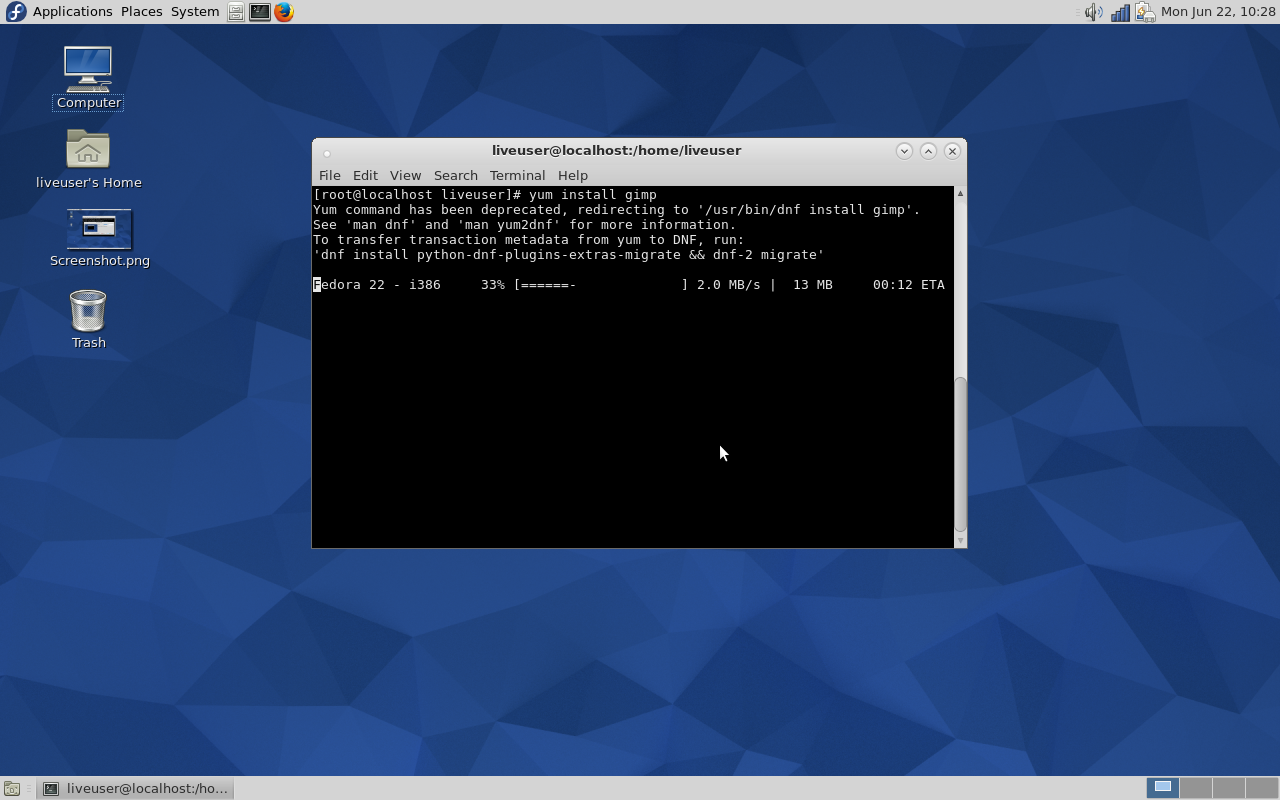
Instead of seeing a list of dependencies, you’ll first get a friendly warning (Figure 1) and then the package will install per normal. The reason the process will continue on is that the developers have created a wrapper that links yum to dnf—this was done to make the transition easier for end-users—so issuing the yum command will still work (at least during the transition).
But not every feature of Yum has already made the transition. Although it is the goal of the creators of DNF to get each and every Yum plugin in working order, some are not yet ready for prime time. For example, Tim Lauridsen is hard at work bringing the Yum Extender to DNF. He currently has a pre-release ready to test.
But the big question (for those that have yet to dive into DNF) is why did this happen?
Why?
There were ultimately three major reasons why Yum was forked into DNF. These reasons were long-standing and serious enough that Yum simply had to go. The reasons were:
-
An undocumented API—this meant more work for developers. In order for developers to do what they needed, it was often necessary to browse through the Yum code base just to be able to write a call. This meant development was very slow.
-
Python 3—Fedora was about to make the shift to Python 3 and Yum wouldn’t survive this change, whereas DNF can run using either Python 2 or 3.
-
Broken dependency solving algorithm—this has been an Achilles heel of the Fedora package manager for a long time. DNF uses a state-of-the-art satisfiability (SAT)-based dependency solver. This is the same type of dependency solver used in SUSE’s and openSUSE’s Zypper.
To put it simply, Yum was outdated and couldn’t stand up to the rigors of the modern Fedora distribution.
Why is this a good thing?
You have to look at this from two different perspectives: The end-user and the developer. If you’re an end-user, the switch from Yum to DNF means one very simple thing: a more reliable experience. Where this reliability comes in is DNFs superior dependency solving. It will now be a very rare occasion that you go to install a package and the system cannot resolve a dependency. The system is simply smarter. Yum’s dependency algorithm was, for all intents and purposes, broken. DNF’s SAT-based dependency solver fixes that issue.
End-users will also see much less memory usage during package installation. Installations and upgrades will also go much faster. That last bit should be of special importance. Running upgrades with the Yum tool was starting to grow unacceptably slow (especially when compared to the likes of apt-get and zypper).
If you’re a developer, the shift to DNF means you’ll be able to work much more efficiently and reliably. All exposed APIs are documented. Another plus for developers is that C will be implemented. The developers have created hawkeye and librepo (C and Python libraries for downloading packages and metadata from repositories). They will also be releasing even more C-based APIs in the future. Considering C is still such a widely-used language (it currently sits at No. 2 on the TIOBE index), this should be a welcome change to developers.
How DNF is used
This is where the good news for end-users falls into place. Migrating from Yum to DNF will only challenge your memory and muscle memory. When you open up a terminal window to run a command-line installation, the inclination will be to issue the command yum install PACKAGENAME. That is no longer the case. That same dandified command will be dnf install PACKAGENAME.
See how simple?
There will be hiccups along the way. Yes, DNF is a drop-in replacement for Yum; and if you weren’t a Yum power user, chances are you won’t experience a single issue in the migration. However, there are issues to be found. Let’s examine the old yum update –skip-broken command. When used, this command would run the update but skip all packages with broken dependencies. DNF, on the other hand, skips these broken packages, silently, by default. To that end, there is no need to include the –skip-broken flag. If you need to have DNF report broken packages, you have to run dnf update and then run dnf check-update. Some users aren’t happy with this behavior, as it adds extra steps to a once simple process. To power users, DNF could wind up requiring more work than Yum. For standard users, on the other hand, DNF will be little more than exchanging the letters yum for dnf.
The migration from Yum to DNF might be a bit awkward for a while—especially when unwitting users open up a command line and attempt to use Yum. But even then, you are issued a warning:
Yum command has been deprecated, use dnf instead.
See 'man dnf' and 'man yum2dnf' for more information.
To transfer transaction metadata from yum to DNF, run 'dnf migrate'
It becomes quite clear that something has changed. I do think, however, the developers could have been much more clear in their warning than to just go old school and say see ‘man dnf’. Instead, something more along the lines of:
The Yum command is no longer in use. Please replace ‘yum’ with ‘dnf’ in your command to make use of the newer system.
Yeah, it’s too simplistic for real-world use, but you get the idea. And, in the end, that’s all end users need to know—replace the word ‘yum’ with ‘dnf’ and you’re good to go.
Has the Fedora team gone in the right direction with the migration from Yum to DNF? If not, how should they have approached this transition?