
If you’re a fan of Fedora, and you’ve upgraded to release 22, you might have noticed a major change under the hood. The familiar (and long-standing) Yum package manager is gone. In its place is the much more powerful and intelligent Dandified Yum (DNF).
Instead of just marching forward, as if DNF were there all along, let’s take a look at why this happened, why it’s a good thing, and how the new package management system is used.
Before we do this, understand those of you who never touch the command line (which on a Fedora system might be a bare minimum) will not see anything different. The GUI front-end remains (pretty much) the same—it’s all still point-and-click goodness. If, however, you are a fan of installing software from the command line, you will notice a quick flash of new text when you go to issue the command:
yum install PACKAGENAME
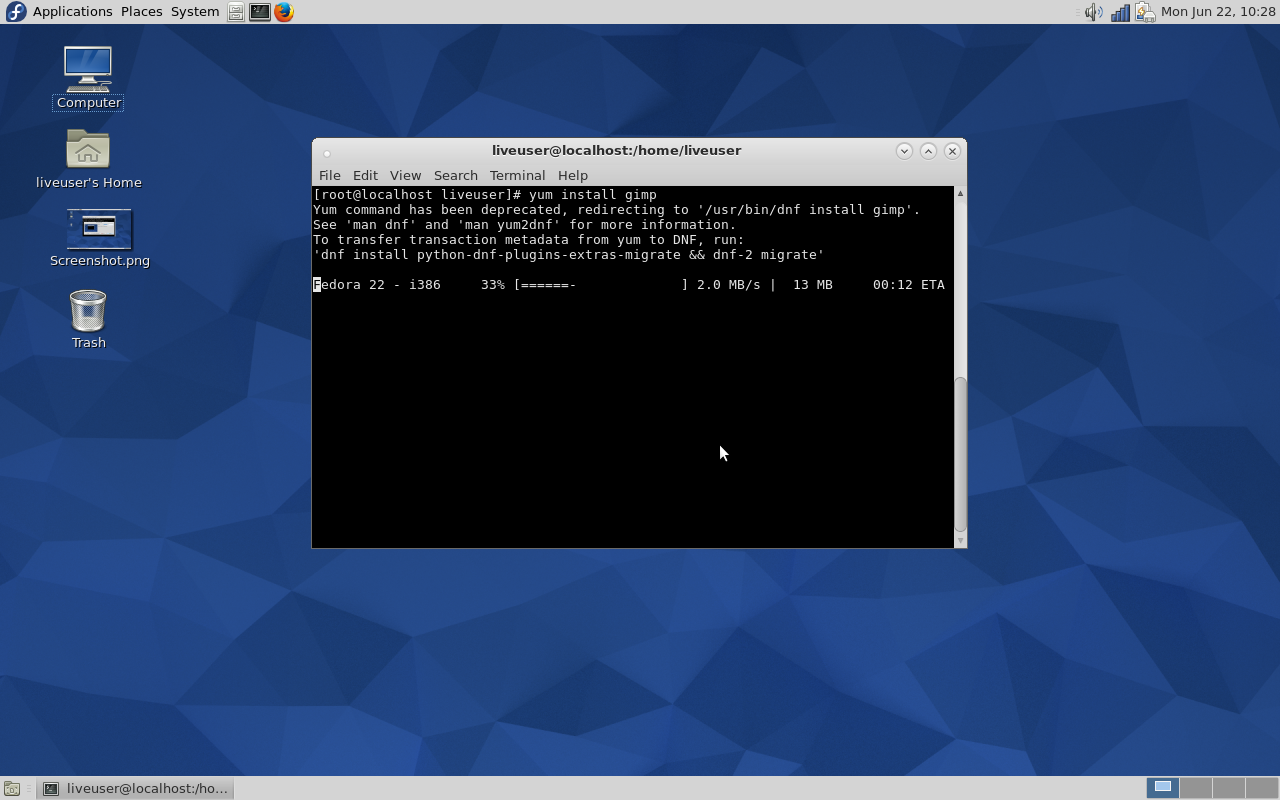
Instead of seeing a list of dependencies, you’ll first get a friendly warning (Figure 1) and then the package will install per normal. The reason the process will continue on is that the developers have created a wrapper that links yum to dnf—this was done to make the transition easier for end-users—so issuing the yum command will still work (at least during the transition).
But not every feature of Yum has already made the transition. Although it is the goal of the creators of DNF to get each and every Yum plugin in working order, some are not yet ready for prime time. For example, Tim Lauridsen is hard at work bringing the Yum Extender to DNF. He currently has a pre-release ready to test.
But the big question (for those that have yet to dive into DNF) is why did this happen?
Why?
There were ultimately three major reasons why Yum was forked into DNF. These reasons were long-standing and serious enough that Yum simply had to go. The reasons were:
-
An undocumented API—this meant more work for developers. In order for developers to do what they needed, it was often necessary to browse through the Yum code base just to be able to write a call. This meant development was very slow.
-
Python 3—Fedora was about to make the shift to Python 3 and Yum wouldn’t survive this change, whereas DNF can run using either Python 2 or 3.
-
Broken dependency solving algorithm—this has been an Achilles heel of the Fedora package manager for a long time. DNF uses a state-of-the-art satisfiability (SAT)-based dependency solver. This is the same type of dependency solver used in SUSE’s and openSUSE’s Zypper.
To put it simply, Yum was outdated and couldn’t stand up to the rigors of the modern Fedora distribution.
Why is this a good thing?
You have to look at this from two different perspectives: The end-user and the developer. If you’re an end-user, the switch from Yum to DNF means one very simple thing: a more reliable experience. Where this reliability comes in is DNFs superior dependency solving. It will now be a very rare occasion that you go to install a package and the system cannot resolve a dependency. The system is simply smarter. Yum’s dependency algorithm was, for all intents and purposes, broken. DNF’s SAT-based dependency solver fixes that issue.
End-users will also see much less memory usage during package installation. Installations and upgrades will also go much faster. That last bit should be of special importance. Running upgrades with the Yum tool was starting to grow unacceptably slow (especially when compared to the likes of apt-get and zypper).
If you’re a developer, the shift to DNF means you’ll be able to work much more efficiently and reliably. All exposed APIs are documented. Another plus for developers is that C will be implemented. The developers have created hawkeye and librepo (C and Python libraries for downloading packages and metadata from repositories). They will also be releasing even more C-based APIs in the future. Considering C is still such a widely-used language (it currently sits at No. 2 on the TIOBE index), this should be a welcome change to developers.
How DNF is used
This is where the good news for end-users falls into place. Migrating from Yum to DNF will only challenge your memory and muscle memory. When you open up a terminal window to run a command-line installation, the inclination will be to issue the command yum install PACKAGENAME. That is no longer the case. That same dandified command will be dnf install PACKAGENAME.
See how simple?
There will be hiccups along the way. Yes, DNF is a drop-in replacement for Yum; and if you weren’t a Yum power user, chances are you won’t experience a single issue in the migration. However, there are issues to be found. Let’s examine the old yum update –skip-broken command. When used, this command would run the update but skip all packages with broken dependencies. DNF, on the other hand, skips these broken packages, silently, by default. To that end, there is no need to include the –skip-broken flag. If you need to have DNF report broken packages, you have to run dnf update and then run dnf check-update. Some users aren’t happy with this behavior, as it adds extra steps to a once simple process. To power users, DNF could wind up requiring more work than Yum. For standard users, on the other hand, DNF will be little more than exchanging the letters yum for dnf.
The migration from Yum to DNF might be a bit awkward for a while—especially when unwitting users open up a command line and attempt to use Yum. But even then, you are issued a warning:
Yum command has been deprecated, use dnf instead.
See 'man dnf' and 'man yum2dnf' for more information.
To transfer transaction metadata from yum to DNF, run 'dnf migrate'
It becomes quite clear that something has changed. I do think, however, the developers could have been much more clear in their warning than to just go old school and say see ‘man dnf’. Instead, something more along the lines of:
The Yum command is no longer in use. Please replace ‘yum’ with ‘dnf’ in your command to make use of the newer system.
Yeah, it’s too simplistic for real-world use, but you get the idea. And, in the end, that’s all end users need to know—replace the word ‘yum’ with ‘dnf’ and you’re good to go.
Has the Fedora team gone in the right direction with the migration from Yum to DNF? If not, how should they have approached this transition?