Home Blog Page 1081

8 Ways to Write a Better Linux SysAdmin Job Posting

SysAdmin job dutiesLinux system administrators are in high demand these days and many hiring managers say they’re having a hard time finding talent to fill their open positions. It’s critical, then, for companies seeking skilled admins to hone their recruiting process in order to stay competitive – and this starts with writing an effective job posting.

Unfortunately, many companies aren’t hitting the mark. Job postings for sysadmin positions are largely similar; they’re boring and generic, according to New York City-based recruiter Steve Levy.

“Too many companies just cut and paste their ads,” he says. “They don’t care if the requirements have changed, the environment has changed. They think all sysadmins are created equally.”

Levy is one of three IT job market experts we asked to share their tips on how to write a better SysAdmin job posting. In short, it’s best to be honest about the job requirements and level of skill required, be specific about the technologies involved, and to emphasize the creative or challenging aspects of the work. Below, we’ve expanded their advice into eight specific ways to improve your chances of attracting the right candidates with more targeted, meaningful ads.

8 ways to improve a SysAdmin job posting

1. Accurately map technical requirements to skill.

“Understand exactly what you’re looking for, and be certain on the needs of your position. If it’s more entry-level and you are able to support a junior admin who can learn and grow on the job, then be upfront about that,” says Jay Madison, senior director of IT Enablement at Red Hat.

Understand the technologies that are in demand for the role, and be sure to reflect them accurately. Then accurately map them to expected levels of proficiency. Make sure your requirements reasonably map to both the maturity of technology in your space, and also the job level, such as senior sysadmin, etc. Don’t expect 10 years of experience for a junior or journeyman-level position.

“No systems administrator worth their salt will look at a position that requires 15 years of experience with a technology that’s only five years old,” Madison says.

2. Be clear about job requirements.

Be honest with expectations on travel, shift, maintenance, and pager duties. Most sysadmins are comfortable with on-call, or off-hours maintenance work if they know in advance that it’s expected. At the same time, pay attention to work-life balance or you risk losing them.

3. Emphasize creativity and challenges

“Stress the ability to be creative and take on new ways of solving problems if your corporate culture allows that. If your corporate culture does not readily support that now, work to be supportive of this approach as best you can,” Madison says. “Automation, scaling, resilient systems, and continuous improvement and continuous delivery (CI/CD) are all valuable commodities that can be implemented by creative and empowered systems administrators, which will help your business succeed and be far more efficient than traditional methods.”

Highlight opportunities to work on recent, or cutting-edge technologies. Routine, operator-style work will not appeal to driven and hungry admins, he says.

“Everyone wants to be working on innovative things that matter, and have an opportunity to feel like they’ve contributed and added value as well as challenged themselves,” Madison says.

4. Make the job title more specific.

Levy can go on full rant about the job ads he sees.

“If you go to LinkedIn on a Sunday afternoon, you see all these ads, and they all say the same things. Imagine you’re a job seeker and you see one Linux system administrator title after another. How do you get somebody to click on your ad if you have the same title as everybody else?” he asks.

The title should be functional, with whatever specific flavor of Linux they’re using, he says.

“Talk about number of employees. CentOS sysadmin, 21,000 employees, global location. Use the language that practitioners use,” he says.

“You know the phrase, ‘You can lead a horse to water, but you can’t make it drink’? When it comes to job ads, you don’t have to make [job candidates] drink. You just want to make them thirsty, just enough to click [on your ad].”

5. Describe the system architecture.

He says companies waste too much time at the beginning talking about how great the company is.

“How can they all be leading companies? Stop using jargon,” he says. He urges companies to make that two sentences, max. If a candidate wants to know more about a company, that’s what company career pages are for.

“I don’t think people spend enough time describing the actual system architecture.,” he says.

“We hire people to solve problems. The first thing is what does the systems environment look like? Specifically, what are you using? I want to know the major components of the technical infrastructure. Hardware and software. I want to know version numbers on software. How large is your user population? You could say, ‘We have X number of users, and we hope to have Y by the end of the year and the system will have to expand accordingly.’

Job candidates also need to know location. Are there any elements that are outsourced?

“The IT execs have an idea where the environment needs to progress over the next 18 months. Give people an idea how the environment might be expanding or changing. There are major and minor long-term and short-term projects. Specifically identify the most critical, we’ve-go-to-get-this-done projects,” he says.

“With Linux, it’s not that you’re going to be giving away trade secrets. But people will read that and say, ‘That’s cool’ or ‘I’ve done that’ or ‘I want to do that.’

6. Write performance-based descriptions.

Companies list too many arbitrary requirements, he says.

“They say, ‘Must have 7 to 10 years of experience.’ So I come back and say, ‘If I find someone who has solved all those specific problems, but only has four years’ experience, you don’t want to talk to them?’ Of course they do. They put these unfortunately dumb boundaries on things.”

He would like to see performance-based job descriptions rather than ones based on skills. In talking about how a candidate solved a particular problem, the skills will come out, he says.

“When you post a job, you have no guarantee that the really great performers will apply. You don’t know. Traditional ads do not differentiate based on aptitude.”

7. Put the job in context.

Each job description needs to start with an understanding of the type of team in which the person will be a member and the team’s overall responsibility, says Jennifer Hay, an IT resume specialist in Seattle.

It might be a team that supports critical business systems or one managing on-premise servers and provisioning cloud services.

In other cases, the new hire might work with network administrators on connectivity issues or with security administrators to protect data—positions that might require other skills that need to be spelled out. How much regulatory compliance will there be?

8. Include only the necessary skills.

She says some clients are very shy and will not apply for positions with a long list of requirements.

“When job descriptions are long, they can exclude those that they are trying to attract,” she says. “Some of my clients won’t apply for jobs when some of the requirements aren’t a good fit. When writing the job description, the company should consider what skills are truly necessary. Also, be honest about the environment. For example, is it fun and fast paced without heavy processing or is the environment a lot more structured?”

She offered a list of job duties that might be required for three categories of positions in systems administration: systems administrator, database administrator, and security administrator (see the graphic, at left). The actual role might involve a combination of these duties, she says. The trick is to include only the most important skills needed for any specific position.

Conclusion

With just a few specific changes to SysAdmin job postings, hiring managers can dramatically improve their chances of finding the right candidate for the job. What techniques have you found most effective in job postings? Please tell us in the comments, below.

For more information on how Linux Foundation certifications can make hiring easier for you, please visit http://training.linuxfoundation.org/certification/why-hire-a-lfcs-or-lfce.
 

7 Elementary OS Freya Tweaks to Make the Platform Even Better

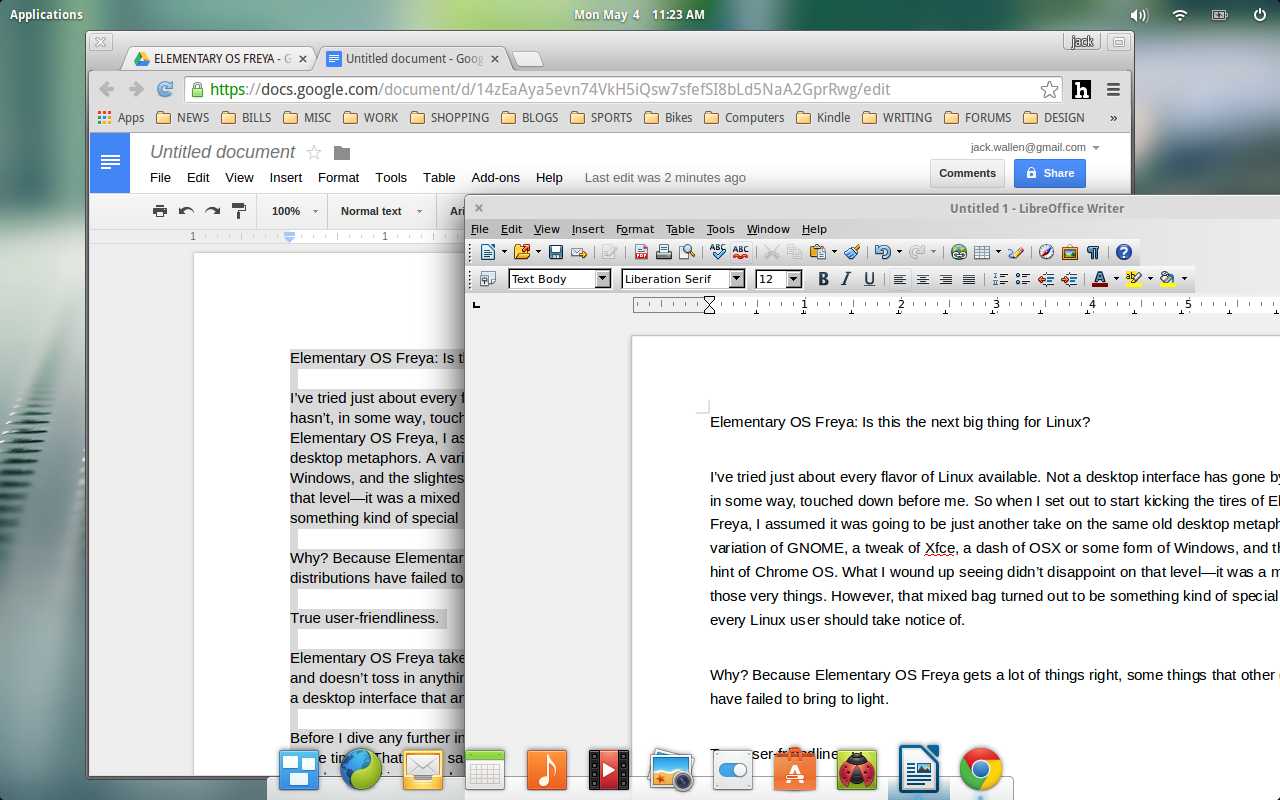
Freya-libre-office

So you’ve installed Elementary OS Freya and found it pretty rock solid. The more you use it, the more you like it. There’s a reason for that…Elementary OS Freya is one of the hottest Linux distributions available at the moment. It’s rock solid, elegant, and easy enough for anyone to use. But as you dig a bit deeper, you find there are certain aspects that require a bit of tweaking or additional software.

If you want to skip the exploration phase and get right to the tweaking of Elementary OS Freya, I have a short list of things you should immediately do, upon finalizing your installation. These tweaks and installations will cover a lot of ground and help your installation go from great to incredible in just a few short steps.

Let’s get to the tweaking.

Enable Canonical Partners repository

There’s plenty of great software available… but from a repository not enabled by default. Enabling this particular repository will add a number of important software titles to your Software Center, such as Skype, adobe-flashplugin, and even media codecs.

In order to enable this particular repository, do the following:

  1. Click on Slingshot (the Applications menu in the upper left corner)

  2. Type Software

  3. Click on Software & Updates when it appears

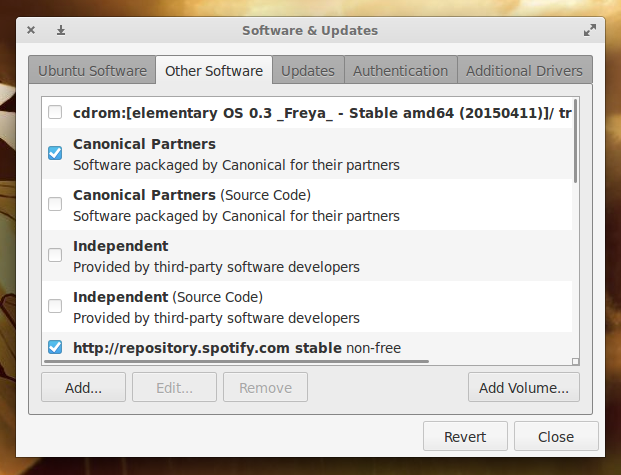
  4. Click on Other Software

  5. Click to enable Canonical Partners (Figure 1)

  6. When prompted, enter your sudo password and click Authenticate

  7. Click Close.

Figure 1: Adding the Canonical Partners repository.

When you click Close, apt will update so the new repository (and its software) is available.

Install additional drivers

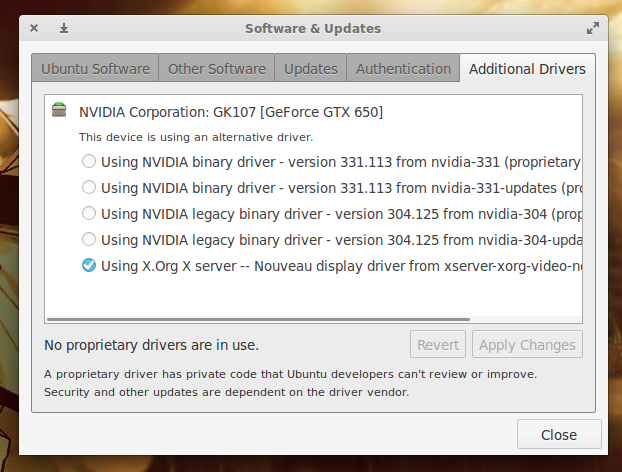
Should your machine make use of graphics (such as NVidia) or networking (such as BCM) hardware that doesn’t work well with open source drivers, you may need to install additional (proprietary) drivers to get the most out of your system. If you’re not even sure what hardware your system has (and if it needs special software to improve performance), you can find out in the same tool used to add the above repository.

In the Software & Updates tool, you’ll find a tab for Additional Drivers. Click on that tab. If the system has determined there is software available for your particular hardware, it will be listed here and ready to be enabled (Figure 2). Select the option you want to use and then click Apply Changes.

Figure 2: Installing additional drivers for graphics, sound, or wireless.

Do note, that installing proprietary drivers isn’t always the best option. You might want to do a bit of research to see how your particular hardware will respond with the combination of Elementary OS Freya and a proprietary driver.

Enable restricted codecs

Out of the box, most things work. Due to regional restrictions, however, some multimedia files may not play. To get around that, you must install extra codecs. Once you’ve installed the Canonical Partners repository, this is actually a single command away. Open up a terminal window (Click on Slingshot, type terminal, and click to open the terminal) and enter the following command:

sudo apt-get install ubuntu-restricted-extras

Type your sudo password, hit the Enter key, and allow the software to install. Once the installation is complete, you should be able to enjoy those multimedia files.

Install LibreOffice

The one major piece of software you’ll find missing from Elementary OS Freya is an office suite. That’s not a problem as LibreOffice is free, open source, and ready to serve. Instead of installing LibreOffice from the Software Center (which will most likely be an out-of-date release), let’s install the latest version. Here’s how:

  1. Download the necessary .deb main installer package that matches your architecture (either 32 or 64 bit) from this page

  2. Save the file to your Downloads directory

  3. Open up a terminal window

  4. Change into the downloads directory with the command cd ~/Downloads

  5. Extract the downloaded file with the command tar xvzf LibreOffice_XXX_Linux_YYY_deb.tar.gz (Where XXX is the release number and YYY is the architecture)

  6. Change into the newly created directory with the command cd LibreOffice_XXX (Where XXX is the release number)

  7. Change into the DEBS subdirectory with the command cd DEBS

  8. Issue the command sudo dpkg -i *deb

  9. Enter your sudo password and hit the Enter key

  10. Allow the installation to finish.

If you open up the Slingshot and type libre you should now see entries for all the pieces that comprise the LibreOffice office suite.

Install Nemo

The default file manager, GNOME Files, is sufficient for some…but others may find it sorely lacking in features. Instead of giving GNOME Files a chance, why not just install a far more powerful and tweak-able file manager. For this, you’ll want to install Nemo. Here’s how:

  1. Open up a terminal window

  2. Add the requisite repository with the command sudo add-apt-repository ppa:webupd8team/nemo

  3. Update apt with the command sudo apt-get update

  4. Install Nemo and the file-roller plugin with the command sudo apt-get install nemo nemo-fileroller

Now, there’s a slight problem with using Nemo as it stands. When you issue the command nemo to start the file manager, it will attempt to manage your desktop (which you do not want, considering the Elementary OS Freya desktop cannot work with a third-party manager). To avoid that, issue the command nemo –no-desktop.

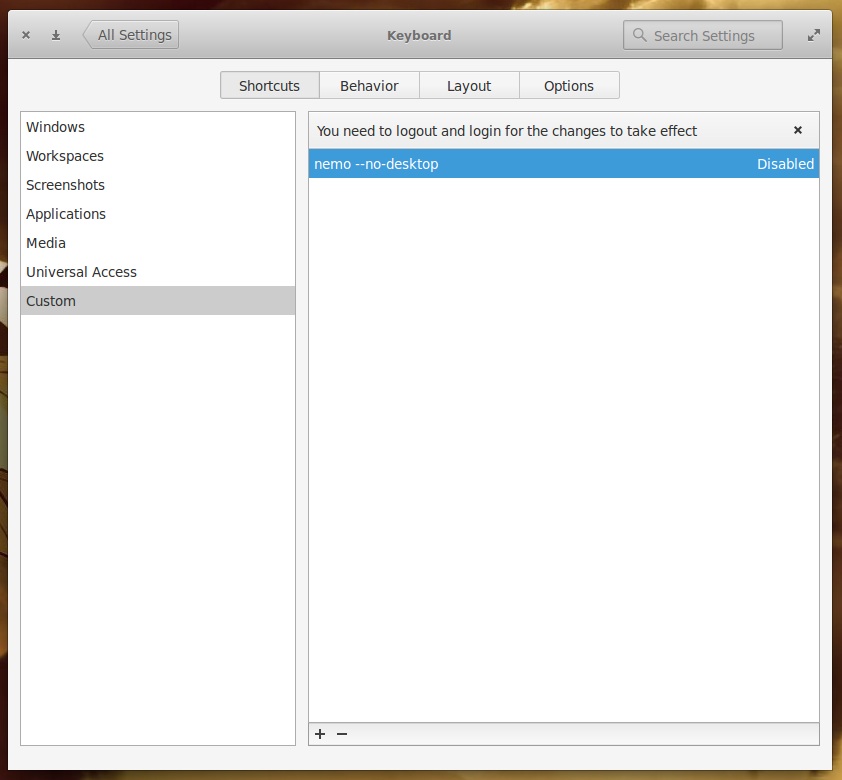
But what if you don’t want to start the new file manager from command line? The best way around that is to create a keyboard shortcut. Here’s how:

  1. Open up Settings

  2. Click on Keyboard

  3. Click on Custom

  4. Click the + button

  5. Type the command nemo –no-desktop when prompted to enter the command

  6. Hit the Enter key

  7. Click where it says “Disabled” (Figure 3)

  8. Click the keyboard shortcut you want to use (I prefer Super+F) to assign the key combination

  9. Log out of Elementary OS and log back in for the changes to take effect

elementary keyboard shortcuts

Install Tweaks

Similar to the Ubuntu Tweak Tool, Elementary has a Settings plugin that adds a number of new options. This tool is called Elementary Tweaks. This will give more appearance settings, font settings, Plank settings, and much more.

To install Tweaks, follow these steps:

  1. Open up a terminal window

  2. Add the necessary repository with the command sudo add-apt-repository ppa:mpstark/elementary-tweaks-daily

  3. Update apt with the command sudo apt-get update

  4. Install Tweaks with the command sudo apt-get install elementary-tweaks

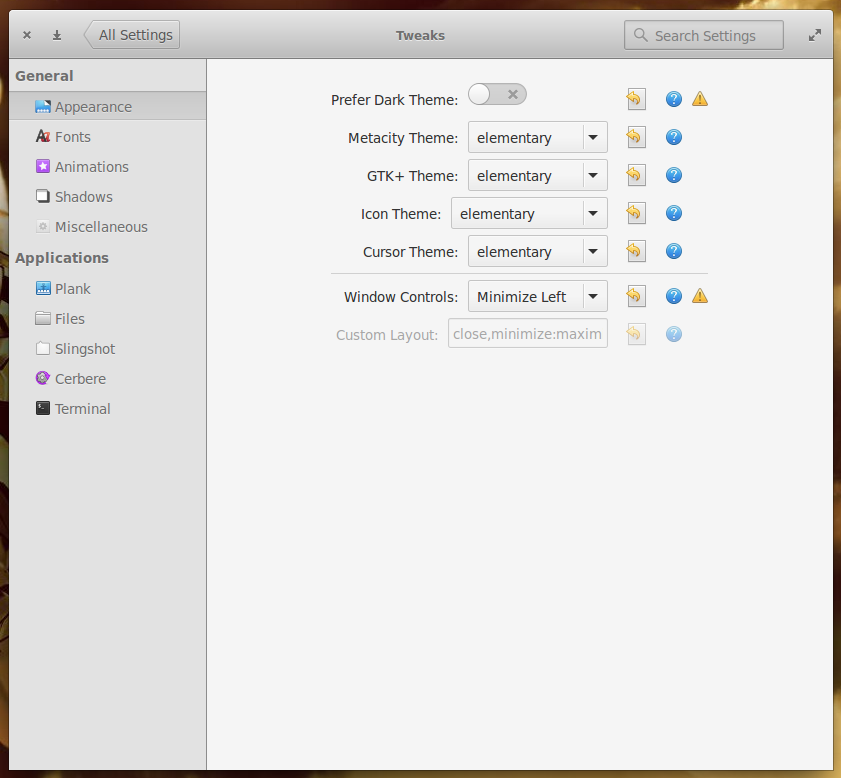
Once installed, you will find Elementary Tweaks in the Settings tool. Open Elementary Tweaks to find a number of added options (Figure 4).

Figure 4: Elementary Tweaks brings more options to the desktop.

Add minimize button to windows

One tiny issue you’ll notice is the lack of a minimize button on windows. If you’re like me, you depend upon that button quite a lot. Now that you have Elementary Tweaks installed, getting that button back is as simple as:

  1. Opening Tweaks

  2. Click on Appearance

  3. Click the Window Controls drop-down

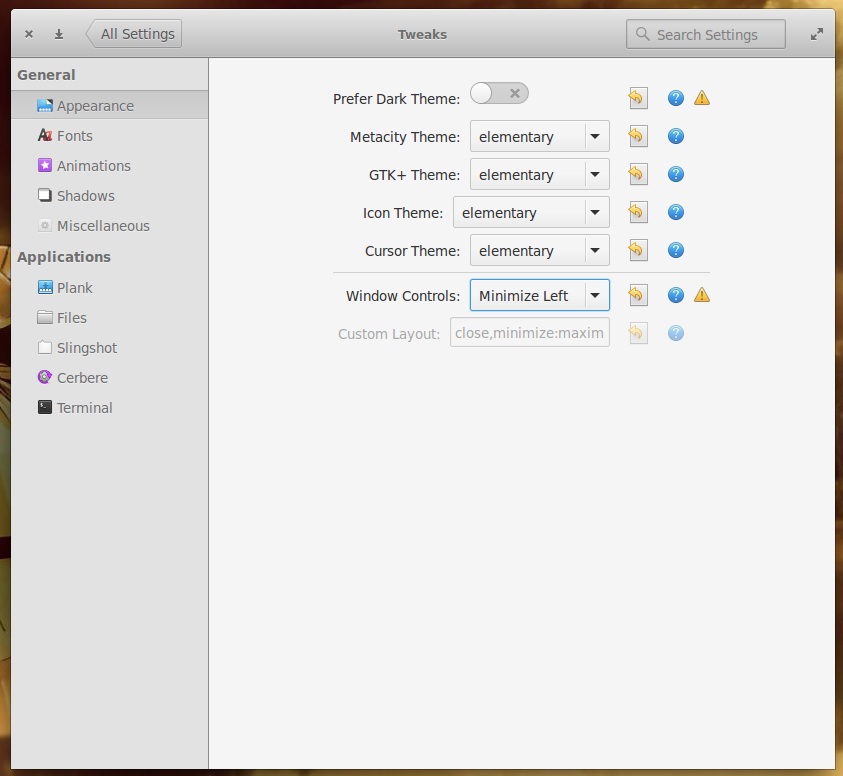
  4. Select the option that best suits your needs (I opt for Minimize Left to mimic the Ubuntu Unity window control—Figure 5).

Figure 5: Adding a minimize button to windows.

At this point, Elementary OS Freya should be tweaked to perfectly meet your needs. If not, there are still plenty of customizations you can manage from within the standard Settings tool and a vast amount of software to install to help you get the job done.

Russia Picks ReactOS As Second OS For Software Freedom

Russia has named various open-source mobile, desktop, and server operating systems to substitute for vendor lock-in / proprietary software currently in use. Interestingly, besides Linux dominating the list, Russia has been evaluating ReactOS — the project that’s long been seeking to be an open-source implementation of Windows…

Read more at Phoronix

There Is a Linux Detergent Out There and It’s Trademarked

There’s a Linux clothes detergent out there, and it’s a real one, from a company that has a trademark on it and that’s selling it today. Welcome to the bizarre world of trademark rules.
Some of the Linux users might have heard about the Linux detergent, but probably not too many. The truth is that there is a company in Switzerland, called Rösch Group, which has the right to use this name on their products, which at this point includes read more)

Should Ubuntu Phone Rebase To Android?

While Jono Bacon is no longer working for Canonical, he hasn’t stopped thinking about Ubuntu or being involved with the community. Over the night he wrote a lengthy blog post with his idea for rebasing the Ubuntu Phone off Android…

Read more at Phoronix

Kernel Address Sanitizer Comes To LLVM’s Clang

LLVM’s Clang C/C++ compiler now has initial Kernel Address Sanitizer support…

Read more at Phoronix

Update on Solus Project, One of the Most Interesting Upcoming Operating Systems

It’s been quite a while since we got a substantial update for the Solus project, but the developers have kindly obliged, and they have shared the progress they made with the community.

In all fairness, the Solus developers and especially Ikey Doherty, the leader of the project, have been quite active on social networks and they’ve kept people informed, but we really needed a bird’s eye view. This is a major undertaking, especially since Solus is not based on something else,… (read more)

A Chromebook Replaced the MacBook Pro on My Desk

An ongoing issue using a MacBook Pro in my office led me to switch to the Acer Chromebook 13 full time.

Read more at ZDNet News

How to Change the Swappiness of Your Linux System

Swappiness is the kernel parameter that defines how much (and how often) your Linux kernel will copy RAM contents to swap. This parameter’s default value is “60” and it can take anything from “0” to “100”. The higher the value of the swappiness parameter, the more aggressively your kernel will swap.

Read more at HowtoForge

Distribution Release: Robolinux 7.9.2

John Martinson has announced the release of Robolinux 7.9.2, the latest update of the project’s Debian-based distribution featuring an optional (and commercial) virtual machine pack for running Windows seamlessly alongside Robolinux: “Robolinux is pleased to announce version 7.9.2 LTS (until 2018) ‘X12+ Privacy & Security’ which has many….

Read more at DistroWatch