Home Blog Page 1104

NASA Space App Challenger Runs Yocto on an Intel Edison-Based Nanosat

ScanSat-teamNASA has long had an interest in Linux and other open source technologies, and has used Linux in a variety of systems, including the R2 humanoid robot now at work at the International Space Station. With its International NASA Space App Challenge, the space agency is tapping into the maker gestalt to come up with new ideas, as well as inspire future space engineers. In this year’s two-day Space App Challengehackathon, which ran April 10-11 in 133 cities around the world, NASA greeted participants with over 25 challenges split into Earth, Outer Space, Humans, and Robotics categories.

A number of projects used the Intel Edison computer-on-module in their designs, including the two highest scoring projects at the April 10 event in San Francisco — Team ScanSat and Team AirOS. They both advanced to the global competition, but did not make the final list of winners. Both projects ran Yocto-based Linux code on the Edison’s dual-core Intel Atom processor. Intel donated the modules to the event, and Intel’s Grace Metri posted a report on the event with more details on both projects.

Intel’s Wai Lun Poon, meanwhile, posted a blog entry highlighting the many Edison-based projects at the New York City event. These included a device that maps space debris (Team Kessel), a spacebase sensor platform (Team SpaceBase), a high-tech glove with heat sensors (Team FirstHand), and a drone for collecting temperature data on Mars (Team DEMS), among others.

Here, we take a closer look at the ScanSAT project, which developed a CubeSat satellite designed to launch from an interplanetary Dragon-sized spacecraft to do visual inspections of the craft and other objects of interest. In the next article we’ll look at AirOS, the runner-up at the San Francisco event. AirOS is a sensor-laden, augmented reality headgear device for NASA ground inspection personnel, combining an Intel Edison with an Oculus Rift VR headset using Leap Motion APIs.

Building with Yocto

Team ScanSAT took on the Deep Space CamSat Challenge, which asked for designs for CubeSat nano-satellites stored in a larger spacecraft to support deep space missions. These “CamSats” would launch from the spacecraft during interesting events, such as a planetary flyby, orbit the ship, and take photos of the ship and nearby objects on a hypothetical mission to Mercury. The CamSat would then return to the spacecraft and dock for later reuse.

Team ScanSat’s Anand Biradar, an aerospace engineer who had previously worked on CubeSats at Planet Labs, answered our questions about the project on behalf of his team members. These include Krishna Sadasivam, a Microsoft computer engineer; Sheen Kao, a mechanical engineer who had worked with CubeSats at Cal Poly; and Robert Chen, a computer scientist who had done remote sensing work at NASA/Jet Propulsion Laboratory.

The members had previously entered several other hackathons together, but had never worked with the Intel Edison. They did have some Arduino experience, however, which was all they needed.

“It was a huge plus that the Intel Edison came with an Arduino-compatible expansion board, with level shifters to support both 3.3v and 5v components,” said Biradar. “This greatly expanded the number of peripherals we could integrate, given that the Edison itself only supports 1.8v on its I/O pins. We enjoyed the amount of control we had over the platform, being able to program behavior at a low level without having to use the Arduino IDE, which most of the teams used. This allowed for more advanced functionality, such as image processing.”

Biradar also lauded the Edison for its support sensors such as accelerometers and gyroscopes, which he said were “crucial” for satellite control systems. Intel provided a Grove starter kit add-on to the Edison, with components including a Smart Relay and Base Shield that “allowed us to quickly prototype and build our project,” said Biradar.

Biradar also liked working with Yocto-based Linux. “Yocto was great in that it worked right out of the box without the need for additional software tools,” he said. “Setup consisted of simply plugging in a USB cable and logging in through the serial port USART. The package manager for Yocto had OpenCV-Python builds available, and the camera worked as soon as we plugged it in. A script made it a breeze to set up WiFi for remote access, and we started developing with the built-in vim editor in less than 10 minutes.”

The design used a webcam as a stand-in for a GoPro camera, which were not available to them at the time. To develop the image processing functions, the team used an OpenCV Python binding.

“We first developed the functionality on our personal computers using our webcams, and were able to easily transfer the code over to the Edison for deployment without any changes,” said Biradar. “The algorithm captured images from the perspective of the CubeSat, and ran it through several image processing techniques to pick out the largest red object in the image, which would ideally represent the docking port on the mothership.”

The team established a virtual bounding box in the image to determine if the dock was within the target area. If it was too far to the left, a signal was sent to pivot the CubeSat to the left or vice versa. The signals were received by a reaction wheel mounted in the demonstration CubeSat, which was essentially a plastic lunchbox equipped with the camera, Edison, control components, a motor, and the reaction wheel.

“The prototype floated virtually frictionless on water,” explained Biradar. “When the reaction wheel spun, the prototype pivoted in the opposite direction in order to orient itself to dock.”

An Edison-Powered CubeSat

One of the key innovations in the design was in the docking and magnetic propulsion mechanisms that enabled the ScanSat to undock and re-dock with the main craft autonomously. 

“The CubeSat has one ion thruster, so it can only accelerate forwards,” explained Biradar. “The repulsive force for undocking is applied by magnetic coils mounted on the mothership. We chose ion thrusters because they have minimal mass loss, and can be recharged while docked with the mothership. This allows it to be reused for a higher number of operational cycles than conventional thrusters.”

Team ScanSat also chose a novel conical design for the craft. “The conical design allows for a more flexible angular approach by the CubeSat, and helps to avoid unneeded complexity in the docking mechanism,” said Biradar.

According to Biradar, his team is planning to build a complete working prototype for control systems and image processing using the Edison. “We would love to see an Edison powered CubeSat in orbit.” He added, however, that to fit into the 10 x 10 x 10cm CubeSat, ScanSat would require an even smaller footprint than the module’s 35.5 x 25mm, while offering the same 3.3v and 5v level I/O.

Considering the rapid rate of miniaturization in the embedded board business these days, with the Edison, Intel’s upcoming Quark-based Curie, and Samsung’s ARM-based Artik, Team ScanSat’s wish may come true sooner than it thinks.

https://www.youtube.com/watch?v=CDbrzUlAxt4″ frameborder=”0

How to Find the Best Open Source Project to Work On

ELC 2015In my last article for Linux.com, I explored a few ways newcomers to open source projects can get started. While there are many resources to explore open source project communities, choosing which project to contribute to can still be a quite daunting task. You could go searching in the more than 23 million repositories on GitHub, the world’s largest source code hosting platform. But there are better ways. This article is meant to be a short guide to help novice open source practitioners more easily identify the first project they’d like to contribute to.
Start with the Humans, End with the Source Code

With some time and training – be it in university classes, via online tutorials, enrollment in a coding workshop, etc. – you can learn a different programming language or work effectively with the new framework of your choice. To be most successful contributing to an open source project, choose one that not only appeals to you technically but socially. You’ll be spending time and effort getting involved, so look for a project that matches your interests and values.

Project’s Mission

Many projects will explicitly state their mission on the website’s About page, so take a look there first. Are the contributors trying to solve a technical or social problem that inspires you to get involved? For example, I volunteer with the Privly Foundation, a non-profit organization that both develops software and creates online & offline educational materials and events to educate users and developers about online privacy. As the person who is always asked by family and friends just what those complicated permission settings on each social networking site actually do, Privly’s mission deeply resonates with me.

Depending on your interests, you can find open source projects dedicated to the democratization of online publishing to tracking the health of honey bee populations worldwide. If you’re interested in working on projects with humanitarian aims, there are over 25 listed in this recent article. While the well worn “scratch your own itch” phrase originally referred to solving a bug that impacts the developer personally, I find it’s more valuable to think of it more expansively; work on something that passionately interests you and knowledge will follow.

Contributor Community

Finding a community working on a problem you’re invested in solving is actually much easier than figuring out if it’s the right community for you. Off the top of my head, I can think of at least a dozen open source projects focused on making content creation easier for bloggers and citizen journalists, written in everything from PHP to Python to JavaScript. So how can one narrow down from there?

Figuring out whether or not you get along well with a project’s community can seem tough when many of your interactions occur online, but there are a few pointers that can make sifting through the many choices faster and easier.

How Are New People Treated?

Is there an explicit space on the website with guidelines for new contributors? Does the project have a listing on OpenHatch with an offer to provide mentors to new participants? Are questions in the project’s IRC channel or discussion forums met with useful advice or are the answers along the lines of “read the manual” or “go search the internet”?

If you’re looking for a good place to get started contributing, look for a group that provides an onramp to new folks that’s both immediately useful and inherently welcoming.

Does the Project Value Contributions Beyond Code?

Many contributors to a project get started by working on so called “peripheral contributions,” e.g. something other than source code; perhaps a developer first contributes a fix to the project’s documentation or gives a how-to lightning talk at a local user group. Does the project celebrate these successes? Are they even acknowledged on the project’s website, newsletter or in its social media streams?

If the answer to these questions is no, you may find that the amount of time that passes before you feel well integrated and rewarded for your work on the project is longer. When getting started with something new, a small amount of immediate reward keeps you motivated to continue. Plus, no one wants to spend their free time working on someone else’s free software unless they feel appreciated. Seeing that a project values all contributions to it is a strong sign that you’ve found a great community to spend time with.

What’s It Like to Hang Out with This Community IRL?

If you’re just getting a feel for a project’s landscape, try spending some time with its community members offline. Many open source projects and their members regularly convene events, from large global user conferences to smaller regional events. Before making arrangements to attend, you may also want to see if the conference or event has a Code of Conduct for attendees. (Providing these ground rules to all participants helps ensure a safe and productive space for everyone. Personally, I will neither speak at nor attend events without a CoC in place.)

If time constraints or travel costs are an issue, you can also spend time with your would-be project community at user group meetings. Check the project’s website for user group listings or check out sites like meetup.com to find local meetings within your area of interest. When attending the meetings, do you enjoy the atmosphere? Feel like you’d enjoy spending time with some of the group members outside of the user group? Like you can ask questions without prefacing them with the words “Sorry for the stupid question?” If you’re answering yes to these questions, chances are good that you’ve found your tribe.

If you are unable to make evening meetings due to family or work obligations, there’s nothing wrong with politely asking the organizers if they ever set up meetings as lunch and learns or weekend breakfasts. Chances are they’ll ask you to help organize, which can be an excellent very first contribution to both the open source project of your choice and its local community.

Tribal Wisdom

Using these tips can help you get started finding a project to contribute to, but one of the greatest things about participating in the open source world is the opportunity to benefit from the collective wisdom of many peers and mentors. If your open source project is searching for new contributors or you’ve interacted with a project community and found it particularly rewarding, I hope you’ll share your knowledge in the comments section of this article.

Happy hacking!

Read more:

Getting Started in Open Source Software


At Least Two Ubuntu Phone Announcements Expected In June

Canonical will be kicking off June by making some announcements with their partners for new Ubuntu Phones in Europe…

Read more at Phoronix

Fedora 22 Workstation : Video Overview and Screenshot tours

Fedora Project have just released the latest version of Linux Distribution, Fedora 22. It now available for download for all the new flavors, Workstation, Server, and Cloud.

Accoording to Fedora 22 official announcement. “Every Fedora release has its own character. If this release had a human analogue, it’d be Fedora 21 after it’d been to college, landed a good job, and kept its New Year’s Resolution to go to the gym on a regular basis. What we’re saying is that Fedora 22 has built on the foundation we laid with Fedora 21 and the work to create distinct editions of Fedora focused on the desktop, server, and cloud (respectively). It’s not radically different, but there are a fair amount of new features coupled with features we’ve already introduced but have improved for Fedora 22,”

Read more at Fedora 22 Workstation : Video Overview and Screenshot tours

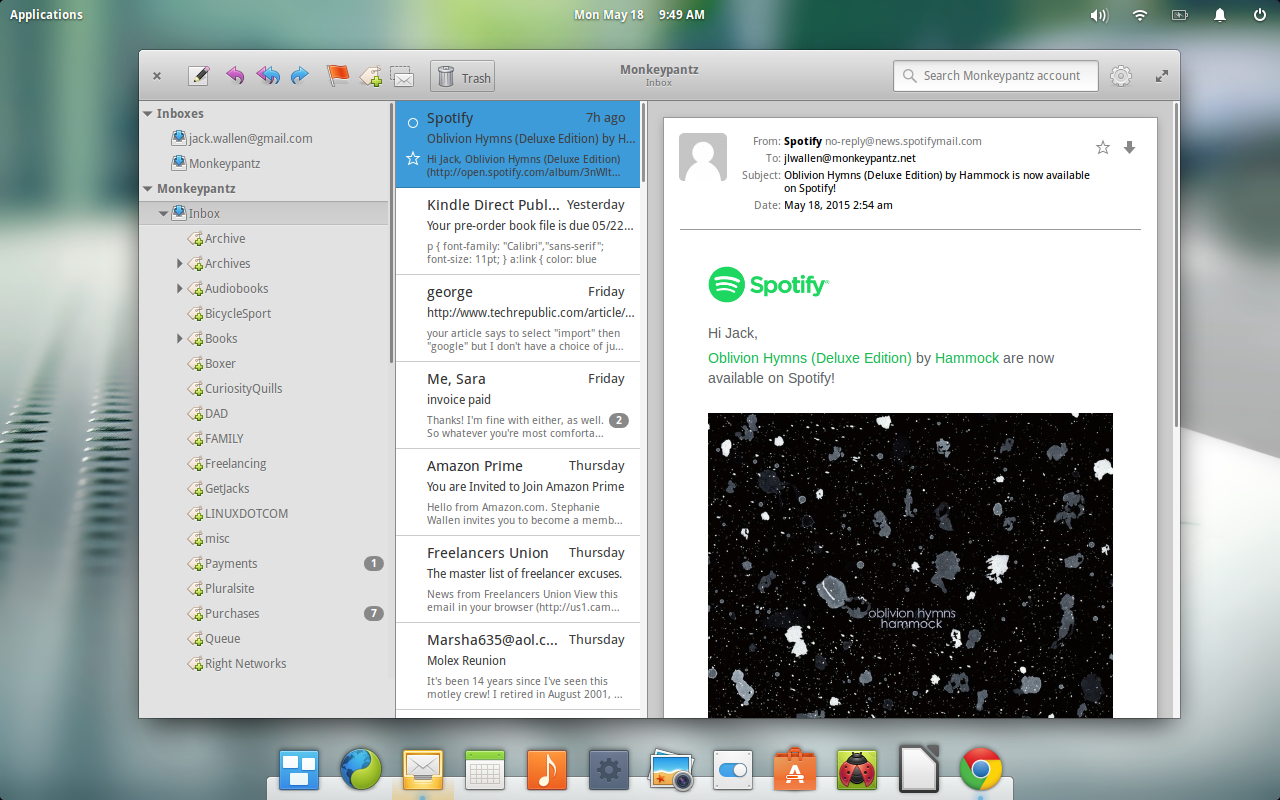
Meet Geary: A Thunderbird Email Client Alternative on Linux

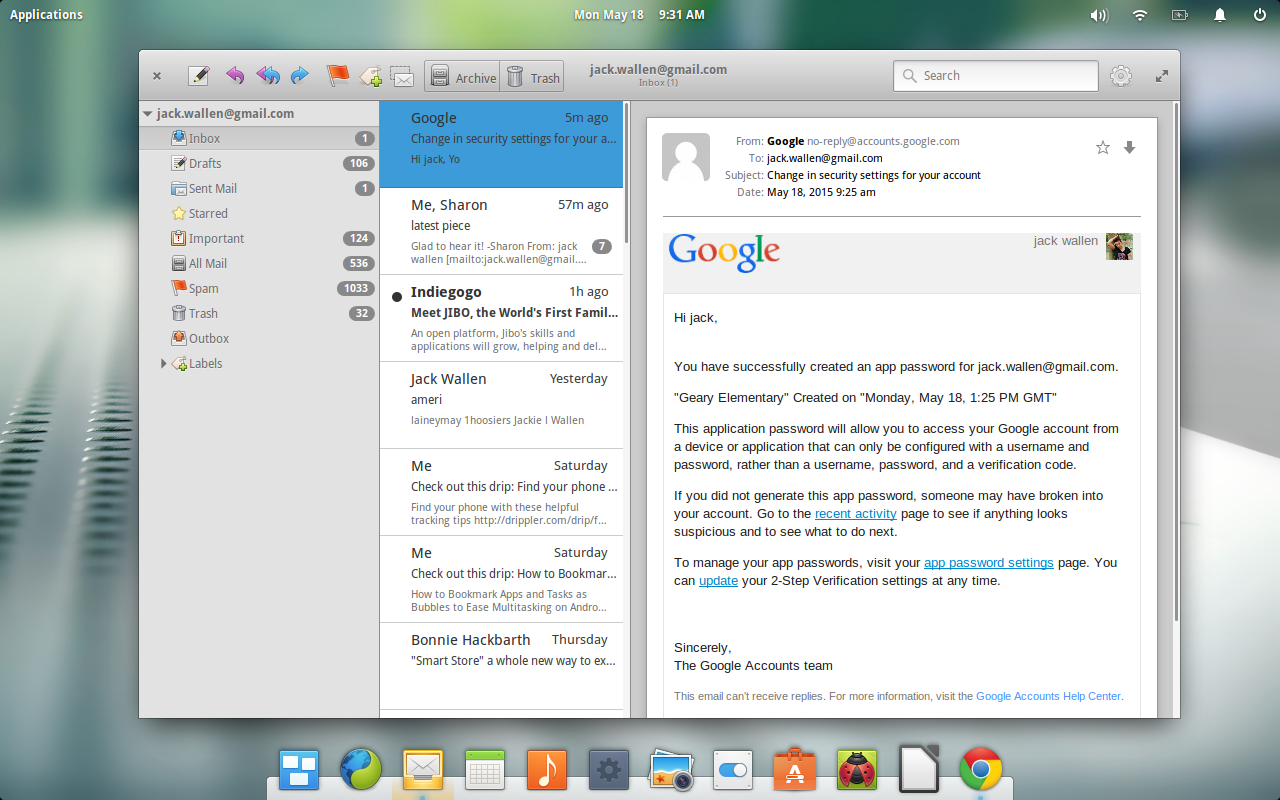
Figure 1: Geary in action on Elementary OS Freya.

On Linux there are a few open source alternatives to the Thunderbird email client. There’s Evolution, KMail, Claws-Mail, Alpine (if you’re really old-school), and a handful of other clients (most of which, don’t live up to anyone’s expectations). There’s also a new kid on the email block. That kid is the brainchild of Yorba. Meet Geary, the new default IMAP email client for the GNOME desktop (and the likes of Elementary OS Freya).

Geary is an interesting beast. It offers a very low-key interface design ─ similar to what you might see in an Android app. It’s flat, clean, and incredibly easy to use. It doesn’t offer numerous panes or sidebars. There isn’t a plugin system for expansion. You won’t even find much in the way of preferences. What you will find, however, is an email client that gets the job done and does so without the footprint and learning curve of other clients. This is truly a set it and forget email client and it is certainly worth a look.

Geary features:

  • A modern and straightforward interface

  • Quick account setup

  • Support for Gmail, Yahoo! Mail, Outlook.com, and popular IMAP servers (Dovecot, Cyrus, Zimbra, etc.)

  • Mail organized by conversations

  • Full-featured HTML mail composer

  • Fast keyword search

  • Desktop notification of new mail. 

It’s not a huge feature list (especially when compared to the likes of Claws Mail), but it gets the job done and does it well.

Let’s walk through the process of installing, setting up, and using Geary.

Installation

What if you don’t use a distribution that defaults to GNOME? Fear not. Geary is found in some distribution default repositories (and for others, it’s easily added). For example, if you use Ubuntu, you can install Geary from the Ubuntu Software Center. If you prefer to install from the command line, you can do so with the following steps:

  1. Open up a terminal

  2. Update apt with the command sudo apt-get update

  3. Install Geary with the command sudo apt-get install geary

That’s it.

If you’re using openSUSE, you can install Geary with the following commands (I’ll illustrate using openSUSE 13.1):

  • Open a terminal

  • Add the repo with the command zypper addrepo http://download.opensuse.org/repositories/openSUSE:13.1/standard/openSUSE:13.1.repo

  • Update zypper with the command zypper refresh

  • Install geary with the command zypper install geary

For Fedora, depending upon what you have installed, you might wind up with a bit of a dependency issue. Take a look at the official Fedora Geary rpm page (this page is for i686 and Fedora 22. For other versions, check here). Download the Geary .rpm file and attempt to install with the command yum install geary-XXX.AAA.rpm (Where XXX is the release number and AAA is the architecture). If you’re using Fedora 22, the command to install would be dnf install geary-XXX.AAA.rpm.

Setup

Once you have Geary installed, it’s time to set it up. How this is done, will depend upon the email service you are using. Let me walk you through the process of connecting Geary to a Google Mail account.

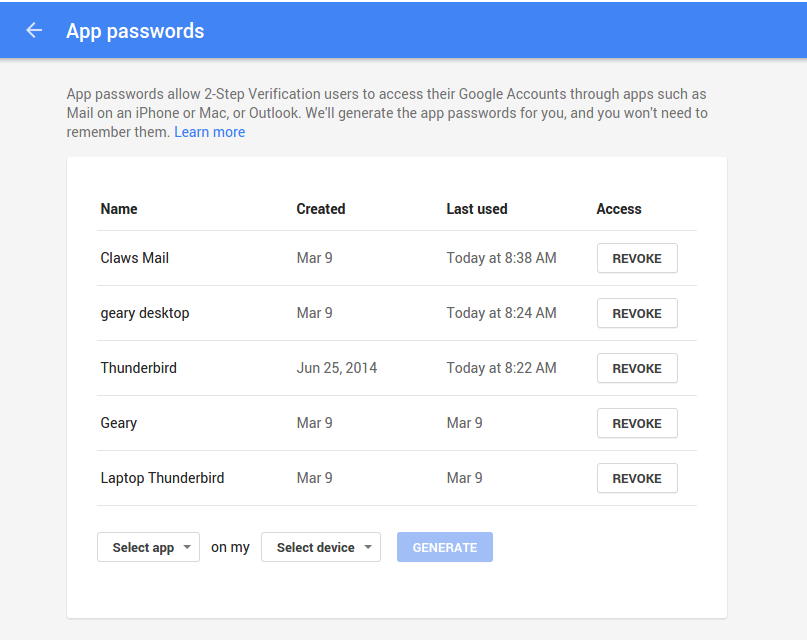
Because of the way Google authenticates, you cannot simply enter your normal account password that you use to log into Gmail. You have to create an app password to be used for Geary. Here’s how to create that app password:

  1. Open up your web browser and log into your Google account

  2. Go to the Google App Password page

  3. From the drop-downs (Figure 2), select Mail and Other (enter Geary when prompted for a name)

  4. Click Generate

  5. When your password is displayed, make note of it.

Figure 2: Creating an app password for Geary.

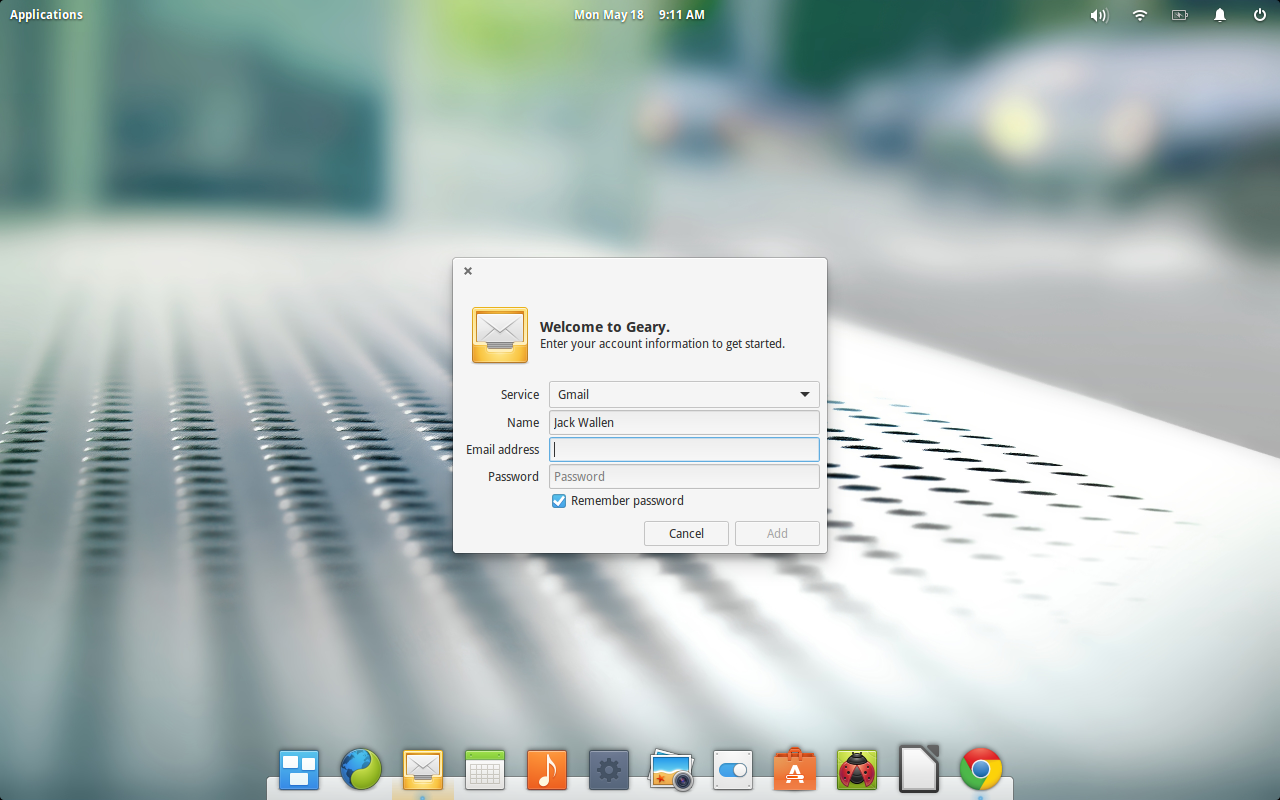
Now that you have your 16-digit app password, here are the steps for connecting Geary with your Google Mail account:

  1. Open Geary

  2. When prompted (Figure 3), select Gmail from the Service drop-down

  3. Enter the details for your Google Mail account (using the app password instead of your standard Google password)

  4. Click Add.

Geary should now automatically open up to your Google Mail account (Figure 1, above), ready for use.

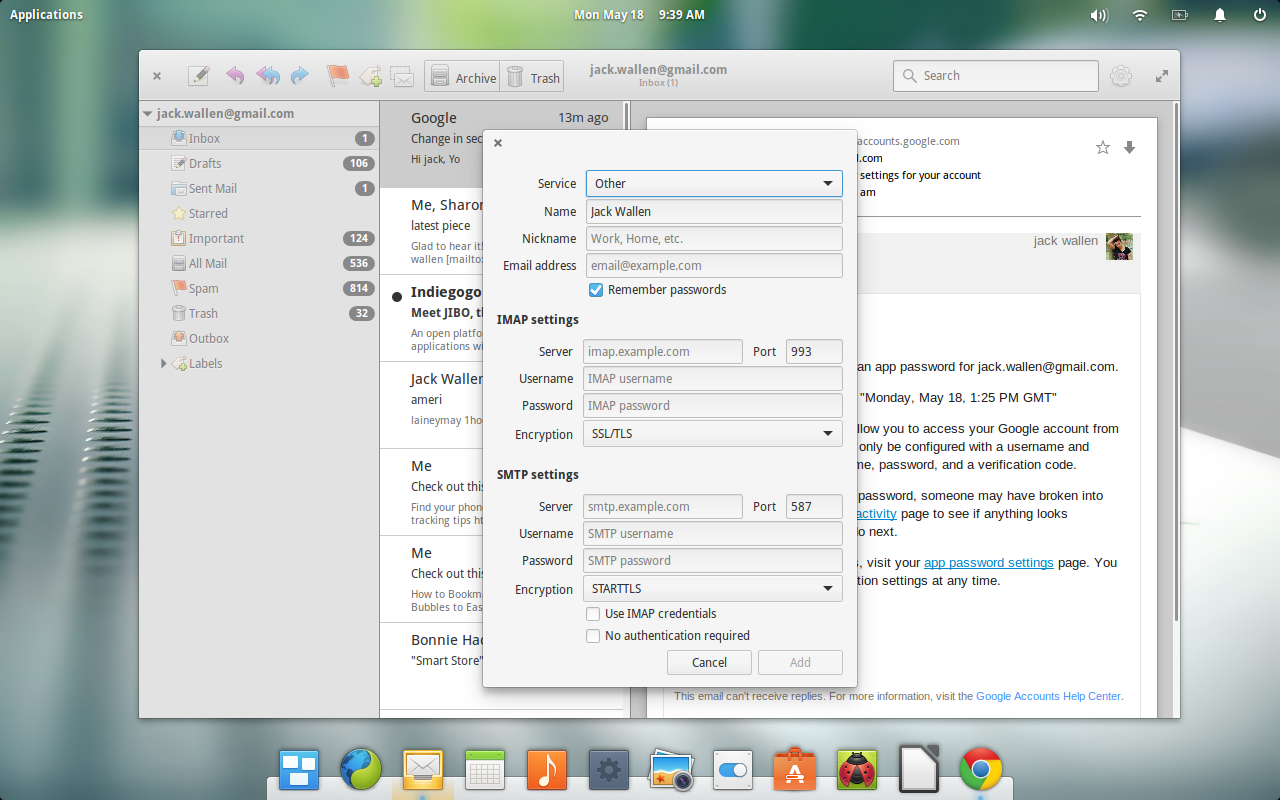
Once you’ve setup an initial account, you can easily add more accounts. Let’s add an IMAP account to Geary. Follow these steps:

  1. Open Geary

  2. Click on the Gear icon (upper right corner)

  3. Click Accounts

  4. Click the + button

  5. Select Other from the Service drop-down

  6. Fill out the details for your IMAP account (Figure 4)

  7. Click Add when finished

geary add IMAP

Usage

As you might expect, using Geary is about as simple as it gets. There are no surprises, gotchas, or tricks. All emails are viewed in conversation threading (which makes for much easier viewing when an email has gone back and forth numerous times). You can star an email for easier filtering. To do this, simply hover your mouse over a particular email (in the middle pane) and then click the star when it appears (Figure 5).

geary starring

There’s one caveat with the starring system—it only works with supporting services. In other words, your IMAP email probably won’t support starring. If you’re working with Google Mail, you’re in luck. You can star an email and then select the Starred listing under Inbox to display only those emails you have starred.

You’ll find a scant-few more tricks up Geary’s sleeve—but not much more (and it’s all very intuitive).

If you’re looking for a change from the old email client, and you want something that doesn’t require much in the way of thought or effort (outside of creating an app password for Google Mail), give Geary a go. I’m fairly confident, even while still in its infancy, it will quickly win you over as your go-to email client.


Research Community Looks to Open Source SDN to Help Distribute Data from the Large Hadron Collider

When the Large Hadron Collider (LHC) starts back up in June, the data collected and distributed worldwide for research will surpass the 200 petabytes exchanged among LHC sites the last time the collider was operational. Network challenges at this scale are different from what enterprises typically confront, but Harvey Newman, Professor of Physics at Caltech, who has been a leader in global scale networking and computing for the high energy physics community for the last 30 years, and Julian Bunn, Principal Computational Scientist at Caltech, hope to introduce a technology to this rarified environment that enterprises are also now contemplating:  Software Defined Networking (SDN).  Network World Editor in Chief John Dix recently sat down with Newman and Bunn to get a glimpse inside the demanding world of research networks and the promise of SDN.

Can we start with an explanation of the different players in your world?

hnphotomay152015

Harvey Newman, Professor of Physics at Caltech

NEWMAN:      My group is a high energy physics group with a focus on the Large Hadron Collider (LHC) program that is about to start data taking at a higher energy than ever before, but over the years we’ve also had responsibility for the development of international networking for our field. So we deal with many teams of users located at sites throughout the world, as well as individuals and groups that are managing data operations, and network organizations like the Energy Sciences Network, Internet2, and GEANT (in addition to the national networks in Europe and the regional networks of the United States and Brazil).

Read more at Network World.

NetUSB Vulnerability Leaves Millions of Connected Devices Open to Attack

Security researchers have published proof-of-concept code for a major router vulnerability leveraging a popular Linux kernel driver that could be used by hackers to compromise millions of connected devices.

Read more at ZDNet News

IT Security Pros See Rise in Salaries

Lead software security engineers, security consultants and others tasked with repelling cyber-threats can expect to earn six-figure salaries per year.

Read more at eWeek

Cinnamon 2.6.3 Arrives in Unstable Official Repository for Linux Mint

Cinnamon developers have just released a new version of the desktop environment today, 2.6.3. The packages are now available for testing in Linux Mint 17.1 and Linux Mint Debian 2, via the Romeo unstable repository.

You might wonder why a stable release of the software is available in the unstable repositories and why it isn’t pushed in the regular repos so that everyone can enjoy it. Well, the short answer is that even if something is dubbed stable, you can’t really know i… (read more)

Linux Mint Debian to Reach End of Life in January 2016

The first edition of Linux Mint Debian will reach EOL status (end of life) in January, 2016, and users have been advised to upgrade their systems as soon as possible.

Linux Mint Debian is just another member of the Linux Mint family, but it’s based on Debian (as the name suggests) and not on Ubuntu, like the rest of them. The Linux Mint developers have been working on the Debian edition for some time, but it’s still not as widely used as the regular flavor. That doesn’t mea… (read more)