This week Samsung debuted three new system-on-chips on several Yocto-based Linux “Artik” computer-on-modules aimed at the Internet of Things market. Last week, a hugely successful Kickstarter campaign by Next Thing Co. launched a tiny, IoT focused “Chip” single board computer starting at $9 that will debut a new, small footprint Allwinner R8 SoC. And in February, the Raspberry Pi Foundation launched a wildly successful Raspberry Pi 2 Model B that features a quad-core Broadcom BCM2836 SoC that was custom made for the SBC.
While most new SoCs still debut on smartphones, tablets, or PCs, there’s an increasing trend toward embedded boards getting some of the opening day glory. And like the three examples above, they increasingly run Linux on SBCs or modules targeting the IoT market.
In olden times, it was the PC that drove new processor launches, and consumers still wait for new chips like the 14nm Broadwell version of Intel’s Core chips, for example, instead of settling for a Haswell version. Qualcomm’s Snapdragons and Nvidia’s Tegras have traditionally debuted on high-end Android smartphones, tablets, and game players, and Intel Atoms have appeared first in versions optimized for mobile devices, followed by much lower-key launches for the embedded version.
As developer-oriented products, SBCs — and especially COMs — are not likely to dominate processor product launches the way mobile devices do. Yet, the fact that embedded boards are beginning to not only debut new SoCs, but affect their design shows how far IoT has come. The trend actually may have started when Intel announced its IoT-focused Intel Edison module in conjunction with its new Quark chip, although the Edison eventually shipped with the Atom processor while the Quark is still disabled. The Quark instead will appear on a tiny Curie module later this year, but it won’t apparently run Linux.
One reason vendors are customizing their SoCs for IoT is that the size, weight, power, and price constraints in IoT, combined with the need for built-in wireless features, are requiring a rethink of processor design, Here’s a quick look at Samsung’s Artik, and the new Chip SBC, each of which could have a significant impact on the course of embedded Linux in the years to come.
Samsung Artik
Samsung’s Artik is unusual on several levels. First, there was the high-profile launch at IOT World this week, combined with ambitious plans to expand Artik throughout Samsung’s mobile and consumer electronic device offerings in the years to come. The devices all support a common SmartThings Open Cloud platform from the SmartThings home automation company Samsung acquired last year.
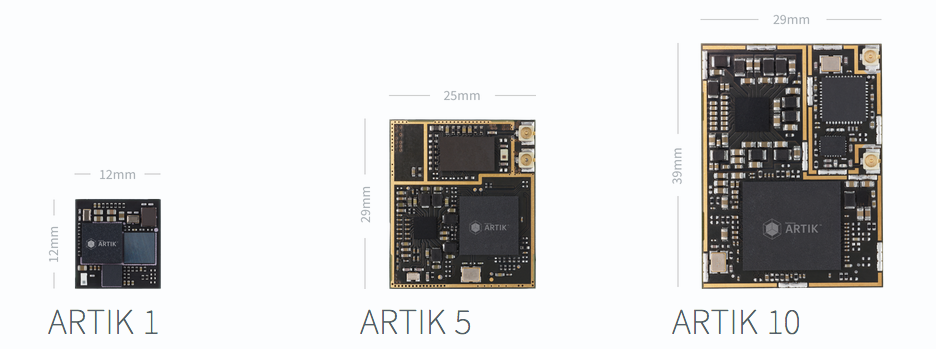
Second, the modules are highly compact, given their relative power. For example, at 29 x 25mm, the dual-core, Cortex-A7 based Artik 5 is even smaller than Intel’s tiny Edison, with which it directly competes. The Artik 10, which boasts an octa-core, Cortex-A15 and -A7 SoC, is not much larger at 39 x 29mm.
The products are also notable for the tight integration between SoC and module, blurring the line between them. The Artik name refers both to the modules and the SoCs that drive them, and there are no current plans to spin the processors off from their modules.
Like most IoT modules and SBCs, the Artik chips have built-in WiFi and Bluetooth. Yet, they also feature ZigBee, and soon will support Google’s 6loWPAN-based Thread protocol. In addition, they support a common hardware encryption technology for greater security.
The device also ships with a unified IoT stack. Despite Samsung’s recent move to re-spin the smartphone-oriented Tizen OS at wearables and other IoT devices, the Artik 5 and 10 modules instead run Yocto-based Linux, which like Tizen is a collaborative project hosted by the Linux Foundation. The third module — the tiny (12 x 12mm), MIPS-based Artik 1 — runs Nucleus OS. There was no mention of Tizen in the Artik announcement.
Although there were no claims for full open source compliance, Artik is billed as an “open” platform. At the very least, the Yocto build is open source, and Samsung has broken with its own past practices by already posting extensive documentation, despite the fact that the modules have only begun sampling, and the firmware is still in alpha stage.
$9 Chip Wags the Allwinner dog
 Last week’s debut of the Next Thing Co.’s Chip SBC rocked the technosphere, and that was before the Kickstarter campaign jumped past the $1.1 million mark. The Debian Linux-based, open source Chip will likely have less of an impact than Artik, due in part to the fact that Next Thing is a small Oakland, Calif. startup rather than a global CE and mobile device giant. Yet, like the recent RPi 2, the Chip will apply pressure for SBC vendors to cut prices even further.
The breakthrough $9 price, which is still available on Kickstarter for another few weeks, is not quite as impressive as it seems at first glance, but it’s still a breakthrough. First, the processor is a relatively slow 1GHz Cortex-A8. Second, the boards won’t ship until December, and fully configured versions won’t arrive until May 2016.
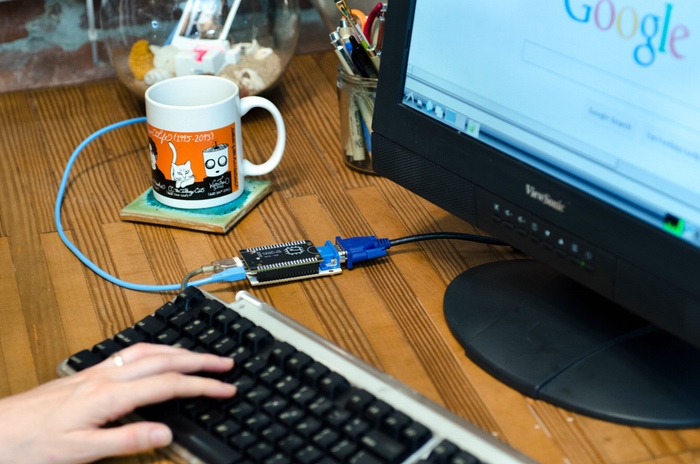
In addition, devices with real-world VGA or HDMI ports, which are added via adapters, run to $19 and $24 respectively. Otherwise you’re limited to the base I/O of a USB port, micro-USB port, audio jack, and composite video jack. Next Thing is also selling a version baked into a “PocketCHIP” clamshell handheld with a 4.3-inch touchscreen, QWERTY keyboard, battery, and GPIO breakout, selling for $49 to $64.
Even when you take all that into account, and add in shipping, the Chip still offers an impressive price/performance ratio. It’s not quite on par with the quad-core RPi 2, which has had the advantage of guarantees for huge sales, but it should offer stiff competition for a host of under $40 modules and SBCs that runs OpenWRT Linux on MIPS-based Atheros AR9331 SoCs. Like these boards, and unlike the RPi, the Chip offers onboard WiFi and Bluetooth, reducing aftermarket costs.
Like the RPi 2, the Chip was able to keep things lean thanks to a customized, lightweight SoC designed to support it. Instead of going to Broadcom, as the Pi Foundation did, Next Thing tapped Allwinner, whose A20, A31, and A80 processors are dominant on low- and mid-range Android tablets, not to mention a growing number of open-spec SBCs.
Next Thing worked closely with Allwinner through the Shenzhen-based “HAXLR8R” accelerator to strip down its earlier Cortex-A8 based A13 processor into a new, IoT-focused R8 SoC. Few details are available yet on the R8, but it’s said to be smaller and more affordable than the A13.
Allwinner boards are fairly popular among open source hackers due to the processors’ low cost and relatively open Mali-400 GPU. However, those same hackers complain about the lack of polished, timely Linux code available by Allwinner for its predominantly Android-focused SoCs.
Next Thing says that Allwinner is planning to release “all the necessary documentation and source code” for the R8 processor and the Chip’s power management chips. Together with Samsung’s “open platform” claims for the Artik, it gives hope that as Linux-based IoT grows in importance, some of its openness may rub off on chip manufacturers as well.

 Valve has just released a new update for the Steam gaming client, and it’s a big one. Granted, it’s mostly filled with small fixes and improvements, but it’s important nonetheless.

 Univention, through Maren Abatielos, had the great pleasure of informing Softpedia about the immediate availability for download of the second point release of their Debian-based Univention Corporate Server 4.0 Linux operating system.