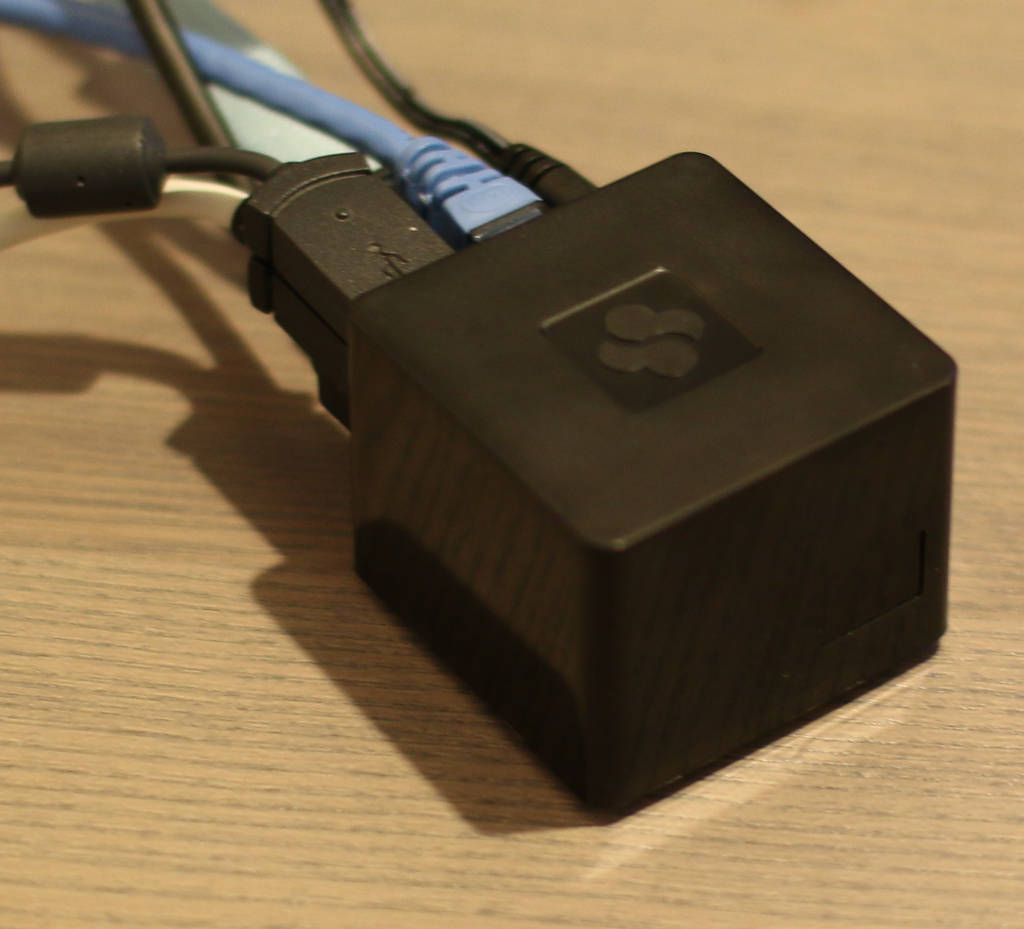
 The CuBox is a 2-inch cubed ARM machine that can be used as a set-top box, a small NAS or database server, or in many other interesting applications. In my ongoing comparison of ARM machines, including the BeagleBone Black, Cubieboard, and others, the CuBox has the fastest IO performance for SSD that I’ve tested so far.
There are a few models and some ways to customize each model giving you the choice between double or quad cores, if you need 1 or 2 gigabytes of RAM, if 100 megabit ethernet is fine or you’d rather have gigabit ethernet, and if wifi and bluetooth are needed. This gives you a price range from $90 to $140 depending on which features you’re after. We’ll take a look at the CuBox i4Pro, which is the top-of-the-line model with all the bells and whistles.
CuBox Features
Most of the connectors on the CuBox are on the back side. The connectors include gigabit ethernet, two USB 2.0 ports, a full sized HDMI connector, eSATA, power input, and a microSD slot. Another side of the CuBox also features an Optical S/PDIF Audio Out. The power supply is a 5 Volt/3 Amp unit and connects using a DC jack input on the CuBox.
One of the first things I noticed when unpacking the CuBox is that it is small, coming in at 2 by 2 inches in length and width and around 1 and 3/4 inches tall. To contrast, a Raspberry Pi 2 in a case comes out at around 3.5 inches long and just under but close to 2.5 inches wide. The CuBox stands taller on the table than the Raspberry Pi.
When buying the CuBox you can choose to get either Android 4.4 or OpenELEC/XBMC on your microSD card. You can also install Debian, Fedora, openSUSE, and others, when it arrives.
The CuBox i4Pro had Android 4.4.2 pre-installed. The first boot up sat at the “Android” screen for minutes, making me a little concerned that something was amiss. After the delay you are prompted to select the app launcher that you want to use and then you’re in business. A look at the apps that are available by default shows Google Keep and Drive as well as the more expected apps like Youtube, Gmail, and the Play Store. The YouTube app was recent enough to include an option to Chromecast the video playback. Some versions of Android distributed with small ARM machines do not come with the Play Store by default, so it’s good to see it here right off the bat.
One app that I didn’t expect was the Ethernet app. This lets you check what IP address, DNS settings, and proxy server, if any, are in use at the moment. You can also specify to use DHCP (the default) or a static IP address and nominate a proxy server as well as a list of machines that the CuBox shouldn’t use the proxy to access.
When switching applications the graphical transitions were smooth. The mouse wheel worked as expected in the App/Widgets screen, the settings menu, and the YouTube app. The Volume +/- keys on a multimedia keyboard changed the volume but only in increments of fully on or fully off. That might not be an issue if you are controlling the volume with your television or amp instead of the CuBox. Playback in the YouTube app was smooth and transitioned to full screen playback without any issues.
The Chrome browser (version 31.0.1650.59) got 2,445 overall for the Octane 2.0 benchmark. To contrast, on a 3-year-old Mac Air, Chrome (version 41.0.2272.89) got 13,542 overall.
Installing Debian
The microSD card does not have a spring loading in the CuBox. So to remove the microSD card you have to use your fingernail to carefully prise it out of the slot.
Switching to Debian can be done by downloading the image and using a command like the one below to copy that image to a microSD card. I kept the original card and used a new, second microSD card to write Debian onto so I could easily switch between Debian and Android. Once writing is done, slowly prise out the original microSD card and insert the newly created Debian microSD card.
dd if=Cubox-i_Debian_2.6_wheezy_3.14.14.raw
   of=/dev/disk/by-id/this-is-where-my-microsdcard-is-at
   bs=1048576
There is also support for installing and running a desktop on your CuBox/Debian setup. That extends to experimental support for accelerated GPU and VPU on the CuBox. On my Debian installation, I tried to hardware decode the Big Buck Bunny but it seems some more tinkering is needed to get hardware decode working. Using the “GeexBox XBMC ‐ A Kodi Media Center” version 3.1 distribution the Big Buck Bunny file played fine, so hardware decoding is supported by the CuBox, it just might take a little more tinkering to get at it if you want to run Debian.
The Debian image boots to a text console by default. This is easily overcome by installing a desktop environment, I found that Xfce worked well on the CuBox.
CuBox Performance.
Digging around in /sys one should find the directory /sys/devices/system/cpu/cpu0/cpufreq which contains interesting files like cpuinfo_cur_freq and cpuinfo_max_freq. For me these showed about 0.8 Gigahertz and 1.2 Ghz respectively.
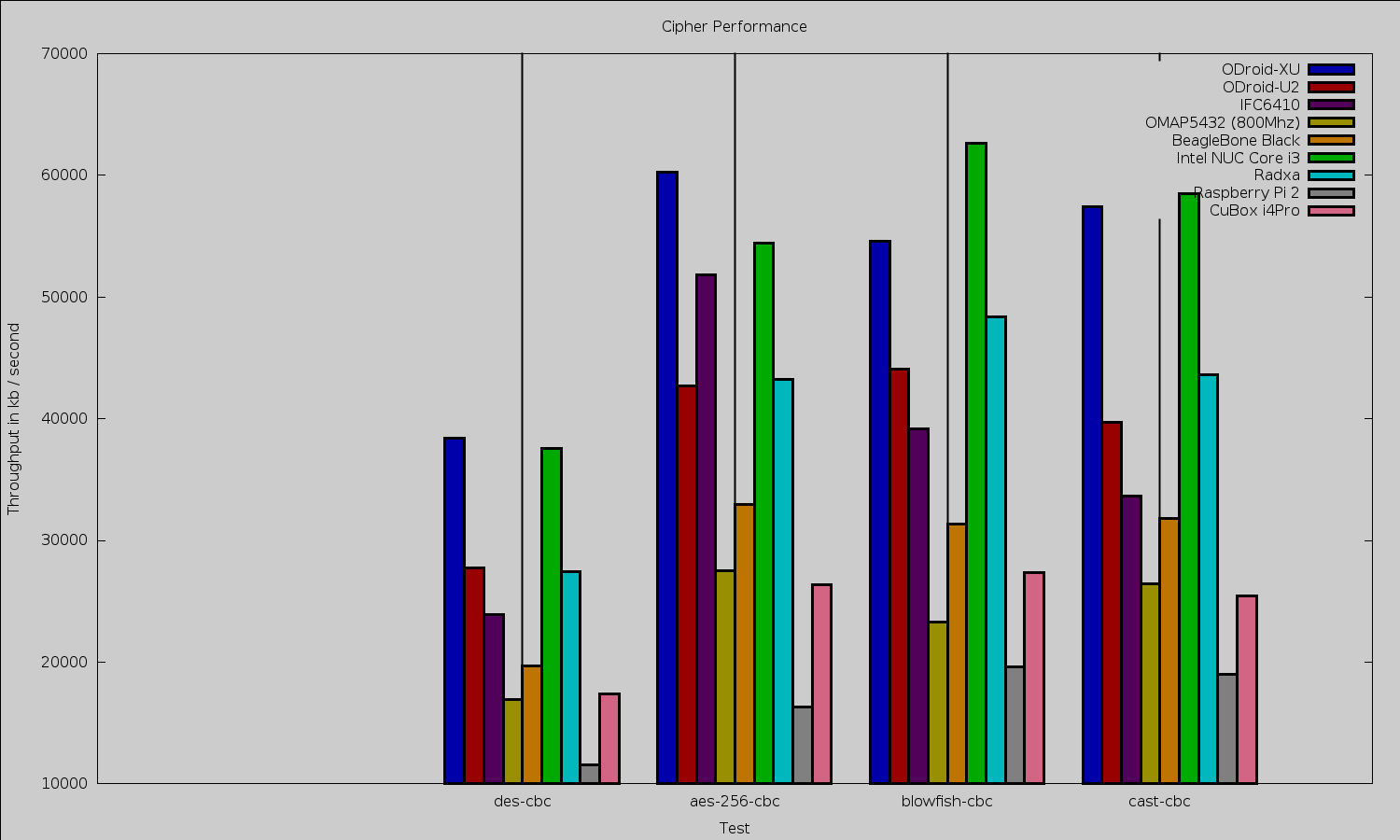
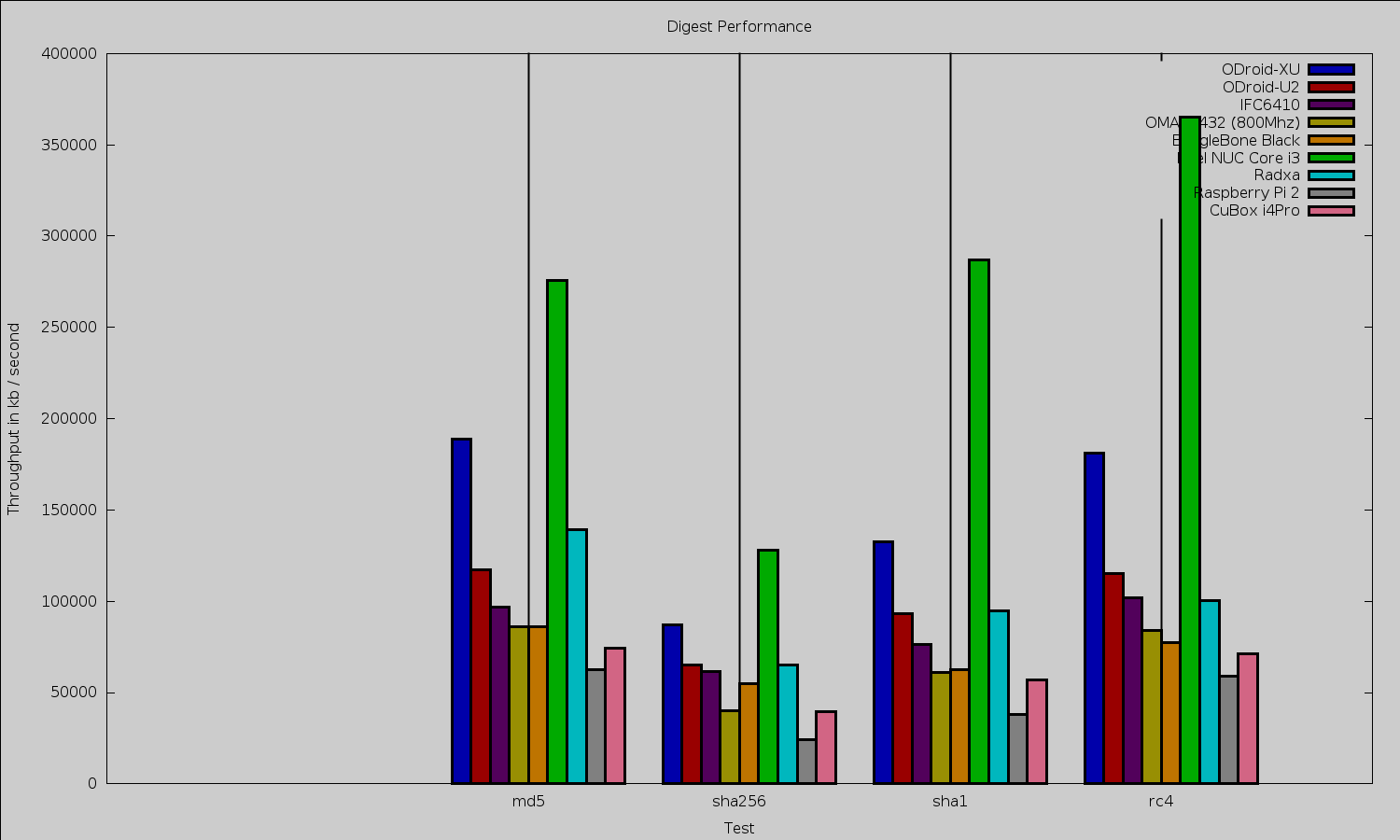
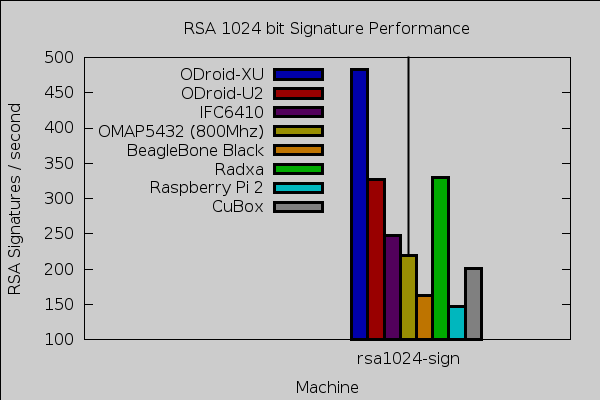
The OpenSSL benchmark is a single core test. Some other ARM machines like the ODroid-XU are clocked much faster than the CuBox, which will have an impact on the OpenSSL benchmark.
Compiling OpenSSL 1.0.1e on four cores took around 6.5 minutes. Performance for digest and ciphers was in a similar ballpark to the BeagleBone Black. For 1,024 bit RSA signatures the CuBox beat the BeagleBone Black at 200 to 160 respectively.
Iceweasel 31.5 gets an octane of 2,015. For comparison, Iceweasel 31.4.0esr-1 on the Raspberry Pi 2 got an overall Octane score of 1,316.
To test 2Dgraphics performance I used version 1.0.1 of the Cairo Performance Demos. The gears test runs three turning gears; the chart runs four line graphs; the fish is a simulated fish tank with many fish swimming around; gradient is a filled curved edged path that moves around the screen; and flowers renders rotating flowers that move up and down the screen. For comparison I used a desktop machine running an Intel 2600K CPU with an NVidia GTX 570 card which drives two screens, one at 2560 x 1440 and the other at 1080p.
| Test |
Radxa
at 1080 |
Beable Bone
Black at 720 |
Mars
LVDS at 768 |
desktop 2600k/nv570
two screens |
Raspberry Pi 2
at 1080 |
CuBox i4Pro
at 1080 |
|
gears
|
29
|
26
|
18
|
140
|
21.5
|
15.25
|
|
chart
|
3
|
2
|
2
|
16
|
1.7
|
3.1
|
|
fish
|
3
|
4
|
0.3
|
188
|
1.6
|
2
|
|
gradient
|
12
|
10
|
17
|
117
|
9.6
|
9.7
|
eSATA
The CuBox also features an eSATA port, freeing you from microSD cards by making the considerably faster SSD storage available. The eSATA port, multi cores, and gigabit ethernet port make the CuBox and an external 2.5-inch SSD an interesting choice for a small NAS.
I connected a 120 GB SanDisk Extreme SSD to test the eSATA performance. For sequential IO Bonnie++ could write about 120 megabit/ second and read 150 mb/s and rewrite blocks at about 50 mb/s. Overall 6,000 seeks/second were able to be done.
For price comparison, a 120 GB SanDisk SSD currently goes for about $70 while a 128 GB SanDisk microSD card is around $100. The microSD card packaging mentions up to 48mb/s transfer rates. This is without considering that the SSD should perform better for server loads and times when there are data rewrites such as on database servers.
For comparison this is the same SSD I used when reviewing the Cubieboard. Although the CuBox and Cubieboard have similar sounding names they are completely different machines. Back then I found that the Cubieboard could write about 41 mb/s and read 104 mb/s back from it with 1849 seeks/s performed. The same SSD again on the TI OMAP5432 got 66 ms/s write, 131 mb/s read and could do 8558 seeks/s. It is strange that the CuBox can transfer more data to and from the drive than the TI OMAP5432 but the OMAP5432 has better seek performance.
As far as eSATA data transfer goes, the CuBox is the ARM machine with the fastest IO performance for this SSD I have tested so far.
Power usage
At an idle graphical login with a mouse and keyboard plugged in, the CuBox drew 3.2 Watts. Disconnecting the keyboard and mouse dropped power to 2.8 W. With the keyboard and mouse reconnected for the remainder of the readings, running a single instance of OpenSSL speed that jumped to 4 W. Running four OpenSSL speed tests at once power got up to 6.3 W. When running Octane the power ranged up to 5 W on occasion.
Final Words
While the smallest ARM machines try to directly attach to an HDMI port, if you plan to add a realistic amount of connections to the CuBox such as power, ethernet, and some USB cables then the HDMI dongle form factor becomes a disadvantage. Instead, the CuBox opts to have (almost) all the connectors coming out of one side of the machine and to make that machine extremely small.
Being able to select from three base machines, and configure if you want (and want to pay for) wifi and bluetooth lets you customize the machine for the application you have in mind. The availability of eSATA and a gigabit ethernet connection allow the CuBox to be a small server — be that a NAS or a database server. The availability of two XBMC/Kodi disk images offering hardware video decoding also makes the CuBox an interesting choice for media playback.
We would like to thank SolidRun for supplying the CuBox hardware used in this review.


 After rolling out
 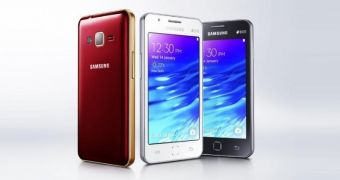 Back in February, we told you that following the moderate success of the Samsung Z1, the first smartphone ever to arrive with Tizen OS on board, the Korean tech giant was rumored to be already working on a successor for the device.