Home Blog Page 1150

5 Best Data Recovery Tools For Linux To Recover Data Or Deleted Partitions


5 best data recovery tools for linux

Atleast once in life, most of us do wrong with the important data on our computer and then we think we must not have deleted this, whether some important documents or lectures’ videos or bunch of important projects. Instead of cursing yourselves for such a foolish mistake, let’s do some work. Let’s try to recover that deleted data out from our HD. Here I am reviewing 5 of the best Data recover tools that can help recovering deleted data on Linux.

Read At LinuxAndUbuntu

The CuBox: Linux on ARM in Around 2 Inches Cubed

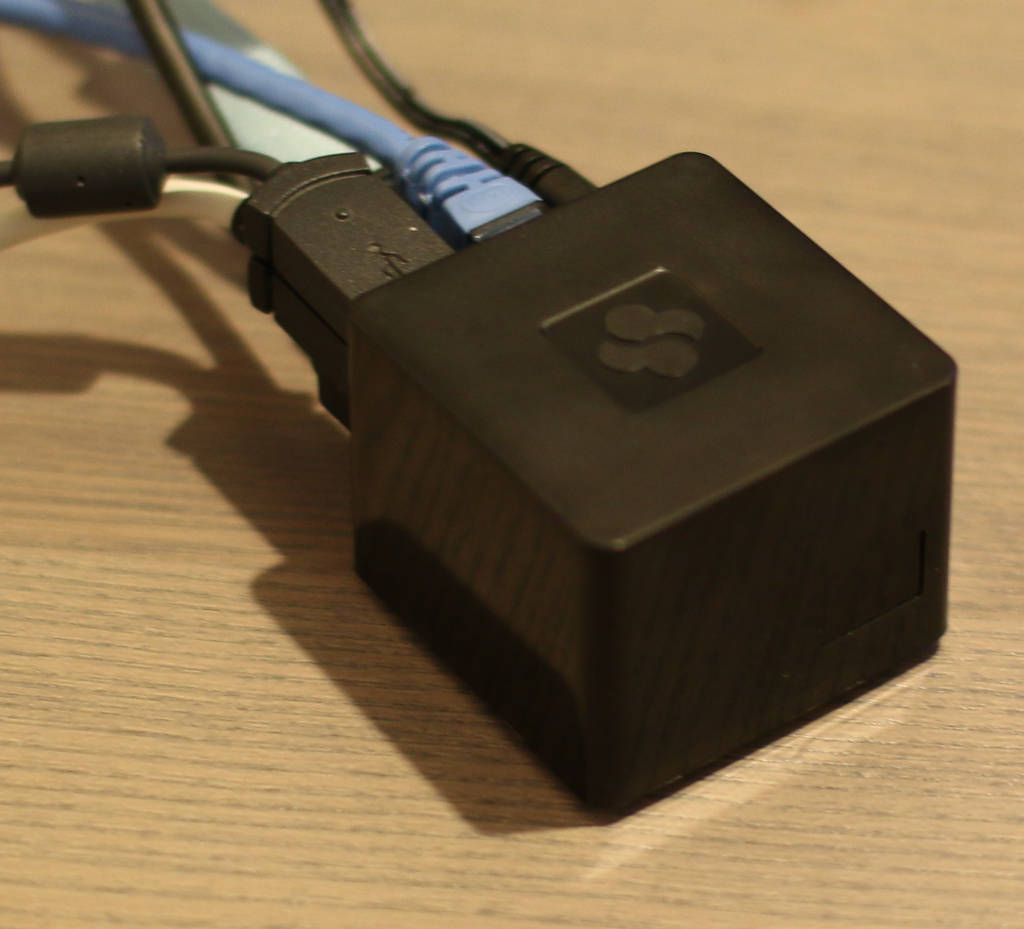
cuboxThe CuBox is a 2-inch cubed ARM machine that can be used as a set-top box, a small NAS or database server, or in many other interesting applications. In my ongoing comparison of ARM machines, including the BeagleBone Black, Cubieboard, and others, the CuBox has the fastest IO performance for SSD that I’ve tested so far.

There are a few models and some ways to customize each model giving you the choice between double or quad cores, if you need 1 or 2 gigabytes of RAM, if 100 megabit ethernet is fine or you’d rather have gigabit ethernet, and if wifi and bluetooth are needed. This gives you a price range from $90 to $140 depending on which features you’re after. We’ll take a look at the CuBox i4Pro, which is the top-of-the-line model with all the bells and whistles.

CuBox Features

Most of the connectors on the CuBox are on the back side. The connectors include gigabit ethernet, two USB 2.0 ports, a full sized HDMI connector, eSATA, power input, and a microSD slot. Another side of the CuBox also features an Optical S/PDIF Audio Out. The power supply is a 5 Volt/3 Amp unit and connects using a DC jack input on the CuBox.

One of the first things I noticed when unpacking the CuBox is that it is small, coming in at 2 by 2 inches in length and width and around 1 and 3/4 inches tall. To contrast, a Raspberry Pi 2 in a case comes out at around 3.5 inches long and just under but close to 2.5 inches wide. The CuBox stands taller on the table than the Raspberry Pi.

When buying the CuBox you can choose to get either Android 4.4 or OpenELEC/XBMC on your microSD card. You can also install Debian, Fedora, openSUSE, and others, when it arrives.

The CuBox i4Pro had Android 4.4.2 pre-installed. The first boot up sat at the “Android” screen for minutes, making me a little concerned that something was amiss. After the delay you are prompted to select the app launcher that you want to use and then you’re in business. A look at the apps that are available by default shows Google Keep and Drive as well as the more expected apps like Youtube, Gmail, and the Play Store. The YouTube app was recent enough to include an option to Chromecast the video playback. Some versions of Android distributed with small ARM machines do not come with the Play Store by default, so it’s good to see it here right off the bat.

One app that I didn’t expect was the Ethernet app. This lets you check what IP address, DNS settings, and proxy server, if any, are in use at the moment. You can also specify to use DHCP (the default) or a static IP address and nominate a proxy server as well as a list of machines that the CuBox shouldn’t use the proxy to access.

When switching applications the graphical transitions were smooth. The mouse wheel worked as expected in the App/Widgets screen, the settings menu, and the YouTube app. The Volume +/- keys on a multimedia keyboard changed the volume but only in increments of fully on or fully off. That might not be an issue if you are controlling the volume with your television or amp instead of the CuBox. Playback in the YouTube app was smooth and transitioned to full screen playback without any issues.

The Chrome browser (version 31.0.1650.59) got 2,445 overall for the Octane 2.0 benchmark. To contrast, on a 3-year-old Mac Air, Chrome (version 41.0.2272.89) got 13,542 overall.

Installing Debian

The microSD card does not have a spring loading in the CuBox. So to remove the microSD card you have to use your fingernail to carefully prise it out of the slot.

Switching to Debian can be done by downloading the image and using a command like the one below to copy that image to a microSD card. I kept the original card and used a new, second microSD card to write Debian onto so I could easily switch between Debian and Android. Once writing is done, slowly prise out the original microSD card and insert the newly created Debian microSD card.

dd if=Cubox-i_Debian_2.6_wheezy_3.14.14.raw 
   of=/dev/disk/by-id/this-is-where-my-microsdcard-is-at 
   bs=1048576

There is also support for installing and running a desktop on your CuBox/Debian setup. That extends to experimental support for accelerated GPU and VPU on the CuBox. On my Debian installation, I tried to hardware decode the Big Buck Bunny but it seems some more tinkering is needed to get hardware decode working. Using the “GeexBox XBMC ‐ A Kodi Media Center” version 3.1 distribution the Big Buck Bunny file played fine, so hardware decoding is supported by the CuBox, it just might take a little more tinkering to get at it if you want to run Debian.

The Debian image boots to a text console by default. This is easily overcome by installing a desktop environment, I found that Xfce worked well on the CuBox.

CuBox Performance.

Digging around in /sys one should find the directory /sys/devices/system/cpu/cpu0/cpufreq which contains interesting files like cpuinfo_cur_freq and cpuinfo_max_freq. For me these showed about 0.8 Gigahertz and 1.2 Ghz respectively.

The OpenSSL benchmark is a single core test. Some other ARM machines like the ODroid-XU are clocked much faster than the CuBox, which will have an impact on the OpenSSL benchmark.

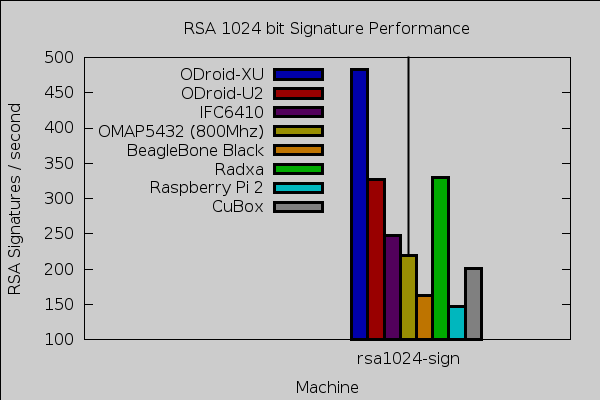
Compiling OpenSSL 1.0.1e on four cores took around 6.5 minutes. Performance for digest and ciphers was in a similar ballpark to the BeagleBone Black. For 1,024 bit RSA signatures the CuBox beat the BeagleBone Black at 200 to 160 respectively.
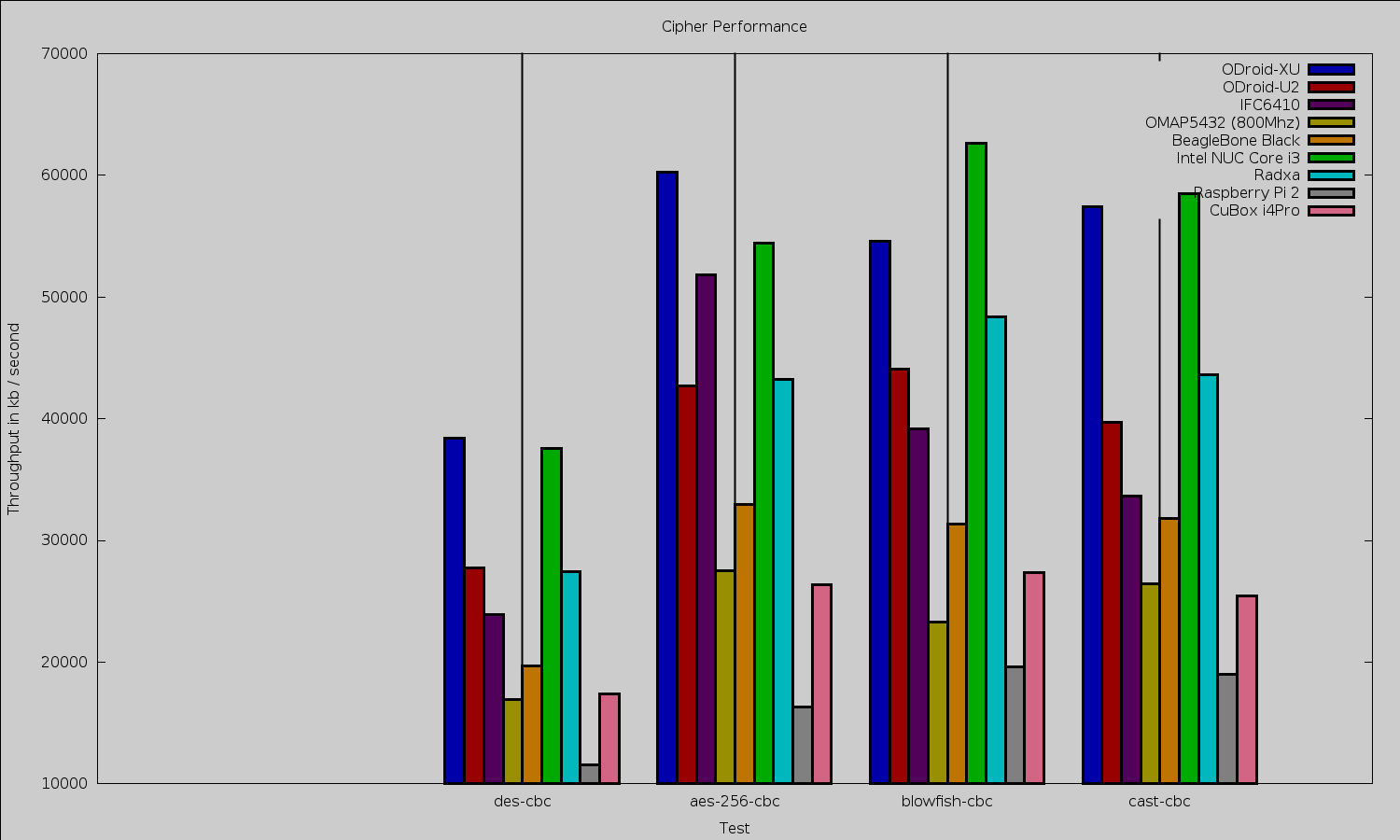
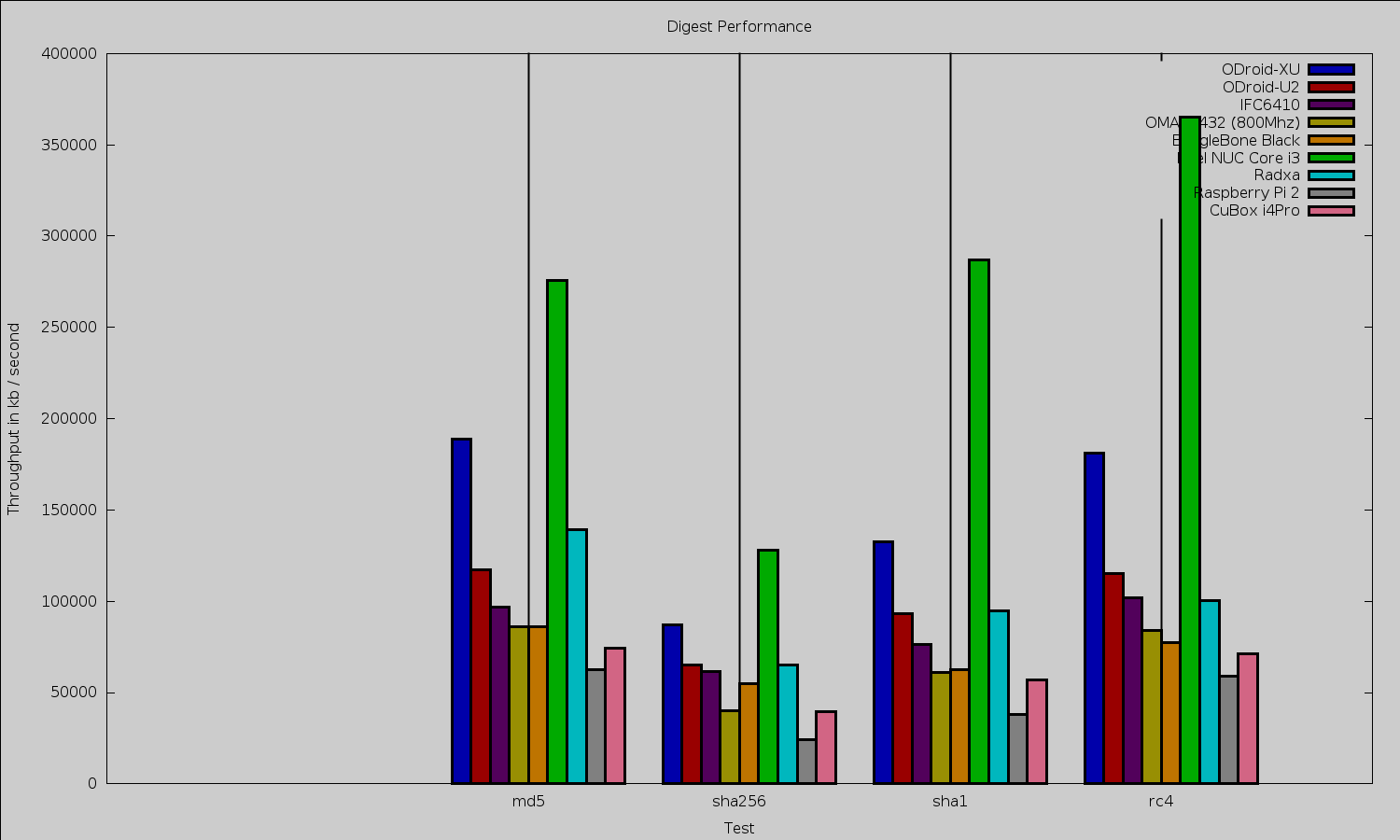
Cubox ciphers

Cubox digests

cubox rsa sign

Iceweasel 31.5 gets an octane of 2,015. For comparison, Iceweasel 31.4.0esr-1 on the Raspberry Pi 2 got an overall Octane score of 1,316.

To test 2Dgraphics performance I used version 1.0.1 of the Cairo Performance Demos. The gears test runs three turning gears; the chart runs four line graphs; the fish is a simulated fish tank with many fish swimming around; gradient is a filled curved edged path that moves around the screen; and flowers renders rotating flowers that move up and down the screen. For comparison I used a desktop machine running an Intel 2600K CPU with an NVidia GTX 570 card which drives two screens, one at 2560 x 1440 and the other at 1080p.

Test Radxa 
at 1080
Beable Bone 
Black at 720
Mars 
LVDS at 768
desktop 2600k/nv570 
two screens
Raspberry Pi 2 
at 1080
CuBox i4Pro 
at 1080

gears

29

26

18

140

21.5

15.25

chart

3

2

2

16

1.7

3.1

fish

3

4

0.3

188

1.6

2

gradient

12

10

17

117

9.6

9.7

eSATA

The CuBox also features an eSATA port, freeing you from microSD cards by making the considerably faster SSD storage available. The eSATA port, multi cores, and gigabit ethernet port make the CuBox and an external 2.5-inch SSD an interesting choice for a small NAS.

I connected a 120 GB SanDisk Extreme SSD to test the eSATA performance. For sequential IO Bonnie++ could write about 120 megabit/ second and read 150 mb/s and rewrite blocks at about 50 mb/s. Overall 6,000 seeks/second were able to be done.

For price comparison, a 120 GB SanDisk SSD currently goes for about $70 while a 128 GB SanDisk microSD card is around $100. The microSD card packaging mentions up to 48mb/s transfer rates. This is without considering that the SSD should perform better for server loads and times when there are data rewrites such as on database servers.

For comparison this is the same SSD I used when reviewing the Cubieboard. Although the CuBox and Cubieboard have similar sounding names they are completely different machines. Back then I found that the Cubieboard could write about 41 mb/s and read 104 mb/s back from it with 1849 seeks/s performed. The same SSD again on the TI OMAP5432 got 66 ms/s write, 131 mb/s read and could do 8558 seeks/s. It is strange that the CuBox can transfer more data to and from the drive than the TI OMAP5432 but the OMAP5432 has better seek performance.

As far as eSATA data transfer goes, the CuBox is the ARM machine with the fastest IO performance for this SSD I have tested so far.

Power usage

At an idle graphical login with a mouse and keyboard plugged in, the CuBox drew 3.2 Watts. Disconnecting the keyboard and mouse dropped power to 2.8 W. With the keyboard and mouse reconnected for the remainder of the readings, running a single instance of OpenSSL speed that jumped to 4 W. Running four OpenSSL speed tests at once power got up to 6.3 W. When running Octane the power ranged up to 5 W on occasion.

Final Words

While the smallest ARM machines try to directly attach to an HDMI port, if you plan to add a realistic amount of connections to the CuBox such as power, ethernet, and some USB cables then the HDMI dongle form factor becomes a disadvantage. Instead, the CuBox opts to have (almost) all the connectors coming out of one side of the machine and to make that machine extremely small.

Being able to select from three base machines, and configure if you want (and want to pay for) wifi and bluetooth lets you customize the machine for the application you have in mind. The availability of eSATA and a gigabit ethernet connection allow the CuBox to be a small server — be that a NAS or a database server. The availability of two XBMC/Kodi disk images offering hardware video decoding also makes the CuBox an interesting choice for media playback.

We would like to thank SolidRun for supplying the CuBox hardware used in this review.

Git Success Stories and Tips from Ceph Creator Sage Weil

Sage Weil, creator of CephGit has changed the way that software is built — including the Ceph open source distributed storage platform, says Ceph Creator Sage Weil. Ceph has used the Git revision control system for seven years, since it switched from SVN. It has changed the project’s work flow and how they think about code.

“Instead of thinking in files and lines, you think in flow of changes. Instead of having a single repository that everyone feeds from and into, everyone now has their own repository, their own branches. The meaning of branch changed,” said Weil, Ceph principal architect at Red Hat. “Everything just fell in place, as if the people who designed it really knew software development at scale.”

In our final “Git Week” profile in celebration of Git’s 10-year anniversary, Weil discusses how and why Ceph uses Git, tells their Git success stories, and gives his best pro tip for getting the most out of the popular tool.

Linux.com: Why does Ceph use Git?

Sage Weil: There are a number of reasons that Ceph chose Git, but in general the flexibility and power that comes with Git is really hard to beat. Of course the distributed nature of the tool also appeals to a team that is working on distributed software as well.

Ceph has been using Git for more than 7 years. We switched from Subversion to Git when we started developing the Ceph kernel module, and never looked back. The simplest and most important feature at the time was a sane representation of merges. Now that the Ceph contributor base has grown we are completely dependent on distributed version control.  

Ceph is deeply embedded in the Linux open-source world and everything there uses Git. There is no other tool which meets our needs for maintaining branches and developing features in parallel over long (and short!) periods of time.

What makes Git such a great tool?

The highlights are definitely the branching workflow (which we use for everything, and check out ‘Git stash’), it’s distributed nature (cherry picking and sharing between developers outside of the central repo), better history management (the ability to make local commits, rebase, clean up the history, and then submit a series of commits for merge to the central repo), and flexibility (version control shouldn’t get in the way). There is a learning curve, but it is worth the pain.

Looking at its history, it still amazes us how it came to the world, and the fact that they were able to pull it seemingly off the cuff, when we needed to move away from BitKeeper. At the time, thinking about version control, at least the free and open source solutions that existed, you ended up with either Subversion or CVS. That was what developers were used to, and we worked within these frameworks. Git changed the whole workflow. Instead of thinking in files and lines, you think in flow of changes. Instead of having a single repository that everyone feeds from and into, everyone now has their own repository, their own branches. The meaning of branch changed. It’s so cheap now. Everything just fell in place, as if the people who designed it really knew software development at scale.

How many developers do you have collaborating on Git?

At last check there are 242 contributors identified in our core repository. However, with our metrics dashboard (http://metrics.ceph.com/), we track about 460 developers across all of our sub-projects.

How much do you personally use it?

Git is part of the daily workflow for all developers. It’s the single most used tool other than the editors and the compiler toolchain.

What’s Ceph’s most active Git repo right now and why?

The most active repo is definitely the core ceph.git repo. While we have sub-projects on GitHub for some of our associated development, most of the development happens in Ceph itself.

What is your favorite pro tip for using Git?

The combination git gui’s ability to quickly stage and unstage lines or hunks into a commit and git rebase -i’s ability to reorder and combine commits is invaluable. This allows you to work with the history as a series of patches and rearrange the content of those patches into a clean history for submission upstream.

Any Git success stories you can share?

Just a couple of months ago we worked on merging a patch set that diverged for six months with hundreds of commits and with many conflicts that would not have ended successfully using any other tool. Trying to do the same thing with SVN (at least as it existed when we made the switch) would have been very challenging and would not have provided a clear view of the code changes. The whole way of thinking about code flow is now different.

Anything else you’d like to say to mark the 10-year anniversary?

It’s hard to believe Git is 10 already. Ten years ago using Git was quite a pain. There were all these wrappers and frontends that made it easier to contribute to a project that was using Git. There is no such need anymore. Usability has improved and users have learned to understand what it’s all about (and internalize the UI inconsistencies and idiosyncrasies). I think that’s a success story.

Read more

Git Success Stories and Tips from Wine Maintainer Alexandre Julliard

Git Success Stories and Tips from Puppet Labs’ Michael Stahnke

Git Success Stories and Tips from Tor Chief Architect Nick Mathewson

Git Success Stories and Tips from Drupal Core Committer Angie Byron

Git Success Stories and Tips from Qt Maintainer Thiago Macieira

Git Success Stories and Tips from KVM Maintainer Paolo Bonzini

10 Years of Git: An Interview with Git Creator Linus Torvalds

Linux Kernel 3.19.4 Brings ARM64, PowerPC, Sound and WiFi Improvements

After yesterday’s announcement for Linux kernel 4.0, Greg Kroah-Hartman announced today, April 13, the immediate availability for download of the fourth maintenance release of Linux 3.19 kernel, along with new point releases for the LTS (Long Term Support) Linux kernels 3.14 and 3.10.

According to the appended shortlog, Linux ke… (read more)

Read more at Softpedia News

3DR’s Solo Drone Boasts Dual Linux Computers Running Dronecode

3DR solo drone

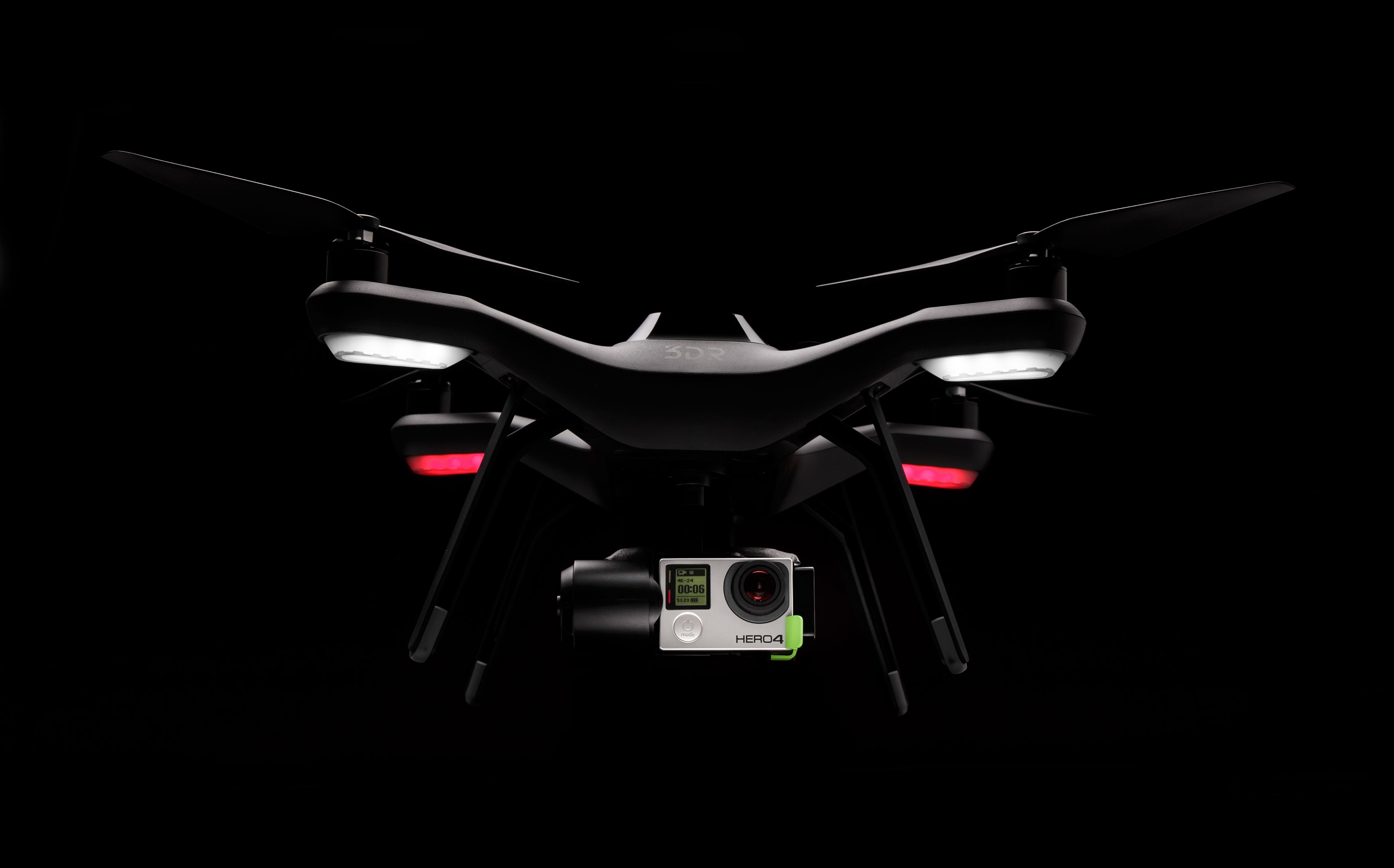
3DRobotics today announced its first Linux-based drone, a Solo quadcopter touted as the first Unmanned Aerial Vehicle (UAV) to support full control of GoPro cameras and deliver live-streaming HD video to mobile devices. The ground controller, as well as the onboard computer connected to the drone’s Pixhawk 2 autopilot, integrates a 1GHz Cortex-A9 computer running Linux. The Solo is available for pre-sale at $1,000, or $1,400 with a GoPro gimbal, with units shipping via 2,000 locations starting May 29.

The Solo’s computers are more powerful than those of 3DR’s usual APM (ArduPilot Mega) open source drone and autopilot kits, which run the Nuttx RTOS on Arduino hardware. The Solo’s onboard “brainstem” autopilot flight computer is closely linked via WiFi to the ground controller’s “frontal cortex” system, “dramatically reducing the likelihood of autopilot system failure during flight,” according to 3DR.

The Linux computers enable greater autonomy and ease of use than earlier 3DR models such as the $750-and-up Iris+ or the newer, $1,350-and-up X8+ octocopter, says 3DR. The Solo can automatically takeoff, return home, and land, among other features.

Wireless video

The Solo is claimed to be the world’s first drone to wirelessly transmit HD video from a GoPro to an iOS or Android device from up to half a mile, which it does with a claimed latency of 180 milliseconds. (According to Engadget, this is actually 720p, rather than 1080p HD.) Industry leader DJI announced a somewhat similar feature last week with its new Phantom 3 drone, which is claimed to zap live Solo appHD video to you from up to 1.2 miles (see farther below).
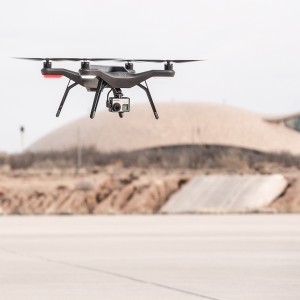
In conjunction with GoPro cameras, the Solo controller lets you start and stop recording video while in flight, as well as easily pre-program aerial camera shots. These so-called Smart Shots routines include a follow-me mode, as well as filming along a virtual track of waypoints. There’s also an orbiting mode that focuses on an object while circumnavigating it, and a selfie establishing shot that backs up and away from you. Some of these features appear to require the $399 GoPro camera gimbal, which keeps the camera image stable with under 0.1 degree pointing accuracy.

The GPS-enabled Solo can fly 25 minutes without a camera or other payload (1,500 grams), or 20 minutes with the GoPro and its gimbal (1,800 g), says 3DR. Its “smart battery” communicates with the device’s computers to warn you when it’s time to head home.

Like the Phantom 3, as well as other consumer drones, the Solo ships with a controller designed to fit an Android or iOS device as a display. The mobile app lets you take still photos, change the FOV and frame rate, and adjust exposure and other settings.

The Solo’s controller features WiFi and a micro-HDMI port, so you can also directly feed live video to a monitor or FPV goggles. A small built-in display is provided, along with dedicated buttons that enable direct hands-on flight when the drone is flying nearby. There’s even a panic button that stops the drone and directs it to hover in midair.

Solo first to run Dronecode via DroneKit SDK

There was little talk of Linux last October when 3DR and the Linux Foundation launched the Dronecode Project as a community project and governance body for APM. The Berkeley, Calif.-based 3DR did say, however, that it was working to port Linux to its open source APM platform. It also announced plans to integrate a Linux-based companion computer for its advanced Iris+ drone using an Intel Atom Edison module.

Solo drone flyingThe Solo, however, is a much more ambitious dive into Linux. It’s only the second Linux-on-APM drone we know of after Erle Robotics’ hobbyist Erle-Copter. Other Linux-based quadcopters include the slightly lower end Parrot BeBop.

With the help of Dronecode, and 3DR’s DIY Drones community, the company has for several years offered open source hardware and software UAV autopilot designs to the hobbyist community. Like 3DR’s commercially sold Iris+ and x8+, however, it appears that access to parts of the Solo will be opened only to selected developers.

The Solo runs apps developed with a recently released, open source DroneKit SDK and web API, backed by the Dronecode Foundation. A “Made for Solo” development program, meanwhile, is “aimed at enabling small companies with great ideas to work directly with us and our manufacturing partners on developing and launching fantastic new accessories,” says 3DR.

It’s unclear how deeply 3DR will open the Solo hardware, and to whom exactly. So far, the company has yet to reveal many detailed specs. Yet, the design is clearly designed to be expandable.

The quadcopter integrates a gimbal bay, an accessory bay, and “easy-to-swap motor pods with integrated speed controllers,” says 3DR. The gimbal bay will be enable manufacturers to create plug-and-play gimbals or imaging devices as an alternative to GoPro, complete with “HD feed to Solo’s mobile app, full camera control, and even access to Solo’s computing power,” says the company.

The accessory bay will be similarly opened to gizmos like optical flow indoor flight stabilizers, ballistic parachute systems, and LED lighting system. The swappable motor pods will eventually support upgraded propulsion systems, says 3DR.

Phantom 3 pushes to 4K

Even if the Solo is not entirely open source, it’s almost certainly more accessible than the Phantom 3. DJI’s latest quadcopter will ship with an SDK for mobile app development, but it’s otherwise a very proprietary platform.

I was intrigued by several reports from hackers that have claimed the Phantom 2 is based on OpenWRT Linux. (Examples can be found here, here, here, and here.) However, when I asked DJI Creative Director Sheldon Schwartz last week at the Phantom 3 launch event in New York, he said there was no Linux in the Phantom 3 or controller.

Whatever is under the hood of the Phantom 3, it will be tough for 3DR’s Solo to beat. Even if you already own a GoPro, the Phantom 3 is cheaper, since it ships with a built in camera and s gimbal for $999. A $1,259 Pro version gives you a 4K camera. In addition to the HD video transmission feature, the Phantom 3 also introduced a vision positioning system that can help the quadcopter navigate in areas with poor GPS reception.

On the other hand, Phantom 3 doesn’t have anything quite like Smart Shots, such as waypoint or follow-me modes. According to a favorable hands-on story about the Solo by The Verge, the Solo was largely shaped by DJI expat Colin Guinn, now Chief Revenue Officer at 3DR.

To give it a boost in its battle with the Phantom, 3DR is offering a 30-day money-back guarantee, as well as a free replacement if Solo breaks in flight. Meanwhile, the future looks bright for both products. In the U.S., the FAA continues to expand exemptions on commercial use, and last week, it allowed Amazon to test its promised delivery drones.

https://www.youtube.com/watch?v=PfN9lTp8ma0″ frameborder=”0

5 Things To Know About The Rise Of Open Source

If you still think open source technology is less reliable than proprietary software, or less secure, it’s time to learn more about the private sector’s digital revolution.

During the past year major tech brands such as Google, Facebook and Microsoft have adopted a more open source philosophy, evident in their latest software releases. Similarly, more large companies are utilizing open source solutions alongside proprietary software to tap into open source’s diverse, creative, cooperative community of developers, thought leaders and users.

If you want to expand the use of open source in your own business, there are a few things you should know.

Read more at Forbes.

IBM Deepens its Cloud Services Entrenchment with the U.S. Government

IBM is making further inroads into getting its cloud computing tools and infrastructure solidified with the U.S. government. Big Blue recently announced that the U.S. Army is using IBM Hybrid Cloud to power one of the biggest logistics systems in the federal government. The new hybrid cloud system will be part of an ambitious Army data center designed to connect the IBM Cloud to the Army’s on-premise environment to enable use of data analytics. The Army foresees cost savings of 50 percent over its current cost structure, based on migrations to IBM’s cloud tools.

The new Logistics Support Activity initiative– known as LOGSA — provides on-time integrated logistics support of Army operations worldwide. Since migrating to an on premise hybrid cloud model with IBM in 2014, LOGSA already processes 40 million unique data transactions every day — more than the New York Stock Exchange. 


Read more at Ostatic

Qualcomm Pressured by Major Investor to Split Company

Activist shareholder Jana wants Qualcomm officials to separate their licensing and chip businesses in order to boost shareholder returns.

Read more at eWeek

PMEM Persistent Memory Driver Coming For Linux 4.1

After months of work, the Intel-developed PMEM driver has been called for pulling into the Linux 4.1 kernel…

Read more at Phoronix

Linux 4.1 Will Improve AMD Bulldozer’s ASLR Entropy Issue

The Linux 4.1 kernel will improve AMD’s ASLR workaround for Bulldozer processors in order to increase randomization…

Read more at Phoronix