Home Blog Page 1157

How to Use the Linux Command Line: Software Management

ubuntu apt

In the previous article of this series we learned some of the basics of the CLI (command line interface). In this article, we will learn how to manage software on your distro using only the command line, without touching the GUI at all.

I see great benefits when using the command line in any Ubuntu-based system. Each *buntu comes with its own ‘custom’ software management tool which not only creates inconsistent experiences across different flavors, even if they use the same repositories or resources to manage software. The life of a user becomes easier with CLI because the same command works across flavors and derivatives. So if you are a Kubuntu user you won’t have a problem supporting a Linux Mint user because CLI will remove all the confusing wrappers. In this tutorial I am targeting all major distros: Debian/Ubuntu, openSUSE and Fedora.

Debian/Ubuntu: How to update repositories and install packages

There are two command line tools for the Debian family: ‘apt-get’ and ‘aptitude’. Aptitude is considered a superior tool as it does a better job at dependencies and better management of packages. If Ubuntu doesn’t come with ‘aptitude’ pre-installed, I suggest you install the tool.

Before we install any package we must always update the repositories so that they can pull the latest information about the packages. This is not limited to Ubuntu. Irrespective of the distro you use, you must always update the repositories before installing packages or running system updates.The command to update packages is:

sudo apt-get update

Once the repositories are updated you can install ‘aptitude’. The pattern is simple sudo apt-get install

sudo apt-get install aptitude

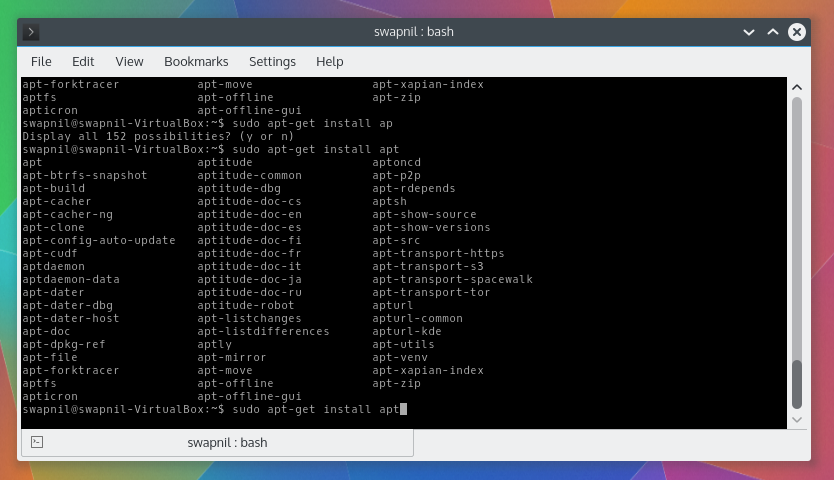
Ubuntu comes pre-installed with a bash-completion tool which makes life even easier with apt-get and aptitude. You don’t have to remember the complete name of the package, just type the first three letters and hit ‘Tab’ key. Bash will offer you all the packages starting with those three letters. So if I type ‘sudo apt-get install apt’ and then hit ‘Tab’ it will show me a long list of such packages.

Once aptitude is installed, you should start using it instead of apt-get. The usage is same, just replace apt-get with aptitude.

Run system update/upgrades

Running a system upgrade is quite easy on Ubuntu and its derivatives. The command is simple:

sudo aptitude update
sudo aptitude upgrade

There is another command for system upgrades called ‘dist-upgrade’. This command is a bit more advanced than the simple ‘upgrade’ command because it performs some extra tasks. While the ‘upgrade’ command only upgrades the installed packages to its newest version, it doesn’t remove any older packages. ‘Dist-upgrade’ on the other hand also handles dependency changes and may remove packages not needed anymore. Also if you want to upgrade the Linux kernel to the latest version then you need the ‘dist-upgrade’ command. You can run the following command:

sudo aptitude update
sudo aptitude dist-upgrade

Upgrade to latest version of Ubuntu

It’s extremely easy to upgrade the official flavors of Ubuntu (such as Ubuntu, Kubuntu, Xubuntu, etc.) from one major version to another. Just keep in mind that it should be from one release to the next release, for example from 14.04 to 14.10 and not from 13.04 to 14.04. The only exception are the LTS releases as you can jump from one LTS to another. In order to run an upgrade you may have to install an additional package:

sudo aptitude install update-manager-core 

Now run the following command to do the release upgrade:

sudo aptitude do-release-upgrade

While upgrading from one release to another keep in mind that while almost all official Ubuntu-flavors support such upgrades, it may not work on unofficial flavors or derivatives like Linux Mint or elementary OS. You much check the official forums of those distros before attempting an upgrade.

Another important point to keep in mind is that you must always back-up data before running a distribution upgrade and also run a repository update, then dist-upgrade.

How to remove packages

It’s very easy to remove packages via the command line. Just use the ‘remove’ option instead of ‘install’. So if you want to remove ‘firefox’, the command would be:

sudo aptitude remove firefox

If you want to also remove the configuration files related to that package, for a fresh restart or to trim down your system then you can use the ‘purge’ option:

sudo aptitude purge firefox

To further clean your system and get rid of packages no longer needed, you must run ‘auto remove’ command from time to time:

sudo apt-get autoremove

Installing binary packages

At times, many developers and companies offer their software as executable binaries or .deb files. To install such packages you need a different command tool called dpkg.

sudo dpkg -i /path-of-downloaded.deb

At times you may come across broken package error in *buntus. You can check any broken packages by running this command:

sudo apt-get check

If there are any broken packages then you can run this command to fix them:

sudo apt-get -f install

How to add or remove repositories or PPAs

All repositories are saved at this location: ‘/etc/apt/source.list’. You can simply edit this file using ‘nano’ or your preferred editor and add the new repositories there. In order to add new PPAs (personal package archives) to the system use the following pattern:

sudo add-apt-repository ppa:

For example if you want to add LibreOffice PPA this would be the pattern:

sudo add-apt-repository ppa:libreoffice/ppa

openSUSE Software management

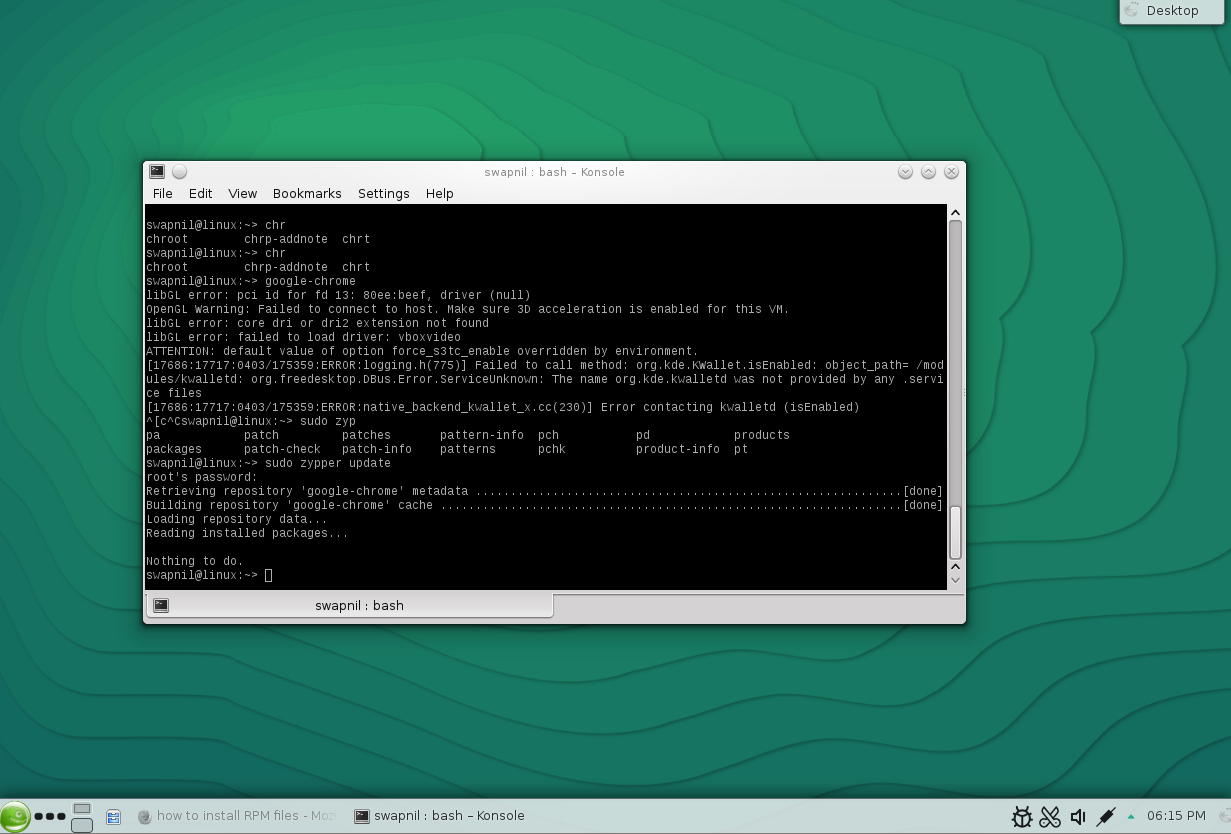
Once you understand how basic Linux commands work, it really won’t matter which distro you are using. And that also makes it easier to hop distros so that you can become distro agnostic, refrain from tribalism and use the distro that works the best for you. If you are using openSUSE then ‘apt-get’ or ‘aptitude’ is replaced by ‘zypper’.
opensuse cli

Let’s run a system update. First you need to refresh the repository information:

sudo zypper refresh

Then run a system update:

sudo zypper up

Alternatively you can also use:

sudo zypper update

This command will upgrade all packages to their latest version. To install any package the command is:

sudo zypper in [package-name]

However you must, as usual, refresh the repositories before installing any package:

sudo zypper refresh

To uninstall any package run:

sudo zypper remove

However, unlike Ubuntu or Arch Linux the default shell of openSUSE doesn’t do a great job at auto-completion when it comes to managing packages. That’s where another shell ‘zsh’ comes into play. You can easily install zsh for openSUSE (chances are that it’s already installed.)

sudo zypper in zsh

To use zsh just type zsh in the terminal and follow instructions to configure it. You can also change the default shell from ‘bash’ to ‘zsh’ by editing the ‘/etc/passwd’ file.

sudo nano /etc/passwd

Then replace ‘bash’ with ‘zsh’ for the user and root. Once it’s all set it will be much more pleasant to use the command line in openSUSE.

How to add new repositories in openSUSE

It’s very easy to add a repo to openSUSE. The pattern is easy:zypper ar -f

So if I want to add a Gnome this would be the command:

zypper ar -f obs://GNOME:STABLE:3.8/openSUSE_12.3 GS38

[It’s only an example, using an older Gnome repo, don’t try it on your system.]

How to install binaries in openSUSE

In openSUSE you can use the same ‘zypper install’ command to install binaries. So if you want to install Google Chrome, you can download the .rpm file from the site and then run this command:

sudo zypper install

How to install packages in fedora
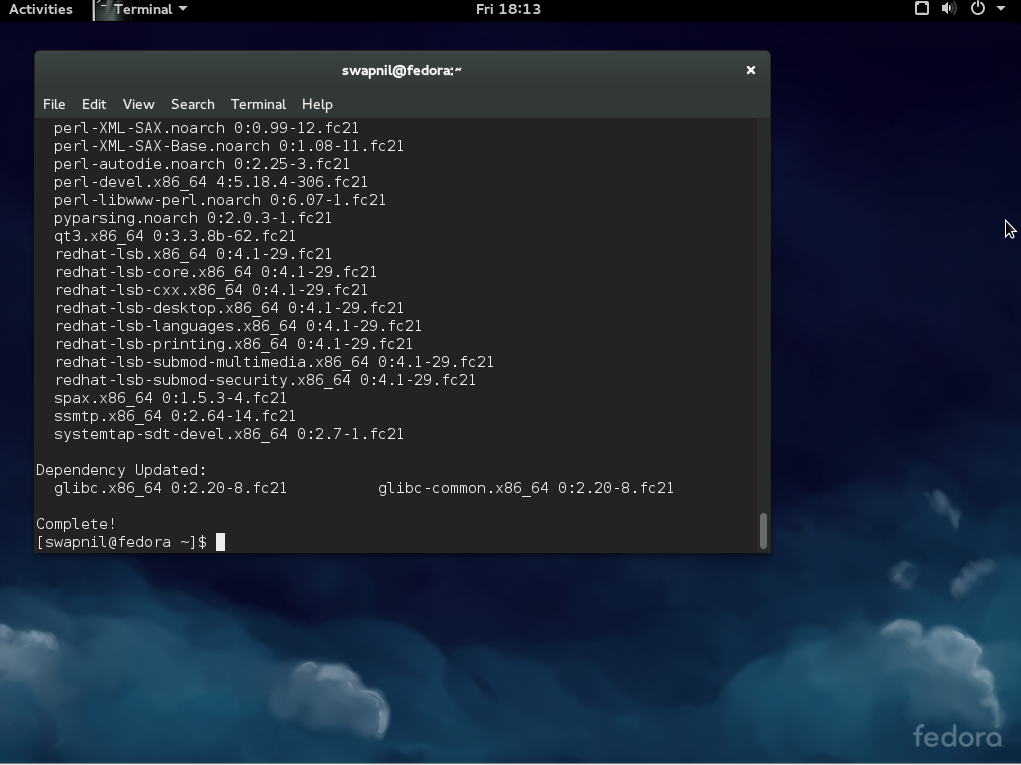
fedora cliFedora uses ‘yum’ which is the counterpart of ‘apt-get’ and ‘zypper’. To find updates and install them in Fedora run

sudo yum update

To install any package simply run:

sudo yum install

To remove any package run:

sudo yum remove

To install binaries use:

sudo yum install

So, that’s pretty much all that you need to get started using command line for software management in these distros.


 

Top 5 Linux First Person Shooter Games Play On Steam


top 5 Linux First person shooter games

Among many Games categories ‘First Person Shooter’ FPS for short has been choice of majority of gamers. If you were using Windows in past then you would’ve heard of FPS games Halo, Titalfall, Call Of Duty, Blackshot and many more. But.. Do we have such exciting First Person Shooter games for Linux. Well, there are many. Here I am going to list Top 5 Linux First Person Shooter games. Check them out and have fun on Linux.

Read At LinuxAndUbuntu

Git Success Stories and Tips from Qt Maintainer Thiago Macieira

Thiago MacieiraGit has come a long way in the 10 years since Linux creator Linus Torvalds released the first version of the now-popular distributed revision control system. For example, the addition of pull requests came three years after the original release, according to Atlassian. And over time it has added more collaboration tools, code review tools, integration to continuous integration systems, and more, recalls Qt Project core maintainer and software architect at Intel, Thiago Macieira.

“At the time we chose (Git), it was for raw performance and for the fact it was distributed,” Macieira said. “Since then, it has gained other benefits… And since it’s now so popular, it’s not a barrier of entry for new contributors.”

Here Macieira shares more about how and why the Qt Project – an open source application development framework – uses Git, its success stories using the tool, and his favorite tip for pro users.

Linux.com: Why does Qt use Git?

Thiago Macieira: Because Git is the best tool for the job. Qt had progressed through several different version control systems and by 2008 we had clearly come to the conclusion that we needed something distributed, to facilitate collaboration as the team grew. Several of our key contributors were already using git-p4 to keep local trees and share things. In addition, we also wanted to make our repository public but read-only, something we could never have done with our previous centralized system.

Before we settled on Git, we did compare it to other distributed version control systems at the time and found that Git had the best performance overall and best long-term chances of succeeding. We did identify some performance issues on non-Linux systems, but those were quickly fixed once identified.

What makes Git such a great tool?

At the time we chose it, it was for raw performance and for the fact it was distributed. Since then, it has gained other benefits, like collaboration tools, code review tools, integration to continuous integration systems, etc. And since it’s now so popular, it’s not a barrier of entry for new contributors.

How many developers do you have collaborating on git?

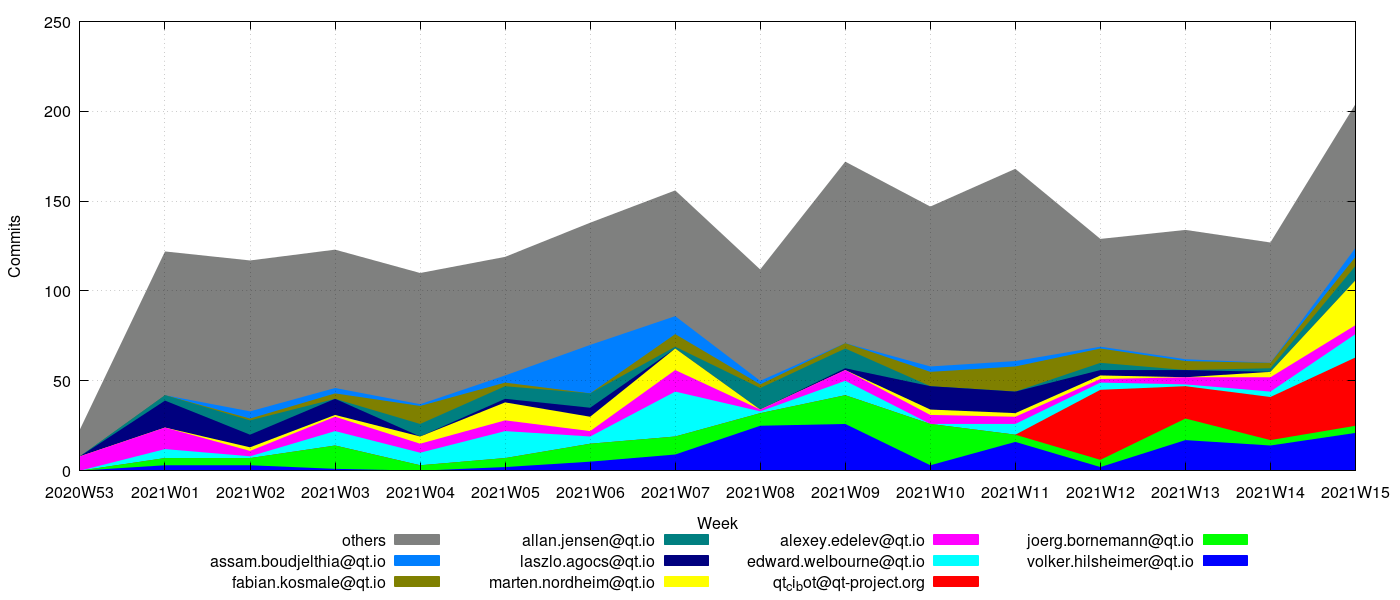
Between 80 to 100 different people, on a weekly basis [see http://www.macieira.org/~thiago/qt-stats/current/qt-all.author.unique.png]

Over the last year, a script of mine is showing 288 people.

How much do you personally use it?

All the time. I use it for every project I participate in, as well as for projects I don’t contribute to. I use it even for projects that don’t officially host on Git, like GCC, LLVM and Clang.

I also engage in some UGFWIINI (Use of Git For What It Is Not Intended) by using it to back up my home directory.

What’s Qt’s most active git repo right now and why?

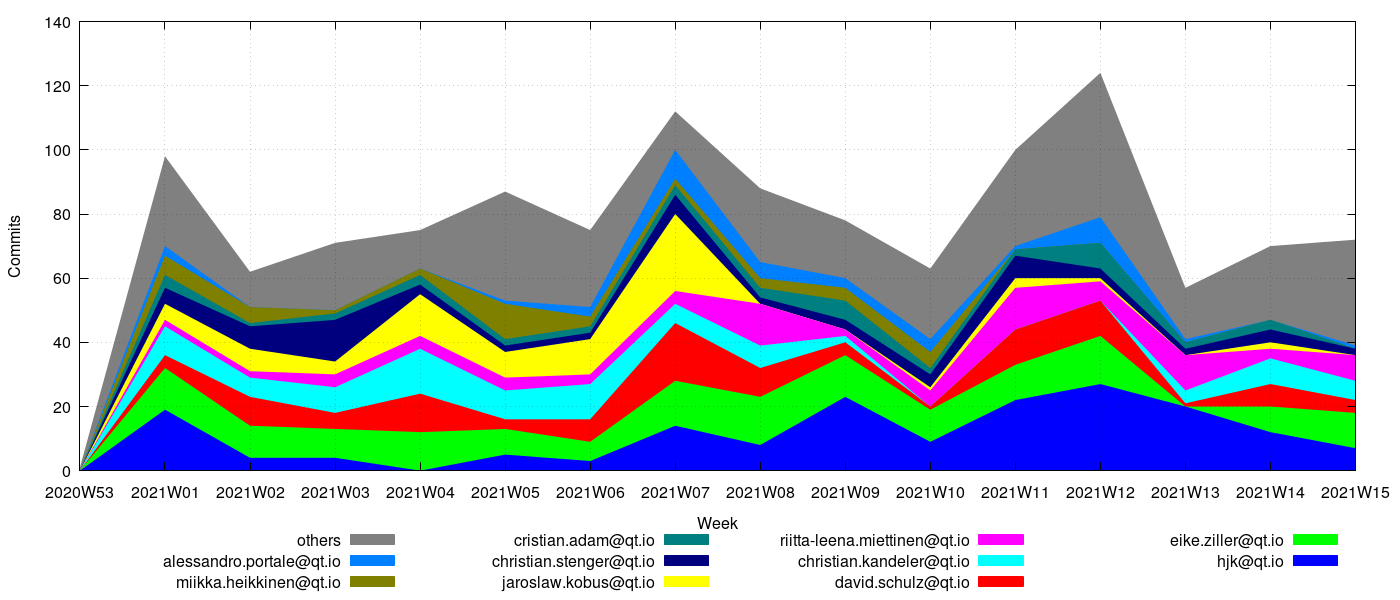
It’s qtbase.git, followed by qt-creator.git. See these two graphs for the numbers:

http://www.macieira.org/~thiago/qt-stats/current/qtbase.author.absolute.png

http://www.macieira.org/~thiago/qt-stats/current/creator.author.absolute.png

They are our largest repositories with critical pieces of our infrastructure. qtbase.git contains the base Qt libraries, which are also the oldest, whereas qt-creator.git contains the IDE and it’s a large and complex application.

What is your favorite pro tip for using git?

The –patch options to git add, git checkout and git reset.

Any git success stories you can share?

I think the conversion from KDE’s Subversion server to Git. At the time I started on that project, the KDE Subversion server was already the largest in the world at 800k commits. By the time we began the conversion, it had 1.1 million commits and required the distributed effort of lots of people writing rules for importing branches and tags the proper way.

Read more:

Git Success Stories and Tips from Wine Maintainer Alexandre Julliard

Git Success Stories and Tips from Puppet Labs’ Michael Stahnke

Git Success Stories and Tips from Tor Chief Architect Nick Mathewson

Git Success Stories and Tips from Drupal Core Committer Angie Byron

Git Success Stories and Tips from KVM Maintainer Paolo Bonzini

10 Years of Git: An Interview with Git Creator Linus Torvalds

Git Success Stories and Tips from KVM Maintainer Paolo Bonzini

Paolo BonziniThis week marks the 10-year anniversary of the day Linux creator Linus Torvalds released the first version of the Git distributed revision control system. Thousands of open source projects now rely on this popular software development tool, which fuels the growth of the collaborative development model that now dominates tech innovation.
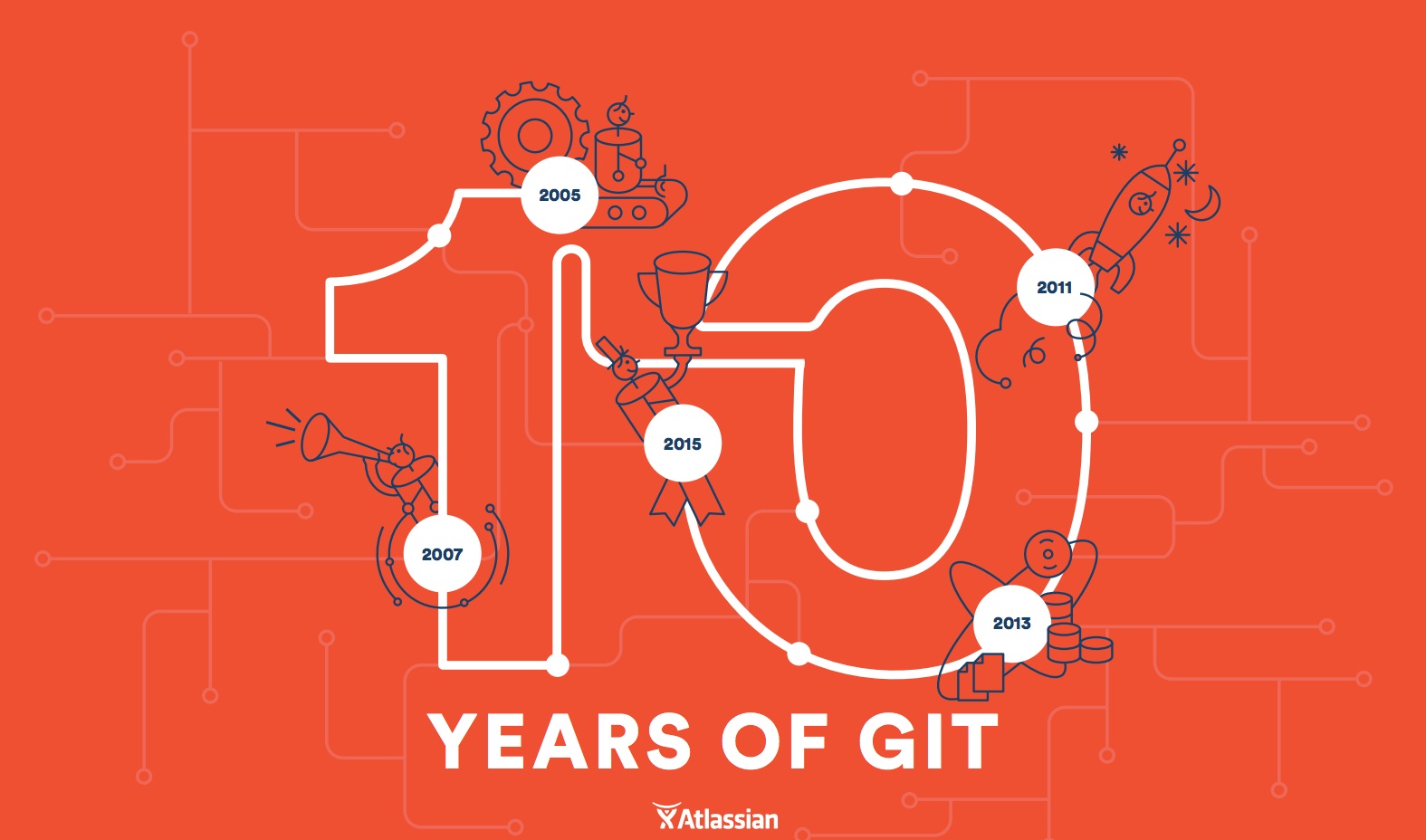
In celebration of this milestone we’ve asked open source project maintainers and leaders to share with us throughout the week how and why they use Git, tell their Git success stories, and give some pro tips for getting the most out of the tool.

Linus Torvalds himself started the series yesterday. Today we’ll hear from Paolo Bonzini, a principal software engineer at Red Hat, QEMU contributor and maintainer of KVM – the Linux kernel-based virtual machine. And stay tuned for the Git stories behind Qt, Drupal, Puppet, Wine, and Tor.

Linux.com: Why does KVM use Git?

Paolo Bonzini: KVM is “just” a subsystem of the Linux kernel, so we use Git just like other parts of the kernel. I am currently the overall maintainer, so I apply patches (from myself or others) and process “pull requests” with patches already vetted and tested by my submaintainers. My tree has three branches: one for patches ready for the current version of Linux, one for patches ready for the next version of Linux, one for patches that should be okay for the next version of Linux but haven’t been tested enough yet.

But you cannot use KVM alone, you need some other code that uses it, and that’s why most KVM contributors also work on QEMU. Considering how Git is used, QEMU works roughly the same as Linux. Only one person, currently Peter Maydell, commits to the official QEMU repository; patches mostly come from submaintainers through pull requests. We found that the model works well, to the point that Peter (who unlike Linus is also a submaintainer) will send pull requests to himself!

What makes Git such a great tool?

The obvious answer would be its distributed nature. It allows submaintainers to work in parallel and provides a very easy match for the hierarchical structure of the projects. However, many very large projects work well without such a hierarchical structure.

Therefore, I’ll say that Git is great because it provides version control in a very non-intrusive way, and because it provides version control very easily for individual projects, too. I’m using the word “projects” in a very broad sense, for example that includes features that are to be included later in Linux or QEMU. You don’t have to be connected to the Internet, you don’t have to setup a server, you don’t even need a separate directory. You don’t need to tell the world in advance what you’re doing.

“git init” or “git checkout -b” are enough to start a project or a feature, and enjoy version control from the very beginning. I think that this leads to code that is better and more maintainable.

How many developers do you have collaborating on Git?

Each release of QEMU has contributions from roughly 170 people. The distribution has a very long tail: about 40 percent of those 170 people contribute only one patch, and about 60 percent contribute less than five.

KVM is smaller, with about 25 people contributing to each release. The same “long tail” effect is visible there, about half of the people only contribute one or two patches.

The long tail is very important. A lot of those “drive-by” patches are bug fixes.

How much do you personally use it?

Of the 1000 commands I have in my shell history, about 400 are invocations of git! (The front runner is vi, with a bit less than 200 invocations).

What’s KVM’s most active git repo right now and why?

It’s difficult to say. Of course all the “action” ultimately becomes part of the top level repository; for KVM that would be mine, for QEMU the official one.

But development happens in the submaintainers’ repos as well; in the case of QEMU, in practice it only happens there. For QEMU, the most active repositories are probably Peter’s ARM repository and the “block device” repository. ARM is very active because there are so many kinds of ARM boards and people use QEMU for emulating them, not just for virtualization. Block devices are very active because… well, because there’s a ton of work to do!

What is your favorite pro tip for using Git?

I have several “aliases” that simplify some git tasks. Here are the simplest of them:

changes = diff –name-status -r

diffstat = diff –stat -r

whatis = show -s –pretty=’tformat:%h (%s, %ad)’ –date=short

pwhatis = show -s –pretty=’tformat:%h, %s, %ad’ –date=short

The two “-r” haven’t been necessary for several years, but those two aliases are 8 years old and I’ve never bothered to update them! The “changes” name comes from Arch, a distributed version control system from which I switched to git.

“whatis” and “pwhatis” convert a commit id to a format that can be pasted in an email. “pwhatis” is for pasting inside parentheses, “whatis” works outside parentheses. When discussing a patch it helps a lot to refer to past commits, and it’s good to use a consistent format (id, subject, date).

Any Git success stories you can share?

I use it so much that I cannot think of any success story. It’s just the reliable tool you use daily and you cannot live without anymore. Perhaps that already counts as a success story?!?

Anything else you’d like to say to mark the 10-year anniversary?

Just a shout-out to my former colleague Jeff Rose, who convinced me to switch to git. That was back in 2007!


Read more:

Git Success Stories and Tips from Wine Maintainer Alexandre Julliard

Git Success Stories and Tips from Puppet Labs’ Michael Stahnke

Git Success Stories and Tips from Tor Chief Architect Nick Mathewson

Git Success Stories and Tips from Drupal Core Committer Angie Byron

Git Success Stories and Tips from Qt Maintainer Thiago Macieira

10 Years of Git: An Interview with Git Creator Linus Torvalds

Three Out of Four Companies Still Vulnerable to Heartbleed

While the Fortune 2000 have patched their vulnerable servers, they continue to use potentially compromised certificates, Venafi reports.

Read more at eWeek

Git This: World’s Favorite Software Development Tool Turns 10


AtlassianGit10yearLinux today is built faster than ever before. The latest data proves it. This is due to the distributed, global community of developers, IT managers and companies contributing to it every minute of every day. This massive collaboration is made possible with similarly distributed tools, tools like Git.

Linus Torvalds 10 years ago today released Git after it was clear BitKeeper was no longer an option for the Linux community. He assessed other existing revision control systems and decided none would do. Ultimately, he decided he would just write a new one, so he went away for a weekend and came back with another hole in one. Most people know Linus created Linux, but many don’t know he is the mastermind behind what has become the most popular revision control system in software development today. If you ask him which is his crowning achievement, he’ll say “do I have to have just one?”

Git has also ushered in an era of social coding that is defining how software is developed and is accelerating the adoption and development of projects like Node.js, Ruby and more. GitHub is used by more than 1 million people and hosts more than 2 million code repositories. This is because developers know that building software together, across geographies and often across companies, results in better, more innovative technologies. Linux is the original example of this and more projects are proving this every day.

Both Linux and Git are great software but the communities and industry that have been built around them are a testament to their quality and long-term sustainability. Companies and projects like Atlassian, GerritForge, GitLab, Perforce, RhodeCode and more have built businesses around Git, for example. Great software attracts contributors in the form of development and dollars. When combined, great software and the resources to support it can have an unlimited impact on the world. Just consider what Linux has made possible – from mobile computing to the cloud and supercomputers, among others – and how Git is helping projects emerge quickly to tackle the computing industry’s most lucrative opportunities.

Linus has been working for fun on a third project over the last couple of years, a diving application called Subsurface. We don’t know if this will change the nature of underwater exploration but when it comes to Linus and his code you never know.

{You can also read the exclusive QA with Linus Torvalds about Git on Linux.com}

Growing The Linux Talent Pool – 50% Off LFCE Exams

Reading the recently released 2015 Linux Jobs Report, it is clear that Linux adoption continues to grow at a breakneck pace. With that growth comes a comparable demand for experienced Linux talent. To help meet that demand, we’re announcing a special sale on our Linux Foundation Certified Engineer exam. The exam, normally priced at $300, will be 50% off ($150) for a limited time.

Qt Installer Framework 2.0 Is Out

The Qt Company has announced version 2.0 of the Qt Installer Framework…

Read more at Phoronix

Details Of DNF Succeeding Yum In Fedora 22 Still Being Discussed

With the upcoming release of Fedora 22, DNF is succeeding Yum as the default package manager. However, some details about this change are still being discussed…

Read more at Phoronix

Walmart Tops IDC List of World’s Biggest IT Spenders

According to a new IDC report, the world’s largest companies spent $895 billion on technology in 2014, with discount retail giant Walmart taking the spending crown.

Read more at ZDNet News