Part three of this series by Xen Project Advisory Board Chairman Lars Kurth discusses early adopters of unikernel technology and why the technology’s future is so bright.
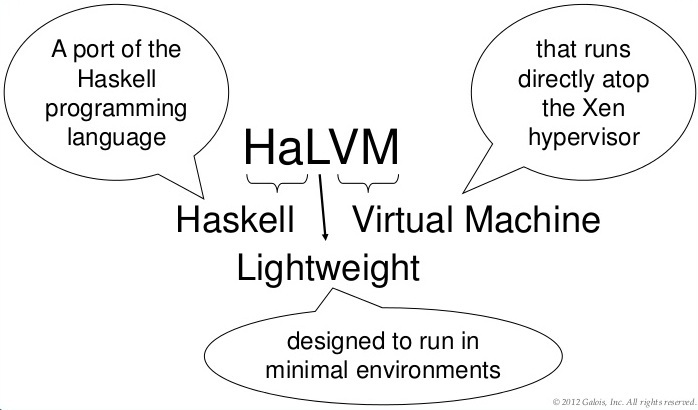 Early adopters are using unikernel technology to run websites, critical systems infrastructure, cutting-edge research or to operate as a network appliance. MirageOS, for example, is serving as a successful testbed for cutting-edge research at the University of Cambridge and other academic groups, while Galois’ clients use The Haskell Lightweight Virtual Machine (HaLVM) for a number of network services and functions.
“One of our clients used a combination of HaLVMs to provide a reliable, secure VPN solution for laptops. Internally, we have also used HaLVMs to implement a variety of network services, including encryption nodes, random number generators, and network sensors,” said Adam Wick, creator of the HaLVM and a research lead at Galois Inc.
OSv runs on Amazon Web Services and is so popular that the beta program is already over-subscribed. Cloudius Systems CEO Dor Laor believes many use cases will benefit from OSv, which offers superior I/O performance, manageability and ease of use. Caches, load balancers, NoSQL and other I/O intensive workloads are ideal targets for OSv, in his opinion.
At an even simpler level, many systems can be improved through the use of a few strategically placed unikernels, according to Galois. Why not insert a HaLVM that performs quick spot checks of all incoming data before passing it on to the server? If your system is sensitive to changes in load, why not insert a MirageOS unikernel that can perform rate limiting? Want to switch to SSL, but your server doesn’t support it — why not add a LING converter?
“Many breaches start with a hacker sending invalid messages to a server that has not been properly implemented. All of the above situations are ones in which the flexibility and scalability of unikernels can really shine, and I believe we will start to see people taking advantage of them over the next year,” said Wick.
The creator of MirageOS, Anil Madhavapeddy’s group is working on a new tool stack called Jitsu (Just-in-Time Summoning of Unikernels), which can start a unikernel in ~20ms in response to a network request.
“This lets us run millions of sleeping unikernels that awaken in response to a network request and live for a few seconds at a time. We’re calling this sort of infrastructure ‘dust clouds’ and expect that it will dramatically change the economics of hosting on the cloud,” he said. Jitsu will be presented at the USENIX NSDI conference this May in Oakland, California.
Amir Chaudhry, who leads the Nymote.org project based on MirageOS unikernels said, “The coming era of hyper-elastic clouds using MirageOS and Jitsu means that users do not have to run large, always-on VMs. Instead, users can provision services and applications only when there is demand, scaling out and back down automatically. This enables people to maintain a secure, personal online presence for a few dollars a year, adding additional services as desired. All without giving up their personal data to third-party services or having to become SysAdmins.”
Containers and Unikernels — Friends or Foes?
Will enterprises deploy a mix of VMs, unikernels and containers? Or will unikernels eventually go mainstream and replace containers? Identifying the best set of technologies for an organization depends on the end goals, experts say. In some cases though, unikernels may very well be the technology of choice in the future.
“Docker is great when you want to put together a number of functions into a single component. If you want a LAMP stack, you’re probably better off just using a LAMP Docker instance and pressing ‘go.’ On the other hand, if you want a lightweight, single-service component that you can bring up and down quickly, or want to scale massively, then unikernels are going to be a clear winner,” Wick said.
New options for developers and SysAdmins are a certainty, as unikernels and container technologies are quickly evolving and hypervisors are branching into new areas such as embedded computing and ARM-based servers. This actually creates new opportunities across the board, according to Cloudius.
“Unikernels provide the best of all worlds – on the one hand they retain the rich hypervisor ecosystem and enable superior isolation, live migration and robust SLA. On the other, unikernels provide container-like properties such as sub-second boot time, density and simplicity,” Laor said.
Madhavapeddy believes unikernels and Linux container technologies are highly complementary to one another. In his opinion, numerous combinations will emerge with hypervisors still the technology of choice for securing multi-tenancy environments.
“I also expect to see a unikernel backend for Docker in 2015 that will enable developers to partition a particular workload across unikernels and Linux VMs,” Madhavapeddy said. “We will also see improved compatibility between the unikernel stacks as the interconnect standards settle down, enabling multiple language runtimes such as Java, OCaml, Go, Rust and Haskell to each run inside a VM and form a secure distributed system of unikernels.”
Martin Lucina, who is working on the Rump Kernel software stack, is focused on providing compatibility with existing applications. He points out that Docker and hypervisors operate at different technology layers, so one will not replace the other. He sees Rump Kernels as a Docker alternative in the future.
“Rump Kernel-powered unikernels can run existing software — Nginx, PHP and MySQL were all ported with little effort,” Lucina said. “Once we work out the remaining challenges in usability, I envision Rump Kernels replacing Docker for deploying services in many scenarios.”
Laor acknowledges that some organizations will want to simplify and stick with a single technology. By following Docker’s format as closely as possible with OSv, he hopes sophisticated users won’t have to compromise on a single technology. With unikernel projects focused on finding a balance between security, performance and portability, unikernels will likely play an important role when deploying any future networked infrastructure.
Here’s a closer look at key projects to watch in the coming months.
7 Game-Changing Cloud Technologies
ClickOS — a high-performance, virtualized software middle box platform based on open source virtualization. Early performance analysis shows that ClickOS VMs are small (5MB), boot quickly (as little as 20 milliseconds), add little delay (45 microseconds) and more than 100 can be concurrently run while saturating a 10Gb pipe on an inexpensive commodity server.
Clive — is an operating system designed to work in distributed and cloud computing environments.
HaLVM — The Haskell Lightweight Virtual Machine (HaLVM) is a port of the Glasgow Haskell Compiler tool suite that enables developers to write high-level, lightweight VMs that can run directly on the Xen Project hypervisor.
LING — is highly compatible with Erlang/OTP and understands .beam files. Developers can create code in Erlang and deploy LING unikernels. LING removes the majority of vector files, uses only three external libraries and no OpenSSL.
MirageOS — Incubated by Xen Project, MirageOS is a clean-slate library operating system that constructs unikernels for secure, high-performance network applications across a variety of cloud computing and mobile platforms. There are now more than 60 MirageOS libraries and a growing number of compatible libraries within the wider OCaml ecosystem. With recent improvements to the toolchain and an increasing number of contributors, MirageOS makes it easier than ever to “compile your own cloud.”
OSv — new OS designed specifically for cloud VMs from Cloudius Systems. Able to boot in less than a second, OSv is designed from the ground up to execute a single application on top of any hypervisor, resulting in superior performance, speed and effortless management. Ssupport for C, Java, Ruby, node.js, and Scala application stacks avaialble as well as future suport for Golang.
Rump Kernels — provide free, portable, componentized, kernel quality drivers such as file systems, POSIX system call handlers, PCI device drivers, a SCSI protocol stack, virtio and a TCP/IP stack. These drivers may be integrated into existing systems, or run as stand-alone unikernels on cloud hypervisors and embedded systems.
Additional Resources
- Tech Republic article “Unikernels Offer a Striped Down Version of Linux” by Nick Hardiman.
- Recent presentation from Galois: “Unikernels: Who, What, Where, When and Why.”
- Erlang on Xen — use cases for the new Erlang platform LING that is at the heart of the elastic cloud.
- Slide deck from Puppet Labs’ Gareth Rushgrove titled “The End of the General Purpose Operating System.”
- Silicon Angle article “MirageOS: Platform for Launching Self-Contained Applications on Top of a Hypervisor” by Saroj Kar.
- Unikernel performance research from Ian Briggs, Matt Day, Eric Eide, Yuankai Guo, and Peter Marheine at the University of Utah. Their preliminary paper, which includes OSv performance data, is “Performance Evaluation of OSv for Server Applications.”
- Xen Project Evangelist Russell Pavlicek’s recent presentation “The Next Generation Cloud: The Rise of the Unikernel.”
- “Containers vs Hypervisors: The Battle Has Just Begun” article by Pavlicek.
- Introduction to the MirageOS Bitcoin Pinata by Amir Chaudhry.
- An example of end-to-end deployments with MirageOS unikernels in “Towards Heroku for Unikernels”: Part 1 and Part 2 by Amir Chaudhry.
- “Rumprun for Rump Kernels: Instant Unikernels for POSIX Applications,” presented at New Directions in Operating Systems by Martin Lucina.
Read Part 1 of this series: 7 Unikernel Projects to Take On Docker in 2015
Read Part 2 of this series: Why Unikernels Can Improve Internet Security

 Unity 8 is not ready for regular use, but Canonical is improving it all the time. Users need to know that despite all the important changes and improvements announced for the Unity 8, it won’t be terribly different from the current implementation.
 Ubuntu developers are working hard to improve the battery life the Ubuntu Touch operating systems, and they are preparing for the launch of a new major update that should provide better performance in this regard.
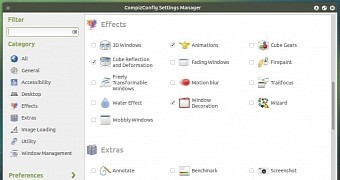 The Ubuntu MATE developers are preparing for the launch of the latest 15.04 branch of the operating system. One of the features to be present in Ubuntu MATE 15.04 is Compiz integration, and one of the developers has put together a video showing all the cool stuff to be available.
 Ubuntu for phones has been officially released and it’s running on Bq phone in the wild, not to mention the thousands of Nexus 4 devices, but not many people know that it also comes with an integrated default firewall.