
Samsung Electronics is said to have signed an agreement to produce its 3D NAND SSDs for Google’s data centers, in a deal said to be “sizeable”.
Read more at ZDNet News
Samsung Electronics is said to have signed an agreement to produce its 3D NAND SSDs for Google’s data centers, in a deal said to be “sizeable”.
 The last week of March has been very interesting for the Linux users. Quite a few games have been released in the span of just a few days, but there are three among them that warrant a little bit more attention.
With all the news and information that’s bombarding the Linux users these days, it’s hard to keep track of everything that’s been going on. There have been a large number of distros released, many announcements regarding new games, upcoming titles, and who knows wha… (read more)
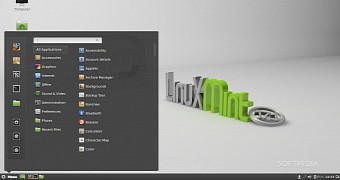 Cinnamon is a desktop environment built by the Linux Mint team and it’s implemented by default in the Mint OSes. The current update, 2.4.7 is just a maintenance one, but it’s pretty extensive and it comes with a ton of changes.
Numerous updates have been released in the 2.4.x branch of Cinnamon, and it looks like the developers are not done with it, not by a long shot. They have already detailed 2.6.x, but it looks like that version is still pretty far away. In the meantime… (read more)

POSSCON, a technical conference, is just around the corner. Given the speaker lineup and talk topics, the event again promises to be one of the most interesting open tech and open web conferences of the year. The list of speakers is long and each one is a master in their field. I got in touch with one, Semmy Purewal of Netflix, to find out more about the culture there, his favorite open source tools, and the impact of open source on his career.
We all know that Linux runs much of modern society – from data centers and mobile phones, to air traffic control and stock exchanges. But what are some of the ways that Linux continues to contribute to innovation in the tech industry?
Over the past six months I’ve asked new Linux Foundation corporate members on the cutting edge of technology to weigh in on what interesting or innovative trends they’re witnessing and the role that Linux plays in them. Here’s what engineers, CTOs, and other business leaders from companies including CoreOS, Rackspace, SanDisk, and more had to say.
The full interviews are part of The Companies That Support Linux series. For more on Linux Foundation corporate membership visit: http://www.linuxfoundation.org/about/join/corporate.

“Companies are building internal platforms for running their businesses and shifting their thinking from how to divide compute resources into smaller units and towards a model where they treat infrastructure as a big pool of resources. Instead of managing individual VMs, resources are available via platforms and APIs to teams without the need to manage the operating system directly.
“In the server infrastructure space this shift has spawned new terms such as immutable infrastructure, launched new interest in Linux containers and Docker and seen the rise of new “behind the firewall” platform-as-a-service products.” – Brandon Philips, CTO at CoreOS.

“The move to software-defined infrastructure is a big shift. Customers already have access to virtualization platforms like Xen that allow them to define their infrastructure with software. Software-defined networking is quickly becoming more mature and scalable. However, customers want the ability to have a software defined datacenter at their fingertips. This may involve physical servers, virtual servers, and virtual networks that need high performance with flexible configurations. Many of the current technologies are designed to run on Linux due to technology already available in the kernel or userland frameworks provided by the community.” – Paul Voccio, Senior Director of Software Development at Rackspace.

“In the Latin American market, we are seeing that users are eager to adopt cloud-based standard technologies and are increasingly interested in the transparency and usefulness of cloud services, represented by its ease of use, understandable metrics and more intelligent monitoring alerts and logs.
“This is being made possible by Linux as a consistent platform underneath.” – Carlos Horowicz, CEO and co-founder of Planisys.
“Storage is undergoing a dramatic transformation from the creation of more data at the edge to the  transportation and eventual storage and use of the data. As a company that plays in all of the points of storage, we see a number of trends.

-Nithya Ruff, director of the SanDisk Open Source Strategy Office.
“The growth of data is increasing in unexpected ways, this comes hand-in-hand with the mobile market’s success in recent years. Without a reliable operating system for servers such as Linux, it would be almost impossible to collect, store and analyze data successfully as we are doing now.” – Eduardo Silva, an open source developer at Treasure Data.

“Linux is the core of the global public clouds. Linux powers many of the world’s largest SaaS platforms. These two destinations, the global public clouds, and global SaaS platforms are the key destinations for the modern enterprise. Our global network and software-defined interconnection means the modern enterprise can quickly and securely get the best connection to these platforms.” – Paul Gampe, CTO of IIX.
“The emergence of Linux as the control-plane of choice provides a consistent platform which allows us massive re-use of tooling and skills. New hardware platforms like OpenCompute and processor architectures like ARM just wouldn’t be making in-roads into the datacentre if we didn’t have the solid base of a common operating system and tools.” – Matt Jarvis, head of cloud computing at  DataCentred.
“The storage industry is undergoing a fundamental shift toward solid state drives (SSD) and emerging non-volatile memory (NVM) technologies. To fully exploit the capabilities of these technologies the operating system and its storage subsystems must continue to evolve. As the leading open source operating system Linux is well-positioned to play an important role in bringing the benefits of new memory technologies to end-users.” – Steve Moyer, vice president of storage software engineering for Micron Technology.

“One innovative trend is the integration of ARM-based processors with FPGAs providing increased flexibility through hardware differentiation combined with the increased capabilities and flexibility of Linux results in a differentiated and successful products based on Altera’s SoCs. Another trend is the transition to ARM v8 architecture with virtualization extensions leveraging projects like KVM, Xen and Linux containers. Furthermore many of our customers are selecting Linux and at Altera, we enable choice for our customers.” – Findlay Shearer, a senior manager of product marketing at Altera.

“We’re witnessing a tremendous move to cloud-based business communications, which is at the core of our business. Since the cloud requires scalability and flexibility, it is another reason why we chose Linux. Your system enables us to continuously innovate and provide businesses with the best communication solutions.” – Josh Lesavoy, Chief Information Officer at Nextiva.
“We are looking now at the emergence of the hybrid cloud. Linux has a major role in this trend both being the cornerstone of the modern data center and being a base for many innovative technologies in this field. Other  interesting trends are software-defined networking and software-defined storage, both having strong roots in Linux.” – Dmitry Fleytman, CTO and co-founder of Daynix.
In part one of this three-part series, Xen Project Advisory Board Chairman Lars Kurth takes a closer look at the rise of unikernels and several up-and-coming projects to keep close tabs on in the coming months.
Docker and Linux container technologies dominate headlines today as a powerful, easy way to package applications, especially as cloud computing becomes more mainstream. While still a work-in-progress, they offer a simple, clean and lean way to distribute application workloads.
With enthusiasm continuing to grow for container innovations, a related technology called unikernels is also beginning to attract attention. Known also for their ability to cleanly separate functionality at the component level, unikernels are developing a variety of new approaches to deploy cloud services.
Traditional operating systems run multiple applications on a single machine, managing resources and isolating applications from one another. A unikernel runs a single application on a single virtual machine, relying instead on the hypervisor to isolate those virtual machines. Unikernels are constructed by using “library operating systems,” from which the developer selects only the minimal set of services required for an application to run. These sealed, fixed-purpose images run directly on a hypervisor without an intervening guest OS such as Linux.
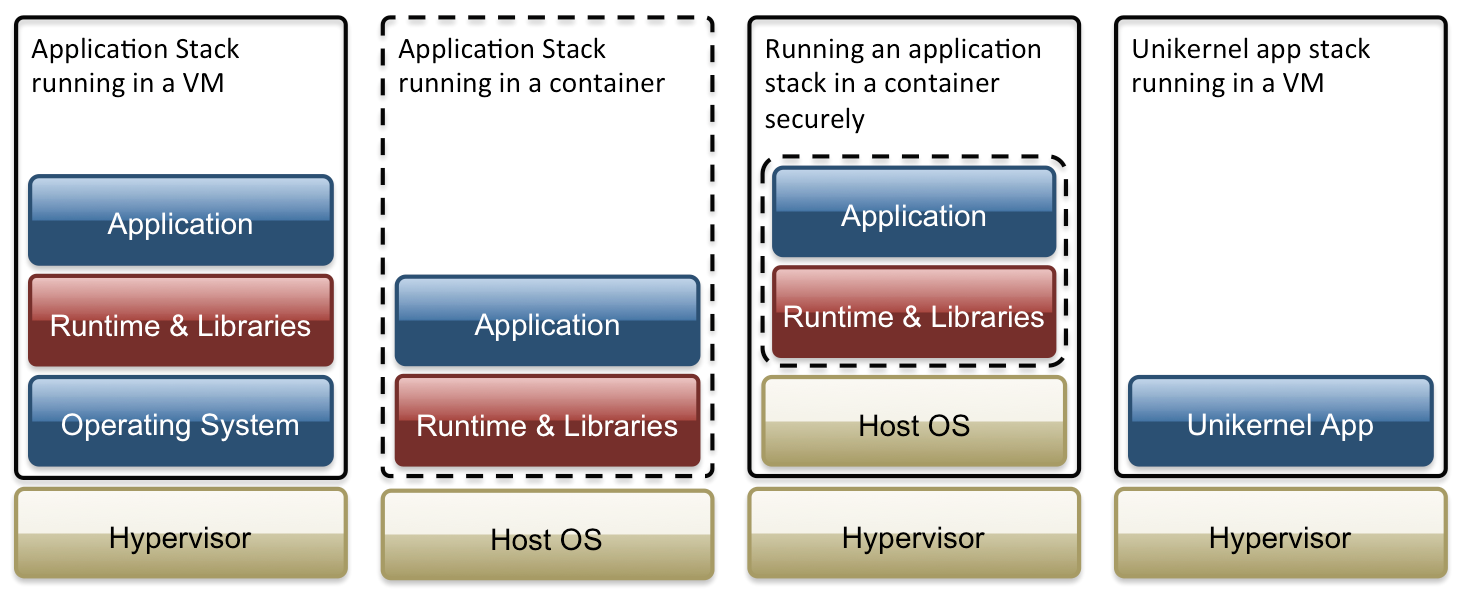
As well as improving upon container technologies, unikernels are also able to deliver impressive flexibility, speed and versatility for cross-platform environments, big data analytics and scale-out cloud computing. Like container-based solutions, this technology fulfills the promise of easy deployment, but unikernels also offer an extremely tiny, specialized runtime footprint that is much less vulnerable to attack.
There are several up-and-coming open source projects to watch this year, including ClickOS, Clive, HaLVM, LING, MirageOS, Rump Kernels and OSv among others, with each of them placing emphasis on a different aspect of the unikernel approach. For example, MirageOS and HaLVM take a clean-slate approach and focus on safety and security, ClickOS emphasizes speed, while OSv and Rump kernels aim for compatibility with legacy software. Such flexible approaches are not possible with existing monolithic operating systems, which have decades of assumptions and trade-offs baked into them.
How are unikernels able to deliver better security? How do the various unikernel implementations differ in their approach? Who is using the technology today? What are the key benefits to cloud and data center operators? Will unikernels on hypervisors replace containers, or will enterprises use a mix of all three? If so, how and why? Answers to these questions and insights from the key developers behind these exciting new projects will be covered in parts two and three of this series.
Read Part 2 in this series: Why Unikernels Can Improve Internet Security.
Read Part 3: How Early Adopters Are Using Unikernels – With and Without Containers
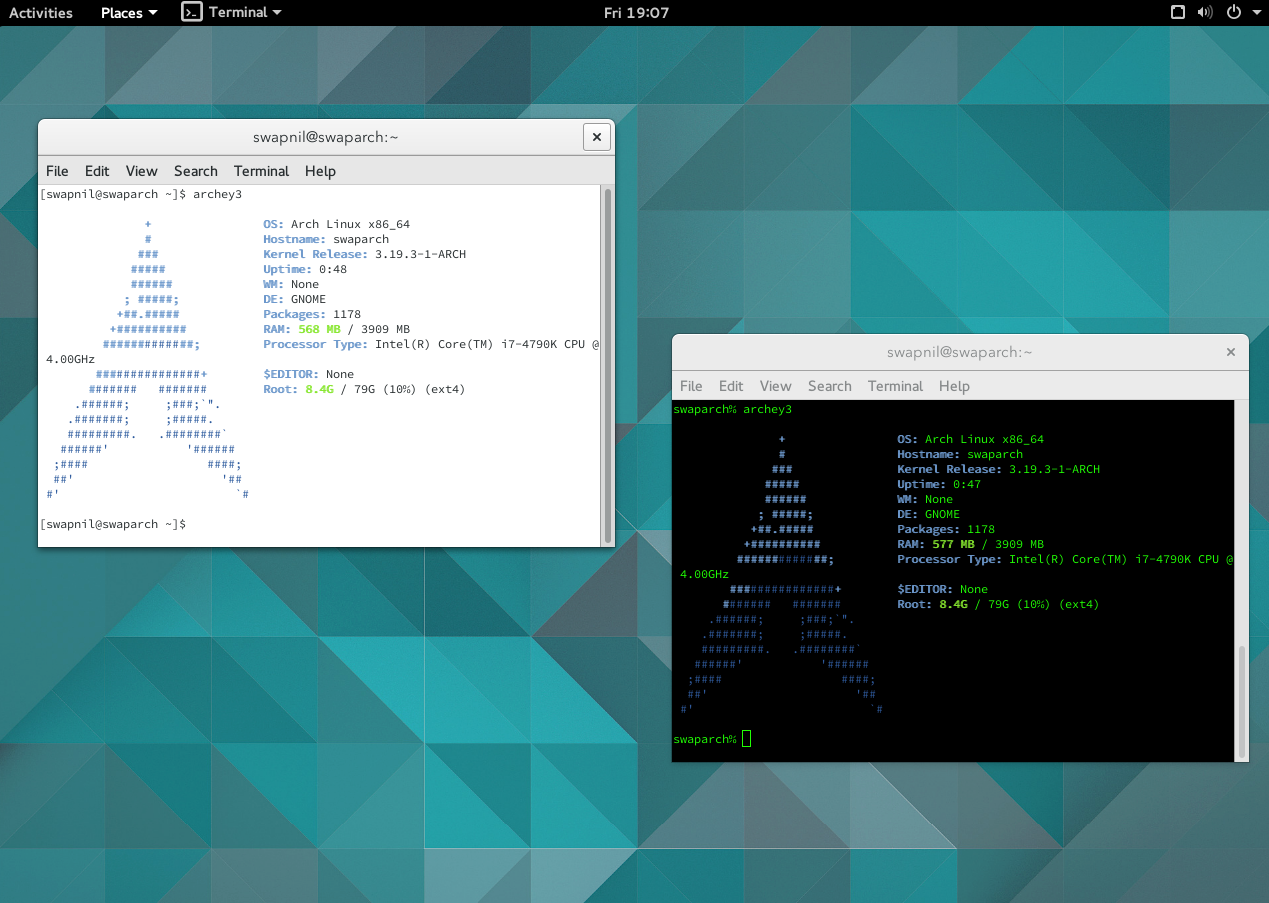
One shell to rule them all, one shell to find them, one shell to bring them all and in the same distro bind them.
Command line is one of the many strengths of Linux based systems. Why is it a strength? There is no one answer; there are many answers. I agree that the graphical user interface (GUI) makes it easier for a user to interact with their system and that’s what new users may need to get started with Linux; that’s what I needed when I was starting off with Linux back in 2005. But as I matured as a user I found CLI (command line interface) was more efficient than fiddling with the buttons of a tool.
CLI also allows users to be independent of distros. Just look at the derivates of Ubuntu, even if they use the same code-base they have different tools to do the same job. Different desktop environments on the same distro need different ways to perform the same task. A user has to un-learn and then re-learn the process of doing the same thing while they hop between distros. Furthermore if we move between Fedora, openSUSE and Arch, it becomes even more complicated.
But once you understand that in Debian-based systems apt-get or dpkg are the commands that you need to manage software, life becomes easy. Then it desn’t matter whether you are on Ubuntu or Lubuntu.
When I was dependent on a GUI, I used to get worried whether that particular distro has that feature or not – it was all about certain features being exposed or hidden through the GUI. One simple example is that Gnome’s Nautilus doesn’t allow batch rename of files where as KDE’s Dolphin does. As a result the user of x distro or DE hesitates in trying out other projects fearing they won’t find the same tools. A Gnome user doesn’t have to sacrifice such a useful function, thanks to the command line.
But that’s not all command line does. It also saves system resources which are consumed by GUIs. So if you are on a slower system, you are better off with the command line than GUI.
People tend to think command line is difficult; it’s not. It’s more or less like SMSing to your PC, telling it what to do.
So without further ado let’s learn some basics of command line.
Shell is basically a program that turns the ‘text’ that you type into commands/orders for your computer to perform. As such there is a set structure of commands; different OSes may use a different structure to perform the same task.
There are many Shells available for Linux, but the most popular is Bash (Bourne-Again shell) which was written by the GNU Project. Another more modern shell with more features is ‘zsh’ which you can install for your distribution (we will talk about shells in a later article).
If you are using a desktop environment then you need a terminal emulator to emulate the terminal within that interface. Different distros come with their own terminal emulators: KDE comes with Konsole and Gnome comes with Gnome Terminal.
When you open a terminal emulator, by default you are in the home directory of the logged in user. You will see the name of the logged in user followed by the hostname. $ means you are logged in as a regular user, whereas # means you are logged in as root.
Unless you are performing administrative tasks or working inside root directories never work as root as it will change the permissions of all directories and files you worked on, making root the user of those directories and their content.
You can list all directories and files inside the current directory by using the ls command.
[swapnil@swaparch ~]$ lsDesktop Documents Downloads Music Pictures Public Templates Videos
To change to any directory, use the cd command. You can also use the ‘Tab’ key which will auto completes the path. Use forward slash to enter directories. So if I want to change directory to ‘Downloads’ which is inside my home folder, we run cd and then give the path. In this case ‘swapnil’ is the username. You need to type your username:
Documents/ Downloads/
[swapnil@swaparch ~]$ cd /home/swapnil/Downloads/
[swapnil@swaparch Downloads]$
As you can see in the third line, ‘Downloads’ directory has moved inside the square brackets, which denotes that currently we are inside this directory. I can see all subdirectories and files inside Downloads directory by running the ls command.
You don’t have to give the complete path if you want to move inside the sub-directory of the current directory. Let’s say we want to move inside the ‘Test’ directory within the current ‘Downloads’ directory. Just type cd and the directory name, in this case it’s ‘Test’, without any slash.
[swapnil@swaparch Downloads]$ cd Test
If you want to change to another directory just follow the same pattern: cd PATH_OF_DIRECTORY . If you want to move one step back in the directory then use cd . . /. To go back two directories use cd . . /. . /and so on.
But if you want to get out of the current directory and go back to home, simply type cd.
You don’t have to change directory to see its content. You can use the ls command in following manner:
ls /PATH_OF_DIRECTORY
Example:
[swapnil@swaparch ~]$ ls /home/swapnil/Downloads/Test/
To see hidden directories and files use -a option with the ls command.
[swapnil@swaparch ~]$ ls -a /home/swapnil/Downloads/Test/
In order to see the size of directories and files you can use -l option with the ls command. It will also tell the permissions of the files and directories, their owners and the time/date of modification:
[swapnil@swaparch ~]$ ls -l /home/swapnil/Downloads/Test/
total 4
drwxr-xr-x 2 swapnil users 4096 Mar 26 11:55 Test_2
The command gave us the file size in a form hard to understand. If you want to get the file size in human readable format then use ls -lh command:
[swapnil@swaparch ~]$ ls -lh /home/swapnil/Downloads/Test/
total 4.0K
drwxr-xr-x 2 swapnil users 4.0K Mar 26 11:55 Test_2
If you want to get a simple list of all the directories and files inside a location, without extra info such as file size, etc., use ls -R command. This command will give a very long output (depending on how many files are there) as directory trees.
If you want to create new directories the command is mkdir. By default the directory will be created in the current directory. So give the complete path of the location where you want the directory to be created:
mkdir /path-of-the-parent-directory/name-of-the-new-directory
So if I want to create a directory ‘distros’ inside the ‘Downloads’ directory, then this is the command I will run:
[swapnil@swaparch ~]$ mkdir /home/swapnil/Downloads/distros
If you want to create a sub-directory inside a new directory then use ‘-p’ option with ‘mkdir’. I am going to create a directory called ‘distro’ along with a sub-directory called ‘opensuse’ inside it. If I run the mkdir command with ‘/distro/opensuse’ as the path, it will throw an error that the directory ‘distro’ doesn’t exist. That’s when the option ‘p’ comes at play and creates all the directories in the given path:
mkdir -p /home/swapnil/Downloads/distros/opensuse
This command will create new directory ‘distros’ and sub-directory ‘opensuse’ inside it.
If you want to delete any file or directory the command is ‘rm’ (for files) and ‘rm -r’ (for directories). You need to be very careful with this command because if you fail to give the correct path of the file or directory then it will remove everything from the current directory and you may lose precious data. The command is simple:
rm /path-of-the-directory-or-file
If I want to remove the opensuse directory, the command would be:
rm -r /home/swapnil/Downloads/distros/opensuse/
However, if you want to delete all the content of a directory without deleting the directory itself use the ‘*’ wildcard with a slash. Let’s say I want to delete all the content of opensuse directory:
rm /home/swapnil/Downloads/distros/opensuse/*
If there are sub-directories inside, for example, opensuse directory then you will need that ‘-r’ option to also delete the sub-directories:
rm -r /home/swapnil/Downloads/distros/opensuse/*
That’s all for today. This article will make you pretty comfortable with the command line. In the next article we will take you to the next level of managing your system via CLI.
Till then, cd bye