Home Blog Page 1175

How To Encrypt Cloud Storage Files & Folders In Linux


data encryption file encryption encryption key cloud file encryption linux

Most of us use cloud storage like, Dropbox, Gdrive, Copy etc. to be able to use our synced files anytime, anywhere and from our any devices. But no one feels safe putting up their sensitive data over there. As recenthacks shows that how safe our data is. In 2014 many celebrities photos were hacked from cloud storages and posted on social networking sites. So why not encrypt data before upload it on cloud storage to increase security.
 

Read At LinuxAndUbuntu

How to Set Up Your Linux Dev Station to Work From Anywhere

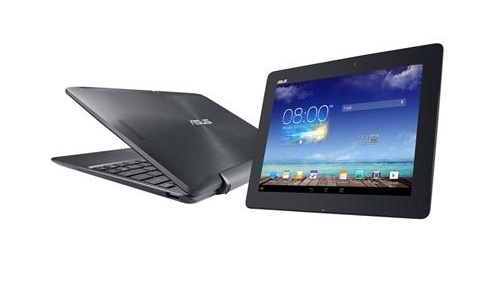
asus transformer tabletBack in 2008, I was vacationing with my family, and as I sat on the beach, like any good techie, my mind kept going back to some code I had been working on earlier that day while sitting in my cabin. My wife insisted I leave the laptop at the cabin, and, having only my phone in hand, I imagined there must be a way to get connected to my work. The phone had Internet and a browser, and there was a faint data connection. But there really wasn’t any way I could work. So instead I had to put the phone down and enjoyed some time offline.

Fast forward almost seven years, and times have changed. Now I take my tablet with me wherever I go. And with that tablet I can continue doing my work–not just tablet work, but all my work. Today, using my tablet, I was coding in node.js and later in C++ using the Geany IDE running on an Ubuntu 14.04 machine. And this very document I’m typing is made possible with LibreOffice on that same Ubuntu machine. My code files are saved away in a git repository on another machine, and my other documents are stashed in a Dropbox folder that gets synced to all my machines. And yes, dare I admit, about once every couple of months I need to boot up a Windows machine and do something on it.

All of this is happening through an Android tablet. Or two actually — a Nexus 7 tablet, and an 11-inch Asus Transformer with a keyboard attached. (I do have a regular computer, which I also use for said work.) I carry my tablets in a little pouch not much bigger than the 11-inch tablet and I can get my work done wherever I go. This afternoon I’ll be back on my main computer working. Then tonight I’ll be sitting at my son’s karate class working away on that same work.

What I want to do is show you the configuration I came up with for a new mobile lifestyle. I can work from nearly anywhere, provided there’s a data signal. And I have enough backup battery power to last me about 30 or so hours. When putting together this configuration, I had several goals in mind:

  • (1) Don’t rely on a single device or computer to work from, and to be able to work both from my computer at home or any of my tablets or even to be able to borrow somebody else’s computer if absolutely necessary. If I lose my tablet, I want to be able to buy a new one and pick right up where I left off.
  • (2) Don’t rely on a single server. Servers and hosts can go down and I don’t want to be left stuck.
  • (3) Be as mobile as possible and able to work from anywhere I want, as long as I have a data signal and eventually a power outlet to plug into to recharge.
  • (4) Be able to create, save, and edit my writing files (such as this one I’m typing) without having to copy files around manually.
  • (5) And finally, to hopefully be able to use native apps on the tablets.

These were my goals, but I didn’t reach them all. The native apps thing didn’t go so well. Also, working on a friend’s computer requires the use of a key file, and I’m not particularly comfortable with putting key files on other people’s computer, nor am I comfortable typing passwords into other people’s computers in case they have key logging software. (I know somebody who keeps such software on his computer to discover passwords wgen friends borrow his computer.)

First I’ll give you the short version of the configuration I settled on. Then I’m going to talk about several different options I tried out and why they weren’t suitable in my case. But your needs will likely be very different from mine, and some of those other options might work well for you. Also, my final setup isn’t perfect by any means, and as such I welcome discussion in the comments about how this might be improved for the benefit of all of us.

Mobile Life: The Short Version

The super-short version of this story is I run VNC software on my Linux servers, and I remote in using VNC.

Now here’s how I handle my files.

I ultimately settled on using Dropbox for my non-critical files. These are files where it would not be a serious problem if my Dropbox account gets compromised. Usually this is for my writing work. If somebody broke in, they would find an early draft of this article, for example. Not a huge deal.

For files that require somewhat more security (but still not huge security), I’m using a version control system. Specifically I have a git repository on a hosted Linux server. These are files that I would prefer people not get their hands on, but if they do, it’s not the end of the world.

For files that are important (contracts, banking information, and so on), I keep private and are not available in my “mobile life” setting. It’s too risky. If I’m out of town on business and somebody at a bank needs a copy of some mortgage papers, I’ll call my wife and have her retrieve it, or they’ll wait until I get home. I’m not storing that “in the cloud.”

Now for the hardware.

I still have my main computer, a quad core machine at home that I work from. It’s actually a laptop, but it’s plugged into two monitors, an external keyboard and mouse, and I generally treat it as as regular workstation computer. I used to cart it with me everywhere (minus the monitors and keyboard), but it’s not the lightest laptop around, and if it were to get stolen, I would have a huge problem on my hands with all that data on it.

I also have a Nexus 7 2013, which runs Android (and I just upgraded to Android 5.) I originally tried using an external keyboard, but the tablet was just too small to stare at for long hours. So I bought a second, bigger, tablet.

The second tablet is an Asus Transfomer TF701T. This is a 10-inch tablet, and I have the keyboard Asus makes specifically for it. I also have a bluetooth mouse, although I can’t always use that if I’m just sitting in a chair and not at a table. (But the keyboard has a small trackpad which works fine.)

And now the servers. I’ll get to the software shortly.

I have a few hosted Linux servers. I personally like DigitalOcean because they’re not very expensive. I have multiple servers running (not just for my personal “mobile” work but my professional work) for under $100 per month. Amazon has come down in price with some of their servers lately, too. One nice thing about Amazon is you can turn off a server and pay only pennies per month to keep it there. DigitalOcean charges you per server whether it’s running or not. But with prices at like $10 per month, that’s not a huge problem for me.

juice sshOne of my goals is to not be reliant on a single server. Ideally, if DigitalOcean were to shut down right now, I could be up and running elsewhere in a matter of minutes–at least ideally, anyway. Realiatically it would probably take me a day or so to get back up and running. Presently I have everything backed up onto Amazon’s S3, which I’m finding is ideal for storing large files. I don’t have images of my drives backed up, as those aren’t portable between hosts. Instead, I keep a full backup of my github files. I’ll get to that when I go into more detail about the software configuration.

But first, here’s the short version of the software.

I already mentioned github and Dropbox. I went through several different cloud storage services before ending up with Dropbox. Previously, Ubuntu One was perfect for me, but it shut down. I tried a few others and then realized Dropbox works great for what I’m doing. It synchronizes my files between my machines without me having to do any work. And if I have two servers running on two different hosts, and I save a file to a folder under ~/Dropbox on my main computer, within seconds that file is saved on my running hosts. If I’m away from home and go into one of my servers and save to ~/Dropbox, that file is saved back to my home laptop. Changes and deletes are similarly propagated. And so far, I’ve never had any trouble.

But what about editing my files? This took a while to get going. Again, the short answer is I use VNC to log into my servers, where I run LibreOffice. But with the keyboard and mouse, my larger tablet basically turns into a small netbook, and I’m able to work. The VNC client I went with is called Remotix. There are versions for both Android and iOS, and it can easily connect to both a Linux VNC server and a Windows RDP server. It reads the mouse and trackpad just fine. When I’m on my smaller tablet without the keyboard and mouse, I can move the mouse pointer around by dragging my finger on the tablet screen just like I would on a trackpad. I’ll have more to say about this and why it was important to me when I talk about the VNC apps in detail in a future article and how I chose the one I did.

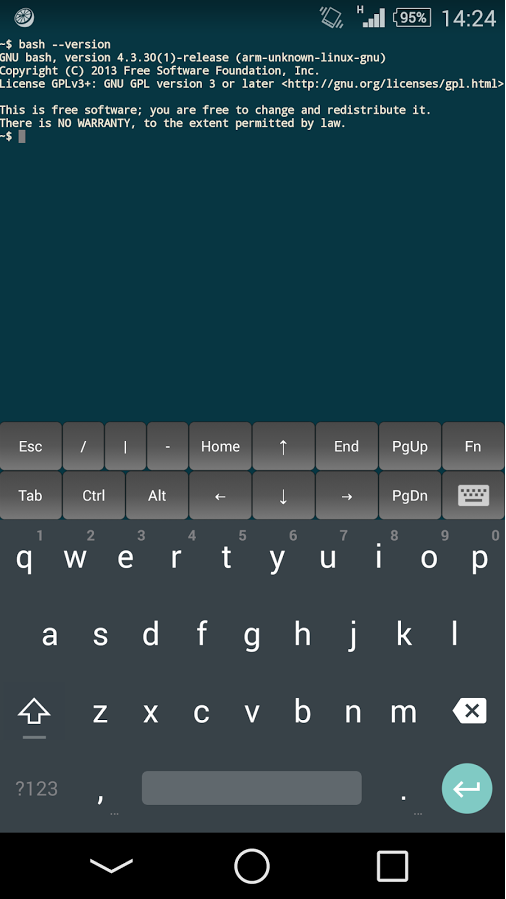
I don’t only use VNC, though. There are some nice terminal programs for Android that support ssh. The one I went with is called JuiceSSH, but there are a few good ones available.

More issues to address

So that’s the short version. Yes, it amounts mostly to VNC, but I’m able to go mobile. There are some issues that aren’t perfect, and I’ll talk about all that in detail as well. For example, my ssh key files are sitting on my tablets, which I’m not fond of. But they require a passphrase. And the tablets have a very long PIN to unlock them, and no important files are stored on the tablets. If a tablet ever gets stolen, I’ll generate a new key, log into my server, and replace the existing key in the .ssh directory with the new one, likely long before anyone cracks both the PIN and the ssh key file passphrase

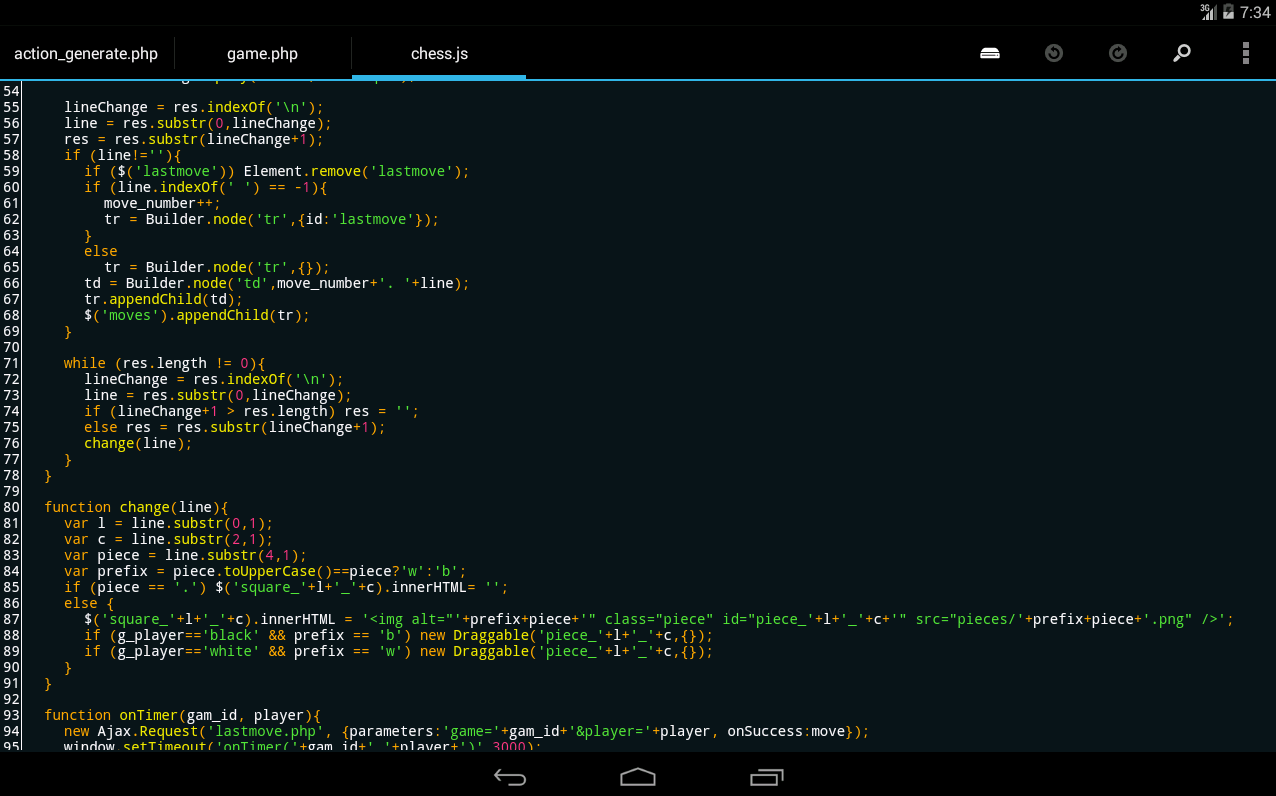
In the next couple of articles, I’m going to talk about different software options that I tried, and how I came to arrive at the configuration I ended up with. (For example, I wanted to use a native word processor app on the tablet, but I hit some snags there. I do, however, occasionally use a native code editor called DroidEdit, which I’m able to read and write remote files via ssh.) 

droidedit screenshot

But some of these software options that I decided against might still be great for you. And then I’ll wrap it up with a discussion of exactly how I configured my Linux servers. I learned a lot about configuring SSH on my server, and setting up a simple but nice desktop environment on my servers (I went with LXDE but tried many different ones), and I’ll share those details with you as well, including my attemps at tiling window managers through a tablet. And I welcome any of your thoughts on how this process might be improved so we can all make our lives easier and more mobile. Stay tuned!

p.s. Midway through this draft I returned home and finished writing it on my main computer in my home office. Now that it’s finished, I will retire to the couch for the evening, but I’ll have my Nexus 7 in hand so I can give the article another read-through before submitting it to my editor… all without copying any files around and without having to disconnect my laptop. Call me lazy, but life is good in this new mobile era of technology.

Read part 2: Choosing Software to Work Remotely from Your Linux Dev Station

GCC 5 Compiler will be released soon

GCC developers will have the first GCC 5 release candidate ready in April, this year.

And the developers expect to have the final version ready probably at the end of April, this year.

According to the developers the emphasis lays on fixing P1s and avoid pushing in risky
fixes for P2s that might end up causing regressions.

Read more about it here: GCC 5 Compiler will be released soon.

This Week in Linux News: Linux Jobs, a Middle School User Group, and More

This week in Linux news, Linux talent is in high demand, a middle school club is fostering the next generation of IT experts, and more. Here are five must-reads in the world of Linux and open source for this week.

1) “If you’ve got the cert, you’ve likely got the job” and other key takeaways from the Linux Foundation’s recent Linux jobs report.

 
2) Middle school Linux group is turning kids into open source leaders and agents of change-
 
 
3) Open source journalist, Swapnil Bhartiya, explains why his favorite distro is Arch Linux.
 
 
4) A slideshow of seven lesser-known productivity apps for Linux.


5) Much like Linux itself, the OS version of Siri “is an open platform anyone can use and contribute to.”


Embedded Linux Keeps Growing Amid IoT Disruption, Says Study

VDC embedded open source market

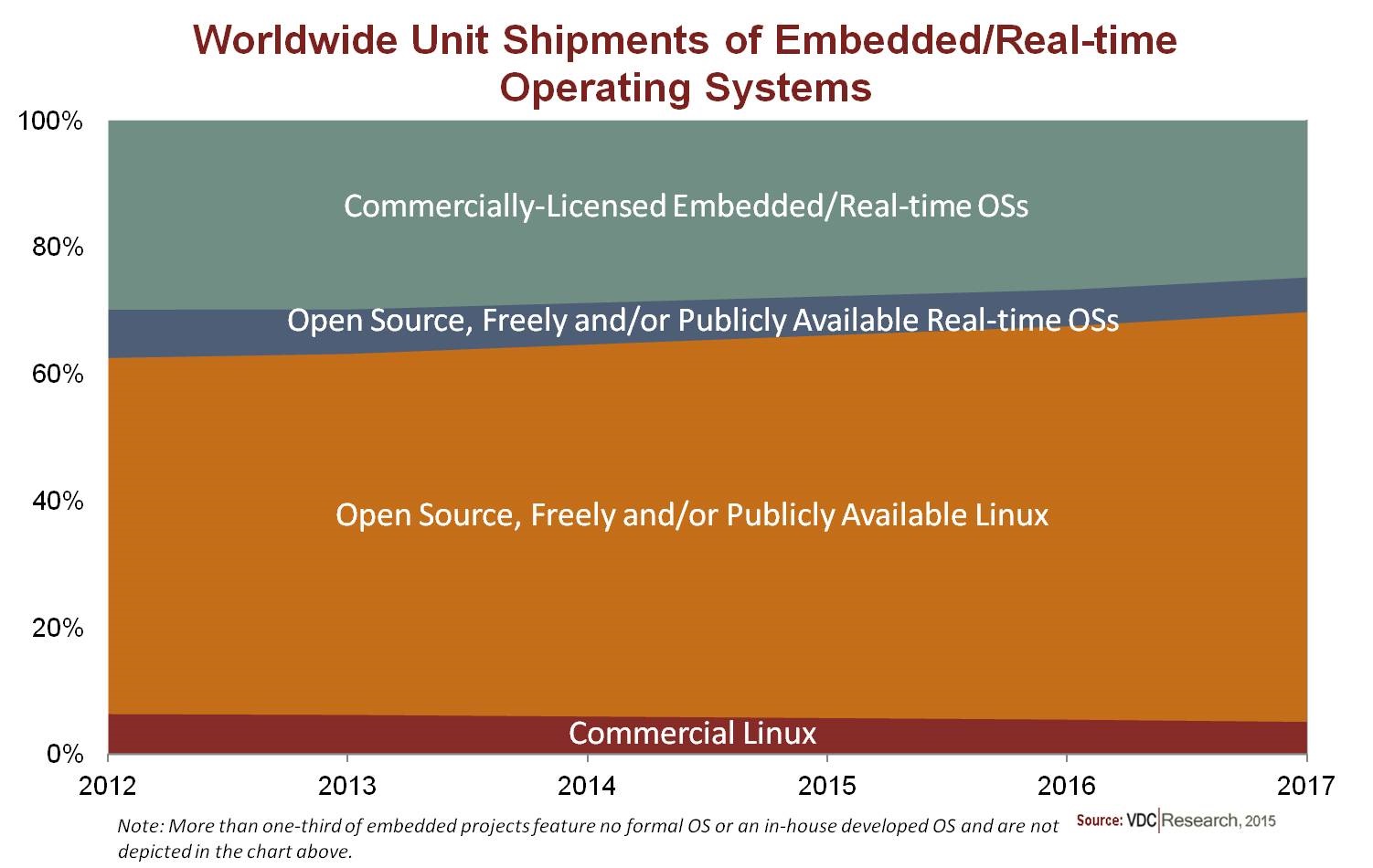
A new VDC Research study projects that Linux and Android will continue to increase embedded market share through 2017 while Windows and commercial real-time operating systems (RTOSes) will lose ground. The study suggests that the fast growth of IoT is accelerating the move toward open source Linux.

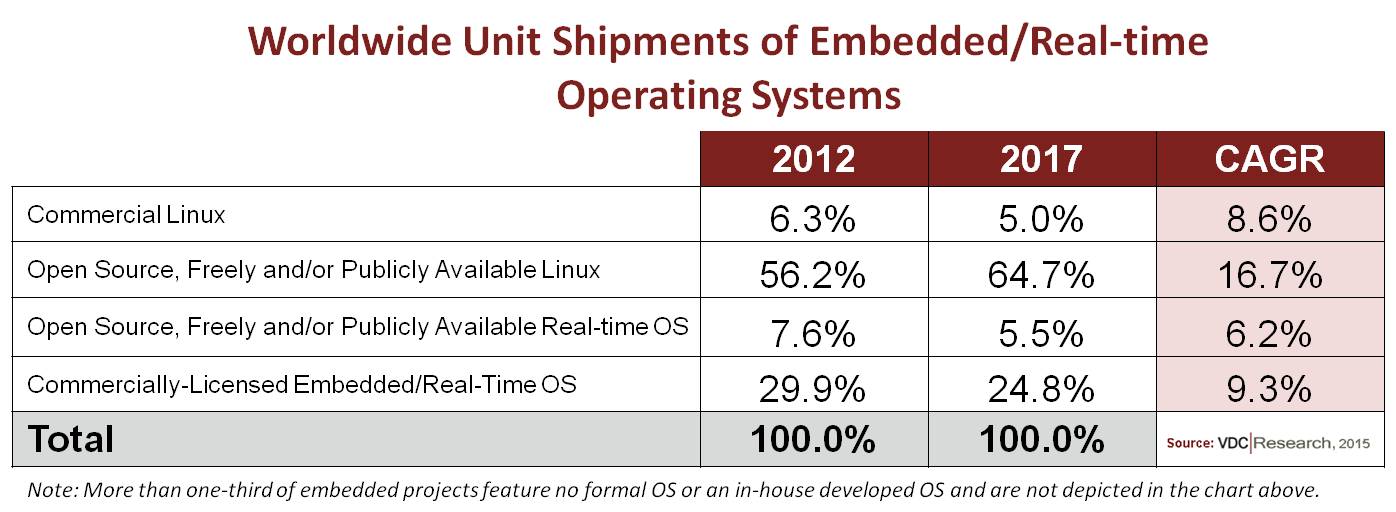
“Open source, freely, and/or publicly available” Linux will grow from 56.2 percent share of embedded unit shipments in 2012 to 64.7 percent in 2017, according to VDC’s “The Global Market for IoT and Embedded Operating Systems.” That represents a CAGR of 16.7 percent for open Linux, says VDC.

The surging open source Linux growth more than compensates for the decline from 6.3 percent to 5.0 percent in commercial Linux shipments. In 2013, there were more than 1.7 times more shipments of embedded devices based on open source OSes, including free RTOSes, than for commercial platforms, says VDC.

“Linux, in particular, continues to grow its developer base and support from leading vendors,” says Daniel Mandell, an analyst at VDC Research. “Linux is the primary OS for new connected device classes such as IoT gateways.”

Note that revenues from commercial distributions are higher, relatively speaking, than unit share. Microsoft, with its Windows Embedded, and Intel’s Wind River, which leads the commercial Linux market with Wind River Linux and also offers the VxWorks RTOS, together accounted for more than half of embedded revenues in 2013, says VDC. In addition, the entire embedded/IoT market is growing, so market share declines don’t necessarily suggest business declines.

The charts above and below do not include shipments of devices running the Linux-based Android. This segment is dominated by consumer smartphones and tablets, more than 600 million of which shipped in 2013, says VDC. While overall Android shipment share will start to decline slightly in 2017 due to saturation in the mobile consumer device market, VDC projects general embedded products running Android will gain share over the next few years. Over the last three years, Android shipments that did not include smartphones, tablets, and E-readers grew at a CAGR of 149.2 percent, culminating in about 15 million units shipped in 2014, says VDC.

In the general embedded market Android is eating into the share of Windows Embedded more than that of Linux, says VDC. Android is moving quickly into areas where Windows has generally outperformed Linux, including automotive infotainment, medical devices, military handhelds, and to a lesser extent, retail and signage.

While some of these applications can be considered IoT, Android is not doing as well in applications that are more typically labeled IoT, such as connected home and industrial automation. These are areas where Linux will continue to shine. Even Google’s Nest, for example, runs Linux rather than Android.
VDC realtime unit-shipments

Windows 10 tips hat to IoT

Microsoft’s embedded future will depend in large part on how Windows 10 fares in the embedded market beyond desktops. This week, the company revealed that Windows 10 will have a 6.6 GB smaller footprint than Windows 8, and will be available in a free, maker-oriented version designed for the Internet of Things. This Windows for Devices/IoT, or Windows 10 IoT, will not only run on the Raspberry Pi 2, but also two other open Linux boards: Intel’s MinnowBoard Max (Intel Atom) and the Qualcomm Dragonboard 410c (Snapdragon 410).

Windows 10 IoT is intended to replace Windows Embedded/CE, which only a decade ago dominated Linux in embedded along with its forgotten cousin Windows Mobile. Windows Embedded still owns a big chunk of the industrial, retail automation, and medical devices market, and drives 95 percent of the world’s ATMs. Yet, the proprietary nature of the aging platform has limited appeal among embedded developers.

Now Microsoft is trying to woo them with a free, if not fully open, platform better suited to IoT. “Microsoft’s efforts to support open development boards and the maker community should propel Windows in embedded and IoT applications,” says Mandell.

Open RTOSes supersede No-OS projects

The VDC figures do not include devices with a custom-built, in-house OS or no OS at all. This segment, which represents over a third of embedded projects, is the only real loser in the IoT era, suggests VDC. In recent years, open source and/or free RTOSes — particularly FreeRTOS — have expanded quickly, primarily in microcontroller unit (MCU) based devices that previously had no formal OS.

“The growth in open source RTOSes has been propelled by the need for an RTOS itself,” says Mandell.

The reason: IoT is demanding more from MCU-oriented devices. IoT nodes such as industrial sensor gear typically require wireless support, and perhaps a bit of security code. Firmware for such functions is difficult to build from scratch without an OS.

“The acceleration in computational, networking, and interface requirements on embedded devices is increasing the need for formal OSes,” says Christopher Rommel, VDC Executive Vice President. “It is likewise making the further development and maintenance of internal OSes often infeasible and/or cost prohibitive.”

Why then do VDC’s projections show unit share for open RTOSes declining? It turns out that the same IoT-driven complexity that has fueled open RTOSes is now driving growth in more sophisticated IoT devices that require more advanced OSes like Linux. This is particularly true of IoT gateways, which aggregate information from largely MCU-driven endpoints.

According to Rommel, the surge in open RTOSs “has caused sufficient disruption to make the pendulum swing back toward commercial options.” Rommel notes that commercial OS vendors have aggressively pursued the IoT market while releasing smaller footprint SKUs like the upcoming Windows 10 IoT or Wind River’s new VxWorks microkernel. Meanwhile, commercial RTOS vendors have lowered prices.

Why IoT likes open source

The growth of the Internet of Things is accelerating the ongoing trend toward open source, says Mandell. Open-spec SBCs like the Raspberry Pi, BeagleBone, and Arduino, are well suited for developing IoT endpoints, and the heterogeneous nature of the IoT, which demands integration with multiple third parties, aligns itself nicely with open platforms.

“Community-backed development platforms are playing an instrumental role in IoT prototyping and development,” he adds.

Yet, the IoT role for Linux will be limited by the degree to which it can control MCUs. While the barebone, Linux-derived uClinux can run on some MCUs (usually badly), microcontrollers are typically beyond the reach even of lightweight Linux distros like OpenWRT, which is popular in MIPS-based IoT devices. MCUs are beyond the scope of the more resource demanding Android and Windows. No wonder ARM decided to launch its own IoT-oriented Mbed RTOS for its Cortex-M MCUs.

“Linux is seeing broad use among IoT gateways, but the majority of node devices connecting to them will feature Cortex-M or Cortex-R processors,” says Mandell. Intel, meanwhile, is trying to push its Linux- and RTOS-supported Quark processor in the same market, he adds.

IoT gateways raise ante for embedded

IoT applications that will “really gain traction in the next few years” include connected industrial/manufacturing, remote health monitoring, automotive infotainment, and wearables, says Mandell. Home automation is another growth area, although Mandell sees this “extremely competitive” market as representing a smaller portion of the IoT pie.

Sensor-driven industrial IoT devices are increasingly connecting with IoT gateways, which aggregate node data and communicate with cloud services. This trend will later expand to home automation.

“IoT gateways are being increasingly deployed in environments like automotive/fleet, energy, and industrial or smart floor applications,” says Mandell.
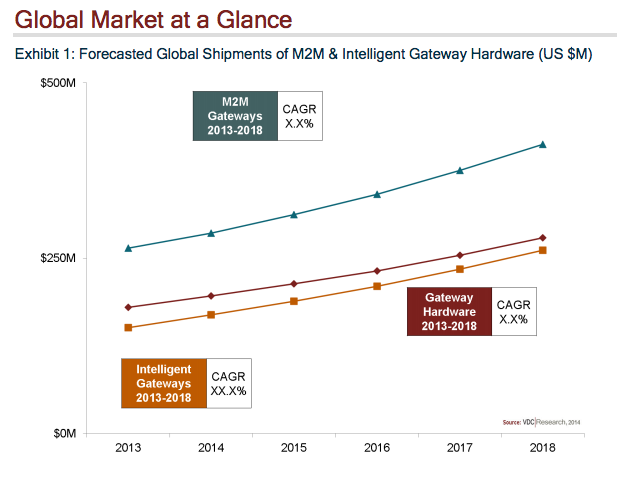
VDC gateway global marketIoT gateways are also enabling “new connected industry solutions and services,” says Mandell. “They typically reside in the cloud, where the vendor can enable stickier, subscription-based revenues, but they can also exist natively on an intermediary device. The growth of IoT solutions will be restricted, though, by long product lifecycles and the lack of engineer expertise in wireless.”

With IoT gateways and other complex devices such as automotive computers, embedded providers must now furnish more of the software stack in addition to supplying or supporting a variety of development tools and environments, says VDC. Examples include aggregating IoT data, security and communications frameworks, and virtualization.

This embedded middleware trend primarily plays to the strength of commercial OS vendors, helping to mitigate their declining share of unit shipments. Wind River has made a major push in Linux-based IoT gateways, and Microsoft has added IoT services to its Azure cloud platform, notes Mandell.

Open source IoT frameworks are also developing middleware. VDC points to DeviceHive and Qualcomm’s AllJoyn as early leaders here. In addition, “Eclipse has seen considerable traction with IoT,” says Mandell, noting that the membership of the IoT Eclipse group includes leading IoT vendors like Cisco, Eurotech, and Sierra Wireless.

Security and communications are priorities in IoT gateways and other advanced gear. Virtualization, which is used in under 20 percent of embedded projects, will be next on the radar. Key virtualization applications include secure, multicore systems, primarily in military/aerospace, industrial, and medical systems, as well as Network Functions Virtualization (NFV) in telecom, says Mandell.

Virtualization can also enable multi-OS implementations combining GUI-ready OSes like Linux with RTOSes. “Increasingly MCUs running open RTOSes are being used as secondary or tertiary OSes within more complex IoT devices, often for node and measurement tracking,” says Mandell. Devices with multiple OSes represented 22.6 percent of embedded projects in 2013, rising to 25.6 percent in 2014, says VDC.

Linux often plays a role in such heterogeneous designs, either via virtualization or hybrid SoCs. Xilinx and Altera started the hybrid trend with the Zynq and Cyclone V, respectively, both of which offer on-chip programmable fabric that spans Cortex-A9 cores running Linux and FPGAs running custom code. These hybrid SoCs partially open up difficult to program FPGA capabilities to mainstream developers.

Freescale has done something similar, except with MCUs. Like its earlier Cortex-A5/Cortex-M4 Vybrid SoC, which runs Linux and the MQX RTOS, respectively, its new Cortex-A9/M4 i.MX6 SoloX goes even farther in coordinating the two processors and OSes.

The coming merger of NXP and Freescale is aimed at part in developing hybrid strategies that combine Linux-friendly processors with MCUs. The combined company will rank second after Renesas in MCU share (2013) with 17.1 percent compared to 25 percent, says VDC. The ability to span these worlds are particularly important in IoT and automotive deployments.

More information on “The Global Market for IoT and Embedded Operating Systems” may be found at VDC Research.

 

Your Next Operating System: Your Datacenter

It’s time to start thinking about a new operating system layer: your entire datacenter, from networking to compute to storage, it’s all one big computer now.

Read more at ZDNet News

BioShock Infinite Is The Latest Game Showing Why Linux Gamers Choose NVIDIA

This week’s release of BioShock Infinite for Linux reinforces the common recommendation by Linux game developers that those seeking the best support and performance should use the proprietary NVIDIA graphics driver. Here’s an initial look at the BioShock Infinite performance on Ubuntu between AMD and NVIDIA graphics.

Read more at Phoronix

Wine 1.7.39 Is a Small Release, Fixes Issues with Microsoft Word and Nero Burning ROM

It’s been a while since the last release of the Wine software used by hundreds of thousands of Linux and Mac OS X users to install applications that only work on Microsoft Windows operating systems. Wine 1.7.39 is a development release and it comes three weeks after the Wine 1.7.38 version that introduced multi-channel audio support.

According to the release notes, a total o… (read more)

Read more at Softpedia News

MakeDongle Protects Mac, Windows or Linux Software with a USB Dongle

Excel Software announced MakeDongle 1.0 that runs on Mac or Windows computers.  MakeDongle generates a secure USB dongle that grants a license to run protected software on the attached Mac, Windows or Linux computer.  MakeDongle complements a diverse suite of protection and licensing tools.

Protected software can be stored on the computer or dongle itself.  When launch, the dongle is validated before the software is allowed to run.  When building dongles, MakeDongle can copy multiple licenses, applications or installers to the USB drive.  A dongle without additional software can be generated in seconds.

MakeDongle can be used standalone or with the QuickLicense, AppProtect or DocProtect products.  It also works with licensing plugins for FileMaker and Xojo.  To use MakeDongle alone, add a programming command to Mac or Windows software.  Several coding interfaces are supported with sample code provided for popular programming languages.

MakeDongle works with QuickLicense.  QuickLicense supports many license types including Trial, Product, Try/Buy and Subscription.  Software is protected by adding API programming commands or by using the AddLicense wrapping tool without programming.  

AddLicense is a popular choice for runtime environments like MAX or Unity since application code and resources can be securely embedded within the EXE or APP file.  Protected software can immediately launch when the appropriate dongle is present or first require a manual or online activation process.  MakeDongle and QuickLicense give developers many options for software and hardware protection.

MakeDongle works with QuickLicenseRT Linux.  QuickLicense and MakeDongle run on a Mac or Windows computer to produce a dongle and license files.  The protected Linux software works on a Linux computer with the dongle installed in any free USB port.

MakeDongle works with AppProtect.  AppProtects wraps a Mac or Windows software into a protected application that runs when the dongle is installed.  An optional computer unique password or online activation can be required.

MakeDongle works with DocProtect.  DocProtect wraps PDF, EPUB, Video, SWF or HTML files into a Mac or Windows application.  The protected document can be used on any computer when the dongle is installed.  An optional computer unique password or online activation can be required.  MakeDongle, DocProtect and QuickLicense can be combined to support other license types and features.

Excel spreadsheets can be protected using QuickLicense and OfficeProtect to produce an EXE for Windows or APP for Mac.  This protection can be combined with a USB dongle that determines what computer can run the application.  The application and encrypted data files can be stored on the dongle making them easily portable between computers.

MakeDongle 1.0 is $395 for a Single User License on Mac or Windows.  MakeDongle can be used to produce unlimited dongles for any number of products.  The product includes royalty-free distribution rights for protected Mac or Windows software that uses the included MakeDongle standalone API.  MakeDongle MacOSX runs on 10.7 or later.  MakeDongle Windows runs on Windows Vista, 7, 8 or 8.1 but can produce dongles that also work on Windows XP.  Visit the company web site for demonstration videos and product information.

Excel Software
Ph: (702) 445-7645
Web: www.excelsoftware.com
Email:
This e-mail address is being protected from spambots. You need JavaScript enabled to view it

Black Lab Linux MATE 6.1 Review

There are many different distributions that use Ubuntu as a base, but one you might not have heard of is Black Lab Linux. Black Lab Linux uses…you guessed it…a cute black labrador retriever as its mascot, and the distro itself is focused on providing a compelling and easy to use desktop version of Linux. Toward that end they’ve tried very hard to create a desktop distro that someone coming from a Mac or Windows could jump in and use, even if they are completely new to Linux.