
With the new Linux 4.0 kernel, you’ll need to reboot Linux less often than ever.
Read more at ZDNet News
 Anyone can learn Linux, given motivation and time to do so. But Thomas Hahn was born with albinism – a genetic disorder that’s left him nearly blind – and despite his great desire to transfer his Windows programming skills to Linux, it’s been nearly impossible to do on his own. He needs someone with sight – and Linux knowledge – to show him how.
Hahn is a graduate student in bioinformatics at the University of Arkansas at Little Rock doing genetic research on yeast through computational analysis. He’s now desperately looking for a tutor who knows Linux and knows how to program, so that he can complete his master’s degree research in time to remain eligible for funding in his PhD program.
“I know how to do my R analysis in Windows and I would need to do that in Linux,” Hahn said.
Because of his disability, Hahn has a grant that enables him to pay a tutor $8 per hour – but so far he has been unable to find someone knowledgable enough in his specific areas and willing to work at such an hourly rate. He also has an $8,000 grant to buy assistive technology, including a new Linux computer, but needs help figuring out what’s best for his specific situation.
“What kind of Linux should I get? I’ve gotten many different recommendations,” Hahn said. “I would like to have somebody helping me in this decision who understands my project, my visual requirements and the advantages and disadvantages of different Linux versions.
“My school is very supportive in helping me to start using Linux,” he said, “but they cannot help me with my disability-specific needs.”
He reached out to the Linux Foundation for help in finding a community member who can work with him on his research project.
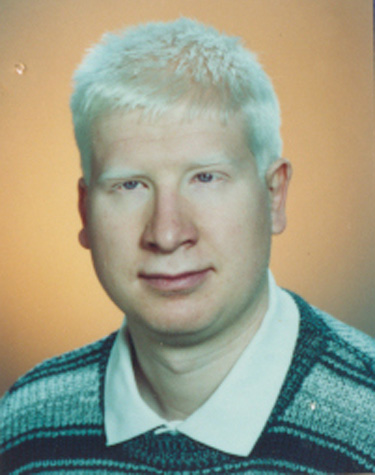
Hahn left his home country of Germany to get his B.S. in molecular biology from Louisiana Tech University with the desire to do research that might lead to better understanding of his own genetic disorder. He later enrolled in a master’s degree program but laboratory work proved too difficult for him – his sight was too poor to distinguish between the clear pipettes, for example, and his assistive glasses became contaminated by the radioactive isotopes used in genetic analysis.
“(The school) told me if I could combine the knowledge I have in biology with computers then I might have a future in research,” he said.
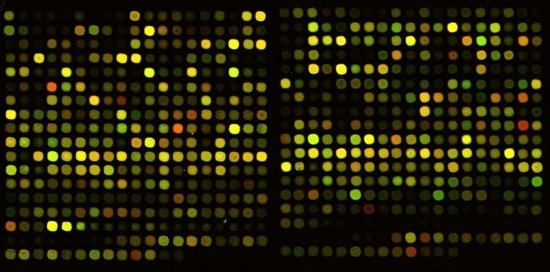
He spent 9 months doing vocational rehabilitation training at World Services for the Blind in Little Rock where he received one-on-one training to improve his computer skills and learn basic programming. Then he applied to the bioinformatics PhD program at the University of Arkansas and was accepted. He taught himself how to do microarray analysis in Windows based on the minimal computer training he received.
Due to his albinism, Hahn lacks pigment in his macula – the colored part of the eye’s retina that allows for central vision. His peripheral vision is still good enough that he can ride a bicycle around campus, he says. But his macula cannot focus enough to read without intense magnification. As a result, he works at 8x magnification, which lets him see about 1/64th of the screen that a fully sighted person does.
He has been able to get by in Windows with the help of Zoomtext, commercial screen-reading software for the visually impaired that magnifies and has text-to-speech functionality. But it’s very slow going; the software has difficulty reading aloud programming-related websites to him. And those it can read, it does sequentially from left to right and top to bottom.
“Unfortunately, this way of acquiring, finding, selecting and processing new information and answering questions is too tiresome, exhausting, ineffective and especially way too time consuming for graduating with a PhD in bioinformatics before my funding runs out,” he said.
Linux is a much more efficient environment for data analysis, Hahn said. For example, a single microarray can contain anywhere from two to 2,000 cell files, each representing a single data sample. And each cell file is in its own tar directory, he says. In Windows he must open each file and unpack it to read the data, then rename the files to be much shorter and easier to find again when he needs them. The day we spoke, Hahn had already spent 9 hours trying to rename files in one sample set.
“I can never put two windows side by side because my vision field isn’t big enough,” Hahn said.
In Linux he could use one command and unpack it all in one directory and write a script to rename the files.
Complicating matters is that everyone else in his bioinformatics program is using Linux – on Windows he doesn’t have anyone to troubleshoot issues with when he runs into problems.
“You can get by on Windows,” Hahn said, “but if you really want to do well in bioinformatics (and have a good job when you graduate) you have to know Linux.”
If you would like to help Hahn move from Windows to Linux or find a Linux tutor who can, please contact him directly via email at Thomas.F.Hahn2 (at) gmail.com, on Skype at tfh002, or call him at 318-243-3940.
 VMware, at Mobile World Congress on Monday, unveiled software to let carriers run OpenStack and the company’s vCloud cloud manager in tandem. The VMware vCloud for NFV platform is targeted to help carriers move to OpenStack while running vCloud for production cloud services. “With support for more than 40 different virtual network functions (VNFs) from more than 30 vendors, VMware vCloud for NFV is the only platform available today that runs different VNFs from different vendors side by side on the same cloud platform,” the company claims.
VMware’s announcement is one of many focused on telcos and carriers coming out of Mobile World Congress.
 It’s becoming increasingly clear that telecom companies and technology are playing a more and more important role in today’s cloud- and mobile-centric world. Shrewdly, Red Hat has focused its OpenStack efforts, and related initiatives, around telcos and their data centers. Working with Juniper Networks, Canonical is pursuing similar goals.
But neither Red Hat nor Canonical swings quite as big a stick as Google. That’s why it’s significant that for the first time Google has confirmed that it will offer connectivity to mobile users in the United States. Rumors had swirled that Google had carrier-class plans, but Sundar Pichai, the company’s senior vice president, confirmed the news once and for all at Mobile World Congress in Barcelona on Monday.
As reported in numerous media outlets, Pichai said “you’ll see us announce it in the coming months.”
 Custom ROM developer Cyanogen is pushing forward its strategy of becoming a more mainstream solution, no longer reserved for those with a taste for hacking.
Present at MWC 2015, the company has taken the wraps off a brand new branding which takes the Android mascot out of the picture, while opting for a cleaner cyan-ish look. No avatars involved.
The new logo highlights the company’s new stance which involves breaching the main consumer gates by putting its software on p… (read more)