Home Blog Page 1205

Overview of Three Chat Clients for KDE: Quassel, KVirc and Konversation

Internet Relay Chat has a history of over 25 years and it is still a widely used text-based protocol for chatting. In the Linux world, each distribution and major project has a chatting room, usually on Freenode, and here you can get online help, participate in collaborative projects, or just have a look at the latest discussions regarding the development of some project or application.

There are plenty of IRC clients out there for Linux, including console-based ones like the powerful Irssi, graphical ones like XChat, HexChat or the ones embedded in instant messaging clients. There are also web-based ones or clients available as add-ons for browsers, for example the ChatZilla add-on for Firefox.

In the following article I will briefly discuss about three clients for the KDE environment, leaving the others for a future article. All three of them come with features such as tabs, DCC, multiple networks or SSL.

Full article

TEA 40.0.0 Released – Qt Text Editor with Many Functions

TEA is a Qt-based text editor with support for tabs, syntax highlighting, spell-checking, editing support for Wikipedia or LaTex, as well as many configuration options. The latest release, 40.0.0, has been put out earlier today and it represents a major milestone.


Full article

How To Create QR Codes In Ubuntu/Linux Mint


Install QR Code in Ubuntu/Linux Mint

QR, stands for ‘Quick Response’ are the types of hyperlinks that can be physically distributed and users can easily access the url/text that is behind that QR Code. The QR code can encode upto 4,296 characters. QR codes can easily be created as a .png image on Linux machines with the program called QR Code Creator.
 

Read at LinuxAndUbuntu

Samsung, OpenChain Aim to Build Trust With Open Source Compliance

Samsung compliance copySamsung is a top-five contributor to the Linux kernel and contributes upstream to more than 25 other open source projects. Yet the public perception that the company doesn’t care about open source has persisted, despite its efforts, said Ibrahim Haddad, head of the Open Source Innovation Group at Samsung in a presentation at Collaboration Summit last week.

“We’re doing a lot in the space but yet people think we’re doing the opposite, so something is really wrong,” Haddad said.

This is in part due to a number of open source license compliance issues in the last few years, including an incident last August when Samsung was called out for violating Linux’s GPL, he said. Though the company fixed the problem within two weeks, he said, the resulting distrust lingers.

How does a company like Samsung go about building trust in the open source community and with its partners and customers in the broader software industry? Simply using open source software and contributing back to those projects upstream isn’t enough. Companies must ensure compliance with open source software licenses in their products as well.

To help companies build trust with the open source community through compliance, Samsung and several partner companies have formed a new working group, hosted by The Linux Foundation. OpenChain aims to create a set of compliance best practices for companies to follow internally. The group’s latest meeting was held at Collaboration Summit last week.

“It starts by building trust within your own company,” Haddad said. “That will eventually propagate through the whole software supply chain.”

Samsung’s Compliance Program

Samsung gets software from thousands of partners and ships millions of devices per quarter; ensuring compliance is not an easy task. The company does still experience some issues, Haddad said, but it has also succesfully reduced the number of missteps over the past three to four years by creating a new compliance program, led by the company’s Open Source Innovation Group. 

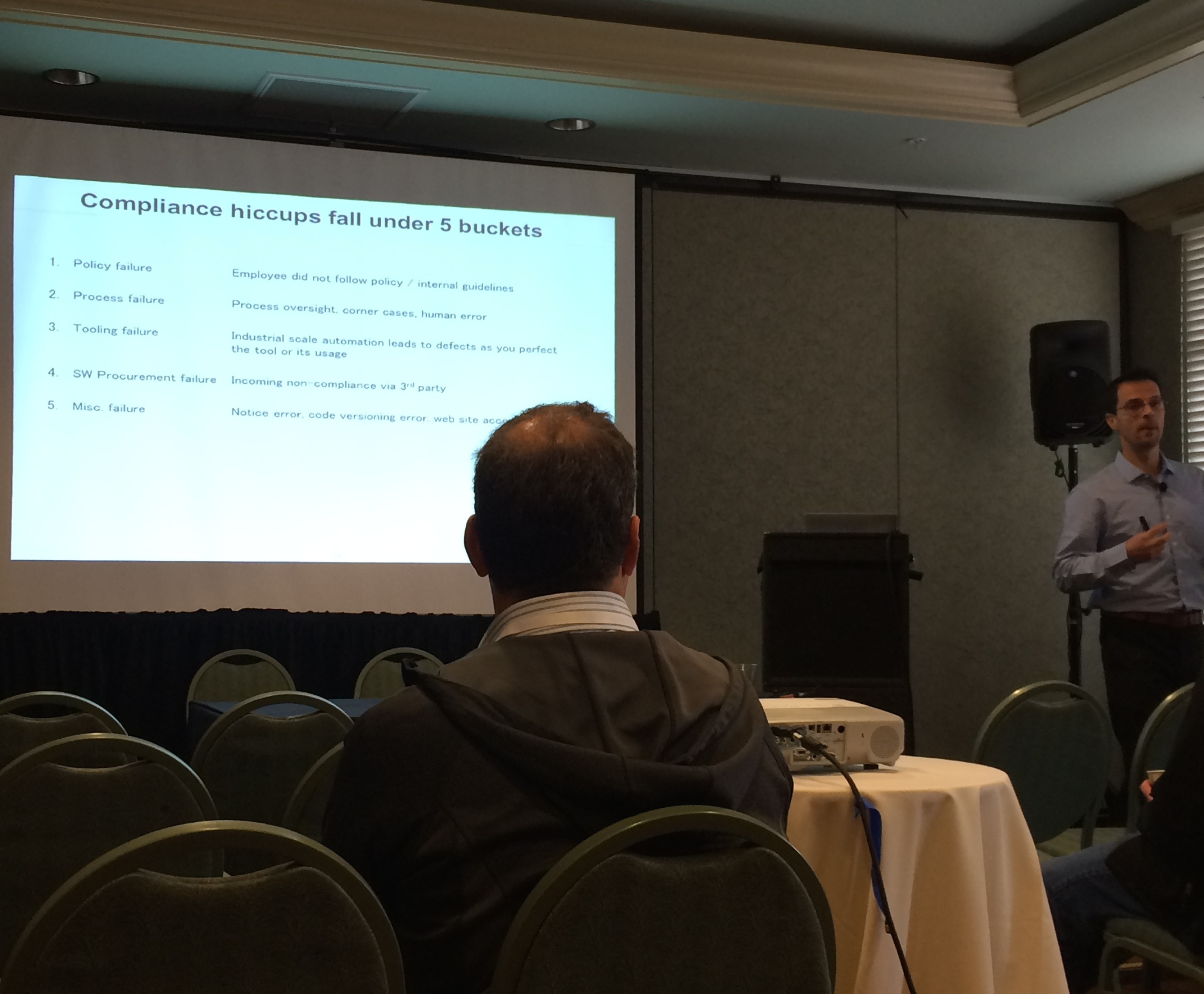
They began by identifying the common points of failure – where compliance issues were likely to arise. This included failures in policy, process, tooling, the software procurement process, and other minor areas such as failure to produce the proper binaries or a website access error. 

“We’ve experienced all of these multiple times,” Haddad said.

Then for every failure they found, they came up with a resolution. For example, to reduce confusion and errors in their compliance policy among employees, Samsung reduced it to essentially one, easy to remember sentence: Any code you get from the outside has to go through a process.  

The next step was making the compliance process very light weight. They track all incoming software from internal as well as third-party sources through a ticketing system. And there’s a 5-step approval process for creating or participating in open source projects, with product managers responsible for smaller requests (such as contributing minor patches to a project) and an open source review board taking larger requests such as forming a new open source project. 

They also have a common set of tools for open source projects now, and a set of courses for developers on open source compliance and development. Developers who want to earn the presitigous title of “software architect” at Samsung are required to take those two courses as part of their overall training for advancement, for example. 

Scaling compliance for an industry

Based on its own experiences, Samsung’s Open Source Group has boiled open source compliance down to five basic goals that companies should meet in order to help build trust internally and within the industry:

Goal 1: Everyone knows their FOSS responsibilities.

Goal 2: Responsibility for achieving compliance is assigned.

Goal 3: FOSS content (packages/licenses) is known. 

Goal 4: FOSS content is reviewed and approved.

Goal 5: FOSS obligations are satisfied.

“As a company, our responsibility is to meet those goals and introduce practices that support each goal,” Haddad said. “If everyone had those in place, our compliance problems would go away.”

The OpenChain work group will help flesh out the criteria for meeting each goal and decide how to verify companies that participate — whether it’s independently through a third-party mechanism or self-policed. Anyone can join the work group and contribute to the conversation.

Companies can then work on implementing each of the five goals incrementally. Their level of completion would be scored on a “scale of compliance.”

“Then when I’m doing business with a company, I can ask them where they are on the scale of compliance,” Haddad said. “That brings a certain level of trust.”

“Just for a second let’s imagine that everyone we interact with on the software side acutally has this in place,” Haddad concluded in his presentation. “In that case the problem we had in August wouldn’t have happened.”

 

Creating Forms for Easy LibreOffice Database Entry on Linux

The LibreOffice suite of tools includes a very powerful database application ─ one that happens to be incredibly user-friendly. These databases can be managed/edited by any user and data can be entered by anyone using a LibreOffice-generated form. These forms are very simple to create and can be attached to existing databases or you can create both a database and a form in one fell swoop.

There are two ways to create LibreOffice Base forms:

  • Form Wizard

  • Design View.

Design view is a versatile drag and drop form creator that is quite powerful and allows you to add elements and assign those elements to database tables. The Form Wizard is a very simple step-by-step wizard that walks the user through the process of creating a form. Although the Wizard isn’t nearly as powerful as the Design View ─ it will get the job done quickly and doesn’t require any form design experience.

For this entry, I will address the Form Wizard (in a later post, I will walk you through the more challenging Design View). I will assume you already have a database created and ready for data entry. This database can either be created with LibreOffice and reside on the local system or be a remote database of the format:

  • Oracle JDBC

  • Spreadsheet

  • dBASE

  • Text

  • MySQL

  • ODBC.

For purposes of simplicity, we’ll go with a local LibreOffice Base-generated database. I’ve created a very simple database with two tables to be used for this process. Let’s create a data entry form for this database.

Opening the database

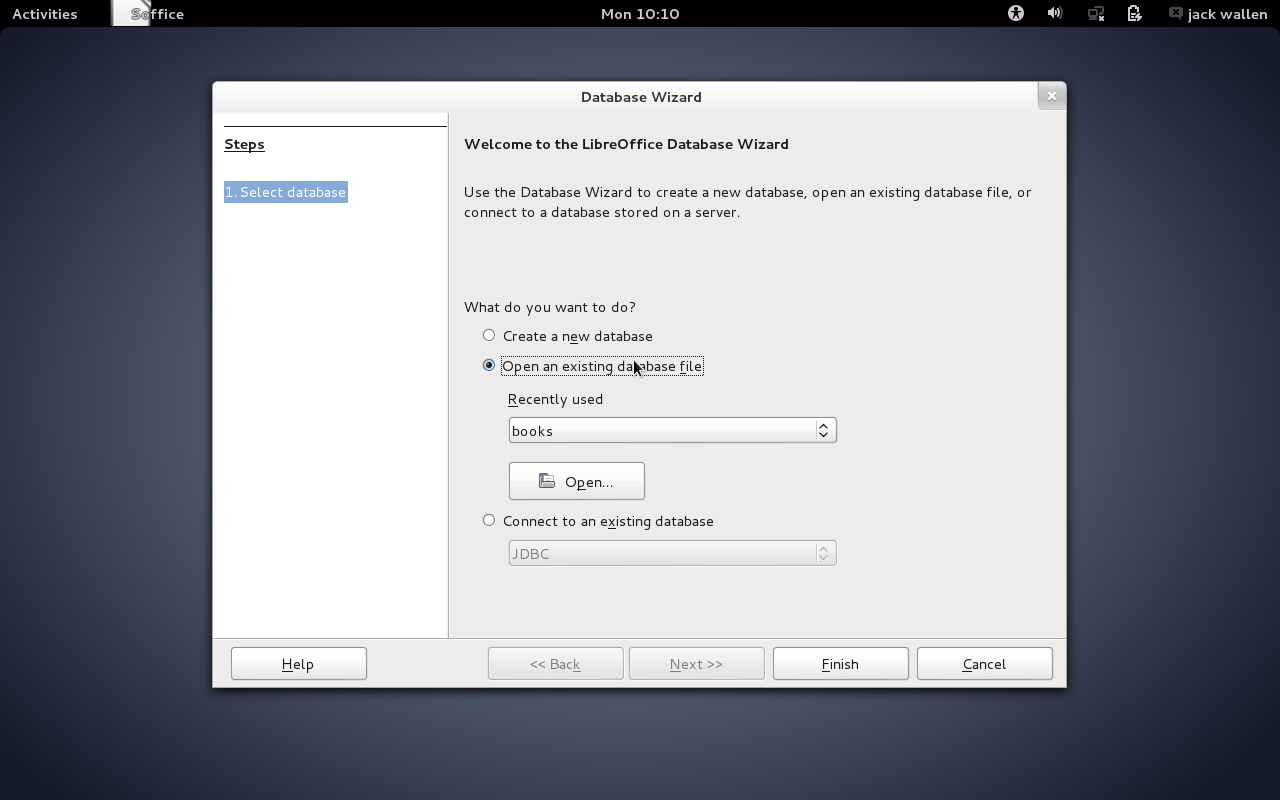
The first step is to open LibreOffice Base. When the Database Wizard window appears (Figure 1), select Open an existing database file, click the Open button, navigate to the database to be used, and click Finish

lo base form 1

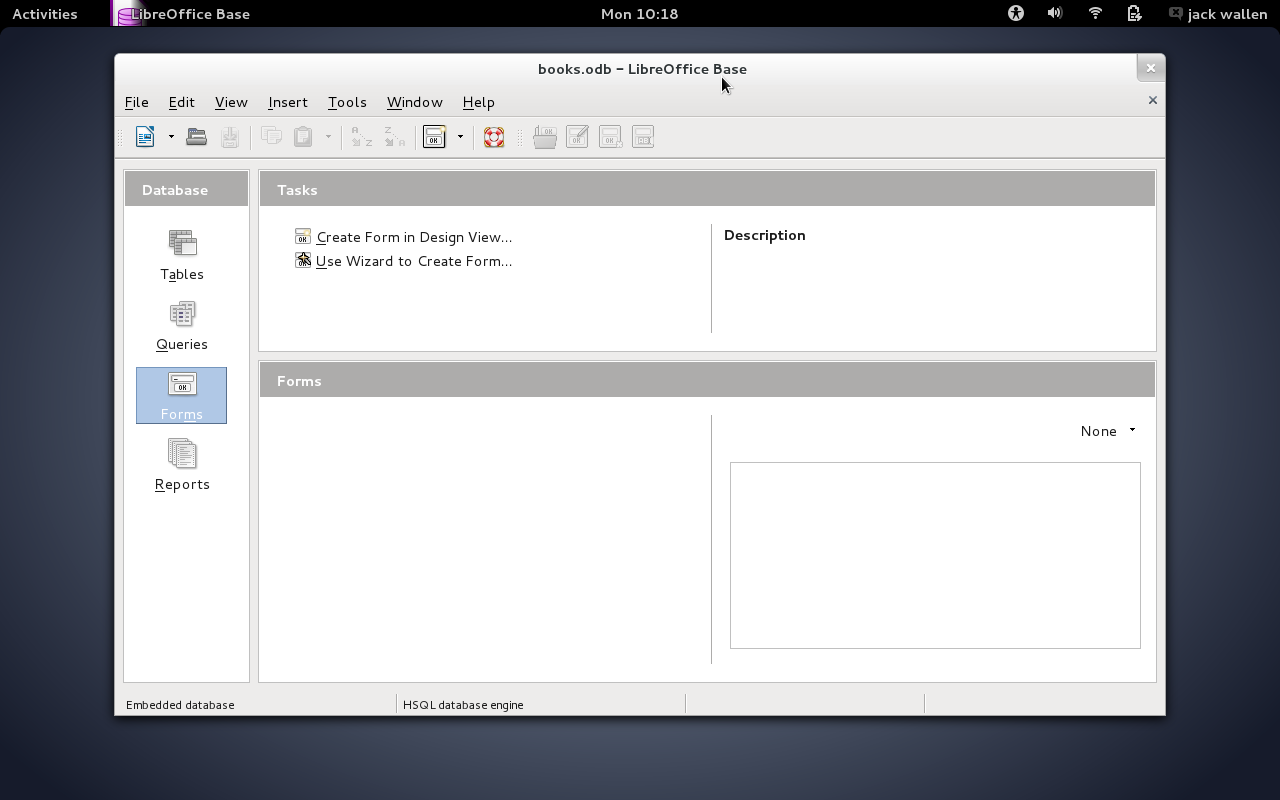
The next window to appear is the heart and soul of LibreOffice Base. Here (Figure 2) you can manage tables, run queries, create/edit forms, and view reports of the opened database.

lo base form 2

Click the Forms button in the left-side navigation and then double-click Use Wizard to Create Form under Tasks.

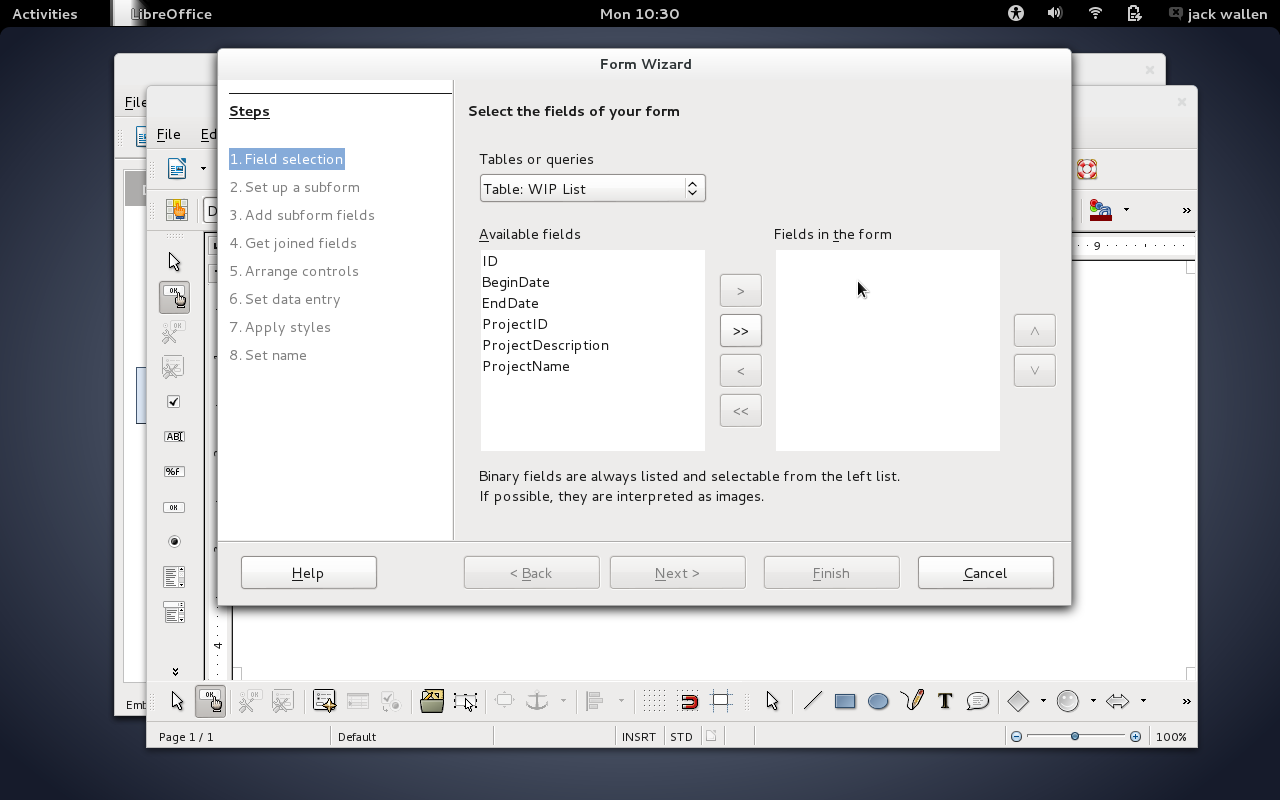
When the database opens in the Form Wizard, your first step is to select the fields available to the form. You do not have to select all fields from the database. You can select them all or you can select as few as one.

If your database has more than one table, you can select between the tables in the Tables or queries drop-down (NOTE: You can only select fields from one table in the database at this point). Select the table to be used and then add the fields from the Available fields section to the Fields in the form section (Figure 3).

lo base form 3

Add a sub-form

Once you’ve selected all the necessary fields, click Next. At this point, you can choose to add a sub-form. A sub-form is a form-within-a-form and allows you to add more specific data to the original form. For example, you can include secondary data for employee records (such as work history, raises, etc.) to a form. This is the point at which you can include fields from other tables (besides the initial table selected from the Tables or queries drop-down). If you opt to create a sub-form for your data, the steps include:

  • Selecting the table

  • Adding the fields

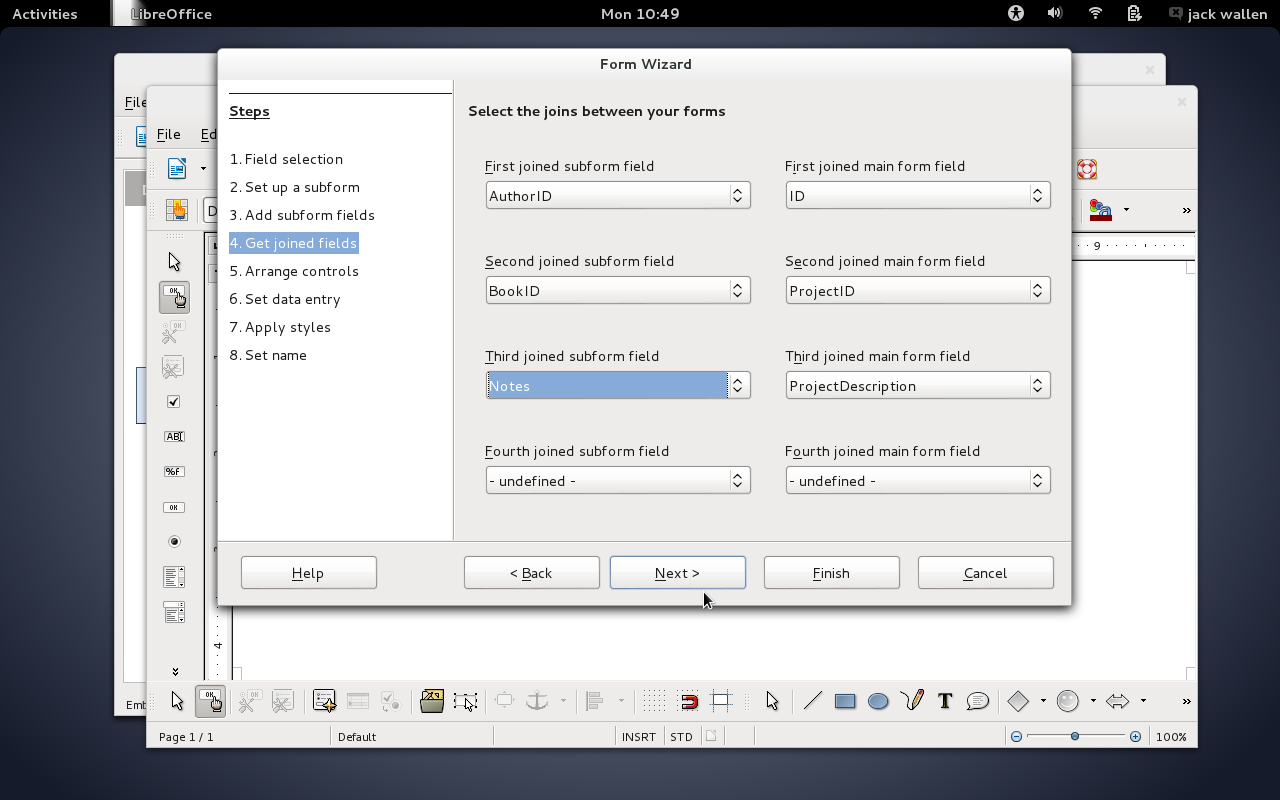
  • Joining the fields (such as AuthorID to ID ─ Figure 4).

lo base form 4

Arrange form controls

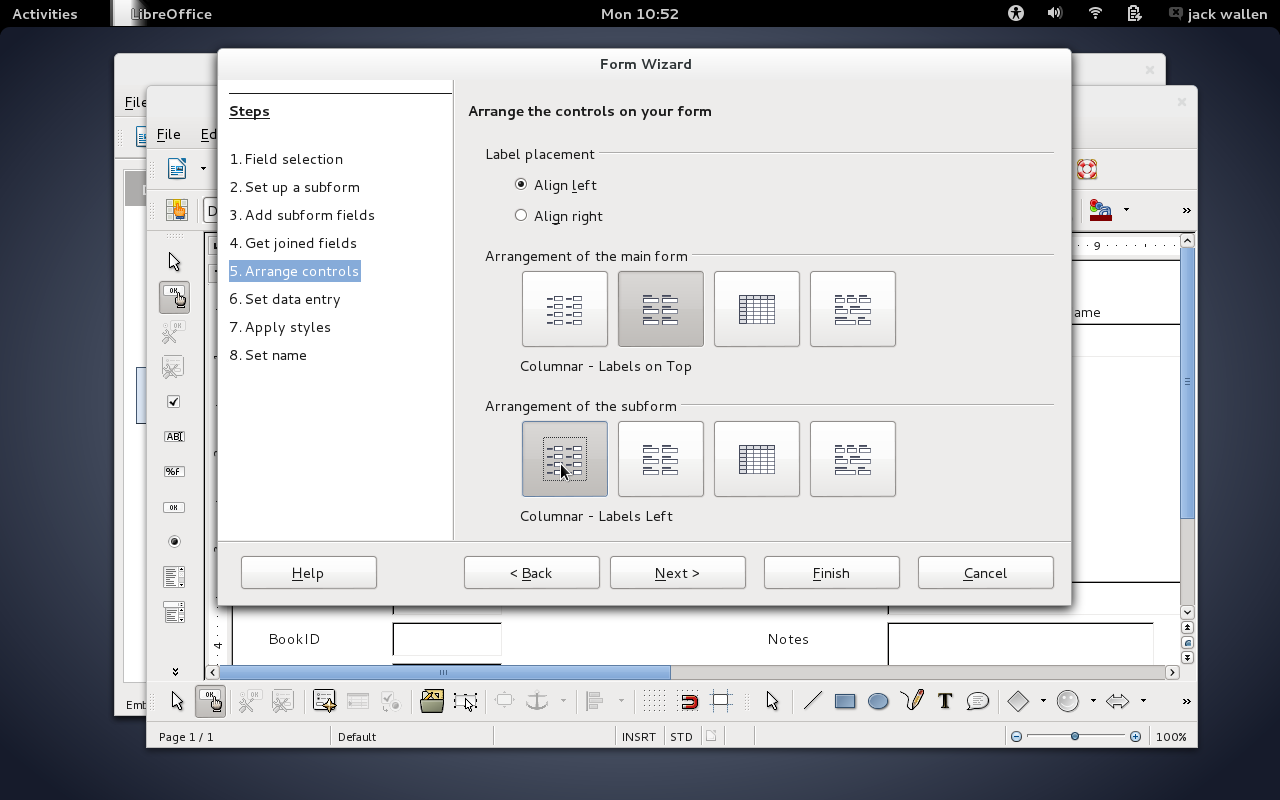
After all sub-forms are added, click Next to continue on. In the next step, you must arrange the controls of the form. This is just another way of saying how you want to the form to look and feel (where do you want the data entry field to reside against the field label). You can have different layouts for forms and sub-forms (Figure 5).

lo base form 5

Select data entry mode

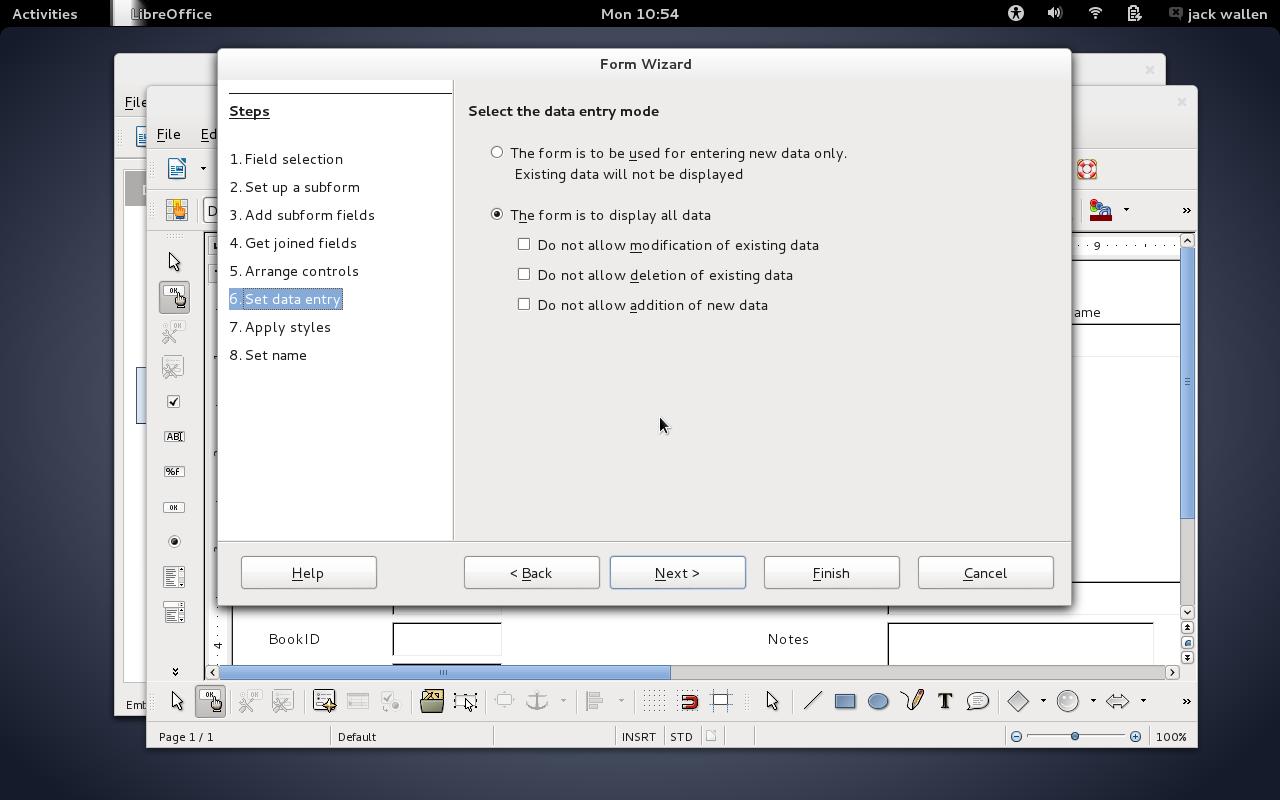
Click Next when you’ve arranged your controls. The next step is to select the data entry mode (Figure 6). There are two data entry modes:

  • Enter new data only

  • Display all data.

If you want to use the form only as a means to enter new data, select Enter new data only. If, however, you know you’ll want to use the form to enter and view data, select Display all data. If you go for the latter option, you will want to select whether previously entered data can be modified or not. If you want to prevent write access to the previous data, select Do not allow modification of existing data.

lo base form 6

Make your selection and click Next.

Start entering data

At this point you can select a style for your form. This allows you to pick a color and field border (no border, 3D border, or flat). Make your selection and click Next.

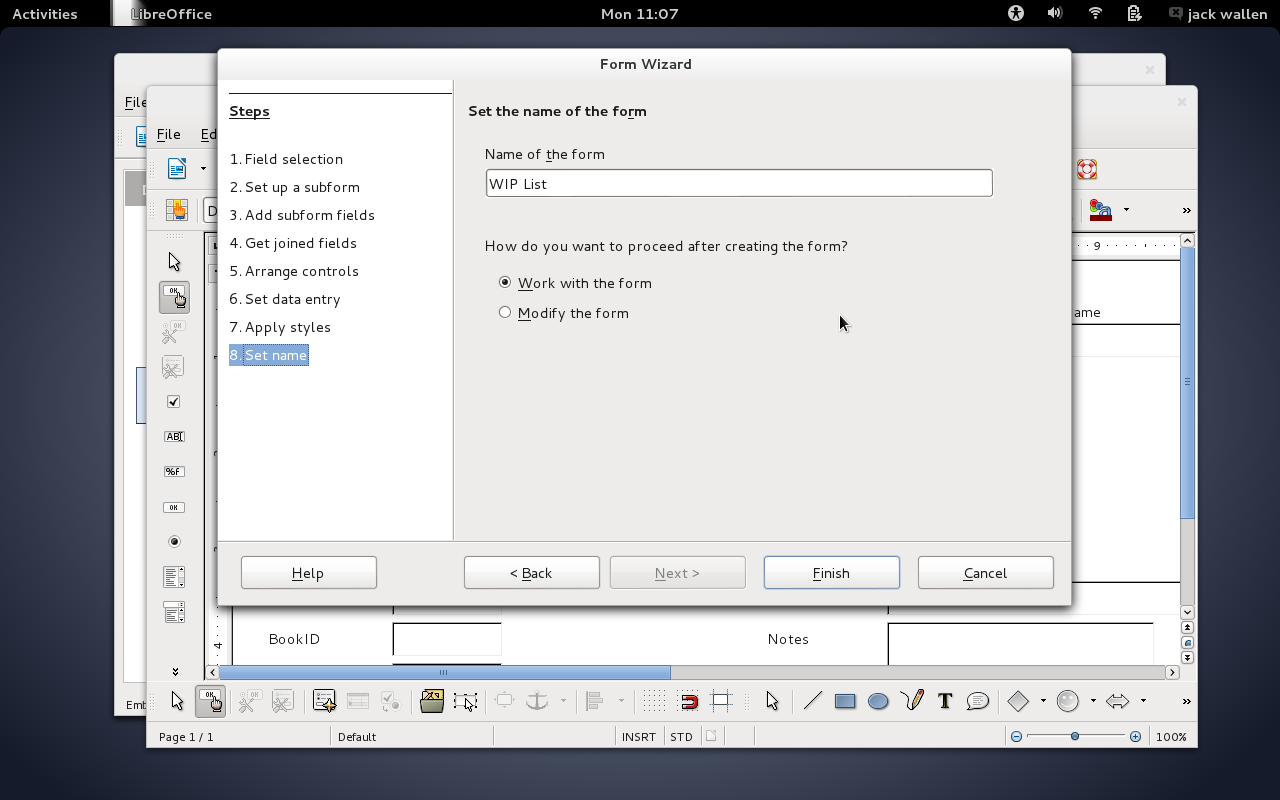
The last step is to name your form. In this same window you can select the option, immediately begin working with the form (Figure 7). Select that option and click Finish. At this point, your form will open and you can start entering data.

lo base form 7

After a form is created, and you’ve worked with and closed said form … how do you re-open a form to add more data? Simple:

  1. Open LibreOffice Base.

  2. Open the existing database (in the same manner you did when creating the form).

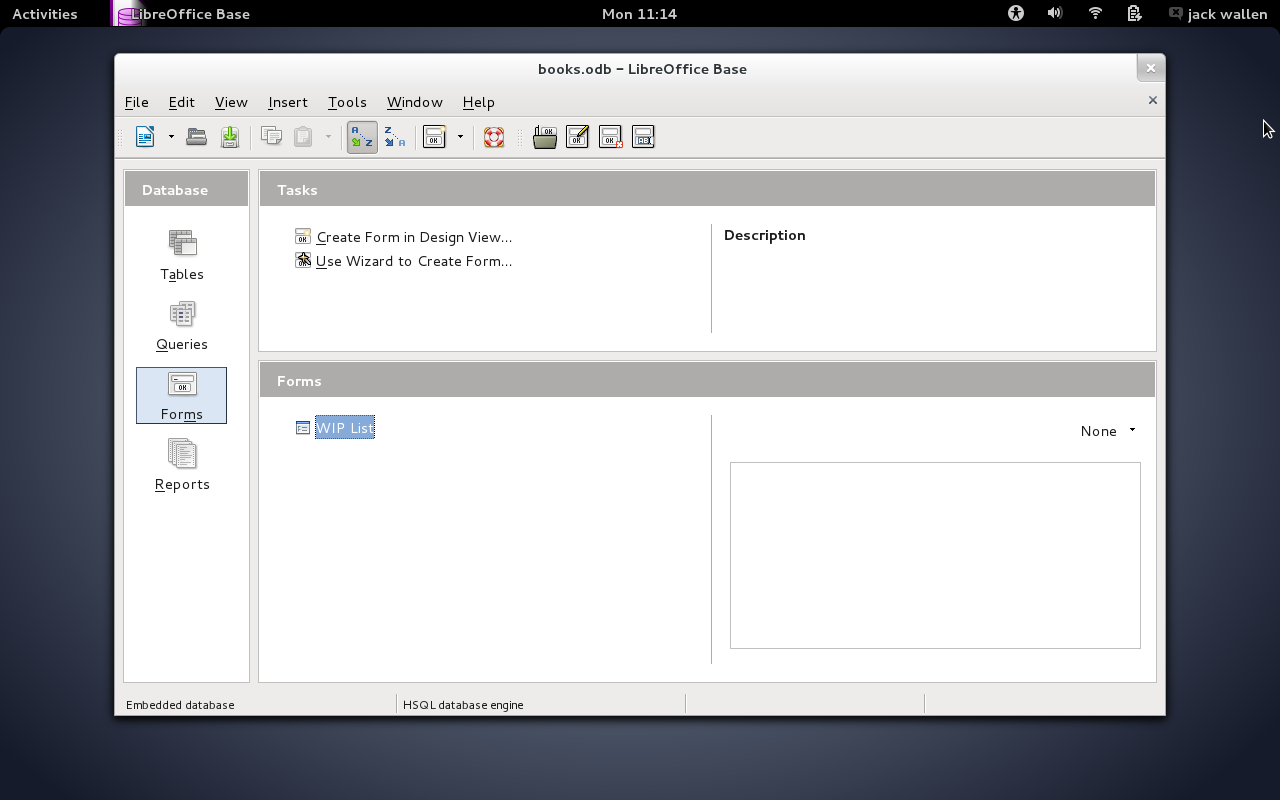
  3. Double-click the form name under Forms (Figure 8).

  4. Start entering data.

lo base form 8

As a final note, make sure, after you finish working with your forms, that you click File > Save in the LibreOffice Base main window, to ensure you save all of your work.

You can create as many forms as you need with a single database ─ there is no limit to what you can do.

If you’re looking to easily enter data into LibreOffice databases, creating user-friendly forms is just a few steps away. Next time we visit this topic, we’ll walk through the Design View method of form creation.

HP Targets Cisco and Facebook With New Line of Open-Source Networking Gear

Hewlett-Packard said on Thursday that it would sell a new line of networking switches that are manufactured by a Taiwanese company and depend on Linux-based, open-source software from another company.

HP, once at the center of high-tech manufacturing, will not make the new networking equipment but will act as a reseller, providing both online ordering and worldwide support for the product.

Read more at The New York Times.

It Could Be A While Before Seeing The Tamil GPU Driver Code

While the Tamil driver is moving along for open-source ARM Mali T-Series graphics support, it could be a while before seeing the actual source code…

Read more at Phoronix

Code Merged This Week For Linux 3.20/4.0 Is Just As Exciting As Last Week

Last weekend I covered the changes so far for the next kernel release, which will be called either Linux 3.20 or Linux 4.0 depending upon Linus Torvalds’ end decision. This week more exciting code has landed…

Read more at Phoronix

Edubuntu 14.04.2 LTS Has Been Officially Released

Along with the release of Ubuntu 14.04.2 LTS (Trusty Tahr) GNU/Linux computer operating system, as announced by Adam Conrad on behalf of Canonical, the Edubuntu team was also proud to announce earlier today, February 20, the immediate availability for download of Edubuntu 14.04.2 LTS, a release that includes new kernel and graphics stacks.

Just like Ubuntu 14.04.2 LTS, the Edubuntu 14.04.2 LTS operating system, which is also supported with security patches and package updates for 5 years, un… (read more)

Read more at Softpedia News

Facebook is Aiming to Overcome Cisco and Juniper with Open Source Networking

Facebook recently released as an open source project its design for a networking device that it says will coordinates the actions of hundreds of thousands of servers in Facebook’s data centers. The target are the bigs like Cisco and Juniper but, respect to those ones, FB has some secret weapons and a huge knowledge of […]

Continue Reading

 
Read more at Open Electronics