Laptops running Google’s Chrome OS are capable devices suitable for work, play, and education. These two Chromebooks won’t break the bank.
Read more at ZDNet News
Utkarsh Sevekar has announced the release of Rebellin Linux 2.5, a set of distributions with a choice of MATE or GNOME desktop environments – based on Debian 7 (the “Synergy” edition) or Debian “Sid” (the “Adrenalin” edition): “We’re proud to announce the release of Rebellin Linux 2.5. Plenty….
 Live patching is the hottest trend when we’re talking about Linux kernel-based operating systems. It was created by SUSE, based on KGraft, and distributed in the SUSE Linux Enterprise Server distribution at the end of 2014. Everyone knows that Linux systems don’t require a reboot every time some packages have been updated, except for the kernel. Well, this is not the case anymore with live patching.
In a world where you have to do at least one or two reboots per week of your Windows computer… (read more)

February 14 is a day to express your love for others and in keeping with that theme, openSUSE extends its gratitude toward the organizations and people who make Free and Open Source Software a reality.
Every year, the Free Software Foundation Europe asks all FOSS users to think about the hard-working people in the Free Software community and to show them their appreciation individually on this “I love Free Software”-Day.
As users and distributors of FOSS, we are thankful for the contributors who dedicate their time and efforts to enable people from around the world to use, study, share and improve free software.
FSFE has done a great thing in raising awareness of contributions made by dedicated coders, developers and hackers through the “I love Free Software”-Day.
Find out more about #ilovefs.
Data is the crucial bit in our personal and professional existence. Without data we would be lost in a vast expanse of nothingness. Spreadsheets, email, documents, contacts, databases, files, folders … the list goes on and on. In a perfect world, every byte of local storage would be backed up to an external hard drive or cloud storage service.
We don’t always live in a perfect world.
Sometimes data has to be recovered. When that tragedy strikes, it’s good to know you have the tools on hand to get the job done. Thankfully, Linux is no stranger to data recovery. In fact, there are a number of solid tools you can use to get back lost data. I want to introduce you to a few tools that do a great job of recovering data.
Of course, as with any instance of recovering lost data ─ nothing is perfect. You can try any of the various tools available only to find the data simply not recoverable. That is the nature of the digital age. To that end, always make sure you have a solid, recent backup available in the event your system goes down hard.
Let’s first start with tools to help you recover data from a downed machine (say a machine with file system or partition issues). These tend to be the easiest to work with as they are all-inclusive tools. My favorite of these tools is SystemRescueCD. This particular rescue CD supports most of the known partition formats and includes all the tools you need to recover data (including sfdisk, Gparted, TestDisk, PhotoRec, FSArchiver, and much more) and includes plenty of tools to work with.
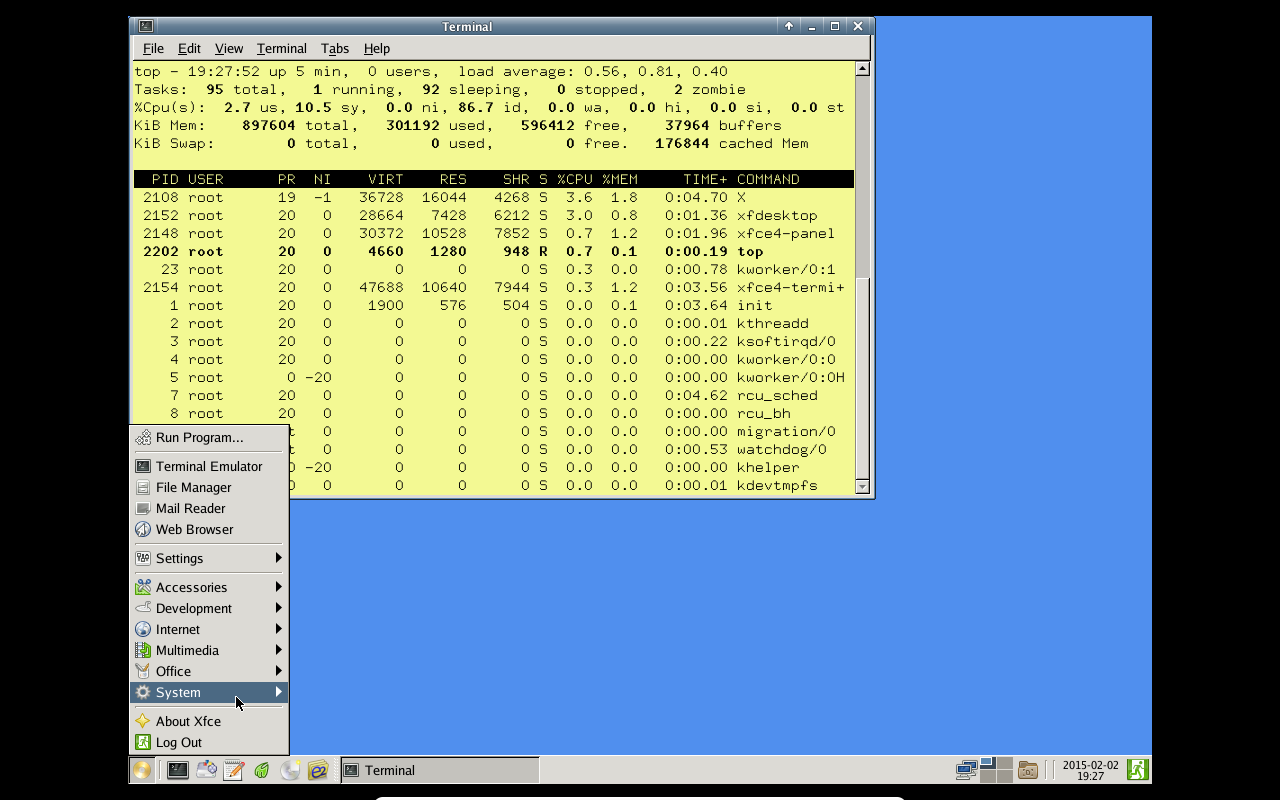
Like most rescue disks, SystemRescueCD works by booting your system from either the CD or USB drive and then uses the tools to work with your file system. Unlike a lot of other rescue tools of this nature, SystemRescueCD offers a full-blown graphical environment to aid you in the task of recovering data (Figure 1).
If you are rescuing data from one machine to another, you will need to attach an external hard drive to the system in order to move the rescued data (or you can use the built-in Samba support and copy data to a networked location). If the idea is to recover or repair a partition table, I strongly suggest copying sensitive data over over anyway ─ on the chance the partition table or file system is further damaged.
There are other rescue systems available that are similar in both intent and style as SystemRescueCD. Each has its pros and cons but, in the end, will get the job done. Some of my favorite Linux data/system recovery distributions include:
Once you get beyond a full-blown distribution, you start looking at purpose-driven tools geared toward recovering data. Linux has just about any tool you need for this task. Let’s take a look at some of them.
Ddrescue
If you’re looking for the command line tool that will copy data from one file or block device to another, it’s Ddrescue that you need. There are a few things you should know about using the Ddrescue:
Never use this tool on a read/write mounted drive or partition.
Do not try to repair a file system with I/O errors.
Destination will be overwritten ─ so make sure destination is free of important data.
This tool is great for recovering data from a failing drive to an external source. You would first need to install the tool on your working system, attach both the failing drive and a destination drive, via USB, and use the tool to extract the necessary data.
Installing the tool on an Ubuntu system can be done with a single command:
sudo apt-get install gddrescue
The command structure of Ddrescue is:
ddrescue [options] infile outfile [logfile]
Let’s use Ddrescue to copy a partition from drive /dev/sdg to drive /dev/sdb. The command (run on a system that works with sudo) would look like:
sudo ddrescue /dev/sdg /dev/sdb
The above command would copy everything from the failing source to the healthy target. Data recovered!
Testdisk
This particular data recovery tool doesn’t actually try to copy data. Instead it attempts to correct partition-level issues that might be preventing you from accessing or recovering your data. Testdisk can:
Recover lost partitions
Make disks bootable again
Fix a partition table
Restore the master boot record
Restore boot sectors
Restore filesystem tables
Undelete files from NTFS, FAT, exFAT, and ext2 filesystems
Copy files from deleted NTFS, FAT, exFAT, and ext2/3/4 filesystems.
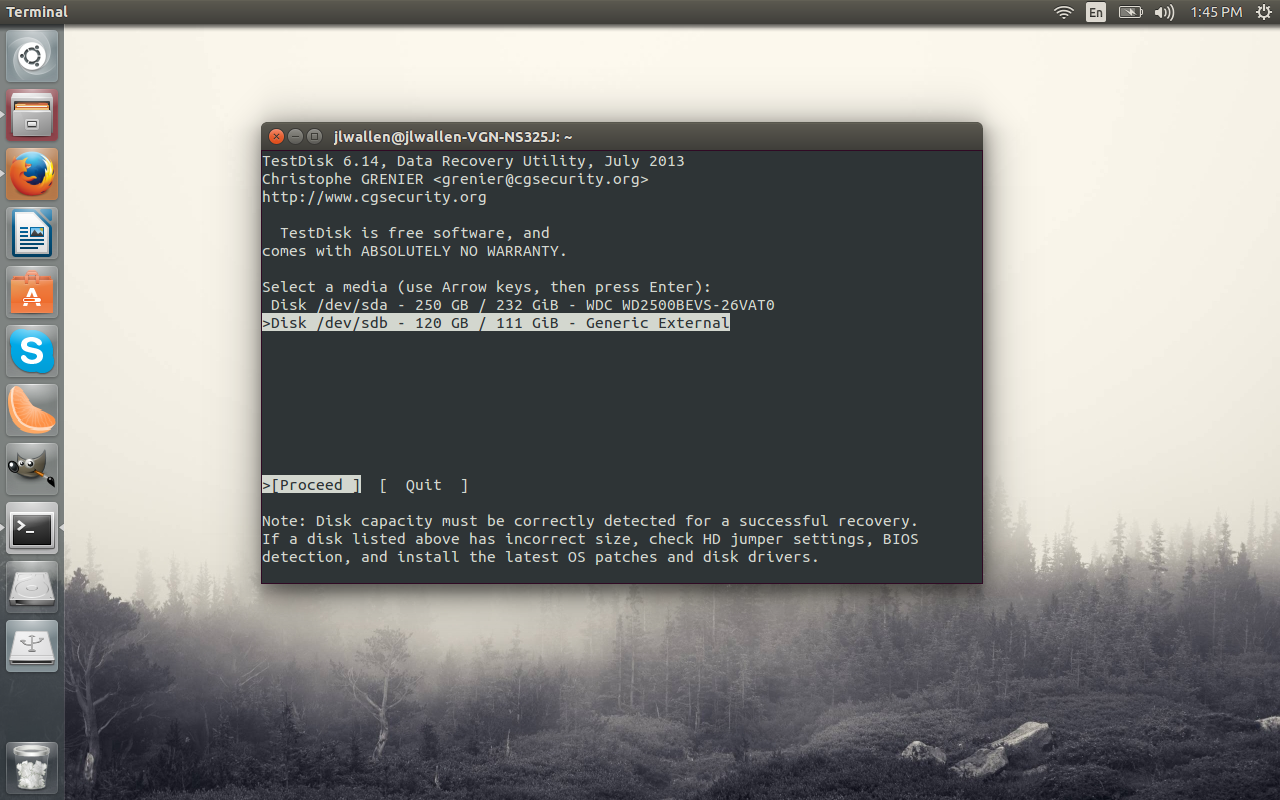
Testdisk is an ncurses tool that runs within a terminal (Figure 2).
To install Testdisk on an Ubuntu system, issue the command:
sudo apt-get install testdisk
Run the tool with sudo testdisk and walk through the easy-to-use wizard for working with your externally attached drive.
Photorec
If you’re looking to recover lost files, photos, videos, etc. Photorec is what you want. This tool is part of Testdisk, so once you’ve installed Testdisk, Photorec is ready to serve. This particular tool completely ignores the file system and looks directly at the underlying data. This means, if your file system is damaged, there’s a chance the data can still be recovered.
To start Photorec, issue the command:
sudo photorec
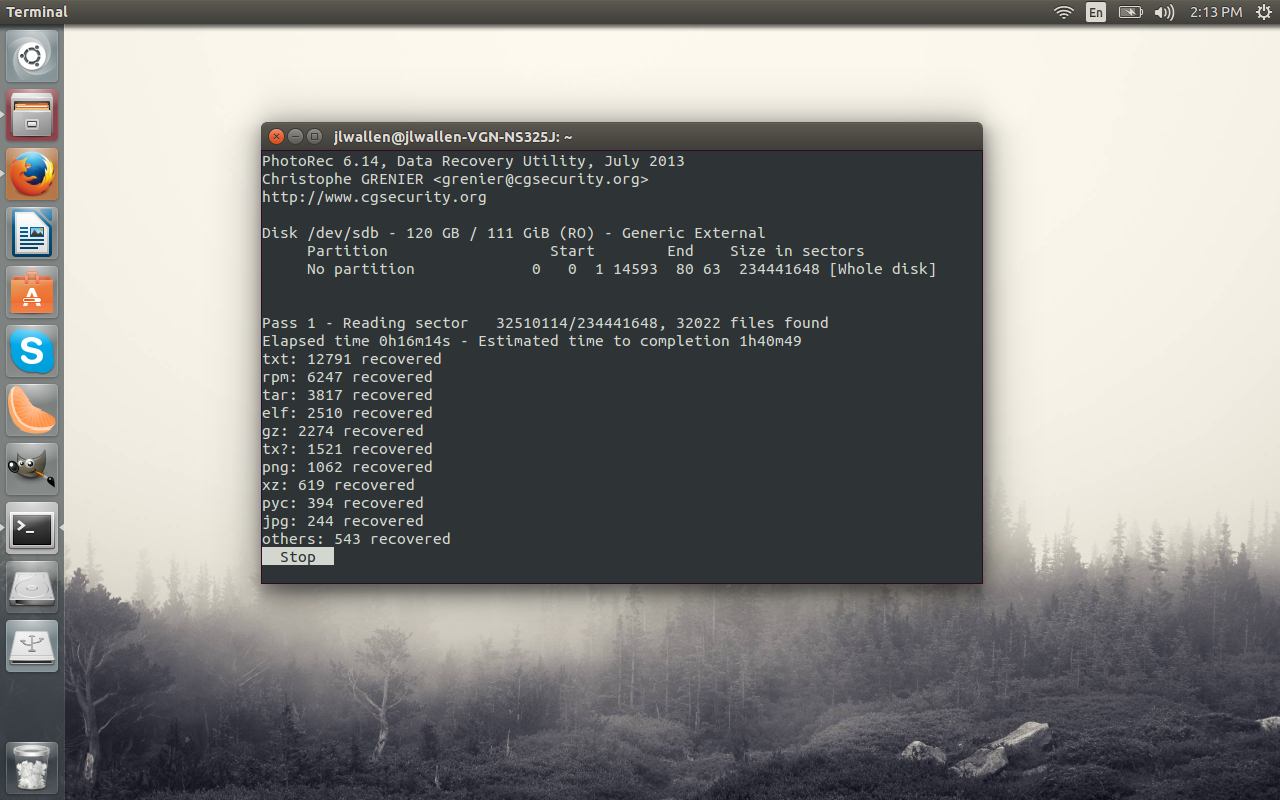
The interface for Photorec is similar to that of Testdisk. As Photorec works, it will display, in real time, what types of files it has recovered (Figure 3).
You do want to make sure the destination partition has enough space to contain the rescued data (you can copy the data to internal storage or external storage).
If you are looking for tools to help you recover data on a Linux system, there are plenty to be had. This post offers you a look into what is available for admins to use ─ from full-blown disk recovery suites to individual tools. There are plenty of other tools ready to aid you in your quest to recover data.
For more information on such tools, check out the Linux.com System Management Forum, where you can interact with your peers and learn even more about data recovery.
 Apache Mesos is one of a select group of open source projects shaping the future of enterprise cloud infrastructure and distributed computing.
The rise of container technology in the past few years has created a unique opportunity for the project, which has been quickly growing its code base and contributions. As companies increasingly turn to Linux container technology to package and run their web applications, they are looking for software to help distribute and orchestrate those containers across data centers, says Dave Lester, open source advocate and software engineer at Twitter.
“We’re already seeing more companies looking at Mesos this year,” Lester said. “Many of the folks vetting it are looking to understand how this technology will play into their container strategy.”
Originally a UC Berkeley research project, Mesos was adopted early-on by Twitter, and became a Top-Level Apache Software Foundation project in 2013. It’s now used by other web giants including AirBnB, Atlassian, eBay, Hubspot, Netflix, and PayPal.
Mesos is, essentially, an abstraction layer in the cloud stack between the hardware in your data center – whether it’s three machines, or 3,000 – and applications above it. As a cluster management tool, Mesos knows what hardware resources are available at any given point, including CPU and memory, and provides that information to application frameworks to schedule tasks, and in the process, minimizes operational costs by automating this coordination.
“By having the layer Mesos provides, you can bring together your compute and batch workloads,” he said. “It creates one system that you can manage both on.”
But Mesos is also evolving beyond a tool into something more akin to an operating system kernel. When combined with the set of application frameworks built on top of it, including Apache Aurora and Kubernetes, the Mesos ecosystem works like a data center operating system.
“The vision of Mesos frameworks is to make it as easy to write and run applications in the data center as it is for applications on your desktop or cell phone,” Lester said.
For open source developers who are interested in next-gen cloud technology, Mesos is a great project to get involved in. Contributors at all experience levels are invited to submit patches, attend a local Mesos user group meeting, and participate in the project’s second annual conference, MesosCon, to be held Aug. 20-21 in Seattle following LinuxCon, CloudOpen and ContainerCon. (Register for MesosCon by Feb. 14 for a $200 discount!)
 Here, Lester, who is also the MesosCon program committee chair, talks more about how to get involved in the project, some upcoming features that are a good place for newcomers, and what to expect from the next MesosCon.
MesosCon is a great place to learn more about Mesos. What’s new at the conference this year?
In our second year of the conference things are going to be somewhat different. This year we’ll have longer talks and many more opportunities for folks to present what they’re doing. The community has grown significantly in the past year, so we’re expanding the conference to reflect that.
Last year was a single track, and fairly packed. This year we’ll break into multiple tracks to do deeper dives on frameworks people are writing, and practical talks on how engineering teams are operating Mesos in production. We’ll have the opportunity to feature use cases from companies, with the goal of providing a more holistic picture of what people are doing in the community.
The CFP deadline for MesosCon speakers is Feb. 14, who should speak and what topics are you looking for?
Talks will be presented by a combination of adopters and core developers, but also developers within the ecosystem. There are tons of topics that directly relate to Mesos, that aren’t Mesos proper, including monitoring, service discovery, load balancing, microservice frameworks, writing and running distributed systems, etc. (You can submit your talk proposal at the event website.)
We’re co-located again this year with CloudOpen so it’s a good opportunity for folks attending to get a broad view of what’s happening. The two conferences are nicely paired. We’re solving similar problems, just for a specific platform.
What’s the best way for contributors to get started with Mesos?
A good place to start is at a local level by joining or starting your own Mesos user group. These meet ups are held in major cities all around the world, and it’s a simple way to get more exposure to how people are using the project. We also have a fairly standard open source process that you see in other Apache Software Foundation projects. The mailing list is a source of truth and the best place to follow ongoing development, and our IRC channel is fairly active which is a good place to ask questions. We’re also active on Twitter: @ApacheMesos.
If you’re interested in contributing and don’t have a specific project in mind, we have tickets labeled “newbie.” Many are simple enough that if you get up and running with Mesos and want to tinker with C++ you could probably submit a patch.
Google Summer of Code or Outreachy (formerly the FOSS Outreach Program for Women) are opportunities to participate as well. People who are curious about the project can pop in and submit a patch or two and see how they like it.
(You can get more info on how to contribute in the Mesos developers guide.)
What exciting new features are upcoming for Mesos?
One of the biggest features added to Mesos this year will be what that community has referred to as persistent storage primitives.
Out of the box, Mesos is stateless. In a distributed system of many servers in a data center, and a scheduler that’s intelligently moving applications around, by default Mesos provides no guarantee that you will continue to run your app on the same machine. So if your app wants to save something to your local hard drive, when the application is rescheduled on a different machine you won’t have access to that data you saved.
It would be great to have storage supported directly. Storage primitives being added to Mesos will allow storage to operate as frameworks. So just like Aurora is a framework for services, you’ll be able to run HDFS or MySQL as a framework on Mesos. That will be a game changer for the project.
What other areas are new and interesting?
Another big feature is optimistic offers. Mesos currently has an intricate knowledge of all the hardware available at any point and it tells the frameworks which machines with various profiles are available and asks “would you like to run applications on it?” If they say yes, it will schedule a job. It currently does that one framework at a time. Optimistic offers will parallelize that communication between Mesos and frameworks, and make it easier to run different frameworks on the same Mesos cluster. This will bring Mesos closer in alignment to Google’s Omega project.