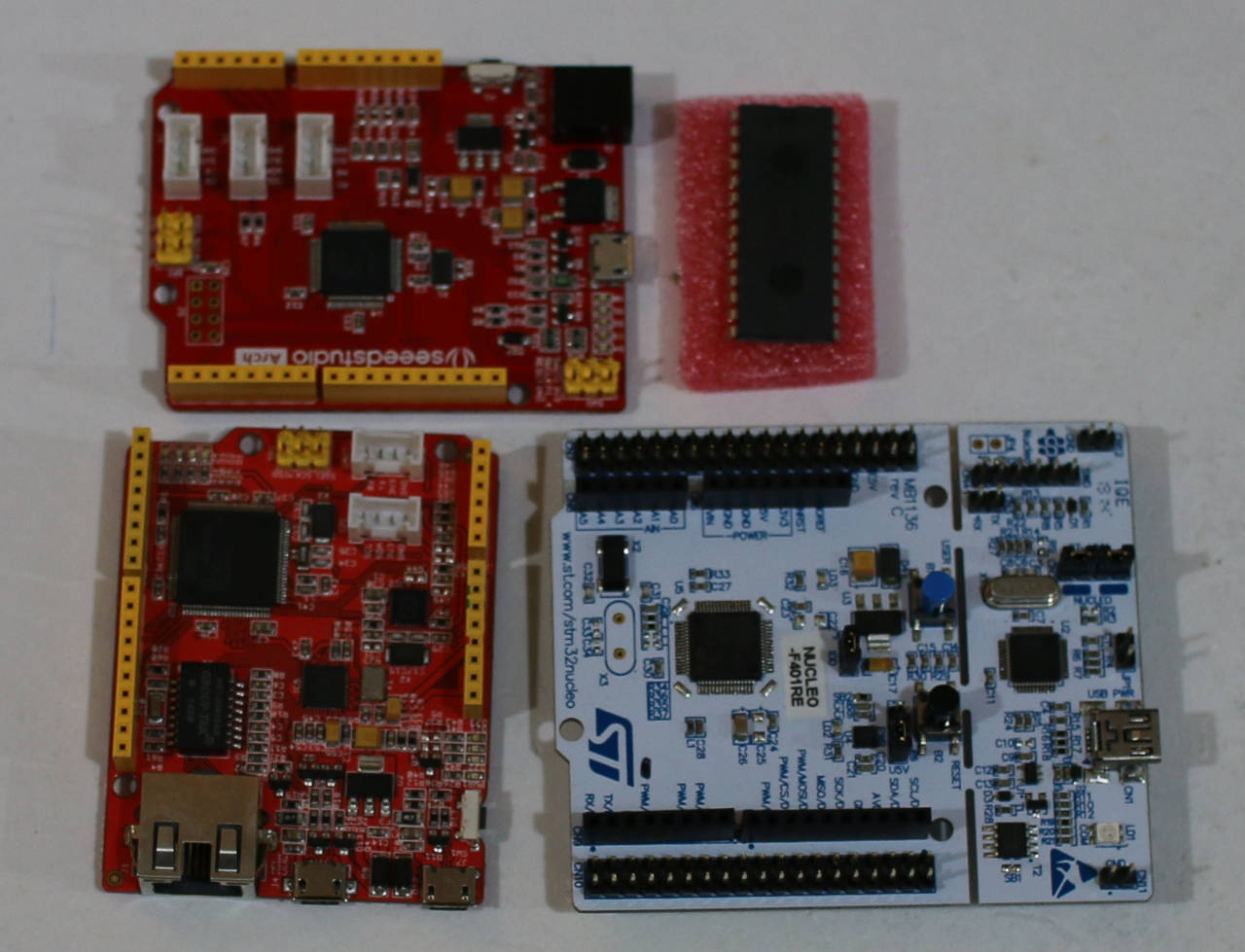
 A microcontroller contains a processor, some memory, and usually has some connections for interacting with external hardware. You might want to use a microcontroller to turn a small servo motor, or connect some buttons and a screen to build a custom calculator, for example. A microcontroller may not run any operating system at all, and simply start executing a single program soon after power is applied.
The mbed platform is an open source environment which allows you to write control programs in C/C++ and deploy them to many ARM Cortex-M based microcontroller boards.
The ARM CPU used in the BeagleBone Black and other single board computers is designed to interface with half to a few gigabytes of RAM and allow a full operating system such as Linux to be run on the computer. (See my long series of reviews on Linux.com of ARM-based computers that run Linux). By contrast the ARM Cortex-M is a microcontroller level chip which might run at 16-100Mhz, contain 2-100kb of RAM, and some flash memory to contain only the program that you want to execute.
You can, however, set up your Linux machine to write control programs for an ARM-based microcontroller using the mbed platform. The mbed IDE can be accessed through a web browser or downloaded to your Linux desktop (see instructions on this, below.)
This setup offers some advantages to embedded developers using microcontrollers. Many readers will likely be familiar with the Arduino environment and have probably used it with the Atmel 328 microcontroller. The mbed platform offers a bit more flexibility by letting you pick both your microcontroller board to best suit your application, as well as allowing you to choose which compiler will best suit your project.
For example, you might have a small program that only needs to use 3-4 pin and a single SPI bus, so a more economic chip is all you will need. On the other hand, you might be running a screen, some DSP code, need some more processing power and want to have around 100kb of memory on board. With mbed you can select a more capable microcontroller that will better handle that application.
Writing programs
The IDE for mbed runs in the Web browser. When you log in you select the target board that you have, open or write a program, compile it, and download the binary to install onto your hardware. When you plug in an mbed microcontroller to your Linux desktop you will see one or more storage devices. These storage devices can be shown in a similar way to a USB flash drive. If there is more than one storage device shown by your Linux desktop, one will likely be very small and one will be around the right size for the flash memory on your mbed hardware.
To install a new program that you downloaded from the mbed IDE just open the storage device and copy the firmware file you downloaded using your Web browser to the mbed device. This avoids the frustration that plagues some embedded environments which want to use /dev/ttyUSBX or an /dev/ACM device files to upload new firmware and the devices do not always show up or appear in menus.
My first thoughts when playing around with mbed were about how well additional hardware was supported. The popularity and years that Arduino has been around have blessed it with a large library base for interacting with various hardware. My initial testing was for the popular Nordic Semiconductor rf24 chips. There are many libraries to support that chip on mbed, including a port of the Maniacbug’s nRF24L01+ Arduino library to mbed.
I actually had quite a time initially getting rf24 communications to work. I was using two Nucleo F401RE boards, and the website for them mentions that you should upgrade their firmware. I had a look over the firmware upgrade page but didn’t see anything that might have caused an issue that I was seeing. I went and performed the firmware upgrade anyway and afterwards the rf24 communication worked well. It is unfortunate that at the moment upgrading the core firmware on the ST Nucleo F401RE was not supported from Linux.
Second on my testing with mbed was a RePaper display with version 1 breakout board. In initial testing with the Nucleo F401RE I could manage to get a single image displayed but was never able to update the display to a second image. Unfortunately, switching over to an NXP LPC1768 based Arch Pro board left me unable to render even an initial image. The same display using the drivers on a BeagleBone Black allowed the screen to be run normally. So it is likely to be an issue with the combination of hardware and epaper library that I was using for mbed.
Bringing the IDE to the Linux desktop
While the online IDE might be sufficient for some, there are also likely to be many developers who have their editor of choice and want to be free of the Web browser.
To develop locally, download the GCC ARM Embedded toolchain, for example, gcc-arm-none-eabi-4_9-2014q4-20141203-linux.tar.bz2 and expand it to /usr/local. Then add the new executables to your PATH, in this case the directory /usr/local/gcc-arm-none-eabi-4_9-2014q4/bin. Then to bring a project to the local machine from the online IDE, right click on the project and select the board you are wanting to use, and GCC (ARM Embedded) as the export toolchain. This will result in a zip file being offered by the Web browser for download.
Expand that zip file somewhere convenient, change directory into the base directory of the newly expanded files. This will be a directory with the same name as the project you right clicked on in the online IDE. Then, with the GCC ARM Embedded toolchain in your PATH you can just type make to build the new bin file to copy to your hardware.
One file that is likely to be of great interest in your local filesystem is, for example, the mbed/TARGET_NUCLEO_F401RE/TARGET_STM/TARGET_NUCLEO_F401REw/PinNames.h file. The TARGET directory names will be different for different hardware boards. Being able to see that the Arduino pin D2 is also PA_10 and that LED1 through LED4 all map to PA_5 for the F401RE will likely help while you are writing your programs.
Capable hardware and persistance
There are APIs for SPI, TWI, digital and analog IO for mbed. The syntax for digital IO is much more terse than that for the Arduino IDE. In mbed each pin can be toggled using simple assignment and where modes are used the pin object itself has support method to be set to input or output. The mbed environment also supports advanced features like threading and TCP/IP interaction including HTTP, WebSockets, as well as NTP and SMTP clients.
The mbed environment supports a range of microcontroller boards and makes it fairly simple to get up to speed and start using a new mbed compatible board. Having capable hardware such as the ST Nucleo F401RE available for a little over $10 makes having a tinker with embedded hardware fairly inexpensive. Although I had a mixed result with the ePaper display, sometimes hardware tinkering is all about persistence no matter what platform you are using.

