
You have both secure and non-secure choices for file transfer, and each can have different advantages in different situations.
Read More at Enable Sysadmin
File transfer protocols: FTP vs SFTP
Building containers by hand: The PID namespace
The PID namespace is an important one when it comes to building isolated environments. Find out why and how to use it.
Read More at Enable Sysadmin
WASI, Bringing WebAssembly Way Beyond Browsers
By Marco Fioretti
WebAssembly (Wasm) is a binary software format that all browsers can run directly, safely and at near-native speeds, on any operating system (OS). Its biggest promise, however, is to eventually work in the same way everywhere, from IoT devices and edge servers, to mobile devices and traditional desktops. This post introduces the main interface that should make this happen. The next post in this series will describe some of the already available, real-world implementations and applications of the same interface.
What is portability, again?
To be safe and portable, software code needs, as a minimum:
- guarantees that users and programs can do only what they actually have the right to do, and only do it without creating problems to other programs or users
- standard, platform-independent methods to declare and apply those guarantees
Traditionally, these services are provided by libraries of “system calls” for each language, that is functions with which a software program can ask its host OS to perform some low-level, or sensitive task. When those libraries follow standards like POSIX, any compiler can automatically combine them with the source code, to produce a binary file that can run on some combination of OSes and processors.
The next level: BINARY compatibility
System calls only make source code portable across platforms. As useful as they are, they still force developers to generate platform-specific executable files, all too often from more or less different combinations of source code.
WebAssembly instead aims to get to the next level: use any language you want, then compile it once, to produce one binary file that will just run, securely, in any environment that recognizes WebAssembly.
What Wasm does not need to work outside browsers
Since WebAssembly already “compiles once” for all major browsers, the easiest way to expand its reach may seem to create, for every target environment, a full virtual machine (runtime) that provides everything a Wasm module expects from Firefox or Chrome.
Work like that however would be really complex, and above all simply unnecessary, if not impossible, in many cases (e.g. on IoT devices). Besides, there are better ways to secure Wasm modules than dumping them in one-size-fits-all sandboxes as browsers do today.
The solution? A virtual operating system and runtime
Fully portable Wasm modules cannot happen until, to give one practical example, accesses to webcams or websites can be written only with system calls that generate platform-dependent machine code.
Consequently, the most practical way to have such modules, from any programming language, seems to be that of the WebAssembly System interface (WASI) project: write and compile code for only one, obviously virtual, but complete operating system.
On one hand WASI gives to all the developers of Wasm runtimes one single OS to emulate. On the other, WASI gives to all programming languages one set of system calls to talk to that same OS.
In this way, even if you loaded it on ten different platforms, a binary Wasm module calling a certain WASI function would still get – from the runtime that launched it – a different binary object every time. But since all those objects would interact with that single Wasm module in exactly the same way, it would not matter!
This approach would work also in the first use case of WebAssembly, that is with the JavaScript virtual machines inside web browsers. To run Wasm modules that use WASI calls, those machines should only load the JavaScript versions of the corresponding libraries.
This OS-level emulation is also more secure than simple sandboxing. With WASI, any runtime can implement different versions of each system call – with different security privileges – as long as they all follow the specification. Then that runtime could place every instance of every Wasm module it launches into a separate sandbox, containing only the smallest, and least privileged combination of functions that that specific instance really needs.
This “principle of least privilege”, or “capability-based security model“, is everywhere in WASI. A WASI runtime can pass into a sandbox an instance of the “open” system call that is only capable of opening the specific files, or folders, that were pre-selected by the runtime itself. This is a more robust, much more granular control on what programs can do than it would be possible with traditional file permissions, or even with chroot systems.
Coding-wise, functions for things like basic management of files, folders, network connections or time are needed by almost any program. Therefore the corresponding WASI interfaces are designed as similar as possible to their POSIX equivalents, and all packaged into one “wasi-core” module, that every WASI-compliant runtime must contain.
A version of the libc standard C library, rewritten usi wasi-core functions, is already available and, according to its developers, already “sufficiently stable and usable for many purposes”.
All the other virtual interfaces that WASI includes, or will include over time, are standardized and packaged as separate modules, without forcing any runtime to support all of them. In the next article we will see how some of these WASI components are already used today.
The post WASI, Bringing WebAssembly Way Beyond Browsers appeared first on Linux Foundation – Training.
What we learned from our survey about returning to in-person events
Recently, the Linux Foundation Events team sent out a survey to past attendees of all events from 2018 through 2021 to get their feedback on how they feel about virtual events and gauge their thoughts on returning to in-person events. We sent the survey to 69,000 people and received 972 responses.
The enclosed PDF document summarizes the results of that survey. Click on the embedded image to see the page advance controls.
Ultimately the good news here is that a healthy number of people feel comfortable traveling this year for events, especially domestically in the US. The results also show that about 1/4 of respondents like virtual events, and the vast majority of people who told us that they had attended in-person events before — another reason to keep a hybrid format moving forward.
The post What we learned from our survey about returning to in-person events appeared first on Linux Foundation.
How to resize a logical volume with 5 simple LVM commands
It’s easy to add capacity to logical volumes with a few simple commands.
Read More at Enable Sysadmin
Static and dynamic IP address configurations: DHCP deployment
Configure a DHCP server and scope to provide dynamic IP address configurations to your network subnet.
Read More at Enable Sysadmin
Static and dynamic IP address configurations for DHCP
IP address configurations are critical, but what is the difference between static and dynamic addressing, and how does DHCP come into play?
Read More at Enable Sysadmin
Charting the Path to a Successful IT Career
So, you’ve chosen to pursue a career in computer science and information technology – congratulations! Technology careers not only continue to be some of the fastest growing today, but also some of the most lucrative. Unlike many traditional careers, there are multiple paths to becoming a successful IT professional.
What credentials do I need to start an IT career?
While certain technology careers, such as research and academia, require a computer science degree, most do not. Employers in the tech industry are typically more concerned with ensuring you have the required skills to carry out the responsibilities of a given role.
What you need is a credential that demonstrates that you possess the practical skills to be successful; independently verifiable certifications are the best way to accomplish this. This is especially true when you are just starting out and do not have prior work experience.
We recommend the Linux Foundation Certified IT Associate (LFCA) as a starting point. This respected certification demonstrates expertise and skills in fundamental information technology functions, especially in cloud computing, which is something that has not traditionally been included in entry-level certifications, but has become an essential skill regardless of what further specialization you may pursue.
How do I prepare for the LFCA?
The LFCA tests basic knowledge of fundamental IT concepts. It’s good to keep in mind which topics will be covered on the exam so you know how to prepare. The domains tested on the LFCA, and their scoring weight on the exam, are:
- Linux Fundamentals – 20%
- System Administration Fundamentals – 20%
- Cloud Computing Fundamentals – 20%
- Security Fundamentals – 16%
- DevOps Fundamentals – 16%
- Supporting Applications and Developers – 8%
Of course if you are completely new to the industry, no one expects you to be able to pass this exam without spending some time preparing. Linux Foundation Training & Certification offers a range of free resources that can help. These include free online courses covering the topics on the exam, guides, the exam handbook and more. We recommend taking advantage of these and the countless tutorials, video lessons, how-to guides, forums and more available across the internet to build your entry-level IT knowledge.
I’ve passed the LFCA exam, now what?
Generally, LFCA alone should be sufficient to qualify for many entry-level jobs in the technology industry, such as a junior system administrator, IT support engineer, junior DevOps engineer, and more. It’s not a bad idea to try to jump into the industry at this point and get some experience.
If you’ve already been working in IT for a while, or you want to aim for a higher level position right off the bat, you will want to consider more advanced certifications to help you move up the ladder. Our 2020 Open Source Jobs Report found the majority of hiring managers prioritize candidates with relevant certifications, and 74% are even paying for their own employees to take certification exams, up from 55% only two years earlier, showing how essential these credentials are.
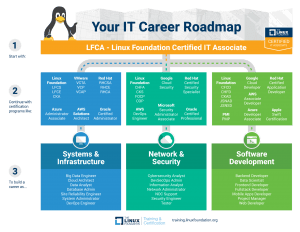
We’ve developed a roadmap that shows how coupling an LFCA with more advanced certifications can lead to some of the hottest jobs in technology today. Once you have determined your career goal (if you aren’t sure, take our career quiz for inspiration!), this roadmap shows which certifications from across various providers can help you achieve it.
How many certifications do I really need?
This is a difficult question to answer and really varies depending on the specific job and its roles and responsibilities. No one needs every certification on this roadmap, but you may benefit from holding two or three depending on your goals. Look at job listings, talk to colleagues and others in the industry with more experience, read forums, etc. to learn as much as you can about what has worked for others and what specific jobs or companies may require.
The most important thing is to set a goal, learn, gain experience, and find ways to demonstrate your abilities. Certifications are one piece of the puzzle and can have a positive impact on your career success when viewed as a component of overall learning and upskilling.
Want to learn more? See our full certification catalog to dig into what is involved in each Linux Foundation certification, and suggested learning paths to get started!
The post Charting the Path to a Successful IT Career appeared first on Linux Foundation – Training.
How to build an active-active-active cluster with RHEL 8 and Percona MySQL
This guide shows you that it’s easy to build a multi-master database on Red Hat Enterprise Linux 8.
Read More at Enable Sysadmin
SODA Foundation Announces 2021 Data & Storage Trends Survey
Data and storage technologies are evolving. The SODA Foundation is conducting a survey to identify the current challenges, gaps, and trends for data and storage in the era of cloud-native, edge, AI, and 5G. Through new insights generated from the data and storage community at large, end-users will be better equipped to make decisions, vendors can improve their products, and the SODA Foundation can establish new technical directions — and beyond!
The SODA Foundation is an open source project under Linux Foundation that aims to foster an ecosystem of open source data management and storage software for data autonomy. SODA Foundation offers a neutral forum for cross-project collaboration and integration and provides end-users quality end-to-end solutions. We intend to use this survey data to help guide the SODA Foundation and its surrounding ecosystem on important issues.
Please participate now; we intend to close the survey in late May.
Privacy and confidentiality are important to us. Neither participant names, nor their company names, will be displayed in the final results.
The first 50 survey respondents will each receive a $25 (USD) Amazon gift card. Some conditions apply.
This survey should take no more than 15 minutes of your time.
To take the 2021 SODA Foundation Data & Storage Trends Survey, click the button below:
Thanks to our survey partners Cloud Native Computing Foundation (CNCF), Storage Networking Industry Association (SNIA), Japan Data Storage Forum (JDSF), China Open Source Cloud League (COSCL), Open Infrastructure Foundation (OIF), Mulan Open Source Community
SURVEY GOALS
Thank you for taking the time to participate in this survey conducted by SODA Foundation, an open source project at the Linux Foundation focusing on data management and storage.
This survey will provide insights into the challenges, gaps, and trends for data and storage in the era of cloud-native, edge, AI, and 5G. We hope these insights will help end-users make better decisions, enable vendors to improve their products and serve as a guide to the technical direction of SODA and the surrounding ecosystem.
This survey will provide insights into:
- What are the data & storage challenges faced by end-users?
- Which features and capabilities do end users look for in data and storage solutions?
- What are the key trends shaping the data & storage industry?
- Which open source data & storage projects are users interested in?
- What cloud strategies are businesses adopting?
PRIVACY
Your name and company name will not be displayed. Reviews are attributed to your role, company size, and industry. Responses will be subject to the Linux Foundation’s Privacy Policy, available at https://linuxfoundation.org/privacy. Please note that members of the SODA Foundation survey committee who are not LF employees will review the survey results and coordinate the gift card giveaways. If you do not want them to have access to your name or email address in connection with this, please do not provide your name or email address and you will not be included in the giveaway.
VISIBILITY
We will summarize the survey data and share the learnings during SODACON Global 2021 – Virtual on Jul 13-14. The summary report will be published on the SODA website. In addition, we will be producing an in-depth report of the survey which will be shared with all survey participants.
SODACON GLOBAL 2021
Interested in attending or speaking at SODACON Global? Details for the event can be found at https://sodafoundation.io/events/sodacon-2021-global-virtual/
QUESTIONS
If you have questions regarding this survey, please email us at survey@sodafoundation.io or ask us on Slack at https://sodafoundation.io/slack/
Sign up for the SODA Newsletter at https://sodafoundation.io/
The post SODA Foundation Announces 2021 Data & Storage Trends Survey appeared first on Linux Foundation.