Home Blog Page 1256

5 Top Free TeX Books

TeX is a system for computer typesetting. It is a powerful low-level markup and programming language that creates professional quality typeset text. The system was developed by Donald Knuth at Stanford University with the purpose of enabling anyone to generate high-quality books, and to develop a system that yields the same results whatever computer is used.

The books featured in this article are all available for free, and some of them are released under an open source license. Some of the books are designed for beginners, others help writers fully master the complexities of TeX.

<A HREF=”http://www.linuxlinks.com/article/20150104065331323/TeXBooks.html“>Full article</A>

Idea – A Novice Approach To Linux On The Laptop

Getting a Linux distribution on a laptop can be difficult for the novice user. Because of this we need another approach than installing Linux in a dual boot configuration.

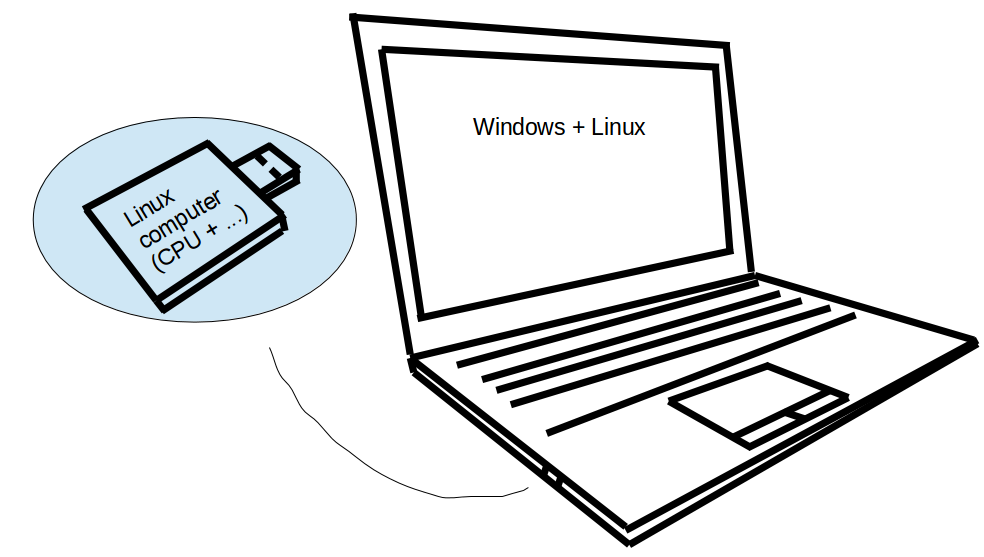
Why not take inspiration from users where they connected a Raspberry Pi to a Motorola Laptop Dock. From this I would say we need a computer on a thumb drive to do something similar.

With USB3 or maybe even with USB2 it should be possible to use the screen, mouse and keyboard on the laptop for the thumb drive computer. Once it is USB connected it would show up as a window in Windows like Virtual Box. Here full screen is an option.

The difference is that it will run full speed on its own hardware. It should even have its own wifi.

So if you have a slow XP computer. You can turn off the internet to Windows for safety and run your attachable Linux device on your laptop.

Here you have a safe way to upgrade your laptop system and an easy way to run Linux on your laptop. Just attach a USB stick.

For more at http://peroglyfer.se

LinuxLaptop

Ringing in 2015 with 40 Linux-Friendly Hacker SBCs

2014 brought us plenty of new open-spec, community-backed SBCs — from $35 bargains, to quad-core powerhouses — and all with Linux or Android support. In May of this year, LinuxGizmos and Linux.com collaborated on a joint survey, asking our readers to choose their favorite open-spec hacker SBCs from a list of 32 that run Linux […]

Read more at LinuxGizmos

How To : Upgrade to Linux Mint 17.1 (Rebecca) from Linux Mint 17 (Qiana)

As we all know, Latest stable version of Linux Mint OS – Linux Mint 17.1, which is based on Ubuntu 14.04 LTS, having a codename Rebecca has been released and is available for download with two desktop environments viz. Cinnamon and Mate. Just like Ubuntu 14.04 Trusty Tahr and Linux Mint 17 (Qiana), Linux Mint 17.1 (Rebecca) will be officially supported till 2019. This tutorial will help you in upgrading to Linux Mint 17.1 Rebecca from Linux Mint 17 Qiana.

Highlights:

  • Fixed 30 Memory leaks and improved responsiveness.
  • Much more customizable and smoother
  • Settings: Background and Theme settings re-designed, added Privacy and Notification settings,
  • Nemo: Nemo toolbar re-designed and much configurable
  • Update Manager: Introcudes grouping of packages to prevent partial or incomplete updates
  • Language Settings: Redesigned the UI which shows more information now.
  • Welcome Screen: Redesigned Login windows preferences, with simpler theme selection.
  • Introduces pastebin command.
  • Kernel: Linux Kernel 3.13 with Ubuntu 14.04 package base.
  • Uses Noto font, by deault.

Read more at YourOwnLinux

Developing history of Huawei optical transmission: 20 years of accumulations

Throughout the developing history of Huawei optical transmission, it is actually a process that bandwidth capacity constantly promoting and business efficiency continuous optimizing, while accompanied by a series of new problems and challenges and solutions generated.

With the rapid development of wireless data, home broadband and leased line services, bandwidth demand continuously rise,optical transmission experienced continuous evolution of technical solutions and network architecture (PDH, SDH, MSTP, WDM and OTN) – compared with PDH system, Huawei SDH not only enhanced capacity and but also improved network efficiency and operation and maintenance; with the development of network IP, SDH gradually evolve to MSTP platform; However, for the trunk line and urban core, the lack of capacity gradually highlighted, so the development of WDM is imperative.

In this process, Huawei adhere to customer-centric, and strive to go beyond, self-dependent innovation. From OTN stage initially to 100G, from super 100G to T-SDN commercial use globally, Huawei experienced 20 years of accumulations in optical transport field, from the “precedency” to “excellence.”

Wearable Electronics Market – Global Industry Analysis and Forecast to 2020

Wearable Electronics are minute electronics devices worn by the consumer which enable wireless networking and mobile computing. The word “wearable technology” refers to any electronic device or product which can be worn by a person to add computing in his action or work and utilize technology to benefit advanced features and characteristics. Wearable electronics may consist of glasses, jewelry, headgear, belts, arm wear, wrist wear, leg wear, footwear, skin patches, and e-textiles.


In recent years, there has been lots of research and development going in the field of wearable electronics attributed to their popularity and wide acceptance in global market.

Buy full report: http://www.persistencemarketresearch.com/market-research/wearable-electronics-market.asp


The major application market of wearable electronics include, 


    • 1) Healthcare and Medical- blood pressure monitors, hearing Aids, continuous glucose monitoring, smart glasses and others 
    • 2) Fitness and Wellness- activity monitors, emotional measurement, foot pods and pedometer, head up display, sleep sensors, smart clothing, smart watches, sleep sensors and others
    • 3) Infotainment- head-up display, hand-worm terminals, head-up display, smart clothing, smart glasses and others
    • 4) Military- head-up display, smart clothing, smart glasses and others


North America is the largest market for wearable electronics followed by Europe and Asia Pacific. In the last few years, North America has been witnessing the fastest growth rate; however Asia Pacific region is expected to take over as the fastest growing market in upcoming years.


Some of the major drivers of the industry include increasing demand of consumers towards communication, networking, positioning and recognition technologies in compact and portable forms, developments in material science, augmented reality and chip evolution and low power inter device connectivity (Bluetooth 4.0, infra red and NFC). Some of the key challenges for the industry are thermal consideration, negative effect of radiation on human health, and device protection.


With the growth of sensors, particularly in the health and medical space, the potential uses of wearable computing technologies are quite extensive. Wearable electronics are expected to increase their adoption levels in different sectors such as health and fitness, gaming, fashion, mobile money, education and transportation.


Rising average life expectancy, baby boomers population and larger proportion of patients requiring long term treatment are some of the key drivers in healthcare and medicine segment whereas demands from professional athletes, recreational fitness consumers, and corporate wellness programs are propelling the market of wearable technology in fitness and wellness sector. The ongoing military up gradation programs around the globe such as, the U.S.’s ‘Future Force Warrior (FFW)’, Australia’s ‘Project Wundurra’, Israel’s ‘Integrated Advanced Soldier (IAS)’, and the U.K.’s ‘Future Infantry Soldier Technology’ are expected to increase the overall market share of wearable electronics market in military and defense.    

Some of the key players in the wearable electronics market include Adidas AG, Recon Instruments, Inc., Fibretronic Ltd., Jawbone, Inc., Fitbit, Inc., Nike, Inc. (U.S.), Olympus Corporation, and Weartech s.l, Vuzix Corporation , Google, Inc., Apple, Inc.,By-Wire.Net, Imprint Energy, Inc, Jawbone, Inc., O’neill Wetsuits LIC, Plastic Logic Ltd., Texas Instruments, Inc., Zoog Technologies, Inc., Weartech S.L, Shimmer Research, Inc., Vancive Medical Technologies, Infineon Technologies Ag, Glassup SRL, Eurotech S.P.A, and AT&T, Inc.


Request full TOC: http://www.persistencemarketresearch.com/toc/3035


Key points covered in the report

  • Report segments the market on the basis of types, application, products, technology, etc (as applicable)
  • The report covers geographic segmentation

      • North America

      • Europe

      • Asia

      • RoW

  • The report provides the market size and forecast for the different segments and geographies for the period of 2010 to 2020
  • The report provides company profiles of some of the leading companies operating in the market
  • The report also provides porters five forces analysis of the market. 

Running Oracle XE 11gR2 in Nova-Docker container on OpenStack RDO Juno (CentOS 7)

Docker image arahman/docker-oracle-xe-11g:latest  allows to build Nova-Docker
Container on RDO Juno running Oracle XE instance, which may be accessed remotely via floating IP assigned to nova instance. Several network configuration files require tuning with Nova system  instance-name and floating IP assigned from neutron external pool.Complete article may be viewed here

Difference between a Hard Link and Soft (Symbolic) Link

This tutorial describes the difference between a hard link and soft (symbolic) link within the unix/linux file system. This tutorial includes examples as well as the commands required to configure a link as well as repair a hanging link.

http://www.dillonhale.com/blog/linux-tutorials/difference-between-hard-link-and-soft-link/

Top Terminal Multiplexer Tools

The phrase ‘terminal multiplexer’ sounds a bit of a mouthful and a large dollop of jargon. Multiplexing is a method of combining multiple data streams into one stream over a shared medium. This gives us a hint of the function of a terminal multiplexer. It is computer software that can be used to multiplex several video consoles. In English? Well, it allows you to make use of multiple separate terminal sessions inside a single terminal. So one terminal session can act like many sessions.

<A HREF=”http://www.linuxlinks.com/article/20141227174048933/TerminalMultiplexerTools.html“>Full article</A>

Live DVD for Advanced Gtk+ Sequencer

Initiating minos-one

Ever wanted to try out Advanced Gtk+ Sequencer and Swami? Then you need minos-one download available at sourceforge.net:

minos-lxdm.iso

This live DVD is shipped with most popular GNU software including:

  • Advanced Gtk+ Sequencer
  • Swami
  • Mplayer
  • ffmpeg

It is a x86_64 build with realtime kernel linux-3.14.25-rt22. System requirements are probably lots of RAM. Me could borrow you with some anoying details but rather deciding to give you a brief howto extend minos-one Live DVD ….

Objectives

GNU/Linux is providing /dev/shm it is a tmpfs its advantages are all files are provided within RAM. Here comes the magic part. You builded a initrd kernel this initrd fs is provided in RAM as well and remounting root / is done anyway.

To get a full setup with source I would recommend you linuxfromscratch.org where you do /usr/share/mkinitramfs/init.in this is the file launched just before /sbin/init.

Note if you wish to start kernel command line:

linux vmlinuz initrd initrd.img init=/bin/bash

There’s a not documented /sbin/init paramater –init which does all magic ie. start init and invoke /etc/init.d

Setup directory structure and base files

First we create some directories to mount our ISO files:

$ cd /mnt
$ mkdir {image,rootfs,rootfs,usrfs,build,cdrom}

Create build.iso file which is large enough to contain and build linux kernel, here we create a 100G file for your builds so make sure to have enough disk space.

$ dd if=/dev/zero of=build.iso bs=512K count=200000
$ vfsnode=`losetup -f`
$ losetup -P $vfsnode build.iso
$ mkfs.ext4 $vfsnode

The created iso is now mounted using loopback device. To know what loopback device just enter:

$ echo $vfsnode

You can either do your own linux from scratch or do:

$ wget -c http://sourceforge.net/projects/ags/files/minos-lxdm.iso/download
$ mount -o loop minos-lxdm.iso /mnt/cdrom

For know we mount the rootfs and usr directory of our live DVD by issueing:

$ cp -rv cdrom/* image
$ mount -o loop image/casper/rootfs.iso rootfs
$ mount -o loop image/casper/usr.iso rootfs/usr
$ mount $vfsnode rootfs/sources

Chroot to the ISO environment

Chroot provides you a nested root environment further we bind devfs to the chroot environment.

$ mount -v --bind /dev rootfs/dev
$ mount -vt devpts devpts rootfs/dev/pts -o gid=5,mode=620
$ mount -vt proc proc rootfs/proc
$ mount -vt sysfs sysfs rootfs/sys
$ mount -vt tmpfs tmpfs rootfs/run
$ chroot /mnt/rootfs /usr/bin/env -i             
     HOME=/root TERM="$TERM" PS1='u:w$ '
     PATH=/bin:/usr/bin:/sbin:/usr/sbin    
     /bin/bash --login

For now your able to build your applications for the iso within chroot environment it is
to use /sources for your build since it’s really large and will not be included in the iso.

ISOLINUX

Download syslinux either with your favourite repository or from syslinux.org and unmount your ISOs when not needed anymore. So you have to logout the chroot environment:

$ exit
$ cd /mnt
$ umount rootfs/{dev/pts,sys,proc,run,dev}
$ umount rootfs/{sources,usr,}

The build your ISO and burn it using cdrecord or wodim:

$ cd image
$ mkisofs -o ../minos-lxdm-new.iso
   -b isolinux/isolinux.bin -c isolinux/boot.cat
   -no-emul-boot -boot-load-size 4 -boot-info-table
   .
$ cd .. && cdrecord -v minos-lxdm-new.iso