
A predictive analytics and decision management software firm deploys OpenShift Enterprise as part of its DevOps strategy.
Read more at Enterprise Open Source Toolkit
When new Linux desktop users arrive, the first thing to be done is locate apps to take the place of the ones they left behind. Most often, the bare installation will contain everything you need to get work done. But there are certain app categories that demand you do a bit of searching to get just the right tool.
One such category is personal finance managers. With the Linux platform, you’ll find applications to meet just about every need to keep track of your finances. So if you don’t want to pay the price of QuickBooks Online, you can take control of those records and keep them on your desktop or laptop.
But which apps to use? Doing a quick search, you’ll find a number of entries in the finance space ─ all of which are not created equal. Instead of going into an in-depth analysis of the cream of the crop, I want to highlight three of the personal finance managers that could, in fact, serve you well as you track your earnings, savings, stocks, etc.
wxBanker is all about simplicity. You won’t find all the bells and whistles many other apps contain. What you will find is an interface that makes it incredibly simple to keep track of your basic personal finances (Figure 1).
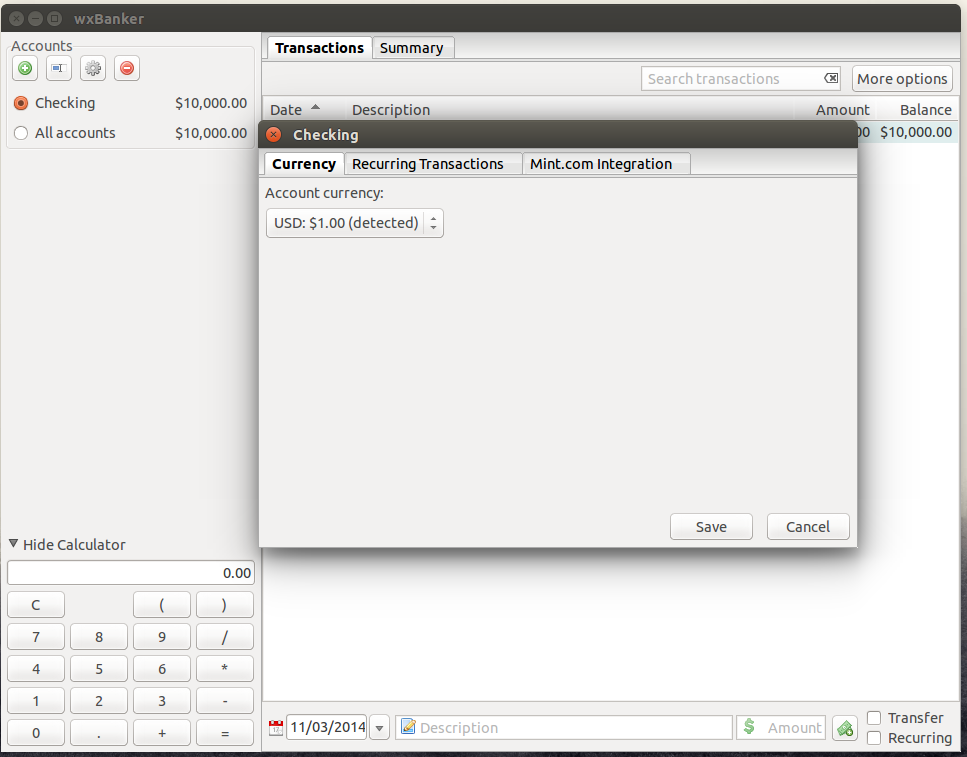
This app does not sync with your online bank records, you won’t do your business books with it, nor will you do your taxes. What it lacks in features, it makes up for absolute simplicity. With wxBanker, you can do simple transactions, transfers, recurring transactions, use a built-in calculator, add as many accounts as you like, enjoy a simple graph, and sync with your Mint.com account (Figure 2).
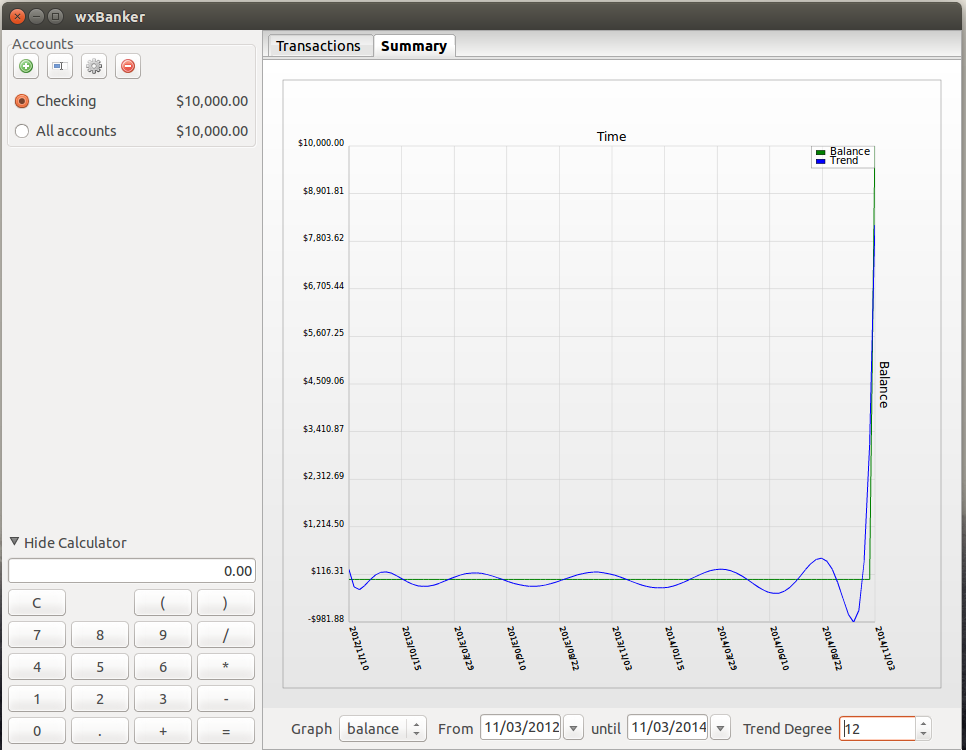
The wxBanker app is best used as an extended version of your check register that can also keep track of whatever accounts you have connected to Mint.com. What’s best about wxBanker is the lack of learning curve.
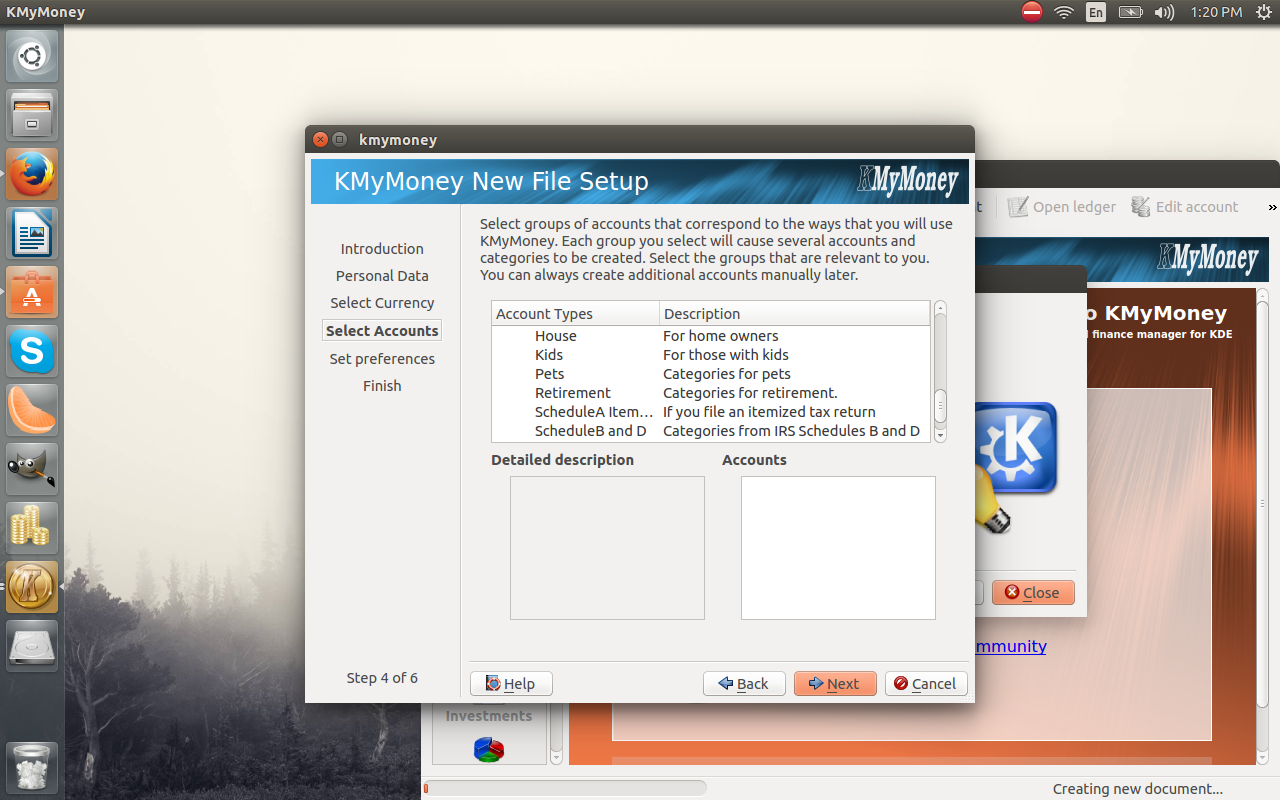
KMyMoney is a native KDE personal finance manager that adds plenty of features to a very well-thought-out interface and makes transitioning from the likes of Quicken or Microsoft Money a no-brainer. KMyMoney features: different account types, categories, QIF import/export, online banking support (via OFX and HBCI protocols), ability to align brokerage and investment accounts, transaction scheduler, and much more. One of the features I find to be a highlight of KMyMoney is the account setup wizard. With just a few steps, you can have an account, specific to your needs, created. Included in that setup is the ability to select account types for specific tax needs (Figure 3).
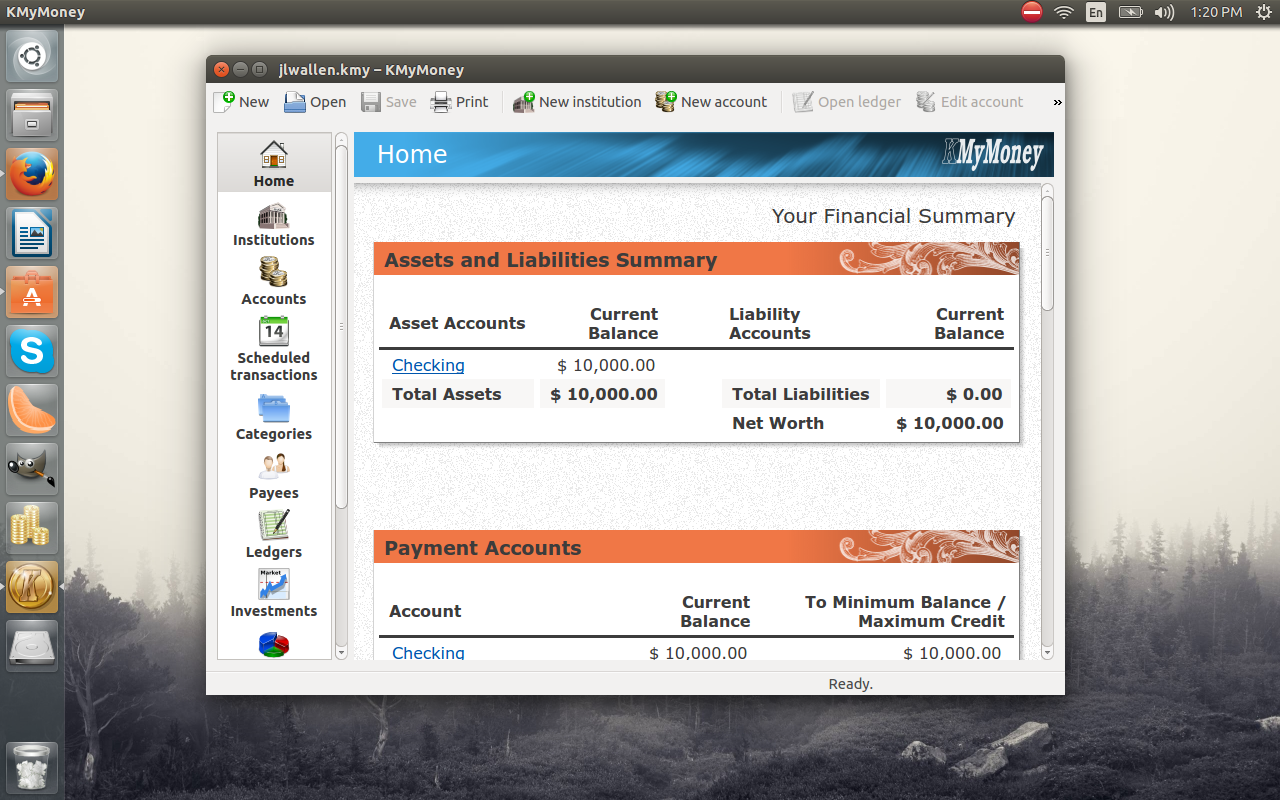
Once the account is set up, you’ll find the KMyMoney interface (Figure 4) incredibly easy to use.
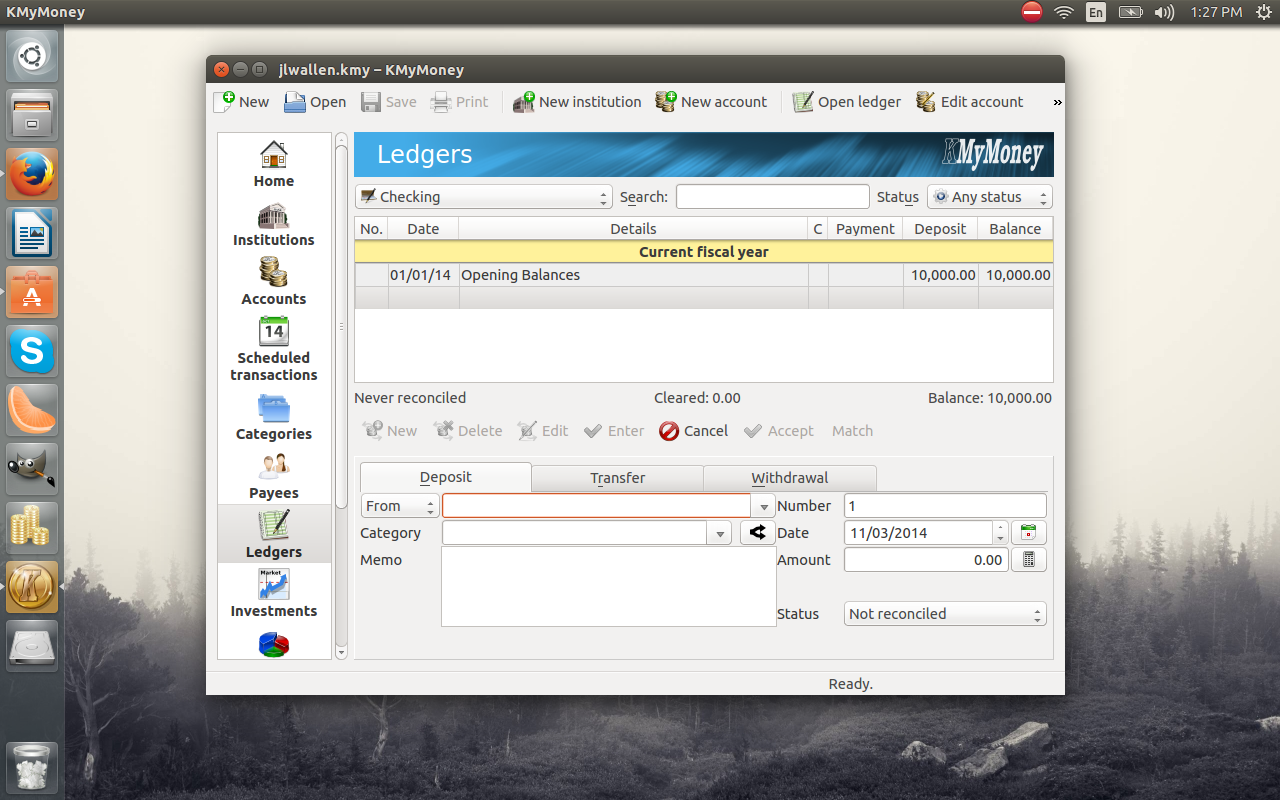
When creating a new transaction in KMyMoney, you have the ability to get more detailed about each transaction (Figure 5). You can set the reconciliation status of the transaction, add memos, and more.
GnuCash is often considered the powerhouse financial tool for Linux. Not only does GnuCash do a stellar job of tracking personal finances, it can also serve to keep track of your small business finances. GnuCash is a double-entry accounting package that features:
Small-Business Accounting
Powerful Reports and Graphs (such as Balance Sheets, Profit & Loss, Portfolio Valuation, and more)
QIF/OFX/HBCI Import, Transaction Matching
Scheduled Transactions
Financial Calculations
Enter split transactions
Mark transactions as cleared or reconciled
Customizable appearance and style.
Already you can see GnuCash takes financial tracking a bit more seriously than the other entries. Although GnuCash offers a lot of business-minded features, it is still an outstanding choice for personal finances.
The new account wizard allows you to easily set up a business account and select from a large number of account types (Figure 6).
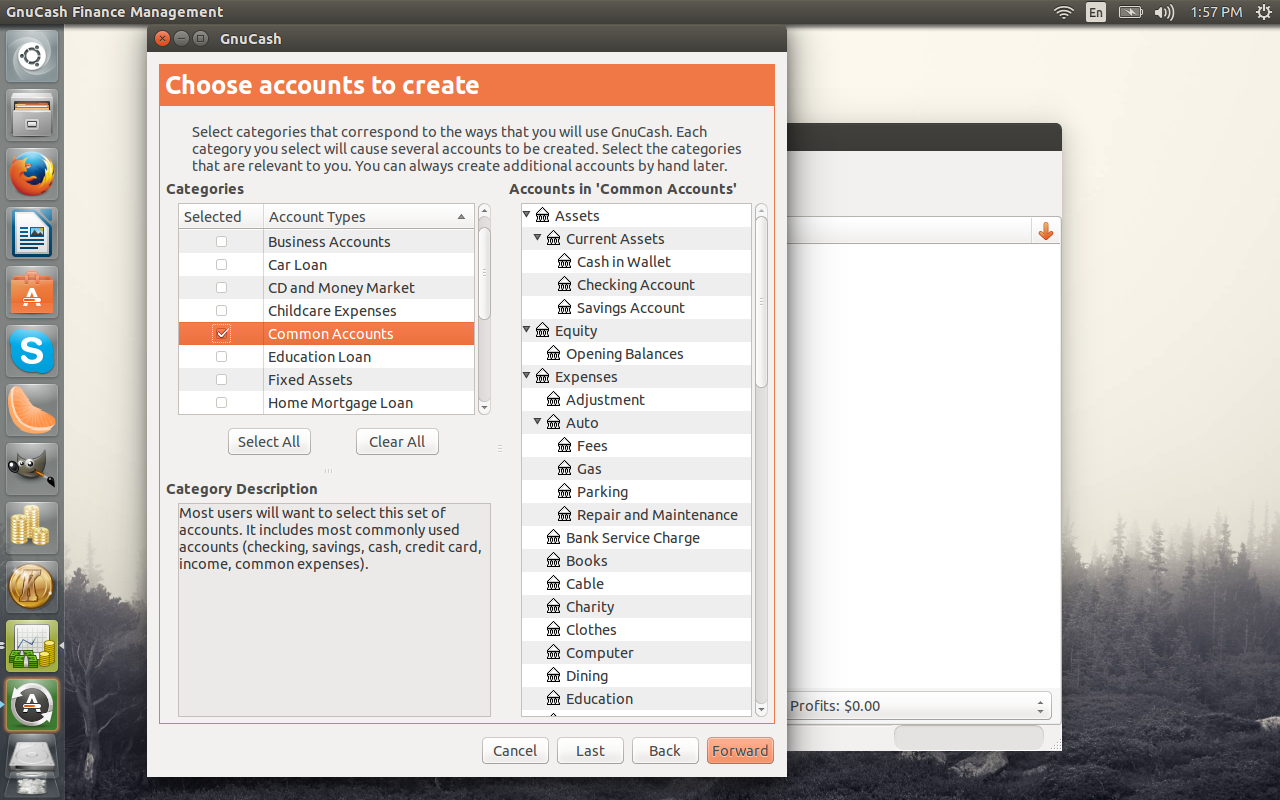
During the setup, you can even select multiple account types to be included. For example, you can add a collection of common accounts as well as a set of business accounts without having to re-run the wizard.
The one caveat with using GnuCash is getting used to the double-entry ledger (Figure 7).
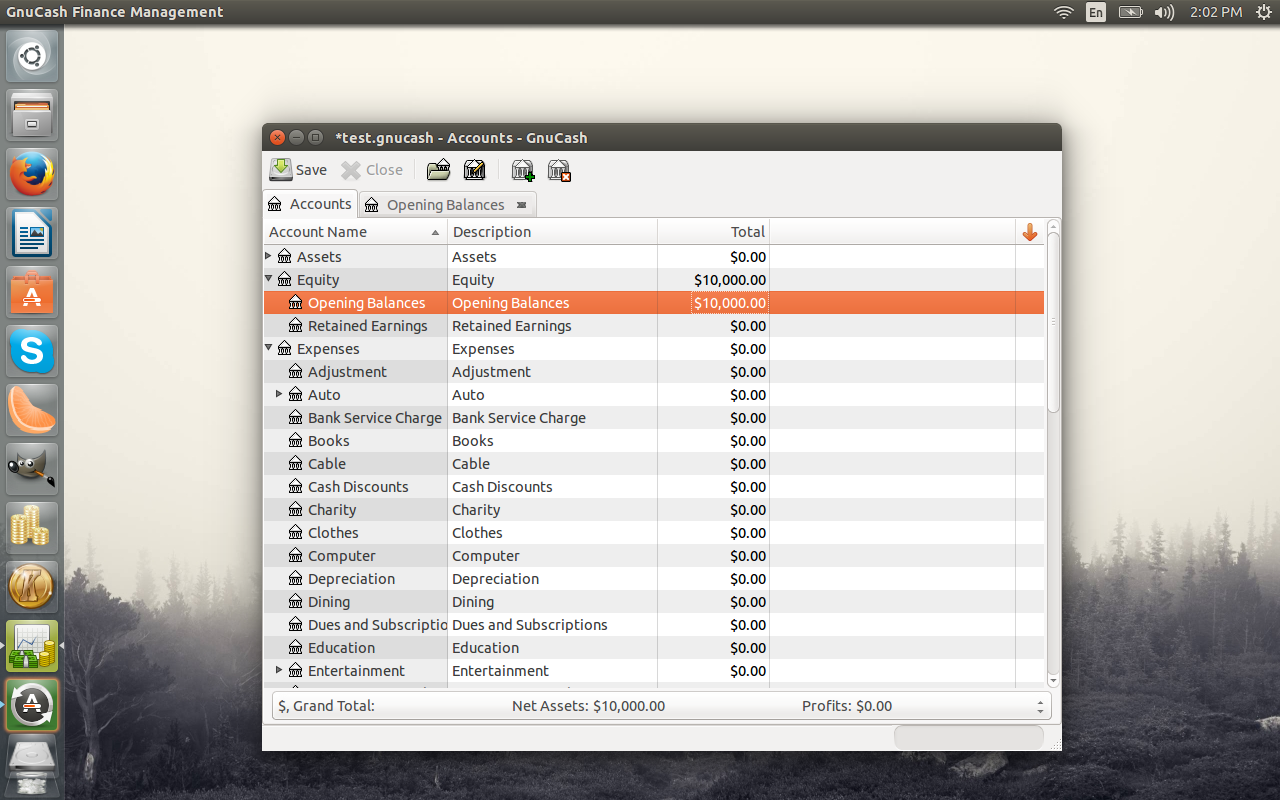
The double entry system is the one barrier of entry for many users. With double entry accounting, every entry to an account requires a corresponding and opposite entry to a different account. For example: Recording earnings of $1000.00 would require making two entries (a debit entry of $1000 to an account called Cash and a credit entry to an account called Income). The good news is that GnuCash does this automatically for you ─ so you don’t have to manually create two entries for every one entry. But understand how double entry works, might help you navigate through your various accounts. This accounting system goes a long way to aid you in year-end accounting (such as with taxes). So if you can acclimate to this new style of bookkeeping, GnuCash will do everything you need in the realm of personal finances … and then some.
If you’re looking for a financial tool that can not only take care of your personal finances, but one day take over as your small business accounting package, GnuCash is exactly what you need.
If you need more help using GnuCash for your small business financial needs, check out this GnuCash getting started guide.
You don’t have to worry that there won’t be a way to track your personal finances, once you migrate to Linux. As with nearly every type of application, Linux has many solutions for every problem. Which financial software is right for you will be a matter of need and taste. And if one of the three listed doesn’t work, there are plenty of other solutions available. Just open up your distribution’s software tool (such as the Ubuntu Software Center, or Synaptic) and search for “financial.” You’ll get plenty of hits to comb through.
Software vendors and service providers can test their PHP applications on IBM POWER8 servers running a ‘turbo charged’ LAMP stack for free until Dec. 10 under a new IBM promotion.
IBM’s ecosytem development team has created a cloud environment for functional testing to help raise awareness of its partner-based Linux on POWER8 LAMP (Linux + Apache + MySQL + PHP) stack alternative, nicknamed Turbo LAMP. Their partners include Ubuntu supported by Canonical, which offers Linux scale-out performance and rapid provisioning with its JuJu Charms framework; Zend’s PHP Server for enterprise scale and security; and MariaDB with MySQL compatibility.
Turbo LAMP exploits POWER8 architecture with 2x or better performance than comparable x86 servers for data intensive workloads, says Leamon Hall, leader of ecosystem development for Linux on Power at IBM. In addition, Mellanox is providing a 40 GB network fabric that integrates with the full stack to deliver the highest performance cloud infrastructure, though this piece isn’t included in the test environment for this promotion.
“Turbo LAMP is another step in showing our leadership in Linux by bringing key partners together in an innovative stack that is optimized with each other’s software to take advantage of the extreme performance that you get on POWER8,” Hall said.
The Turbo LAMP stack provides a standard open source based LAMP stack to enable PHP applications to just run as-is on IBM’s new POWER8 servers. In addition, each component of the stack has been tuned for optimal performance and integrated with JuJu Charms for rapid cloud provisioning, Hall said.
POWER8 processors, introduced in April as integral to IBM’s first open servers designed for big data, offer eight-way multithreading for four times more threads along with 4x greater memory bandwidth than a commodity x86 processor, according to the company. By combining the Power8 technology with the Turbo LAMP stack, IBM aims to offer a supported hardware and software solution that can be installed on-premise for private clouds or accessed via a public cloud.
“All of a sudden you can do more with less. So for a private cloud or a cloud service provider that means a more cost-effective infrastructure longer term,” Hall said. “And it means an extensible architecture that can grow much larger without having to add a lot of hardware along the way.”
The Linux on Power Turbo LAMP App-a-Thon is a great opportunity for developers looking for a solution to help bump up their proof of technology application to one that meets enterprise-grade performance and security criteria, Hall said. E-commerce or content-based applications, in particular, are likely to reap the benefits of the Turbo LAMP/ Power8 combination, as well as applications that are data-intensive.
“Demanding apps that might require 20 cores of processors can benefit from 160 threads vs. only 40 threads on an x86 based LAMP server. Especially for a server that needs to support applications with large numbers of users and high volume data transfer rates between MariaDB and Zend (which typically happens in e-commerce), the Turbo LAMP stack would be very well-suited for this,” Hall said.
Anyone who registers for the App-a-Thon will have remote access to test their apps on IBM’s hardware. And IBM is offering other incentives for testing, including a two-week optimization and sizing guide with IBM Innovation Center on Turbo LAMP full stack with Mellanox 40Gb network fabric and a customized “go to market” and channel assessment with IBM Power Sales.
To see the full details and to register visit https://ibm.biz/tlamp-start
Editor’s Note: This is a guest blog from Imagination Technologies.
The Internet of Things promises to create a boom for the technology sector. Many semiconductor vendors are creating new and exciting solutions that will enable next-generation connected devices running different Linux distributions, for use across a broad range of applications from wearables to smart cars.
One of the main requisites for success in this market is offering developers early access to feature-rich yet affordable development platforms so they can prototype their code and optimize it for consumer products. Often enough, these boards also become consumer products in their own right – check out these DIY thermostats for example.
Developers looking for low-power, wireless-enabled IoT gizmos which integrated a MIPS-based chipset have already been able to choose between microcontroller-based systems from Microchip running real-time operating systems and applications processors from MediaTek and Qualcomm Atheros which typically run OpenWrt or other lightweight Linux distributions.
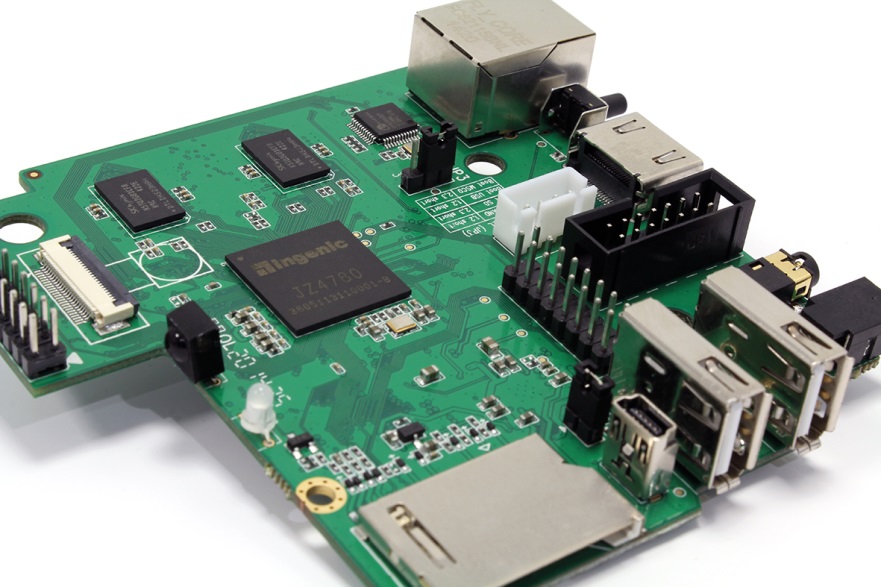
Imagination Technologies today launched Creator CI20, a new development board that unites a dual-core 1.2 GHz MIPS32 CPU and a full suite of connectivity options (Fast Ethernet, 802.11 b/g/n Wi-Fi and Bluetooth 4.0) into an Internet of Things platform that runs a variety of Linux distributions or Android 4.4 KitKat and retails for $65.
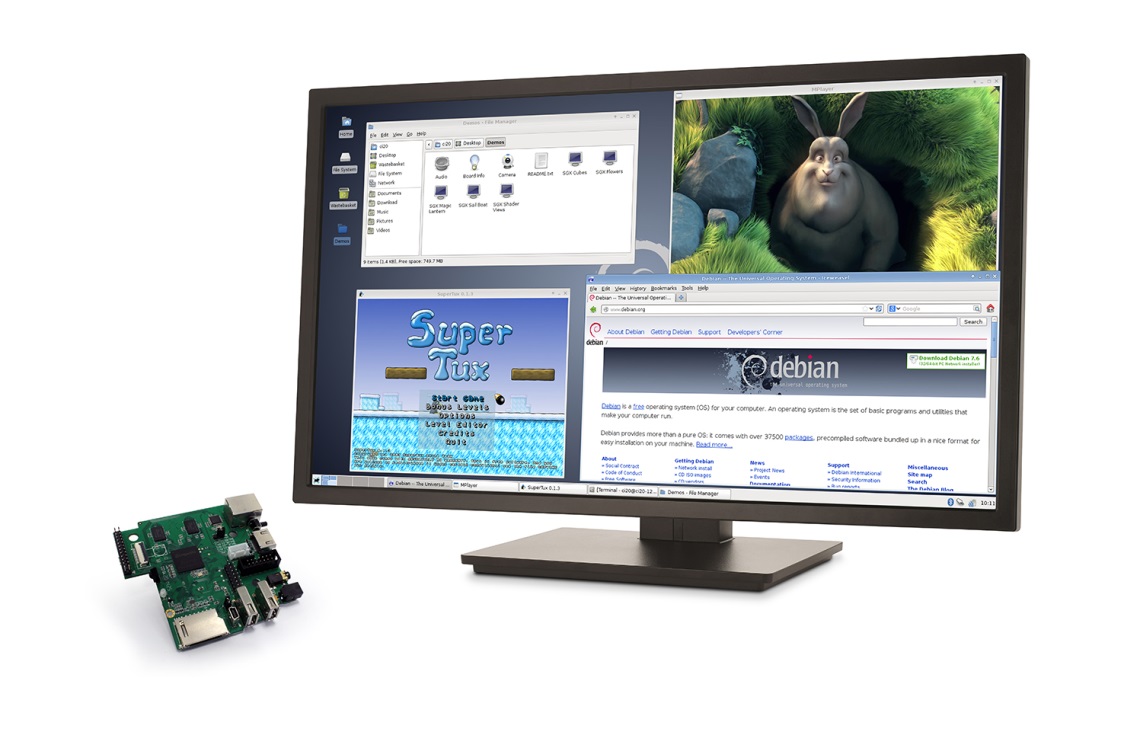 By integrating additional multimedia features like OpenGL 2.1 graphics and H.264/VP8 video decoding, Imagination is generating new opportunities for mobile and embedded developers, hobbyists, makers and enthusiasts looking to create more feature-rich applications.
When initially previewed in August, the MIPS Creator CI20 development board caused quite a stir, appearing on the front page of several major publications; this naturally attracted a lot of attention from the Linux community and we’ve had thousands of exciting ideas pouring in from users all around the world. To date, Imagination has shipped many hundreds of boards for free to developers who are working on interesting projects.
Here is a short selection of how registrants plan to use their Creator CI20 boards (see more examples, below):
“I plan to add support for the Creator CI20 board to the Buildroot build system. Buildroot is a simple, efficient and easy-to-use tool to generate embedded Linux systems through cross-compilation.” – Phil Eichinger
“I’ve been hacking the Bionic libc (from Android) for several years to work on non-Android, and actually embedded and non-embedded general purpose Linux systems. Originally, I had tied this to Gentoo Linux, but now it’s fully based on autotools and should work on any Linux distribution. My project will focus on curating BSD-licensed, system-level open-source packages (e.g. Bionic with autotools) and also providing educational materials for the general public, and fast-track courses for start-ups. I am very excited to support MIPS with the Bionic libc on general-purpose, non-Android systems.” – Christopher Friedt
This initiative is the latest in a series of Imagination investments in the Linux community. In October we became a member of the Linux Foundation alongside Altera, DataCentred and other international companies. Additionally, we’ve announced the establishment of the prpl foundation, an industry group that focuses on enabling next-generation data center-to-device, open-source and portable software on virtualized architectures. We have also announced a collaboration between Imagination and Oracle to port and optimize Java for MIPS CPUs.
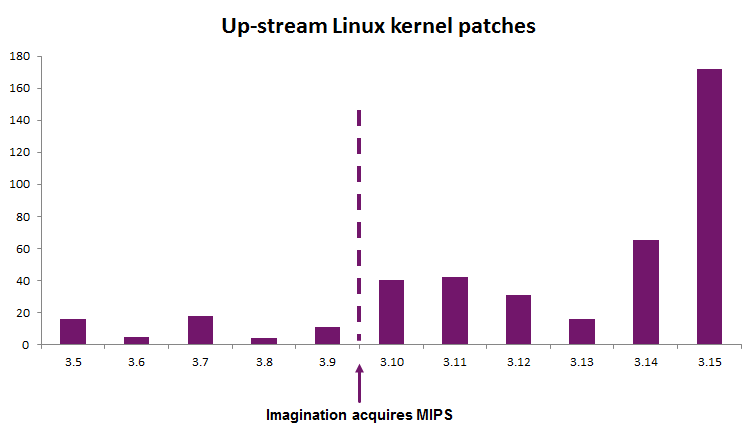
A lot of the work we’ve recently done has been focused on optimizing the Linux kernel for the latest features of the MIPS Warrior family. This includes adding new instructions and providing fixes and updates to support architectural specifications such as EVA (Enhanced Virtual Addressing), SIMD (Single Instruction Multiple Data), CPS (Coherent Processing System), GIC (Global Interrupt Controller), VZ (Virtualization) and others.
We are very excited to see how Linux developers will use the new MIPS Creator CI20 development board. Joining the Linux Foundation offers us exciting opportunities to streamline the kernel development process, collaborate with like-minded partners and provide support for the vibrant open source community that continues to build around the MIPS architecture.
Working on a new Linux-related project for MIPS? Go to http://store.imgtec.com to order your Creator CI20 development board now.
“We would like to evaluate the board as an alternative to other mainstream SBC systems. MIPS Creator CI20 would be used to collect environmental sensor information such as temperature, humidity, etc. around an MRI device for proactive maintenance and prevention of major faults. We feel this MIPS-based board might provide us a way to work around vendor lock in.” – Stealth start-up, USA
“I’ve been testing small form factor, low power alternatives for mobile wireless monitors on television production sets. Existing products on the market are either astronomically expensive, or don’t quite live up to what we need them for. I feel like the MIPS Creator CI20 board would make a great testing ground for what I have in mind. I’ve also been playing around with developing a fork of XBMC that’s more tuned for professional video codecs and environments. This would be the perfect platform for screening rooms for producer to view materials in, without the hassle of a traditional computer. There’s so much untapped potential in the professional video market and there’s little to no competition for what is out there today. I hope to hear back soon!” – Christopher LaBonty, video editor and IT consultant
“Limelight Game Streaming is a free open-source project to bring NVIDIA’s GameStream technology to as many devices as possible. We’ve successfully brought GameStream to several desktop PCs and Android devices and now plan to use the MIPS Creator CI20 development board for two of our current ports. Our Android port already has native libraries for MIPS32-based processors; it’s been tested in the Android MIPS emulator but never on a real device. A MIPS-based device that can decode 1080p at 60 fps video is a very cool prospect and having the hardware in hand allows us to tune our use of Android’s MediaCodec framework to produce the lowest latency video. We also plan to port Limelight to Creator CI20. Recently, we’ve been extending support to other small form factor Linux devices; getting Limelight running on Creator CI20 under Debian would provide a better option for users that want a small streaming device.” – Cameron Gutman, Limelight Game Streaming
“I run robotic and programming classes in a number of schools and universities in Shropshire, England. I was absolutely over the moon when I was offered the incredible MIPS Creator CI20 dev board. I have been using it to show off and teach young child the art of robotics and computer programming. Imagination has made quite a few people (young and old) very happy. Thank you for even proposing to support and develop grass roots, home brew computer science.” – Dr Ashley A. Green, Robotics and Space Educator
“I work as computer lab technician for a college in Québec and part of my job is to find new learning tools for our students in computer sciences. The MIPS Creator CI20 development board is the perfect Linux learning environment, and we are very happy to have a real world example of the MIPS architecture in our hands. Moreover, we just started teaching Android app development, and emulators are slow. This board is a much better solution than buying expensive tablets and phones! On a personal level, I’m also interested in the HTPC capabilities of this single-board computer!” – Patrice Boudreault from Cégep de Jonquière, Canada
“I’ve been using Linux on a daily basis since 2005 and I do electronics in my free time. I plan to use the MIPS Creator CI20 board as an IP PBX (mostly with Asterisk, Opensips and Freeswitch) as I worked some year ago as a VoIP engineer. Since the board delivers optimal power consumption and offers built-in Wi-Fi, I plan to hook it up to some solar panels and create an IP PBX for smaller companies that would run when you put under direct sunlight (with a battery backup). Maybe it could even get a small OLED display for major parameters like simultaneous calls, free disk space, free memory, CPU utilization.” – Anonymous maker, Hungary
“I am currently a student in course at Arizona State University during which the students learn and use MIPS assembly language. Usually students will use simulators such as SPIM or MARS to model the behaviour of real-world, MIPS-based devices. I am very interested to see how RISC architectures, which have usually been confined to the embedded space, can evolve and grow into the desktop market. These CPUs have finally become powerful enough to compete with classic Intel CPUs in more than just performance per watt. I also plan to use the MIPS Creator CI20 board for Linux development and compare it to various other embedded development kits. In the future, I expect that I’d be able to use the MIPS Creator CI20 as either a complete replacement for my Raspberry Pi (currently running an Airplay and Mumble server) or as an HTPC – I’m still exploring possibilities, which are, of course, endless.” – Omri Mor, Arizona State University
 Over the past couple of years, The Linux Foundation has emerged as a very influential organization overseeing not only directly Linux-related initiatives, but important technology efforts including building out “The Internet of Everything.” This week, the foundation made a series of announcements, including the news that it is expanding its leadership team, and news about events that the foundation will sponsor in 2015. Here is more.
The foundation announced the addition of industry veterans Steve Westmoreland, Laura Kempke, Philip DesAutles and Russell Farnell to its leadership team. The roles that the leaders will fill are as follows:
Philip DesAutels, Senior Director of IoT and Leader of the AllSeen Alliance
Laura Kempke, Vice President of Collaborative Projects Operations and Marketing
Russell Farnell, Vice President of Finance and Human Resources
Steve Westmoreland, Chief Information Officer
 Today, Mirantis is unveiling the free version of Mirantis OpenStack Express (the hosted on-demand version of the Mirantis OpenStack distribution) for developers. It’s a push to try and encourage developers to build products on top of OpenStack, as the need for a rich ecosystem of such tools is increasing.
The Developer Edition includes an OpenStack tenant with a quota of 4 virtual CPUs, 4GB RAM,100GB of storage and two floating IP addresses, plus access to OpenStack APIs. It also comes with 24/7 support and a dozen tutorials to help developers get started. The online tutorials are based on Mirantis Training for OpenStack. Here are more details.