A common thread runs through most of these nine trends: Open source is leading the way in technology development. It’s become the vehicle of choice for startups to gain traction, as customers — mainly developers within companies — take new technologies for a spin, provide feedback, and eventually put them into production. Meanwhile, other developers see what’s hot and start building an ecosystem around a core project, as has occurred with Docker, Hadoop, OpenStack, and others.
The simple model of open source development — collaborative, self-organized, and distributed — even appears to be having an impact on enterprise app dev. That trend will take years to unfold, although some companies are now experimenting with it.
Rocket is a new container runtime, designed for composability, security, and speed. Today we are releasing a prototype version on GitHub to begin gathering feedback from our community and explain why we are building Rocket.
Why we are building Rocket
When we started building CoreOS, we looked at all the various components available to us, re-using the best tools, and building the ones that did not exist. We believe strongly in the Unix philosophy: tools should be independently useful, but have clean integration points. We hope this is reflected in tools that we build, such as etcd, which have seen widespread adoption and use outside CoreOS itself.
Phil Müller has announced the release of Manjaro Linux 0.8.11, the latest update of the Arch Linux-based distribution featuring the Xfce and KDE desktops: “We are happy to announce the final release of Manjaro Linux 0.8.11. The Xfce edition remains our flagship offering and has received the attention…”
[If you’re looking for details on what was announced at SUSECon, there are a wide variety of excellentarticleshere on Linux.com, and on a number of other sites. From here on I’m just going to be talking about some of the fun bits that most people don’t get to hear about.]
At high noon on a sunny Sunday in Orlando, Florida, I checked into my hotel and strolled on down to the adjoining convention center. Banners for SUSECon 2014, set to officially kick off less than 48 hours from that moment, were already flying in the lobby and over the doorways.
There was an excitement in the air. People — some of whom I recognized, many I did not — were hurrying to and fro. Palletsofboxes (in varying states of unpacking) were placed at strategic locations throughout the conference center. At least, I assume the locations were strategic. Truth be told I didn’t have the foggiest idea what was in most of those boxes. Luckily I didn’t really need to know… that was someone else’s job.
I’ve been to many tech conferences over the years — too many to count. But this one was special for me. I’ve had badges, at past conventions, with words on them like “Speaker,” “Press/Media” and “Sponsor.” But this time… this time I was working for the company that was organizing the whole thing. My badge said “All Access.” Being on the other side — the side that was putting the entire show together — was… exhilarating.
All. Access. It was right there, in all caps, on the badge hanging at the bottom of my lanyard. And, boy howdy, did I treat those two little words as a challenge. If I was going to be technically allowed to go anywhere at any time, you bet I was going to do so.
Backstage duringthekeynote? You bet. In the expo hall during the setup time (when the doors were locked and guarded)? Absolutely. I went everywhere… and I took my camera with me. And nobody batted an eye.
[Okay, that’s not entirely true. There was this one lady that worked for the convention center (not SUSE) whose job it was to guard the door to the expo hall during the day. She was convinced I looked rather sketchy and was probably not supposed to be there. At one point she convened an impromptu hall-way meeting with her fellow door guards — that I was lucky enough to eavesdrop on part of — where they debated whether or not the scrawny guy in the Pac-Man shirt should be there. They eventually decided I was allowed to be there (what with the “All Access” and all) but they should keep an eye on him. You know. Just in case. Cool sidenote: I just referred to myself in both the 1st person and 3rd person in this paragraph. I’m pretty sure that means I have super powers.]
Now, most of SUSECon was planned well ahead of time (by a crew of people that know how to plan these sorts of things) — and I had the good fortune of watching a lot of that planning take place. I even got to review the script for the keynote ahead of time. I knew what was coming. I knew what to expect. Despite this — there were still a few surprises in store. And I thought I’d tell the tale of two of my favorite moments from the conference to give everyone a quick peek behind the curtain.
Rockin’ with Gene Simmons
The first was the conference party. The first night of any good tech conference, there is always a party. Sometimes the parties are amazing. Sometimes they’re a snooze fest. SUSECon 2013 (which I attended as a journalist covering the event, before I ever joined the SUSE team) had a pirate themed party that was absolutely rocking. Obviously, for 2014, we had to find a way to top that.
So, of course, we had a brainstorming meeting — and I got invited to be a part of it. During that meeting, a very smart SUSE-keteer suggested having a party with a retro video game theme. Obviously, I jumped on this like white on rice. In fact, I was rather adamant that this was the best idea ever and I expressed this opinion at length. Using the words “awesome” and “badical” as many times as possible. Because that’s what I do.
The meeting ended with no clear decision made. And I was left off further meetings discussing the planning for this party… which was probably smart (My opinion was pretty doggone clear). Since I wasn’t on those meetings anymore it seemed like a safe assumption we weren’t going with that, most triumphant, party idea.
Jump forward to the first day of SUSECon. I wander past the security guard and into the expo hall (“All Access”. Boom.) and immediately I begin to geek out. Gigantic, three-foot-wide rubik’s cube lights. Classic 1980’s arcade games throughout the hall. ‘80’s banners. Part of the floor had even been turned into a large-scale game of Pac-Man.
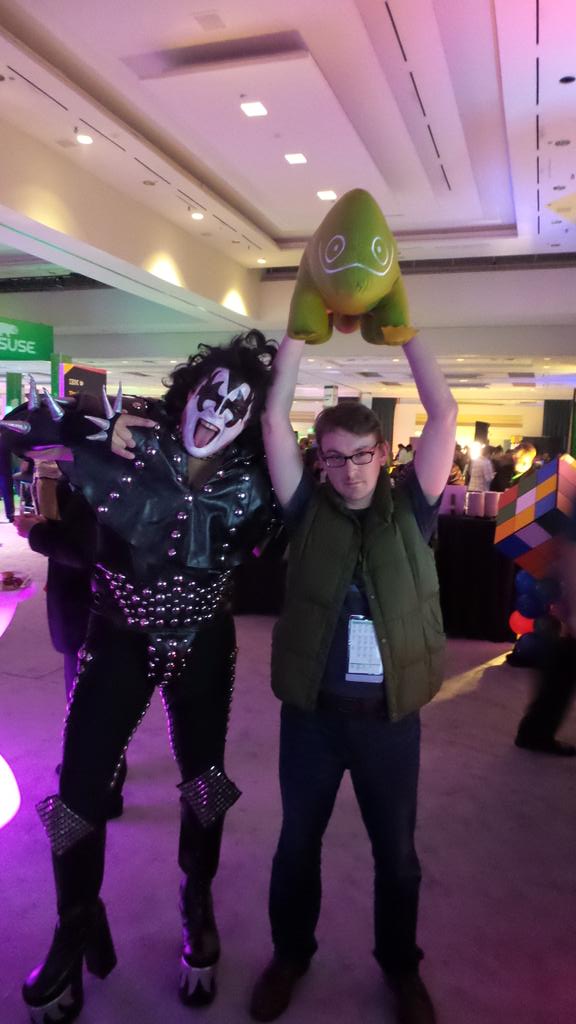
I dash back to my room and change into my “Back To The Future” T-Shirt, blue jeans and toss on my green vest (I know the Marty McFly vest is orange… but this is SUSECon, after all… green is more appropriate). Or, as I like to call it, my “fancy suit”.
When I get back down to the expo hall, I was greeted by an amazing sight. Standing outside, getting ready to go in, are celebrity impersonators for Madonna, Michael Jackson, Prince and GeneSimmons (in full KISS gear). Later to be joined by Mario, Luigi, Pac-Man and Ms. Pac-Man.
It was… glorious.
A Failed Demo… Almost
Two days later and the closing keynote of the conference was almost upon us. With minutes to go before the doors opened to the world, we took the opportunity to do a quick run-through of the demo for SUSEStorage.
During that demo, there is a part where someone picks up a big power cable and unplugs it. At that moment the audience hears a “PZZzwwwww” noise (you know, the “power just got shut off” noise) and the lights all go out. A big, dramatic, funny moment. A key moment.
Only one problem: The “power off” noise plays… but the lights didn’t actually go out. Whoops!
Oh, well. No biggy, right? That’s what we do rehearsals for! Wait… what time is it? It’s time to open the doors and let everyone in? Well. It’ll work when we do it in the actual Keynote in just a few minutes… right? Right?
Luckily, it did. And the resulting demo during the keynote (below) was nothing short of awesome. Because the crew was pro. But, I tell ya, that sure made a few folks sweat!
Okay. That’s all the wordage that I’ve been allotted to talk about my SUSECon experience. And one heck of an experience it was.
Organizations that want to tap the full capabilities of cloud for the development of enterprise-grade business applications need to equip their IT and development teams with the right tools.
“We would like to provide HPC resources and expertise to a broader business and academic community to accelerate their research and product development. We believe that the Virtual Supercomputer is more than just a technological platform – it is a tool to democratize HPC industry. And this is how the concept of eManufacturing will become a reality.”, says Dmytro Fedyukov, the CEO of Massive Solutions. “We welcome users, datacenters, universities, application developers, and experts to evaluate beta service and join partner alliance to make VSC a success.”
Enterprise cloud storage has come a long way in the past decade as storage developers have worked out a lot of the kinks that plagued the technology early on. Companies are embracing it as a way to store data without having to manage their own storage servers, while still enjoying the benefits of replication, scalability, and stability.
In this series of articles I’ll take you through some different cloud storage options. These are commercial companies, although some of them use open source software. In today’s article I look at Cloudant, which uses a modified form of CouchDB. Originally they forked CouchDB and built a scalable and fault-tolerant version called BigCloud; since then, their updates have been merged back into the main CouchDB code. This means in theory you could run your own services similar to Cloudant’s offerings; however, there are some recent features of the system that have not yet made it back into CouchDB.
Cloudant, which was founded in 2008, was sold to IBM in February of 2014. As such, we’re actually talking about an IBM product here. As for pricing, there are several levels based on your needs. For starting out, though, you can use Cloudant for free, as long as you stay under a monthly charge of $5. You can find the details at https://cloudant.com/product/pricing/.
Getting Started
You can configure and access your data either programmatically or through Cloudant’s web interface. In either case, however, you’ll have to understand JavaScript Object Notation (JSON), as that’s the format your data is stored in. You’ll need to understand some basics about CouchDB.
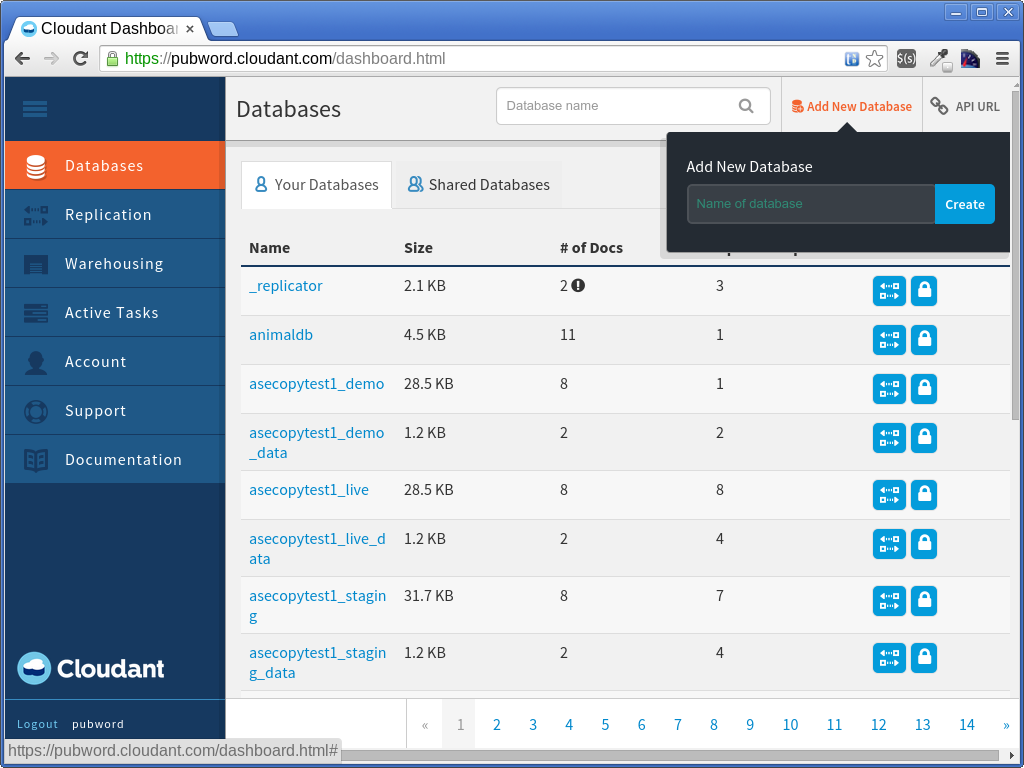
The first thing you do, then, is create an account at https://cloudant.com/. Then you can log in, which takes you to your dashboard. From there, you can create your first database. Here’s a capture of my dashboard; I already have created several databases:
Creating a Database
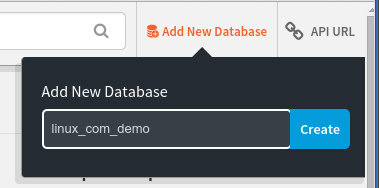
In the CouchDB (and thus, Cloudant) world, a database is a collection of documents. Documents, in turn, are JSON objects. To create a database, simply click the Add New Database link that’s towards the upper-right corner. Enter the name of the database, and then click Create.
Adding Documents to a Database
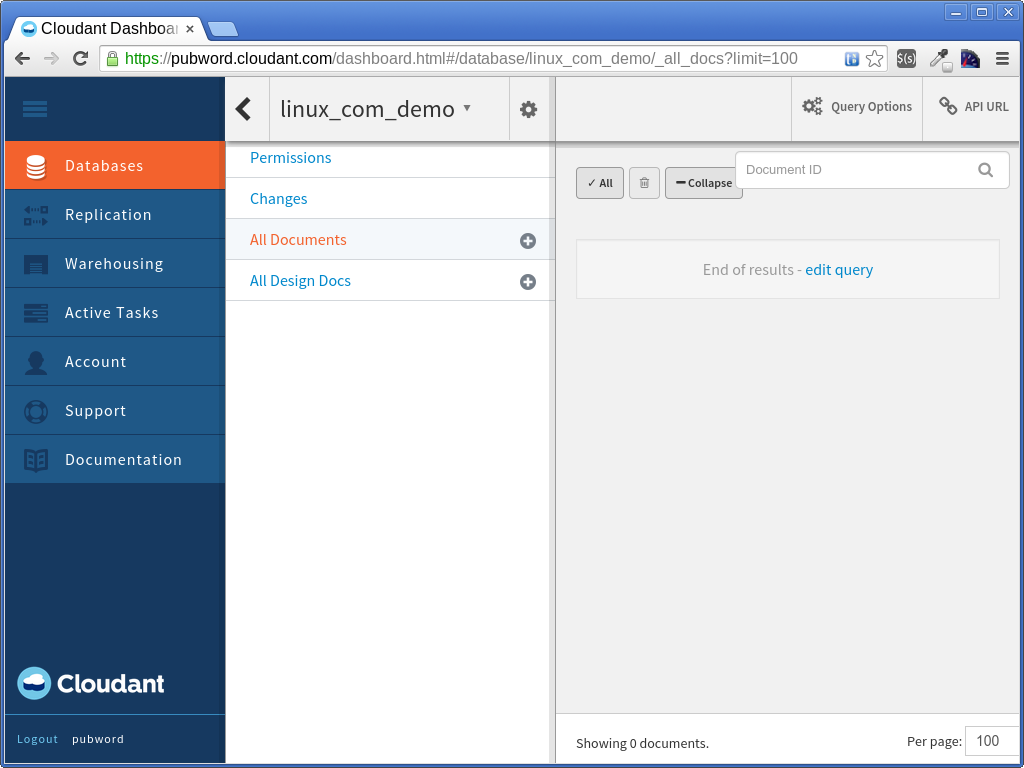
After you create the database, you will be taken to the database’s document view in the dashboard, as shown here:
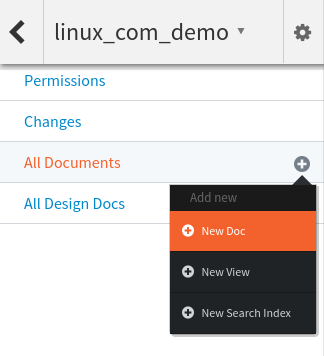
The top of the view shows you the name of the current database you’re working on. The right-hand pane shows you your documents. Right now there aren’t any, so let’s go ahead and create one. In the middle pane, to the right of All Documents is a little plus symbol. Click it; this will reveal a dropdown, and in that dropdown click New Doc.
This opens the document editor. The document editor is a code editor within which you can edit your JSON document. Your document must conform to the JSON specification. One way to think of a JSON object is that it’s a JavaScript object without any functions or variables or expressions that need to be evaluated; in other words, only literals. The member names and strings must be surrounded in double quotes.
You’ll notice that the document editor starts out with a JSON document containing a single member called _id, which is a string containing a UUID. This is _id is required for every CouchDB document, and it must be unique within the database. If you’re familiar with SQL databases, you can think of it as essentially a primary key. Every document must have one. The web-based editor here creates an _id for you.
Now you can go ahead and add members to your JSON object. Here’s one example; the _id you’re presented with will be different:
After entering or pasting this in, click the green Save button that’s at the top. You’ll see a message at the top of the window that the document was saved. Or, if you enter code that isn’t valid JSON, you’ll see an error message instead. The editor includes some syntax checking and will notify you with the location of an error with a little x to the left of the line. It does so as you’re typing, so you should be able to catch any errors before you even try saving the document.
Then click Back to return to your database view. Now you’ll see your new document listed in the right-hand pane.
Conclusion
Creating databases and documents is easy in Cloudant. You can also create views for searching and mapping your data, as well as construct queries (using a special query syntax) and full-text searches (using Lucene). In the next article we will try all three out. We’ll use the dashboard as well as try it programmatically. See you then!
Q4OS is like Exe GNU/Linux a distribution using the Trinity desktop and based on Debian Stable. In fact I could have picked Exe as well for review but Q4OS just had a new release and it looks cleaner from the start. It was simply the novelty factor that pulled me towards it and it’s got a few nice touches of its own as we shall see. Version 0.5.20 was just released on 11/11/2014 and is available both for the mainstream 32 (i386) and 64-bit architectures. The images are a modest 314MB and 337MB respectively which makes for a speedy download and will definitely fit on your CD or even older USB sticks.

 [If you’re looking for details on what was announced at SUSECon, there are a wide variety of