
Wine developers are contemplating a staging-like tree where new changes could be introduced faster before being mainlined inside Wine, but this idea doesn’t catch the fancy of all Wine developers…
Read more at Phoronix
Scribus is a great desktop publishing program for creating brochures, business cards, invitations, newsletters, and pretty much any kind of printed document you want. Scribus exports to PDF, SVG, EPS, and most image file formats. It is cross-platform and runs on all major operating systems. When you install Scribus be sure to get the templates and documentation packages.
The native Scribus file format was changed for the 1.4 series. Newer Scribus major versions can open files created in all older versions, but not the reverse. For example, Scribus 1.3.x cannot open Scribus 1.4.x files. When you open an older Scribus file format in 1.4.x it is converted to the newer format, and will not open in older versions.
Scribus is all about controlling page layout with precision. You can do a lot of what Scribus does in Libre/Open Office, but Scribus does it better and with fewer vexations. (I have a love/exasperation thing going with LibreOffice, as it seems composed of equal parts fabulousness and vexations.) Let’s take a quick tour of some of Scribus’ coolest features.
One of its best new features is Render Frames. Text inside a Render Frame is rendered to LaTex, Lilypond, GNUPlot, GraphViz and POV-Ray, without having to call an external editor.
Scribus has a nice batch of import filters, and imports Adobe Illustrator files, including EPS and PDF files created in AI. It also imports Kivio Stencils (SML), Dia Shapes (SHAPE), Macintosh PICT (PICT), Windows Metafile (WMF), and many others.
The Scrapbook gives a fast, easy location to store images and text snippets for re-use. You can use it for temporary storage of objects for a project, or create and save Scrapbooks to use in multiple projects.
It comes with a good batch of templates, and you can download more (and share your own) from Scribusstuff.org.
A good project for getting familiar with Scribus is to create a cheery greeting card. Let’s say we have a nice color printer and some good card stock, and we’re making Mom a birthday card. Moms love photos of their kids, so find a nice one of yourself. Open Scribus, click the New Document tab, and set your page size and orientation (figure 2). My example is US Letter, landscape, two-sided.
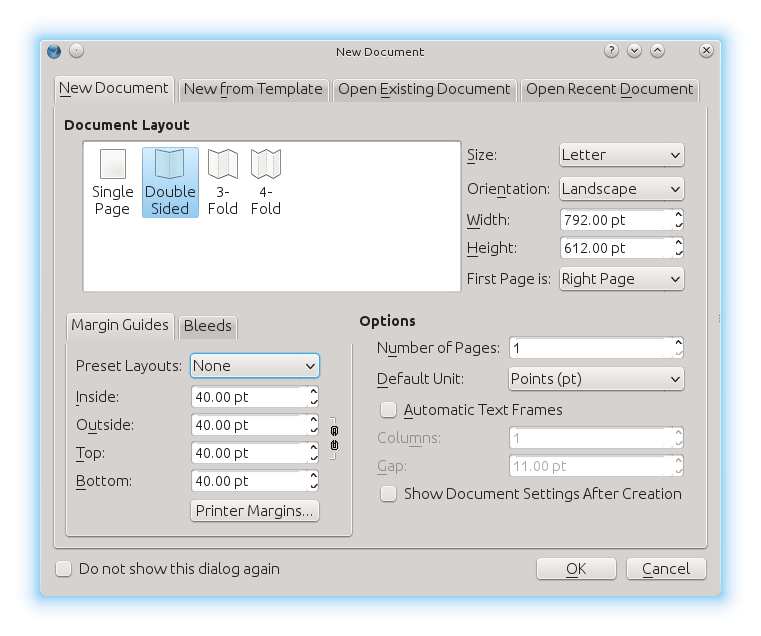
You can change your open document parameters anytime in File > Document Properties, and set defaults in File > Preferences.
I will fold this in half, so my nice greeting card will have four pages. Let’s do the outside pages first. The cover is on the right, and the back is on the left. I’ll start with my cover text. It doesn’t show the fold line, so watch your side and top scales. The default scale is in points, so if you didn’t set your default to inches just click the dropdown menu on the bottom left to change from pt to in, or whatever scale you want to use.
Click Insert > Insert Text Frame. To add text, right-click inside the Text Frame and left click Edit Text to open the Story editor. You can also double-click and just start typing at the cursor, but the Story editor makes it easier to select fonts and change colors and sizes. Click Edit > Fonts Preview to see which fonts are installed and what they look like. The contents of the edit window in the Story editor don’t show up in your document until you click the green arrow, or press Ctrl+w. You have to make your line breaks in the Story editor, and you have to format each line separately. Resize and move your frame around until it looks right.
Now I want a cool pretty picture, so the next step is Insert > Insert Image Frame. Draw your approximate size and position, then right click inside the frame and left click Get Image, or press Ctrl+i. Sadly, it won’t let you type or paste in the filepath, but you must clicky through menus until you find your image. If you can’t see the whole filepath in the file navigator dropdown, make the window longer. Why do GUI file dialogues love to truncate filepaths, anyway? It’s as though they love to make us guess.
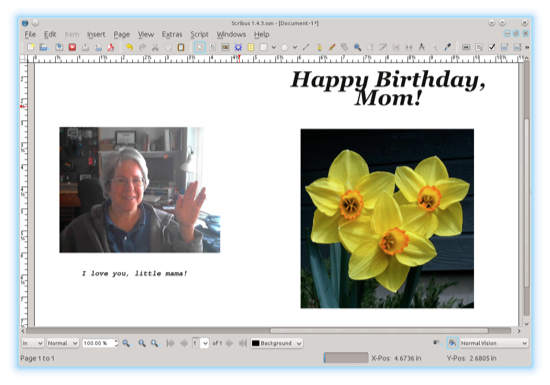 When your image is inserted into your frame, right click again and left click either Adjust Image to Frame, or Adjust Frame to Image to make it fill the frame. You might even have to do both to fill the frame. There is an Image Effects option in the right click menu if you feel like doing weird things to your picture.
There is an unusual and useful option on the bottom left of the Scribus window: click the eyeball to activate the dropdown menu to the right of the eyeball. This displays your document as it appears to people with different types of color blindness.
Now follow the same steps to add text and images to the back page. You should have something like figure 3.
Now we need the inside pages, and that means adding one more page. Click Page > Insert, and insert the page at the end. Though it won’t matter if you have a typical home printer that does not do duplex printing. If you do have a duplex printer, then you need to be careful of your page order and orientation. Do the insert text and images dance until you’re satisfied, and then you can print it, give it to your mommy and make her happy.
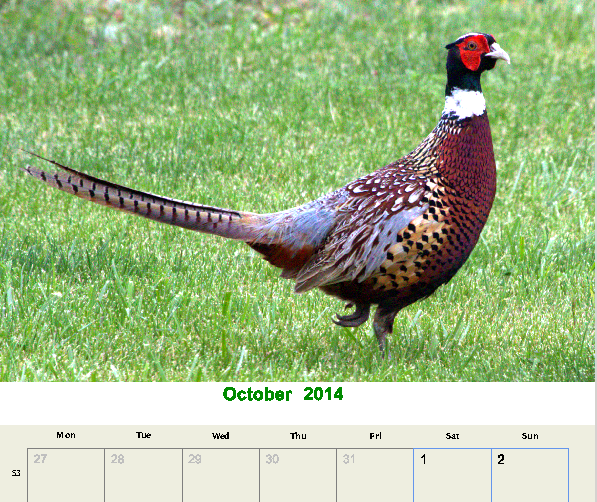
Figure 1, above, shows a cool calendar decorated with a photo of the handsome rooster pheasant that makes the rounds of my neighborhood every day. Unfortunately the Calendar Wizard is broken, so you have to enter the dates manually. You can create this calendar by opening the Cal2 template (File > New From Template > Calendars), and then editing the image. Then the normal procedure is to run Scripts > Scribus Scripts > Calendar Wizard, which then lets you create a whole year of monthly calendars with your choice of starting month and year. The wizard is a Python script, so perhaps one of you fine readers is a Python guru who can fix this.
John Linville is a principal engineer at Red Hat and the maintainer for wireless LANs in the Linux kernel. In this video he gives us a guided tour of his home office, including his Fedora and RHEL workstations, his collection of vintage hardware, and a few retro computing projects underway. (For more, see the full series of Linux kernel developer videos.)
Linux.com: What area of the kernel do you work on and what are you working on now?
John Linville: Officially, I am the maintainer for wireless LANs in the kernel. But more recently I’ve been dabbling in other  topics related to cloud networking and SDN.
What do you like most about your work space?
The best part is that it is at home. I live about an hour from Red Hat’s headquarters, and that commute time is just wasted when I have to go into the office. Plus, working at home makes it a bit easier to transition back and forth between work, home, and hobbies.
What do you like least?
I dislike how messy it gets. I share the space between work and hobbies, and from time to time one or the other of them causes some upheaval to the space. When the clutter builds high enough, it starts to effect my mood. So, I try not to let that build too much. 🙂
What’s the oddest work space you’ve ever used?
Early in my career I worked at IBM. During those early years, I was a bit of a machine — constantly coding, testing, inventing, or whatever. I spent lots of time in the lab. I had an office,but it was at the other end of the building and it felt too far away for me to be productive.
Before long, the lab was expanded by walling-off parts of an adjacent hallway. A few of us young folks took that opportunity to move our desks out into that lab expansion (aka the hallway) so we could be
productive and still have a desk of our own. The hallway did have the advantage of having windows, even if we were on the ground floor.
Of course, someone complained that our desktops could be viewed from outside the building — we were at risk for corporate espionage! So, we gathered-up some discarded printouts and used them to paper the windows. Being a snarky 20-something, I wrote “IBM CONFIDENTIAL” in big letters on some of the papers we put on the windows. There was still some pushback, since the discarded printouts contained source code. But eventually we were allowed to keep our unique space… 🙂
Is there a particular item in your work space that we should know about?
Other than my retro computing hoard, the most interesting thing to me is my glass chair mat. Making a chair mat out of glass sounds stupid, but it works really well. The tempered glass is tougher than you
might think, and it stays flat even under a heavyweight like me. Any bigger folks out there that want to use an office chair in a carpeted area should find a glass mat!
Read more about John’s retro computing hobby in the blogs he writes about his Fahrfallgame for the Radio Shack Color Computer, Motorola 6847 graphics chip, and general retro hacking topics.
 Netflix is now available to watch on Ubuntu out of the box — no hacks, plugins or user-agent switching workaround required.
Read more at OMG! Ubuntu!
