Home Blog Page 1345

New computing centers for Afghanistan with UCS

The center for international and intercultural communication (ZiiK) at the Technical University Berlin (TU) is dedicated to offering students from developing countries long-term perspectives focussing hereby on sustainable help in information technology.

Since 2002, Dr. Nazir Peroz, born in Afghanistan and Director of the Ziik, supervised the setup of new IT centers in five Afghan universities with the use of open source software. “From the beginning, our aim was always to create something that will continue to help Afghanistan in the long term as well, something which opens up perspectives for the future for the nation, and offers the people hope”, explained Peroz. “The IT sector is ideal for achieving these goals because it is indispensable for modern economy on the one hand and requires lower investments in hardware than other branches of trade on the other.”

When the team arrived in Kabul first in 2002, the situation was dreadful. After decades of war and the tyranny of the Taliban, there was not much of the academic education system left. In the whole of the capital’s college there were just a handful of old computers, some of which didn’t even work anymore. When establishing the computer centers, the Germano-Afghan project employed Open Source software right from the start. “Naturally, the license costs were the most important reason for choosing Open Source software”, said Daniel Tippmann, Project Planner and Coordinator at the ZiiK.

As to the operating system to use, the team wanted a system, which puts the Afghan staff in a position to perform all the necessary work with as little training as possible and if possible without our support. Over the years, the ZiiK team and its Afghan partners tried out numerous different operating systems, primarily different Linux distributions. The youngest of the computer centers, the IT Center Kandahar (ITCQ), was the first to set up all the servers on the basis of Univention Corporate Server (UCS), which proved to be the best for them in terms of ease of use, flexibility and scope of action due to its App Center, which offers the installation and integration of numerous other proven open source solutions. Until the end of 2015, the other four universities will follow and migrate completely to UCS.

More information at: IT for Afghanistan: German project supports the training of young IT professionals

Linux 3.17-rc7 Released: Linux 3.17 Final Release Pushed Back

While Linus Torvalds was looking at possibly releasing Linux 3.17 this weekend, there’s been a chance of course with a 3.17-rc7 kernel instead having been released…

Read more at Phoronix

Introduction of Huawei SSR1PCXLL401 board

SSR1PCXLL401 is a SDH service board which serve in Huawei OSN 1500B equipment. You could discover several names of this board, these are SSR1PCXLL4, SSR1PCXLL401, SSRD0PCXL411. In fact they describe the same item and you can use any name of it to search on the internet. Many professional HUAWEI transmission product suppliers buy this board such as thunder-link international. Reports various alarms and performance events, which facilitates the management and maintenance of the equipment.

Four parts compose of SSR1PCXLL401, namely, SDH Processing Unit whose function is transmits and receives 1xSTM-1/STM-4/STM-16 optical signals; SCC Unit works on Configures and monitors services, monitors the service performance,and collects the information about the performance events and alarms; Cross-Connect Unit includes Higher order cross-connect capacity: 60(Gbit/s); Lower order cross-connect capacity: 20(Gbit/s), which matters a lot to the customers; the forth one Clock Unit provides the standard system synchronization clock.

The SSR1PCXLL401 is available in one functional version, that is R1. It is used in the OSN 1500B Transmits and receives 1xSTM-1/STM-4/STM-16 optical signals. It converts the received optical signals into electrical signals and sends the electrical signals to the cross-connect side. In addition, it also converts the electrical signals sent from the cross-connect side into optical signals and transmits the optical signals.

The SSR1PCXLL401 could be installed in slots 4 and 5 in the subrack. By default, slot 4 is the slot for the working board, and slot 5 is the slot for the protection board.

The feature code 401 of the SSR1PCXLL401 indicates the type of optical interface is S-4.1. Some parameters that differ from the series board of SSR1PCXLL401 can be referred as follows: (S-4.1) , its transmission distance is 2 ~ 15 km; (L-4.1 ), 20~40km; (L-4.2), 50~80km and (Ve-4.2 ), 50~100km.

How to Organize Your Linux File System for Clutter-Free Folders

bleachbit 1

Linux is an incredibly powerful system that works well for both server and desktop environments. But like any platform, Linux is prone to end user mistakes and neglect. One area of neglect many users are guilty of is folder clutter. This may sound innocuous, but it can lead to lost data and (in worst case scenarios) even insecure/unstable systems. Fortunately, folder clutter is something you can easily avoid or remedy. With just a little care and maintenance, you can have a directory structure, clean of cruft, which will serve your needs for a very long time.

Let’s first take a look at how you can avoid clutter and then we’ll follow up with how you can cure the clutter.

Avoiding the clutter

Most all modern Linux systems go a long way to help you avoid cluttered folders. That doesn’t, in any way, mean they handle the issue for you. You must be pro-active in order to avoid a landslide of files and folders from crushing your system. The good news is, from the start, you’ll find the folder hierarchy set up in such a way as to help you avoid the clutter.

Open up your file manager and look in your home directory. What do you see? You should see the following sub-directories:

  • Documents

  • Downloads

  • Music

  • Pictures

  • Public

  • Templates

  • Videos.

Every user created on the system will have those folders in their home directory. There’s a reason for these folders — for users to place their data. Though simplistic, this folder hierarchy is perfectly suited for the average desktop user. Save documents in Documents, music in Music…you get the idea.

However (there’s always an “however”)…don’t just dump every document you create, download, or are sent into the Documents folder. Plan out a strategy. Create sub-folders within Documents, such as:

  • Work

  • School

  • Creative

  • Schedules

The more specific you can get with your folders the better.

As for Pictures — this is one of the folders that is most prone to chaos. If you fancy yourself a photographer (amateur or pro), consider using a tool like Shotwell to do all of the image importing for you. By default, when Shotwell imports images, it places them in a dated folder structure. This means all of your images taken in 2014, 2013, 2012, 2011, 2010… will be saved in folders labeled by date. If you just insert the SD card into a reader and move all of those files into ~/Picture folder, any hope of organization will be tossed out the window.

I tend to take this idea even further. Instead of saving all of my crucial data on the same drive that holds the operating system, I add a secondary drive and use it to store all of my data. I then create links from the folders in the home directory to the folders in the secondary drive. This does a couple of things:

  • Prevents your operating system drive from filling up

  • Allows you to reinstall your OS without worrying about losing data.

The first issue is crucial when employing smaller, solid-state drives to house your operating system. You will want to make sure to house your data on a secondary drive. When adding that drive, pay very close attention to how you structure the folder hierarchy. Do not just randomly save files and folders or you create chaos.

If you’re keen on adding extra drives, you have the hardware, and you have large collections of multimedia, considering adding separate drives for Documents, Music, and Videos.

Curing the clutter

But what happens when you’ve not really paid the best attention to your directory structure and you find yourself constantly searching for needles in an ever growing haystack? What can you to cure your system of the clutter? Fortunately, there are a few apps and tools out there that can help you. I want to bring to light a few of these tools.

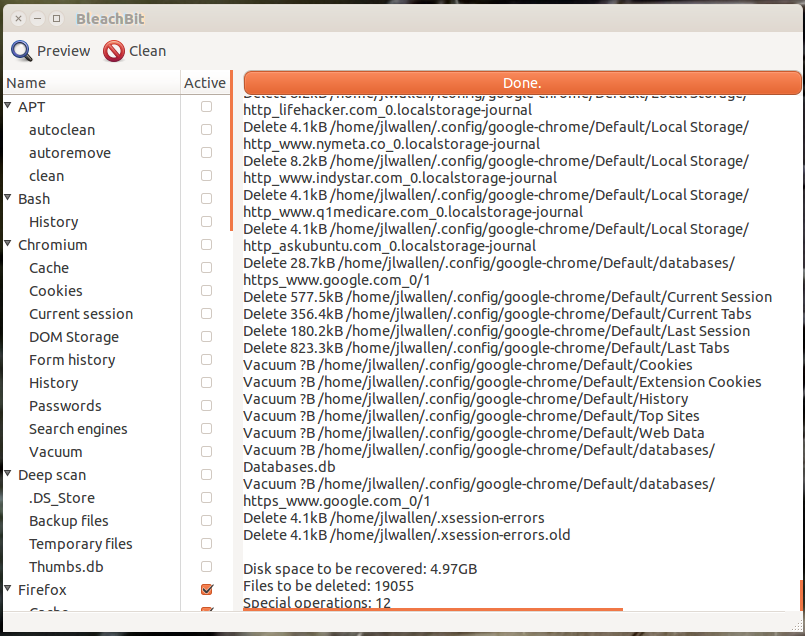
The first tool is Bleachbit. This system cleaner does a great job of cleaning up:

  • Cache

  • Backup files

  • Temp files

  • Cookies

  • Crash reports

  • and much more.

Bleachbit can be found in most distribution software repositories, so you should be able to install it from your system software installation tool (such as the Ubuntu Software Center). Once installed, you simply have to run the tool, check what you want cleaned (see the image, above), and click the Clean button.

If you’re looking for a tool to help rid your system of:

  • Duplicate files

  • Problematic file names

  • Temp files

  • Bad symlinks

  • Empty directories

  • Nonstripped binaries.

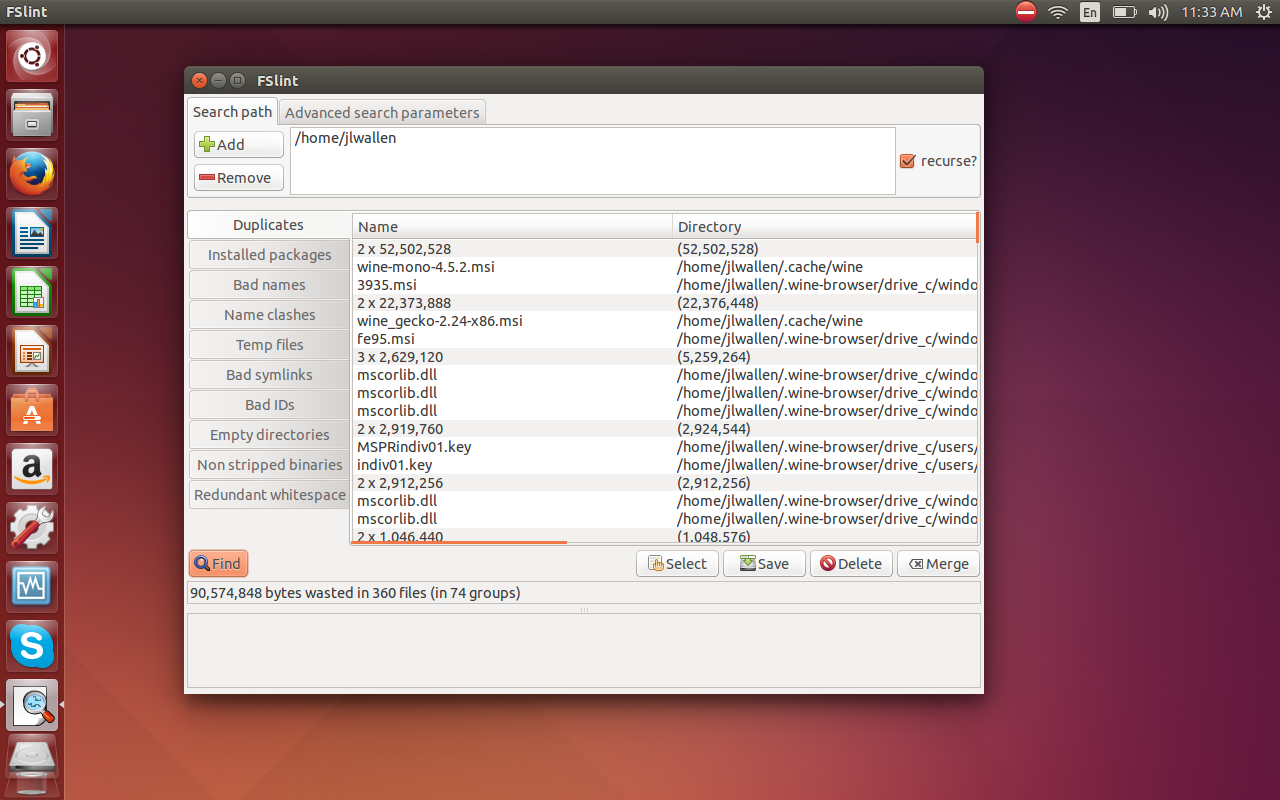
FSlint is what you need. The duplicate files search alone is worth getting to know this app. With a quick search, FSlint will display all of the duplicate files in a folder structure (image below).
fslint 1

Depending upon the size and the contents of the folders to be searched, FSlint can take a while to search for duplicates, so make sure to give it plenty of time. On a two-terabyte drive (with 73% of its space in use), FSlint took nearly an hour to report duplicate files.

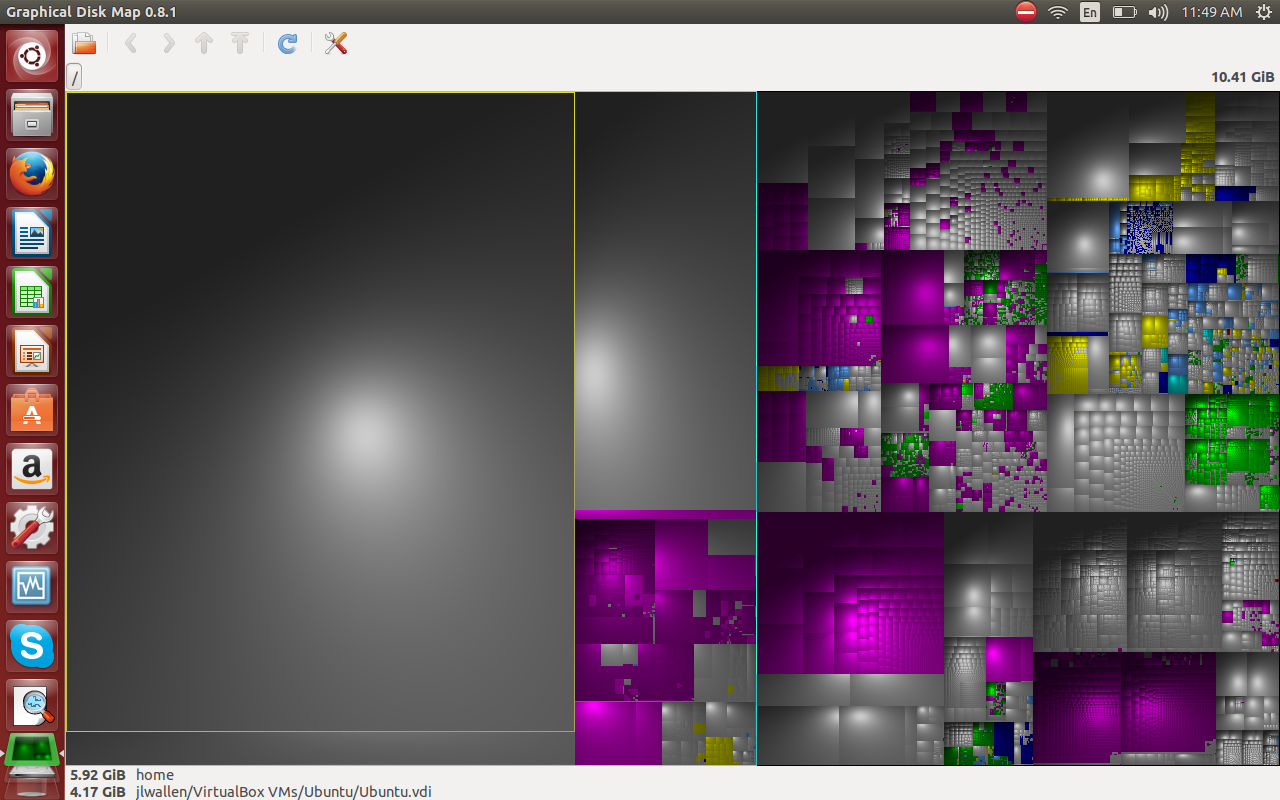
What about files and folders taking up space? You might have left a bunch of downloaded ISO files somewhere on your drive. How do you find them? You can try a tool like Graphical Disk Map (or GdMap). Install this app from your default repositories and, with a quick click, you can see what is gobbling up that disk space and just where those large files are (image below).
gdmap 1 

Of course, if you’re on a headless or GUI-less server, you’ll want to know how to do such things as search for duplicate files from the command line. Thankfully, there’s regular expressions (or regex) to help with that task. Regular expressions are an immensely powerful tool that can do just about anything you want — at a price. The price? Regular expressions commands a steep learning curve. How challenging and powerful are regular expressions? You could use the following command to find duplicate files on your Linux drive:

find -not -empty -type f -printf "%sn" | sort -rn | uniq -d | xargs -I{} -n1 find -type f -size {}c -print0 | xargs -0 md5sum | sort | uniq -w32 --all-repeated=separate | cut -f3-100 -d ' ' | tr 'n.' 't.' | sed 's/tt/n/g' | cut -f2-100 | tr 't' 'n' | perl -i -pe 's/([ (){}-])/\$1/g' | perl -i -pe 's/'''/\'''/g' | xargs -pr rm -v

With just a little planning and care, you can keep your Linux desktop free from clutter. Even if it does get out of control, there are tools to help you out. If you know which tools to turn to, and how best to organize your file system, gaining control of that chaos can be quite simple.

Hadoop Developer Cask, Formerly Continuuity, Goes Open Source

Continuuity Inc., whose software makes it easier for developers to build applications that run on the big-data storage and analysis system Hadoop, has changed its name to Cask and will put its technology into open source.

The company has also named Boyd Davis, a former vice president and general manager at Intel Corp.INTC -0.50%, as its chief operating officer. Most recently, Mr. Davis managed Intel’s Datacenter Software Division, where he said he developed the strategy that drove Intel’s $740 million investment into the Hadoop vendor Cloudera Inc. last May.

Read more at Wall Street Journal.

Eight Up and Coming OpenStack Cloud Projects

The number of projects within OpenStack continues to grow. eWEEK takes a look at some upcoming OpenStack projects to look forward to.

Read more at eWeek

Free Software Foundation Statement on the GNU Bash “Shellshock” Vulnerability

GNU Bash has been widely adopted because it is a free (as in freedom), reliable, and featureful shell. This popularity means the serious bug that was published yesterday is just as widespread. Fortunately, GNU Bash’s license, the GNU General Public License version 3, has facilitated a rapid response. It allowed Red Hat to develop and share patches in conjunction with Bash upstream developers efforts to fix the bug, which anyone can download and apply themselves. Everyone using Bash has the freedom to download, inspect, and modify the code — unlike with Microsoft, Apple, or other proprietary software.

Software freedom is a precondition for secure computing; it guarantees everyone the ability to examine the code to detect vulnerabilities, and to create new and safe versions if a vulnerability is discovered. Your software freedom does not guarantee bug-free code, and neither does proprietary software: bugs happen no matter how the software is licensed. But when a bug is discovered in free software, everyone has the permission, rights, and source code to expose and fix the problem. That fix can then be immediately freely distributed to everyone who needs it. Thus, these freedomsare crucial for ethical, secure computing.

Read more at the Free Software Foundation.

The Next AMD Catalyst Linux Driver Is Much More Exciting

Yesterday I wrote about an upcoming Catalyst Linux driver offering VCE and HSA support while today are more details on this forthcoming update…

Read more at Phoronix

Linux 3.18 Should Let Radeon GPUs Clock Higher For OC’ed Cards

AMD’s Alex Deucher sent in another Radeon drm-next patch series this week with some more last-minute tweaks for the Linux kernel’s next merge window…

Read more at Phoronix

Kubuntu 14.10 Beta 2 Released

Kubuntu Developers have finally announced the release of second beta for 14.10 aka Utopic Unicorn. The beta shows the progress Kubuntu team has made towards the final release scheduled for October.

The beta comes with stable Plasma 4 and a preview of Plasma 5 which is still work in progress and misses some core features of Plasma. These features will be added in the future releases as and when they are ready. While Plasma 5 is not recommended for use on production systems, you can still use it to get work done and help developers in finding and fixing bugs – that’s the only ‘optional’ price a free software user has to pay.


Read more at Muktware