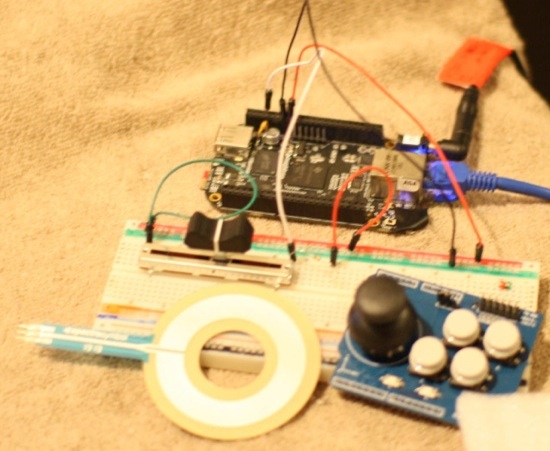
In this Linux.com series on the BeagleBone Black we have seen how to use the Linux interface allowing us to access chips over SPI and receive interrupts when the voltage on a pin changes. This time around we will take a look at how to get analog input on the BeagleBone Black.
While GPIO, TWI, and SPI communication happens using just the two states of high voltage and ground voltage, with analog input you can read many values in between high and low.
Examples where you might want to use analog input are sensing the environment, for example using a light-dependent resistor to see how bright it is currently, or a temperature sensor. Human interaction also offers many analog inputs such as using potentiometers, joysticks, or resistive touch screens.
This article is provided without warranty or fitness for any purpose. I’ve done the things described and it doesn’t seem to have hurt my BeagleBone Black or anything else. Any hardware setups you do are at your own risk.
Test Analog Input
While the GPIO pins on the BeagleBone Black run at 3.3 Volts, the analog input pins can only accept up to 1.8 V maximum. You might remember that pins 1 and 2 on P9 are ground with 3 and 4 being both a supply for 3.3 V. When dealing with analog readings we instead want the analog ground and analog power lines. All the pins we want are on the P9 header, which is the one nearest to the power input jack. Pin 32 is VDD_ADC with Pin 34 as GNDA_ADC. Analog inputs are on pins 33 and 35 through 40 inclusive. Analog input zero is on pin 39. For full details of the headers refer to the System Reference Manual.
To test analog input I’m using a 10K linear potentiometer. If the potentiometer is setup in series with a fixed resistor then it will act as a voltage divider. The design I used placed a fixed resistor before the potentiometer and a voltage sample is taken at the input to the potentiometer. The fixed resistor has two purposes; to inflict a small voltage drop from the 1.8 V supplied from VDD_ADC and to offer some resistence to power flowing through the circuit when the potentiometer is set to it’s minimal resistence.
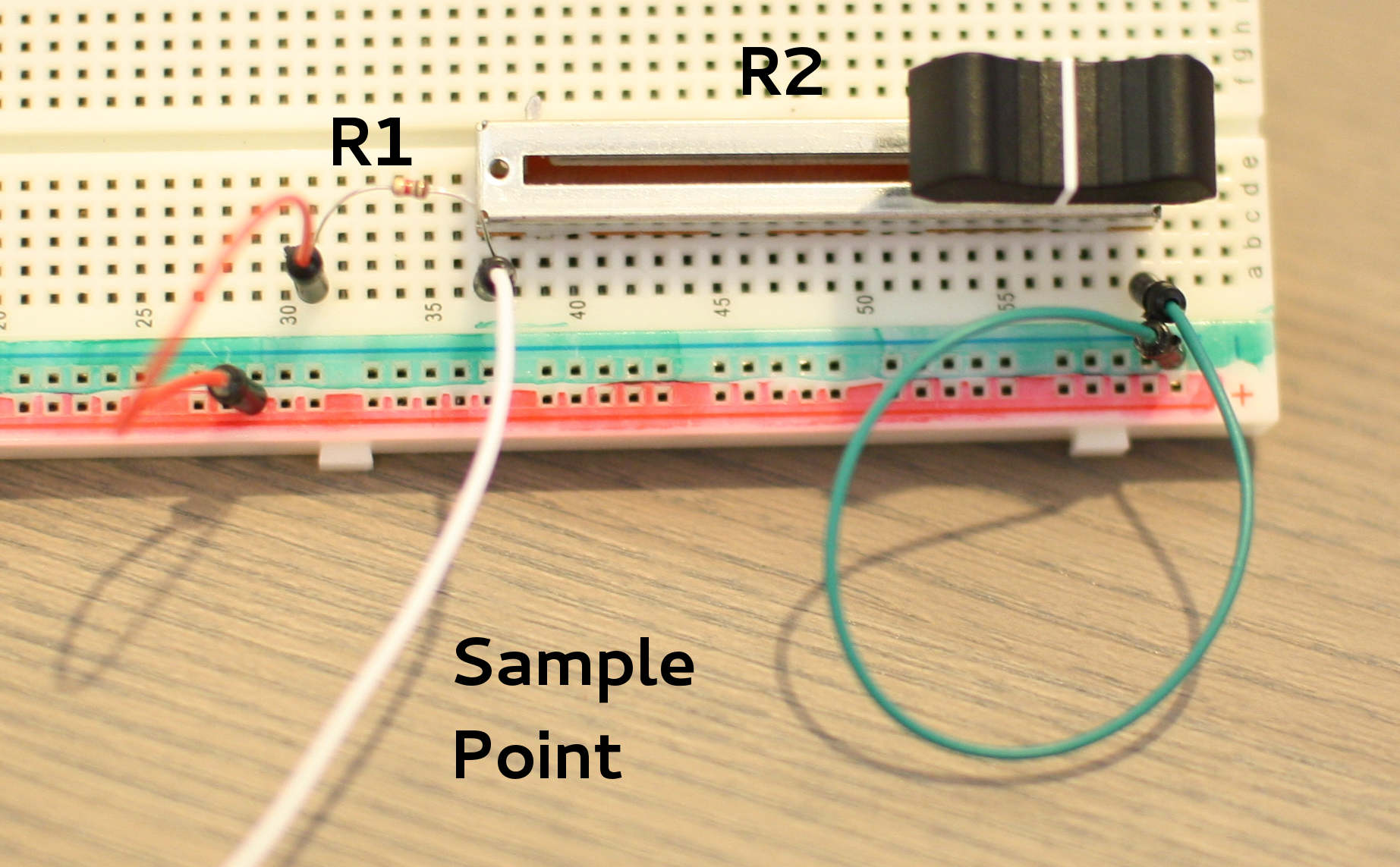
Looking at the voltage divider theory, consider the setup as shown in the picture above, R1 is a fixed resistor of 1k ohms and R2 can vary between 10k and 0k. The white wire is the sample point which will change in voltage as the slider on the potentiometer is moved. When the potentiometer offers its maximal resistence (10k) the sample voltage will be around R2/(R1+R2) * VIN = 10,000/(10,000+1,000) * 1.8 = 1.64 V. When the potentiometer is set to a low resistence then the sample voltage will tend towards 0 V.
Using an Extech EX330 multimeter I found that the VDD_ADC header on my BeagleBone Black was giving 1.803 V. The 1K resistor I used was slightly under its rated value. The potentiometer offered a maximum resistence of 10.4k Ohms. When the potentiometer was set to its maximum value the sample point read at 1.645 V. Still under the 1.8-V maximum value for analog input on the BeagleBone Black so all is well.
Connecting the board with power and ground can be done by connecting the red wire in the above picture to VDD_ADC (pin 32) and the green to GNDA_ADC (pin 34). Before I connected the sample point to any analog input I decided to verify the voltage range it can offer. I got between 20 mV and up to 1.644 V with the potentiometer slider at either extreme. Moving the slider about 1/6th away from the 20 mV end of of its track gave a 1 V reading, but the reading was fairly linear from there to the 1.644 V end of the track. Replacing the 1k fixed resistor with a 10k resistor give a more linear reading between about 2 mV to 1 V as the potentiometer was adjusted. So I left the 10k fixed resistor in for the rest of the article.
Reading the analog input
The sample point can be connected to any analog input, I chose analog input 0, which is pin 39 on the P9 header.
My BeagleBone Black was already setup for analog input. The cape-bone-iio line is what you want to see when you view your slots file, as shown below. I tried to remove my cape-bone-iio be writing -7 to the slots file, which caused my analog input files to disappear from /sys but also created instability, locking me out of reading the slots file again until I rebooted the BeagleBone Black.
root@beaglebone:~# echo cape-bone-iio > /sys/devices/bone_capemgr.*/slots
...
root@beaglebone:~# cat /sys/devices/bone_capemgr.*/slots
 0: 54:PF---
 1: 55:PF---
 2: 56:PF---
 3: 57:PF---
 4: ff:P-O-L Bone-LT-eMMC-2G,00A0,Texas Instrument,BB-BONE-EMMC-2G
 5: ff:P-O-- Bone-Black-HDMI,00A0,Texas Instrument,BB-BONELT-HDMI
 6: ff:P-O-- Bone-Black-HDMIN,00A0,Texas Instrument,BB-BONELT-HDMIN
 7: ff:P-O-L Override Board Name,00A0,Override Manuf,cape-bone-iio
 8: ff:P-O-L Override Board Name,00A0,Override Manuf,am33xx_pwm
 9: ff:P-O-L Override Board Name,00A0,Override Manuf,BB-SPIDEV0
10: ff:P-O-L Override Board Name,00A0,Override Manuf,gpio-P9.12
11: ff:P-O-L Override Board Name,00A0,Override Manuf,gpio-P9.15
12: ff:P-O-L Override Board Name,00A0,Override Manuf,gpio-P9.23
13: ff:P-O-L Override Board Name,00A0,Override Manuf,bone_pwm_P9_14
14: ff:P-O-L Override Board Name,00A0,Override Manuf,gpio-P9.26
15: ff:P-O-L Override Board Name,00A0,Override Manuf,gpio-P9.27
The files which allow you to access the analog inputs are tucked away inside /sys where you might not think to find them. The files are also in upper case so will likely avoid your first attempt to use find to get at them.
root@beaglebone:/sys# cd /sys
root@beaglebone:/sys# find . -iname "ain*"
./devices/ocp.3/helper.12/AIN0
./devices/ocp.3/helper.12/AIN1
...
The following readings were taken as I moved the potentiometer slider from least resistence to maximum resistence with a 10k resistor in series before the potentiometer.
root@beaglebone:/sys/devices/ocp.3/helper.12# cat AIN0
0
root@beaglebone:/sys/devices/ocp.3/helper.12# cat AIN0
427
root@beaglebone:/sys/devices/ocp.3/helper.12# cat AIN0
746
root@beaglebone:/sys/devices/ocp.3/helper.12# cat AIN0
921
While the above AIN files provide the ability to keep getting the current value of the analog input, you might like to have the hardware fill a buffer with the values for you. This way you won’t have to worry about specific timing, you can just read all the values over the last second or two in one go. Unfortunately I found many relatively recent web pages with information on how to do this but what I found conflicted in subtle ways.
The example file from the kernel sources at drivers/staging/iio/Documentation/generic_buffer.c gets quoted often. Texas Instruments has a patch to that file to remove triggers and continually display the analog input values on the console. Unfortunately I found that my Linux kernel refused to enable a buffer for the analog input(s) without a trigger being setup, with the relevant dmesg shown below.
[ 463.846511] Buffer not started: no trigger
Enabling triggers may require you to insert the iio-trig-sysfs kernel module as shown below. This creates the new iio_sysfs_trigger directory.
root@beaglebone:/sys/bus/iio/devices# insmod /lib/modules/3.8.13/kernel/drivers/staging/iio/trigger/iio-trig-sysfs.ko
root@beaglebone:/sys/bus/iio/devices# l
total 0
lrwxrwxrwx 1 root root 0 Mar 23 02:36 iio:device0 -> ../../../devices/ocp.3/44e0d000.tscadc/tiadc/iio:device0
lrwxrwxrwx 1 root root 0 Mar 23 03:01 iio_sysfs_trigger -> ../../../devices/iio_sysfs_trigger
I created a fork of the adc-iio-continuous-sampling-userspace repository so I could modify a few files. I also changed the use of poll() to select() so that a more accurate count of trigger events is kept. When reading larger buffers the reliance on poll() didn’t differentiate the case that the device file remains ready to give data because the loop had not completely drained the data yet. The core of the generic_buffer.c in the above fork simply waits for new values on /dev/iio:device0 using select() and prints them in a human readable form on the console.
The below script will start generic_buffer continuously monitoring the analog inputs 0 and 5. The trigger will be sysfstrig1. When run the script will output startup messages and then pause. If the second block of commands below is run in another terminal then the script_adc window will spring into life printing columns of analog readings.
# cat ./script_adc.sh
echo 1 > /sys/bus/iio/devices/iio_sysfs_trigger/add_trigger
echo 1 > /sys/bus/iio/devices/iio:device0/scan_elements/in_voltage0_en
echo 1 > /sys/bus/iio/devices/iio:device0/scan_elements/in_voltage5_en
./generic_buffer -n tiadc -t sysfstrig1 -l 128 -c 10
# ./script_adc.sh
... [pause in time] ...
wait__ 0 10
 rs 80 ss 8
1315.000000 1508.000000
1315.000000 1456.000000
1315.000000 1429.000000
1315.000000 1421.000000
1315.000000 1414.000000
1315.000000 1413.000000
1315.000000 1410.000000
1315.000000 1408.000000
1315.000000 1411.000000
1315.000000 1411.000000
wait__ 1 10
 rs 80 ss 8
1315.000000 1410.000000
1315.000000 1411.000000
To trigger the analog buffer from another terminal:
root@beaglebone:/sys/bus/iio/devices/trigger0# cat name
sysfstrig1
root@beaglebone:/sys/bus/iio/devices/trigger0# echo 1 > trigger_now
While the use of triggers and two consoles in the above is a little bit strange, there is nothing stopping the main program from using a timer to continually trigger the analog input device.
The analog converter in the BeagleBone Black is 12 bits so it should offer values between 0 and 4096. This is a little bit better resolution than the 10 bits offered on Arduino boards. As the maximum voltage I offer to the analog pin is 1 V in this article I am throwing away a lot of sample voltage range and thus almost half of the resolution of the analog input. The main thing to watch is that you never supply over 1.8 Volts to any analog input. There are also some rules about supplying voltage to pins and SYS_RESET that you should take a look at to avoid damanging your BeagleBone Black. The interface offered to analog inputs allows you to very quickly get the current values and the buffering solution lets you continually monitor your inputs without missing any samples.
For more articles in this series see:
Getting Started With the BeagleBone Black: A 1GHz ARM Linux Machine for $45
BeagleBone Black Part 2: Linux Performance Tests
BeagleBone Black: How to Get Interrupts Through Linux GPIO
Robotic Arm Control from the BeagleBone Black
How to Control a 3 Wheel Robot from a Tablet With BeagleBone Black

 Red Hat posted strong quarterly results last week that beat Wall Street’s expectations, and a big part of the news was that the company is starting to see meaningful revenue from its many initiatives surrounding cloud computing. Enterprises are a big part of Red Hat’s cloud focus, but the company has also made clear that it will focus on cloud services for big telecom companies, and organizations in niche sectors.