Cathy Lin has announced the release of Deepin 2014.1, a bug-fix update of the Ubuntu-based community distribution with a highly customised and intuitive desktop environment: “Deepin 2014.1 released. In this version, we focus on enhancing the system stability. Meanwhile, the system performance has been optimized thoroughly and the….
Understanding I/O Patterns at the Block Level with ioprof

Over at Admin HPC, Intel’s Jeff Layton writes that understanding how data makes its way from the application to storage devices is key to understanding how I/O works and that monitoring the lowest level of the I/O stack, the block driver, is a crucial part of this overall understanding of I/O patterns.
The post Understanding I/O Patterns at the Block Level with ioprof appeared first on insideHPC.
Announcing Apache™ CloudMonkey™ v5.2.0
Command Line Interface Tool Simplifies Apache CloudStack Configuration and Management
28 August 2014 —Apache CloudStack, the mature, turnkey Open Source cloud computing software platform used for creating private, public, and hybrid cloud environments, today announced Apache CloudMonkey v5.2.0, the latest feature release of its command line interface tool.
CloudMonkey is written in Python, and can be used both as an interactive shell and as a command line tool that simplifies CloudStack configuration and management.
Apache CloudMonkey v5.2.0 is the latest feature release of the 5.x line that was first released in September 2013. Some of the new features and changes include:
- Multiple server profiles where users can use CloudMonkey against different CloudStack management servers and switch between them using a profile option;
- A default profile under the section [local] is added with default values;
- Some bugfixes related to network requests, error handling, JSON decoding and shell interactivity;
- Every time ‘set’ is called, CloudMonkey will write the config and reload config file;
- Configuration options ‘protocol’, ‘host’, ‘port’, ‘path’ are deprecated now but setting them is still allowed which sets a single “url” option, in the config file the [server] section is deprecated now and CloudMonkey won’t read values from this section anymore but instead read from current server profile;
- Missing key/values are automatically set with defaults by CloudMonkey;
- During installation and upgrades, it will detect the platform to install either pyreadline (Windows) or readline (OSX and Linux)
THE TRUTH ABOUT – HOW TO SECURELY ERASE A SOLID STATE DRIVE (SSD)
The short answer is:
Perhaps you can’t. Well, you can, but that means that you need to use a hammer.
The long answer:
You could use the build in ATA Secure Erase command (if your drive supports that), or you can overwrite the SSD multiple times, but…
There are studies out there showing that the data could be recovered even after overwriting multiple times.
Red Hat CTO Unexpectedly Quits, Amid Rumors of Executive ‘Friction’
In a surprising move, long-time Red Hat executive Brian Stevens has stepped down from the company, as staffers suspect friction in the executive suite.
Containers vs Hypervisors: The Battle Has Just Begun
Let me make one thing clear up front: I like Docker. I think it is good tech. I can see all sorts of scenarios when a lightweight, containerized deployment mechanism could be really nifty, even if it doesn’t have the advantage of a hypervisor under it to protect its host operating system. I get it. It’s cool.
But there are a few loud, but lonely, voices in the crowd who proclaim, “The battle is over! Containers have won! Hypervisors are obsolete!”
I’m sorry, that’s just wrong.
That’s like a championship fighter who upon landing a couple good blows on his opponent in the first round yells, “Stop the fight! I’ve won! Crown me champion!”
We all know it doesn’t work that way. Ultimately, the championship goes to the one who wins the battle. And, in this case, the battle isn’t over; it’s just beginning.
The Case for Containers
The concepts behind Docker and other Linux containers are solid:
-
Very small VMs that allow for much higher server density by removing redundant or unnecessary operating system elements from the VMs themselves.
-
Nicely packaged VM stacks, which can easily be transferred, replicated, and controlled, ensuring high levels of portability.
-
VM software stacks that are small, removing the problem and tedium of building a large stack of version-specific operating systems and tools that need lots of care and feeding to replicate and maintain.
-
Extremely fast startup times that can facilitate a more flexible infrastructure, allowing greater latitude to respond to the needs of the moment – literally.
The challenge, however, is that the security attack surface of a “shared kernel” strategy has its weakest link in that “shared kernel” itself. If one malicious hacker manages to violate that shared kernel, all instances that employ that shared kernel are potentially compromised.
Certainly, a similar argument can be made of traditional hypervisors – if you can violate the hypervisor, you might be able to violate the VMs it powers – but the industry has had many years of experience hardening hypervisor installations. While it is not a task for slackers, it is not rocket science either. Hundreds of successful virtualization and cloud providers in the world attest to the manageability of the task; from giants like Amazon, Rackspace, Verizon, and Huawei, down to smaller local and boutique-style service providers, the names of which are far less well known.
Some voices asserting the supremacy of containers cite Google as the proof case. By architecting the Google Docs application stack to work safely on containers, Google has shown the way, they say.
Except Google is Google. They can afford to hire thousands of the best and brightest to do intelligent things that few others can do. After 30 years in this industry, and two decades dealing with customers on site, I doubt that most organizations could readily do what Google has done. If they could, they’d be Google, too.
The ideal solution is to provide the benefits of containers while actually reducing the attack surface. In the age of the cloud, systems need a higher degree of security than ever before. The shared kernel scenario simply doesn’t provide that.
The situation is so critical, in fact, that multiple Docker power users announced at LinuxCon North America in Chicago that they use Docker in traditional VMs to bolster security. Even the recent announcements from new Docker partner VMware highlight the value of running Docker in VMware’s VMs to bring “security capabilities to container environments.” Suddenly, the announcements of the death of the hypervisor seem entirely premature.
The Unikernel, Power for Security-Sensitive Cloud
However, there is a technology on the rise which is far more promising where security is needed: the unikernel.
Sometimes called “cloud operating systems” or “library operating systems,” unikernels combine many of the advantages of Docker-like container systems with the security footprint of hypervisors and a much smaller attack surface within each VM.
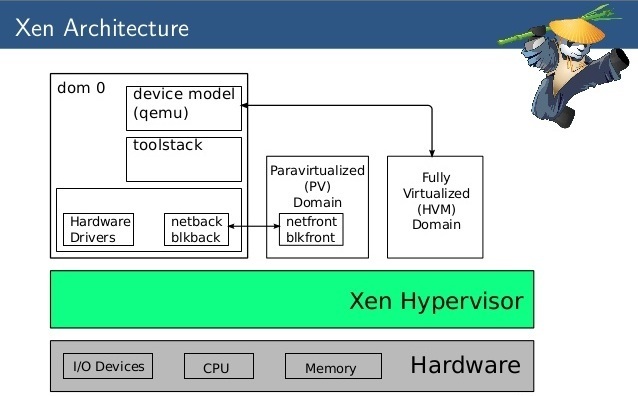
Unikernel systems create tiny VMs. Mirage OS from the Xen Project incubator, for example, has created several network devices that run kilobytes in size (yes, that’s “kilobytes” – when was the last time you heard of any VM under a megabyte?). They can get that small because the VM itself does not contain a general-purpose operating system per se, but rather a specially built piece of code that exposes only those operating system functions required by the application.
There is no multi-user operating environment, no shell scripts, and no massive library of utilities to take up room – or to subvert in some nefarious exploit. There is just enough code to make the application run, and precious little for a malefactor to leverage. And in unikernels like Mirage OS, all the code that is present is statically type-safe, from the applications stack all the way down to the device drivers themselves. It’s not the “end-all be-all” of security, but it is certainly heading in the right direction.
The number of unikernel-type systems today is still small, and their names are not yet well known. In addition to Mirage OS from Xen Project, there are others like OSv from Cloudius Systems, HaLVM from Galois Systems, NEC’s ClickOS, and LING (formerly known as “Erlang on Xen”). They provide environments which bind to languages such as Java, C, OCaml, Haskell, and Erlang. And they greatly simplify both the development and deployment processes surrounding the unikernel solution stack.
They are young – and they are the beginning.
I fully expect that five years from now we will look back at the unikernels of 2014 and see these as the seedlings of what will be a growing forest of unikernel-type systems. Unikernels raise the bar on the notion of a containerized VM by matching the touted packaging and deployment benefits while improving software development workflow and resource efficiency. And, perhaps most importantly of all, it does all this while reducing the external attack surface through operating environment specialization. Frankly, I can’t wait to see what will develop in this space.
“The battle is over?” No chance. We’re not even done with Round 1. It’s just beginning to get to really interesting.

How to Install the Netflix Streaming Client On Linux

Netflix is one of the biggest video streaming services on the planet. You’ll find movies, television, documentaries, and more streamed to mobile devices, televisions, laptops, desktops, and much more. What you won’t find, however, is an official Linux client for the service. This is odd, considering Netflix so heavily relies upon FreeBSD.
This is Linux, though, so as always the adage ‘Where there’s a will, there’s a way’ very much applies. With just a few quick steps, you can have a Netflix client on your desktop. This client does require the installation of the following extras:
-
Wine
-
Mono
-
msttcorefonts
-
Gecko
I will walk you through the installation of this on a Ubuntu 14.04 desktop. I have also tested this same installation on both Linux Mint and Deepin – all with the same success. If you like living on the bleeding edge, you can get the full Netflix experience, without having to go through the steps I outline here. For that, you must be running the latest developer or beta release of Google Chrome with the Ubuntu 14.04 distribution. NOTE: You will also have to upgrade libnss3 (32 bit or 64 bit). Once you’ve installed all of that, you then have to modify the user-agent string of the browser so Netflix thinks you are accessing its services with a supported browser. The easiest way to do this is to install the User Agent Switcher Extension. The information you’ll need for the HTTP string is:
-
Name: Netflix Linux
-
String: Mozilla/5.0 (Windows NT 6.3; Win64; x64) AppleWebKit/537.36 (KHTML, like Gecko) Chrome/38.0.2114.2 Safari/537.36
-
Group: (is filled in automatically)
-
Append?: Select ‘Replace’
-
Flag: IE
If dealing with bleeding edge software and user agent strings isn’t for you, the method below works like a champ. The majority of this installation will happen through the command line, so be prepared to either type or cut and paste. Let’s begin.
Installing the repository prepare apt-get
The first thing you must do is open up a terminal window. Once that is opened, issue the following comands to add the correct repository, update apt-get, and install the software.
-
sudo apt-add-repository ppa:ehoover/compholio
-
sudo apt-get update
Now, you’re ready to start installing software. There are two pieces of software to be installed. The first is the actual Netflix Desktop app. The second is the msttcorefonts package that cannot be installed by the Netflix Desktop client (all other dependencies are installed through the Netflix Desktop client). The two commands you need to issue are:
-
sudo apt-get install netflix-desktop
-
sudo apt-get install msttcorefonts
The installation of the netflix-desktop package will take some time (as there are a number of dependencies it must first install). Once that installation completes, install the msttcorefonts package and you’re ready to continue.
First run
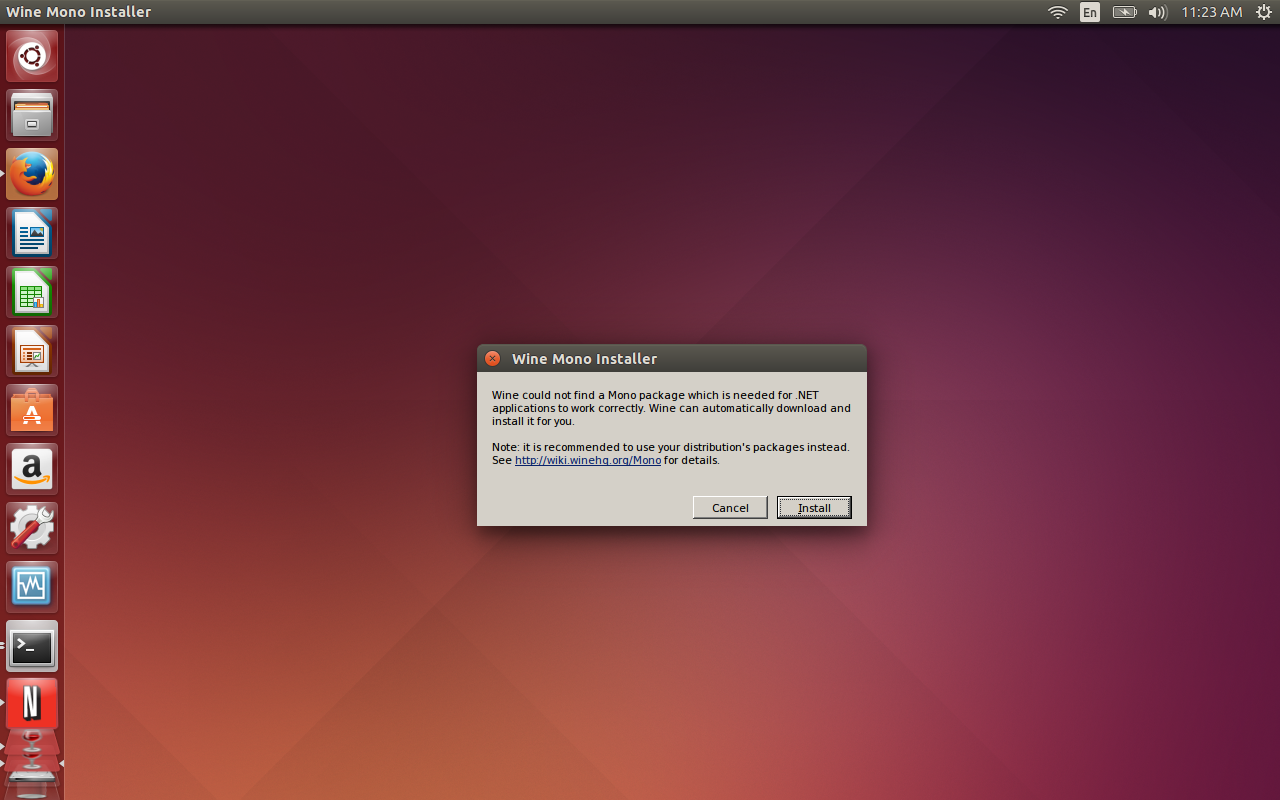
You’re ready to fire up the Netflix Desktop Client. To do this (in Ubuntu), open up the Dash and type netflix. When you see the launcher appear, click on it to start the client. When you first run the Netflix Desktop Client you will be required to first install Mono. Wine will take care of this for you, but you do have to okay the installer. When prompted, click Install (Figure 1) and the Wine installer will take care of the rest.

You will also be prompted to allow Wine to install Gecko as well. When prompted, click Install for this action to complete.
At this point, all you have to do is sign in to Netflix and enjoy streaming content on your Linux desktop. You will notice that the client opens in full screen mode. To switch this to window mode, hit F11 and the client will appear in a window.
Although this isn’t an ideal situation, and there may be those that balk at installing Mono, by following these steps, you can have Netflix streaming video service on your Linux desktop. It works perfectly and you won’t miss a single feature (you can enjoy profiles, searching, rating, and much more).
Linux is an incredible desktop that offers everything the competition has and more. Give this installation of Netflix a go and see if you’re one step closer to dropping the other platforms from your desktop or laptop for good.
HP Security Study Finds Internal Defenses Lacking
Apparently spending more money on security doesn’t necessarily mean an enterprise is actually more secure, HP’s State of the Network Security survey finds.
Samsung’s Tizen Mobile OS Failing to Impress Device Makers, Pundits
Samsung sees Tizen as an ideal choice for wearables and is looking to get it on smartphones and other platforms. But can it be a viable alternative to Android?
Mozilla Unveils $33 Intex Cloud FX Smartphone

- On Monday, Mozilla unveiled its first ultra low-cost smartphone, Intex Cloud FX, together with Indian handset company Intex Technologies India Ltd. The smartphone runs on Mozilla’s Firefox software and supports two SIM cards and is powered by a one gigahertz processor, with expandable memory of up to 4 gigabytes.
- Read more at the Wall Street Journal.