
Home Blog Page 1378

How to Install the Netflix Streaming Client On Linux

netflix-client-screen

Netflix is one of the biggest video streaming services on the planet. You’ll find movies, television, documentaries, and more streamed to mobile devices, televisions, laptops, desktops, and much more. What you won’t find, however, is an official Linux client for the service. This is odd, considering Netflix so heavily relies upon FreeBSD.

This is Linux, though, so as always the adage ‘Where there’s a will, there’s a way’ very much applies. With just a few quick steps, you can have a Netflix client on your desktop. This client does require the installation of the following extras:

  • Wine

  • Mono

  • msttcorefonts

  • Gecko

I will walk you through the installation of this on a Ubuntu 14.04 desktop. I have also tested this same installation on both Linux Mint and Deepin – all with the same success. If you like living on the bleeding edge, you can get the full Netflix experience, without having to go through the steps I outline here. For that, you must be running the latest developer or beta release of Google Chrome with the Ubuntu 14.04 distribution. NOTE: You will also have to upgrade libnss3 (32 bit or 64 bit). Once you’ve installed all of that, you then have to modify the user-agent string of the browser so Netflix thinks you are accessing its services with a supported browser. The easiest way to do this is to install the User Agent Switcher Extension. The information you’ll need for the HTTP string is:

  • Name: Netflix Linux

  • String: Mozilla/5.0 (Windows NT 6.3; Win64; x64) AppleWebKit/537.36 (KHTML, like Gecko) Chrome/38.0.2114.2 Safari/537.36

  • Group: (is filled in automatically)

  • Append?: Select ‘Replace’

  • Flag: IE

If dealing with bleeding edge software and user agent strings isn’t for you, the method below works like a champ. The majority of this installation will happen through the command line, so be prepared to either type or cut and paste. Let’s begin.

Installing the repository prepare apt-get

The first thing you must do is open up a terminal window. Once that is opened, issue the following comands to add the correct repository, update apt-get, and install the software.

  • sudo apt-add-repository ppa:ehoover/compholio

  • sudo apt-get update

Now, you’re ready to start installing software. There are two pieces of software to be installed. The first is the actual Netflix Desktop app. The second is the msttcorefonts package that cannot be installed by the Netflix Desktop client (all other dependencies are installed through the Netflix Desktop client). The two commands you need to issue are:

  • sudo apt-get install netflix-desktop

  • sudo apt-get install msttcorefonts

The installation of the netflix-desktop package will take some time (as there are a number of dependencies it must first install). Once that installation completes, install the msttcorefonts package and you’re ready to continue.

First run

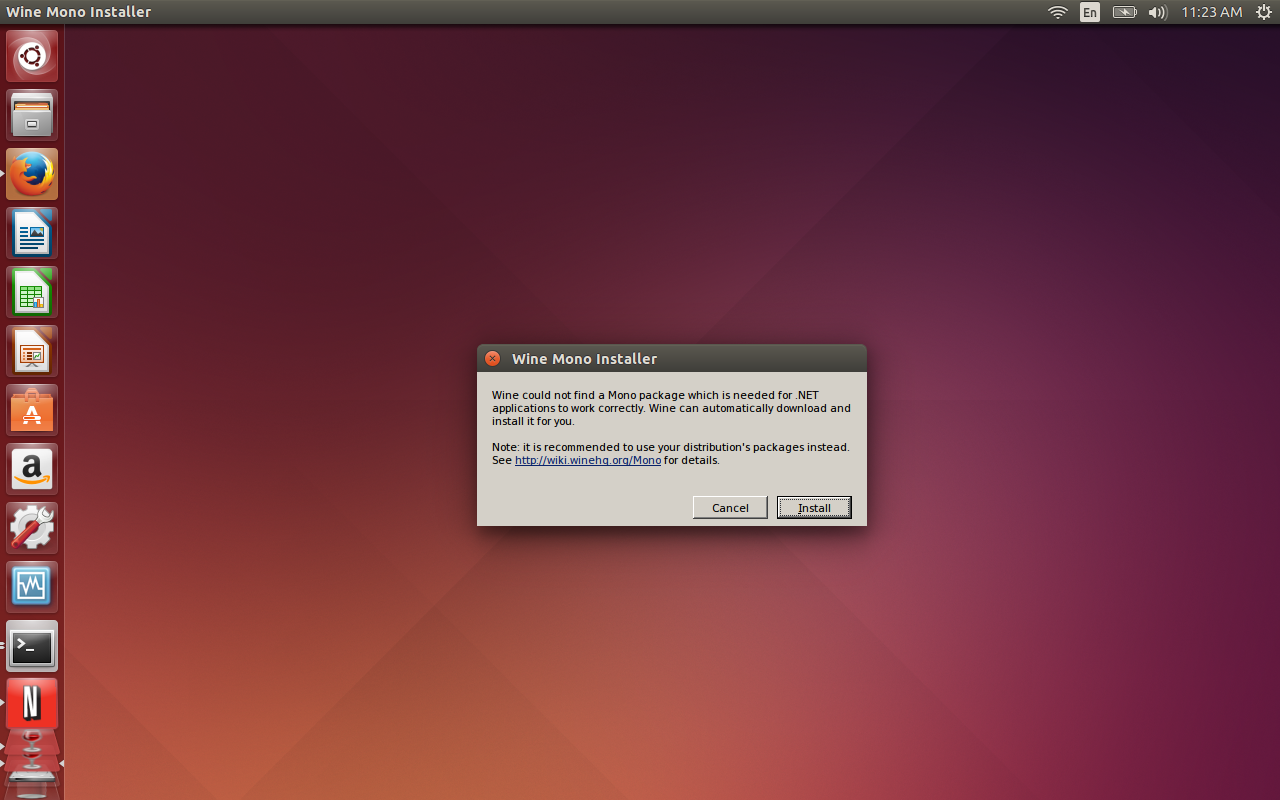
You’re ready to fire up the Netflix Desktop Client. To do this (in Ubuntu), open up the Dash and type netflix. When you see the launcher appear, click on it to start the client. When you first run the Netflix Desktop Client you will be required to first install Mono. Wine will take care of this for you, but you do have to okay the installer. When prompted, click Install (Figure 1) and the Wine installer will take care of the rest.
wine mono installer

You will also be prompted to allow Wine to install Gecko as well. When prompted, click Install for this action to complete.

At this point, all you have to do is sign in to Netflix and enjoy streaming content on your Linux desktop. You will notice that the client opens in full screen mode. To switch this to window mode, hit F11 and the client will appear in a window.

Although this isn’t an ideal situation, and there may be those that balk at installing Mono, by following these steps, you can have Netflix streaming video service on your Linux desktop. It works perfectly and you won’t miss a single feature (you can enjoy profiles, searching, rating, and much more).

Linux is an incredible desktop that offers everything the competition has and more. Give this installation of Netflix a go and see if you’re one step closer to dropping the other platforms from your desktop or laptop for good.


HP Security Study Finds Internal Defenses Lacking

Apparently spending more money on security doesn’t necessarily mean an enterprise is actually more secure, HP’s State of the Network Security survey finds.

Read more at eWeek

Samsung’s Tizen Mobile OS Failing to Impress Device Makers, Pundits

Samsung sees Tizen as an ideal choice for wearables and is looking to get it on smartphones and other platforms. But can it be a viable alternative to Android?

Read more at eWeek

Mozilla Unveils $33 Intex Cloud FX Smartphone

On Monday, Mozilla unveiled its first ultra low-cost smartphone, Intex Cloud FX, together with Indian handset company Intex Technologies India Ltd.  The smartphone runs on Mozilla’s Firefox software and supports two SIM cards and is powered by a one gigahertz processor, with expandable memory of up to 4 gigabytes.
 
Read more at the Wall Street Journal.

Linux Doesn’t Need to Own the Desktop

Linus Torvalds issued Linux 3.17 rc-2 on Monday of this week, and he deviated from his normal schedule in doing so, because August 25 happens to mark the 23rd anniversary of the original Linux announcement. “Hello everybody out there using minix,” Torvalds wrote.

Meanwhile, PCMag.com has proclaimed that Linux has run out of time. But isn’t it true that the endless discussions of whether Linux is a success on the desktop are moot? Linux is in supercomputers and cars, it formed the basis for Android and is the most popular platform to run emerging cloud platforms like OpenStack on–just to name a few of its successes. The desktop is not the only battleground for Linux.


Read more at Ostatic

Netflix Open Sources More of its Useful Utilities

Cloud computing platforms make headlines every day now, including leading open source platforms such as OpenStack, but few organizations have the cloud expertise that Netflix has. The company also has an admirable history of open sourcing many of its most useful cloud tools and accompanying security tools. We’ve reported on Netflix open sourcing a series of interesting “Monkey” cloud tools as part of its “simian army,” which it has deployed as a series satellite utilities orbiting its central cloud platform.

Now, Netflix has released three of its internal tools that help protect the security of its platform, and function as convenient utilities. Scumblr, Workflowable and Sketchy are available now. Detailed instructions on setup and configuration are available in the projects’ wiki pages.

Read more at Ostatic

Protect Your Devices With a $10 ‘USB Condom’

The USB Condom is a small and unobtrusive dongle that effectively turns any USB cable into a secure ‘charge-only’ cable to allow safe recharging from untrusted USB ports.

Tizen Samsung Smart Camera NX1 with a New UI Coming Next Month?

  Samsung Electronics has been making steady headway in the world of cameras, and possibly leading the pack when it comes to Smart Cameras with its features that it offers. We heard a while ago that samsung where going to be releasing another flagship Smart Camera following the release of the Samsung NX30 camera.     According to the website Mirrorless Rumors, it looks like Samsung will launch a new mirrorless camera, the Tizen based NX1.

It is believed that the camera body with be similar to that of the Mamiya 6, and it is also water & dust proof. This is a surveillance camera, and has the ability to allow the the photographer to measure the distance from you to a particular subject, and also take an ultra sharp image. We are looking at a 28 megapixel sensor and also a new high resolution EVF (electronic viewfinder), but also has a new user interface (UI) that shares similarities with a Tizen UI, suppose seeing will be believing. 

Read more at Tizen Experts.

20-Way Radeon Comparison With Open-Source Graphics For Steam On Linux Gaming

When it comes to Linux gamers wanting a discrete graphics card backed by open-source drivers, the only solution right now to truly recommend for those serious about performance and making use of the hardware is really AMD Radeon graphics. While Nouveau has been making much progress, until re-clocking and other issues are worked out the performance can be unbearably slow depending upon the particular graphics processor or run into other problems. (Of course, when talking about proprietary graphics drivers on Linux, the story is entirely different, or if considering integrated Intel HD Graphics.) For those pursuing a AMD Radeon GPU for their own Steam Box/Machine build and hope to use the open-source Gallium3D drivers, here’s some Steam on Linux gaming benchmarks from almost two dozen different GPUs.

Read more at Phoronix

IT Security Spending to Rise, with Focus on Mobile

Respondents in a recent Gartner IT Key Metrics Survey indicate that, overall, organizations will spend an average of $381 per employee on IT security.

Read more at eWeek