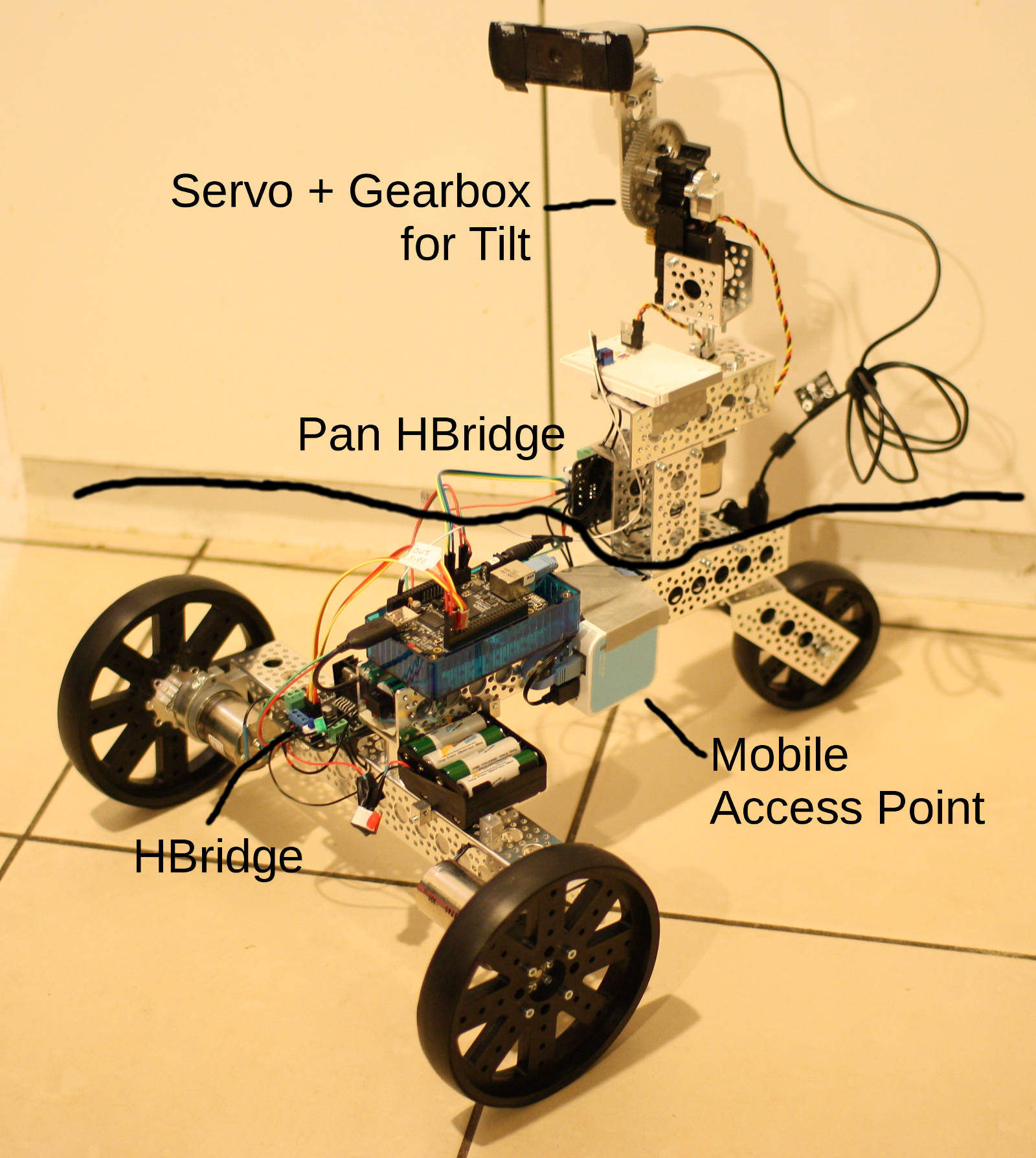
 Give the BeagleBone Black its own wheels, completely untether any cables from the whole thing and control the robot from a tablet.
The 3 Wheel Robot kit includes all the structural material required to create a robot base. To the robot base you have to add two gearmotors, batteries, and some way to control it. Leaving the motors out of the 3 wheel kit allows you to choose the motor with a torque and RPM suitable for your application.
In this article we’ll use the Web server on the BeagleBone Black and some Bonescript to allow simple robot control from any tablet. No ‘apps’ required. Bonescript is a nodejs environment which comes with the BeagleBone Black.
Shown in the image at left is the 3 wheel robot base with an added pan and tilt mechanism. All items above the long black line and all batteries, electronics, cabling, and the two gearmotors were additions to the base. Once you can control the base using the BeagleBone Black, adding other hardware is relatively easy.
This article uses two 45 rpm Precision Gear Motors. The wheels are 6 inches in diameter so the robot will be speed-limited to about 86 feet per minute (26 meter/min). These motors can run from 6-12 volts and draw a maximum stall current draw of 1 amp. The large stall current draw will happen when the motor is trying to turn but is unable to. For example, if the robot has run into a wall and the tires do not slip. It is a good idea to detect cases that draw stall current and turn off power to avoid overheating and/or damaging the motor.
In this Linux.com series on the BeagleBone Black we have also seen how to use the Linux interface allowing us to access chips over SPI and receive interrupts when the voltage on a pin changes, and how to drive servo motors.
Constructing the 3 Wheel Robot
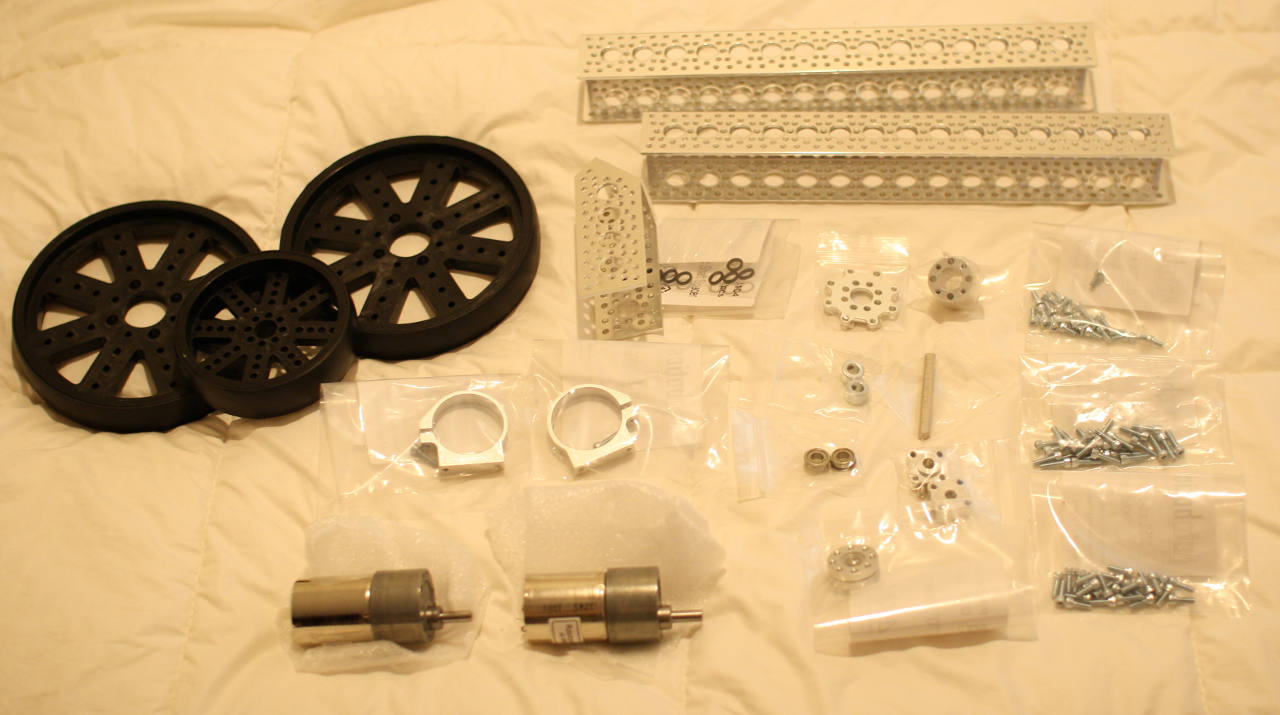
The parts for the 3 Wheel Robot kit are shown above (with the two gearmotors in addition to the raw kit). You can assemble the robot base in any order you choose. A fair number of the parts are used, together with whichever motors you selected, to mount the two powered front wheels. The two pieces of channel are connected using the hub spacer and the swivel hub is used to connect the shorter piece of channel at an angle at the rear of the robot. I’m assuming the two driving wheels are at the ‘front’. I started construction at the two drive wheels as that used up a hub adapter, screw hub, and two motor mount pieces. Taking those parts out of the mix left less clutter for the subsequent choice of pieces.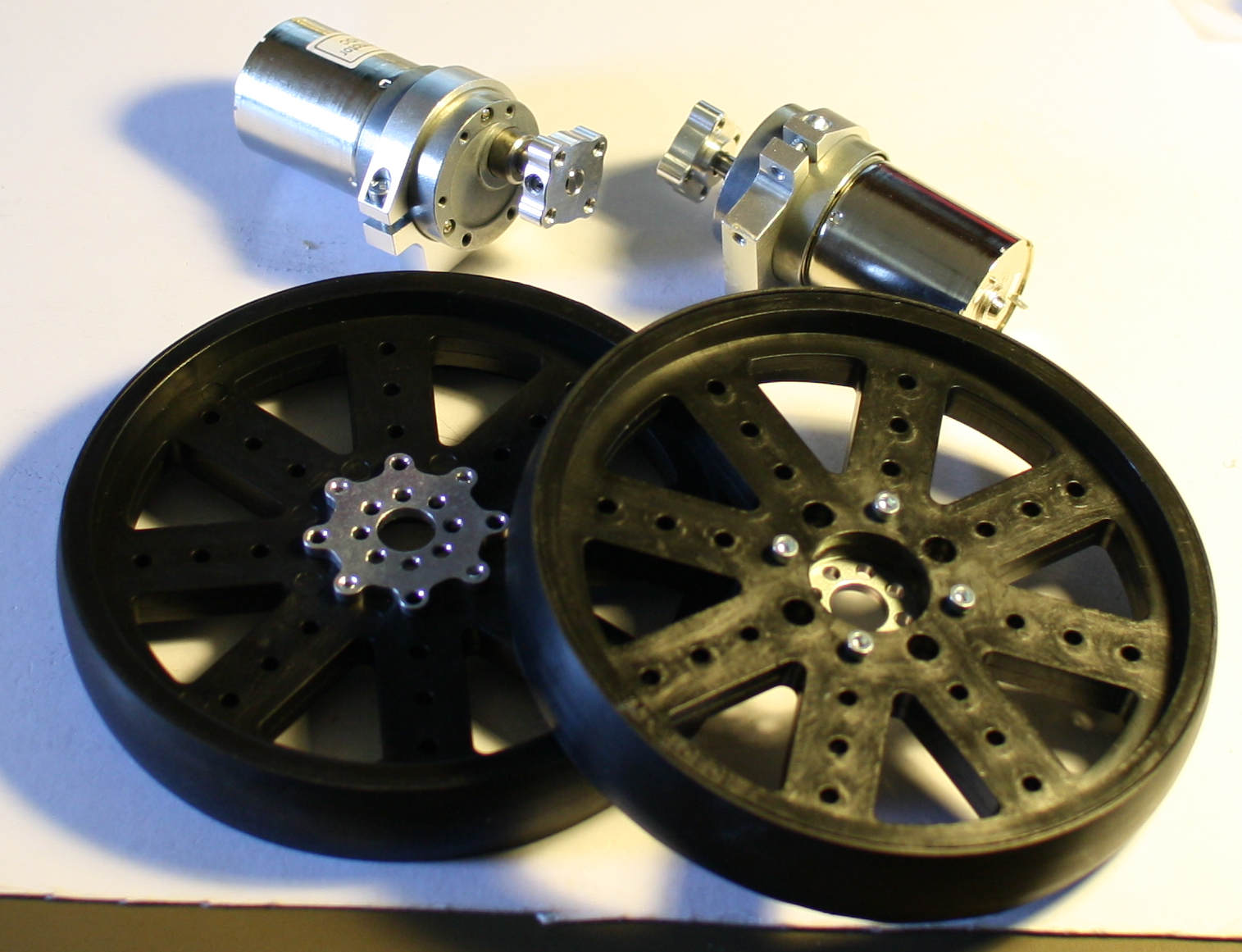
Powering Everything
In a past article I covered how the BeagleBone Black wanted about 2.5 into the low 3 Watts of power to operate. The power requirements for the BeagleBone Black can be met in many ways. I chose to use a single 3.7-Volt 18650 lithium battery and a 5 V step up board. The BeagleBone Black has a power jack expecting 5 V. At a high CPU load the BeagleBone Black could take up to 3.5 W of power. So the battery and step up converter have to be comfortable supplying a 5V/700mA power supply. The battery is rated at about 3 amp-hours so the BeagleBone Black should be able to run for hours on a single charge.
The gearmotors for the wheels can operate on 6 to 12 V. I used a second battery source for the motors so that they wouldn’t interfere with the power of the BeagleBone Black. For the motors I used a block if 8 NiMH rechargeable AA batteries. This only offered around 9.5 V so the gearmotors would not achieve their maximum performance but it was a cheap supply to get going. I have manually avoided stalling either motor in testing so as not to attempt to draw too much power from the AA batteries. Some stall protection to cut power to the gearmotors and protect the batteries should be used or a more expensive motor battery source. For example, monitoring current and turning off the motors if they attempt to draw too much.
The motor power supply was connected to the H-bridge board. Making the ground terminal on the H-bridge a convenient location for a common ground connection to the BeagleBone Black.
Communicating without Wires
The BeagleBone Black does not have on-board wifi. One way to allow easy communication with the BeagleBone Black is to flash a TP-Link WR-703N with openWRT and use that to provide a wifi access point for access to the BeagleBone Black. The WR-703N is mounted to the robot base and is connected to the ethernet port of the BeagleBone Black. The tablets and laptops can then connect to the access point offered by the onboard WR-703N.
I found it convenient to setup the WR-703N to be a DHCP server and to assign the same IP address to the BeagleBone Black as it would have obtained when connected to my wired network. This way the tablet can communicate with the robot both in a wired prototyping setup and when the robot is untethered.
Controlling Gearmotors from the BeagleBone Black
Unlike the servo motors discussed in the previous article, gearmotors do not have the same Pulse Width Modulation (PWM) control line to set at an angle to rotate to. There is only power and ground to connect. If you connect the gearmotor directly to a 12 V power source it will spin up to turn as fast as it can. To turn the gearmotor a little bit slower, say at 70 percent of its maximum speed, you need to supply power only 70 percent of the time. So we are wanting to perform PWM on the power supply wire to the gearmotor. Unlike the PWM used to control the servo we do not have any fixed 20 millisecond time slots forced on us. We can divide up time any way we want, for example running full power for 0.7 seconds then no power for 0.3 s. Though a shorter time slice than 1 s will produce a smoother motion.
An H-Bridge chip is useful to be able to switch a high voltage, high current wire on and off from a 3.3 V wire connected to the BeagleBone Black. A single H-Bridge will let you control one gearmotor. Some chips like the L298 contain two H-Bridges. This is because two H-Bridges are useful if you want to control some stepper motors. A board containing an L298, heatsink and connection terminals can be had for as little as $5 from a China based shop, up to more than $30 for a fully populated configuration made in Canada that includes resistors to allow you to monitor the current being drawn by each motor.
The L298 has two pins to control the configuration of the H-Bridge and an enable pin. With the two control pins you can configure the H-Bridge to flow power through the motor in either direction. So you can turn the motor forwards and backwards depending on which of the two control pins is set high. When the enable pin is high then power flows from the motor batteries through the motor in the direction that the H-Bridge is configured for. The enable pin is where to use PWM in order to turn the motors at a rate slower than their top speed.
The two control lines and the enable line allow you to control one H-Bridge and thus one gearmotor. The L298 has a second set of enable and control lines so you can control a second gearmotor. Other than those lines the BeagleBone Black has to connect ground and 3.3 V to the H-Bridge.
When I first tried to run the robot in a straight line I found that it gradually turned left. After some experimenting I found that at full power the left motor was rotating at a slightly slower RPM relative to the right one. I’m not sure where this difference was being introduced but having found it early in the testing the software was designed to allow such callibration to be performed behind the scenes. You select 100 percent speed straight ahead and the software runs the right motor at only 97 percent power (or whatever callibration adjustment is currently applied).
To allow simple control of the two motors I used two concepts: the speed (0-100) and heading (0-100). A heading of 50 means that the robot should progress straight ahead. This mimics a car interface where steering (heading) and velocity are adjusted and the robot takes care of the details.
I have made the full source code available on github. Note the branch linux.com-article which is frozen in time at the point of the article. The master branch contains some new goodies and a few changes to the code structure, too.
The Server
Because the robot base was “T” shaped, over time it was referred to as TerryTee. The TerryTee nodejs class uses bonescript to control the PWM for the two gearmotors.
The constructor takes the pin identifier to use for the left and right motor PWM signals and a reduction to apply to each motor, with 1.0 being no reduction and 0.95 being to run the motor at only 95 percent the specified speed. The reduction is there so you can compensate if one motor runs slightly slower than the other.
function TerryTee( leftPWMpin, rightPWMpin, leftReduction, rightReduction )
{
    TerryTee.running = 1;
    TerryTee.leftPWMpin = leftPWMpin;
    TerryTee.rightPWMpin = rightPWMpin;
    TerryTee.leftReduction = leftReduction;
    TerryTee.rightReduction = rightReduction;
    TerryTee.speed = 0;
    TerryTee.heading = 50;
}
The setPWM() method shown below is the lowest level one in TerryTee, and other methods use it to change the speed of each motor. The PWMpin selects which motor to control and the ‘perc’ is the percentage of time that motor should be powered. I also made perc able to be from 0-100 as well as from 0.0 – 1.0 so the web interface could deal in whole numbers.
When an emergency stop is active, running is false so setPWM will not change the current signal. The setPWM also applies the motor strength callibration automatically so higher level code doesn’t need to be concerned with that. As the analogWrite() Bonescript call uses the underlying PWM hardware to output the signal, the PWM does not need to be constantly refreshed from software, once you set 70 percent then the robot motor will continue to try to rotate at that speed until you tell it otherwise.
TerryTee.prototype.setPWM = function (PWMpin,perc)
{
    if( !TerryTee.running )
	return;
    if( PWMpin == TerryTee.leftPWMpin ) {
	perc *= TerryTee.leftReduction;
    } else {
	perc *= TerryTee.rightReduction;
    }
    if( perc >  1 )
	perc /= 100;
    console.log("awrite PWMpin:" + PWMpin + " perc:" + perc  );
    b.analogWrite( PWMpin, perc, 2000 );
};
The setSpeed() call takes the current heading into consideration and updates the PWM signal for each wheel to reflect the heading and speed you have currently set.
TerryTee.prototype.setSpeed = function ( v )
{
    if( !TerryTee.running )
	return;
    if( v < 40 )
    {
	TerryTee.speed = 0;
	this.setPWM( TerryTee.leftPWMpin,  0 );
	this.setPWM( TerryTee.rightPWMpin, 0 );
	return;
    }
    var leftv  = v;
    var rightv = v;
    var heading = TerryTee.heading;

    if( heading > 50 )
    {
	if( heading >= 95 )
	    leftv = 0;
	else
	    leftv *= 1 - (heading-50)/50;
    }
    if( heading < 50 )
    {
	if( heading <= 5 )
	    rightv = 0;
	else
	    rightv *= 1 - (50-heading)/50;
    }
    console.log("setSpeed v:" + v + " leftv:" + leftv + " rightv:" + rightv );
    this.setPWM( TerryTee.leftPWMpin,  leftv );
    this.setPWM( TerryTee.rightPWMpin, rightv );
    TerryTee.speed = v;
};
The server itself creates a TerryTee object and then offers a Web socket to control that Terry. The ‘stop’ message is intended as an emergency stop which forces Terry to stop moving and ignore input for a period of time so that you can get to it and disable the power in case something has gone wrong.
var terry = new TerryTee('P8_46', 'P8_45', 1.0, 0.97 );
terry.setSpeed( 0 );
terry.setHeading( 50 );
b.pinMode     ('P8_37', b.OUTPUT);
b.pinMode     ('P8_38', b.OUTPUT);
b.pinMode     ('P8_39', b.OUTPUT);
b.pinMode     ('P8_40', b.OUTPUT);
b.digitalWrite('P8_37', b.HIGH);
b.digitalWrite('P8_38', b.HIGH);
b.digitalWrite('P8_39', b.LOW);
b.digitalWrite('P8_40', b.LOW);
io.sockets.on('connection', function (socket) {
  ...
  socket.on('stop', function (v) {
      terry.setSpeed( 0 );
      terry.setHeading( 0 );
      terry.forceStop();
  });
  socket.on('speed', function (v) {
      console.log('set speed to ', v );
      console.log('set speed to ', v.value );
      if( typeof v.value === 'undefined')
	  return;
      terry.setSpeed( v.value );
  });
  ...
The code on github is likely to evolve over time to move the various fixed cutoff numbers to be configurable and allow Terry to be reversed from the tablet.
The Client (Web page)
To quickly create a Web interface I used Bootstrap and jQuery. If the interface became more advanced then perhaps something like AngularJS would be a better fit. To control the speed and heading with an easy touch interface I also used the bootstrap-slider project.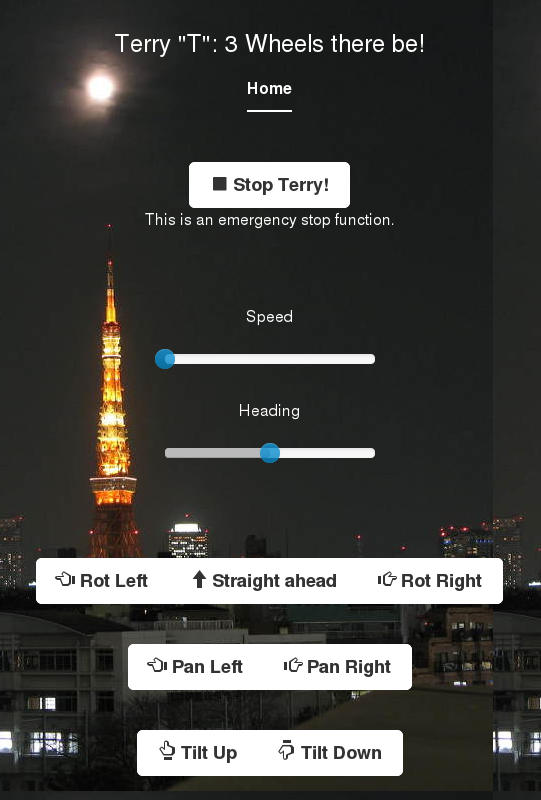
<div class="inner cover">
<div class="row">
<div class="col-md-1"><p class="lead">Speed</p></div>
<div class="col-md-8"><input id="speed" data-slider-id='speedSlider'
type="text" data-slider-min="0" data-slider-max="100"
data-slider-step="1" data-slider-value="0"/></div>
</div>
<div class="row">
<div class="col-md-1"><p class="lead">Heading</p></div>
<div class="col-md-8"><input id="heading" data-slider-id='headingSlider'
type="text" data-slider-min="0" data-slider-max="100"
data-slider-step="1" data-slider-value="50"/></div>
</div>
</div>
<div class="inner cover">
<div class="btn-group">
<button id="rotateleft" type="button" class="btn btn-default btn-lg" >
<span class="glyphicon glyphicon-hand-left"></span> Rot Left</button>
<button id="straightahead" type="button" class="btn btn-default btn-lg" >
<span class="glyphicon glyphicon-arrow-up"></span> Straight ahead</button>
<button id="rotateright" type="button" class="btn btn-default btn-lg" >
<span class="glyphicon glyphicon-hand-right"></span> Rot Right</button>
</div>
</div>
With those UI elements the hook up to the server is completed using io.connect() to connect a ‘var socket’ back to the BeagleBone Black. The below code sends commands back to the BeagleBone Black as UI elements are adjusted on the page. The rotateleft command is simulated by setting the heading and speed for a few seconds and then stopping everything.
$("#speed").on('slide', function(slideEvt) {
    socket.emit('speed', {
        value: slideEvt.value[0],
        '/end': 'of-message'
    });
});
...
$('#straightahead').on('click', function (e) {
     $('#heading').data('slider').setValue(50);
})
$('#rotateleft').on('click', function (e) {
     $('#heading').data('slider').setValue(0);
     $('#speed').data('slider').setValue(70);
     setTimeout(function() {
        $('#speed').data('slider').setValue(0);
        $('#heading').data('slider').setValue(50);
     }, 2000);
})
The BeagleBone Black runs a Web server offering files from /usr/share/bone101. I found it convenient to put the whole project in /home/xuser/webapps/terry-tee and create a softlink to the project at /usr/share/bone101/terry-tee. This way http://mybeagleip/terry-tee/index.html will load the Web interface on a tablet. Cloud9 will automatically start any Bonescript files contained in /var/lib/cloud9/autorun. So two links setup Cloud9 to both serve the client and automatically start the server Bonescript for you:
root@beaglebone:/var/lib/cloud9/autorun# ls -l
lrwxrwxrwx 1 root root 39 Apr 23 07:02 terry.js -> /home/xuser/webapps/terry-tee/server.js
root@beaglebone:/var/lib/cloud9/autorun# cd /usr/share/bone101/
root@beaglebone:/usr/share/bone101# ls -l terry-tee
lrwxrwxrwx 1 root root 29 Apr 17 05:48 terry-tee -> /home/xuser/webapps/terry-tee
Wrap up
I originally tried to use the GPIO pins P8_41 to 44. I found that if I had wires connected to those ports the BeagleBone Black would not start. I could remove and reapply the wires after startup and things would function as expected. On the other hand, leaving 41-44 unconnected and using 37-40 instead the BeagleBone Black would boot up fine. If you have a problem starting your BeagleBone Black you might be accidentally using a connector that has a reserved function during startup.
While the configuration shown in this article allows control of only the movement of the robot base the same code could easily be extended to control other aspects of the robot you are building. For example, to control an arm attached and be able to move things around from your tablet.
Using a BeagleBone Black to control the robot base gives the robot plenty of CPU performance. This opens the door to using a mounted camera with OpenCV to implement object tracking. For example, the robot can move itself around in order to keep facing you. While the configuration in this article used wifi to connect with the robot, another interesting possibility is to use 3G to connect to a robot that isn’t physically nearby.
The BeagleBone Black can create a great Web-controlled robot and the 3 wheel robot base together with some gearmotors should get you moving fairly easily. Though once you have the base moving around you may find it difficult to resist giving your robot more capabilities!
We would like to thank ServoCity for supplying the 3 wheel robot base, gearmotors, gearbox and servo used in this article.


 Back in January of last year I
  how to think parallel, is incredibly exciting.
 * Directly after the Linux Kernel Panel wrapped up,
  Never underestimate the impact that the U.S. National Science Foundation (NSF) can have on technology. After all, way back when there was no commercial web, it was the NSF that–under pressure from entrepreneurs–opened up the gates for the commercial web to become a low cost way for organizations and individuals to become networked.