Home Blog Page 1381

Netflix Architect Offers Template for Monitoring Linux Performance Tools

Last week I spoke at LinuxCon North America 2014 in Chicago, which was also my first LinuxCon. I really enjoyed the conference, and it was a privilege to take part and contribute. I’ll be returning to work with some useful ideas from talks and talking with attendees.

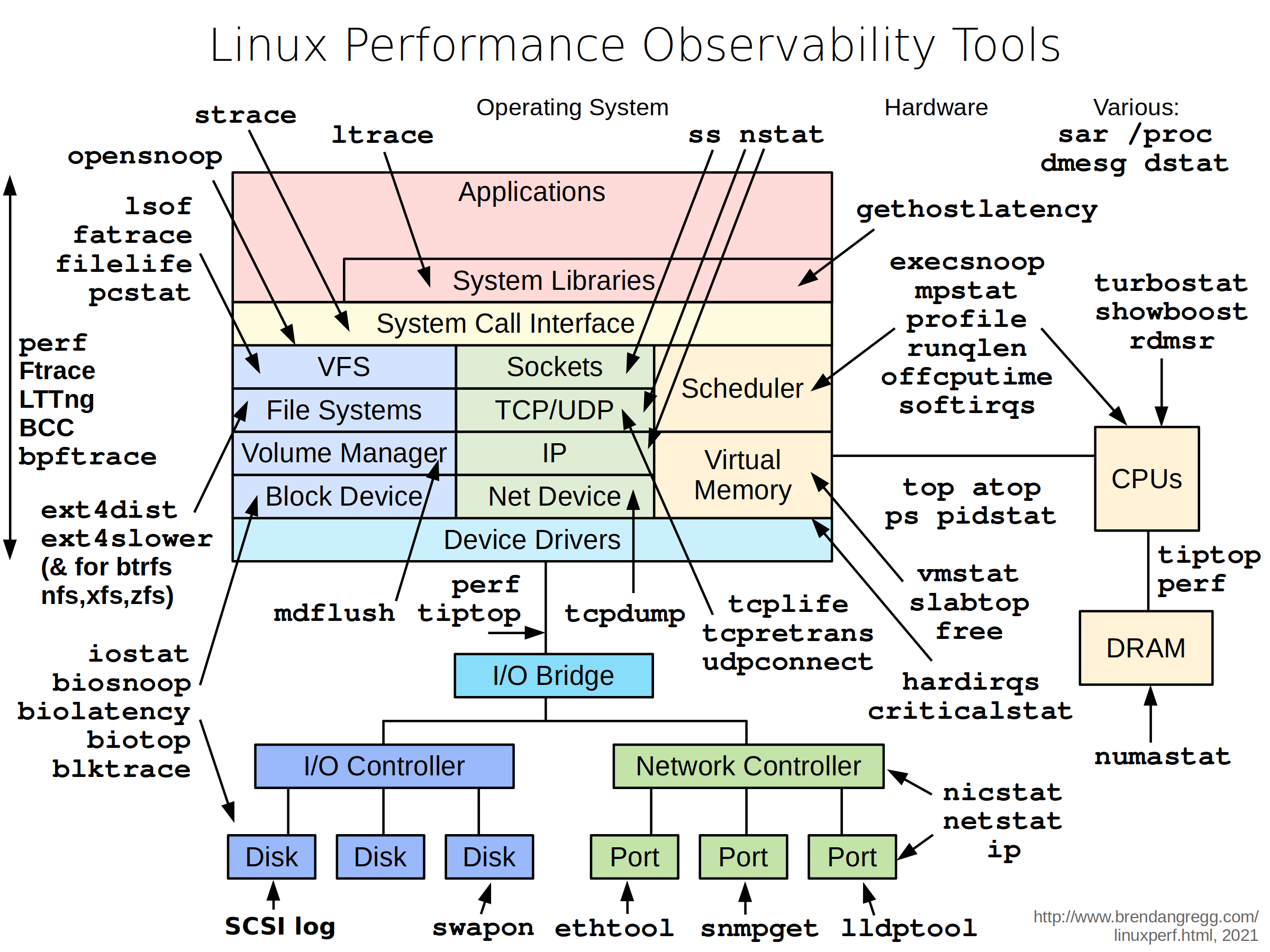
I included my latest Linux performance observability tools diagram, which I keep updated here:


But I was really excited to share some new diagrams, which are all in the slides: 


I gave a similar talk two years ago at SCaLE11x, where I covered performance observability tools. This time, I covered observability, benchmarking, and tuning tools, providing a more complete picture of the performance tools landscape. I hope these help you in a similar way, when you move from observability to performing load tests with benchmarks, and finally tuning the system.

I also presented an updated summary on the state of tracing, after my recent discoveries with ftrace, which is able to serve some tracing needs in existing kernels. For more about ftrace, see my lwn.net article Ftrace: The hidden light switch, which was made open the same day as my talk.

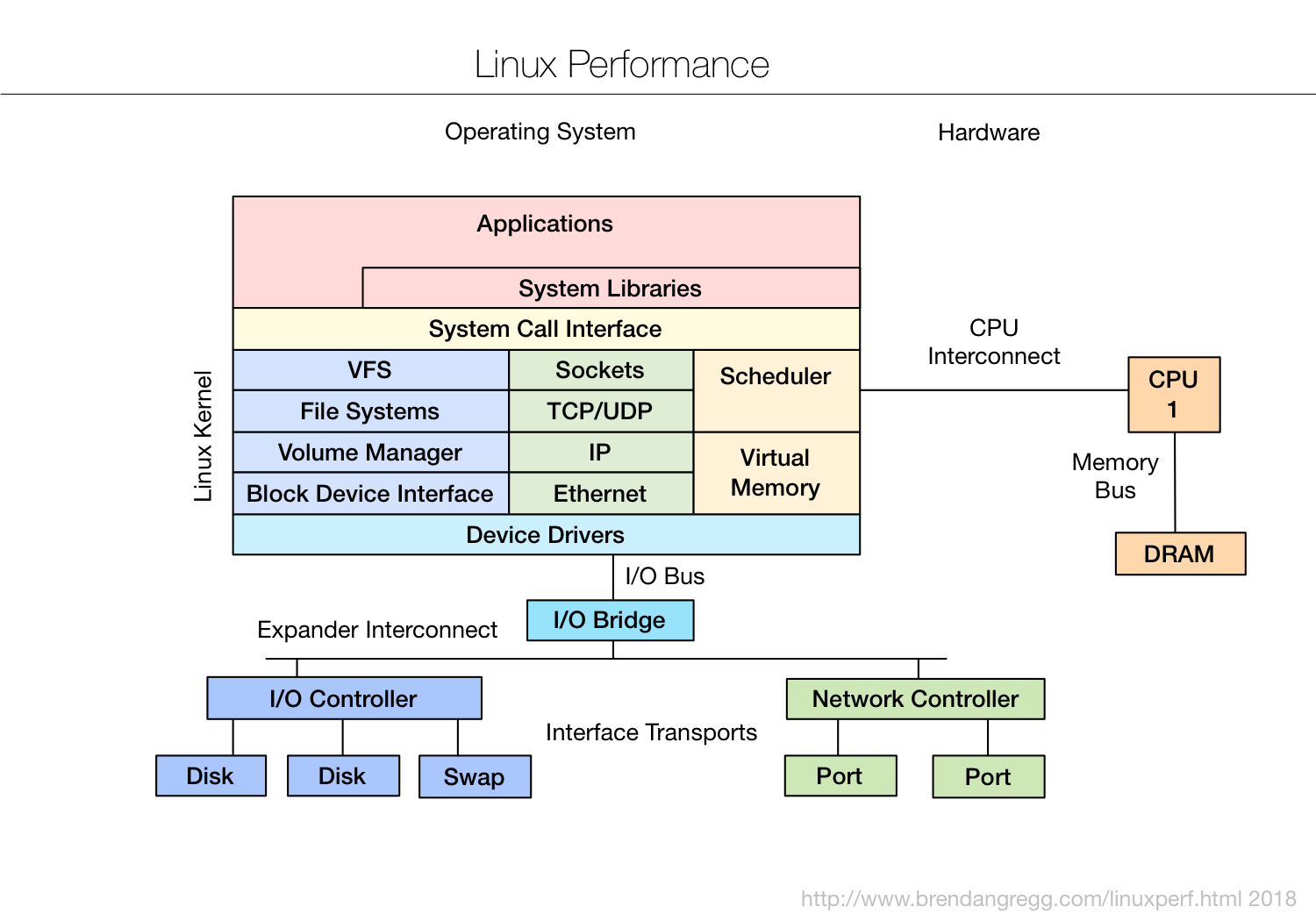
At one point I included a blank template for observability tools (PNG):

 My suggestion was to print this out and fill it in with whatever observability tools make most sense in your environment. This may include monitoring tools, both in-house and commercial, and can be supplemented by the server tools from my diagram above.

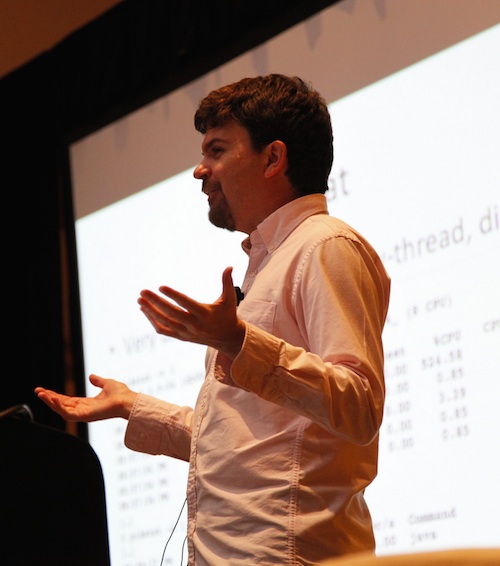
Brendan Gregg spoke at LinuxCon North America, 2014, in Chicago.

At Netflix, we have our own monitoring system to observe our thousands of cloud instances, and this diagram helps to see which Linux and server components it currently measures, and what can be developed next. (This monitoring tool also includes many application metrics.) As I said in the talk, we’ll sometimes need to login to an instance using ssh, and run the regular server tools.

This diagram may also help you develop your own monitoring tools, by showing what would ideally be observed. It can also help rank commercial products: next time a salesperson tells you their tool can see everything, hand them this diagram and a pen. 🙂

My talk was standing room only, and some people couldn’t get in the room and missed out. Unfortunately, it wasn’t videoed, either. Sorry, I should have figured this out sooner and arranged something in time. Given how popular it was, I suspect I’ll give it again some time, and will hopefully get it on video.

Thanks to those who attended, and the Linux Foundation for having me and organizing a great event!

Brendan Gregg is a senior performance architect at Netflix, where he does large scale computer performance design, analysis, and tuning. He is the author of the book “Systems Performance”, and recipient of the USENIX 2013 LISA Award for Outstanding Achievement in System Administration. Previously a performance and kernel engineer, his recent work includes developing tools, methodologies, and visualizations for Linux performance analysis.

This guest post is re-published with permission from Brendan Gregg’s blog. 

VMware Embraces Docker Container Virtualization

According to VMware, the best way to run a Docker container is on a VMware virtual machine.

Read more at eWeek

Opening Up in New Ways: How the OpenPOWER Foundation is Taking Open to New Places

It’s no secret that open development is the key to rapid and continuous technology innovation. Openly sharing knowledge, skills and technical building blocks is something that we in the Linux community have long been promoting and have recognized as a successful model for breeding technology breakthroughs. Much of The Linux Foundation’s and its peers’ efforts to date have been centered on fostering openness at the software level, starting right at the source — the operating system – and building up from there. Traditionally, the agenda has not included a great amount of attention on how to open up at the hardware level. Until now. 

A year ago, many of us in the Linux community took notice when IBM, NVIDIA, Mellanox, Tyan and Google announced their intentions to form the OpenPOWER Foundation, a group through which the IBM POWER processor architecture would be opened up for development.  Now, one year later, the group has officially formed and the notion of open hardware development that starts at the processor level has resonated with many.

According to OpenPOWER, they now have 53 members and seven working groups focused on enabling broad industry innovation across the full hardware and software stack.  Through the Foundation, member companies are free to use the POWER architecture for custom open servers and components for Linux based cloud data centers, or any processor application they choose. 

Fostering open collaboration at all levels – from the chip and on up through the entire hardware and software stacks – is what is needed to drive a new era of innovation. To this end, The Linux Foundation looks forward to partnering with the OpenPOWER Foundation in the near future on projects in which we have a shared vision. In particular, we will aim to work together in ways that can address some of today’s largest technology challenges – like better harnessing Big Data, addressing security concerns and energy efficiency – in a way that unlocks opportunity for all.

So, with that, let me officially welcome the OpenPOWER Foundation to the community.  We look forward to working together to drive open innovation in new ways and in new places.

You can hear more about OpenPOWER in this keyntoe from IBM at last week’s LinuxCon and CloudOpen events.

https://www.youtube.com/watch?v=ncPJHC8i_Ks?rel=0&list=UUfX55Sx5hEFjoC3cNs6mCUQ” allowfullscreen=”true” frameborder=”0″ width=”425

Have you ever encounter Chip Failures of the TN55NO2 and TN55TOX Board on Huawei OSN 8800

Summary: The clock chips used on some TN55 of Huawei OSN product Optical OSN 8800 NE have design defects. As a result, the failure rate of the chips is 5% after they are in service for 2 years. In the case of a clock chip failure, services on these boards will be interrupted and cannot be restored even after you remove and reinsert or perform a cold reset on the boards.
[Problem Description]
Trigger conditions:
The chip failure rate is 5% within 2 years. The chip failure rate is proportional to the service period but is irrelevant to application scenarios.
Symptom:
On the transmission faulty board, a Hard_Bad alarm is reported and cannot be cleared and services are interrupted.
Identification method:
1. Check the bar codes of the boards against the attachment. If the bar codes are included in the attachment which provided by the official website, you can determine that the boards are at risk of a clock chip failure.
2. If the previously described symptom occurs on a TN55 board, you can determine that the board is at risk of a clock chip failure.
You can also query the register using the following commands.
[Root Cause]
The clock chip has design defects. As a result, the TN55 boards have 5% failure rate within 2 years.
[Impact and Risk]
Optical OSN 8800: On a board with a defective clock chip, a Hard_Bad alarm is reported and services are interrupted. The services cannot be restored even after you remove and reinsert or perform a cold reset on the board. The chip failure rate is 5% within 2 years and is proportional to the service period.
[Measures and Solutions]
Recovery measures
Replace the boards with a defective clock chip.
Solutions:
Replace the boards with a defective clock chip.
Material handling after replacement:
For markets outside China directly scrap the boards. For markets inside China, send the boards back to the Spare Parts Center for disposal.

Red Hat Bids to Become a Hybrid Cloud Power

Red Hat pushes interoperability with multiple cloud platforms with the latest release of CloudForms 3.1, its hybrid cloud management platform.

RAW Sharpening and Noise Reduction With Raw Therapee on Linux

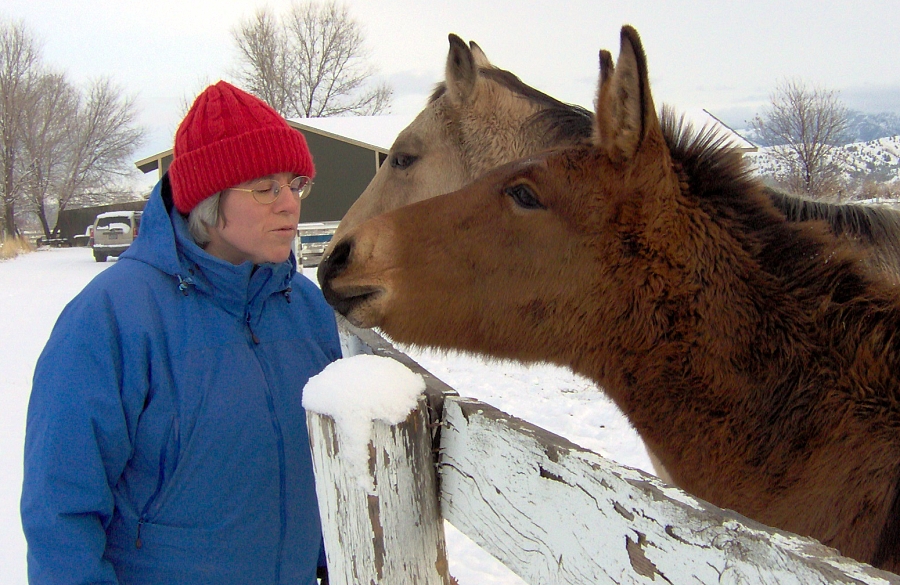
Figure 1: Snowy day on the farm.

The full power of digital photography lies in knowing how to manipulate RAW images. When you shoot RAW you get the highest-quality images, and the most editing headroom for repairs and enhancements. Raw Therapee is a wonderful cross-platform RAW image processor. Use it for noise reduction, pulling details out of shadows, fine-grained sharpening, color adjustment, color management, contrast, luminance, brightness, gamma, and hue corrections, convert to black and white, exposure corrections, distortion, chromatic aberration, and vignetting repairs, apply lens correction profiles, and about a skillion more features.

Raw Therapee is not a raster graphics editor like Krita or GIMP, and you cannot use it to add text to an image, combine images, or do surgical fixes such as red-eye correction. When you make changes, for example contrast, color, sharpness, or any other element, they are applied to the whole image. When you have processed an image in Raw Therapee, you can import it into Krita or GIMP for more surgical editing.

Raw Therapee is fast and efficient. It displays thumbnails of all images in a directory. Double-click the one you want to work on, and it opens in its own tab. All editing is non-destructive, your changes are immediately previewed, and no changes are made until you send your images to the processing queue. Your originals are always preserved unchanged, and your edited images are saved in the converted/ directory inside your original image directory. Or, in any other directory that you prefer.

Raw Therapee supports RAW, TIFF, PNG, and JPEG image file formats. One of its most useful features is sidecar files. These are plain text files that record the tools you used on an image and their settings. These have a .pp3 extension, so an image named mypuppy.jpg is paired with a sidecar file named puppy.jpg.pp3. You can re-use these files by importing them into other images. Raw Therapee comes with a good batch of presets contained in .pp3 files.

Que Bella Luna

Photographing the moon is great fun, and you can get good pics with modest cameras. The basic steps to getting good moon photos are: 

  • A good solid tripod
  • A zoom lens or telescope
  • Fast shutter speed. 

The Earth and moon are both moving very fast, and the moon is so far away the tiniest camera movement is magnified. Fortunately it is bright, so you can use a high shutter speed at low ISO. Figure 2 shows the original image taken with a Canon 7D and the Canon 100-400mm zoom lens at 400mm.
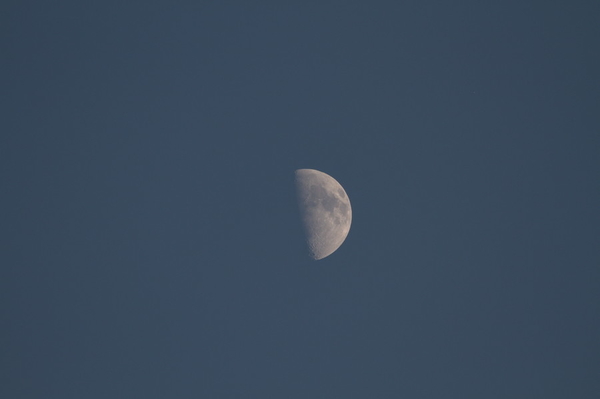
Figure 2: Unprocessed moon photo with Canon 7D at 400mm.

When you take into account the 1.6x crop factor of the 7D’s APS-C sensor, this is the equivalent of an image captured with a 640mm lens. And the moon is still small, so it’s going to take some cropping and enlarging to make it look like anything.

Look on the right control panel in Raw Therapee for the Transform tab. This is the one with the little scissors and protractor. Expand the Crop menu, click the Enabled checkbox, and drag your cursor over your image to select the crop area. Drag the corners to change the dimensions, and move the whole crop grid with Shift+cursor. The Crop menu includes a nice complement of composition guides and fixed ratios. Your image will not be cropped until it moves through the processing queue, so use the zoom tool at the bottom to enlarge your image view.
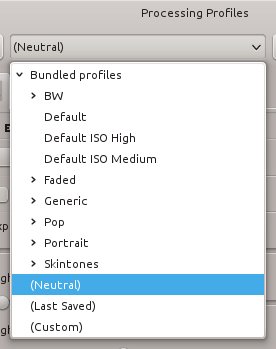
Figure 3: Processing profiles.You can see the width and height of your crop in the Crop dialog, so if you need to reduce your image size just scroll down a little to the Resize controls.

Take a look at the Navigator panel on the left side. This displays your image with crop and zoom frames, color values, and editing history.

A good first stop is the Processing Profiles menu to apply some of the presets just to see what they do (figure 3).

Let’s use the Neutral profile, and then apply noise reduction and sharpening.

Noise Reduction

Noise reduction is always a balancing act between losing details and creating a pleasing smoothness. Raw Therapee’s noise reduction is very good at reducing noise without losing a lot of details. Go to the Details tab, and check the Noise Reduction checkbox to enable it. Select the Lab method, because this separates luminance from the color channels. Set the Luminance Detail slider to zero, and play with the Luminance slider. The Luminance slider applies smoothing and loses fig-4 noise reduction settingsdetails, so when you have a nice level of smoothness adjust the Luminance Detail slider to bring out details.
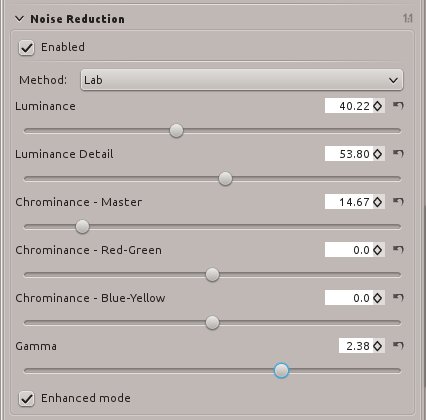
Play around with the Chrominance channels to see how they affect your image. Chrominance-Master affects all color channels equally. Chrominance-Red-Green affects the red channel, and Chrominance-Blue-Yellow operates on the blue channel. You may find that one of these channels has more noise, so you can tailor settings per channel.

Adjusting Gamma usually has a nice dramatic brightness effect. Smaller gamma values are applied to shadows, while higher gamma values enhance brighter tones.

Use Enhanced Mode because this runs the noise reduction algorithms twice and usually produces a nicer result.

Sharpening

Now we can apply a little sharpening. Try the Unsharp Mask first, because it usually gives the best results. A smaller Radius value brings out small details better. Haloing is often a side effect of a small radius value, so if you get halos increase the radius.

The Amount slider determines the level of sharpening, which you can see as you move the slider. There is one gotcha with sharpening, and that is that Raw Therapee applies sharpening before resizing. This can make your sharpening look wrong, so you might want to apply sharpening as a separate step after you have applied your other changes.Figure 5: Sharpening settings.
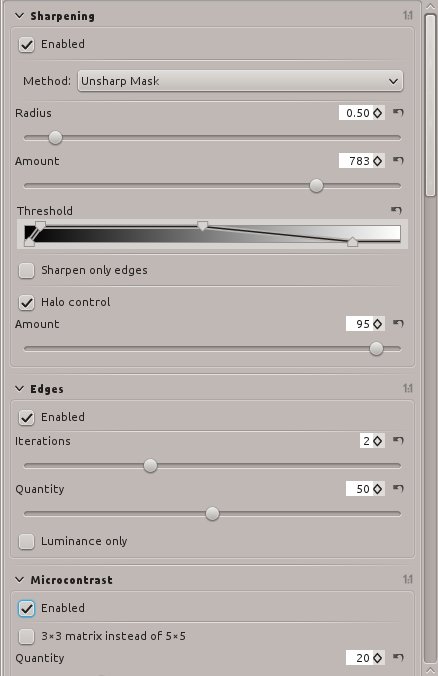
The Threshold slider is a wonderful tool for applying sharpening in the tonal range where it does the most good. The left pair of sliders controls darker tones, and the right pair apply to lighter tones. Usually the default setting looks good, but it costs you nothing but a little time to experiment. A good way to see what any of the controls do is to set them to extremes, to make it obvious what changes they’re making.

Try the Sharpen Only Edges setting on simple images without a lot of fine detail, because this applies sharpening only to areas of contrasting pixels and not areas of uniform tones. If you have a lot of details, like my moon photo, then edge sharpening most likely won’t look as sharp.

Halo control is rather interesting; when you’re pixel-peeping at high zoom it looks fakey, but when you step back to a normal viewing size it sometimes makes your photo look more realistic. Remember that mathematical fidelity and how we perceive images are often dissimilar, so tweak it to suit your own taste.

There are two more settings that apply to edges: Iterations and Quantity. These are independent from the Sharpen Only Edges setting. On some images, like my moon pic, enabling Edges adds a nice crisp clarity.

Enabling Microcontrast can bring out even more fine detail. It can also make your image look a little noisier.

Processing Queue

That’s enough messing around with this moon photo. When you’re ready to apply your changes click the little icon with two gears, down underneath your image. This puts it in the processing queue, which should already be open in its own tab (figure 6).Figure 6: Processing queue.
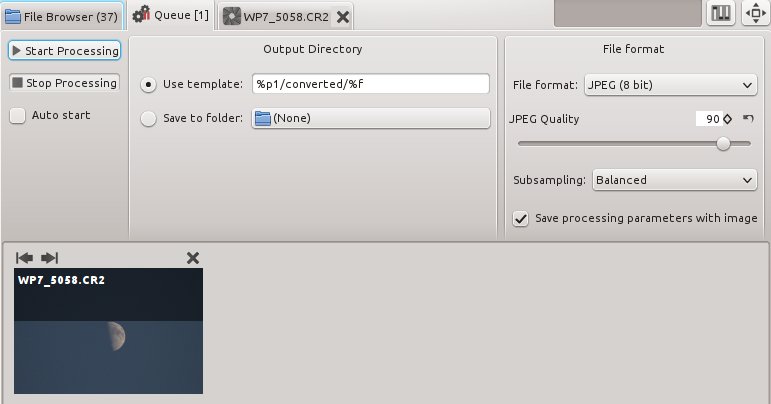
You can set your output file location here, and file type. Click the Start Processing button, and behold figure 7, our glorious moon photo.
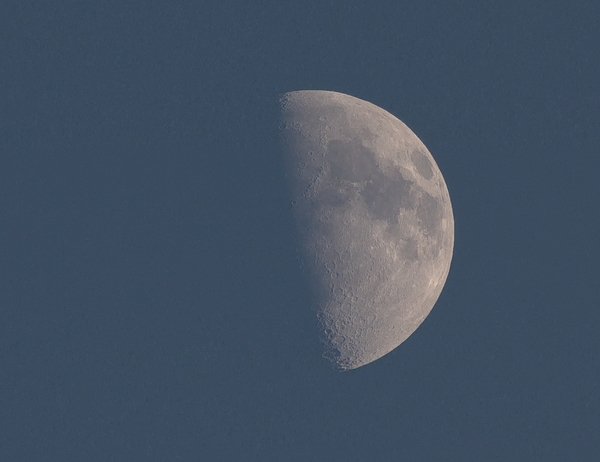
Figure 7: Final moon photo

Not bad for a Web JPG.

Advanced photo editing is always complex. The good news is it costs you nothing but time to study and experiment. Check out these resources to learn more, and the Raw Therapee manual at Rawpedia is an excellent guide.

A RAW Feast on the Linux Darktable (Photo Editor)
Move Over GIMP, Here Comes Krita 
RAW Magic In Digikam: Understanding RAW Photo Settings 
How to Remote Control Your Camera with Darktable on Linux 
Professional Graphics Creation on Linux 
Build A Serious Multimedia Production Workstation With Arch Linux 

Choose Your Side on the Linux Divide

The battle over systemd exposes a fundamental gap between the old Unix guard and a new guard of Linux developers and admins

Read more at InfoWorld.

Haiku Debates Kernel Switch (But It’s Not Happening)

 A very interesting discussion is taking place in the Haiku mailing list right now. A developer has created a working prototype implementation of the BeOS API layer on top of the Linux kernel, and he is wondering if the project is worth pursuing. He’s got the App, Interface and Networking Kits in good shape within a few months’ work.

Read more at OS News.

VMware Comes Full Circle, to Release its Own OpenStack Flavor

Ever since 2012, we’ve covered the unsure stance that VMware has displayed toward emerging open source cloud computing platforms, including OpenStack, CloudStack and Eucalyptus. In this post, we reported that VMware’s CEO had cited OpenStack in particular as “lacking maturity.”

Now, VMware has moved to challenge the threat to its hegemony that OpenStack poses by working on its own distribution of OpenStack called VMware Integrated OpenStack (VIOS).


Read more at Ostatic

First Firefox OS Phone Arrives in India, Priced at $33

Mozilla has announced that the first smartphone running its Firefox OS mobile operating system is now on sale in India, following earlier reports that a low-cost phone would arrive there in July.

The phone is called Cloud FX and is built by Intex Technologies, an Indian phone maker. It went on sale on the Snapdeal.com website on Monday for 1,999 rupees (Rs.), or approximately $33.


Read more at Ostatic