
Dell is going the way of EMC, IBM and HP in positioning itself as a one-stop enterprise storage IT shop.
Read more at eWeek
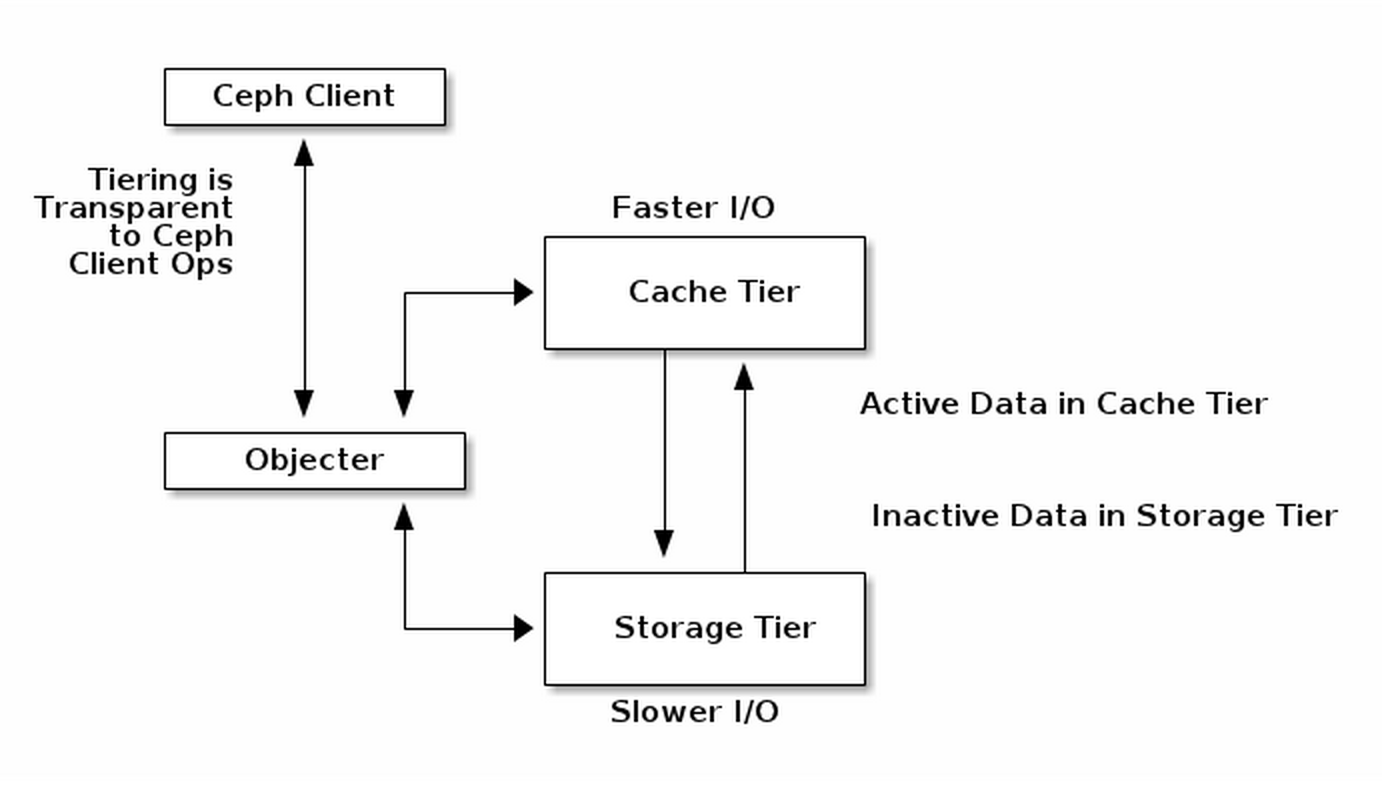 Red Hat last month released the latest version of Inktank Ceph Enterprise, their object and block storage product based on the upstream open source Ceph project. It’s notable not only as the first release since Red Hat acquired the two-year-old startup, Inktank, in April, but also for two key features that help open up a new market for Ceph.
 While Ceph gained prominence as the open source software-defined storage tool commonly used on the back end of OpenStack deployments, it’s not strictly software for the cloud. With the latest new enterprise feature addition, Ceph has begun to see adoption among a new class of users interested in software-defined storage for big data applications.
The new enterprise features can be used in both legacy systems and in a cloud context, “but there’s almost a third category of object storage within an enterprise,” said Sage Weil, Ceph project leader, in an interview at OSCON. “They’re realizing that instead of buying expensive systems to store all of this data that’s relatively cold, they can use software-defined open platforms to do that.”
“It’s sort of cloudy in the sense that it’s scale out,” Weil said, “but it’s not really related to compute; it’s just storage.”
Ceph Enterprise 1.2 contains erasure coding and cache-tiering, two features first introduced in the May release of Ceph Firefly 0.8. Erasure coding can pack more data into the same amount of space and requires less hardware than traditional replicated storage clusters, providing a cost savings benefit to companies that need to keep a lot of archival data around. Cache tiering divides the data cluster so that hot data being accessed regularly can be held on faster storage, typically SSD’s, while erasure-coded cold data sits below on cheaper storage media.
Used together, erasure coding and cache tiering allow companies to combine the value of storing relatively cold, unused data in large quantities, with faster performance – all in the same cluster, said Ross Turk, director of product marketing for storage and big data at Red Hat.
It’s a set of features that are both useful in a cloud platform context as well as in standalone storage for companies that want to benefit from the scale-out capabilities that the cloud has to offer but aren’t entirely ready to move to the cloud.
“In theory it’s great to have elastic resources and move it all to the cloud, but training organizations to adapt to that new paradigm and have their own ops teams able to run it, takes time,” Weil said.
OpenStack was a good first use case for Ceph to target because developers and system administrators on those projects understand distributed software, Weil said. Similarly, a greenfield private cloud deployment is a good use case for Ceph because it’s easy to stand up a new storage system at the same time “rather than attack legacy use cases head on,” he said.
But enterprise private and hybrid cloud adoption still lags behind public cloud use, according to two recent reports by IDC and Technology Business Research. One reason is that most companies lack the internal IT resources and expertise to move a significant portion of their resources to the cloud, according to a March 2014 enterprise cloud adoption study by Everest Group.
Storage faces an even longer road to adoption than the cloud, given the high standards and premium that companies place on retaining data and keeping it secure.
“People require their storage to be a certain level of quality and stability – you can reboot a server but not a broken disk and get your data back,” Turk said.
By providing an economic advantage to users in the growing cold storage market, Ceph has the added benefit of encouraging enterprise adoption of open source storage in the short term without relying on cloud adoption to fuel it.
Over the long term, cloud computing and the software-defined data center – including storage, compute, and networking – will become the new paradigm for the enterprise, Weil said. And Ceph, already a dominant open source project in this space, will rise along with it.
“A couple of decades ago you had a huge transformation with Linux going from proprietary Unix OSes sold in conjunction with expensive hardware to what we have today in which you can run Linux or BSD or whatever on a huge range of hardware,” Weil said. “I think you’ll see the same thing happen in storage, but that battle is just starting to happen.”
Red Hat’s acquisition of Inktank will help shepherd Ceph along that path to widespread enterprise adoption — starting with this first Ceph Enterprise release. Ceph will also eventually integrate with a lot of the other projects Red Hat is involved with, Weil says, including the Linux kernel, provisioning tools, and OpenStack itself.
“We feel very good about what Red Hat’s able to do for the project,” Weil said. “One thing that’s hard for open source startups is all the work around QA, testing and packaging – putting code in a form that’s stable and robust and delivering that to a customer. That’s Red Hat’s expertise.”
Clonezilla is a partition and disk cloning application for Linux, Free-, Net-, and OpenBSD, Mac OS X, Windows, and Minix. It supports all the major filesystems including EXT, NTFS, FAT, XFS, JFS, and Btrfs, LVM2, and VMWare’s enterprise clustering filesystems VMFS3 and VMFS5. Clonezilla supports 32- and 64-bit systems, both legacy and UEFI BIOS, and both MBR and GPT partition tables. It’s a good tool for backing up a complete Windows system with all of your installed applications, and I like it for making copies of Linux test systems so that I can trash them with mad experiments and then quickly restore them.
Clonezilla can also copy unsupported filesystems with the dd command, which copies blocks rather than files, so it doesn’t need to understand filesystems. So, the short story is Clonezilla can copy anything. (A quick note on blocks: disk sectors are the smallest addressable storage units on hard disks, and blocks are logical data structures made up of single or multiple sectors.)
Clonezilla comes in two versions: Clonezilla Live and Clonezilla Server Edition (SE). Clonezilla live is ace for cloning single computers to a local storage device or network share. Clonezilla SE is for larger deployments, and fast multicast cloning an entire network of PCs at once. Clonezilla SE is a wonderful bit of software that we shall cover in the future. Today we shall create a Clonezilla Live USB stick, clone something, and restore it.
When you visit the download page you’ll see Stable and Alternative Stable releases. There are also Testing releases, which I recommend if you’re interested in helping to improve Clonezilla. Stable is based on Debian and includes no non-Free software. Alternative Stable is based on Ubuntu, includes some non-Free firmwares, and it supports UEFI Secure Boot.
After you download Clonezilla, install Tuxboot to copy Clonezilla to a USB stick. Tuxboot is a modification of Unetbootin that supports Clonezilla; you can’t use Unetbootin because it won’t work. Installing Tuxboot is a bit of pain, though Ubuntu users can install Tuxboot the easy way from a personal packages archive (PPA):
$ sudo apt-add-repository ppa:thomas.tsai/ubuntu-tuxboot
$ sudo apt-get update
$ sudo apt-get install tuxboot
If you’re not running Ubuntu and your Linux distribution doesn’t include a packaged version of Tuxboot, download the source tarball and follow the instructions in the README.txt file to compile and install it.
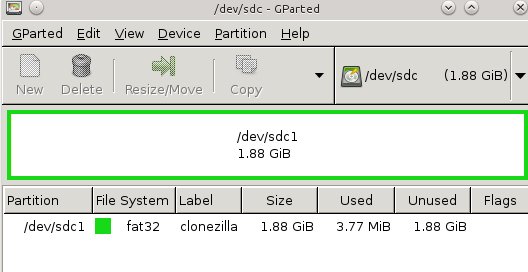
Once you get Tuxboot installed, use it to create your nice live bootable Clonezilla USB stick. First create a FAT32 partition of at least 200 megabytes; figure 1 (above) shows how it’s done in GParted. I like to use labels, like “clonezilla”, so I know what it is. This example shows a 2GB stick formatted as a single partition.
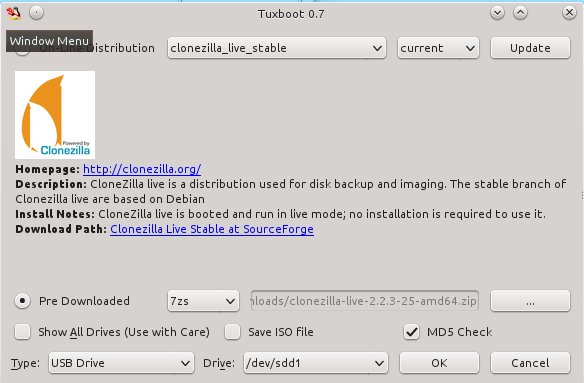
Then fire up Tuxboot (figure 2). Check “Pre-downloaded” and click the button with the ellipsis to select your Clonezilla file. It should find your USB stick automatically, and you should check the partition number to make sure it found the right one. In my example that is /dev/sdd1. Click OK, and when it’s finished click Exit. It asks you if you want to reboot now, but don’t worry because it won’t. Now you have a nice portable Clonezilla USB stick you can use almost anywhere.
Boot up your Clonezilla USB stick on the computer that you want to backup, and the first thing you’ll see is a normal-looking boot menu. Boot to the default entry. You’ll be asked language and keyboard questions, and when you arrive at the Start Clonezilla menu select Start Clonezilla. In the next menu select device_image, then go to the next screen.
This screen is a little confusing, with options for local_dev, ssh_server, samba_server, and nfs_server. This is where you select the location for your backup image to be copied to. The size of your destination partition or drive must be the same size or larger than the volume you’re copying. If you choose local_dev, then you’ll need a local partition with enough room to store your image. An attached USB hard drive is a nice fast and easy option. If you choose any of the server options you’ll need a wired Ethernet connection, the IP address of your server, and your login. I’ll use a local partition, which means selecting local_dev.
When you select local_dev Clonezilla scans all of your locally-attached storage, including hard disks and USB storage devices, and makes a list of your partitions. Select the one you want to store your new image in, and then it asks which directory to use and shows you a list. Select your desired directory, and the next screen shows all of your mounts and used/available space. Press Enter, and the next screen gives you the option of Beginner or Expert mode. I choose Beginner.
In the next screen you can choose savedisk, which creates an image of an entire hard disk, or save_parts, which allows you to select individual partitions. I want to select partitions.
The next screen asks for a name for your new image. After accepting the default or entering your own name, go to the next screen. Clonezilla scans your partitions and creates a checklist so you can pick the ones you want to copy. After making your selections, the next screen gives you the option to do a filesystem check and repair. I’m impatient, so I skip this part.
The next screen asks if you want Clonezilla to check your newly-created image to make sure it is restorable. I always say yes. Next, it gives you a command-line hint in case you ever want to use the command-line instead of the GUI, and you must press Enter again. You get one more confirmation, and then type y for Yes to make the copy.
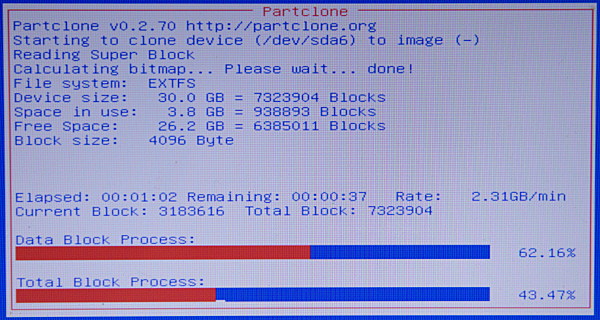
You get to watch a nice red, white, and blue progress screen while Clonezilla creates your new image (figure 3).
When it’s all finished press Enter and then select reboot, and remember to remove your Clonezilla USB stick. Boot up your computer normally, and go look at your nice new Clonezilla image. You should see something like this:
$ ls -l /2014-08-07-11-img/
total 1241448
-rw-r--r-- 1 root root       1223 Aug  7 04:22 blkdev.list
-rw-r--r-- 1 root root        636 Aug  7 04:22 blkid.list
-rw-r--r-- 1 root root       3658 Aug  7 04:24 clonezilla-img
-rw-r--r-- 1 root root      12379 Aug  7 04:24 Info-dmi.txt
-rw-r--r-- 1 root root      22685 Aug  7 04:24 Info-lshw.txt
-rw-r--r-- 1 root root       3652 Aug  7 04:24 Info-lspci.txt
-rw-r--r-- 1 root root        171 Aug  7 04:24 Info-packages.txt
-rw-r--r-- 1 root root         86 Aug  7 04:24 Info-saved-by-cmd.txt
-rw-r--r-- 1 root root          5 Aug  7 04:24 parts
-rw------- 1 root root 1270096769 Aug  7 04:24 sda6.ext4-ptcl-img.gz.aa
-rw-r--r-- 1 root root         37 Aug  7 04:22 sda-chs.sf
-rw-r--r-- 1 root root    1048064 Aug  7 04:22 sda-hidden-data-after-mbr
-rw-r--r-- 1 root root        512 Aug  7 04:22 sda-mbr
-rw-r--r-- 1 root root        750 Aug  7 04:22 sda-pt.parted
-rw-r--r-- 1 root root        625 Aug  7 04:22 sda-pt.parted.compact
-rw-r--r-- 1 root root        514 Aug  7 04:22 sda-pt.sf
Restoring your image is similar to creating it. Again, boot up Clonezilla, go through the same initial steps, select dev_image, and then on the local_dev screen select the location of your image that you want to restore, whether it’s on a local device or network share. Then continue through the rest of the screens, making sure that you have the correct restore image and target locations selected.
You can learn more of Clonezilla’s amazing powers at the Clonezilla Live Documentation page.
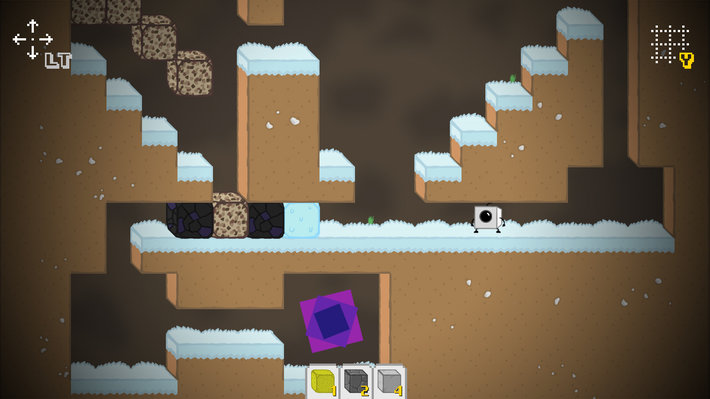
Caveats make me itchy.
Not the “I wore a wool sweater” kind of itchy. More the “I just saw a bunch of bugs and even though not a single bug is crawling on me, I’m itching like Gary Busey at a Renaissance fair” kind of itchy.
Any time the answer to a question begins with “Yes, but…” I start to develop imaginary rashes, especially when it comes to me recommending Linux to non-Linux-using folk.
In years past, the problem was far worse than it is today. It used to be that if someone asked you “Should I use Linux for my home computer?” your response required a small mountain of caveats: “Yes, but there’s a big learning curve”, “Yes, but only if there are good drivers in the kernel for your hardware” or, my personal poison ivy, “Yes, as long as you don’t need to play video games.”
Luckily, over time, most of those caveats have gone away. Linux distros are, in general, far easier to install and use nowadays. And hardware support, while not always 100 percent, has improved to the point of not being a blocking issue for the vast majority of people.
But video games… that caveat is still there. Or is it?
That very question got me thinking… when will the time come that we, as a people, can proudly proclaim Linux as a successful gaming platform? I mean, what does it even mean to be a successful gaming platform? Is there some sort minimum number of users needed?
The Xbox One, for example, has shipped over 5 million units. How does that compare to Linux? I’m not exactly sure. We know that Linux (the non-Android kind) accounts for between one and two percent of all traffic from web clients. Two percent means there are, roughly, eleventy billion Linux desktops. Okay, so we don’t have reliable stats on the total number of Linux desktop installations. But, even if “eleventy billion” is a tad inflated, there are certainly far larger numbers of Linux PC’s than of Xbox One’s.
Which means, from the numbers point of view, Linux is doing just dandy. But numbers don’t really tell the whole story. In 2011 over 36 million Twinkies were sold. And, as I found out the hard way, Twinkies play Portal poorly. Obviously install base alone does not a game platform make.
[Side Note: “Twinkies play Portal poorly” is great fun to say. Highly recommended.]
After much debate, with a fellow gamer about what makes a successful game platform, we came up with this:
“The measure of a great gaming platform is if people want to use it to play games on, rather than another platform. At least on occasion.”
Simplistic, I know, but it makes a good deal of sense. Which would mean Linux is a verifiable success as a gaming platform and has been for a good long time.
As good as that declaration feels, it doesn’t remove that caveat when recommending Linux to people. Sure, Tux Racer is cool. But it’s not exactly going to draw the hardcore (or even casual) gamer to the Linux side of the Force.
[I’m going to get angry emails for badmouthing Tux Racer… I just know it.]
Well, how about big name titles like Team Fortress 2, XCOM, Civilization V or DOTA 2? Would that do it? Would that convince people that Linux is a serious and worthwhile gaming platform? One that could power a person’s primary gaming machine? Can I write an entire paragraph using only questions? I think I can?
The answer to all of that is a resounding “Yes.”
And those four game examples are only the tip of the iceberg. The flood of commercial (and often big budget) titles coming our way via the Steam store is nothing short of astounding. Since the Linux launch of Steam in the beginning of last year, the number of Linux native games being sold through it has skyrocketed to more than 600. That’s faster than one new, commercial Linux game every single day.
Here’s the really crazy part: Steam isn’t the only game in town. Desura has been providing a Linux desktop-focused game store since 2011. And let’s not forget the Ubuntu Software Center or the Humble Bundle. Or GoG.com – which just launched official Linux support.
The fact is there are an amazing variety of distribution channels for video games on Linux nowadays easily competing with any other platform (both in terms of quantity and quality of games available).
To go back to the Xbox One comparison for a moment, there are currently (roughly) 260 games available for Microsoft’s console. There are more than 600 Linux games on Steam. And another 600 on Desura. And more than 50 on GoG. Sure this comparison is a tad bit like comparing Apples and Mini-vans, but it still drives the point home:
As a gaming platform, Linux is not only a viable option, but a smart option. It is a caveat-free option for hardcore and casual gamers alike.
Now I’ll be the first to admit that this article reads like a bit of a cheerleader piece. But why shouldn’t it? As Linux users, we have long struggled to get to a place where we can proudly proclaim to our friends and family “Yes! You should use Linux as a gaming PC. That is a highly recommended way to go!” We should be proud! All of us. We made it to this point as a community.
It feels good. It feels really, really good. And far less itchy.
[Phew! I made it to the end of an article about gaming on Linux without, even once, referencing any of the games I have developed for Linux. Achievement Unlocked: “Self-Promotion Self-Restraint”.]
Within our industry, there is a growing divide between two schools of thought; between those companies that believe that the future of the network lies in openness, and those that think a proprietary approach is the compelling way to go.
Many readers will pause here and say “Hang on… That debate is over. Everyone knows that customers want open standards!†And that highlights an important point. Customers do, by and large, want openness. Vendors have recognized that preference and highlighted their membership in various open communities. No vendor has leapt forth and insisted that closed is the way to go. The tension is more complex; it is between open-and-fully-interoperable, and ostensibly-open-yet-proprietary. The question of interoperability will clearly impact how your network and your business will be able to function and evolve in the long-term.
In essence, the open approach is based on the belief that, in order to truly align an enterprise’s infrastructure strategy with its business requirements, customers must be free to choose the solutions that best meet their specific needs, regardless of which vendor builds them. In order for this ‘best of breed’ approach to work, technologies must be – not just based on open standards – but genuinely interoperable, giving customers the option to bring in specific products and components as their needs evolve and change.
Read more at Brocade’s blog.
 Android’s march to the top of the smartphone field has been nothing short of meteoric. Back in 2008, there were still questions about the viability of the platform. But in July, Strategy Analytics researchers delivered their latest smartphone market share numbers, which showed Android reaching new highs at a record 84.6 percent share of global smartphone shipments. That is commanding share.
Some people forget, though, that Google steers a preferred version of Android (the version used by members of the Open Handset Alliance, with Google Play support and services), while the Android Open Source Project walks its own path. The fact is, though, both channels benefit Google in big ways.
