OpenSUSE “Factory” up to now has referred to the development version of the openSUSE Linux distribution while being announced by SUSE today is that it’s also going to serve as an independent distribution under a rolling-release development model…
Health Care, Finance Sectors Lead IT Spending Growth
Financial service organizations are hiking IT operational budgets by 5 percent at the median and capital budgets are up 2.5 percent, while another sector showing above-average growth in IT operational spending is health care, with budgets rising 3.6 percent at the median, according to a report from Consumer Electronics. Banks, insurers, and other financial service firms reported the strongest growth in both operational and capital budgets, the study revealed.
Steam OS Review – From a Linux User’s Point of View
Steam OS images were made available for free download yesterday. I grabbed the images, created an ISO and booted a high-end system on it (it was a working Windows 8 desktop). Instead of automated install, I chose advanced install so I could see what was going on. It was a pure Debian installer experience.
Once you installed everything successfully and rebooted your system, you will be greeted with typical Grub and Gnome login screen and there are four options – default Xsession, Steam OS, Gnome 3 Shell and Gnome Classic. I chose Gnome Shell just for the sake of checking it out.
Read more at Muktware
“The World’s Most Highly-Assured OS” Kernel Open-Sourced
The seL4 kernel that’s an advanced, security-enhanced version of the L4 micro-kernel has been open-sourced by General Dynamics C4 Systems and NICTA…
Internet of Things Big Security Worry, Says HP
HP found 25 vulnerabilities per device including everything from TVs to thermostats to home alarms and scales.
Anti-X & Zorin 9
Anti-X 14.2 is a pretty good distro, have been setting it my specifications.
When you install a new browser, iceweasel does not work. Then you have no access to setting up a printer. Anti-X is great for using g-parted and also unetbootin to make usb sticks and it is fairly quick. This distro is easy to install and run for a beginner or someone who is new to Linux
Zorin 9 is easy to set up and seems to run fairly smooth, that is what I’m using now. It’s stable with no glitches that I can find, so I reccomend this desktop over ubuntu or other desktops I have used. That said I have been using Linux for about six months, so guess I would be what you call a “NEWBIE” to the system, but it sure beats the heck out of paying Microsoft high dollar for a system that need upgraded every couple years that has become confusing to customers.
.
How to Simplify Linux Package Installation With Yum Groups
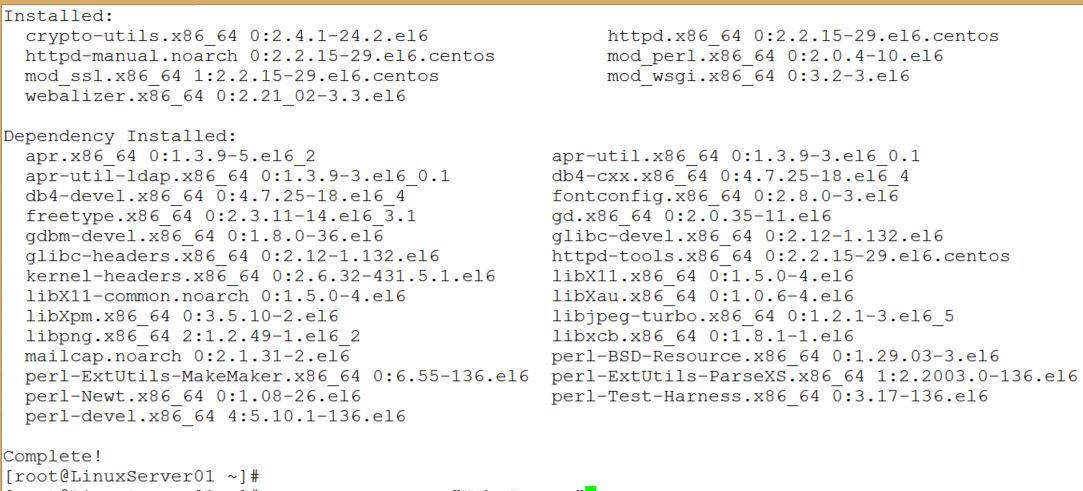
Most Linux admins are aware of the yum (Yellow Dog Updater Modified) utility for package management in Red Hat-based distros such as RHEL, CentOS, and Fedora. Few, however, are aware of the power, benefits, and utility of yum groups. In addition to installing individual packages, yum can also install and manage groups of packages through its groupinstall feature, a part of yum groups. By using yum groups, it’s not necessary for you to manually install related packages individually. For example, the yum group “Web Server” not only installs httpd, it also installs crypto-utils, httpd-manual, mod_perl, mod_ssl, mod_wsgi, and webalizer, plus all their dependencies.
The following tutorial is based on CentOS 6.5 and should work with other versions of Red Hat-based distros. Older versions may require that you install yum-utils in order to use yum groups.
A free companion video for this guide is available at http://youtu.be/0ab17Sh-LM0.
Package Management through Groups
In the following steps, you will learn how to list available groups, install a group, and remove a group.
-
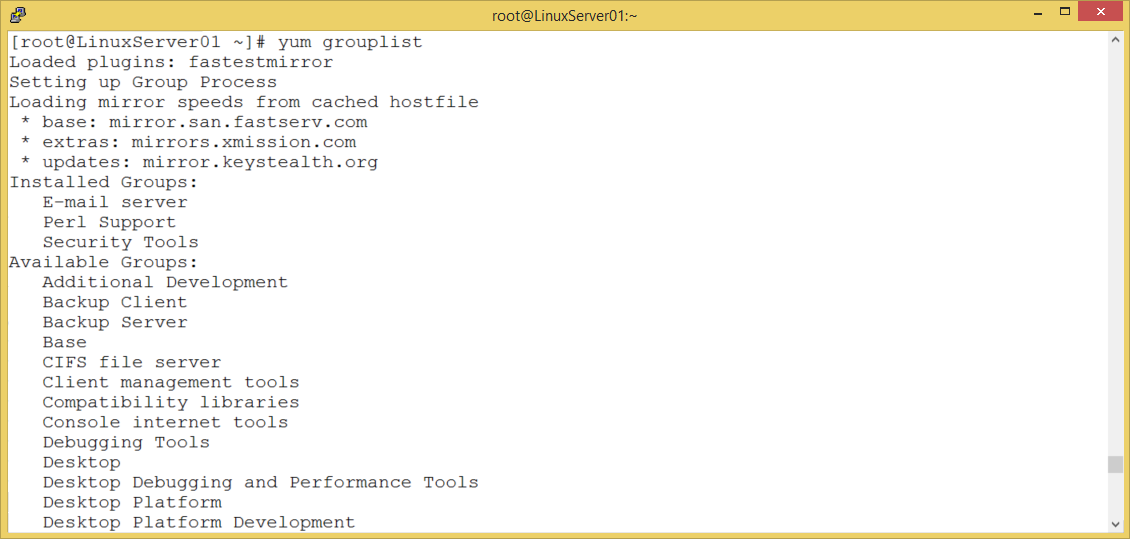
Use the command yum grouplist to see a list of all the available package groups.

-
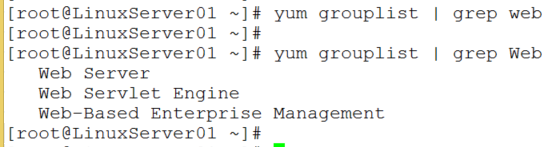
Now, add a grep filter to look for groups related to “Web” by using the command yum grouplist | grep Web (Remember, everything in Linux is case-sensitive.)

-
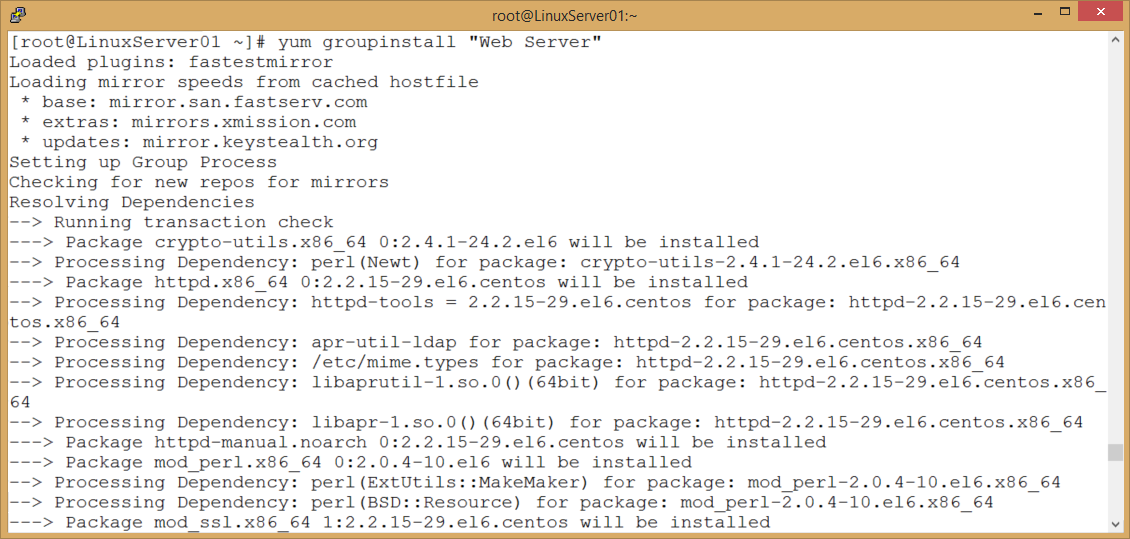
Use yum groups to install the Web Server group with the following command:
yum groupinstall “Web Server”
(Notice the use of quotation marks around the package name since it consists of two words. Also, notice that the two words are capitalized.) Stand up and stretch while this installation takes place. It has to download and install 34 packages which takes about a minute, depending on your connection speed and your computer’s speed. Do some shoulder rolls and neck rolls while this takes place. Seriously.

-
When it’s finished, as usual, it will return a command prompt. In the following screen capture, you can see all the packages it installed. Obviously, even with automatic dependency installation, this is still a lot less work than installing the packages manually.

-
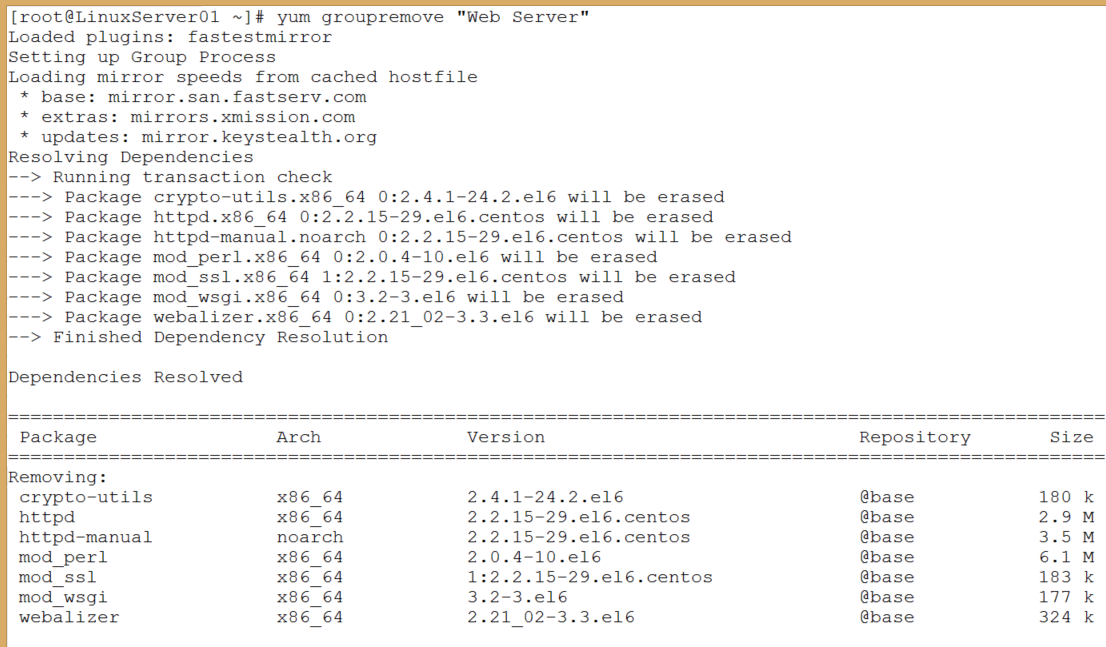
Now, remove the group with the command yum groupremove “Web Server”

As with yum groupinstall, the process of uninstalling packages is much easier with yumgroupremove.
An obvious disadvantage to using yum groups is that it installs a lot of packages, some of which you may not need or want. Yum groups, however, is a great way to teach yourself about various packages that you might want to use on a particular type of server. Ultimately, you’ll probably perform customized, manual package installations. During your learning process, yum groups can provide many insights into available packages.
Excerpted from the newly expanded and updated The Accidental Administrator: Linux Server Step-by-Step Configuration Guide, 2nd Edition by Don R. Crawley.
Don R. Crawley is author of The Accidental Administrator series of books for IT professionals including The Accidental Administrator: Linux Server Step-by-Step Configuration Guide and president of soundtraining.net a Seattle, Washington-based IT publishing and training firm. He is a veteran IT guy with over 40 years’ experience in technology for the workplace. He holds multiple certifications including Linux+ and IPv6 Silver Engineer. He tweets @doncrawley and blogs at www.soundtraining.net/blog. Don can be reached at (206) 988-5858, www.soundtraining.net, or This e-mail address is being protected from spambots. You need JavaScript enabled to view it
.
The Shocking Truth About Torvalds’ Home Office
If the Linux world has anything akin to royalty, Linus Torvalds surely must be its monarch. So what could be more natural than for the Linux-loving masses to want to see where he works and lives? Fortunately for FOSS fans, none other than the Linux Foundation has stepped up with an answer to that desire in the form of a video showcasing Torvalds’ home office. Think it’s tidy? Think again. You’ll laugh, you’ll cry. At the very least, you’ll come away feeling better about the state of your own work setup.
EdX CEO Anant Agarwal: Open Source is the Future of Education
Starting this Friday, Aug. 1, the more than 300,000 students who registered for the Linux Foundation’s free Introduction to Linux course on edX will be able to log in and start learning Linux. It is the first Massive Open Online Course (MOOC) on Linux, opening training access to anyone around the world with an Internet connection. It’s also part of a larger revolution in education being led by edX, the online learning platform founded by Harvard and MIT.
“Open EdX is an open-source platform that I believe has the potential to form the foundation of online learning around the world,” says Anant Agarwal, CEO of edX. “Much like Linux transformed the computing world, I believe open source will transform education as well.”
Agarwal will give a keynote talk on “Reinventing Education Through Massive Open Online Courses” at LinuxCon and CloudOpen North America in Chicago, Aug. 20-22, 2014. In this Q&A interview he discusses why the Intro to Linux course has been so popular, the role of Linux and open source in education, and how to get involved in Open EdX.
Linux.com: Enrollment in the upcoming Intro to Linux course on edX has reached more than 150,000 registrants – what is creating this kind of demand for Linux training?
Anant Agarwal: With edX, we have learners from all over the world coming to our platform to learn about all sorts of things. Areas of study that bridge skills gaps and can help people get jobs, get promotions and do better in existing jobs are extremely popular with our learning community. Whether in the USA or India or other countries of the world, Linux is a very critical area of knowledge. Software development and Linux in general are extremely valuable skills for people. The Linux course has been among our top three most popular courses on edX in terms of enrollment.
How does this compare to the other courses you offer and why the difference?
There are many reasons why the Intro to Linux course has become one of our most popular courses. One reason is that it is an introductory course, and these tend to draw a much larger learner base than the more advanced courses.
Secondly, people see a connection between learning about Linux and being able to get the right set of skills to advance in their careers. There are millions of Linux-related jobs available in all countries in the world. We have more than 2.5 million learners today from every country in the world, and Linux is a global phenomenon. Linux drives cloud data centers, enterprise computing and forms the foundation of a large part of computing that happens around the world today.
The third is it’s a course being offered by the Linux Foundation itself. Students will get to learn about Linux from the experts. All of these things contribute to the course’s popularity. And, of course, it is free.
In your LinuxCon keynote you plan to speak about the future of online education – what is that future?
My keynote will talk about the online movement and where it’s going, the future of education and why there’s a lot of excitement about MOOCs. In particular, I see a lot of synergy and connection between what we’re doing and the Linux community. Our open-source platform is the Linux of learning. What Linux has done for computing, edX has done for education. Linux is at the foundation of all computing today and similarly I think online learning will be at the heart of education around the world.
Open EdX is an open-source platform that I believe has the potential to form the foundation of online learning around the world. We’ve seen a number of nations beginning to adopt it, China, France, The Queen Rania Foundation in Jordan and Saudi Arabia, for example. Our hope is that, much like Linux, we’ll be able to make an impact around the world.
What role will Linux and open source play in that future?
Much like Linux transformed the computing world, I believe open source will transform education as well. Education is a fundamental human right. An open platform is important to making progress. With open source we can benefit from the collective improvements the whole community can make. Universities, individuals and countries can take our open-source platform and use it for what and how they want and at the same time make improvements to it. Google is an open-source member of edX and has contributed technologies for single sign-on and integration of things like Google hangouts and student help sessions to edX. And we have many other technology partners who have contributed as well.
We can move exponentially faster as the whole community moves to adopt the open-source philosophy. If you have a global standard, everyone can contribute and improve the same thing rather than have separate, isolated efforts. Open source is very critical for rapid adoption and improvement in technology around the world. And that’s why it’s very important.
Anything else you’d like to mention about your talk?
We are really delighted to host the introductory Linux course on edX, and from what I’ve seen it’s going to be an absolutely spectacular course. I’m looking forward to more courses from the Linux Foundation and the Linux community engaging with edX. I hope you’ll come to edX and take these courses and also contribute to the platform. Go to openedx.org where you can see the open-source software and community. I encourage you to become part of the community to follow our road map and updates. We’ll also have an Open edX developers conference on Nov. 19 in the Boston area.

The 5 Layers of PaaS
A year or two ago, PaaS systems were monolithic. A single vendor or solution, like Heroku, would provide one system that handled all aspects of PaaS. But things are changing. With a plethora of Open Source tools like Docker, Packer, Serf, CoreOS, Dokku, and Flynn, it is now possible to build your own PaaS. But what exactly makes up a PaaS?
I will take a functional approach to defining PaaS by asking what are the things that a PaaS does?
Read more at TechnoSophos.