
Home Blog Page 1415

How to Fix a Mangled Partition Table on Linux

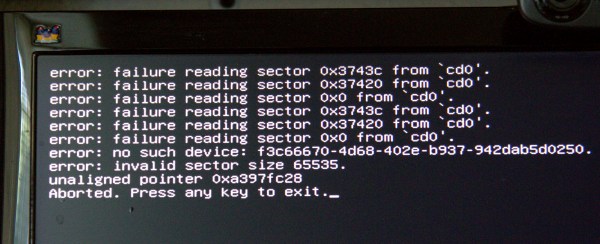
fig-1 boot failureWell there I was, rebuilding a router and having a good time when I accidentally damaged the partition table on my main Linux installation, which is a GUID partition table, or GPT. Figure 1 (above) shows the cheery message that greeted me at boot.

How did this happen? I was installing Voyage Linux on a compact flash card, and while I was messing around with GParted and other filesystem tools I accidentally ran some commands on/dev/sdb, my main hard disk, instead of /dev/sdc, the compact flash card. Like, oops. I don’t know exactly which operations gummed up /dev/sdb, which would be good to know. But I don’t, so let us carry on.

“Press any key to exit” landed at a blinking cursor on a black screen. Fortunately, I always foil the desires of certain distros that disable ctrl+alt+delete, or make it behave like Windows and open a services manager. I make sure that it is enabled and that it reboots the system. I booted into a different Linux installation and pondered how to make repairs. When your partition table is damaged to the point that your Linux will not boot, you have to fix it from the outside of the damaged system via bootable rescue media, or another Linux in a multi-boot installation. SystemRescueCD on a USB stick is my fave. Any *buntu live system also makes a great rescue distro, especially on a USB stick with persistent storage, because then it remembers your settings, you can install apps, and store documents.

There are no guarantees- you may be able to repair the problem, or you may have to reinstall your operating system. If the partition table is unrecoverable you may not be able to recover your data. So, as always, your first and best line of defense is good backups.

TestDisk

A good tool for repairing partition tables and recovering files is TestDisk. TestDisk operates on both the legacy MBR and the newfangled GPT (see Using the New GUID Partition Table in Linux (Goodbye Ancient MBR)) . TestDisk is in most Linux repos, and on SystemRescueCD. Start it up as root:

$ sudo testdisk
TestDisk 6.14, Data Recovery Utility, July 2013
Christophe GRENIER 
 This e-mail address is being protected from spambots. You need JavaScript enabled to view it
 ;
http://www.cgsecurity.org
TestDisk is free data recovery software designed to help recover lost
partitions and/or make non-booting disks bootable again when these symptoms
are caused by faulty software, certain types of viruses or human error.
It can also be used to repair some filesystem errors.
Information gathered during TestDisk use can be recorded for later
review. If you choose to create the text file, testdisk.log , it
will contain TestDisk options, technical information and various
outputs; including any folder/file names TestDisk was used to find and
list onscreen.
Use arrow keys to select, then press Enter key:
>[ Create ] Create a new log file
 [ Append ] Append information to log file
 [ No Log ] Don't record anything

Select “create a new log file”. In the next screen select the disk you want to repair.


Select a media (use Arrow keys, then press Enter):
 Disk /dev/sda - 2000 GB / 1863 GiB - ST2000DM001-1CH164
>Disk /dev/sdb - 640 GB / 596 GiB - WDC WD6401AALS-00J7B1
 Disk /dev/sdc - 32 GB / 29 GiB - SanDisk CF  Extreme USB2
 Disk /dev/sr0 - 366 MB / 349 MiB (RO) - ATAPI   iHAS424   B
 
>[Proceed ]  [  Quit  ]
 

This example shows two hard drives, a compact flash drive, and an audio CD. /dev/sdb is the broken one. In the next screen we select the partition type:

Disk /dev/sdb - 640 GB / 596 GiB - WDC WD6401AALS-00J7B1
Please select the partition table type, press Enter when done.
 [Intel  ] Intel/PC partition
>[EFI GPT] EFI GPT partition map (Mac i386, some x86_64...)
 [Humax  ] Humax partition table
 [Mac    ] Apple partition map
 [None   ] Non partitioned media
 [Sun    ] Sun Solaris partition
 [XBox   ] XBox partition
 [Return ] Return to disk selection
Hint: EFI GPT partition table type has been detected.

In the next screen, select Analyse:

Disk /dev/sdb - 640 GB / 596 GiB - WDC WD6401AALS-00J7B1
     CHS 77825 255 63 - sector size=512
>[ Analyse  ] Analyse current partition structure and search for lost partitions
 [ Advanced ] Filesystem Utils
 [ Geometry ] Change disk geometry
 [ Options  ] Modify options
 [ Quit     ] Return to disk selection

Hmm. This does not look good. Select Quick Search:

 TestDisk 6.14, Data Recovery Utility, July 2013
Christophe GRENIER 
 This e-mail address is being protected from spambots. You need JavaScript enabled to view it
 ;
http://www.cgsecurity.org

Disk /dev/sdb - 640 GB / 596 GiB - CHS 77825 255 63 Current partition structure: Partition Start End Size in sectors Bad GPT partition, invalid signature. Trying alternate GPT Bad GPT partition, invalid signature. P=Primary D=Deleted >[Quick Search] Try to locate partition

This can take a little time, so be patient. And hopefully TestDisk will find your partitions:

TestDisk 6.14, Data Recovery Utility, July 2013
Christophe GRENIER 
 This e-mail address is being protected from spambots. You need JavaScript enabled to view it
 ;
http://www.cgsecurity.org

Disk /dev/sdb - 640 GB / 596 GiB - CHS 77825 255 63 Partition Start End Size in sectors > MS Data 63 89470974 89470912 MS Data 80078846 265625597 185546752 [xubunthome] P MS Data 265625600 1250263039 984637440 [data-xubuntu] Structure: Ok. Use Up/Down Arrow keys to select partition. Use Left/Right Arrow keys to CHANGE partition characteristics: P=Primary D=Deleted Keys A: add partition, L: load backup, T: change type, P: list files, Enter: to continue ext4 blocksize=4096 Large file Sparse superblock, 45 GB / 42 GiB

Hurrah, this is looking hopeful. If it doesn’t find your swap partition, or gives you a message that it won’t restore it, don’t worry about it because a swap partition doesn’t hold data and you can easily restore it later. At this point you have the option to select a partition and press P to see your files, and copy them to another storage medium like a different hard drive or a USB stick. Don’t copy them back to the same device, because if your recovery fails your copied files go with it. It did a funny thing on my system: no matter which directory I chose to copy files into, they all went into /home/carla/carla. I couldn’t find out if this is the correct behavior, but I got my files back.

When TestDisk finds a partition that it can restore, it is marked in the left column with a P, and highlighted in green. In the above example that is only the third partition. Press the return key, and then you can try writing the partition to disk, or doing a deeper search for more recoverable partitions. The deeper search can take a long time, even several hours on a big hard disk.

TestDisk 6.14, Data Recovery Utility, July 2013
Christophe GRENIER 
 This e-mail address is being protected from spambots. You need JavaScript enabled to view it
 ;
http://www.cgsecurity.org

Disk /dev/sdb - 640 GB / 596 GiB - CHS 77825 255 63 Partition Start End Size in sectors 1 * Linux 16534 109 24 77825 70 5 984637440 [data-xubuntu] [ Quit ] >[Deeper Search] [ Write ] Try to find more partitions

Then you can select writing the recovered partitions to disk:

TestDisk 6.14, Data Recovery Utility, July 2013
Christophe GRENIER 
 This e-mail address is being protected from spambots. You need JavaScript enabled to view it
 ;
http://www.cgsecurity.org
Write partition table, confirm ? (Y/N)
TestDisk 6.14, Data Recovery Utility, July 2013 Christophe GRENIER This e-mail address is being protected from spambots. You need JavaScript enabled to view it ; http://www.cgsecurity.org You will have to reboot for the change to take effect. >[Ok]

Several things could happen: You could get a complete restoration with all of your partitions and files. You could get a partial recovery that you can mount from another system and retrieve your files. Or it could all go to that great bitbucket in the sky. Most likely you will get at least some of your files back even if you can’t restore your partition table, because stuff that is written to disk is amazingly persistent.

Please visit CGsecurity.org to learn more about TestDisk, and also PhotoRec, an excellent data recovery tool.
SysAdmin Day 2014: Best Linux Foundation SysAdmin Quotes

sysadminday2014Happy SysAdmin Day 2014! Over the past three weeks we’ve been profiling the Linux Foundation’s heroic team of system administrators in honor of the amazing work they do behind the scenes to keep this organization and our collaborative projects humming. Here are some of their best quotes, which highlight just how talented, passionate and also fun-loving Linux SysAdmins really are.

Today is also the last day to nominate your system administrators for recognition here on Linux.com, as well as the chance to win free tickets to LinuxCon and CloudOpen North America taking place in Chicago August 20-22, 2014. Just email the Linux.com editors at This e-mail address is being protected from spambots. You need JavaScript enabled to view it
 about why your SysAdmin should be recognized. Submissions are due by the end of the day today, July 25. 

Gallery


View Gallery
(8)

Best Linux Foundation SysAdmin Quotes

“The thought that we are in a position to tell Linus what he can and cannot do on the Linux systems we manage makes me giggle every time – because it’s so wonderfully absurd.” – Konstantin Ryabitsev, part of the Collaborative Projects IT team, which is responsible for providing IT hosting for projects like kernel.org, codeaurora.org, opendaylight.org, allseenalliance.org, and a few others.

“My favorite part of the job would definitely be getting to play with new technologies… I also really enjoy architecting systems that interoperate well and improve the lives of my customers.” – Andrew Grimberg, the primary administrator for the OpenDaylight Project’s infrastructure. 

“I love the flexibility of working from home… My family is typically around me all day and I love feeling involved in their lives and still being able to get work done.” – Clint Savage, a systems administrator for the Collaborative Projects building virtual machines, maintaining authentication systems and identity management.

“My specialties are in web performance scaling, automation, security, and monitoring. I also am pretty good at faking being a DBA (database administrator). :-)” – Eric Searcy, IT Infrastructure Manager responsible for the design and architecture of the systems that power core programs such as Events and Training.

“Have you ever worked with someone who refused to use new software until they had been trained? I find that frustrating. No one here is like that. We have broad foundations of knowledge to work from. We can all read documentation, learn as we go, and adapt to changes as they come. That’s the best.” – Michael Halstead maintains all of the Yocto Project’s public facing infrastructure, including Yocto Autobuilders, which are based on Buildbot.

“I like the saying: “Failure isn’t an option. It’s mandatory.” That’s how I think about complex systems at large scales. The individual components are going to fail in lots of different ways and the challenge is to think about how to build systems that can deal with that failure gracefully and transparently.” – Ryan Day, part of the team that provides infrastructure and services for Collaborative Projects.

“I like to joke around with my coworkers to feel funny, and write scripts to feel clever. I just want to be loved.” – Aric Gardner, a Linux Foundation SysAdmin who works on the OpenDaylight collaborative project.

Nginx Plus r4 Improves Web Server Security

The new release of the commercially supported open-source Web server locks down SSL security.

Read more at eWeek

Linux Foundation SysAdmin Aric Gardner Avoids a GUI at All Costs

Happy SysAdmin Day! This profile is part of a series on Linux Foundation system administrators over the past three weeeks. Do you have a super-hero sysadmin you’d like to recognize? Send your nomination to This e-mail address is being protected from spambots. You need JavaScript enabled to view it
 by the end of the day today, July 25, and enter them to win a free ticket to LinuxCon and CloudOpen North America taking place in Chicago August 20-22, 2014. (See the full contest announcement for more details.)

Aric GardnerAric Gardner is a Linux Foundation SysAdmin who works on the OpenDaylight collaborative project. Here he tells the story of how became a sysadmin, shares his specialty in scripting and automation, and describes a typical day at work, among other things.
How long have you been a sys admin?

Aric Gardner: Since 2008. I have what may be an inspiring story about becoming a sysadmin. I had just moved to Montreal, with my then pregnant girlfriend. I was 22 and was working mostly odd jobs unloading shipping containers. My friend had given me his old computer and, let me tell you, Windows XP was not running well. Later that day, I was at the local cafe and I saw an Ubuntu live CD. When I got home I popped it in and was sucked into a world that has yet to spit me out. Three years later on the mlug, Evan Prodromou was looking for a sysadmin for his new startup, identi.ca. I hit the books and taught myself the basics of running a Nagios server. A few weeks later, I met him for an interview, told him I was green but willing, and he took me on. That moment really changed my life. My first task was to create the very Nagios server that would enslave me (happily) for the next three years. A big thanks to the anonymous member of the Linux community that left those live CD’s at my cafe, and to Evan for giving me the opportunity to prove myself.

When did you start at the Linux Foundation and how did you get the job?

April 2014. I was working for eNovance and got headhunted by Konstantin. tsk. tsk.

What do you do for the Linux Foundation? What’s your speciality?

I’m new here so other than learning the ropes, I’ve been making myself useful by migrating OpenDaylight’s build infrastructure to Rackspace.

I don’t like graphical interfaces or repetitive tasks (I know, typical), so I’ve become good at scripting and automating as much of my job as possible. So far I have scripts that grab snmp passwords and add new machines to our cacti servers, create and populate new puppet manifest, generate and distribute ssh keys for rsyncs, and probably a few others I’m forgetting. Just things that make my day more interesting.

Will you describe a typical day at work for you?

Lately, I’ve been creating custom machines for Rackspace (their images don’t have SELinux) puppetizing them and then migrating existing Jenkins systems on to them. I try to leave something hanging from the day before so that I can hook into the that task and ramp up productivity as soon as I’m done with my first coffee. Barring that, I check the ticket queue and then my weekdone to see if anything is hanging. Since I’m new here I still have a lot of questions, so I also spend a good deal of time on IRC bugging tykeal (Andy).

sysadminday2014What’s your favorite part of the job/ thing to do and why?

I like to joke around with my coworkers to feel funny, and write scripts to feel clever. I just want to be loved.

A more serious answer is text processing, basically taking output and making it input to remove the teduim from my job.

What is your nightmare scenario? How have you prepared for it?

Oh boy. Clicking the wrong box on a graphical user interface with dire consequences. I try to avoid using them when I can.

What is your favorite sysadmin tool and how do you use it?

Just the regular tool belt. I like to pimp my vim, I recommend using pathogen to load up at least neocomplcache and syntastic, snip mate can be great as well. I’m also a big fan of awk, and writing good bash. If you want to up your game I really recommend this page. http://mywiki.wooledge.org/BashGuide

The guide is made by the wizards who hang out in #bash on freenode.

What’s your favorite story about working at the Linux Foundation?

Hmm, not sure. I don’t have too many stories. Ask me after August’s LinuxCon in Chicago.

What do you do for fun, in your spare time?

Weekly I play ice hockey, ride my bike and check out my friends’ shows in the local comedy scene. The overall theme of my life is more geared towards spending time on the Ottawa River and trying to tame the wild hearts of my children.

Read more about the Linux Foundation’s system administrators:

Linux Foundation SysAdmin Eric Searcy Lives By Regex

Linux Foundation SysAdmin Clint Savage Reminisces on Weeklong Hackfest

Linux Foundation SysAdmin Konstantin Ryabitsev, an SELinux Expert

Linux Foundation SysAdmin Michael Halstead’s IT Career Started at Age 15

Linux Foundation SysAdmin Andy Grimberg Loves New Tech and Snowboarding

To Linux Foundation SysAdmin Ryan Day, Elegance is the Best Tool

An Interview with Karen Sandler (Model View Culture)

Over at Model View Culture, Adam Saunders interviews Karen Sandler, executive director of the Software Freedom Conservancy (SFC) and formerly the executive director of the GNOME Foundation. Sandler talks about SFC, the Outreach Program for Women, as well as being a cyborg: “I was diagnosed with a heart condition and needed a pacemaker/defibrillator, and none of the device manufacturers would let me see the source code that was to be literally sewn into my body and connected to my heart. My life relies on the proper functioning of software every day, and I have no confidence that it will. The FDA generally doesn’t review the source code of medical devices nor can the public. But multiple researchers have shown that these devices can be maliciously hacked, with fatal consequences. Once you start considering medical devices, you quickly start to realize that it’s all kinds of software that is life and society-critical – cars, voting machines, stock markets… It’s essential that our software be safe, and the only way we can realistically expect that to be the case over time is by ensuring that our software is free and open. If there’s catastrophic failure at Medtronic (the makers of my defibrillator), for example, I wouldn’t be able to fix a bug in my own medical device.“

Read more at LWN

Tails Linux Still at Risk Despite Security Fixes

Researchers aim to prove a point “that no software is infallible” by finding bugs in a privacy Linux distribution favored by Edward Snowden.

Read more at eWeek

Chromebooks Emerge as Major New Linux Force on Notebooks

Acer-C720-ChromebookThe Linux faithful have mixed opinions on the success of Google’s Linux- and Chrome browser based Chrome OS. The lightweight OS came along years after Fedora, Ubuntu and other Linux distros, and shares relatively little of their mainstream Linux codebase. Some dismiss it as a limited, browser-only platform — a complaint often applied to Firefox OS — while others warn that Google is co-opting and subjugating Linux, a process already begun with Android.

In the other camp are Chrome OS boosters like long-time Linux chronicler Stephen J. Vaughan-Nichols of ZDNet, who welcomes more open source competition for Windows, no matter what the source. All in all, though, watching Chrome OS surpass Ubuntu and the gang in market share is kind of like watching your kid brother win the trophy you always dreamed of.

Love it, loathe it, or laugh at it, Chrome OS keeps on advancing. According to a Google blog post this week, more than 1 million Chromebooks were sold to schools in the second quarter alone. A July 14 study from research firm NPD Group estimates that Chromebook sales within the U.S. Commercial Channel increased 250 percent year-over-year, representing 35 percent of all channel notebooks sales. For the three weeks ending June 7, the figure moved to 40 percent, says NPD.

Chromebook profits are also spreading to more companies. Acer, which sells the only $199 Chromebook, the C720, has jumped from 7 percent to 31 percent of total Chromebook and Chromebox sales from May 2013 to May 2014, estimates NPD, while Samsung has dropped from 88 percent to 48 percent. Meanwhile, Dell halted sales of its education-oriented Chromebook 11 after it quickly sold out.

Is all this enough to threaten Windows? Microsoft seems to think so. Earlier this month, the software firm said it was working with partners like HP to develop a new line of low-cost Windows-based laptops for the holiday season, starting with a $199 HP Stream model. Showing its concern about the Chromebook invasion, Microsoft even posted a Windows-friendly comparison chart between Windows notebooks and Chromebooks, pointing to the limited printing and gaming support in Chrome OS, and lack of extras like Skype and Microsoft Office. Yet, Google has had success arguing other merits, including low price, ease of learning, low maintenance, and the real Windows killer: better security.

The global market share for the entire desktop PC segment is less clear, especially as research firms have taken to including mobile devices in their breakdowns of computing devices by OS. NetMarketShare still places Linux at only about 1.6 percent of desktop market share in 2014, only slightly better than years past. However, Linux users have long claimed the NetMarketShare tally has underrepresented Linux, even before the Chromebook arrived.

Microsoft wakes up and smells the Chrome

NPD, which noted an overall rebound in the sluggish PC market this year, predicts that Chromebooks will soon face greater competition. “The next test for Chrome will clearly be the most difficult, as both Apple and Microsoft get more aggressive in pricing and deal making over the next few months,” stated NPD Group VP Stephen Baker.

We’ve seen this movie before. Back in 2008 and 2009, Linux briefly represented about 20 to 30 percent of the market for low-cost, small-screen “netbook” notebooks. But then Microsoft finally took the threat seriously, and cut its prices on Windows XP. It also exerted pressures on vendors and retailers and spun some good old-fashioned FUD to crush it.

Microsoft may well slow the Chromebook invasion, but it’s not likely to kill it. Five years later, Microsoft has less clout over PC manufacturers, and consumers are faced with far more computing choices, including a variety of phones, phablets, tablets, smart TVs and other devices . Relatively few of these run Windows. Also, Linux netbooks lacked a clear competitor of the kind Redmond always faced with Apple’s Mac. Intel came closest to being a champion, as it pushed the Moblin and Meego Linux platforms for netbooks while also encouraging Windows netbooks. But Intel was still a close ally to Microsoft, and didn’t care what OS the netbooks were running as long as they ran on Atom processors.

As Chromebooks emerge as a major new Linux force on notebooks, the platform has made another baby step toward touchscreen laptops, convertibles, and tablets. On July 21, Google announced a new stable channel update for Chrome OS that includes pinch to zoom support and a touch-ready window manager. The first touch-enabled Chromebook was Google’s own Chromebook Pixel, which starts at $1,299, but the improved touch support suggests a more competitively priced model may appear before the holidays.

For Half, STEM Degrees Lead to Other Jobs

A U.S. Census Bureau report released earlier this month reports on what happens to people who receive STEM, or science, technology, engineering and math, degrees in college. The report, based on 2012 American Community Survey data, found many well-paid and educated workers who, despite holding a STEM degree, do not have a job in one of those fields.

The Census Bureau reports that only 26% of people with any type of four-year STEM degree are working in a STEM field. For those with a degree specifically in computer, math or statistics, the figure is 49%, nearly the same for engineering degrees.

Read more at ComputerWorld. 

Dive In, Penguins: Upstart Builds Linux Virtual SAN

Three Bulgarian engineers who co-founded a firm called StorPool â€“ which builds a virtual SAN using the aggregated storage of Linux KVM servers – are aiming to expand the reach of their three-year-old project.

StorPool software aggregates a KVM server’s disk and SSD storage into a single, block-addressed pool in which data is replicated and striped across all drives. In effect, there is a storage cluster set up with a shared-nothing architecture. You can scale capacity and performance independently by adding more drives or more servers or upgraded server processors respectively.

Read more at The Register.

SAP Stamps Cloud Foundry and OpenStack with Meaningful Endorsements

SAP may not be on every individual user’s radar, but the company is a giant global force in running enterrprise back-end systems, new forays into the cloud and other new platforms, and managing enterprise class applications. Now, SAP has announced that it is committing to Cloud Foundry and OpenStack, providing a clear path forward for an open cloud ecosystem.

The company will become a sponsor of Cloud Foundry, a leading open platform-as-a-service (PaaS), and the OpenStack Foundation, which helps deliver OpenStack.


Read more at Ostatic