Eric Turgeon has announced the availability of the first beta build of GhostBSD 4.0, a FreeBSD-based operating system with MATE as the preferred desktop environment: “The second beta build of the 4.0-RELEASE cycle is available on SourceForge for the amd64 and i386 architectures. Changes and problems fixed between….
Enterprise Technology Resurges Beyond IT Leaders’ Grasp
Survey finds CEOs are getting more intimately involved in enterprise decisions, potentially usurping CIO and other traditional IT leaders’ roles.
Web Application Development in Linux Environment

This article is presented by Vijay Web Solutions India Pvt. Ltd., a complete mobile and web application development company in India. The article represents the technologies used for developing web applications focused, comparing open source alternative to proprietary supported in Linux, also commenting on performance and development time.
Comparing Alternative Distribution
Currently there is a wave of development / export of most applications for use on the web. It should be emphasized that one should be careful when doing this as it should analyze the real need of it, so the development of web applications is more complex than the development of executable applications.
Solutions such as application delivery are needed in companies that have branches / points distributed over a considerable distance geographically. Citrix Metaframe is one of the tools that is installed on a Windows server with great performance hardware, allows publishing of any program installed on it. It provides user friendly interface to define which users can access each application published and how many instances of this application can run simultaneously according to the number of licenses. It is a great solution because it works with complex software applications made by going to the DOS platform. Greatest obstacle in such a solution is its cost, it can turn into more than $ 20,000.00 just for this tool with a considerable server hardware.
An alternative would be to develop web applications for use in the browser and distributed via a web server. I have always wondered about what would use more network traffic. Both forms are processed on the server, both using a metaframe as using a web application. But think about how it would be to transfer the image generated by the client instance on the server that is to be transferred to the client metaframe, if it would generate more traffic than sending an HTML document.
Greatest attractive to use the second option is you can use the Unix platform and our old known as Apache web server. For such applications there are several free to use database management systems like PostgreSQL, Firebird or even the most popular MySQL, which is widely used for its integration with PHP. Nor would there be problems in integrating an application that was being published by a Linux server with Apache to access databases on a Windows server, for example.
Database
Applications always require Relational Database Management Systems (RDBMS). Currently, there are several alternatives available in the market, being always hottest, the Oracle, currently at version 12c (c stands for cloud) and Microsoft SQL Server at version 2014. These solutions are great, however cost a bit outside the context of many companies on the rise. Alternatively, the DBMSs appeared attractive for situations like this, because despite being free to use, features stable operation and very good consistency.
There is availability of versions available for various distributions of Linux. Among them we can mention the PostgreSQL, which has characteristics and features that do not want to leave it on business. Firebird which is the freeware version of our renowned Interbase, having the same characteristics and is compatible with the same. But, surely you could not miss the MySQL which despite being the least robust of the three above options is the most used. A lot of web application development companies developing commercial applications working with PostgreSQL, to be the most robust among them and implement a best aspects safety. The Firebird still leaves a bit to be desired in this regard. The adoption of tools like these in projects reduces the cost of deploying the systems in customers. This facilitates their financial customer acceptance which might not be achieved only with the use of these free alternatives.
Technologies for Development
For the development of applications, use some CGI tool able to interpret the scripts on the server and return a default output to the user (HTML), to interact and post this information to be processed on the server, etc… There are several tools available on the market, thus as in the database have the paid and free to use. There are still very large number of servers using ASP which is Microsoft proprietary, which can only be installed on a server running Windows.
In return, we have solutions that are platform as JSP (Java Server Pages), PHP, and ColdFusion, which despite to be paid, and support installation on various distributions of Linux. Initially, in response to the use of ASP, PHP, which has spread a lot and gained a lot of fans is the clear language for programming that supports development with the paradigm of object orientation. The reason both has widespread, because there are several packages and documentation available on the Internet for both of these technologies.
Another tool that has been growing very equaling or even surpassing is JSP, because being originated from Sun’s Java technology, it presents as a very consistent solution due to the great support that provides the Java language and how big the opponent group .NET from Microsoft. Also it supports the deployment on a Linux server. A proprietary solution that many are unaware that also supports Linux is Adobe ColdFusion currently at version 11. We will briefly discuss about it in the paragraphs below.
It offers the possibility to run on a Linux server with Apache and consult a base in a MS SQL Server on a Windows server. It is a simple and clear language, with advantages and disadvantages over the others. How big advantage is the ability to rapidly develop, because the language has different tags, such as CFINPUTs, which besides having the same attributes of INPUTs defined in HTML, allow the tag itself set the field validation on the client, messages, etc… without the need to write code in Javascript for this, as it would be in the languages mentioned above.
ColdFusion automatically generates these codes. Allows integration with Java technology since their codes are compiled and these generated classes in Java are used to send the output to the user. Disadvantages are that the cost for its implementation is necessary to acquire a license to power up Install the server and the CF developer community is very small in relation to the other. For example, to generate a PDF document that in the case of PHP and JSP must be native or using packages and libraries in CF only with proprietary solutions support. Notes on a case study that although it consume a considerable amount of RAM memory and other resources, it has a good performance microprocessor Pentium IV 2.4 MHz, 1GB of RAM and a 800MHz local bus without the need for a dual server.
All this with the Apache web server with SSL support. A detail that is worth noting that in this case study that I have seen, opening a series of doors services the CF, the more interesting it would be to place a firewall even before avoid direct external access.
Conclusion:
With this article, we hope to have contributed to the analysis of its structure helping to choose the path you want to follow. Proprietary solutions can be integrated into the Linux platform bringing benefits and reducing the cost. If the company can invest in a solution based on CF aimed at the rapid development of the projects, this can be achieved in the Linux environment.

Distribution Release: Webconverger 25.0
Kai Hendry has announced the release of Webconverger 25.0, the latest version of the specialist distribution for web kiosks, based on stable Debian GNU/Linux 7.0: “Webconverger 25 release. Highlights of this 25.0 signed and tagged release, making Webconverger an even better web kiosk: new super simple whitelist= filtering….
X.Org Server 1.15.2 Released
For those habitually upgrading their X.Org Server code or packaging the xorg-server for a repository, the 1.15.2 release is now available…
Intel Chips, 3D Printing Could Put a Robot in Every Home
Intel chips and 3D printing could make robots as ubiquitous, affordable, customizable and diversely helpful as smartphones.
Development Release: Ubuntu 14.10 Alpha 1
Stéphane Graber has announced that the first alpha build of what will eventually become Ubuntu 14.10 “Utopic Unicorn”, is ready for testing. As has been the case recently, this is an optional testing stage and only four of the official Ubuntu sub-projects (namely, Kubuntu, Lubuntu, Ubuntu GNOME and….
Read more at DistroWatch
Google Gives Developers Early Access to Android L
The Android L preview version gives developers an intriguing look into what the next version of Android will look like and how it will work. Read all about it here.
Development Release: Oracle Linux 7 RC
Chris Kawalek has announced the availability of the release candidate for Oracle Linux 7, a distribution rebuilt from source code of the recently released Red Hat Enterprise Linux 7: “It’s an exciting day for the Oracle Linux team because the Oracle Linux 7 release candidate is now available….
Meet Xiki, the Revolutionary Command Shell for Linux and Mac OS X
Command-line lovers, allow me to introduce you to Xiki, the incredibly interactive, flexible, and revolutionary command shell. I do not use the word “revolutionary” lightly. The command shell has not advanced all that much since the ancient days of Unix. Xiki is a giant leap forward. If you’re looking for the Next Big Thing in FOSS, Xiki is it.

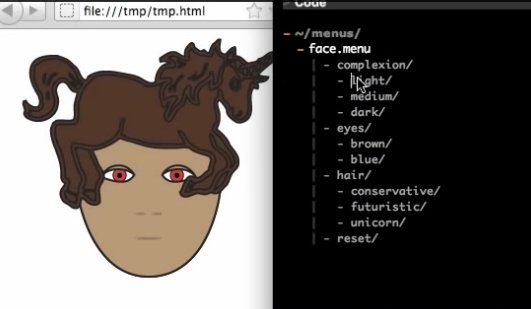
Xiki merges shell and GUI concepts. It runs in a text editor, so everything is editable and you can save your Xiki sessions in text files. You can use a mouse in Xiki, insert a command prompt anywhere you want, incrementally filter searches, expand and filter directory contents, open and edit files in place, enter text notes wherever you want, edit, re-order, and re-use command history, and you can do all of this in a natural progressive flow. You can create new commands as you go, browse and replay commands that were run from specific directories, and have menus of favorite commands. You can send Tweets and emails directly from Xiki. Xiki is so different it can be a little difficult to wrap your mind around it, so watch the screencasts to see it in action.
Currently Xiki supports Emacs, Vim, and Aquamax. Note: Vim support is immature, so try Emacs (Linux) and Aquamax (OS X). Emacs runs in GUI mode by default, so you don’t need Xemacs or other variants just to get GUI mode.
You can download and install it from github.com/trogdoro/xiki. Linux users need to install Ruby and ruby-dev 1.9.3, and ruby-railties. Then follow these steps to install Xiki:
$ git clone git://github.com/trogdoro/xiki.git Cloning into 'xiki'... remote: Reusing existing pack: 6282, done. remote: Total 6282 (delta 0), reused 0 (delta 0) Receiving objects: 100% (6282/6282), 4.88 MiB | 239.00 KiB/s, done. Resolving deltas: 100% (2980/2980), done. Checking connectivity... done. $ cd xiki $ sudo gem install bundler Successfully installed bundler-1.6.3 1 gem installed Installing ri documentation for bundler-1.6.3... Installing RDoc documentation for bundler-1.6.3... $ bundle $ sudo ruby etc/command/copy_xiki_command_to.rb /usr/bin/xiki Fetching gem metadata from https://rubygems.org/........ Fetching additional metadata from https://rubygems.org/.. Resolving dependencies... Using rake 10.3.2 Using i18n 0.6.9 [...] Using trogdoro-el4r 1.0.10 Using xiki 1.0.1a from source at . Using bundler 1.6.3 Your bundle is complete! Use `bundle show [gemname]` to see where a bundled gem is installed. $ sudo ruby etc/command/copy_xiki_command_to.rb /usr/bin/xiki Putting the 'xiki' shell command at: /usr/bin/xiki Finished.
Now run the xiki command:
$ xiki $ > Summary The 'xiki' shell command is mostly meant to be called by programs that want to interface with Xiki. But it is sometimes useful for people to call it directly. Example usages: $ xiki ip $ xiki docs/faq
Setting up your editor The most common way to use Xiki is from a text editor. For example, from in a text editor, typing "tables" on any blank line and then double-clicking on it (or typing control-enter or command-enter) to browse and update your mysql database. See the README.md file in the Xiki dir for help setting up your editor. You can view it by typing this command or going to this url: $ xiki readme https://github.com/trogdoro/xiki > Service The 'xiki' shell command automatically runs a service in the background to keep things fast. % xiki status % xiki stop % xiki restart > Interfaces Xiki can be used from... - A text editor - The 'xiki' shell command - The http://xiki/ url in your browser (experimental) For more information type: $ xiki docs > Google Group and Twitter Join the google group or follow @xiki on twitter for help with installing and using, or just to chat or share your ideas: http://groups.google.com/group/xiki/http://twitter.com/xiki > Troubleshooting A couple commands to help you trouble-shoot: % bundle install % xiki restart % xiki readme
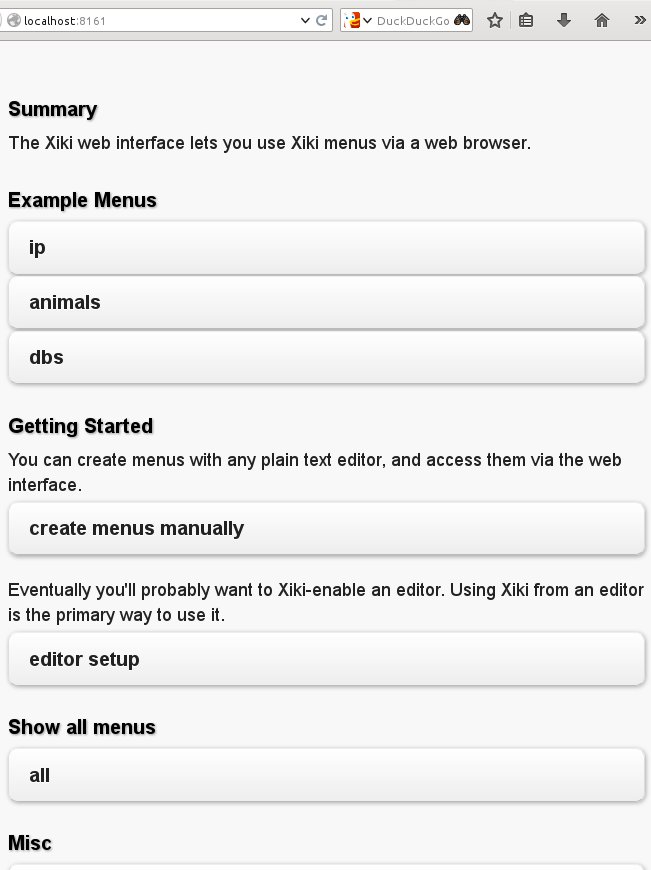
If you see all this, then Xiki is installed correctly and working. Try running xiki status, xiki stop and xiki start. These operate like ordinary shell commands, without all the cool stuff like you see in the screencasts. Now how do you get it working in a text editor? Your choices on Linux are Xemacs and Vim. Xemacs is supported better than Vim, and you need Xemacs (or any variant of Emacs that has a graphical interface) rather than plain Emacs. The easy way to configure Xemacs is to run the Xiki Web interface, which you start with xiki web/start. Then point a Web browser to http://localhost:8161/, and you’ll see something like figure 2.

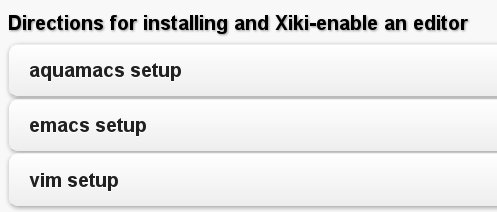
Click the “editor setup” button, and then you’ll see something like figure 3.

Click the “emacs setup” button, and then when it takes you to the next click on all three buttons in turn. Then fire up Xemacs, and you should be able to do some of the cool things demonstrated in the screencasts. Xiki is under heavy development, so if you run into glitches visit the Xiki group on Google to get help.
Howcome I Never Heard of It?
Xiki’s inventor, Craig Muth, has been working on Xiki for ten years. Maybe I’ve led a sheltered life, but I never heard of it until he started a Kickstarter campaign to raise funds to help accelerate development, and to push it into general release. Craig especially wants to improve the installer and expand Xiki into other text editors, and possibly have some budget for paying contributors.
Xiki is written in Ruby, and carries the permissive MIT license. Craig would love to have some collaborators, and has an open invitation to pair-program with anyone who is interested.
Accessibility and Mobile Devices
When I started playing with Xiki it quickly became clear that it has huge potential as an interface for assistive devices such as Braille keyboards, wearable devices like high-tech glasses and gloves, prosthetics, and speech-to-text/text-to-speech engines, because Xiki seamlessly bridges the gap between machine-readable plain text and GUI functions. Ruby is a wonderful language for doing a lot with a few lines of code. Which also makes Xiki a natural platform for mobile devices, like phones, tablets, smart watches, smart glasses, and all the “Internet of things” that the buzzspeakers are so excited about. The current state of programming these devices is pretty sad: every manufacturer has their own incompatible secret sauce, and they’re not user-hackable. Even Android isn’t as open as it could be. I would love to see the Linux model of open, hackable code and open device spread to the “Internet of things” as well.