
VIDEO: Rackspace CTO John Engates details how his cloud infrastructure team dealt with Heartbleed and what the playbook is for security events.
Read more at eWeek

Bill Traynor first got hooked on embedded Linux development when a friend who maintained Hitachi’s SH architecture helped him install Linux on his Sega Dreamcast. From there he developed a hobby of installing Linux on various gaming consoles, toys, and handheld devices. And when embedded development boards became more abundant, accessible and cheaper, Traynor moved on to more serious tinkering.
“For me, the availability of Linux on the many low-cost, ARM-based dev boards has been fun,” he said via email. “Small, powerful boards, like the BeagleBone Black have really made things fun again.”
Traynor has been using Linux for about 15 years, starting as a business systems analyst doing mainframe systems support in the financial and insurance software industry. He enjoyed the power and flexibility of the tools available in the shell when connected to the mainframe, he said, which led him to explore running a Unix-like operating system at home. He found a boxed copy of Red Hat 5.0 at a local bookstore and spent many hours installing and tweaking it.
Nowadays the resident of Waterloo, Ontario, Canada is a self-employed technical writer and open source community manager. For the past eight years, he’s also administered the Embedded Linux Wiki at www.elinux.org. Through the wiki, he helps embedded Linux newcomers boot Linux on their development boards and points them toward additional resources. He also helps them become more familiar with the nuances of the embedded Linux community at large.
He typically has a few development boards, such as a BeagleBone Black, Minnowboard, and Atmel’s
SAMA5DSXplained connected to his Linux desktop, which he uses for testing new kernels, verifying tutorial content on elinux.org, and debugging with open tools, such as OpenOCD.
The BeagleBone Black is his favorite board to develop on at the moment because of the large and knowledgable community that’s built up around it. Debian is his favorite embedded distro, “because it just works,” he said.
In his spare time he works through the exact steps necessary to do various things with Linux on the large crop of small development boards now available. Then he either integrates his findings into pages on elinux.org or writes up a tutorial.
“I really need to document things more though but haven’t found the time of late,” he said.
For would-be embedded developers interested in the Raspberry Pi or BeagleBoard, Traynor recommends two beginner-level tutorials on eLinux.org:
RPI Easy SD Card Setup page
BeagleBoard Community page.
“And for all others, I’d say to just explore,” he said. “There’s so much information on the elinux.org wiki, it’s difficult to choose a best place to start.”
Traynor has been an individual supporter of The Linux Foundation for the past four years and recently renewed. He takes advantage of the hardware and book discounts as well as his @linux.com email address.
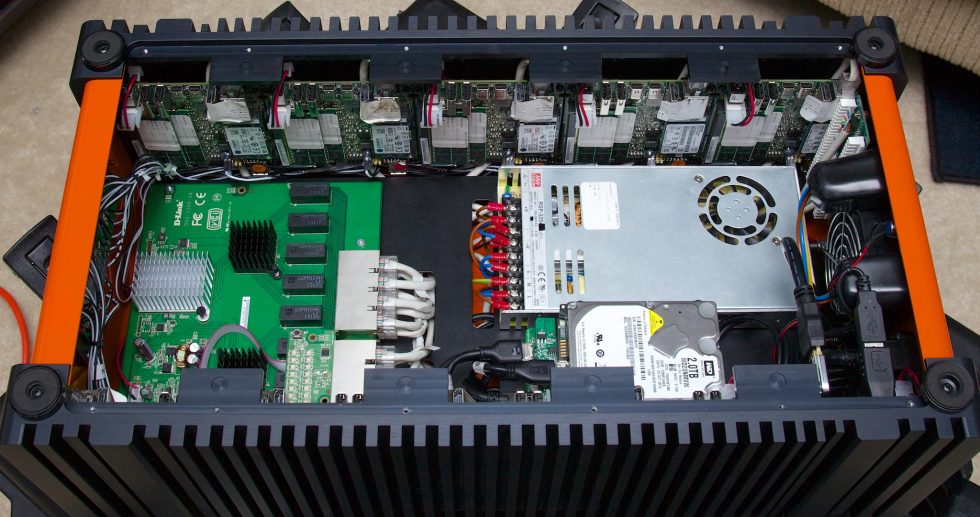
Take ten high-end Intel NUCs, a gigabit Ethernet switch, a couple of terabytes of storage, and cram it all into a fancy custom enclosure. What does that spell? Orange Box.
Not the famous gaming bundle from Valve, though—this Orange Box is a sales demo tool built by Canonical. There are more than a dozen Orange Boxes in the wild right now being used as the hook to get potential Canonical users interested in trying out Metal-as-a-Service (MAAS), Juju, and other Canonical technologies. We got the chance to sit down with Canonical’s Dustin Kirkland and Ameet Paranjape for an afternoon and talk about the Orange Box: what it is, what it does, and more importantly, what it is not.
 While Google has steadily touted Chrome OS as a cloud-centric operating system, the platform’s ability to work with offline apps is steadily growing, and that is making Chromebooks much more flexible systems than they were before. On the Chrome Web Store, you can find many apps that work offline, including QuickNote for note taking, Videostream for Chromecast, and more. Google has even recently given Chromebook users a way to watch Google Play Movies and TV offline.
In this post, you’ll find good resources for arming yourself with the best offline apps for Chrome OS.