
While the newest OpenSSL security problems are troubling, and you should address it, it’s nothing as bad as Heartbleed.
Read more at Enterprise Open Source Toolkit
 At the Tizen Developer Conference in San Francisco this week, Samsung unveiled the first smartphone to run the Linux-based Tizen mobile operating system. In this video, CNET reporter Jessica Dolcourt walks through the phone’s features and demonstrates its camera capabilities.
Samsung’s Tizen UI is similar to Android’s, she says, and the Z has many features in common with the Samsung Galaxy phones. The Tizen phone has the same rounded icons and setting options as the Samsung Galaxy S5, as well as the same fingerprint scanner and heart rate monitor. The camera functionality is also largely the same.
“When you snap open the camera you’ll notice a lot of the modes and the layout are very similar to what you’ll find in Samsung Galaxy phones,” Dolcourt says. “This is Samsung trying to maintain its brand and that’s very beneficial to people who aren’t familiar with Tizen.”
The Z comes pre-loaded with all of Samsung’s apps, as well as a few other common apps such as Twitter and Google search. The app store is still “bare bones,” she says, though that’s to be expected in a new operating system. Samsung will work with developers to increase the variety of available applications as the platform grows and plans to launch a new app challenge in Russia, where the Z will launch in Q3 this year.
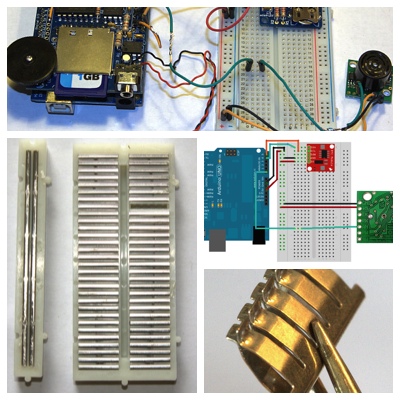 In Part 1 we learned about solderless breadboards and the DS1307 real-time clock for keeping time on Arduino devices. Now we’re going to load and test the complete sketch for playing motion-activated audio reminders.
Load your SD card with your recorded messages: pay bills, play with the dogs, favorite poems, inspirational quotations, favorite songs– anything you want. Your audio files must be mono 22050Hz WAV files. Then try out the Reminder Machine sketch. Change the audio file names to your audio filenames, set some near-future times, wave something in front of the MaxBotix, and see what happens.
/* Arduino Reminder Machine
*  Play audio reminders, inspirational
*  quotations, poetry, or anything
*  you like. Playback is triggered by
*  motion sensor and schedule
*/
#include <FatReader.h>
#include <SdReader.h>
#include <avr/pgmspace.h>
#include "WaveUtil.h"
#include "WaveHC.h"
#include <Wire.h>
#include "RTClib.h"
/* Variables for reading SD card
*  and printing filenames
*/
SdReader card;
FatVolume vol;
FatReader root;
FatReader f;
WaveHC wave;
uint8_t dirLevel;
dir_t dirBuf;
#define error(msg) error_P(PSTR(msg))
RTC_DS1307 RTC;
void setup () {
    Serial.begin(9600);
    Wire.begin();
    RTC.begin();
/* Begin initializing and checking SD card for errors
*/
  putstring_nl("nLet's start by testing the SD card and files.");
/* Test if card will play with the default 8 MHz SPI
*  (Serial Peripheral Interface) bus speed. If it doesn't, comment out
*   "if (!card.init()) " and uncomment "if (!card.init(true))"
*/
  //  if (!card.init(true)) {
  if (!card.init()) {
    error("Card init. failed!");
  }
/* enable optimized reads - some cards may timeout. Disable if you're having problems
*/
   card.partialBlockRead(true);
/* Now we will look for a FAT partition!
*/
  uint8_t part;
  for (part = 0; part < 5; part++) {
    if (vol.init(card, part))
      break;
  }
  if (part == 5) {
    error("Sorry, I could not find a valid FAT partition!");
  }
/* Print partition information
*/
  putstring("I'm using partition ");
  Serial.print(part, DEC);
  putstring(", and the filesystem type is FAT");
  Serial.println(vol.fatType(), DEC);
/* Can the root directory be opened? Print an error
*  message if it can't.
*/
  if (!root.openRoot(vol)) {
    error("Can't open root dir!");
  }
/* All right, everything looks good. Print
* the filenames found on the SD card.
*/
  putstring_nl("nI found these files on your SD card: (* = fragmented):");
  root.ls(LS_R | LS_FLAG_FRAGMENTED);
  putstring_nl("nEverything checks out, so let's get started!n");
}
/*** End Initialize and check SD card for errors ***/
/* Begin Reminder Machine sketch
* First display time, date, and
* MaxBotix sensor value
*/

void loop()
{
    DateTime now = RTC.now();
    int a0value = analogRead(0);
    Serial.print("The reading from the sensor, taken from analog pin 0, is ");
    Serial.print(analogRead(0));
    Serial.println();
    Serial.print("The day of the week is ");
    Serial.print(now.dayOfWeek(), DEC);
    Serial.println();
    Serial.println("The date and time are:");
    Serial.print(now.year(), DEC);
    Serial.print('/');
    Serial.print(now.month(), DEC);
    Serial.print('/');
    Serial.print(now.day(), DEC);
    Serial.print(' ');
    Serial.print(now.hour(), DEC);
    Serial.print(':');
    Serial.print(now.minute(), DEC);
    Serial.print(':');
    Serial.println(now.second(), DEC);
/*** End date, time, and sensor value display ***/
/* Now we schedule audio playback. Audio will play
* when two conditions are met: the sensor detects
* movement, and it is the scheduled time
*/
    if  ((a0value <= 45) && (now.hour() == 14)) {
       Serial.println("nNow playing: Walk the dogs!n");
       playcomplete("WALKDOGS.WAV");
       delay(600000); //do not replay for 10 minutes
       }
    else if ((a0value <=45) && (now.day() == 5)) {
       Serial.println("nNow playing: Mow the lawn!n");
       playcomplete("MOWLAWN.WAV");
       delay(600000);
       }

    else if ((a0value <=45) && (now.dayOfWeek() == 7) && (now.hour() == 18)) {
      Serial.println("nNow playing: Relax and read a book!n");
      playcomplete("READBOOK.WAV");
       delay(600000);
       }
    else {
      Serial.print("nSorry, your numbers don't match. No music for you.nn");
       delay(30000);
      }
}
/*** End playback schedule ***/
/* Audio playback and error functions
*/
void error_P(const char *str) {
  PgmPrint("Error: ");
  SerialPrint_P(str);
  sdErrorCheck();
  while(1);
}
void sdErrorCheck(void)
{
  if (!card.errorCode()) return;
  Serial.print("nrSD I/O error: ");
  Serial.println(card.errorCode(), HEX);
  Serial.print(", ");
  Serial.println(card.errorData(), HEX);
  while(1);
}
/* Play a WAV file from beginning to end with no pause.
* Play only one file at a time
*/
void playcomplete(char *name) {
  playfile(name);
  while (wave.isplaying) {
     }
}
void playfile(char *name) {
  if (wave.isplaying) {
    wave.stop();
  }
  if (!f.open(root, name)) {
    Serial.print("nCouldn't open file ");
    Serial.println(name);
    return;
  }
  if (!wave.create(f)) {
    Serial.print("nNot a valid WAV"); return;
  }
  wave.play();
}
/*** end Audio playback and error functions ***/
/*** end sketch ***/
When it starts successfully it will say this:
Let's start by testing the SD card and files.
I'm using partition 1, and the filesystem type is FAT32
I found these files on your SD card: (* = fragmented):
MOWLAWN.WAV
WALKDOGS.WAV
READBOOK.WAV
Everything checks out, so let's get started!
The reading from the sensor, taken from analog pin 0, is 11
The day of the week is 3
The date and time are:
2014/5/21 15:59:35
Sorry, your numbers don't match. No music for you.
When the conditions are met to play an audio file, this is what you’ll see:
The reading from the sensor, taken from analog pin 0, is 39
The day of the week is 3
The date and time are:
2014/5/21 16:0:11
Now playing: Walk the dogs!
The code that reads your SD card and controls audio playback came from the WaveHC example sketches. The date and time code came from the RTClib example sketches. The payload in the middle, the loop code that controls playing back your audio files, is a simple series of if–else–if statements. You can customize this sketch by editing the loop function.
You may not want your reminder files to play every time you walk by after they are triggered the first time, and there is an easy way to control this with Arduino’s delay() function. delay() takes a single parameter of milliseconds, so 1000 is one second. If you set the delay() value to 600000, that is 10 minutes that your reminder will not play. The delay period starts after your WAVE file stops playing.
Your a0value setting should specify the maximum distance so that your sensor is not set off by an opposite wall or other object that does not need reminders.
The examples in the sketch play your reminders during a period of a single hour. You can narrow the time range with minutes, like this:
((a0value >= 30) && (now.hour() == 16) && ((now.minute() >= 0) && (now.minute() < = 30)))
This sets the reminder for 4:00 to 4:30 p.m. Mind your parentheses! They can drive you nuts.
This sketch can easily be modified to play reminders only on a schedule, or only when the sensor detects movement, so have fun mixing it up.
This concludes our wonderful and fun project. Please consult the References section to learn more.
How to Build a Custom Arduino Talking Reminder Machine, Part 1
Ladyada.net Arduino Tutorials
Arduino language reference
An excellent introductory book for novices is Programming Arduino: Getting Started with Sketchesby Simon Monk, andArduino Cookbook, 2nd Editionby Michael Margolis is great if you already know a little about electronics and a smidgen of C programming.

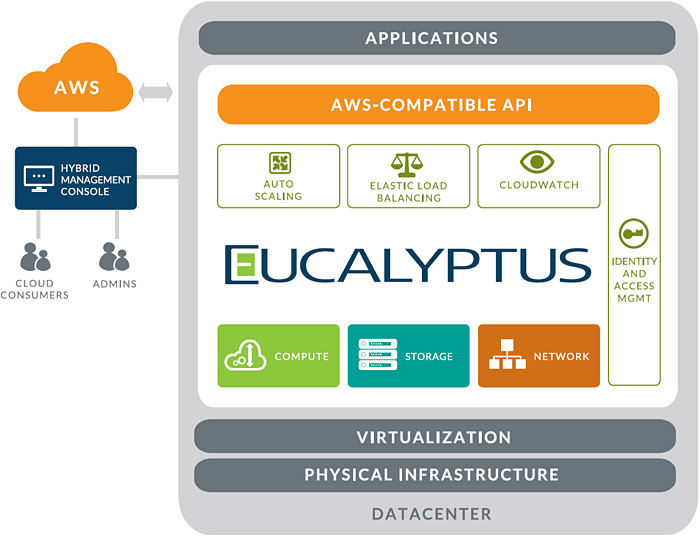 Eucalyptus Systems has long been a key provider not just of open cloud technology but also of Amazon Web Services (AWS) compatibility. Last month, Eucalyptus achieved its version 4.0 milestone with software that adds a number of new features to the mix as well as offering a glimpse at what’s to come.
Linux.com spoke recently with Shashi Mysore, director of product management at Eucalyptus, about the standout features in this latest release as well as what’s coming down the pike. Here, Mysore points out four exciting new features in the new release.
“Eucalyptus 4.0 addresses the needs of business leaders and IT administrators by reducing the complexity of deploying and managing private clouds at scale,” Mysore told Linux.com.
Specifically, the new release offers a variety of advanced new capabilities in the areas of networking, storage and security for greater control and support of large-scale clouds.
Eucalyptus Edge Networking and Scalable Object Storage, for example, are two particularly significant product enhancements that give IT and DevOps teams the ability to deploy and manage large-scale production clouds, Mysore said.
1. Edge Networking: “Edge Networking allows easy deployment of Eucalyptus into existing enterprise network topologies; it also reduces bottlenecks by shifting network traffic out to where applications are running, rather than through a central Linux server,” he explained.
2. Scalable Object Storage: an extensible and highly scalable service that provides S3 functionality on-premise. “This gives users the flexibility to choose from any third-party S3-compatible storage solutions, such as the included Walrus service or open source RiakCS,” Mysore pointed out. Cloud administrators can also deploy AWS-compatible user-facing services in an active/active configuration to cater to large-scale cloud demands, he said.
3. Eucalyptus Management Console has been expanded to include Cloud Account Administration. “From here, administrators can create and manage users, groups, quotas and policies,” he noted. “The new graphical policy editor makes it easy to define the rules that govern resource access in an enterprise cloud.”
4. Early support forAWS CloudFormation, a service designed to offer an easy way to create and manage a collection of related resources in the cloud. Support for AWS CloudFormation is currently available in Eucalyptus 4.0 as a Technology Preview, but it’s planned for general availability at the end of this year. “Users are eager to see CloudFormation be the next AWS-compatible service made available,” Mysore explained.
Other enhancements being considered for future inclusion are support for AWS Virtual Private Cloud (VPC), region support and other hybrid capabilities with Eucalyptus and AWS, he added. Eucalyptus works with users to define a roadmap for future changes. The full plan is available online for review and feedback.
For more on Eucalyptus Edge Networking, see the video below. And for a more complete list of the new features in Eucalyptus 4.0, meanwhile, check out the official announcement.