
Version 6.6 Beta 1 of the RHEL-derivative ClearOS is now available with new packages for this Linux distribution designed to serve as a network gateway/server…
Read more at Phoronix
 If you look at the guts of some of the world’s fastest supercomputers, you might be surprised at how much open source technology you find. Linux has long powered many significant supercomputers, and the Ubuntu Insights blog recently noted that China’s Tianhe-2, the world’s fastest supercomputer, runs both Ubuntu and OpenStack.
China’s National University of Defense Technology, NUDT, developed Tianhe-2, and the organization is collaborating with Canonical.
 As we’ve covered, there have recently been several articles from publications including the Wall Street Journal and ReadWriteWeb stating that Red Hat won’t support customers who choose a rival OpenStack distribution. There is much controversy, surrounding the issue, and Mirantis’ Boris Renski has an interesting post up about the issue. “We are currently in active talks with Red Hat to collaborate on supporting RHEL for customers who choose the Mirantis OpenStack distribution,” he writes, as he forwards a number of points about how Red Hat’s policies could be more inclusive.

Digital cameras make it easy to rack up gigabytes of photo archives. Let’s learn how to find duplicates and organize all of your photos without making it your life’s work.
Before doing anything, please have a good backup of your photo files.
In the olden days of photography we thought were ready for anything with a few 36-exposure film cassettes in our bags. Now we can capture gigabytes of photos in just a few minutes, without reloading. I have a 32GB card in my camera, which holds 1700+ RAW images at 18MB each. Don’t worry, I won’t make you look at all of them. Heck, I don’t even know what I have. Over the years I’ve created duplicates by dumping them onto my computer when I was in a hurry, and making backups without rhyme or reason, so I want to hunt down all the duplicates and get rid of them. But I’m looking at 205GB of photos:
$ du -sh Pictures/
205G    Pictures/
How many photos is that? Like, a way lot. Let’s use find to count them. All of my photos are in a single directory, Pictures, so I don’t have to search multiple directories. This counts all the files in Pictures without counting directories:
$ find Pictures/ -type f | wc -l
30481
Oh my, that is a lot of photos. So how many are duplicates? Again, we turn to find. This incantation will take some time to run, depending on the speed of your computer and the size of your photo archives. It finds duplicates by generating and matching an md5sum hash on each file, and then using sort and uniq to print all the photo filenames in a text file, with duplicates listed together and separated by a blank line. It finds only duplicates, and will not count files that are not duplicated:
$ find Pictures/ -type f -exec md5sum '{}' ';' | sort | uniq --all-repeated=separate -w 15 > dupes.txt
The result looks like this:
Pictures/unsorted-pics/Pictures/dump/IMG_4532.CR2 Pictures/Pictures-oldish/2009- 4-7/2009-12-27a/IMG_4532.CR2
Pictures/unsorted-pics/Pictures/dump/IMG_4883.CR2 Pictures/2010-01-07/img_4883. cr2 Pictures/Pictures-realhome/ 2010/2010-01-07/img_4883.cr2 Pictures/Pictures-realhome/ 2011/jan-2011/img_4883.cr2
Wonderful! Some of my photos are duplicated four times. Now how to count these? wc -l counts all the lines:
$ wc -l dupes.txt
14156 dupes.txt
Which is not very useful, because that includes the blank lines. awk counts only the lines with filenames, and not the blank lines:
$ awk 'NF != 0 {++count} END {print count}' dupes.txt
9855
That’s a little better. Only 9855 photos to wade through. How many of these are duplicates? Let’s count the unique files with awk. This splendid incantation looks for the blank lines, and then counts only the line immediately following a blank line:
$ awk '/^$/{getline;print;}' dupes.txt |wc -l
4301
So I have 4301 unique photos, and 5554 duplicates to weed out. At this point I could cobble up a compound command to move or delete the duplicates, but there are easier tools to do this.
Another way to look for duplicates is with the fdupes command, whose only job in life is to find duplicate files, and to optionally delete them. It operates like our long find command, using md5sums, with the advantage of being simpler to use. It has a simple set of options that you can read all about in man fdupes, and it displays a progress meter as it works. This example counts up all the duplicates in Pictures, and how much disk space they’re using:
$ fdupes -rSm Pictures/
5554 duplicate files (in 4301 sets), occupying 41484.8 megabytes
It is reassuring to see awk and fdupes give the same results.
fdupes will also delete duplicate files with the -d option, and ask you to confirm each deletion. Use the -N option to turn off the confirmation prompt and to delete all duplicates without bothering you.
I’m sure some of you are waving your hands and going “Hey, what about FSlint?” FSlint is my tool of choice for this job.
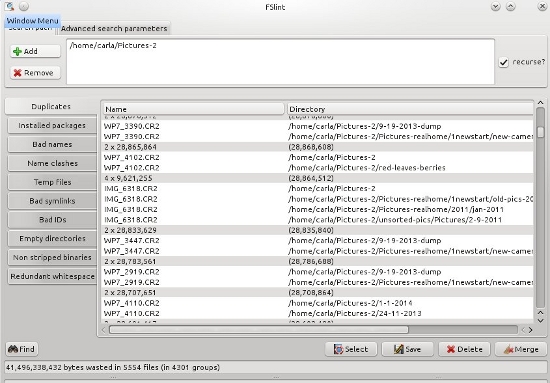
FSlint, “filesystem lint”, is a nice graphical filesystem cleaner that finds and removes duplicates, and a host of other functions such as finding redundant whitespace, empty directories, bad symlinks, files with missing user IDs, and listing your installed packages. By default it excludes lost+found, /dev, /proc, /sys, and /tmp, plus git, CVS, svn, and bzr files. You can fine-tune the exclusion list to your heart’s content.
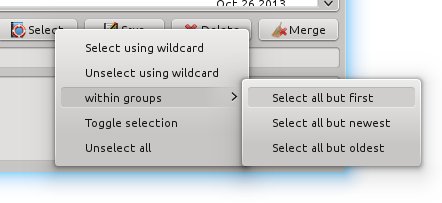
FSlint is very easy to use. Tell it what directory or directories to search, click Find, and then go away and let it work. When it’s finished it presents you with a list of files organized the same way as in our example dupes.txt. Click the Select button to choose which files to delete: all but the first in each group, all but the newest, or all but the oldest. I select all but the first in each group and then click Delete. (Flossmanuals.net has a nice FSlint manual.)
Obviously, all of these commands work on any file and not just photographs. So now let’s look at a great tool for digital photographs: Exiftool.
We’ve looked at using ImageMagick to process digital photos in How to Resize, Rename, Sort and Proof Photos from the Command Line. Now I want you to meet ExifTool. ExifTool is a brilliant little utility that reads, writes, and edits metadata on most image file formats. Its most basic usage displays all the EXIF data in a photo:
$ exiftool photo.jpg
File Permissions                : rw-r--r--
File Type                       : CR2
Exif Byte Order                 : Little-endian (Intel, II)
Image Width                     : 5184
Image Height                    : 3456
Camera Model Name               : Canon EOS 7D
Exposure Time                   : 1/400
F Number                        : 6.3
ISO                             : 100
Focal Length                    : 190.0 mm
Lens Type                       : Canon EF 100-400mm f/4.5-5.6L IS
That is just a tiny sampling, as the total EXIF data for this image runs to 324 lines. So, now that you have taken care of your duplicates problem, let’s figure out some ways to organize all those photos. A simple method of organization is by date. This example moves all the images in a directory into a new parent directory, with subdirectories named by date:
$ exiftool '-Directory<CreateDate' -d newdir/%Y-%m-%d -r olddir/
This is how it looks in one of my directories:
$ exiftool '-Directory<CreateDate' -d sorted-pics/%Y-%m-%d -r unsorted-pics/
    1 directories scanned
   56 directories created
   91 image files updated
The result looks like this:
$ ls -1 sorted-pics/
2008-09-20
2009-04-14
2009-10-03
2010-02-18
2011-03-19
Another way to do this is to create parent directories per year. This example labels the subdirectories with the year and month:
$ exiftool '-Directory<CreateDate' -d newdir/%Y/%Y-%m -r olddir/
For insurance, you can copy the files instead of moving them by adding the -o option:
$ exiftool -o '-Directory<CreateDate' -d newdir/%Y/%Y-%m -r olddir/
Of course, you may use any date and time format you desire, using these macros: %Y %m %d %H %M %S. Consult man strftime for a complete date and time reference.