
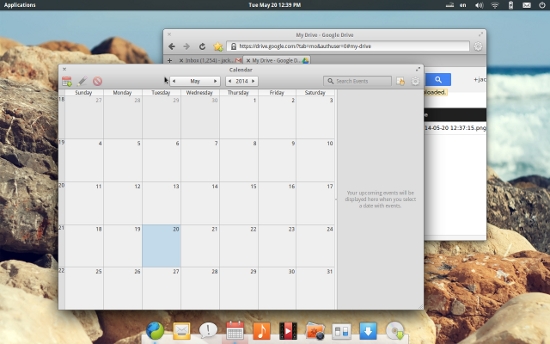
The sheer variety available to the Linux desktop brings with it a level of discussion and debate most other platforms do not know. Which desktop is the best? Should Linux hold onto what has always worked? Should the Linux desktop mimic what others already know? Dare Linux look and feel like OS X?
That last idea is a bit of a conundrum – one with multiple arguments. First and foremost, there is no debating that OS X is a fast-growing platform. It not only has deep roots in Linux architecture, it has been accepted by numerous types of users. There have been many attempts at “cloning” the OS X desktop on Linux. Some of those clones have succeeded, to varying levels. One in particular (PearOS) succeeded so well it was bought by an unknown American company and removed from existence. That company is rumored to be Apple (a Black Lab Linux developer announced (in a goodbye letter) he was leaving the team to join Apple “…in a Linux endeavor they recently acquired.” It’s fairly easy to put that two and two together.) But still, until there are facts, it is conspiracy, at best.
But what is it about OS X that not only draws the users, but has Linux developers scrambling to clone? One fact that cannot be denied about OS X is the consistency found throughout. No design element has been overlooked and every window opened retains the overall look and feel better than any other desktop. Beyond that, you have to start looking at apps…even more specifically, the likes of iTunes. Since the smartphone has become such an incredibly integral component of day-to-day life, users rely upon the tools to keep those devices in sync with their data. Whether you like the app or not, few apps do a better job of syncing multi-media and other data as does iTunes. Without something similar – Linux loses out.
Matthew Garret, in his essay The Desktop and the Developer proposes that “A combination of improved desktop polish and spending effort on optimising developer workflows would stand a real chance of luring these developers away from OS X with the promise that they’d spend less time fighting web browsers, leaving them more time to get on with development.”
Improved desktop polish. That statement alone should ring very true with Linux desktop designers across the globe. I would add modern to that – Improved modern desktop polish – because users are no longer happy with the likes of flat desktops, such as Gnome 2, Fluxbox, or KDE. Users, especially the average user, wants polish, they want something that looks as modern as the mobile tools they use.
Distributions, such as Ubuntu, have gone to great lengths to take that idea of consistency and elegantly apply it throughout. Unity does an incredible job of working the look and feel of the design to every aspect of the desktop. Linux Mint also has grown, leaps and bounds, with unifying the look and feel of the desktop.
Have Ubuntu and Mint caught up to OS X? With respect to unification of look and feel, it’s becoming a very close race. As for application familiarity, that’s another debate all together.
OS X-Like Linux Distros
As for distributions cloning OS X, PearOS has been forked, but even the fork is running into some levels of resistance. At first it was named Clementine and showed promise. The distribution then ran into legal issues with the name (the original name belongs to my media player of choice, Clementine). Now, Klementine OS is nowhere to be found.
Beyond the conspiracy theories, beyond the purchasing and obfuscation, why would a Linux distribution want to mimic the look and feel of OS X? When you do a search for “OS X Linux clone”, you generally come up with the following distributions:
-
PearOS
-
Elementary OS Luna
-
Clementine (now Klementine)
-
Red Star OS.
After much digging, I discovered yet another Linux distribution with a desktop aimed at resembling OS X. This distribution is called Pirum OS. This distribution was started by high school developer Tyler Wolf and, almost as quickly as it started, was re-branded into The Pear Project. No development, no signs of life.
This disappointment sent me reeling back to Google to discover LuninuxOS. Outside of having a double-take of a name (it’s pronounced loon-e-nux o-s), the platform has a single idea: that an alternative computing operating system should be beautiful, simply, fast, reliable and fun. After a bit of digging, it turns out this distribution is also no longer in development.
Why try to clone OS X?
All of this leads me to a single question: With so many challenges (some legal), why do developers insist on attempting to create an OS X clone of Linux? I’ve scoured through the various pages of the different distributions to seek out that answer. There are numerous conclusions to draw:
-
The developers want to mimic the OS X look because of its popularity
-
The developers feel the familiarity of the OS X interface will draw users
-
There is some truth to the ease-of-use claims that surround OS X.
Once you give some of these distributions a try, you quickly come to realize that some are simply a standard GNOME (in most cases) desktop with a Dock and a Panel. Once you get beyond the theme of the desktop, there is little OS X to be found. You won’t find iTunes or any of the other software stacks that draw people to Mac. What you will find is the standard Linux software. And that is nothing to hide. In fact (outside of the desire to look like OS X), when you examine the single most common goal of all of the OS X clones to have come and gone, you have one common goal:
Beauty.
All of these clones want to emulate what is often considered the de facto standard when it comes to elegance on the computer desktop: OS X. But by whose standard? Compare OS X to some of the modern Linux desktops, such as:
-
Unity
-
GNOME 3
-
Deepin Linux.
All of a sudden, OS X doesn’t look so modern. In fact, OS X is still hanging on to the same metaphor it’s used for thirteen years. The true beauty to OS X stems from the hardware, not the software. Install an OS such as Ubuntu 14.10 or the latest Deepin Linux on a Macbook Pro Retina and see what real, modern elegance looks like.
Focus on innovation
With every OS X project that comes and goes, hardship seems to follow. Either it’s crossing the boundaries of copyright (and having the project closed), failing to drum up enough developer interest to get the project truly off the ground, or having the project purchased (insert your own conspiracy theory here). So the big question still remains. Why? Why not focus on doing what Linux has always done better than any other platform – innovate. If you want to create a platform similar to OS X, take what Apple has done well and blend it with what Linux has done well and create something completely unique.
Remember, trademark and patent law is very confusing and challenging. The owners of those patents will go out of their way to prevent you from infringing on what they’ve created. Don’t think, for a second, that the likes of Apple will allow someone to perfectly mimic their desktop without putting up a fight. Some outstanding distributions have come and gone because they desperately wanted to cling to what Apple was doing. PearOS was a darling among a large crowd and could have gained a strong foothold for the Linux desktop. It disappeared in a shroud of mystery.
Is it an impossible battle to fight? All in the name of cloning something that people either love or hate? No matter how you slice it, Apple is mighty. We may never know if they flexed that might to prevent a clone desktop from gaining any momentum. What we do know is that Linux is the king of innovation and will continue to enjoy a number of brilliant and modern desktops.
 Linux kernel debugging may soon be a bit easier for kernel developers and users in the field thanks to the work of