
Last year, only one ISP achieved six out of six stars in protecting user data. Now, Apple, Facebook, Google, and Microsoft, among a handful of others, have stepped up.
Read more at Enterprise Open Source Toolkit
 Well, that didn’t stay a secret for very long.
I’ve gotten a number of questions about this, so just to clear things up – yes, we are planning to give Gear 2 watches to Tizen Developer Conference attendees.
If you’ve checked out the schedule, you’ll see that there is a “Wearables” track. This should be pretty cool, particularly for app developers who can see this new ecosystem on the horizon and want to get in on the ground floor. And of course, what better way to get started than to do so on your own device?
We’re looking forward to another good conference this year, and hope you can join us! As I’d mentioned previously, when you register as an attendee, use the code LFCOMTDC14 to get 50% off the registration price.
See you in San Francisco!
There is a world of file managers beyond GNOME’s Nautilus and KDE’s Dolphin. These are perfectly good file managers, but they’re fairly heavyweight and drag in a ton of dependencies. Gentoo File Manager, Rox-filer, Xfe, and PCManFM are some excellent alternatives that are lightweight, powerful, very configurable, independent of any particular desktop environment, and well-maintained. All of them have complete graphical functionality, and also support keyboard shortcuts and command-line operations. If you’re looking for something a little different, give these a try.
The Gentoo File Manager has nothing to do with Gentoo Linux. It was named for the Gentoo penguin, and has been around longer than Gentoo Linux. Gentoo is lightweight and fast, and a tweaker’s dream cram-full of functionality. It has two panes, and you can configure each pane independently. If two panes aren’t enough you can split them horizontally or vertically.
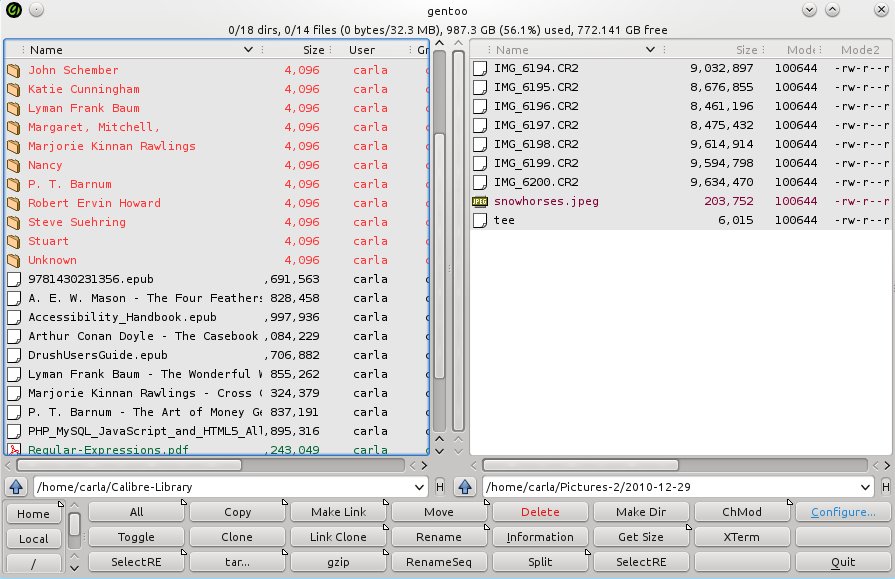
The default sheet of buttons across the bottom is just the beginning. You can edit the existing buttons by changing the button or font color, and changing the command. There are two steps to creating a new button with a new command, or editing an existing button. First you go to Configure ._ Buttons -> Definitions, select an existing button or create a new row, and click the Command icon. This brings up a list of commands to choose from, for example new_shell for opening an X terminal. The default is xterm. If you prefer a different X terminal, then go to Commands -> Definitions to change the definition of the new_shell command. This allows multiple commands, and the button will execute all of them. You can also create new custom commands here.
Gentoo file manager is designed to do everything with a button-click or right mouse click, and also allows performing complex operations using regular expressions. Filetypes are color-coded, delete really means delete, and configurable context menus open files in whatever app you want. Once you get it arranged to your liking it’s very fast to work in.
ROX-Filer is a fast graphical file manager with a deceptively simple interface. It relies on context menus, configurable buttons, and right-click menus. A lot of the buttons are toggles, for example show/hide thumbnails, change sort order, and show/hide extra details, so it’s very fast to see what you want.
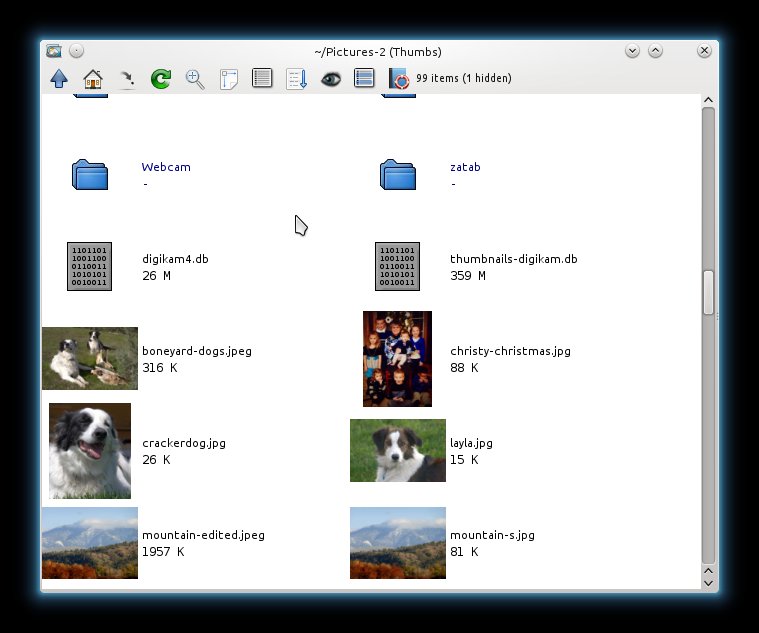
Left-click opens a file or directory, middle-click opens in a new window, and right-click opens the main menu. The main menu includes the Options dialogue for configuring ROX-filer. Left-click drag draws a box around a group of items to select them, and pressing the Escape key un-selects. Use Control+ left-click to select an arbitrary group of items.
You can open multiple windows and drag and drop files between them, and save file locations in the Bookmarks menu. There is a slick trick for quickly returning to a previous directory: Press Ctrl+1 on the directory you want to bookmark. Close it, and then return to it from any ROX window by pressing 1. Make multiple saves with 2, 3, and so on.
Hit the up arrow or Backspace key to return to the parent directory, Home and End navigate to the start and end of the directory, and Page Up/Page Down navigate up and down a screen at a time.
The Pinboard gives you a place to drag selected files, and Pinboards are automatically saved. Pinboards are directories with symlinks to your selected files, so it’s a fast and ingenious way to save arbitrary batches of files.
ROX-Filer supports mounting removable media, running shell commands, virtual filesystems, batch operations, and lots more. Find out all about it in the excellent ROX-filer manual.
Xfe, the X file explorer, is a little-known gem that includes multiple panes, an editable location bar, and a navigation panel. It has buttons all over the place, so you’re never far from whatever you want to click, and my favorite feature is the panel focus indicator, which is a little green light to show which panel has focus.
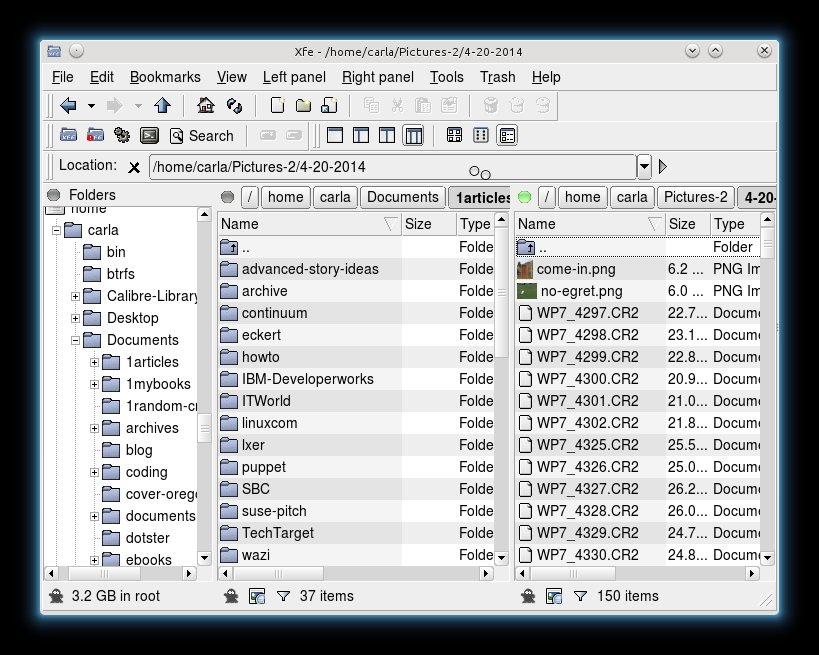
You can have a single panel, two panels, and a tree pane in any combination. It supports image thumbnails, though it does not support thumbnails for RAW photo files. It’s one click to open it in a root session, open a terminal, and to run scripts and commands. You can create files and directories, symlinks, mount and unmount filesystems, and copy and move files. It includes a nice batch of configurable keyboard shortcuts, and multiple themes, including Windows 95 for any recent Linux converts who want a familiar interface. Xfe, like ROX-filer, also has some good documentation.
PCManFM is a nice tabbed file manager with a clean, uncluttered interface. It is the default file manager for the LXDE desktop. You can open directories in new tabs or new windows, and drag-and-drop files between them. It has an optional sidebar that displays either Places or your file tree. It also supports two panes, and the pane without focus is shaded.
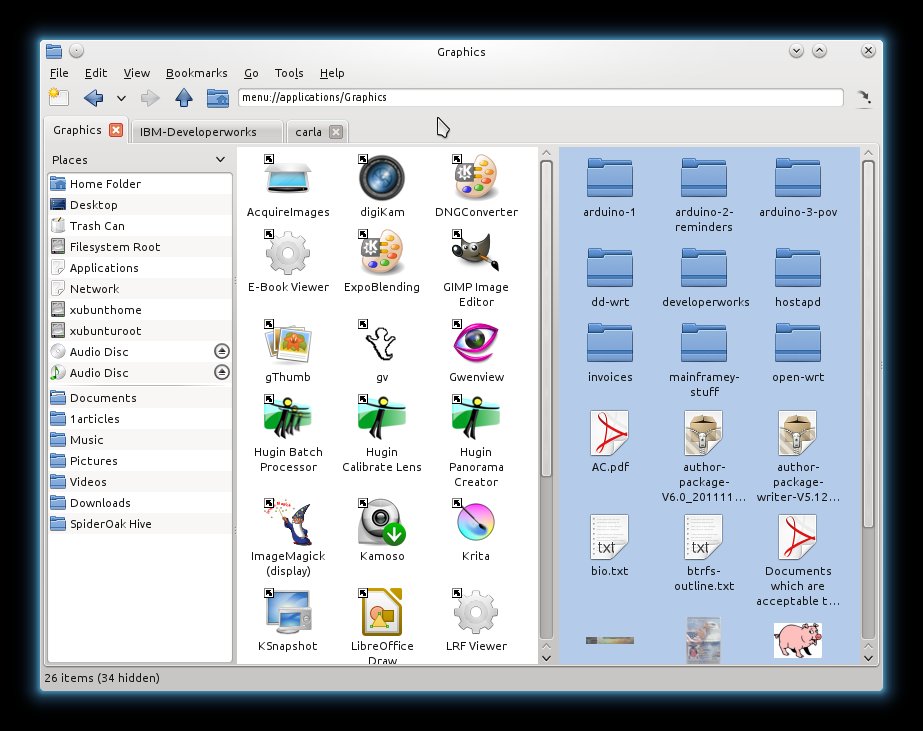
PCManFM comes with a more complete default configuration than the others in this roundup, with good right-click menus already set up with useful Open With, Open in New Tab/Window, Properties, Rename, and other common commands, and it handles removable music and movie media nicely. It even has an application launcher. It’s pretty easy to find your way around PCManFM, and there is a bit of documentation on the LXDE wiki.


In many ways Jonas Björk exemplifies today’s Linux professional. Not only does he work as chief networking officer at System Easy Admin AB in Stockholm, Sweden, but he’s also a consultant with Sony Mobile Communications AB,  where he supports and maintains a software stack built on Ubuntu, CentOS and other open source software.
“At the moment I am building a new platform with Veewee, Vagrant and Puppet,” Björk told Linux.com.
Working on the cutting edge of technology, across international boundaries, on multiple projects, using a wide range of skills and tools, and with deep passion and enthusiasm. These are some of the defining characteristics of Bjork’s job, and of any Linux job today.
Just as the Linux operating system has matured and blossomed since creator Linus Torvalds first released it in 1991 — expanding beyond mainframes and desktops into smartphones, cars, in-flight entertainment systems, the International Space Station and even crockpots, to name just a few examples — so, too, have Linux jobs.
“Fifteen years ago, if you wanted to get paid for working on Linux, there were just a handful of companies you might join” and most Linux jobs were programming-related, Kerry Kim, SUSE’s director of solution marketing, told Linux.com.“Today, there are literally thousands, and most are not your traditional Linux distributors. This is likely due to the maturity of Linux, its proven efficacy and its pervasiveness in Internet-connected devices and systems.”
In this Special Report, we aim to paint a picture of today’s Linux jobs using data, expert perspectives and real-life examples. The slideshow, below, also includes photos and profiles of 21 Linux professionals who tell us what they do and offer their advice for anyone pursuing a Linux career.
While much has changed about the Linux job market, our interviews with 30 Linux professionals for this Special Report, confirm that at least one aspect of the job hasn’t changed much at all. Passion tends to be a defining characteristic of the people filling those jobs, as do creativity, professional pride, and the love of learning, challenges and freedom. Many Linux pros today relish the opportunity to work on the cutting edge, wherever they happen to be around the globe.
“Job? It doesn’t feel like a job,” Björk said. “I have fun every day creating things that matter for other people. I know that my optimization of one environment will make developers’ jobs easier, and they will be happier. I know that the websites that I’m working with are loved by millions of visitors around the globe. That makes every day worth the effort.”
These sentiments echo the results of the Linux Foundation’s recently released 2014 Linux Jobs Survey and Report. There, just 17 percent of respondents ranked money and perks highest among the reasons for seeking out a Linux career. Instead, 51 percent cited their passion for Linux, while 64 percent wanted to work with Linux because of its pervasiveness in modern-day technology infrastructure.
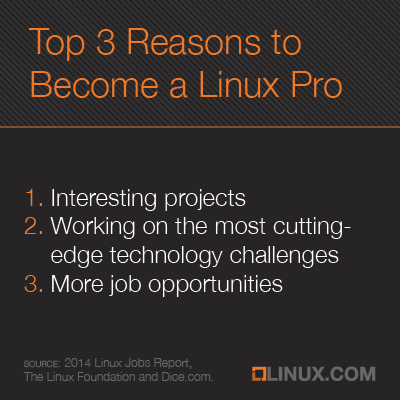
“Interesting projects” was the No. 1 most-cited benefit of being a Linux pro; in second and third places, respectively, were “working on the most cutting-edge technology challenges” and “more job opportunities.” A full 86 percent reported that knowing Linux has given them more career opportunities.
Modern Linux jobs offer more variety in job titles and industries and come with more prestige and higher pay than did those of years gone by.
“There appears to be today a wider variety of Linux careers, and many more of them,” confirmed SUSE’s Kim.
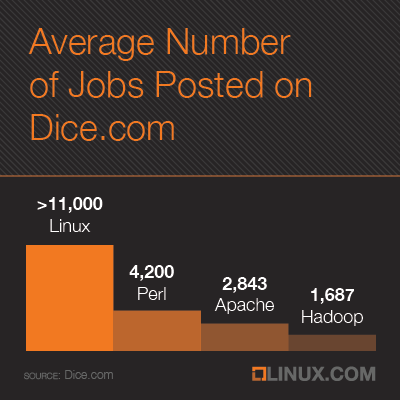
Indeed, on any given day there are 11,000 Linux jobs posted on IT careers site Dice. That’s a jump of more than 10,000 jobs or a 1,011-percent increase from 2003 when the site began regularly collecting job-posting data, spokesperson Rachel Ceccarelli told Linux.com.
A few recent examples: “Linux Systems Admin at Brookhaven National Laboratory in Upton, NY – perks include an on-site Child Development Center, a pool, weight room and tennis courts,” Ceccarelli pointed out. “Unix/Linux Systems Admin at Blizzard Entertainment in Irvine, CA – a gaming company offering a job for ‘geeks'” is another, as is “Staff Linux Services Engineer at Illumina in Santa Clara, CA – a life sciences company looking for a Big Data professional with Linux experience.”
 Joaquim Rocha is a software engineer with CERN, the European Organization for Nuclear Research – one of the most unique places in the whole world, he told Linux.com. “I love that it’s a multicultural environment, that I get to meet very interesting people, and that my code is Open and is helping very important physics research,” he said.
CERN illustrates a new diversity in the size and types of companies hiring Linux pros. It’s no longer just tech industry stalwarts such as IBM and Intel — today, hiring organizations range from gaming companies like Valve to governments to stock exchanges around the world. Other examples of organizations advertising recently for Linux professionals on Dice.com include Northrup Grumman, the University of Chicago, Match.com and UnitedHealth Group, Ceccarelli said.
Linux adoption has become so widespread that Linux admins are no longer the odd ones out, said Jay Lyman, a senior analyst with 451 Research. “It’s pretty standard expertise that every IT admin should know, sort of like Windows used to be.”
It has also become the platform of choice for new technologies, including cloud computing and big data, for example, –so that Linux administrators, professionals and IT operators have become “a hot commodity,” Lyman said.
“It is clear from most IT job listings that Linux is in high demand,” he said. “I think there has also been an evolution from Linux admins who mostly focus on CLI and scripts to Linux IT operators who mostly focus on Linux clusters and clouds.”
So, as Linux expertise and experience in general have become more sought-after and also more widespread, higher-level Linux skills and cloud computing have become even more important and in demand, Lyman suggested.
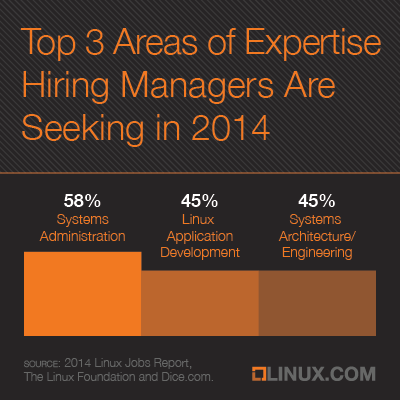
Modern Linux jobs aren’t necessarily just for programmers or system administrators, either — open source software, for instance, can overlap considerably with the category, thereby expanding the possibilities for the job functions that result.
“We look at mentions of open source in job postings,” Ceccarelli noted. “For example, on any given day there are 2,843 Apache jobs posted on Dice. There are 4,200 Perl positions and 1,687 Hadoop jobs. But, Linux is still tops with more than 11,000 jobs.”
SUSE’s Kim met someone at the last Linux Foundation Collaboration Summit whose sole job it was to manage “external R&D,” he recounted — “in other words, set the strategy and execute efforts using the methodology of open collaboration, pioneered by Linux, to enhance innovation in other areas (e.g. cloud computing, distributed storage, software defined networking) inside the enterprise.”
Kim also met a lawyer who specializes in open source licensing as well as someone who manages open source projects for a currency trading firm, he noted.
The Linux Foundation launched its first Linux Jobs Report back in 2012, and at the time, the data already painted a rosy picture for Linux professionals, particularly when compared with their general IT peers. Today, that’s even more true.
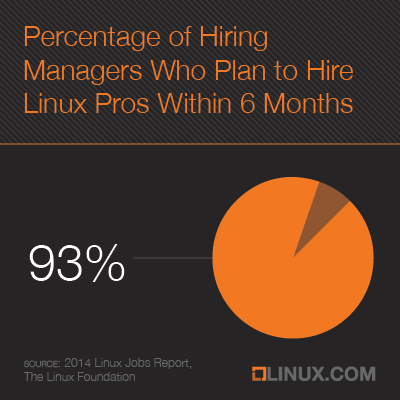
To wit: 77 percent of hiring managers today have “hiring Linux talent” on their list of priorities this year, and more than 90 percent planned to hire a Linux professional within six months.
Not unrelated, Linux careers today also “seem to have more legitimacy and cachet than in previous years,” Kim suggested.
“Yesterday’s Linux programmer was stereotypically the sun-deprived teenager hacking away in mom’s basement,” he explained. “Today, there are many more professional programmers working for corporate enterprises.”
Lowell Higley always wanted to have a job that involved Linux and “tried for several years to get into Red Hat, Novell
or other Linux companies,” he told Linux.com.
Today, he’s a senior principal product manager with CA Technologies.
 “Being a large player in the market for Linux solutions and toolsets for a 50-year-old computing platform that can run circles around typical platforms is just super cool,” Higley said. “Who else can say their product is capable of running a couple hundred Linux instances on a single piece of hardware? Yeah, super cool.”
Another favorite part of the job for Higley is “going out and talking to mainframe Linux users and hearing how they are using Linux on z,” he explained. “How they do it, the battles they fought and the problems they face today are all things I love to learn.”
Continuous learning and problem solving are also a big part of the job for Audrey Eschright, a software engineer at Elemental Technologies. She’s a member of the platform team, which is responsible for the base operating system on their server appliances, the product installer, and the product code that manages system settings.
“We work on top of multiple Linux distributions, and the tools and requirements can be quite varied, so I have to be able to pick up unfamiliar programming languages quickly, make sense of things whether or not the documentation is sufficient, and tell the difference between “I did this wrong” and “that’s a bug in their code,” Eschright said. “Plus, create workarounds when the existing tools and systems have flaws or don’t cover what we need.”
In short, “as Linux has continued to positively impact corporate bottom lines, Linux professionals are sophisticated, talented and highly coveted — now more than ever before,” Kim pointed out.
No wonder hiring companies have had to step up their efforts to attract and retain Linux professionals. Among the top three perks offered by companies today toward that end are flexible work schedules or telecommuting options, salary increases above the company norm, and additional training or certification, according to the 2014 Linux Jobs Survey and Report.
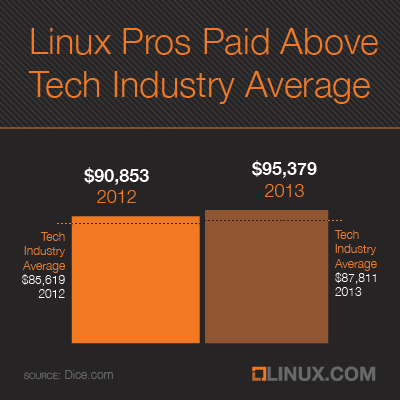
Linux professionals today enjoy a particularly encouraging salary scenario. While the average technology professional garnered a salary increase of just under three percent last year — growing from $85,619 to $87,811 — Linux pros saw a full five percent increase from $90,853 to $95,379, according to the 2014-2013 Dice Tech Salary Survey.
Contributing to the rising salaries are the many skills now needed and used in Linux jobs. Among the top 10 keywords employers most searched for when looking for Linux talent on Dice.com over the past 30 days were (in order): Java, Amazon Web Services, Perl, Unix, SQL, Spring, Security, Rest, Storage and Ruby, according to Ceccarelli. Following after that top 10 were Chef, Hadoop, MapReduce, Mining and Forecasting.
“Android and iOS developers are almost becoming a dime a dozen,” Joel Capperella, vice president of marketing at Yoh, recently told Computerworld. “Linux is still a unique skill; not everybody owns it.”
Linux pros are also more adaptable – picking up new skills as needed and adjusting to new technologies. The rise of DevOps is a perfect example. Focused on bringing together development and operations — once siloed organizations — the trend has spawned new ways of working, and those involved have had to learn to adapt.
“Linux-focused folks tend to have a better time adjusting to DevOps technology, methodology and culture, since they typically have more exposure to and experience with software development and collaboration than their Windows counterparts though Windows,” Lyman explained. “Net, Azure and other Microsoft technologies are increasingly  involved in DevOps efforts.”
“I love the fact that I must continue learning every day,” Chris Travers, cofounder and director at Efficito, told Linux.com. “One day I will be programming a phone switch, and the next I will be tackling programming in tax compliance. The day after that I could be working on libraries to better integrate database functions with object-oriented applications. As Heinlein said, ‘specialization is for insects.'”
Indeed, “each day is a unique experience,” agreed Mike Stone, a production support analyst/programmer with McKesson. “I couldn’t ask for a better way to spend my work days.”
Want to meet some more of the people who populate this rapidly growing field? Flip through our slideshow, then, for a series of profiles describing real-life Linux professionals and their jobs today. And please tell us about your own Linux job in the comments below or on Twitter with the #myLinuxjob hash tag.