Home Blog Page 1556

Development Release: Parsix GNU/Linux 6.0 Test 3

Alan Baghumian has announced the final test release of Parsix GNU/Linux 6.0, a live and installation DVD based on Debian’s current stable release but featuring the very latest GNOME 3.10 desktop: “Our third and last official testing release for Parsix GNU/Linux 6.0 code name Trev, has been released…..

Read more at DistroWatch

Linux Filesystem Simplified

This following set of commands immensely simplifies handling almost all the filesystem related issues. To know more about it check here Linux Filesystem Simplified

In-Vehicle Systems: The Next Frontier

Alex Agizim is VP and CTO of Embedded Systems at GlobalLogic.

Alex AgizimI had an opportunity to speak at Collaboration Summit this year on building OSS-based IVI systems, concentrating on the use of the Xen Project Hypervisor. The evolution of in-vehicle systems is a very exciting topic, and Collab Summit confirmed for me that automotive software is currently in a state of flux. Specifically, there is a gap between the conservative automotive industry and the demands of consumers (e.g., customization, connectivity, cloud, third party apps, etc.).

Although big names like Google and Apple are now starting to move into the space, they have just as much of a learning curve as the other players in the market, meaning there is an opportunity for any company of any size to become a leader. With such fierce competition among organizations to dominate this field, I expect we will see some revolutionary new approaches and technologies. Already we are seeing open source technologies like Linux, Tizen, and Android being leveraged for new automotive products.

Today’s consumer products require a convergence of technologies, meaning it will become crucial to cultivate partnerships between different expertises. My own company, GlobalLogic, recently became a member of the multi-disciplinary Automotive Grade Linux steering committee to help develop an automotive-grade Linux platform. Furthermore, CollabSummit enabled me to meet with forward-thinking people in communications, electronics, and embedded technology. I am excited by the possibilities presented by these meetings, and who knows, maybe I will be speaking at CollabSummit 2015 on a breakthrough in-vehicle system resulting from the partnerships I created at this year’s conference!

For more thoughts on the state of In-Vehicle Infotainment see my recent blog on IVI system sandboxing.

Answers to Your Q’s on Free Intro to Linux Course from edX Twitter Chat

Jim Zemlin and Anant AgarwalLinux Foundation Executive Director Jim Zemlin and edX CEO and MIT professor Anant Agarwal answered questions in a live Twitter chat yesterday about the free Intro to Linux training course that will be available on the edX online learning platform starting around Aug. 1.

The course will make basic Linux training materials available to anyone, anywhere, who has Internet access and a desire to learn Linux. It will also be one of the first non-university courses offered on edX and one of the first MOOCs (massive open online course) devoted to Linux.

The chat attracted dozens of great questions from participants interested in learning more about free IT and computer science training opportunities, Linux career prospects, the format and content of the Intro to Linux course, and much more.

In case you missed it, below are some of the highlights of the chat in question and answer format. You are also welcome to send your questions to us on Twitter at @LinuxFoundation or in the comments below.

Intro to Linux Course Details

When is this course expected to start and what will it cover?

Zemlin: The course starts around August 1st and will cover both command line and graphical perspectives. Key topics include using the command line, text editors, bash scripting, security and much more. Keep an eye on the edX website.

Is any prior experience in Linux required?

Zemlin: No prior experience required.

How long does it take to complete?

Zemlin: We expect a typical user to take 40-50 hours to finish the course.

What distros will you be covering?

Zemlin: The course will build skills across three major distros: Fedora, Debian and SUSE. The course supports any distro within the three major families, not any one specific distro.

Are Ubuntu and Mint close enough to Debian for the purposes of the course?

Zemlin: Yes. Ubuntu and Mint are close enough.

Will Ubuntu servers and VM’s (virtual machines) be outside the scope of the class?

Zemlin: Those are more advanced topics we address in other courses through Linux Foundation training.

Do we need to have Linux for the course? Will live boot be sufficient?

Zemlin: Just live boot from USB or CD Rom…or install Linux in a virtual machine.

What kind of assignments should we expect for homework / quizzes?

Zemlin: There will be activities, games and labs (with solutions).

Will we be able to ask our queries and problems during the session?

Zemlin: We will have an edX discussion board available. Check demo101 on edX to see how it works.

What equipment do we need for the course ? (such as microphone,webcam…)

Agarwal: You will need a webcam when you sign up for a verified certificate, but otherwise all you need is the will to learn and a laptop.


Will there be a syllabus of the material covered available before the start date?

Zemlin: A more detailed syllabus will be available May 1. You can see the course outline here.

Can we meet Linus Torvalds or Richard Stallman during the course?

Zemlin: We may have a surprise for you.


Linux Job Opportunities


After taking this course, what jobs or positions would I be able to get?

Zemlin: The course is the first step to a Linux career. You can also start contributing to Linux anytime. Check out #mylinuxjob to learn more about positions. According to Dice, pro’s with Linux knowledge make more money than other IT pro’s.


If you were hiring and came across a certification from Edx would that be worth enough to employ?

Agarwal: Employers are increasingly telling us they like seeing these certs.

Zemlin: No certificate is needed to get a Linux job, just knowledge and passion.


I’ve been in the IT industry since 1997, will this class gain me any advantage if I decide to look for a Linux-specific job?

Zemlin: Yes. this course can help you learn Linux and find a Linux-specific job. There are tons of them.


Do you think in the near future it will be possible to prepare for a career with only MOOCs?

Agarwal: We’re moving towards programs and sequences of MOOCs called XSeries to show mastery in a discipline.


What’s the state of Linux in general?

Zemlin: The state of linux is strong. 10,000 developers from 1,000 companies are building it every day and Linux adoption on the rise. See adoption stats in this enterprise user report.


edX Course Credit


Does this involve testing after modules, and or an end test, and do credentials result from completion?

Agarwal: Yes, there will be a verified certificate of achievement if you successfully complete the course. Verified certification involves a webcam check against your photo ID. Honor code certificate does not involve a check.


Is there only a verified certificate option to this or the honor code one too?

Agarwal: Yes, there will be an honor code certificate for the Linux MOOC as well.


Will the honor code certificate be good on the resume too?

Anant: You can always take the honor code certificate for free and that will be good on your resume, too, or LinkedIn, Facebook or Google+.


What’s the difference between the honor code certificate and free course?

Agarwal: You can audit the course with all the materials for free, or you can sign up for a free honor code certificate. The honor code or audit are both free. Audit the course if you are only interested in parts of the course. Take the honor course if you are interested in completing the course and earning the honor code certificate if you pass.


Are you intending to make any other free/subsidized courses based on the success/failure of this?

Zemlin: We will decide about offering other MOOCs after we see how the first one goes.


Course Preparation and Linux Experience


What’s your advice for those just starting out and incredibly intimidated by programming languages like C/C++, or UNIX/Linux in general?

Zemlin: Start with this course. It was designed for folks like you and start reading LWN and Linux.com.


Will an experienced user gain any benefits from this or is this purely aimed at new users?

Zemlin: The course is foundational. Experienced folks will find it helpful as a resource for newer employees but not for them.


How can I prepare for the course?

Zemlin: The course is designed for beginners so no prep is required. Follow @linuxfoundation for more Linux information. But one way you can prep is to check out the Learn Linux section on @LinuxDotCom: bit.ly/1hkvTYZ.


Is there a reference or suggested textbook?

Zemlin: We recommend joining discussion boards and local meetups rather than textbooks.


What is overall goal for the course? Is it meant to address a skills gap, or as a gentle intro to Linux for those who are new?

Zemlin: We hope to increase access to learning Linux for the masses. Linux runs Amazon, Facebook, Google, the majority of the stock markets, Android, CERN, most modern TV’s – most of modern society. We need more people with skills to run those systems.


How can I learn about all the script types such as perl, python and bash?

Zemlin: This course covers bash in some detail. It might be a good starting point for you.

Agarwal: You can take MITx 6.00x for python. Also check out HarvardX CS50x on @edXOnline.


Additional Questions

Will you get into embedded linux?

This course focuses primarily on foundational knowledge of Linux. Embedded Linux is a more advanced topic, though we do offer classes on that.

Is The Linux Certification Track LPIC 1, 2, 3 somehow equal to it?
LFS101x is a training course that would help prepare someone for the LPIC-1 exam, though additional training would be needed for the more advanced topics.

Is the coursework instructor-led or self-paced?
It is entirely self-paced, though there will be community discussion boards where you can interact with others taking the course.

How much audio-visual training is there? Are there subtitles to translate non-English and understand everything that is taught?
Visuals will be used wherever possible but users will need to know English to truly benefit from the course.

Will the editor vi or vim be taught?
Yes, vim is covered in a chapter on Text Editors.

Will course materials (videos) be enabled for download in areas with poor Internet connectivity?
Course videos are only available for streaming.

How much will we be covering directory organization/management and the importance/danger of root access? 
There is a whole chapter on File Operations and another one on Security, which also covers use of Root.

How much will it help us learn skills needed to develop applications for Linux? 
This course focuses primarily on foundational knowledge of Linux. Application development is a more advanced topic, though we do offer classes on that.

Does the course cover OpenStack and relatively new software?
This course focuses primarily on foundational knowledge of Linux, so there’s no coverage of advanced topics such as OpenStack, though we do offer classes on that.

Will the course be centered around desktop or server?
Both the GUI and the command line are covered extensively.

I want to be a software engineer. Will it be helpful for me to take this course?
If you are unfamiliar with Linux but interested in areas such as application development for Linux or Android then this course serves as a good introduction to the world of Linux.


Three Alternatives to Ubuntu One Cloud Service

Many of us had hoped it was an April Fool’s prank. But Ubuntu One will, in fact, no longer be available as of June 1, 2014 and all data will be wiped July 31, 2014. This will leave a great number of Ubuntu users without a cloud service. Fear not, intrepid users, there are plenty of cloud services and tools available – each with native Linux clients – ready and willing to take your Ubuntu One data and keep it in the cloud.

But out of the many services, which might be the best to suit your needs? Given what happened with Ubuntu One, many are growing leery of using services hosted by smaller companies (who could easily fold in the coming years). With larger companies making it impossible for the small guys to compete, the best bet for long-term cloud storage is to go with the proven companies with a track record of keeping the lights on and the data safe. With that in mind, which of the large companies work best on the Linux platform? Let’s take a look.

Google Drive (with Insync)

Because I have become more and more reliant on Google Drive, the obvious solution for me was to shift all of my Ubuntu One data to Google’s cloud service. After seeing the prices (100GB for $1.99/month), it was a no brainer. There was one catch – syncing. For reasons unbeknown to me, a native Linux has yet to appear from behind the magic curtain that is Google. No problem…a company called Insync has us covered. With a robust and reliable native client for Linux, Insync easily syncs your Google Drive data onto your choice of location within your Linux box.

The Insync client is one of the best clients available to the Linux desktop. It does have a price associated with it, but for anyone looking to sync their Google Drive account with Linux, it is very much worth it. Pricing ranges from a one-time $15.00 for a single consumer account license to a business license at $15.00 per account, per year.

Installation is simple. I will walk you through the process on the Ubuntu 13.10 platform (Insync is available for Ubuntu, Debian, and Fedora). The one requirement for Insync is Python.

  1. Download the .deb file into your ~/Downloads directory

  2. Open a terminal window

  3. Issue the command cd Downloads

  4. Issue the command sudo dpkg -i insync_XXX_xxx.deb (Where XXX is the release number and xxx is the architecture)

  5. Type your sudo password and hit Enter

  6. Hit ‘y’ when prompted

  7. Allow the installation to complete.

Once the command line installation is complete, it’s time to walk through the GUI wizard. This will open up automatically. In the resulting window, click Start Insync.

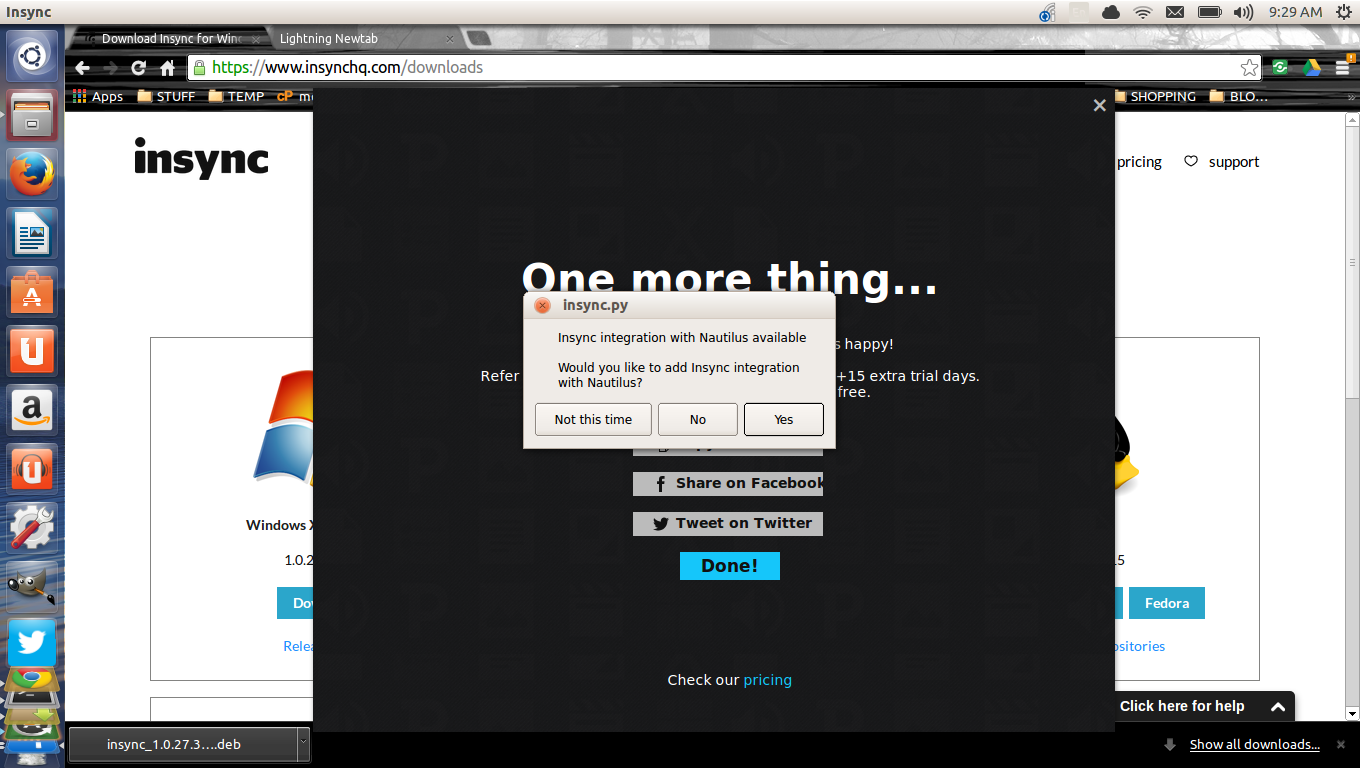
You’ll be required to log into your Google account to complete it and then give Insync permission to work with your Google Drive account. Click Accept, when prompted, and then click Start syncing. The synced folder will be named after the address associated with your Gmail account and will reside in your home directory. If you want to relocate this folder, click Advanced setup and you can place that folder anywhere you like. In the Advanced setup, you can also give your synced folder a different name and make sure all Google Docs are not automatically converted. Before the wizard is complete, you will be asked if you want to integrate Insync with Nautilus. I highly recommend you do this, as it will make it incredibly easy to add folders to Insync with a simple right-click within Nautilus. To integrate, just click Yes when prompted (Figure 1).

insync

You will then be prompted for your sudo password, so Insync can download and install the necessary components for Nautilus integration. Finally, click Done in the installer window and, when prompted, click Restart Nautilus.

When Insync is running you’ll see an icon in the notification area. From there you can interact with the application to check status, pause, add accounts, and more.

Dropbox

This has been the de facto standard cloud storage for a long time – with good reason. It works with nearly everything. So you can be sure to have your data synced to all of your devices – regardless of platform. The downside of Dropbox is that it’s costlier than Google Drive and you’re boxed into a single folder. A free account will get your 2 GB of space and for $9.99/month you get 100 GB. Not much else needs to be said about Dropbox (as it has been covered extensively); but the installation of the client is fairly simple. You will first need to sign up for an account, or have a pre-existing account to log into. Once you have that information, do the following (we’ll stick with Ubuntu):

  1. Download the appropriate installer file for your platform into your ~/Downloads folder

  2. Open up a terminal window

  3. Issue the command cd Downloads

  4. Issue the command sudo dpkg -i dropbox_XXX_xxx.deb (Where XXX is the release number and xxx is the architecture)

  5. Type your sudo password and hit Enter

  6. Allow the installation to complete

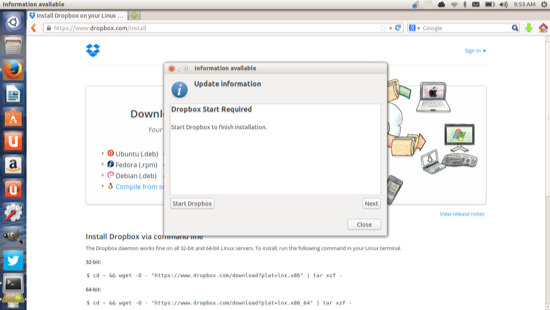
  7. When prompted click the Start Dropbox button (Figure 2)

dropbox 

Now it’s time to walk through the official Dropbox install Wizard. This is quite simple – it will first ask you for your account credentials (or, if you don’t have an account, allow you to set one up). When prompted, log into your Dropbox account (from within the install wizard) and then tell Dropbox where to place the syncing folder. By default, the folder will be ~/Dropbox. You cannot change the name of the folder and you can only sync that one folder. You do get to choose which Dropbox sub-folders to sync (this can be helpful if you have a large Dropbox folder and a smaller SSD drive).

Once the installation is complete, you’ll be prompted to restart Nautilus. Dropbox does have limited Dropbox integration. What it allows you to do is move a folder into your Dropbox folder – you cannot sync folders outside of Dropbox.

If you’re not using Google Drive, Dropbox is one of the better solutions available, for the Linux desktop – especially if you use other platforms and want to sync data across every device.

ownCloud

Is a bit different from the competition in that it requires you to connect to your own ownCloud server. On the plus side, ownCloud is open source, so anyone can set up their own cloud server. The downside to that is you will need an IP address accessible to the outside world, in order to make use of this. If you have that available, ownCloud is an incredibly powerful solution that you control. Setting up an ownCloud server is beyond the scope of this article, but installing the client is simple (again, sticking with the Ubuntu platform):

  1. Open up a terminal window

  2. Issue the command sudo sh -c “echo ‘deb http://download.opensuse.org/repositories/isv:/ownCloud:/desktop/xUbuntu_13.10/ /’ >> /etc/apt/sources.list.d/owncloud-client.list”

  3. Issue the command sudo apt-get update

  4. Issue the command sudo apt-get install owncloud-client

  5. Enter your password when prompted and hit Enter.

After the install completes, issue the command owncloud and then enter the server address for your ownCloud 5 or 6 server. You will then be prompted for your username and password. Upon successful authentication, you can configure where you want your ownCloud folder to exist. Once you set that folder, click Connect and the ownCloud client will prompt you to either open the ownCloud folder or the ownCloud web interface. Click Finish and you’re done.

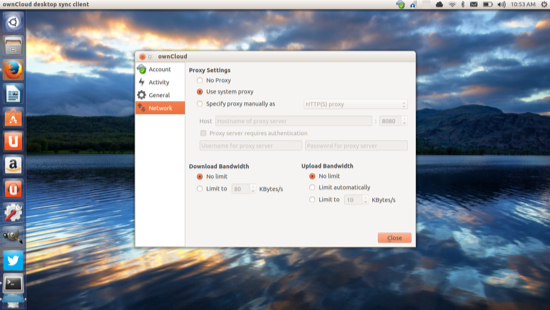
The ownCloud client also has a notification icon that allows you to Sign in, quit, or go to the ownCloud settings. The ownCloud settings window (Figure 3) allows you to: 

  • Add a folder

  • Check storage usage

  • Set up ignored files

  • Modify your accounts

  • Check activity

  • Set ownCloud to launch at start

  • Set up a proxy

  • Limit bandwidth

owncloud

If you want to install your own server, you can download it and install it from the ownCloud installer page. NOTE: The web installer is the easiest method for new users. If you don’t want to setup your own server, there are plenty of ownCloud service providers available. Check out this page for a listing of supported service providers. Some of the plans (such as on OwnDrive) are free (1GB of space).

Ubuntu users need not fear the loss of Ubuntu One. With so many cloud services available – most of which offer native Linux clients – there are too many choices, ready to host your data, to be concerned. Give one of these options a try and see if they don’t meet your needs.

Which cloud service will take over the hosting of your Ubuntu One data? Or do you plan on setting up your own cloud server?

Ericsson and Mirantis OpenStack Deal Sets a Precedent in the Open Cloud

The Swedish giant Ericsson stepped up its commitment to open source cloud platform software this week, striking a deal with Mirantis to use OpenStack as the base foundation for its telecommunications network, data centers and cloud services. Ericsson has been an investor in Mirantis, along with Red Hat and other companies. Its commitment to OpenStack sets an example for many large enterprises and technology companies expected to standardize on OpenStack this year. The deal is also good news for Mirantis.

As noted by Ray Le Maistre:

“Ericcson unveiled its Cloud System, comprising its Blade Cluster and Smart Services Router platforms, in early 2013, noting at the time that the hardware would be supported by its Cloud Execution Environment, which includes a KVM hypervisor and OpenStack cloud management software.”


Read more at Ostatic

Debian Developers Release APT 1.0

Debian developers announced this week version 1.0 of APT, their Advanced Packaging Tool, on the day that the packaging project turned sixteen years old…

Read more at Phoronix

The New Generation of OpenQA Hits the Production Server

Bad news for the bugs: the new version of openQA is ready for prime time. Everybody following the blog of the openSUSE Team @ SUSE or the Factory mailing list during the last months, should be aware of the ongoing work to improve openQA and to promote it into a key component of the openSUSE integration process. Finally the new openQA is ready for public production environments, so thanks to the collaboration between the openSUSE Team and the original developers of openQA –Bernhard M. Wiedemann and Dominik Heidler– it’s finally deployed and accessible at openqa.opensuse.org

This new version brings a lot of changes at many levels, but probably the most relevant difference is the approach for tests execution: instead of running every step sequentially and comparing the needles at the end, the new version evaluates the status several times per test, deciding what to do next based on that status or aborting the whole tests as soon as a critical error is found. This approach enables both a better usage of the resources and more precise results.


Read more at openSUSE News

Linux Mint Programs for Windows XP Users

Yes, many of your Windows programs aren’t available on Linux, but some of them are and there are Linux programs that can do just as well as your old XP software.

Hands-on with AVLinux: Crammed with Multimedia Goodies

This Debian GNU/Linux derivative is absolutely jam-packed with elements for multimedia creation, editing and playing.