Home Blog Page 1600

How to Use htaccess to Run Multiple Drupal 7 Websites on Your Cheapo Hosting Account

You can run multiple websites from your inexpensive shared Web hosting account, thanks to .htaccess.

What is the point of .htaccess, anyway? It’s just another cruel hoax to keep us scared and humble, isn’t it. It may seem that way, and even the Apache devs consider it a form of near-magic. It relies on Perl Compatible Regular Expressions, so any rules you write for .htaccess are mostly punctuation.

Apache logo

Understanding at least the basics of .htaccess is essential for running any website on the Apache Web server. .htaccess is for per-directory configurations. You place it in the directory you want to do stuff to, and it acts on that directory and all of its subdirectories. You can use it for authentication, access control, mod_rewrite directives, managing multiple sites on a single server, and pretty much everything that is managed in your Apache server configuration files. (On Fedora, CentOS, and other Red Hattish distros the Apache configuration files are in/etc/httpd, and on Debian/Ubuntu/Mint they’re in /etc/apache2/.)

As .htaccess duplicates your main Apache configs, when do you use it? When you don’t have access to your server configuration, like on inexpensive shared Web hosting accounts. If you have access to your Apache server then you don’t need to bother with .htaccess, and in fact you shouldn’t use it because you’ll take a performance hit. Once you configure Apache to allow .htaccess it will look in every directory for it, even if you don’t have any .htaccess files. If you are using mod_rewrite and put rewrite rules in .htaccess, your rules will be re-compiled with every request. When rewrite rules are in your server configuration they are read once and cached.

You can use any content management system (CMS) you want, like WordPress or Joomla. We’re diving into Drupal 7 because it’s a special case that needs more complex configuration. It’s not well-documented, so hopefully this will help the hordes of frustrated Drupal 7 admins.

Drupal 7 and .htaccess

When you’re running multiple websites from a single Apache server it’s better to use Apache virtual hosts. But if you’re using an inexpensive Web hosting account you won’t have that option, so you’ll have to use .htaccess. In these examples I’m using a hosting account with CPanel and the Softaculous installer. Figure 2 shows what the public_html directory, which is the Web root, looks like with two Drupal 7 installations.
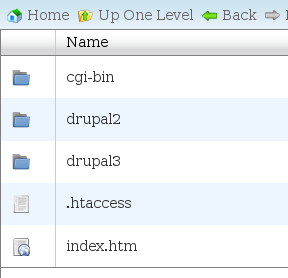
fig-2 filesystem

The rinkydink way to access each site is to include the subdirectory in the URLs, like mysite.com/drupal2 and myothersite.com/drupal3. Which is fine for testing and when you don’t care. But when you do care and want URLs like mysite.com and myothersite.com, you need .htaccess. If your cheapo hosting account lets you run multiple domains first set them up in CPanel under Domains. Then you use .htaccess to direct traffic to the correct sites.

Drupal 7 needs special handling, because you need to edit the .htaccess file in your Web root, and Drupal’s.htaccess and settings.php files. This is what my Web root public_html/.htaccess looks like:

Options -Indexes
Options +FollowSymLinks
RewriteEngine on  
# Serve www.mysite.com from drupal2 directory RewriteCond %{HTTP_HOST} ^www.mysite.com$ [NC] RewriteRule ^ http://%1%{REQUEST_URI} [L,R=301] RewriteRule ^(.*+)$ drupal2/$1 [L,QSA]
# Serve www.myothersite.com from drupal3 directory RewriteCond %{HTTP_HOST} ^www.myothersite.com$ [NC] RewriteRule ^ http://%1%{REQUEST_URI} [L,R=301] RewriteRule ^(.*+)$ drupal3/$1 [L,QSA]

You can copy and paste this for your own Drupal 7 sites, and all you have to change is the domain name in the RewriteCond rule and your site directory in the second RewriteRule for each site. Next, enter your settings.php file (mine is public_html/drupal2/sites/default/settings.php) and set your base_url. Look for a line like this, uncomment it, and type your site’s base URL:

$base_url = 'http://mysite.com';  // NO trailing slash!

“Base URL” is one of those terms that sounds like you should be doing something special. It’s just your site URL. Now you must edit your Drupal root .htaccess. In my example that is public_html/drupal2/.htaccess. This is a fat file all full of good stuff. Look for this line:

RewriteRule ^ index.php [L]

Comment it out, and add this line:

RewriteRule ^(.*)$ index.php?q=$1 [L,QSA]

And you’re done. A couple of notes:

— Drupal updates will stomp your Drupal .htaccess, so keep a backup copy, or do the rename-rename dance before and after applying updates. 
— You must protect your settings.php with restrictive permissions. Change it to read-write when you need to edit it, and then change it to 0400 (owner read only) when you’re finished.

What Just Happened

Let’s dissect this so we know what is going on.

RewriteCond %{HTTP_HOST} ^www.mysite.com$ [NC]

RewriteCond defines the conditions for rewriting a URL. The syntax is RewriteCond TestString CondPattern. The TestString is evaluated and then compared to the CondPattern. If the test string matches the conditions then the result is passed to the next rule.

The TestString is the %{HTTP_HOST} variable, and the CondPattern is ^www.mysite.com$. This means “examine the incoming HTTP request headers, and when HTTP_HOST equals www.mysite.com then apply the following RewriteRules”. ^ indicates the start of the string to be matched, and $ marks the end of it. The backslashes escape the dots, because the dot can be either a literal dot or a metacharacter. [NC] is a RewriteRule flag that means “no case”, or case-insensitive.

Want to see what HTTP request headers look like? You can see them in your Web browser. In Firefox try Tools > Web Developer > Web Console > Network (figure 3).
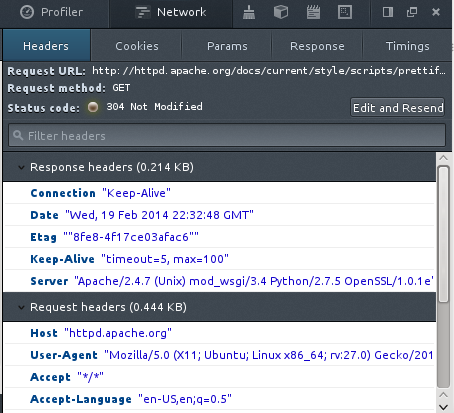
fig-3 http headers

RewriteRules do the heavy lifting. You can have multiple rewrite rules, and each one is applied in order. The syntax is RewriteRule Pattern Substitution [flags].

RewriteRule ^ http://%1%{REQUEST_URI} [L,R=301]

Our first RewriteRule redirects all the pages on the site. It matches URLs starting with www.mysite.com, and any path component (REQUEST_URI) that follows it; in other words, all the other pages on the site. How, you ask, does %1 magically know it represents www.mysite.com? That is a RewriteCond backreference. Backreferences are created internally by Apache and are always present for your coding pleasure. The backreference %1 was created automatically from our RewriteCond rule. So http://%1%{REQUEST_URI}> means all the pages on the site.

[L,R=301] means stop processing when matching URLs are found (L) and do a 301 redirect (moved permanently). When you’re testing new redirect rules you should use 302 (temporary redirect) so you don’t confuse search engines and hork your SEO.

RewriteRule ^(.*+)$ drupal2/$1 [L,QSA] is the final step that makes the nice www.mysite.com URL work, instead of www.mysite.com/drupal2. We already know what the caret and dollar sign mean. The conditional expression inside the parentheses is three metacharacters, which combined create a wild card that matches everything. It also creates another backreference, which is used in the substitution drupal2/$1. L is stop processing when the conditions are met, and QSA means append. So put it all together and it makes drupal2/ the site root.

If you’re thinking this is all a little brain-bending, it surely is. The official Apache documentation is worth studying, and there are number of excellent Apache books, and no Apache admin should leave home without them.

Linux Video of the Week: Hands-On with the $25 Firefox Phone

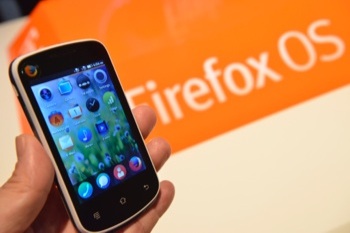
All of the major mobile Linux OS players, from Tizen and Firefox to Sailfish and Ubuntu, had exciting announcements at Mobile World Congress this week (see our coverage of Samsung’s Tizen smartwatches Spreadtrum-Reference-Device-sm-2-3and an overview of all of the mobile OS announcements.) But one of the most buzzed-about was Mozilla and Spreadtrum’s prototype $25 Firefox OS phone.

Mozilla has designed a phone that’s even more affordable for emerging markets and thus redefines the entry level for smartphones. Mozilla engineers were able to accomplish this by adjusting the hardware requirements of the operating system to run on a 1 GHz CPU, single core Spreadtrum chipset with only 128 MB of RAM. That’s only 25 to 50 percent of the RAM found in existing entry-level devices on the market, said Joe Cheng, product manager at Mozilla in this video demonstration of the prototype phone, below.

Mozilla’s MWC announcements also served as a platform to promote open source alternatives in the mobile market as well as openness on the Web in general.

“It’s important today to have an open and interoperable system and as we go forward and more types of devices are connected, interoperability and open systems will be ever more important,” said Mitchell Baker, Mozilla co-founder and chair of the Mozilla Foundation, in a press conference at MWC. “We and our partners have challenged ourselves to bring this rich experience and sense of possibility to all price points.”

See the $25 Firefox phone demonstrated:

https://www.youtube.com/watch?v=3Osphb4LqBY” frameborder=”0

Are Your Servers Pets or Cattle?

Yesterday I attended a talk by Randy Bias of Cloudscaling. The talk was called “Pets vs. Cattle: The Elastic Cloud.”

I thought Randy’s perspective on infrastructure and system administration is really interesting, so I’m going to explain some of the key points that he shared with us yesterday…

Under the old-fashioned “enterprise computing” infrastructure model, servers were given cutesy names like “Cookie,” “Dakota,” “Reagan,” or “Aardvark.” Each server was procured individually and configured by hand (often by several different people)…

Instead of treating the machines as pets, Randy told the audience, we should be treating them as cattle.

Read more at Laura Hamilton’s blog.

Mobile Linux OSes Innovate, Cut Costs as Smartphone Market Slows

Based on the latest IDC forecasts for a major slowdown in the smartphone market, mobile Linux contenders looking to get in on the smartphone-apalooza may find the glory days have gone. IDC projects smartphone shipments will grow 19.4 percent in 2014 — half the growth of last year’s 39.2 percent year-to-year rise – before dropping to 8.3 percent growth in 2017 and 6.2 percent in 2018.

Still, shipments will continue to grow, even if the pace falls off, and there are plenty of opportunities in smartphones, especially in budget devices.

Spreadtrum Reference DeviceThe new open source platforms can also find homes in faster growing categories like tablets, TV devices, and wearables. Samsung, for example, is postponing its Tizen smartphones for the time being in favor of applying the Linux-based OS to form-factors including cameras, refrigerator computers, and its stylish new Gear 2 smartwatches.

The coming smartphone slowdown certainly applies more pressure on mobile Linux platforms to either innovate with features or provide competitive pricing. Fortunately, examples of both were in evidence at this week’s Mobile World Congress (MWC), from Jolla’s modular faceplates to a $25 Firefox OS smartphone prototype.

IDC and others agree that budget smartphones will dominate future smartphone shipments, as emerging-market consumers switch from feature phones or no phone at all. The 2013 average selling price (ASP) will likely drop from $335 to $260 by 2018, says IDC. Indeed, MWC was awash in budget phones. For every high-end, octa-core phablet or Samsung Galaxy S 5, there were several new budget models, almost all running Android.

Even Microsoft’s Nokia went lower end with new X and X+ phones running a modified Android build and selling for just 89 and 99 euros, respectively. The irony works on many levels here, including the fact that before Nokia went high-end with Windows Phone, it dominated feature phone sales. Nokia phones are still the most commonly seen phones in developing nations.

Spreadtrum’s $25 Firefox OS phone

Perhaps the most significant announcement at MWC came from Mozilla and Spreadtrum, which showed a prototype of a Firefox OS phone that will sell for $25. The prototype is the cheapest of several 3G and 2G budget Firefox OS reference designs from China-based Spreadtrum, which is incorporating its new 1GHz Cortex-A5 based SC6821 chipset. Like most current Firefox OS phones, the designs are limited to 3.5-inch devices, but there’s a full suite of wireless features, and a 5-megapixel camera.

Already, Indonesian carriers Telkomsel and Indosat say they’ll launch the $25 phones later this year, and Telenor has also shown interest. By comparison, the cheapest Android phones tend to go for about $50. Although Google has tweaked Android 4.4 to run on lower-end devices, Firefox OS appears to run better on low-end silicon, thanks in large part to its lightweight HTML5 architecture.

Alcatel ONETOUCH FIRE CMozilla had the most smartphone news among the mobile Linux contenders. The company launched a self-branded Flame developer phone, as well as 10.1-inch InFocus and 7-inch Vixen developer tablets from Foxconn and Via Technologies, respectively.

ZTE and Alcatel announced more Firefox OS devices, including the ZTE Open C and Open II, and the Alcatel OneTouch Fire C, E, and S phones. Alcatel also unveiled the first commercial Firefox OS tablet — the Alcatel One Touch Fire 7— and Huawei showed off its Y300 phone.

Most of these devices offer much loftier specs than the first round of low-cost ZTE and Alcatel phones, or even LG’s Fireweb. However, they’re still barely mid-range at most, which is right where Mozilla and its partners want them.

The Alcatel Fire S, for example, sports a 1.2GHz, quad-core processor, and a 4.5-inch, 960 x 540-pixel IPS screen, as well as 4G LT, NFC, and 8- and 2-megapixel cameras. Alcatel’s Fire 7 features a dual-core, 1.2 GHz processor and a 7-inch 960 x 540 display, yet sells for only 79 euros.

The ZTE Open C is more modest, but still advances to a dual-core 1.2GHz CPU and a 4-inch display. Huawei’s Y300 is a rebadge of an existing Android phone, and offers a 4-inch WVGA display and a dual-core processor.

Mozilla says it sold between 500,000 and 750,000 Firefox OS phones in its first six months, and that it will expand this year from 15 markets to 27. Other Firefox OS announcements include new App Manager development tools and PhoneGap support.

Jolla focuses on innovation

Jolla and Ubuntu also had news about their mobile Linux platforms. Jolla recently began selling its Sailfish OS phones throughout Europe, and this week released Sailfish OS 1.0. This first formal release of the MeeGo Linux-based OS offers performance and battery improvements, plus enhancements to landscape mode and camera zoom.

The Finnish company also tipped a UI launcher due in the second quarter, designed to simulate the Sailfish OS gesture interface on Android devices. The idea is that Android users will fall for the novel UI, and load up Sailfish OS on selected Android phones as the builds mature later in the year.

Jolla Angry BirdsThe current Jolla phone is too pricey for emerging markets, so Jolla is instead promoting innovations like Android compatibility, as well as its customizable The Other Half backplates. At MWC, Jolla announced custom The Other Half covers for Rovio’s Angry Birds and clothing retailer Makia.
Google is pursuing an even more radical modular smartphone vision with Project Ara. According to a Feb. 26 report in Time, Google announced an Ara Developers’ Conference on April 15-16 in Mountain View. Countering the critique that such a modular phone would be overpriced, Google is planning to ship the core exoskeleton for $50.

Canonical tips first Ubuntu Phone manufacturers

Finally, Canonical announced its first two hardware partners for Ubuntu Phone. Belying earlier suggestions that the first Ubuntu Phones might slip to 2015, Meizu and BQ claim they’ll ship by the end of the year.

Judging from the high-end Meizu and BQ phones shown at MWC, Ubuntu will also initially focus more on innovation than low price. Meizu will load Ubuntu on its existing MX3, which runs Meizu’s own Flyme Android derivative on a Samsung Exynos Octo processor, and offers a 5.1-inch 1800 x 1080-pixel display. The prototype from Spain’s BQ has a quad-core processor.

Going high end makes sense for Ubuntu Phone, which is perhaps the most innovative of all the emerging platforms, as it offers seamless links with Ubuntu desktops, using essentially the same desktop Linux OS. Ubuntu’s best chance of success may well be on tablets, which don’t appear to face the same slowdown as smartphones.

IDC: Smartphone slowdown coming, but Linux to grow fastest

Despite smartphone volume in 2013 that for the first time surpassed 1 billion units, the smartphone market is heading for a major slowdown, according to a Feb. 26 report form IDC. It’s not that the party is over — IDC projects the market will grow 19.4 percent in 2014 — but that’s almost half the growth of last year’s 39.2 percent year-to-year rise. Saturated markets in North America and Europe will lead the continuing slowdown to 8.3 percent annual growth in 2017 and 6.2 percent in 2018, projects IDC.

According to IDC, Android will garner 78.9 percent of smartphone shipments in 2014, dipping to 76 percent by 2018. Apple will also drop slightly from 14.9 percent to 14.4 percent, says IDC. While Android ASPs will drop 6.1 percent through 2018, iPhone pricing is expected to dip only 1.2 percent, projects IDC.

IDC projects a larger 8.3 percent ASP drop for Windows Phone through 2018, along with a corresponding shipment increase of 29.5 percent, boosting it to 7 percent share. It should be noted, however, that IDC has been more bullish on Windows Phone than have most prognosticators, and Microsoft’s OS has yet to prove it can work well on low-end devices.

The fastest growing OS category through 2018 will not be Windows Phone, says IDC, but “Other,” which will grow 32.7 percent to a 2.3 percent share. These days “Other” means mobile Linux vendors. Judging from a recent IDC projection for yearly growth in Firefox OS smartphone volumes by a factor of six, Mozilla’s OS should dominate “Other” stats at least in the early years.

A total of 2.3 percent may not seem like much, but it’s better than Blackberry’s projected 0.3 percent. Booyah!


LTSI v3.10 is Now Released

LTSI releaseLong Term Support Initiative (LTSI) Kernel Maintainer Greg Kroah-Hartman this week released LTSI-3.10.

This latest version, released on Feb. 24, has brought more than 2,500 additional patches on top of the 3.10 Stable Kernel maintained by the kernel community.

The following are some examples of features that have been merged into LTSI-3.10:

  • LTTng
  • Power efficient workqueues
  • Intel’s BayTrail support
  • Intel’s Minnowboard support
  • Renesas’s R-Car series support backported from the latest mainline
  • Xilinx Zynq board support.

In addition to the new release, Greg has updated LTSI 3.0 and LTSI 3.4. (LTSI 3.0.101 and LTSI 3.4.81 are the latest versions.)

It has been more than two years since LTSI 3.0 was first released. This is the last update of LTSI 3.0, which we call the end of its maintenance cycle. From now on 3.4 and 3.10 are the on-going LTSI Kernels.

Moving forward, we are planning more exciting stuff this year, including the launch of the LTSI Test Suite. This will ensure that businesses can take advantage of the LTSI Kernel much more easily.

So please keep your eye on our websitetwitter channel and blogs for more updates.

Finally, please join us at the Linux Foundation Collaboration Summit March 26-28 in Napa, Ca., for more on the latest project developments.

We’ll hold an LTSI session on the second day (March 27) starting at 9 a.m., as well as an LTSI workshop that day at 3 p.m. (Meeting room TBA.)

As always, if there is anything we can help you with, please contact us!

In Barcelona, Samsung Courts the Apps Developers

Samsung Electronics came to Barcelona’s Mobile World Congress to show off its newest smartphones and smartwatches to consumers.

The new Samsung Galaxy S5


Associated Press

But it’s also taking advantage of the global tech event to court one of its most important audiences: the programmers and apps developers that make the third-party services that increasingly define the experience on its devices.

At a side hall at the trade show’s main complex this week, several hundred programmers and developers gathered to take in a string of presentations that were low on dazzle, and heavy on PowerPoint slides showing lines of Courier-typefaced programming code.

Read more at WSJ Digits Blog.

Introducing: Debian for OpenRISC

Christian Svensson has announced a version of Debian for the OpenRISC open-source processor. “Some people know that I’ve been working on porting Glibc and doing some toolchain work. My evil master plan was to make a Debian port, and today I’m a happy hacker indeed! Below is a link to a screencast of me installing Debian for OpenRISC, installing python2.7 via apt-get (which you shouldn’t do in or1ksim, it takes ages! (but it works!)) and running a small Python script. http://asciinema.org/a/7362” (Thanks to Paul Wise.)

Read more at LWN

Mirantis and IBM Run Ambitious OpenStack Benchmark Test

OpenStack player Mirantis continues to deliver unique offerings, and the latest is a benchmark test that is targeted to help IT departments guage performance, scalability and managability metrics. Mirantis and IBM’s SoftLayer division, which is focused on cloud computing, set up 350 physical servers on an IBM SoftLayer bare-metal multi-datacenter cloud to run the benchmark test. Mirantis OpenStack was working with 75,000 virtual servers, provisioned in parallel streams levels ranging from 100 at a time to 500 at a time.

The benchmark was designed to show how quickly and reliably OpenStack could respond to on-demand, real world workload requirements for provisioning cloud resources, and achieved a sustained a rate of 9,000 new virtual servers per hour for over 8 hours. 


Read more at Ostatic

Samsung: We’re Working on 64-Bit Chips for This Year

The company also has an integrated apps processor/LTE chip in the market and is considering doing more on the connectivity side, an executive from the Korean giant’s chip business tells CNET. [Read more]

 
Read more at CNET News

How to Use KVM from the Command Line on Debian or Ubuntu

There are different ways to manage virtual machines (VMs) running on KVM hypervisor. For example, virt-manager is a popular GUI-based front-end for VM management. However, if you would like to use KVM on a headless server, GUI-based solutions will not be ideal. That is when virsh comes in handy. virsh is a command-line tool for […]
Continue reading…

The post How to use KVM from the command line on Debian or Ubuntu appeared first on Xmodulo.

Read more at Xmodulo