
David Airlie has sent in the much anticipated Direct Rendering Manager (DRM) graphics drivers changes for the Linux 3.14 kernel…
Read more at Phoronix
openSUSE fans claim it has the best KDE4 implementation, and is an all-around uber-nice distro. Does it? Is it?
Short story for the impatient: openSUSE is a rock-solid Linux distribution with a nice KDE4 implementation and lots of high-end enterprise goodness.
 Most distro reviews go no deeper than a quick look at a live CD/DVD, or a quick tour in a virtual machine, some commentary on the colors, a few screenshots, and done. Linux distro installers have been the best of any operating system for years now, so there is little point in discussing installation, and colors? Is it a mystery that we can change the colors? openSUSE 13.1 was released in November 2013, and I decided to use it for 30 days before reviewing it. Well, time got away from me and here it is nearly 60 days, so it has had a thorough pummeling at my brutal hands.
openSUSE is an independent project that receives support from SUSE. SUSE’s development strategy is first stability, then features, then performance. openSUSE is a little different. As Jos Poortvliet (openSUSE’s community manager) puts it, it ships when it’s not too broken. openSUSE doesn’t try to match SUSE’s dedication to perfection, but follows a timed release schedule of a new release every eight months, and a version upgrade every two years. So we’ll get 13.1, 13.2, and 13.3, and then 14.1.
So what does “not too broken” mean in real life? It translates to a good solid distro that you can use for everything from ARM systems to desktops to notebooks to high-demand high-traffic servers.
openSUSE is a great distro for trying out new technologies. While everyone else is still telling us that Btrfs is not ready for production systems, SUSE Enterprise Linux has supported it since SLES 11 SP2, and it’s also available (though not default) in openSUSE. The Snapper graphical Btrfs manager is a must-have; it works beautifully and makes managing snapshots as easy as falling over. The openQA automated distro build tester is an amazing tool for any distro. This release adds Android device integration in the Dolphin file manager, which is a very cool thing. Because starting with Android 4.0, Ice Cream Sandwich, most Android devices use the MTP (Media Transfer Protocol) to transfer files to a PC, instead of appearing as a generic USB mass storage device. This causes trouble for Linux users because MTP is not installed in most distros by default, though it is in repos. openSUSE 13.1 includes it by default so when you plug in your Android gadget (tablet, phone, Kindle) it automatically shows up in Dolphin.
We also get MariaDB in place of MySQL, OpenStack Havana, Samba 4.1, which is the Active Directory replacement, an experimental KWin Wayland backend, and VLC integration with Phonon. VLC may replace gstreamer as the Phonon backend in 13.2. Both VLC and gstreamer are excellent multimedia frameworks, and in my perfect world it is Phonon that would go away, because for me it gets in the way and it cannot be removed or disabled.
Audio and video were a little weird at first. I kept getting odd pops in the audio between tracks on Pandora and on music CDs. Video did not scroll or redraw smoothly, but rather it hung to the point that it was getting in the way of doing work. Both issues were cured after an update or two and are now nice and smooth.
If you’re used to how Ubuntu and its derivatives configure sudo, which is to give the default user full privileges and a locked root user account, openSUSE’s handling of sudo might seem a little weird. The openSUSE default is for sudo and su to behave similarly: both need the root password. This is a pointless way to use sudo, so you’ll need to run visudo to set it up correctly. You’ll still need the root password for YaST.
openSUSE uses the ancient convention of stuffing all users into the users group, so everything in all home directories are visible to all users. I’ve always thought this is weird, and while YaST lets you choose a different default group there is no option for user private groups. In fact the dropdown list to select a different default group merely shows you all existing groups, which doesn’t help because you don’t want to use any of these as the 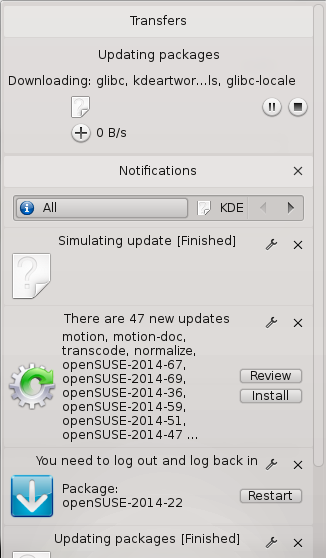 default for a human user. So you’ll need to use the
 useraddcommand to set up new users instead to give your users their own private groups.
I’ve been a KDE fan since KDE 1.something, way back in the days of pixely graphics. It’s always been complex, and the current versions are great steaming masses of complexity. KDE4’s configuration options and features are legion, so it’s often difficult to tell where a problem originates– is it KDE wigging out, or the underlying distro? Like notifications.
For some reason notifications became a great big important deal to some of the major Linux projects such as Ubuntu, GNOME, and KDE, so they’ve invested a lot of energy into giving every last little process and task a voice. So we get to enjoy all manner of interruptions, rather like baby birds who want something to eat RIGHT NOW. I’ve given up trying to tame the darned things and just turn them off, which is a long and involved process, and it will give me something to click on when I am too old and senile to do much else. Sort of a forever whack-a-mole game. Occasionally they are a little bit useful, and sometimes they’re just plain mystifying, like update notifications (figure 2). The top pane shows progress. Nowhere did it tell me the total size of the downloads, or give an estimated time to completion. Somehow packages are downloaded even though it says 0KB network transfer. It also says I should review the proposed updates, and restart my system now. Magic 8 Ball says just do it and quit bothering me.
Is this a KDE issue? Something weird with openSUSE? Who knows. As long as the updates work I shall content myself with scowling at it occasionally.
There really isn’t much to say. openSUSE works. I have no problems with dependency conflicts, installing and removing all kinds of software including source builds, playing with mass widgets, running gobs of VMs, doing multi-channel audio recording, and video editing without drama. It’s a nice distro with a good responsive community and good documentation. It’s great for KDE fans, and for server admins who want a rich set of advanced enterprise functionality. It is a solid distro that I recommend without reservation.

OpenDaylight is an open source project and open to all. Developers can contribute at the individual level just like any other open source project. This blog series highlights the people who are collaborating to create the future of Software Defined-Networking (SDN) and Network Functions Virtualization (NFV).
Hugo Trippaers currently works as a mission critical engineer for Schuberg Philis with 20 years of IT experience in roles ranging from network architect to software developer. Within every role, Hugo had an eye for open source projects and has often been contributing code and knowledge. In his current position he is spending most of his time writing code for open source projects.
How did you get involved with OpenDaylight? What is your background?
I got involved with SDN when one of my colleagues asked me to look at integrating Nicira NVP with Apache CloudStack (ACS). When I said yes, I got on a rollercoaster ride that took me to the Nicira offices in Palo Alto where I was able to meet with Martin Casado and the other folks at Nicira. That really got me hooked on the whole concept of SDN, and I integrated SDN support into Apache CloudStack. Since that day I’ve been deeply involved with the Apache CloudStack (ACS) community where I am one of the members of the Project Management Committee. My goal for ACS is to make sure that Apache CloudStack supports as many SDN solutions as possible. When I learned of the OpenDaylight Project I knew I wanted to have support for that as well. After e-meeting with Brent Salisbury and Madhu Venugopal on how to do the integration, I got really interested in the internals of OpenDaylight and started to help out where I could.
What projects are you working on for OpenDaylight? Any new developments to share?
My main focus is the Open vSwitch database plugin (OVSDB). This project is instrumental in getting overlay-based network virtualization supported using Open vSwitch, which is what I wanted to support in Apache CloudStack. As a company, we are using this technology on a daily basis, so I have some practical experience that I can use to deal with real world scenarios.
I’ve been simultaneously working on two sides of the project. While working on the OVSDB project to get all the features supported that a cloud management system expects, I’ve also been working on the ACS side to get the integration plugin ready for the main branch. By being involved with the OVSDB project I could immediately discuss my challenges and develop solutions. For somebody writing an integration layer between two products it’s awesome to be able to tackle challenges on both ends at the same time.
 How focused has Samsung become on Chromebooks–portable computers that run Google’s cloud-centric Chrome OS? According to a report in DigiTimes, after cutting its targets for notebook computer sales, the company may have plans to “no longer launch conventional notebook models except Chromebooks in 2015, according to Taiwan-based supply chain makers.” While there is no official confirmation from Samsung, the move would represent a big shift for Samsung and one of the biggest votes of confidence yet for Chromebooks.
 All over the technology arena, the Command Line Interface (CLI) still commands attention. As a case in point, Linode, a player in the cloud hosting space, today announced availability of the Linode CLI, a tool that provides a way to provision and manage Linode cloud services from the command line. The tool is designed to enable users to easily automate common tasks, such as creating, rebooting, or resizing servers, while also making it possible to manage DNS records and distribute workloads across backend Linodes.