Announced today to Wayland developers was SWC, a new Wayland compositor framework designed to be taken advantage of by window managers targeting Wayland…
Read more at Phoronix
The second alpha release of Xubuntu 14.04 and several other members of the Ubuntu family (but without Ubuntu itself) is now ready for download and testing: “The Xubuntu team is happy to announce the immediate release of Xubuntu 14.04 Alpha 2. As often expected with very early cycle….
Read more at DistroWatch
 It is Wrong to Be Me
If I were a cute little baby boy, or even an ugly one, I would have been given tools, trucks, stompy boots, and guns to play with. But no. Girls don’t get those things. Instead I was given girly, impractical clothing like a Dale Evans skirt, hat and boot outfit. The boots and hat were nice, but a skirt? Seriously? You can’t ride a horse in a skirt, or climb a tree, or dig holes, or anything. My childhood was one long frustration because nobody ever wanted to teach me anything. I wanted to do all the things my dad did, like till the garden with the big scary roto-tiller, fine woodworking, go target shooting, make fires in the burn barrel and work on cars. Obviously there are things you don’t let a young child do. But I knew– I KNEW I could do these things, and do them competently and safely if someone would just show me how. I have that kind of brain wiring where I can “see” inside things like cars and computers and structures and know how they work, and figure out what’s wrong with them. I’m sure a lot of you have that same feeling; you KNOW you can do a particular thing, and you just need a little boost, someone to believe in you and get you started.
My life was one long series of discouragements both subtle and blatant. I wanted to play the baritone horn. Girls don’t play horns, so I got stuck with a flute. I wanted to take shop, but girls have to take home economics. I couldn’t wear pants to school, not even in the winter, not until junior high when there was this giant earth-shattering revolutionary change in the rules, and girls were finally allowed to wear weather-appropriate clothing. (I guess hypothermia is ladylike.) I was nuts about astronomy and the Apollo space programs and I wanted to be an astronaut, and my teachers just laughed at me. Literally. In high school I would have sold my soul to join the audio-visual club, but– you guessed it– no girls. We got the crappy old gym and leftover equipment, while the boys got the giant beautiful new fieldhouse and new everything.
High school was the worst, all kinds of pressure to be a proper lady and find a boy and plan for marriage and babies. I had occasional brief flings with girl fashions, but they don’t work for anything other than standing around posing like a living ornament. You can’t do stuff and be a fashionable girl, so it was jeans and tees for me. Which meant a continual stream of “You would be so pretty if you would do your hair and wear nice clothes!” comments, and reminders that boys would not be interested in me if I didn’t dress up and behave. I was too loud, too funny, too smart, too fat, too rebellious, too opinionated, too everything the wrong thing.
So the message I kept getting, over and over every day in every way was that I didn’t fit in and I wanted all the wrong things, and acted all the wrong ways, and that being a girl was some kind of fatal defect, and I should never have my own dreams or goals. My response to all this was to withdraw, tune out, and try to do my own thing. Which I did, poorly, with many detours and setbacks. I never got to go to college or trade school, and everything I know I learned the hard way. But persistence is more important than brilliance, and now at the ripe old age of 56 I have some achievements to be proud of, and a lot more to look forward to.
I have a lot of interests, and I need ten lifetimes to do everything I want to do. Between having to earn a living, pursuing the things I wanted to learn, and not being able to settle down and focus on one thing, I’ve had a whole lot of different jobs. I worked shit jobs just to make a paycheck, but mostly I’ve worked for myself. I had a short stint as an auto mechanic, but as vehicles became more computerized I couldn’t afford the training to keep up, or buy the necessary equipment. So I got into landscaping and housecleaning, and that was good for a few years. I became a massage therapist and did well, because I could “see” inside people’s bodies as well as inside mechanical objects. But that became dull after a few years; my brain was bored and I needed some intellectual challenges.
The majority of Linux nerds back in the mid-1990s were old Unix nerds. Not me. My first computer was a borrowed Apple something or other. It was all right, and it came with a manual that encouraged hacking it. (How times have changed.) Then I got a Windows 3.1/MS-DOS 5 PC. I spent most of my time in DOS because Windows was so unusable. Not long after that I discovered Linux, and became proficient in both Linux and Windows, and became a freelance system and network administrator. Several years ago I left Windows behind for good, except for occasional forays to help friends. Every time I have to touch it it’s like trying to drive a glossy but mechanically-defective, limping, belching, stinking, oil-dripping 1959 Cadillac Eldorado, the car with the biggest tail fins of all time.
I tried working for some tech companies like Microsoft, Tektronix, IBM, and Intel. What a fiasco. I can’t count how many young men with way less experience and skills than me snagged the good fun hands-on tech jobs, while I got stuck doing some kind of crap customer service job. I still remember this guy who got hired as a desktop technician. He was in his 30s, but in bad health, always red and sweaty and breathing hard. It took him forever to do the simplest task, like connecting a monitor or printer. He didn’t know much and was usually wrong, but he kept his job. I busted my butt to show I was serious and already had a good skill set, and would work my tail off to excel, and they couldn’t see past that I wasn’t male. So I got the message, mentally told them to eff off and stuck with freelancing.
If I had to pick one single job title it would be author. My earliest dreams were of becoming a famous fiction writer. I haven’t gotten there yet, but since the late 1990s I’ve made the bulk of my living from writing Linux howtos, hundreds of them. I like to give myself credit for helping and inspiring people to become happy Linux users. I’ve written three Linux books and they all sold well, though I’m not sure I want to write any more because the market is changing so quickly. It’s a heck of a lot work to produce even a small book.
I discovered Linuxchix.org early in my Linux adventures, and it’s a good thing because without them I might have told the whole Linux and FOSS world to eff off and die. I met a lot of cool helpful people as I got into Linux, and I also became the target of a lot of evil jerks. Linuxchix gave me a safe haven and I made a lot of great friends. I’ve tried to be a role model and encourage more girls and women to get into tech, and I also hear from men who tell me I inspired and encouraged them. Which is great, because the more the merrier. We absolutely need to make diversity a primary goal, because (I think it was Matt Zimmerman who said this) “A lack of diversity leads to a failure of imagination.”
It’s no good wasting energy on regrets, but I was so obviously a messed-up kid I’m still a tiny bit bugged that no adults took notice and reached out a helping hand. So I make a point of reaching out to people who are overlooked and marginalized. Survival of the loudest is a poor criterion for building healthy, creative communities; we need to pay attention to everyone.
I’ve been fortunate to have a number of wonderful mentors in my Linux career: Paul Heinlein got me started as a tech writer, and Michael Hall has been opening doors for me since 2003. Brian Proffitt, Joe Brockmeier, and the all-seeing all-knowing goddess Esther Schindler have all lent helping hands at crucial times. I haven’t figured out how to pay them back, so I hope paying it forward is good enough.
The greatest and most important challenge for Linux and FOSS is the most overlooked, and the most dismissed, and that is universal access for everyone for everything: blind and vision-impaired, deaf and hearing-impaired, and various physical limitations like not able to type or mouse, or to sit up for extended periods of time. Linux lags far behind even the inferior overpriced accessible aids in Windows and Mac. We should lead. We should be showing the world how it’s done, and make Linux computers fully-usable with no barriers to any activity: coding, Web surfing, multimedia production, writing, whatever is possible to do with a computer should be possible for anyone.
There are many fragmented independent accessibility projects. We need an accessibility stack that is just as fundamental as networking, audio, and video. To that end I have started Universal Tux, with the goal of bringing together the various independent accessibility projects, and making accessibility a priority rather than an afterthought. The home for Universal Tux is universaltux.org. This just launched so there isn’t much there yet, but I’m in this for the long haul, so, as they say, watch this space.
I figure I have a few good years left, and I plan to enjoy them to the hilt. Linux and FOSS are going to continue to be at the center of my professional life, and I hope you’ll come along too.
Thank you to Karen Leverich for the wonderful shopping quote
 “The migration to a heterogeneous architecture has presented new challenges to the application community, most notably the development of a programming strategy that allows applications to run efficiently on the hybrid architecture, while maintaining portability with other more conventional computer architectures. This talk will review the deployment of petascale capabilities at ORNL that has led to the current architectural direction and will discuss the preparations aimed at ensuring a successful transition to heterogeneous architectures for some key simulation problems, including global atmospheric modeling.”
The open source libferris project is a virtual file system that aims to provide a single file system interface for all data. I have been advancing libferris towards that goal over the last ten years. Over that time, libferris has gained support for mounting relational databases; physical devices like printers, webcams, and scanners; composite files like Berkeley DB and XML files; applications like Amarok, Firefox, emacs, pulseaudio, XWindow, dbus, and evolution; and more recently web services like GDrive, YouTube, Vimeo, and Flickr, as well as many other things.
Libferris gives you the same filesystem access to all of the above data sources. Why shouldn’t you be able to use your text editor of choice to edit a comment on Flickr or your preferred image viewer to look at a virtual jpeg created from a webcam. Providing a filesystem API lets all applications access (and potentially update) anything libferris can get at. In order to provide access to as many things as possible libferris runs in the user address space. Things like accessing relational databases shouldn’t have to happen from inside the Linux kernel itself. Once a file system is mounted you can dig into the metadata, making things easier to find, filter and index.
I have some examples of command line use of some of these features later in the article. But first I’ll give you a little more background on some of the key features.
Early on in the project’s life, it became clear that using just directories and files made it unnatural and difficult to access metadata, for example, little pieces of information like the width and height of an image or the artist of an audio file. Modern filesystems now offer an Extended Attribute (EA) interface which allows key-value pairs to be associated with files. Building on that idea, the EA interface was also virtualized in libferris to allow the key-value pairs to come from and go to many places.
Having “many places” for metadata to come from and go to might seem confusing at first, so hopefully a few examples will clear things up a little. Reading the “width” EA on an image file will cause libferris to work out the width in pixels of the image and return that to you as the value of the EA. If you have kernel EA available in your home directory, writing to the “foo” EA on an image file in libferris will cause that EA to be stored by the Linux kernel filesystem in an on disk EA. If you don’t have kernel EA support, or the file permissions do not allow you to write an EA on a file, then libferris will store that EA for you in an RDF repository. When you mount a relational database or XML file then the EA will come from the database tuples or XML attributes. So most of the time you don’t have to care about the details, the metadata storage will try to “do what you mean” and has the RDF fallback.
The fallback to using RDF allows you to store metadata on any virtual filesystem regardless of what the underlying storage permits you to do. For example, you can annotate a website and libferris will store that for you in RDF and make it available through the same EA interface that all metadata is available through. For the semantic web fans out there, you can also smush your RDF metadata and link multiple URLs which should logically share metadata.
A single file system API allows command line tools like ls, cp, cat, io redirection and others to dig into any data source that libferris can access. In a similar way, having all metadata offered through the EA key-value interface allows the sorting and filtering support in libferris to be applied to any metadata. If you want to see the images in a directory sorted by mime type, aperture size, and then by modification time you can do it with ferrisls. Each EA can have type information associated with it, and most do. So libferris knows that the “size” and “width” EA are numbers and can sort the values as you would expect.
Once the file system and metadata interfaces were available it made sense to add index and search support. There are many implementations of indexing to choose from, and no single implementation of index and search provides the best results in all situations. You might want to use a small memory mapped file on a low power NAS to provide simple locate(1) functionality, while on a larger file server you might want to use PostgreSQL for your indexing needs. The results from a query can also be returned as a libferris filesystem. So you can directly “cat” or ferriscp the results of a search.
You can also federate multiple libferris indexes together to combine results from multiple locations, such as a local index on your home directory on the desktop machine and a file server index.
OK, so enough with the history and overview, and on with how to install libferris (farther below) and some examples of things that you might find useful to do with it.
Consider the below XML file as an example input. Using ferrisls you can reach right into an XML file and list the elements at any level. This is a common interaction style in libferris for files which might be thought of as composite such as XML, db4, archives, csv and so on. You don’t have to worry about mounting, just read the file as though it was a directory.
If you know a little bit more about the structure of the XML file, you can select which XML attributes you want using the libferris filesystem Extended Attribute interface. The –show-ea option to ferrisls tells it what EA you would like to see in the listing. In this case, the filesystem EA are created from and send data to XML attributes.
$ cat basic.xml
<top>
  <person name="alice" age="25" />
  <person name="bob"   age="32" />
  <person name="cathy" age="35" >boo!</person>
</top>
$ ferrisls basic.xml/top
                                 0                    alice
                                 0                    bob
                                 0                    cathy
$ ferrisls --show-ea=name,age basic.xml/top
alice   25
bob     32
cathy   35
$ fcat basic.xml/top/cathy
boo!
Libferris can also perform modifying actions on many of its virtual filesystems, and certainly for mounted XML files. The below example uses the ferris-redirect command to stream data from its standard input into any libferris file. Libferris also has FerrisFUSE which provides an implementation of Filesystem in UserSpace. So you can access libferris with any tool that can use a Linux in kernel filesystem if you like. For example, you could also mount the basic.xml file using FerrisFUSE and just use normal bash redirection to update it.
I have reimplemented many of the basic file system tools for two reasons: so that FUSE is not always needed (no explicit mounting and unmounting) and to be able to provide extended functionality such as sorting and filtering output on any metadata that the filesystem offers. You can consider the sequence | ferris-redirect filename to be much like > filename in bash redirection but with ferris-redirect you can write that data to more places. As you can see in the below, I’ve updated the text content of the bob XML element using io redirection.
$ echo "a really nice guy" | ferris-redirect basic.xml/top/bob
$ cat basic.xml
<?xml version="1.0" encoding="UTF-8" standalone="no" ?>
<top>
  <person age="25" name="alice"/>
  <person age="32" name="bob">a really nice guy
</person>
  <person age="35" name="cathy">boo!</person>
</top>
If you prefer binary files to XML, you can mount Berkeley db4 in the same way as XML with libferris. Below I use the “fcreate” tool to make a new empty Berkeley db4 file. The “rdn” means Relative Distinguished Name and is a bit of a holdover from early use of some LDAP naming. I will likely convert “rdn” instances to “filename” throughout the code in the future. Because a mounted db4 file and a mounted XML file are exposed in a very similar way, you can run XQuery on db4 instead of XML files if you want to speed up some of the lookups in your query.
$ fcreate --create-type=db4 --rdn=foo.db .
Created new context: file:///tmp/foo.db
$ ls -lh foo.db
-rw-------. 1 ben ben 8.0K Dec 30 19:52 foo.db
$ date | ferris-redirect foo.db/file1
$ fcat foo.db/file1
Mon Dec 30 19:52:41 EST 2013
$ db_dump -p foo.db
VERSION=3
format=print
type=btree
db_pagesize=4096
HEADER=END
 file1
 Mon Dec 30 19:52:41 EST 2013a
DATA=END
Libferris can also mount relational databases as filesystems using QtSql and it also has explicit support for mounting PostgreSQL. The extended attribute interface is extremely useful here as the tuples in a table map nicely to files in the filesystem and the columns in a tuple map to the EA for each file. Below I create a simple SQLite database with only one table. Using ferrisls -lh shows you that the file for each tuple is named using the “name” column from the table. You can list any table using the path format databasename/tablename as shown. For postgresql databases you can also access PostgreSQL functions through the filesystem.
The ferrisls -0 option complements the normal -l long listing option to ls. The main difference is that with -0 you ask the filesystem itself what it thinks are the most interesting EA for you to see. Sometimes there are more interesting things than the size, protection bits, and mtime to see. In this case, every column from the database table is considered “interesting” along with an EA telling you what the primary key for the tuple is. This is the repeated “id” at the end of the ferrisls -0 output. The –xml and –json options build on the -0 option but produce output in XML or JSON format respectively.
$ sqlite3 test.db
SQLite version 3.8.2 2013-12-06 14:53:30
Enter ".help" for instructions
Enter SQL statements terminated with a ";"
sqlite> create table trees ( name varchar, count int, id integer primary key autoincrement );
sqlite>  insert into trees (name,count) values ( 'General Sherman', 5 );
sqlite>  insert into trees (name,count) values ( 'Gum', 44 );
sqlite>  insert into trees (name,count) values ( 'Mahogany', 9 );
sqlite> select * from trees;
General Sherman|5|1
Gum|44|2
Mahogany|9|3
$ ferrisls -lh test.db/trees
                                 56                   General Sherman
                                 45                   Gum
                                 49                   Mahogany
$ ferrisls -0 test.db/trees
General Sherman 5       1       General Sherman id
Gum     44      2       Gum     id
Mahogany        9       3       Mahogany        id
$ ferrisls --xml test.db/trees
<?xml version="1.0" encoding="UTF-8" standalone="no" ?>
<ferrisls>
  <ferrisls count="" id="" name="trees" primary-key="id" url="file:///tmp/test.db/trees">
    <context count="5" id="1" name="General Sherman" primary-key="id"/>
    <context count="44" id="2" name="Gum" primary-key="id"/>
    <context count="9" id="3" name="Mahogany" primary-key="id"/>
  </ferrisls>
</ferrisls>
$ ferrisls --json test.db/trees
{
 "children" : { "1" : { "name" : "General Sherman" },
                 "2" : { "name" : "Gum" },
                 "3" : { "name" : "Mahogany" } },
 "self" : { "name" : "trees" }
}
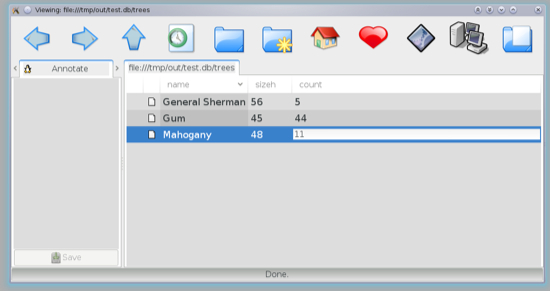
Databases can also be updated through the filesystem by writing to the EA as shown below. The -a option to ferris-redirect causes the data to be written to the given (extended) attribute instead of into the main content of the file. The screenshot following is the “ego” file manager which allows you to directly click to edit EA. Much of the functionality of ego is accessed through the many side panels, drag and drop, and context menus. If mounting SQLite seems interesting, see my longer blog post for more details including creating virtual tables in SQLite to access libferris and exposing an apache access_log file through libferris as a virtual table.
$ echo -n Gum Tree | ferris-redirect -a name test.db/trees/2
$ ferrisls -0 test.db/trees
General Sherman 5       1       General Sherman id
Gum Tree        44      2       Gum Tree        id
Mahogany        9       3       Mahogany        id
Looking back at how SQLite database tables are exposed through the filesystem, it isn’t much of a stretch to see that a spreadsheet can be exposed as one file per row and EA to get access to each column. Libferris has support for many of Google’s services such as Spreadsheets, YouTube, and Drive. The spreadsheet access is at the cell level so you can create and update spreadsheets from the command line as I have done in the below example. There is more information on mounting Google spreadsheets with libferris.
$ ferrisls -0 google://
docs
drive
spreadsheets
youtube
$ echo 20 | ferris-redirect -a c  google://spreadsheets/smalltest1/Sheet5/2
$ echo  7 | ferris-redirect -a c  google://spreadsheets/smalltest1/Sheet5/3
$ echo 14 | ferris-redirect -a c  google://spreadsheets/smalltest1/Sheet5/4
$ echo -n "=sum(C2:C4)" | ferris-redirect --ea c google://spreadsheets/smalltest1/Sheet5/1
1                       41
2                       20
3                       7
4                       14
Support for mounting Google Drive was added earlier in 2013. A major feature of online storage sites is the ability to selectively share your files with other people. To do this with a mounted Google Drive, just echo the email address of the person you wish to share an uploaded file with into the “shares” EA with libferris.
$ ferriscp goodstuff.txt google://drive/
$ echo "
This e-mail address is being protected from spambots. You need JavaScript enabled to view it
"
| ferris-redirect -a shares "google://drive/goodstuff.txt"
$ echo "
This e-mail address is being protected from spambots. You need JavaScript enabled to view it
"
| ferris-redirect -a shares "google://drive/goodstuff.txt"
Moving along to mounting some applications, the examples below show mounting Amarok, the clipboard, GStreamer, sane, and Flickr. Amarok has three main directories in the filesystem; control, current, and playlist. Ferrisls on amarok://control will also show you the current state of Amarok. In the control directory, the play/pause toggle file can control if Amarok is playing, you can set the volume by writing a value (percent of full volume) into the volume file. The Amarok playlist is exposed as a virtual directory and you can directly “copy” the tracks from that virtual directory to another filesystem if you like.
The clipboard filesystem is backed by Klippper so you might not see it unless you are using KDE. The GStreamer filesystem allows you to access media sources and get jpeg images and video streams through the virtual filesystem. So you can get at your laptop or phone camera over the network without needing to think about how to read image data from those devices. The scanner and Flickr API are filesystems you can copy data from the scanner directly to the web. Or you can grab your data from any other libferris filesystem such as GStreamer or indeed another Flickr API implementing site and copy it to the web.
$ echo  1 | ferris-redirect amarok://control/toggle-play-pause
$ echo 20 | ferris-redirect -T  amarok://control/volume
$ echo 89 | ferris-redirect -T  amarok://control/volume
$ ferrisls -0 amarok://control
pause   0
play    1
toggle-play-pause       1
volume  89
$ ferrisls -0 amarok://playlist
1  2:56  Mark Forry, Yvette ...  Free Software Song
...
$ ferriscp amarok://playlist/1 /media/portableplayer/
$ ferrisls -0 xwin://localhost/clipboard
0       bueller... bueller....
1       examples
...
$ fcat xwin://localhost/clipboard/0
bueller... bueller....
$ fcat gstreamer://capture/lid.jpg | okular -
$ ferriscp scanner://default/gray-full-300/scan.jpg  flickr://me/upload
Authentication with web services and other data stores is set up with ferris-capplet-auth. This handles OAuth handshaking with sites providing an implementation of the Flickr API, Facebook, Vimeo, and Google services. This is also where you can setup authentication information to PostgreSQL, Zoneminder, and FerrisREST servers. This way URLs in libferris do not contain user credentials and certainly don’t ever have passwords in them. So the risk of accidentally sharing a URL with authentication information in it is lessened. You can also use ferris-capplet-auth without a GUI as shown below. You will be given the URL to visit in order to authenticate libferris and asked for tokens at appropriate times to complete the handshake. Details on authentication are in a previous linux.com article.
$ ferris-capplet-auth --auth-service gdrive --auth-with-site gdrive
...
$ ferris-capplet-auth --list-auth-sites
facebook
flickr
23hq
pixelpipe
vimeo
google
Sometimes it can be useful to access things that libferris can mount through other systems, sort of like looking at the reverse of everything is a file system. Currently you can access libferris as a KIO slave, through FUSE, as a KDE Plasma data source, as an SQLite virtual table, as a virtual Xerces-C++ DOM, and through XQuery using XQilla. There are also the start of language bindings, mainly targeting Guile and Perl. Having Perl support at the IO::All level is the ultimate goal. Currently support is there to tie to a file handle allowing the below code to create a PDF with the current time in it.
#!/usr/bin/perl
use Time::localtime;
use libferris;
$trunc = 0;
my @options = ();
push(@options,"trunc") if $trunc;
tie( *FERRIS, 'libferris', '>printer://Cups-PDF/foo.pdf', @options );
print FERRIS ctime() , "n";
untie( *FERRIS );
If you’re sufficiently intrigued by the project, go try it out. I have updated my Fedora 20 packages on the openSUSE Build Service which is available at Fedora_20. After downloading home:monkeyiq.repo from the above link to /etc/yum.repos.d/ you should be able to install libferris using the below command. These are the packages I use on my laptop and the build I used to run many of the examples in this article. I also have some packages for Debian ARM hardfloat.
# yum install libferris-suite
One strength of libferris is also one of its weak points; because there is support for mounting many data stores, extracting metadata from many files, and different index implementations, there are other libraries that libferris uses for many of these things which can make building libferris a little daunting for first-time users. Many of the features are optional and will be disabled at configure time if the libraries are not installed on your system. Some lower level dependencies have been split out of libferris itself such as libferrisstreams, stldb4, and fampp which provide some C++ std::iostream support, an interface to Berkeley db4, and file change monitoring respectively. The main things that Libferris needs which you might not have installed are Xerces-C 3, Boost, and development headers for a mime engine (KDE, GNOME, efsd, or libfile). If you want to mount some of the web services then qjson and qoauth need to be installed too.
In the future I hope to add support for mounting more web services and enhance the web front end to libferris. Mounting web services is more of a challenge than local sources because of throttling, network latency, and the REST API changing on the whim of the company running the site. I will also continue my pursuit to have libferris included in a main stream Linux distribution to help make it simple to install for more people.