
After spending the last 18 months retooling Facebook as a “mobile company,” the next front is pushing those developments to the open source community.
Read more at Enterprise Open Source Toolkit
ZaReason‘s latest incarnation of their Android tablet, the ZaTab ZT2, is a sturdy little chunky monkey. First a quick look at its specs:
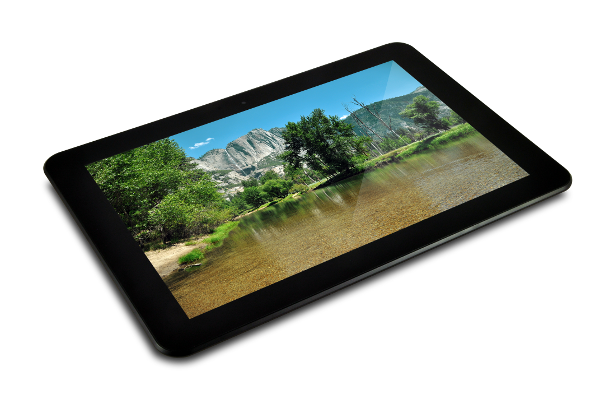
The ZaTab is unlocked so you can do whatever you want with it, just like a PC. Like install CyanogenMod to get the latest and greatest in truly free Android. Or try some other tablet operating system like Bohdi Linux, Firefox OS or Kubuntu Netbook Plasma. I have no idea if they run on the ZaTab, so if you try them please let us know in the comments if it worked. You can also install any apps you want, and not just the Google-approved ones, and develop and test your own apps. (Be sure to check out Juliet Kemp’s excellent series on Android development for beginners.)
I’m not a tablet or smartphone user, so playing with the ZaTab was a new experience. Poking the screen with my fingers feels messy and somewhat childish, like fingerpaints. But I can appreciate the technology behind the touch interface– it’s slick how the screen orients itself when you move the tablet, and zooming with a pinch or squeeze is kind of fun. Finger presses and taps replace mouse clicks, and you get different results with short taps and long presses. For example, a long press on a Gallery image selects it and opens a menu for sharing and editing. A long press on a desktop widget or app opens the delete function, which removes it from your desktop but does not delete it from your system. So a long press often functions as a right-click context menu.
It ships with four default virtual desktops, and you can put different widgets and apps on each desktop. You can use any image for wallpaper, or get some Live wallpapers. Live wallpapers are animated, and some connect to network services so beware of battery and system resource drain. There are zillions upon zillions to choose from, both free and paid.
The ZaTab is well-integrated with Google services, which is both a benefit and an annoyance. I always have mixed feelings about Google; they give us a lot of nice apps and services for free. But what is the true cost of all those free goodies? Google is an impenetrable black box, so we don’t know what they’re doing behind the scenes with all of our personal stuff passing through their servers. If you’re already a Google user and have Gmail, Google+, Drive, and all that other then you can easily configure your account in the ZaTab and have access to all your stuff. Google Search is already on your desktop, and Google Voice Search. Voice Search worked well for me, and it accurately recognized what I was saying. So I either have good diction or Google’s voice recognition is extra-good.
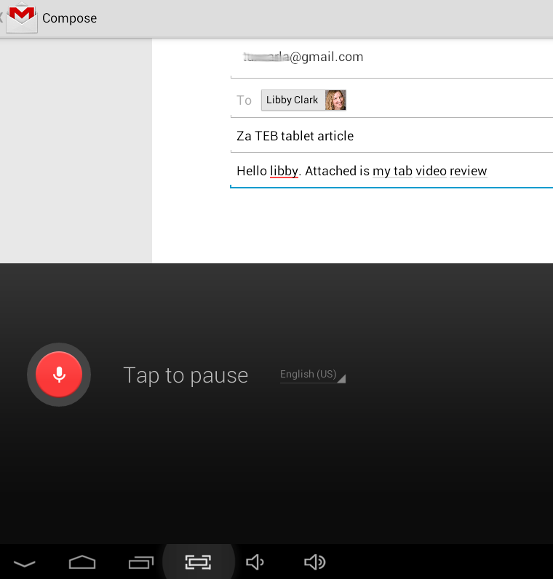
The speech engine didn’t work as well for composing an email. It’s easy to use– when you compose a new message in Gmail just press the microphone key on the keyboard and start talking. It got a lot of words wrong and was slow. It was pretty good with punctuation and putting apostrophes in the right places, which is more than you say for a goodly percentage of native American English speakers.
Speaking of keyboards, the on-screen keyboard is pretty good, though for me it’s not a replacement for a real keyboard. But these virtual keyboards are going to keep improving until someday they are viable replacements for physical keyboards, with tactile feedback and many times more customizable.
What if you want total voice control of your Android device? Try the Voice Shortcuts Launcher app. It’s free on Google Play. (Which, by the way, is in your default app drawer on the ZaTab.) It lets you build custom shortcuts for commands like “Open Powells.com” and “Open text editor” and what-have-you. It’s quite versatile, though it still doesn’t give you complete voice control because you can’t power up your tablet or log in with it. I wish voice technologies were more advanced; they’re still primitive on Linux, and somewhat better on Mac and Windows, but still a long way from where they should be. Hands-free control is essential for people who, for various reasons, can’t type or use their hands very well, and it’s a nice feature for all users.
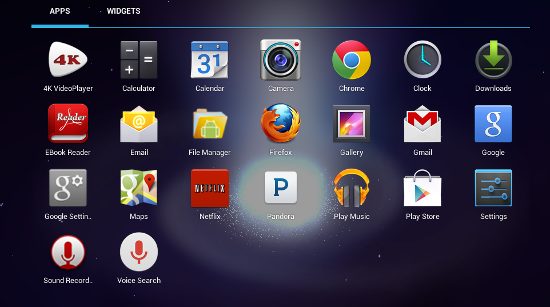
The ZaTab is set up with USB mass storage protocol, so all you need to copy files between a PC and the tablet is to connect them with a USB cable. You can also stuff a microSD card in the tiny microSD slot and copy files to it. Getting the card out is a little tricky because it’s so small, so you may want tweezers to grab it. Of course you can also use Web services like Dropbox and Google Drive, which seems like the long way around but there they are if you want them.
I plugged the ZaTab into my mondo biggo LCD television with a miniHDMI-to-HDMI cable, cued up some Netflix movies, and the sound and picture were quite good. If you have movies stored on your ZaTab the bundled 4k VideoPlayer is a decent basic player, and the Play store has many more players to choose from.
The bundled camera app is a good basic app that controls both the front and rear camera, and takes both stills and videos. Both Skype and Google Hangout work fine with video, though you want to be careful to hold your tablet steady so your image isn’t going all jiggedy. The built-in microphone is surprisingly good, though the speakers, as is typical of small speakers, are average.
eBooks look really good on the ZaTab. I have an original Kindle, and I like it a lot for plain text books and books with simple monochrome illustrations. It’s the perfect special-purpose book reader: lightweight, simple, and easy on the eyes. But the real potential for eBooks is full color, because printing in color is still expensive. The ZaTab is heavier and bulkier than the Kindle, but I like the bigger pages, better zoom, and adjustable screen brightness. I especially like that it supports all eBook formats, which the Kindle does not, and you can find a number of good ereader and library manager apps. I give it a big thumbs up for reading.
I’m getting 8-10 hours on a charge, depending on what I’m doing. Skype, Google Hangout, live wallpapers, and recording video suck down the battery faster, but it’s still better than my Thinkpad. The last time I traveled with my beloved Thinkpad may be the last time: it’s heavy, and there is no room even for a 14″ laptop when you fly cattle-car class. A tablet would fit in squished airplane cabins better, and if I tote along a keyboard for serious typing it’s still a lot lighter than my Thinkpad. I could purchase an ultra-light Thinkpad for $1200, or a ZaTab for $299. Hmmm…
Overall this is an attractive tablet that for me would serve both for entertainment and serious work, especially on the road, and for “distro-hopping” CyanogenMod and other tablet operating systems.

Not even Mighty Big Blue can stop a hurricane. But. IBM and Marist College are testing a new cloud computing innovation that could help prevent disruptions in voice and data communications services caused by hurricanes and other natural disasters. more>>
A lot has changed on the open source scene since the first FLOSS Survey launched way back in 2002. That survey provided one of the early, comprehensive views of open source developers and development communities around the world, and results from it were widely cited in academic publications, in the press and elsewhere. Now, more than a decade later, researchers are launching an updated version: FLOSS Survey 2013. Over 1,000 respondents are already participating and the survey closes on December 6.
You can take the survey here.