The way Asynctask has been implemented in Android, is an apt example of Half Sync – Half Async pattern described in Pattern Oriented Software Architecture or POSA2. First of all, let us try to understand what we mean by Half Sync-Half Async design pattern. Half Sync- Half Async pattern is a specific way how we want to structure our threads in a multithreaded application. As the name suggests, in this pattern we divide the solution of managing multiple threads into two different specific zones – one is synchronous and the other is an asynchronous zone. The main thread communicates with a thread asynchronously and this thread is responsible for queuing multiple tasks in a FIFO order. This thread then pushes these tasks on the synchronous layer to different threads taken from a thread pool. These thread pools then execute these tasks synchronously in the background. The whole process can be depicted by the following diagram.
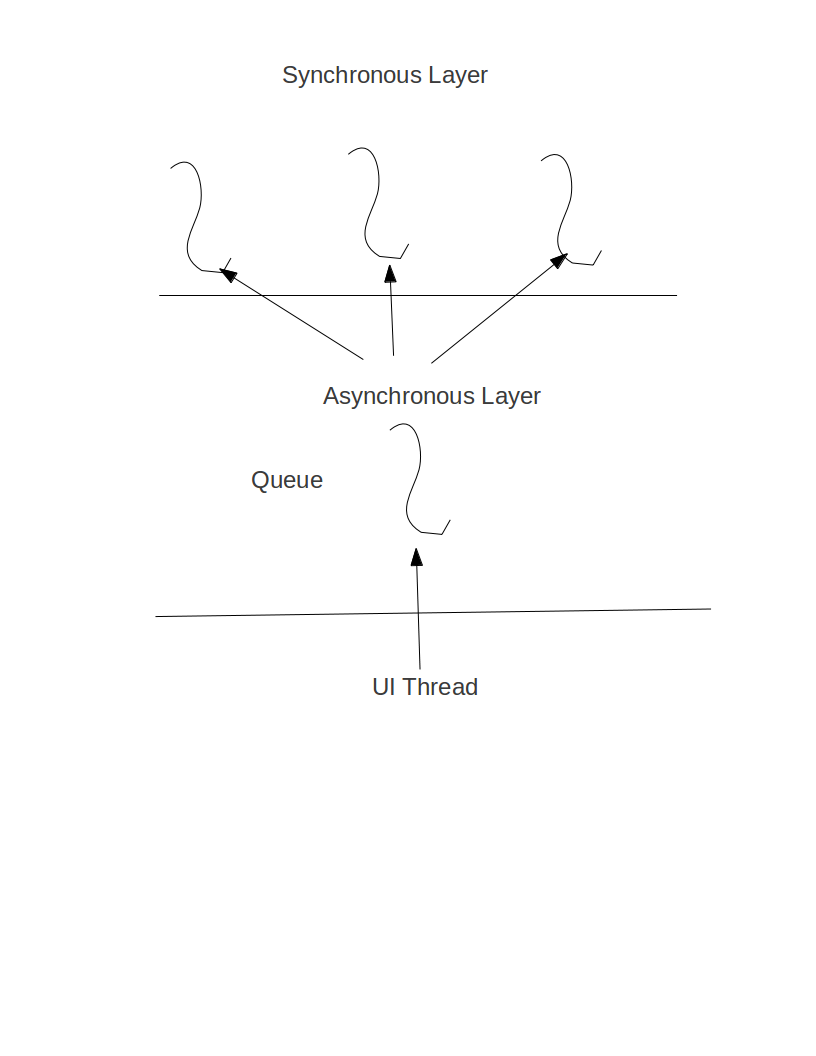
If you are new to the terms Asynchronous and Synchronous in the conjunction of multithreaded application let me throw some lights on it. These can be best understood in a client-server architecture perspective. A synchronous function means it will block the caller of it and will return only after it finishes its task. On the other hand an asynchronous function starts its task in the background but returns immediately to the caller. When it finishes the background task, it notifies the caller about it asynchronously and then the caller takes action.
The two scenarios have been depicted by the following two diagrams. 
Now let us dive deep into the Android’s Asynctask.java file to understand it from a designer’s perspective and how it has nicely implemented Half Sync-Half Async design pattern in it.
In the beginning of the class few lines of codes are as follows:
private static final ThreadFactory sThreadFactory = new ThreadFactory() {
private final AtomicInteger mCount = new AtomicInteger(1);
public Thread newThread(Runnable r) {
return new Thread(r, “AsyncTask #” + mCount.getAndIncrement());
}
};
private static final BlockingQueue<Runnable> sPoolWorkQueue =
new LinkedBlockingQueue<Runnable>(10);
/**
* An {@link Executor} that can be used to execute tasks in parallel.
*/
public static final Executor THREAD_POOL_EXECUTOR
= new ThreadPoolExecutor(CORE_POOL_SIZE, MAXIMUM_POOL_SIZE, KEEP_ALIVE,
TimeUnit.SECONDS, sPoolWorkQueue, sThreadFactory);
The first is a ThreadFactory which is responsible for creating worker threads. The member variable of this class is the number of threads created so far. The moment it creates a worker thread, this number gets increased by 1.
The next is the BlockingQueue. As you know from the Java blockingqueue documentation, it actually provides a thread safe synchronized queue implementing FIFO logic.
The next is a thread pool executor which is responsible for creating a pool of worker threads which can be taken as and when needed to execute different tasks.
If we look at the first few lines we will know that Android has limited the maximum number of threads to be 128 (as evident from private static final int MAXIMUM_POOL_SIZE = 128).
Now the next important class is SerialExecutor which has been defined as follows:
private static class SerialExecutor implements Executor {
final ArrayDeque<Runnable> mTasks = new ArrayDeque<Runnable>();
Runnable mActive;
public synchronized void execute(final Runnable r) {
mTasks.offer(new Runnable() {
public void run() {
try {
r.run();
} finally {
scheduleNext();
}
}
});
if (mActive == null) {
scheduleNext();
}
}
protected synchronized void scheduleNext() {
if ((mActive = mTasks.poll()) != null) {
THREAD_POOL_EXECUTOR.execute(mActive);
}
}
}
The next important two functions in the Asynctask is
public final AsyncTask<Params, Progress, Result> execute(Params… params) {
return executeOnExecutor(sDefaultExecutor, params);
}
and
public final AsyncTask<Params, Progress, Result> executeOnExecutor(Executor exec,
Params… params) {
if (mStatus != Status.PENDING) {
switch (mStatus) {
case RUNNING:
throw new IllegalStateException(“Cannot execute task:”
+ ” the task is already running.”);
case FINISHED:
throw new IllegalStateException(“Cannot execute task:”
+ ” the task has already been executed “
+ “(a task can be executed only once)”);
}
}
mStatus = Status.RUNNING;
onPreExecute();
mWorker.mParams = params;
exec.execute(mFuture);
return this;
}
AS it becomes clear from the above code we can call the executeOnExecutor from exec function of Asynctask and in that case it takes a default executor. If we dig into the sourcecode of Asynctask, we will find that this default executor is nothing but a serial executor, the code of which has been given above.
Now lets delve into the SerialExecutor class. In this class we have final ArrayDeque<Runnable> mTasks = new ArrayDeque<Runnable>();.
This actually works as a serializer of the different requests at different threads. This is an example of Half Sync Half Async pattern. it actually puts a task in the end of the mTasks arraydeque and then pushes them to different threads from the threadpool. Look at the code
public void run() {
try {
r.run();
} finally {
scheduleNext();
}
what it actually does it runs in an endless loop waiting for new tasks to arrive and whenever a new task arrives it calls scheculeNext() which actually runs this task in a thread from the threadpool. However, it allows only one task to be executed at any time. Hence with the default executor we cannot have multiple tasks executing parallelly.
Now lets examine how the serial executor does this. Please have a look at the portion of the code of the SerialExecutor which is written as
if (mActive == null) {
scheduleNext();
}
So when the execute is first called on the Asynctask, this code is executed on the main thread (as mActive will be initialized to NULL) and hence it will take us to the scheduleNext() function.
The ScheduleNext() function has been written as follows:
protected synchronized void scheduleNext() {
if ((mActive = mTasks.poll()) != null) {
THREAD_POOL_EXECUTOR.execute(mActive);
}
}
In this function we initialize the mActive by the Runnable object of the AraayDeque which is already inserted in that Queue. The the task will be executed in a thread taken from the threadpool. While executing this task in a thread from the threadpool, the finally portion of the run method becomes responsible for calling the Schedulenext() function which polls the queue (nonblocking) and whenever there is a new task it executes that in a thread taken from the threadpool.
To understand why the execute function cannot be called more than once on the same Asynctask, please have a look at the below code snippet taken from ExecutoronExecute function of Asynctask.java especially in the below mentioned portion:
if (mStatus != Status.PENDING) {
switch (mStatus) {
case RUNNING:
throw new IllegalStateException(“Cannot execute task:”
+ ” the task is already running.”);
case FINISHED:
throw new IllegalStateException(“Cannot execute task:”
+ ” the task has already been executed “
+ “(a task can be executed only once)”);
}
}
AS from the above code snippet it becomes clear that if we call execute function twice when a task is in the running status it throws an IllegalStateException saying “Cannot execute task: the task is already running.”.
if we want multiple tasks to be executed parallely, we need to call the execOnExecutor passing Asynctask.THREAD_POOL_EXECUTOR (or maybe an user defined THREAD_POOL as the exec parameter. And if we do that, the sPoolWorkQueue becomes responsible for the Half Sync Half Async pattern for Asynctask.
