According to the latest distribution data of different versions of Android, Jelly Bean mobile operating system now runs on more than 50
The post Jelly Bean now powers more than half of Android devices appeared first on Muktware.
According to the latest distribution data of different versions of Android, Jelly Bean mobile operating system now runs on more than 50
The post Jelly Bean now powers more than half of Android devices appeared first on Muktware.
Linux operating system creator Linus Torvalds has proposed that Linux 4.0, an upcoming release of the open-source software, should be dedicated to stability and bug fixing.
The Linux kernel can be supplied with various parameters during boot time or at run time. These parameters customize the default behavior of the kernel, or inform the kernel about hardware configuration. Kernel parameters can be changed at run time by modifying files in /proc or /sys, while certain kernel parameters need be passed to […]
Continue reading…
The post How to add kernel boot parameters via GRUB on Linux appeared first on Xmodulo.
The Linux 3.12 kernel was released on Sunday evening but prior to that was a last-minute pull request that got rejected by Linus Torvalds and with it he reaffirmed the focus of Linux on 64-bit…
Online rumors have the carrier introducing the 7-inch value tablet in the coming days — and it might just be the first of many.
Linus has released the 3.12 kernel. “I was vacillating whether to do an rc8 or just cut the final 3.12, but since the biggest reason to *not* do a final release was not so much the state of the code, as simply the fact that I’ll be traveling with very bad internet connection next week, I didn’t really want to delay the release.“
Some of the main features in this release include improvements to the dynamic tick code, support infrastructure for DRM render nodes, TSO sizing and the FQ scheduler in the network layer, support for user namespaces in the XFS filesystem, multithreaded RAID5 in the MD subsystem, offline data deduplication in the Btrfs filesystem, and more.
Linus noted a couple of other things in the announcement. One is that the 3.13 merge window will not be starting for another week. He is also starting to think about an eventual 4.0 release, and has tossed out the idea of having 4.0 be a bugfix-only release, though he has his doubts as to whether it would work. “But I do wonder.. Maybe it would be possible, and I’m just unfairly projecting my own inner squirrel onto other kernel developers. If we have enough heads-up that people *know* that for one release (and companies/managers know that too) the only patches that get accepted are the kind that fix bugs, maybe people really would have sufficient attention span that it could work.“
Earlier today I wrote at length about Intel open-sourcing their Broadwell graphics driver code for Linux support months ahead of the 2014 processor debut. Besides the kernel changes queued up for the Linux 3.13 kernel, the Broadwell OpenGL/3D driver support has turned up in a Mesa Git branch…
The critical and consumer response to Motorola Mobility’s Moto X launch this summer was a mixed bag. The phones were nice enough, but many expected the first Motorola phones released under the Google regime to stretch the techno limits, Nexus style. One feature, however, stood out as a bold move: the somewhat Dell-like MotoMaker service that provided online customization of styling, memory, and accessories.
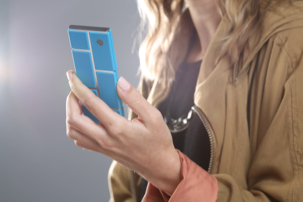
With this week’s announcement of Motorola’s Project Ara, it’s clear that customization is more than just a gimic to Motorola and Google. The open source project aims to build a modular smartphone platform that lets users customize their phones on a more fundamental level, while also swapping out parts for upgrades.
Defined by Motorola as a “free, open hardware platform for creating highly modular smartphones,” Project Ara aims to “create a vibrant third-party developer ecosystem, lower the barriers to entry, increase the pace of innovation, and substantially compress development timelines.” Motorola will build the endoskeleton (endo) while third parties will build snap-on modules including processors, displays, keyboards, battery extensions, and sensor devices such as pulse oximeters, says the company.
Motorola says it has been developing Project Ara for a year, but has now decided to partner with Phonebloks, which has been working on a similar concept. On Oct. 29, the Dutch startup met its Thunderclap goal of 900,000 supporters, reaching a total of 979,264. No money changed hands, but it’s still an impressive tally, suggesting that consumers are looking for something new from their smartphones.
Motorola has begun asking the Phonebloks community for input, and will soon send out invitations to developers to start building modules, possibly with prize incentives. An alpha release of the Module Developer’s Kit (MDK) is expected this winter.
Project Ara could not exist today without the success of open hardware projects like Arduino, Raspberry Pi, and BeagleBoard.org. Such projects have already brought a modular approach to embedded computing. Their shields, capes, and module extensions are simply less integrated versions of the Phonebloks’ bloks. For a more polished example that looks like consumer electronics, there’s inspiration to be found in Bug Labs’ open source Linux “Bug” embedded computers, which feature over a dozen Bug Block modules.
For a phone example, the already numerous critics of Project Ara and Phonebloks point out that the now-defunct Modu phones tried the concept, and failed. Modu didn’t go as far as PhoneBloks, however, and tech products fail all the time.
More recently, Jolla’s phones, which run the MeeGo Linux-based Sailfish OS, offer a somewhat similar concept. The phones integrate “Other Half” backplate options that let carriers, resellers, or users switch profiles. For example, you could switch between work and play profiles, or adult and child modes.
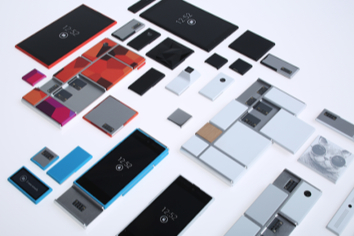
Motorola is taking these concepts even further, essentially deconstructing the modern smartphone. (Their prototype product shot looks like an iFixIt teardown.) Aside from likely being friendlier to the environment – people are expected to replace aging or broken parts rather than toss the entire phone after one or two years – Project Ara should appeal to consumers’ growing interest in customization. Android isn’t dominating mobile just because the devices were necessarily superior. It’s winning because it offers a greater degree of choice in features, interfaces, styling, and pricing.
Once you get used to choice, you want more. Even with Android phones, there are almost always compromises to be made. Some features you can’t have, and others you don’t need, or the pricing doesn’t match. With Project Ara, on the other hand, you could customize your phone by selecting competitive options from third parties, just like you do with apps today. When a hot new camera component comes along, you can buy it immediately rather than wait. When your screen cracks, you can buy a better one, supposedly at a fraction of the cost of the entire phone.
The critics are right in pointing out that Project Ara is a longshot. Popular Science, for example, brings up valid questions about Phonebloks, ranging from support issues to the difficulty in producing a modular phone that’s also sufficiently light, thin, and stylish.
Even with a major company like Google-rola behind the effort, a multi-party modular phone flies against well-established business traditions like corporate control and built-in obsolescence. It’s difficult to see how it would be more profitable than selling a pre-integrated smartphone. Google is often willing to lose money for a year or two on an interesting “moonshot,” but this one could prove unfeasible in a hurry.
Yet, other once immutable business trends have changed in recent decades. Thanks to globalization and improved manufacturing technologies, built-in obsolescence is no longer a given in categories ranging from automobiles to appliances. Twenty years ago, it would have seemed laughable that open source software might soon dominate a good chunk of the server and consumer electronics markets. Only five years ago, the idea of funding products via online popularity contests would have seemed ludicrous. Times change.
Hardware modularity may take open source to an extreme that we have difficulty conceiving today, but other changes may help alter our view. Improved 3D printing – which in part inspired Motorola to attempt Project Ara in the first place – could make it easier for smaller operations to compete in the modular components market. In much the same way, the automobile industry depends on an ecosystem of parts suppliers.
In addition, the diminishing stocks of some of the rare-earth metals found in mobile devices could reduce our acceptance of the throw-away smartphone. Our landfills are full of pricey, often toxic, metals that are increasingly hard to find, and primarily mined in China. Meanwhile, the environmental impact of mobile device manufacturing has been well documented.
There are, however, other trends that could derail modular and monolithic smartphones alike: the continuing trend of miniaturization, and the rise of wearable computing. The smartphone is not only likely to split apart into different wearable devices including eyewear, smartwatches, and fitness trackers, but technology will be distributed in the devices and infrastructure around us. All these devices will communicate wirelessly and process and store data in the cloud. Now that’s modularity.

A picture is worth a thousand words, and a well-crafted how-to video is darned near priceless. Linux has all the tools you need to make high-quality and useful instructional videos. We shall make a simple screencast with the wonderful Kdenlive video editor and the Audacity audio recorder and editor, and learn how to share this splendid screencast on YouTube.
All you need is your nice Linux PC with Kdenlive and Audacity installed, a good-quality microphone or headset, and a YouTube account. (Yes, there are many other free video-sharing services, and you are welcome to explore them.) YouTube is owned by Google, so Google tries to entice you into rampant sharing with everything and everyone in the world. Just say no if this is not what you want to do.
Our workflow goes like this:
Kdenlive supports most popular digital video formats, including AVI, MP4, H.264, and MOV. It supports image files such as GIF, PNG, SVG, and TIFF, and audio file formats including uncompressed PCM, Vorbis, WAV, MP3 and AC3. You can even read and edit Flash files. In short, it should handle pretty much anything you throw at it.
Your soundtrack is just as important as your video track. Please, I beg you, pay attention to your audio. Keep it clean and simple, and keep the rambling digressions, verbal tics, and distracting background noises to a minimum. I prefer a good-quality headset for making narrations because you don’t have to worry about microphone placement, and you can listen to yourself over and over without driving bystanders insane.
The Kdenlive documention is outdated and tells you that you need RecordMyDesktop to make screencasts. I have Kdenlive 0.9.4, and it does not need RecordMyDesktop.

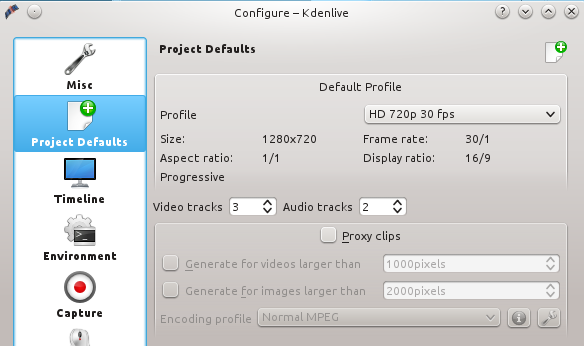
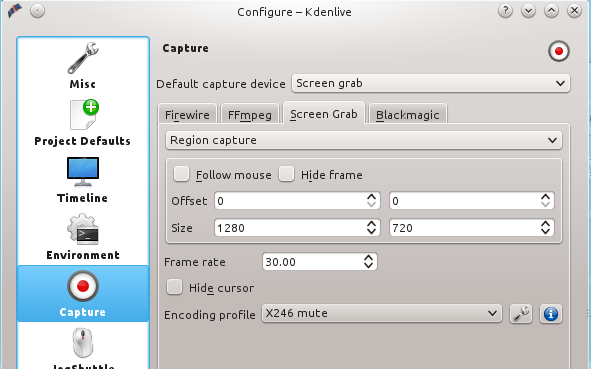
If you’re installing Kdenlive for the first time you’ll get a configuration wizard at first run. Don’t worry too much about the default settings because you can change them anytime. These are the settings I use for my screencasts: HD 720p 30 fps, 1280×720 screen size. How do you know what settings to use? YouTube tells you. To set these values go to Settings > Configure Kdenlive > Project Defaults > Default Profile > HD 720p 30fps (figure 1), and set the size of your screen capture in Settings > Configure Kdenlive > Capture > Screen Grab (figure 2). You may also choose a Full Screen Capture, though it’s better to stick with the dimensions specified by YouTube, because if they’re different YouTube adds pillarboxes to make them fit. Your eager viewers want to see a screen filled with glorious content, not pillarboxes.

The default YouTube video player size is 640×360 at 320p, which is small and blurry. The player has controls for small, larger, and full-screen, plus multiple quality levels. These are for your viewers only, and you can’t change the defaults, which is sad because nothing looks good at 640×360 at 320p. But you still want to make videos with the higher quality settings, and you can always add some text to remind your viewers to try the better settings.
Before you do anything else go to File > Save as to save your project, and remember to save it periodically.
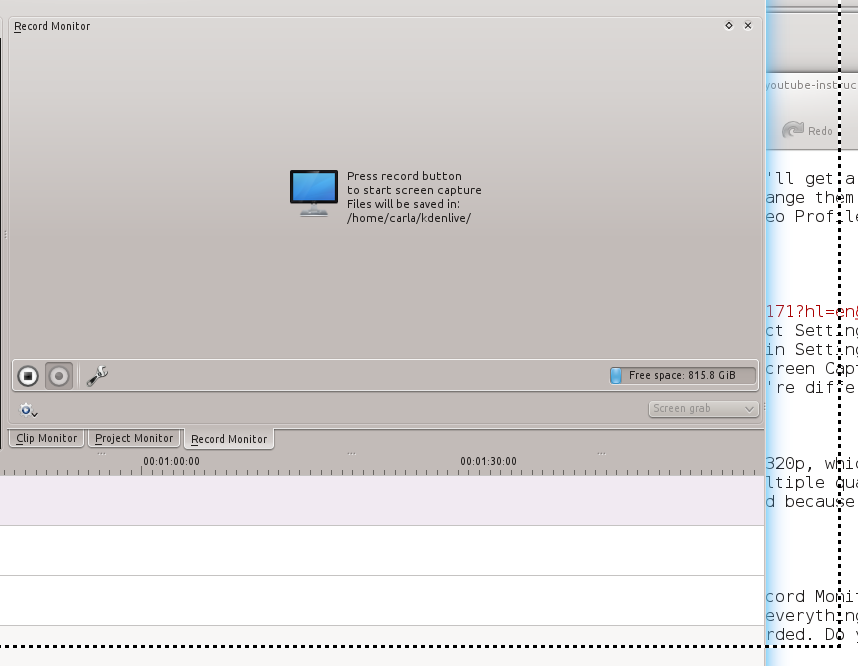
Making your screen capture is easy as pie. Go to the Record Monitor, select Screen Grab, and then hit the Record button. This opens a box with dotted borders on your screen, and everything inside this box is recorded. So all you have to do is move and size the window you want recorded inside the box. Do your thing, then when you’re finished click the stop button (figure 3).

Clicking Stop automatically opens the Clip Monitor so you can preview your new clip. If you like it, drag it from the Project Tree to the Video 1 track. Now you can edit your new video. There are always bits you’ll want to trim; a fast way to do this is to play your clip in the Project Monitor until you get to the end of the part you want to remove. Then Pause, then press Shift+r. This cuts your clip at the point on the timeline that you stopped, so now you have two clips. Click on the one you want to delete and press the Delete key, and poof! It is gone.
You’ll want to drag your remaining clip to whatever point on the timeline you want it to start, and you might want to add some nice transitions. Some simple fades are good; simply right-click on your clip and click Add Effect > Fade > Fade from black and Fade to black, and Kdenlive will automatically place them at the beginning and end.
Please see Whirlwind Intro to Audacity on Linux: From Recording to CD in One Lesson to learn the basics of recording with Audacity. Export your recording as a 16-bit WAV file and then import it into Kdenlive via Project > Add Clip. Drag your new audio clip down to one of the Audio tracks. An easy way to make your narration is to play your video track and talk as it plays. With a little luck you won’t have to do a lot of cleanup, and your commentary will be in sync with the video.
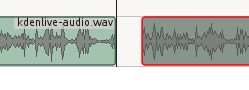
If you’re a fast talker and get ahead of your video, you can easily add a space in the audio track. Simply cut your track with Shift+r, and drag one of the clips away from the cut to create a silent gap (figure 4).
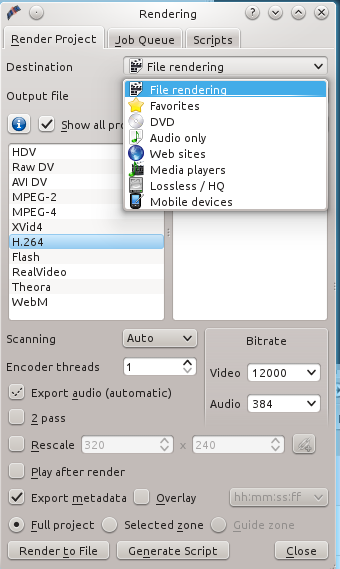
When you’re happy with your edits and ready to export to your final format, click the Render button. This takes a few minutes depending on the speed of your computer and size of your project. There are presets for Web, and if you choose File Rendering you can tweak your settings (figure 5). I’ve gotten good results with File Rendering > H.264, Video bitrate 12000, and audio 384. H.264 is a super-compressed MPEG-4
format that delivers small file sizes and good quality.
Play your new video in VLC or MPlayer or whatever you like, and if it looks good then you’re ready to upload to your YouTube account. In typical Google fashion your dashboard and video manager are disorganized and complicated, but keep poking around and you’ll figure it out. Before you can do anything you’ll have to put your account in good standing, which means getting a code number from Google via text or email. When you prove you’re not a bot by entering the code number you’ll be able to upload videos.
You can upload your videos and mark them as either private or public. Google has some editing tools you might like, such as auto-fix and music soundtracks, though in my nearly-humble opinion hardly anyone does background music correctly so it’s just annoying. But you might be the first to do it right!
The most useful editing tool is automatic closed-captioning. I recommend using this on all of your videos, not only for people who can’t hear very well but for anyone who has to keep the volume low, and to make sure everyone understands what you’re saying. The captioning tool also creates a transcript.
Another useful tool is the annotations tool, which supports speech bubbles, titles, spotlights, and labels. Of course you can do all this in Kdenlive, so you can try both.
Well, here we are at the end and it seems we’ve barely begun. Please share your videos and YouTube tips and tricks in the comments. And while you’re at it, please share your new video tutorial with us on video.linux.com and join the 100 Linux Tutorials Campaign.
Linux is one of the world’s leading operating systems powering much of the Internet and rapidly becoming a core mobile and embedded technology, as well. Helping to lead Linux forward is the Linux Foundation and its charismatic leader Jim Zemlin.
Jim Zemlin has been the executive director of the Linux Foundation since the organization was created in 2007, after a predecessor Linux group, called the Open Source Development Labs (OSDL), collapsed. In a video interview with eWEEK, Zemlin explains why the Linux Foundation continues to grow year after year.
“It’s not important for us to grow just for growth’s sake,” Zemlin said.
Read more at eWeek.