
Thanks to HPC, simulations will become a key tool in Biomedical research, both in clinical situations and in the Pharma industry.
Read more at insideHPC
Roberto Dohnert has announced the release of OS4 OpenLinux 14, an Ubuntu-based desktop Linux distribution focused on ease of use: “Today we are announcing the new release of OS/4 OpenLinux 14. With this release we bring many new enhancements to the OS/4 line. OS/4 OpenLinux 14 is the….
 Just when things were looking pretty dull today, I spotted an exciting tidbit of news. Jeff Hoogland announced a new release of Bodhi Linux today, September 12, 2013. It’s been six months since 2.3.0 was released and today’s announcement addresses that and future plans as well.
This release brings Linux 3.8, Enlightenment 17.4, and Midori 0.5.5. Hoogland added, “As always – our default theme selection is shaken up.” Bodhi Linux is available in a 32 bit version featuring a PAE kernel, a 32 bit version with a non-PAE kernel, and a 64 bit version. Downloads are hosted by Sourceforge now, but Hoogland says those applying the regular system updates should already have the equivalent of 2.4.0.
Philip Müller has announced the release of an updated build of Manjaro Linux, version 0.8.7.1, an Arch-based distribution with a choice of Xfce or Openbox and now also complete with a useful 63-page beginner’s guide: “On behalf of the Manjaro development team I’m happy to announce our updated….
Last time around I took a look at the Cubieboard, installing Linux onto it and its general power usage needs. (See “Cubieboard: ARM A8 CPU with SATA for Under $50.”) Now we’ll see some numbers on how well the A10 ARM at the heart of the Cubieboard performs. Remember when reading the performance numbers that the Cubieboard and BeagleBone Black are single core machines while the GK802 and ODroid-U2 are quad cores, and on top of all that the Intel 2600K has hyperthreading.
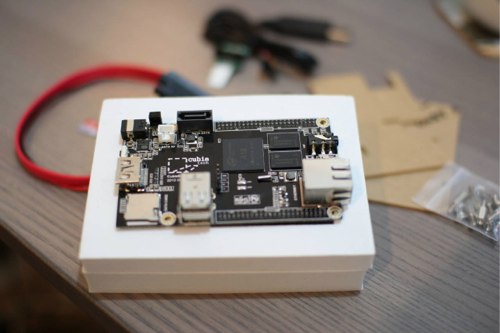
I am using a 16Gb SanDisk Ultra microSDHC card to benchmark devices that offer a microSD slot. Such cards can be purchased for around $15 and with ratings up to 30mb/sec they should allow a smaller ARM machine to run effectively while keeping the storage cost reasonable. I’ll just refer to this card as the “test microSD card”. Expanding the openssl-1.0.1e.tar.gz onto the test microSD card took 7.6 seconds. The same operation took 4.7 seconds on a desktop Intel 2600K machine. Compiling openssl took 25.5 minutes on the Cubieboard, about 8.5 minutes on the GK802 quad core Freescale i.MX6 machine, and around 1.5 minutes on the Intel 2600K CPU.
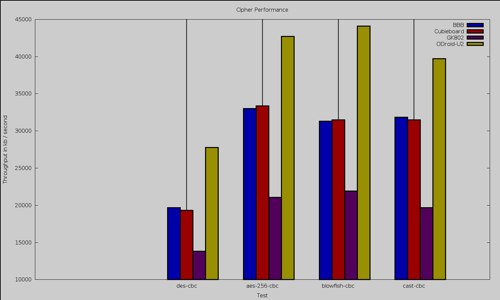
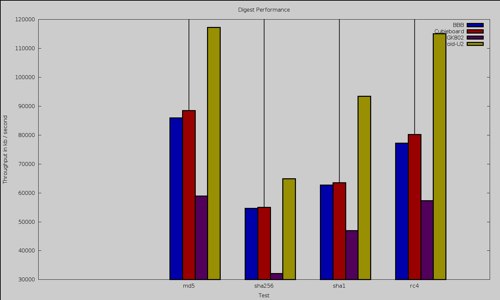
The openssl speed test showed similar results for ciphers and digests with the Cubieboard (red) performing in the same ballpark as the BeagleBone Black (blue). RSA signature verification on the Cubieboard at 166 was slightly faster than the Beagle Bone Black with 163, but again these are in the same ball park.
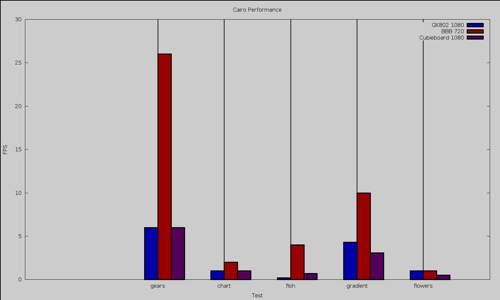
To test 2d graphics performance I used version 1.0.1 of the Cairo Performance Demos. There are many individual tests in the Cairo demos: the gears test runs three turning gears, the chart runs four line graphs, the fish is a simulated fish tank with many fish swimming around, gradient is a filled curved edged path what moves around the screen and flowers renders rotating flowers that move up and down the screen. For comparison I used a desktop machine running an Intel 2600K CPU with an NVidia GTX 570 card which drives two screens, one at 2560×1440 and the other at 1080p. I’ve also included the performance of the GK802 running at 1080p and BeagleBone Black running at 720p.
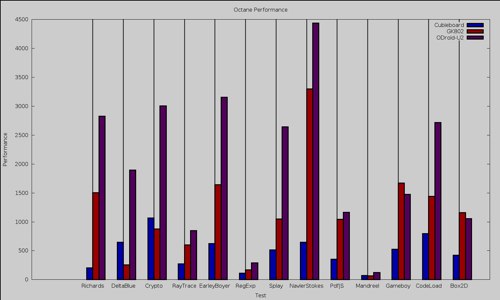
For testing Web browsing performance, I used Firefox and ran the Octane Javascript benchmark. The Intel 2600K sets the top performance as expected with 9667 overall. Next up, the ODroid-U2 came in at 1411, then the GK802 with 777 overall, the Cubieboard at 384, and finally the BeagleBone Black at 367. Note that the BeagleBone Black and Cubieboard are both single core machines while the others are all quad or more cores.
The Cubieboard comes with 4Gb of onboard flash storage. Bonnie wants to create files which are twice the size of the available memory on the system to avoid disk caches from interfering with the benchmark. Since I was using some of the internal storage for an Ubuntu install I only had about 600Mb of free spage on any one filesystem on flash. The first attempts I made were to write files of up to 200Mb in size, after three attempts to do this, each ending in a kernel Oops during IO I decided to sacrifice the Ubuntu install in internal storage and reformat the nandd partition using a striped ext4 filesystem without a journal. The final bonnie++ command shown below completed on the newly formatted ext4 filesystem in internal flash. This resulted in a sequential output of 4.6Mb/sec with a sequential input of about 68Mb/sec. The read benchmark is likely to be higher than real read performance because of the 1Gb of RAM available for caching.
user@bbb:~/flash$ /sbin/bonnie++ -f -m cubieflash -s 100 -r 50 -n 0 -d `pwd`
... Oops!
... Reboot...
# mount | grep nandd
/dev/nandd on /mnt/t2 type ext4 (rw,relatime,data=ordered)
# mkfs.ext4 -O ^has_journal -E stride=2,stripe-width=1024 -b 4096 -LTESTFS /dev/nandd
# mount LABEL=TESTFS /mnt/test
# cd /mnt/test
mkdir benchmarking
# chown ben benchmarking
# su -l ben
$ cd /mnt/test/benchmarking
$ /sbin/bonnie++ -f -m cubieflash -s 200 -r 100 -d `pwd`
To get the SATA port up and running you might have to perform a few extra steps, shown below. Firstly you’ll need the sunxi-tools to verify that your /boot/script.bin initializes the SATA port. The Fedora 18 I used did not enable the SATA port so I had to update the decoded script.fex file and regenerate my /boot/script.bin file from the fex file.
I used the 120Gb model of the SanDisk Extreme range of SSD for testing. These drives can be had for around $100. An ext4 filesystem was created with default parameters and mounted with default parameters. About 41Mb/sec could be written to the SSD and 104Mb/sec read back from it with 1849 seeks/sec performed. For comparison, the exact same drive on the TI OMAP5432 got 66Mb/sec write, 131Mb/sec read and could do 8558 seeks/sec.
# bin2fex /boot/script.bin > /boot/script.fex
# vi /boot/script.fex
...
sata_power_en = port:PB08<1><default><default><0>
...
# fex2bin /boot/script.fex >| /boot/script.bin
# modprobe  sw_ahci_platform
# su -l ben
$ cd /mnt/ssd/benchmarking
$ bonnie++ -f -m cubiessd -d `pwd`
The Cubieboard offers similar raw CPU performance to the BeagleBone Black, which is another 1Ghz single core machine. The Cubieboard2 is now available based on the dual core Allwinner A20 CPU. While I got some hardware offloaded 1080 video decoding working, I had to compile vlc myself and tinker around with the CedarX libraries to get there. The SATA port and cable offered by the Cubieboard are rare to see for a board of this price range and offer good performance for a lower end SSD.
Read other reviews in this series:
Getting Started With the BeagleBone Black: A 1GHz ARM Linux Machine for $45
BeagleBone Black Part 2: Linux Performance Tests
How to Run Linux on ODROID-U2: A Monster of an ARM Machine
ODROID-U2 Part 2: Benchmarking the ARM Beast