Home Blog Page 1808

LibreOffice 4.1.1 Released Fixing 101 Bugs

Here we go again with another LibreOffice update, this time to the 4.1 branch released last month. LibreOffice 4.1.1 was announced today in Berlin with “a large number of improved interoperability features with proprietary and legacy file formats.” This branch is developed for those wishing the latest in features, “for enterprise adoptions, though, The Document Foundation suggests LibreOffice 4.0.5, backed by certified professionals.”

Many of the updates this cycle were for importing and exporting bugs. One interesting bug fixed was fdo#67388, in which files in .deb packages weren’t owned by root:root. Another fixed was fdo#67235 where the Timefield is limited automatically to max. 00:00:01 in Base. “Copying an email address and pasting it in a plain text editor shows U+0001 instead of the email address, also when referring the cell in a formula expression” in Calc was also patched.

Read more at Ostatic

Universal ARM/x86 COM Standard Gets a Boost

Electronics distributor Avnet has added Taiwan-based TechNexion’s computer-on-modules to its board-level embedded products portfolio. The deal raises the profile of TechNexion’s open EDM (Embedded Design Modules) standard that defines three COM sizes usable with both ARM and x86 CPUs, and which incidentally forms the computing core of the open hardware Wandboard SBC. The EDM COM […]

Read more at LinuxGizmos

Cubieboard: ARM A8 CPU with SATA for Under $50

The Cubieboard brings SATA connectivity to a very low price point ARM Single Board Computer (SBC). The board has an ARM A8, 1Gb of RAM, 4Gb of Flash storage, HDMI output, and a whole bunch of IO pins. A recent update, the Cubieboard2 is now out, which replaces the Allwinner A10 CPU from the original Cubieboard (single A8 core) with a dual core Allwinner A20 (two A7 ARM cores). Given the Allwinner A10 CPU is an A8 core it might perform slightly better in single threaded tests per clock than the A7 cores in the Allwinner A20 CPU.

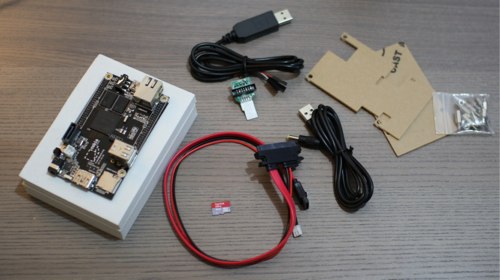
Shown in the picture is the Cubieboard and Developer Set. While no power transformer is supplied, you can run the Cubieboard off USB power with the supplied cable. If you are intending to power a SATA drive from the Cubieboard then you’ll want to use a power supply rather than trying to power both the Cubieboard and SATA drive off the single USB power cable. In the top right of the picture you can see the two-piece case that is supplied which sandwiches the Cubieboard in clear plastic. In the center of the picture is the SATA cable: the lower two connectors go to the Cubieboard and the larger connector on the other end to a 2.5 inch SATA drive. In the top middle of the picture is the JTAG connector and a debug cable. The JTAG connector plugs into the microSD slot of the Cubieboard for debugging. A microSD card is shown for scale. Adding the Developer Set to the basic Cubieboard also makes the total cost more than $50.

Cubieboard and developer set

Booting with Linux

A major convenience of the Cubieboard having been around for a while is that there is a lot of support for running Linux on it. Unfortunately though, I found myself needing to compile vlc to get hardware accelerated decoding. My Cubieboard came with Android 4.0.4 preinstalled on it’s internal 4Gb of Flash. When booting from the internal flash a green light near the CPU will be lit. When booting from the microSD card that green light remains off.

There is a Fedora 18 Remix for the Cubieboard and Ubuntu Images too. The Fedora 18 Remix is geared toward being expanded onto and run from a microSD card. Because uBoot is already part of the Remix image that you download, getting Fedora 18 up and running on the Cubieboard is as simple as using dd to copy the Remix image to a microSD card, inserting that card into the Cubieboard, and powering up the Cubieboard.

The first time you boot the Fedora 18 Remix it will resize itself to use the full size of the microSD card that you have copied it to. So setting up a 32Gb system is as easy as using a 32Gb microSD card. A few questions like first user creation are then asked and you are presented with an Xfce desktop. If you are using DHCP to assign IP Addresses to your machines you might like to add something like “mac_addr=c6:aa:aa:aa:aa:00” to the end of the mmcargs line in your /boot/uEnv.txt file to assign a selected fixed MAC address to your Cubieboard so that it doesn’t move around on your network.

The internal 4Gb of NAND storage on the Cubieboard is exposed through the /dev/nand device files. I found that all were small partitions except nandg and handh which were 335 and 2592 Mb respectively. Once you have booted a Linux distribution from the microSD card, you might like to migrate it over to the 4Gb of internal flash storage to free up the card slot. Another option is to use a very fast microSD card and leave the Linux distribution on the microSD card and use the internal flash for other purposes.

Migrating Linux to Flash

I used the commands shown below to migrate a Fedora 18 installation over to the internal flash. I based the /boot partition on the one on the microSD card and used the remaining internal storage for the new root partition. The newly created /dev/nand1 will be the new 209Mb /boot partition and /dev/nand2 will be the 3874Mb system partition. Using volume labels for the filesystems avoids the need to keep remembering the exact paths. The combination of tar commands used to copy the root filesystem is based on the one in the XFS HOWTO but I added the –one-file-system flag to avoid issues with /sys, /proc, and having tar trying to recurse into /mnt and chase its own tail.

The two main references to the old system you have to update are /boot/uEnv.txt and /etc/fstab. Then you are going to want to put uBoot onto the start of the internal flash storage using the commands based on those used to install uBoot on a microSD card. Luckily the Cubieboard is set to boot from microSD before it’s internal NAND flash so you can recover if you paint yourself into a corner.

wget http://dl.cubieforums.com/loz/boot_partition/bootloader/cubie_nand_uboot_partition_image.bin
dd if=cubie_nand_uboot_partition_image.bin of=/dev/nand
sync
partprobe /dev/nand
sync
... wait a minute
... reboot
# mkfs.ext4 -LNANDSYSTEM /dev/nandb
# mkdir /mnt/new
# mount LABEL=NANDSYSTEM /mnt/new
# cp -av /boot /mnt/new/
# cd /
# tar --one-file-system -lcf -  . | (cd /mnt/new/; tar xpvf - )
# vi /mnt/new/uEnv.txt
   Change root=UUID=78...1 to root=LABEL=NANDSYSTEM 
# vi /mnt/new/etc/fstab
LABEL=NANDSYSTEM   /   ext4   defaults   1 1

The LiveSuit tool allows you to write an image directly to the 4Gb of internal NAND flash on the Cubieboard. To do this you have to put the Cubieboard into FEL mode which allows LiveSuit to write data to its NAND over a USB cable. To do this, turn off the Cubieboard by holding its power button down for 10 seconds. While holding down the button below the mini-usb plug on the Cubieboard, use a cable from the mini-USB port on the Cubieboard to connect it to a USB port of a desktop computer and then hold the power button down for a while on the Cubieboard. This should have the Cubieboard recognized on the desktop machine and you will be able to write a new image to the Cubieboard internal flash.

Power Usage and Video Playback

At a logged in 1080p desktop the Cubieboard drew 1.6 watts. When I was compiling openssl that went up to around 2.9 watts. During hardware accelerated playback of the 1080 big buck bunny file power usage was at around 1.8 watts.

Compiling vlc with support for the CederX hardware video decoding took me hours of tinkering, downloading source, and building. At the end I found some container formats were problematic but I could play back the 1080p big buck bunny mov file with only a few minor stutters here and there. I’m not sure if the final kinks iron out with more tinkering or not. There are also some known issues with 1080 playback with CederX hardware decoding.

Next time around we’ll see benchmarks for the CPU, Graphics and NAND for the Cubieboard. As for the SATA port, I’m hoping to connect an SSD to see just how quickly data can be shuffled to and from storage on the Cubieboard. With a sub-$100 SSD the Cubieboard might be a great, low-run cost, lower volume, always available MySQL database server. We would like to thank Miniand Tech for providing the Cubieboard review hardware.

Read other reviews in this series:

Getting Started With the BeagleBone Black: A 1GHz ARM Linux Machine for $45

BeagleBone Black Part 2: Linux Performance Tests

How to Run Linux on ODROID-U2: A Monster of an ARM Machine

ODROID-U2 Part 2: Benchmarking the ARM Beast

OMAP5432 Review: Texas Instruments’ Dual Core ARM A15

Benchmarking Performance of TI’s OMAP5432 Board

The openSUSE Release Process (SUSE openSUSE Blog)

Michal Hrusecky and Jos Poortvliet team up to describe the openSUSE release process on the SUSE openSUSE blog. They cover the nuts and bolts of the software side, as well as the marketing activity preparing for a release. “There are several bots that check packages [sent] to Factory. First is factory-auto, which does some basic checks regarding you spec file, rpmlint warnings and similar. If you pass this quick test, it’s time for more thorough testing. A bot named factory-repo-checker tries to actually install your package in a testing environment to make sure it is possible and it also looks for possible file conflicts, so you wouldn’t overwrite somebody [else’s] package. Last check before a package gets in front of the review team is legal-auto. This one checks the licence (did it change? is it a new package?) and if needed calls in our legal team to take a look at the package. The final step is manual review by members of review team which will try to spot mistakes that automatic checks overlook.

Read more at LWN

Ubuntu Is Going After A New Linux Kernel API

In large part because of Canonical’s new focus around Ubuntu Touch on phone/tablet devices, the Ubuntu developers are wanting a new revocable memory API for the Linux kernel to help in low-memory scenarios…

Read more at Phoronix

GNOME Web To Abandon Google Search

The GNOME Web Browser will no longer be using Google as its default search engine but they have struck a deal to use DuckDuckGo as its new search engine…

Read more at Phoronix

SODIMM-style COM runs Linux on Freescale Vybrid SoC

iWave Systems unveiled a tiny computer-on-module based on Freescale’s Vybrid VF6xx system-on-chip, which integrates an ARM Cortex-A5 processor along with a Cortex-M4 microcontroller. The RainboW-G16M-µMXM module provides up to 1GB RAM and 2GB flash, offers numerous interfaces including networking, video, audio, camera input, USB, CAN, GPIO, and analog I/O, and runs over an industrial temperature […]

Read more at LinuxGizmos

5 Things to Know About Salt Cloud Management

You will be forgiven if you haven’t heard of the Salt project. The company behind the project, Salt Stack, incorporated only a year ago, and Salt is now a rapidly growing open source systems and configuration management tool. Although Salt Stack is a new name in the configuration management tools pool, the company has already made a big splash. Salt Stack was named Black Duck Software’s Open Source Rookie of the Year for 2011, one of four “Cool Vendors in DevOps” by Gartner in April 2013, and at its Structure 2013 event in June, GigaOM selected Salt Stack as the winner of its LaunchPad competition. 

Salt and pepperIn Salt Air episode 1 on YouTube, Salt project CTO and founder Tom Hatch described Salt as a garage project until it was featured on FLOSS Weekly in November 2011. Hatch credits the popular FLOSS Weekly podcast for kickstarting the project’s recognition. 

And if you are already familiar with Salt, you probably know that Salt’s core function is its remote execution. In his Linux Journal article on how to get started with Salt Stack, Ben Hosmer explains—in layman’s terms—how Salt Stack works.

“Tools like Salt, Puppet, and Chef allow you to issue commands on multiple machines at once, and install and configure software, too,” Hosmer says. “Salt has two main aspects: configuration management and remote execution.” 

“Other systems were designed to do this, of course, but they failed in several ways,” says Salt contributor Corey Quinn in a blog post. Salt’s approach is simpler, Quinn says. “Salt leverages the ZeroMQ message bus, a lightweight library that serves as a concurrency framework. It establishes persistent TCP connections between the Salt master and the various clients, over which communication takes place. Messages are serialized using msgpack, (a more lightweight serialization protocol than JSON or Protocol Buffers), resulting in severe speed and bandwidth gains over traditional transport layers, resulting in in the ability to fit far more data quickly through a given pipe.”

Salt also has a reputation for being easy to install and start, it’s highly scalable, and it’s fast. “Getting up and running is almost embarrassingly simple compared to other configuration management systems,” Quinn says. 

Five Things to Know About Salt

1. Salt is not just configuration management. “It is cloud management, orchestration, the Salt reactor, etc.,” says Tom Hatch, Salt Stack CTO. The reactor system was introduced in Salt version 0.11.0, and the idea behind it is that, with Salt’s events and ability to execute commands, a logic engine could be put in place to allow events to trigger actions (e.g., reactions).

2. Salt can be used as a lightweight cloud controller. The Salt Virt functionality was included in release 0.14.0, providing a system to allow private clouds to be managed within Salt, easily and quickly. 

3. The ZeroMQ socket library is not going to be the only option in release 0.17.0. “We are moving toward a more modular network communication system,” Hatch says. “The new salt-ssh system is coming in 0.17, for instance, and does not require a salt agent to be running on target systems.” 

4. The new Salt Web UI, “Halite” (rock salt), will be shipping with Salt 0.17.0. “Halite, like the rest of Salt, is 100% open source,” Hatch says. “We are not open core, like everyone else in the space. Halite is an entirely event driven UI, and in 0.17.0 it can be enabled with only setting a config option and restarting the master.” 

5. In 0.17.0, Salt is introducing a new default means for ordering states in the config management system, making states get evaluated in the order in which they are defined, according to Hatch. “This makes Salt both fully imperative and still fully declarative,” Hatch says.

Hatch says that open source plays an important role in the development of Salt Stack, and the company has turned away investors who weren’t supportive of open source. Hatch recognizes that open collaboration has offered many benefits to the project, and learning about different needs and  perspectives has helped the project develop. 

“I would encourage other projects to be as open as they can, to accept contributions and work with contributors,” Hatch says. “It really helped build out the community and bring in new ideas to the project and the company.”

To learn more about the Salt development community, visit: http://docs.saltstack.com/topics/community.html. Hatch will also be talking about the Salt project at LinuxCon’s CloudOpen North America in New Orleans next month. 

Rikki Endsley is the former associate publisher of Linux New Media’s Linux Magazine, ADMIN, and Ubuntu User magazine. Now she works as a freelance tech journalist, editor, and the community manager for USENIX. Rikki’s articles have appeared in a variety of publications and websites, including Linux.com, NetworkWorld, ITWorld, SmartBear.com, and CMSWire. Find her online at rikkiendsley.com or on Twitter at @rikkiends.

 

Forum Thread: A Comparison of Vagrant and Docker

A Hacker News forum thread discusses the similarities and differences between Vagrant and Docker: ” It is unfortunate that so many people compare Vagrant and Docker. While there is overlap, Docker is mostly not viable as a dev environment tool alone, so it isn’t a fair comparison. The main reason is because you have to be using Linux (and a recent Linux) as your main dev system, and in practice this is very rare. Move beyond indie developers and for all intents and purposes Linux desktops are non-existent (Vagrant is in use by companies like BBC, Expedia, Intuit, etc. and I can tell you most devs don’t know how to use Linux let alone run it as their primary dev platform).

“BUT, I agree that putting your dev environment in a Docker container is absolutely _amazing_, and there is a KILLER Vagrant/Docker combo.”

See the full discussion at Hacker News.

Usage of Tor Online Anonymity Tools Recently Doubled

There are a number of reasons why many people around the globe want to be able to use the web and messaging systems anonymously, despite the fact that some people want to end Internet anonymity altogether. In some areas in the world, opressive government regulations threaten free speech, and even in the U.S. there has recently been uproar over NSA snooping. Online privacy is getting to be a very big deal.

That’s why it’s notable that according to the latest statistics available through Tor Metrics Portal there has been a large 100 per cent increase in the number of Tor clients and as many as 1,200,000 users are now connecting to the network. Tor, from the Tor Project, is one of the most powerful and flexible open source solutions for online anonymity, and it’s clearly gaining popularity. 


Read more at Ostatic