
Sources tell Game Informer that the console could launch by the end of the year. [Read more]
Read more at CNET News
The standard desktop edition of Porteus 2.1, a Slackware-based mini-distribution with a choice of multiple desktops, has been released, along with the “Kiosk” edition: “Major additions since our 2.0 release include restructuring our layout to have standalone ISOs for five desktop environments (KDE 4, Razor-qt, MATE, Xfce and….
Let’s start from the beginning, because even though Wayland has been in development for over five years there is still a lot of misunderstanding of what it is. Wayland is a display server protocol that is intended to replace the X Window System. We’ve had X for 27 years, and computing has changed a wee bit in that time. Back in the olden days we had text terminals and every little pixel was precious. Now we have great honking graphics cards with more processing power than the servers and workstations of yesteryear, multiple displays, smartphones and tablets, embedded devices, and users who are not going to settle for colorful ANSI displays, but want complex 3D graphics. And why shouldn’t Linux lead the way in graphics rendering? Are we not overdue for holodecks? And who would ever want to leave their holodeck? Though, as figure 1 shows, you can make some cool color images with ANSI.
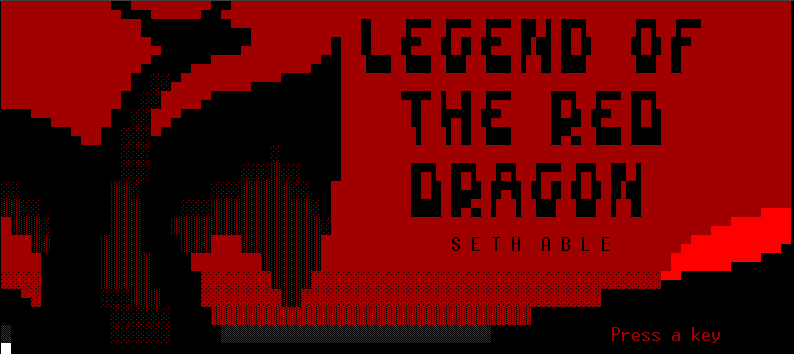 Figure 1: ANSI artwork from Legend of the Red Dragon.
X has been showing its age for the past 10-12 years, and has acquired a considerable cruft base in that time, to the point that it is more in the way than useful. You younguns might not remember, but back in the olden days of Linux we had to configure X manually, and it controlled displays, mice and keyboards. Yes, keyboards and mice. Why? Darned if I know. This is what I wrote in my awesome Linux Cookbook, published in 2004:
“XF86Config requires that you know configuration data about your mouse, keyboard, video adapter, and monitor. It takes you through setup line by line, asking questions until you’re ready to explode. Most important are the name of your video card, the amount of video RAM, and the horizontal/vertical refresh rates for your monitor.”
What is this XF86Config? It was the main configuration file for XFree86 (capitalized in a most annoying and typing-unfriendly way) which was the original X Window System for Linux. It was doing fine and everyone was happy until the core development team became full of strife. In 2003 they gave developer Keith Packard the boot and changed the XFree86 license so that it was incompatible with the GPL, by adding an advertising clause:
“The end-user documentation included with the redistribution, if any, must include the following acknowledgment: “This product includes software developed by The XFree86 Project, Inc (http://www.xfree86.org/) and its contributors”, in the same place and form as other third-party acknowledgments. Alternately, this acknowledgment may appear in the software itself, in the same form and location as other such third-party acknowledgments.”
The GPL prohibits the addition of restrictions beyond those that it already imposes, and this was a cumbersome and possibly unworkable clause in any case, as tracking multiple contributors in a large project composed of multiple components is difficult. Of such small things are great rifts born, and this was the final blow in a succession of internal problems on the XFree86 project. Keith Packard, who is probably the most knowledgeable person about the X Window System, went on to lead the fork of XFree86 that we use today, Xorg, which is short for X.org. Development on XFree86 ended in 2009.
Xorg does not even come with a user configuration file, but rather auto-configures your graphical display. Though you can write your own custom xorg.conf file if you like, or use the X -configure command to generate a skeleton config file.
Linux users are used to clunky configuration tools, and the world hasn’t ended yet. So what else is wrong with X? How about decades of cruft? Much of X’s functionality has moved into the kernel– for example memory management, command scheduling, and mode setting– and into libraries like freetype, fontconfig, and cairo. It’s very complex and difficult for developers to understand, with unintended consequences galore, and not in a good state to be fixed rather than replaced. Even with so much functionality moved out of X it’s still a memory and CPU hog.
As it says in the FAQ Wayland is not an X fork, and it is not an X server. Rather, it is a protocol that communicates between a compositor and its clients. Compositing is one of the most useful and progressive developements in window managers: the old way was for applications to handle rendering their own windows directly inside shared display memory, which was not particularly efficient or stable. These old-style window managers are called stacking window managers. A compositing window manager takes control of this by giving each application its own little bit of memory buffer, and then it composites all these buffers into an image in the display memory. It’s more stable because a stacking window manager can freeze or crash when a single application misbehaves. A compositing window manager keeps on chugging even when an application wigs out, and draws windows more smoothly and without flickering.
The compositor can also be a Linux display server, an X application, or a special Wayland client. The Wayland project includes a demo Wayland compositor, called Weston. It’s fast, small, and runs on embedded and mobile devices.
Compositing window managers are capable of all kinds of special effects coolness, such as 2D and 3D animations, rotation, drop shadows, blurring, magnifiers, and all kinds of nifty stuff. Some popular compositing window managers are Xfwm, Cairo, KWin (KDE4), Mutter (GNOME 3) and Compiz. KWin and Mutter have partial Wayland support, with plans for complete suppport. The Enlightenment team have always done amazing work with graphics, and are also working hard to implement Wayland. Fedora includes Wayland, and is aiming for complete support by Fedora 21. A number of key toolkits support Wayland: Qt 5, GTK+ 3, and Clutter.
Wayland offloads many tasks that X currently handles. Drawing, multiple monitors, and font rendering are all tasks that can be handled by something other than an X server. Drawing is what you see on your screen every time something changes, like scrolling, opening a new application, playing a video– everything is drawn on your screen by the X server.
X has two drawing APIs, one which is old and nobody uses, and the other is the XRender extension which is what we use now. Wayland has no drawing APIs, and doesn’t need any thanks to direct rendering which links the Linux kernel directly with your graphics adapter, cutting out the fat X server middle layer. The Linux kernel includes a direct rendering manager (DRM) which has two parts: the kernel drm driver, and your graphics card driver, if it supports direct rendering. Which it should in this glorious year 2013 in the new millennium. Graphics processing units (GPUs) are much faster at processing video than your CPU, so the more video functionality we can push to them the better.
Wayland aims to be simpler, cleaner, and more flexible. It’s not possible to make a clean break with Xorg because of trainloads of legacy code and applications, but Xorg can run as client of Wayland for backwards-compatibility. By positioning Wayland as an intermediary between compositing window managers, clients, and the Linux kernel, clients can load up on all kinds of specialized functionality without having to deal with an old giant complex X codebase.
The Wayland developers seem undecided about building networking into Wayland, suggesting that perhaps standalone network display servers like VNC are preferable. Me, I love my ssh -Y incantations and you can pry them from my cold dead hands. But I’m not picky about the details of how to forward graphical displays over the network as long as I can do it, so time will tell.
Wayland has been in development for five years by the people with the most expertise: the Xorg team. It’s going to take a few more years before it’s ready for prime time, but you can play with it now. The best distro for previewing Wayland is Arch Linux, which has all the essential bits in their software repos and some good beginner instructions.

Earlier this week, Google, IBM, Mellanox, NVIDIA and Tyan announced plans to form the OpenPOWER Consortium – “an open development alliance based on IBM’s POWER microprocessor architecture.” According to the release, the Consortium will collaborate on both hardware and software to build out new hyperscale and cloud data centers.