Enea announced a new version of its embedded Linux distribution compatible with Yocto Project 1.4 code, and available with extensive service and customization options. The Enea Linux 3.0 cross-development tool chain and runtime environment also features varying levels of real-time Linux support for guaranteed performance and quality of service (QoS). Enea is a Swedish software […]
MediaTek announced its first quad-core system-on-chip aimed at tablets. The MT8125 integrates four 1.5GHz Cortex-A7 cores with Imagination Technologies’ PowerVR Series5XT GPU, enabling 1080p video recording, 1920 x 1200 resolution, and a 13-megapixel camera, and offers integrated 3G HSPA+, 2G EDGE, and WiFi communications.
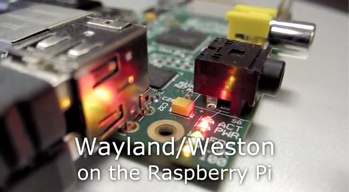
On May 24, Raspberry Pi Foundation executive director Eben Upton announced that the open source board’s recommended Linux distribution, Raspbian, will be adding support for a customized Wayland display manager.
While the Pi’s Broadcom BCM2835 system-on-chip may be limited to a 700MHz ARM11 processor, it also has an impressive graphics processing unit (GPU) called the VideoCore 4. The Wayland windowing interface is optimized for the VideoCore and will offer much faster and more capable display performance compared to the current X Window, wrote Upton.
Funded largely by the Raspberry Pi Foundation, the Pi version of Wayland, as well as the associated Weston reference compositor back-end, was developed primarily by Collabora with the help of Pekka Paalanen on the Weston side. The Wayland/Weston windowing interface can be tested now, and will soon be offered as a more stable Raspbian technology preview. It will be fully integrated in Raspbian in the coming months, said Upton in a Linux.com email interview yesterday (see farther below). Although X will continue to be supported for now using XWayland, “We’ve made the decision to bypass X completely,” Upton proclaimed in the announcement.
The lightweight, Debian-based Raspbian, which uses the LXDE GUI environment, was already optimized for the Raspberry Pi’s ARMv6-architecture ARM11 CPU. The most recent version of Raspbian (“Wheezy”) was upgraded earlier this year to Debian 7.0 and Linux 3.6.11, and shows dramatic performance improvements, according to benchmarks published May 28 on Phoronix. (It should be noted that several commenters questioned the Phoronix interpretation of the results, however, so we’ll wait for confirmation.)
Raspbian is now joined by a new ARMv6 optimized Fedora 18 Remix for the Pi called Pidora. Released last week by the Seneca Centre for Development of Open Technology (CDOT), Pidora offers much improved performance on the RPi compared to earlier RPi-focused remixes, and features numerous packages from Fedora 18 (see our earlier article on Pidora).
The RPi version of Wayland/Weston should make it easier for Pidora and other RPi-supporting distributions like ArchLinux and Risc OS to build their own Wayland display managers, said Upton. (A recent TechRadar roundup review of RPi-ready distros also included Plan 9 and Android 2.3, although both received poor marks.)
Wayland Makes Headway
Typically, we think of the Raspberry Pi as an embedded hacker platform for headless gizmos. (For a glimpse of the RPI’s range, see this recent Reddit thread on RPi projects, which includes everything from prosthetic knees to wood engraving machines.) Yet, about half of all RPi projects make extensive use of the HDMI port for running an external monitor, including most educational applications.
The aging X Window interface used by current Linux distributions — including Raspbian, which incorporates X11 by way of its Openbox window manager — is not optimized for the hardware video scaler (HVS) in the RPi’s VideoCore 4 GPU. As a result, much of the GPU’s power, including throughput of up to 500 megapixels per second and blending throughput of 1 gigapixel per second, are unavailable. The ARM11 processor is left to do much of the work, leading to poor graphics performance and shaky window manipulation.
Several Linux distributions are looking to replace X with modern display servers such as Wayland, or in the case of the Ubuntu project, Canonical’s own homegrown Mir. Wayland and Mir are simpler and more flexible than X, and offer built-in support for the now almost ubiquitous hardware-accelerated graphics.
The Fedora project’s three-year old plan to replace X with Wayland has finally gathered steam. The first beta version of Fedora 19 (“Schrödinger’s Cat”), released May 28, includes a GNOME-based GTK+ UI toolkit that supports a preliminary version of Wayland with Weston. There may be good reasons why the Fedora project has been dragging its feet on Wayland. Potential headaches in replacing X11 are discussed in this April post on LWN.net.
Now, it’s Debian’s turn to go Wayland, at least in its Raspbian incarnation. In addition to promising generally better graphics display performance, Wayland/Weston gives RPi users some “neat features,” according to Upton’s announcement. These are said to include “non-rectangular windows, fades for windows which don’t have input focus and an Exposé-like scaled window browser.” The performance is good enough that Upton expects Wayland to replace X11 as the default in Raspbian later this year.
RPi’s Eben Upton on Wayland/Weston
We dove a little deeper in our email interview with Upton, as follows. Most of the terms he mentions are explained in this overview of Wayland/Weston on the RPi by Collabora’s Daniel Stone, as well as this description of Weston on RPi by Pekka Paalanen. (Editor’s Note: Be sure to catch Eben Upton’s keynote talk at LinuxCon North America, Sept. 16-18 in New Orleans.)
Q: Why Wayland now?
Upton: Wayland has become much more mature over the last few months: It was much easier for Pekka to add support for DispmanX (our back-end compositor interface) in March/April by writing a new renderer than it was last year, when the preferred route was to use overlay planes. XWayland seems to have moved forward as well (and we’re investing quite a lot of our own money in this), so we have a good backward-compatibility story.
Q: Were there any other options considered, including a Mir-style homegrown display manager?
Upton: We did consider traditional X acceleration, but it’s very hard to bootstrap the level of competence required to do this well from a standing start. A homegrown display manager was a non-starter: We don’t see the rationale for yet another fork, and unless you’re a giant corporation like Canonical you’d be pushing water uphill to get adoption. Wayland is just such a good fit both for our hardware and for the sorts of things our users want to do.
Q: Will Raspbian continue to support X sessions as well, or is this a wholesale change?
Upton: We’ll continue to support X for the foreseeable future, but we won’t be investing specifically in improving X performance.
Q: Is this only for Raspbian, or do you foresee other supported distributions adding Wayland support?
Upton: I’d love to see other distributions supporting Wayland. Everything that’s being done for Raspbian is going upstream, so I don’t see any reason why this couldn’t happen.
Q: What kind of graphics improvements do you expect in the full release for Wayland/Weston on Raspbian, and where do expect to see it pay off the most?
Upton: Things like 60fps window dragging have a large impact on the perceived quality of the user experience, but the real payoffs for us are the ability to add zero-copy hardware accelerated surfaces for 3D graphics and video playback. Obviously this is something we could have done with overlays and conventional X acceleration, but Wayland gives us a much simpler, cleaner route to almost the same destination. One nice fringe benefit is that we’ll be able to present the wacky big-endian framebuffer format used by the Squeak Smalltalk VM (and hence by MIT’s Scratch educational programming language) directly without having an ARM-side format conversion.
Q: Is Wayland on Raspbian primarily aimed at educational applications?
Upton: For us this is about improving the Pi’s usability as a general-purpose computer, whether that’s for education or as a “first PC” for the developing world. We figure at least 50% of our current volume is going into headless applications; it will be interesting to see how this changes over time as Wayland/Weston, and our other OSS investments like Pixman, Squeak, PyPy and LibreOffice, roll into the platform.
Avnet Electronics Marketing has begun shipping an improved, production-grade version of its community-supported, Linux-ready Xilinx Zynq-7020-based development kit. The $395 ZedBoard includes a Zynq-7020 SoC with dual 667MHz Cortex-A9 cores and FPGA programmable logic, and offers gigabit Ethernet, USB OTG, HDMI, A/V ports, and more. The production-grade ZedBoard single-board computer (SBC) implements more than 50 […]
Fedora lovers can finally get their own Pi-optimized distro with the release of a Fedora 18 Remix called Pidora. Developed by the Seneca Centre for Development of Open Technology (CDOT), Pidora is based on Fedora 18, the upstream contributor to Red Hat Enterprise Linux (RHEL).
Pidora is the fifth remix of Fedora for the Pi, but the first to make use of Fedora 18’s new support for the ARMv6 architecture used by ARM11 processors. As a result, performance is claimed to be improved over the earlier ARMv5 version.
The distribution includes “almost all of the Fedora 18 package set available via yum” precompiled to take advantage of the Pi, as well as C, Python, and Perl programming environments. Pidora offers graphical firstboot configuration, as well as a compact initial image size that can be automatically resized to take advantage of available storage, says CDOT.
Pidora adds an auto swap creation feature that allows for larger memory usage, as well as the initial release of a headless mode for display-free devices. Other touted features include the Midnight Commander file manager, plugin support for the Gedit text editor for graphical mode, as well as other text editors for console operation. IP address information can be expressed via speakers or LEDs, and libraries are available for motors and robotics I/O, says CDOT.
CDOT is rethinking the distro’s name, however, after Russian-speaking readers of a Pidora announcement on LinuxGizmos.com last week noted that Pidora is similar to a derogatory Russian word. It appears, however, that CDOT may choose to change only the Russian version of the name.
There’s an increasingly vocal chorus of analysts who believe that Intel can solve for ARM and ultimately pass that architecture in mobile computing performance.
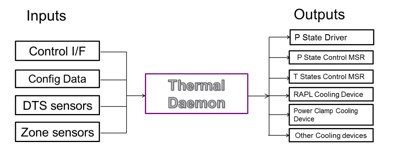
Intel’s Open Source Technology Center has released an open source tool to monitor and control temperature in tablets, ultrabooks and laptops. The Linux Thermal Daemon can use the latest thermal drivers in the Linux kernel, not just the standard cpufreq subsystem, to provide CPU temperature control.
Due to constrained system size, small form factor devices reach their maximum temperature with relatively less load than desktops and servers. And as they get smaller and thinner, traditional cooling methods such as heat sinks and fans are being designed out of the devices. Developers can’t rely only on hardware and BIOS to regulate temperature without negatively impacting performance.
Thermal Daemon “proactively tries to limit the temperature so BIOS doesn’t take a drastic action to cool the system,” said Srinivas Pandruvada, the Thermal Daemon project lead in the Open Source Technology Center at Intel. “The hardware and BIOS can (regulate) itself but it’s usually not an optimal solution, depending on their implementation. And, if the temperature reaches critical point, it can result in powering down of the system. ”
Tapping Intel Drivers for Temperature Control
The Linux kernel already holds a number of power management drivers that regulate temperature and cooling in various ways and rely on ACPI configuration to use them. But there are new cooling drivers developed by Intel, for which the device must first ask the driver to take action. The Thermal Daemon tool manages cooling drivers, either through preconfigured or custom settings.
“Developers can access XML configuration files and specify what level of temperature and what cooling drivers they want to use,” Pandruvada said. “But for most developers, the default settings and cooling actions should be enough.”
By tapping into the latest kernel drivers such as Intel P-State , RAPL (running average power limit) and PowerClamp, Thermal Daemon allows developers to more precisely control the temperature set point for a given use case.
However, not all of the above drivers are accessible to all hardware. The Intel P-state drivers are specific to the new generation Sandy Bridge and Ivy Bridge processors, for example.
“If the latest drivers are not available, then the daemon will revert to x86 model specific registers and the Linux ‘cpufreq subsystem’ to control system cooling,” according to the Intel news release.
Download and Get Involved
This is the first code release since the Thermal Daemon project kicked off in December, so the driver hasn’t been incorporated yet into any distributions. Intel is actively looking for feedback and features for consideration in future versions, Pandruvada said.
Thermal Daemon can also be applied to other computing form factors such as mobile and server, but is being targeted initially towards the tablet and laptop segments.
Google is seeing some 1.5 million new Android devices being activated daily, but is the Android ecosystem too focused on market share rather than profits?

 Funded largely by the Raspberry Pi Foundation, the Pi version of Wayland, as well as the associated Weston reference compositor back-end, was developed primarily by
  We dove a little deeper in our email interview with Upton, as follows. Most of the terms he mentions are explained in this
  Pidora is the fifth remix of Fedora for the Pi, but the first to make use of Fedora 18’s new support for the ARMv6 architecture used by ARM11 processors. As a result, performance is claimed to be improved over the earlier ARMv5 version.
 result in powering down of the system. ”