Home Blog Page 1932

BeagleBone Black Ships, Climbs Device Tree with Linux 3.8

BeagleBoard.org has begun shipping its faster, cheaper “BeagleBone Black” SBC with a Linux 3.8 kernel, supporting Device Tree technology for more streamlined ARM development. The $45 BeagleBone Black runs Linux or Android on a 1GHz TI Sitara AM3359 SOC, doubles the RAM to 512MB, and adds a micro-HDMI port. A month after BeagleBoard.org announced its […]

Read more at LinuxGizmos

Introducing the BeagleBone Black’s Linux 3.8 Kernel

This guest column by BeagleBoard.org co-founder Jason Kridner introduces the BeagleBone Black’s cutting-edge Linux 3.8 kernel, up from the original BeagleBone’s 3.2 kernel. The new kernel incorporates a new Direct Rendering Manager (DRM) display driver architecture, as well as full support for the Device Tree data structure introduced in Linux 3.7 in order to streamline […]

Read more at LinuxGizmos

Netflix Innovation Defined by Getting Out of Developers’ Way

Developers key to operating cloud native applications, says architecture director of company’s cloud systems team.

First Linux-Driven Arduino Board Reaches Out with WiFi

With its low cost, open source flexibility, and extensive I/O, Arduino is popular among educators, embedded prototypers, and other hardware hackers building everything from sensor networks to robots. But adding WiFi to the boards requires expensive shields, and can be difficult to set up. Third-party, WiFi-enabled clone boards like the new Spark Core can help, but they’re often expensive, and compatibility can be an issue. In any case, with the Arduino’s limited memory support and lack of an advanced operating system, building web services on the WiFi link is even more challenging.
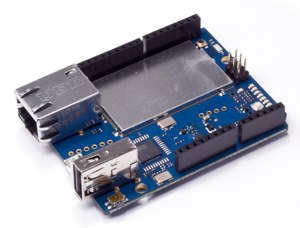
Arduino YunTo make up for this deficit, Arduino, the Italian-based project that designs the official line of Arduino boards, has announced the Arduino Yún. The Yún (“cloud” in Chinese) is the first in a series of WiFi-enabled Arduino boards, and the first to run Linux. It’s intended as a general-purpose prototyping board for any Arduino creation that requires an Internet connection.

Developed with a Boston-based automation development firm called Dog Hunter, the Arduino Yún single board computer (SBC) was announced at Maker Faire Bay Area last weekend. It will be available in late June for $69, compared to about $25 for the Yún’s underyling “classic” Arduino Leonardo board. Like the Leonardo, the Yún is equipped with a 32-bit ATmega32u4 microcontroller, a 16MHz crystal oscillator, and 14 GPIO pins. However, it also adds an Atheros AR9331 WiFi system-on-chip (SoC) from Qualcomm built around a 400MHz MIPS 24k processor.

The Atheros SOC runs Linino, a custom version of OpenWRT Linux, a lightweight distribution popular on low-power embedded devices. As the diagram below indicates, the Linux-based Linino part of the board is kept separate from the Arduino side. The former includes Ethernet and USB host connection in addition to WiFi, while the Leonardo circuitry has a micro-USB connection for programming via an attached PC.
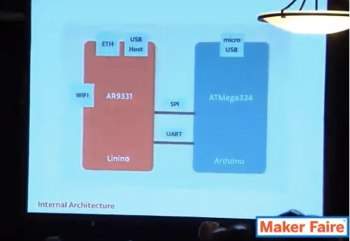
Arduino Yun architectureArduino’s new Bridge library delegates network connections and HTTP transaction processing to the Linino computer running on the Atheros SOC. Developers can program the device via WiFi or the board’s USB port.

To a linked computer, the Arduino Yún automatically appears as a WiFi access point. Developers can access the Linux computer to launch applications and scripts, and pass along parameters for processing, such as sensor readings. Python and Shell scripts are supported out of the box, as well as SSH sessions for customizing the device. Users can add other open source tools and apps, as well.

Arduino provides built-in support for Temboo’s full collection of more than 100 cloud-based APIs and databases. The Temboo APIs let developers “mix and match data coming from multiple platforms,” including Twitter and PayPal, says Arduino.

The Arduino Yún is well-suited for robots, but it can be used for everything from WiFi-enabled home automation systems to 3D printers. (At the Maker Faire, Arduino also announced a new, non-Linux Arduino Robot kit billed as “the first official Arduino on wheels.”)

Arduino Yún vs. Hybrid Pi/Arduino SBCs

The Arduino Yún appears to be a response to the trend of building WiFi-enabled robots and other often motorized gear by integrating Arduino boards with low-cost, open source Linux development boards. Typically, the projects start with a Raspberry Pi, but the BeagleBone is also a popular option.

Compared to an Arduino, the Raspberry Pi offers advantages like a faster processor, Linux networking smarts, and an HDMI port. However, it lacks much of the Arduino’s I/O for motor control and sensor acquisition. This is one reason why you see so many hybrid Pi/Arduino robot projects, such as the Arduino/Pi Robot or the Telemus.

In addition, several open source, mostly robotics-focused SBCs have appeared on KickStarter that pre-integrate Raspberry Pi and Arduino functionality. These include the BrickPi, as well as the UDOO and RIO boards.

The Arduino Yún offers a more Arduino-centric solution that may well prove ideal for many Arduino developers who want WiFi and web services, but are not ready to jump headlong into Linux. Here, Linux is clearly meant to be a step-child to Arduino, with its duties primarily limited to network management. Considering all the emerging designs where Arduino is a step-child to a Linux computer, this seems to be a fitting response. Yet, assuming hackers become comfortable with this arm’s length approach to Linux development, some interesting new applications could emerge through Linino, even with the modest MIPs chip.

It will be interesting to see which way Arduino goes with its next Linux/WiFi-based design. Presumably, it will add Linux and WiFi to the more powerful Arduino Due board, but any number of interesting possibilities could emerge. 

LogMeIn Tests Cloud Apps Management Tool

AppGuru, available in a preview edition, offers a centralized dashboard for provisioning and configuring cloud services across organizations.

Kindle Fire HD Spreads to Over 170 Countries, Bringing Uncertainty for Other Android Tablets

The Kindle Fire represents a real threat to the Android tablet landscape not because of the Amazon logo, but because of its highly disruptive pricing.

How To Use Multiple PHP Versions (PHP-FPM & FastCGI) With ISPConfig 3 (Ubuntu 13.04)

How To Use Multiple PHP Versions (PHP-FPM & FastCGI) With ISPConfig 3 (Ubuntu 13.04)

Since ISPConfig 3.0.5, it is possible to use multiple PHP versions on one server and select the optimal PHP version for a website. This feature works with PHP-FPM (starting with PHP 5.3) and FastCGI (all PHP 5.x versions). This tutorial shows how to build PHP 5.3 and PHP 5.4 as a PHP-FPM and a FastCGI version on an Ubuntu 13.04 server. These PHP versions can be used together with the default PHP (installed through apt) in ISPConfig.

Read more at HowtoForge

LinkSmart’s Low-Cost, Big Data Plan with Linux and MapR

LinkSmart’s audience and link management platform for publishers was built with big data at its core. So when management decided to migrate the cloud-based application to their own hardware, there was no question it would be completely powered by Linux. 

Linux-based infrastructure allows the 3-year-old startup to cut costs, both by avoiding the licensing fees of proprietary systems and by tapping the community’s collective knowledge base instead of paying for expensive support contracts, said CTO Manny Puentes.

Manny Puentes, CTO LinkSmart“Linux is the operating system really helping to propel a lot of the startup community and innovation,” Puentes said.

LinkSmart uses mostly open source software, including Hadoop, to mine terabytes of audience-related data for digital publishers. Using information such as how long visitors stay on-site and what they’re interested in, LinkSmart’s platform can then steer a publisher’s content decisions as well as strategically insert links that drive more pageviews and sales.

Because much of the open source software they use embraces the Linux environment, it’s easier to find developers who are accustomed to working on Linux, Puentes said. They can also contribute back to upstream projects important to their business, he said.

“That’s how we surface important information to our publishers at a low cost to the business,” Puentes said.

More IT cost savings with MapR

LinkSmart’s core data platform is the MapR Hadoop distribution running on 10 Intel Xeon processors with 64GB memory and four 2-terabyte SAS drives installed with Ubuntu 12.04. Other tools include Kafka, Cassandra and mySQL for storage.

Key to the company’s IT cost savings is MapR’s NFS mount, Puentes said.  The feature allows systems administrators to directly access the Hadoop cluster using standard Linux commands.  They can run sort to change the order of how data is presented, for example, or tail a long-running batch job as it’s running.

“In other distributions, a developer has to wait until the program completes before viewing results,” said Jack Norris, chief marketing officer at MapR. “If it is a long-running job — and many Hadoop jobs can execute for hours — this causes delays in determining if there are problems with output that can be detected much earlier through a tail command.”

For a small company like LinkSmart, with only 20 employees, MapR’s Linux integration means the IT staff can maintain the distributed file system like it manages all their other file systems. And developers save time by accessing the stack directly instead of writing a special script to pull data.

“It’s not just a cool feature; it plays an economic role,” Puentes said. “I was able to put in a Hadoop cluster and I have one IT guy managing the file system and all other Linux file systems. For a startup, that’s incredible.”

MapR has intentionally worked over the past two years to better integrate with enterprise operating systems including Linux, Norris said. As a result, their distribution now supports Linux commands across distros from Red Hat, CentOS, Ubuntu, SUSE and OpenStack.

“It’s about defining the new stack for enterprises in terms of how they’re going to drive the applications of the future,” Norris said. “It’s a much simplified stack and at the foundation is Linux.”

New Paper: How Engineering Leaders Can Use the Yocto Project to Solve Complex Problems

Last month we held the 7th Annual Collaboration Summit and as usual, there was a lot of interest in The Yocto Project. For those who don’t know, The Yocto Project provides a multitude of templates, tools and specific methods you can follow that make it easier than ever to create a custom Linux-based system for a product, regardless of the hardware architecture (read highlights of the new Yocto release here).

 In a new Linux Foundation training publication titled How Engineering Leaders Can Use the Yocto Project to Solve Complex Problems, the Linux Foundation’s Director of Embedded Solutions, Rudi Streif, outlines some common challenges that plague engineering leaders who work with embedded products.  As a 20+ year experienced embedded engineer, Streif walks you through some specific scenarios that are common across all industries and shows how the Yocto Project was design specifically to address them. Some of the challenges addressed in this new publication include:

  • Controlling your Linux operating system stack

  • Distribution maintenance

  • Build system and tooling

  • Open source licensing requirements

  • Getting the support you need

  • Ramping up and scaling your organization

 If your organization is considering moving to Linux or you’re interested in exploring how the Yocto Project can make your next project easier, this new publication does a great job of taking you through the many advantages of using the Yocto Project for your embedded projects in the future.  

Download This Linux Training Publication

An Excerpt From this Publication:

The two principal approaches for building a Linux operating system stack for your product are the following:

  • Top-Down:  Leveraging an existing Linux distribution and scaling it according to product requirements;

  • Bottom-Up:  Building a custom Linux distribution for your product starting with the kernel and adding packages as needed;

Both of these options have their advantages and their challenges.  Let’s explore.  

Top-Down

Leveraging an existing Linux distribution that you can download and install on your architecture of your hardware is not supported, peripheral devices have no drivers, and other problems typically found with embedded systems? Furthermore, how do you scale the distribution to your needs? All of those distributions come with a package management system that lets you install and uninstall components. While they are handling the dependencies, it remains a cumbersome process at the end of which you will have to create a file system image to install on your target hardware when going into production.

Bottom-Up

Building a custom Linux distribution from scratch gives you the most control over your operating system stack, including customizing and optimizing the Linux kernel potentially for multiple architectures, adding device drivers, and more. However, it is not a trivial task and the tools traditionally available have been limited.

Enter:  The Yocto Project

The Yocto Project combines the best of both worlds. While the Yocto Project is not an (embedded) Linux distribution but creates a custom one for you, what it does provide is a set of common configurations to choose from. This includes a minimal system with console login, a system with a basic graphical user interface for mobile devices and even a system that is compliant with the Linux Standard Base (LSB), to get your team started quickly. After selecting your initial configuration and your target system, which can be an emulated target or actual hardware, the Yocto Project fetches all the necessary source code for the components that comprise the system, builds its own toolchain and then uses that toolchain to build all the other software components. Within a couple of hours or less, depending on your build system, the Yocto

Project creates bootloader, kernel and root file system images according to your configuration that you can either launch in an emulator or transfer to actual hardware.

After the initial build, components included in the system can easily be added and removed by modifying the build recipes, either by editing them directly or using a graphical user interface. Recipes are organized in layers that provide separation of configuration using a single setting allows building the same operating system stack for different target hardware.

Linux distribution maintainers spend considerable time and effort looking for patches and new releases of components included in their distributions.

The Yocto Project can help facilitate the maintenance for your team in several ways.   

Download This Publication

Sharp: Linux Kernel Internships (OPW) Update

Sarah Sharp reports on the response to the availability of a set of Outreach Program for Women internships working on the Linux kernel. “As coordinator for the Linux kernel OPW project, I was really worried about whether applicants would be able to get patches into the kernel. Everyone knows that kernel maintainers are the pickiest bastards^Wperfectionists about coding style, getting the proper Signed-off-by, sending plain text email, etc. I thought a couple applicants would be able to complete maybe one or two patches, tops. Boy was I wrong!” In the end, 41 applicants submitted 374 patches to the kernel, of which 137 were accepted.

Read more at LWN